
Offrinko
| 开发者 | uniteug |
|---|---|
| 更新时间 | 2026年10月22日 19:08 |
| PHP版本: | 7.4 及以上 |
| WordPress版本: | 7.1 |
| 版权: | GPLv2 or later |
| 版权网址: | 版权信息 |
详情介绍:
- An "Affiliation" panel in the editor reads your article title ("iPhone 17 Pro review", or "The 5 best smartphones of 2026") and finds the products it is about.
- "Generate the table": the AI looks for each product page only at the merchants where you earn commissions (your Amazon stores, the Awin/Rakuten/… advertisers you joined), with price and availability.
- Tick the offers you want, create the table and insert it at the cursor in one click. "Copy the shortcode" stays available for the classic editor and page builders.
- The AI finds the page; Offrinko checks that it responds and builds the affiliate link itself. The AI never makes the link.
- Uses the AI provider you configured in WordPress (Settings > Connectors, WordPress 7.0+): Anthropic, Google, OpenAI… Offrinko stores no API key. No provider? Everything else keeps working manually.
- One field: paste one or many URLs (one per line) and get a ready-to-copy table of affiliate links.
- The network is chosen automatically from the merchant directory (domain → network → merchant ID).
- Tracking parameters (utm_*, gclid, fbclid, ref, another partner's tags…) are cleaned before conversion. Links already made for another partner are unwrapped.
- Unknown domain? A clear message and an "Add this merchant" button, right where you are.
- One tab per network: Amazon (one tag per store: .fr, .it, .com, .de, .es, .co.uk), Awin, Rakuten Advertising, Tradedoubler, CJ, Effiliation, Kwanko.
- Custom networks with a URL template:
{url},{url_encoded},{publisher_id},{merchant_id},{sub_id}. - Optional tracking sub-ID such as
mysite-{post_id}to know which article generated the sale. - Links are resolved when the page is displayed: change a merchant's network or ID once, every article follows.
- Merchant directory pre-filled with major French, Italian and African shops, with CSV import/export.
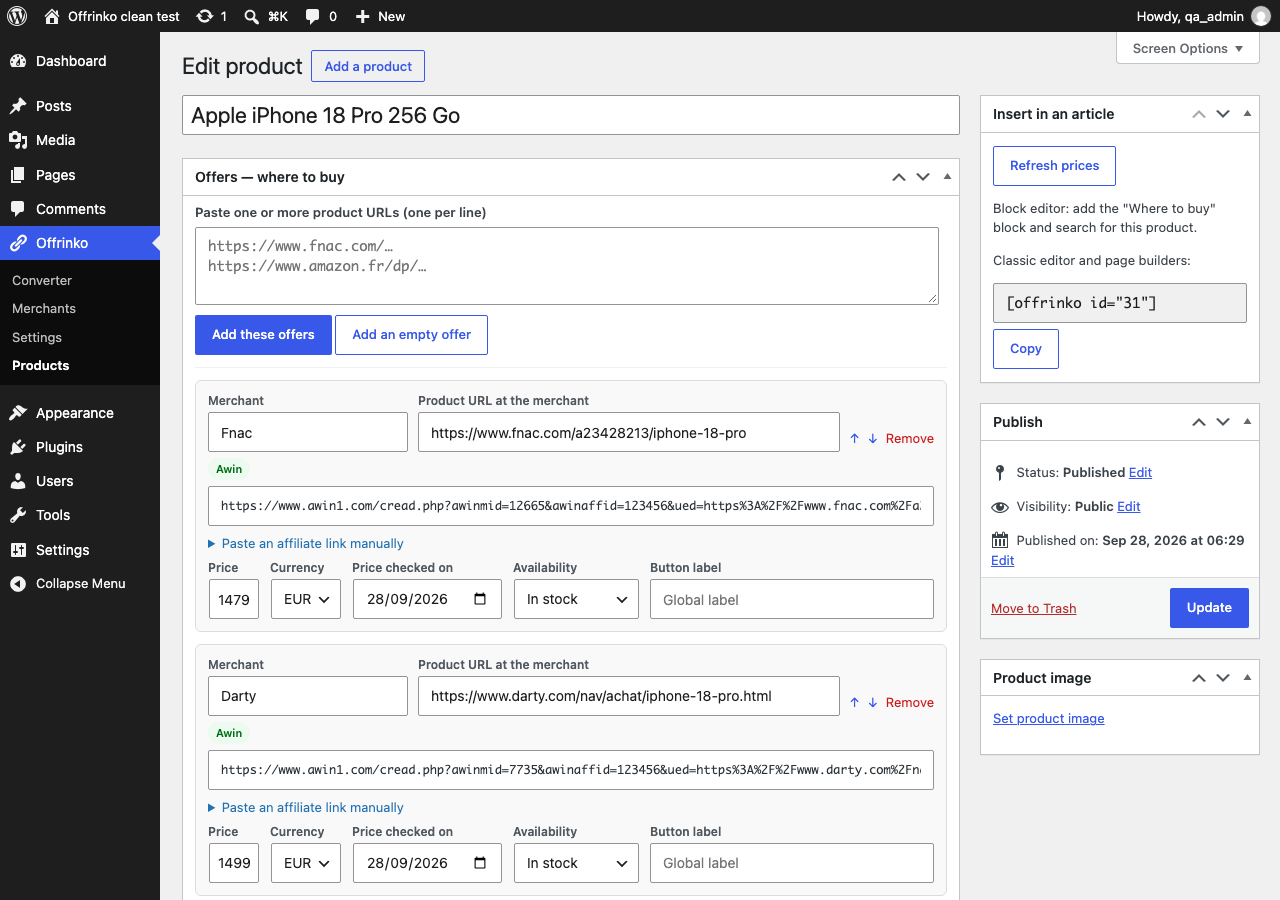
- "Product" content type: name, image, short description, ASIN, EAN, and as many offers as you want (merchant, URL, generated link, manual price, date, availability, button label).
- Paste several URLs at once: all offers are created and converted.
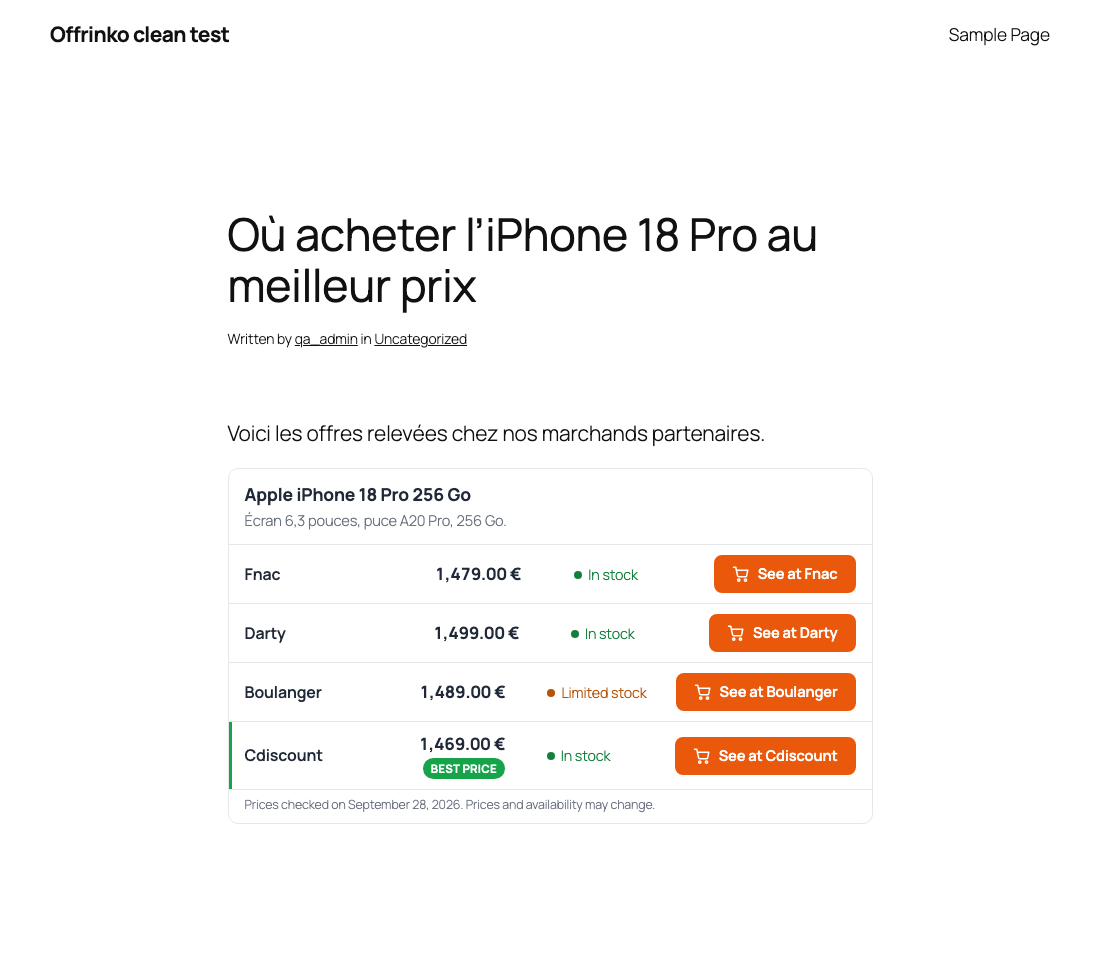
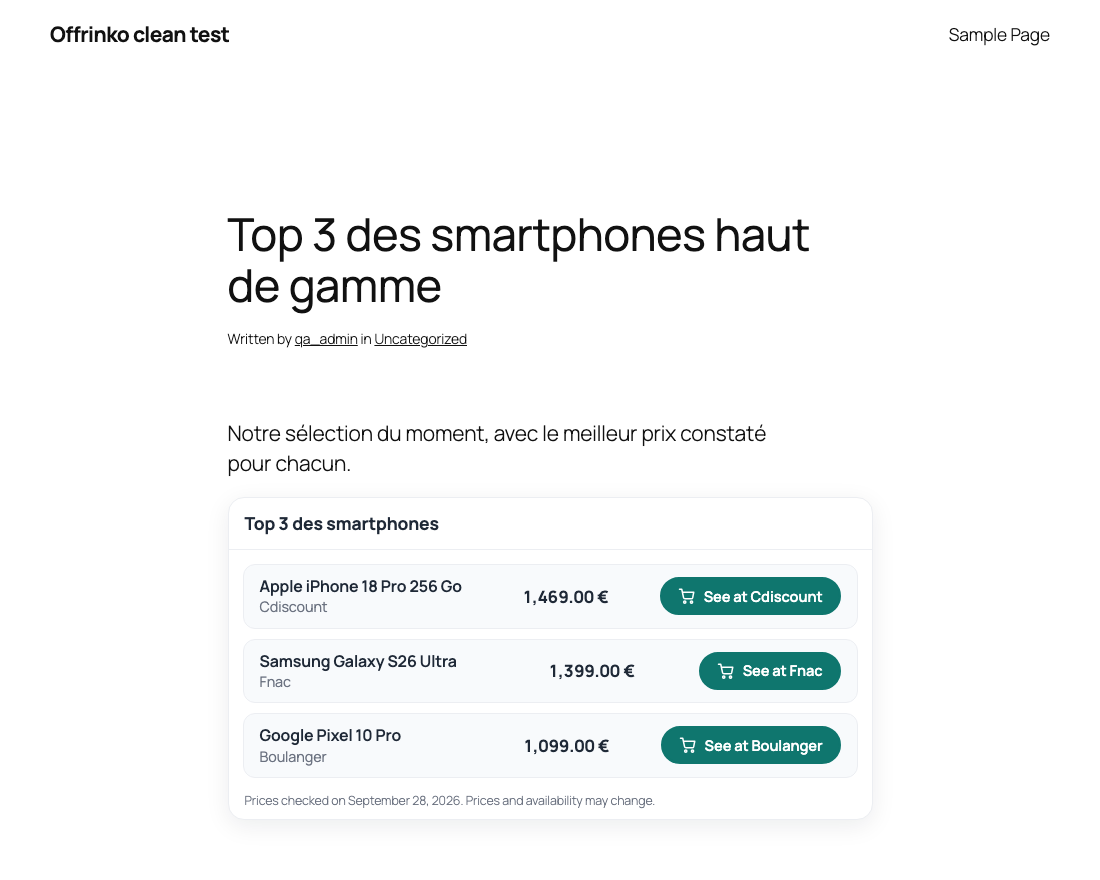
- Two table types: A — one product at several merchants ("Where to buy the iPhone 17 Pro"), B — several products compared ("Top 5 smartphones").
- "Best price" badge on the cheapest offer, "Prices checked on…" date, availability.
- Stacked cards with a full-width buy button under 600px, based on the table width (works in sidebars too).
- "Where to buy" block with product search and on-the-fly creation.
- "Affiliate link" toolbar button in the block editor: select text, paste the merchant URL, done.
- Shortcodes for the classic editor and page builders:
[offrinko id="42"],[offrinko ids="42,43,44" type="b" title="Top 3"],[offrinko_link url="https://…"]text[/offrinko_link]. - Classic editor helper box to convert a URL and insert it as a link.
- All links get
rel="sponsored nofollow noopener"andtarget="_blank"(configurable). - Polylang and WPML: Amazon links follow the article language (.fr in French, .it in Italian).
- Ready-made themes: Classic, Card, Minimal, Dark.
- Visual settings with live preview: colors, borders, radius (square to pill), rows as separators or cards, button style, icon (cart, bag, tag, arrow) and label template (
Buy for {price},See at {merchant},Buy the {product}). - Documented CSS variables (
--ofk-radius,--ofk-btn-bg,--ofk-border…) and stable classes, to go further from the WordPress CSS editor (Additional CSS).
- No external call when a visitor loads a page, no third-party script, no front-end JavaScript at all.
- The stylesheet is only loaded on pages containing a table.
- Offers and merchants are stored in dedicated indexed tables, not in post meta.
- No image hot-linking: product images come from your media library (or the article's featured image).
- Amazon prices are hidden by default: the "Show Amazon prices" option comes with a warning about the Amazon Associates Program Policies.
- "Refresh prices" under each table in the editor: new search, old and new prices side by side, you choose what to apply.
- Reminder in the editor and in the posts list when a table's prices are older than your chosen delay.
安装:
- Upload the
offrinkofolder to/wp-content/plugins/, or install it from Plugins > Add New. - Activate the plugin.
- Go to Offrinko > Settings > Networks and enter your publisher identifiers (Amazon tags, Awin publisher ID…).
- Go to Offrinko > Merchants and set the network and merchant ID of the shops you work with.
- Paste product URLs in Offrinko > Converter, or add the Where to buy block to an article.
屏幕截图:


常见问题:
Does the plugin contact the affiliate networks?
No. Links are built locally from documented deep-link formats.
What do I need for the automatic search?
WordPress 7.0 or newer and an AI provider configured in Settings > Connectors (for example the "AI Provider for Anthropic" plugin with your API key). Offrinko sends its prompts through the WordPress AI Client and never stores a key. Usage is billed by your provider. Without a provider, the converter, the product library and the tables work normally.
Which merchants does the automatic search look at?
Only the ones you can earn commissions with: Amazon stores for which you entered a tag, and directory merchants with a configured network and merchant ID. One merchant is searched per request.
Why is my Amazon price not displayed?
The Amazon Associates Program Policies require prices coming from the official Amazon API. Offrinko hides Amazon prices unless you tick "Show Amazon prices" in Settings > AI & prices, knowing the risk.
Where do I find the merchant ID (awinmid, mid, p…)?
In your affiliate network dashboard, on the advertiser/program page. Enter it once in Offrinko > Merchants.
A merchant only gives links from its own portal (e.g. Jumia).
Set its network to "Manual link (portal)" and paste the link generated in the portal in the "Affiliate link" field of the offer.
Can I add another network?
Yes, in Settings > Networks > Custom networks, with a URL template. Developers can also register a network class with the offrinko_networks filter.
Will the tables break my theme?
Tables are scoped under the .ofk class, reset list and link styles, do not use <table> markup and adapt to their container width.
更新日志:
- Comparison tables (type B) show the short description of each product under its name.
- Multilingual sites: each product can have its own name and short description per language (new "Name and description per language" box, and an "i18n" field in the REST API); tables use the language of the article.
- Fix: the amazon.co.uk partner tag was not saved (its field emptied itself after saving).
- Amazon: new setting "Amazon local alternatives" (on by default) adds the gaOptInStatus parameter of SiteStripe, so Amazon offers visitors from other countries a local alternative.
- Amazon: English articles use the other English store (amazon.com or amazon.co.uk) when the store of their locale has no partner tag.
- First release: converter, merchant directory, product library, AI product search (WordPress AI Client), "Affiliation" editor panel, price refresh, "Where to buy" block, shortcodes, toolbar button, four themes with live preview, Polylang/WPML support.