OnlineCompiler.io Code Runner: Online Compiler and Runnable Code Blocks
| 开发者 | onlinecompiler |
|---|---|
| 更新时间 | 2026年11月13日 17:58 |
| PHP版本: | 7.4 及以上 |
| WordPress版本: | 7.1 |
| 版权: | GPLv2 or later |
| 版权网址: | 版权信息 |
详情介绍:
[onlinecompiler] shortcode in the classic editor), write the code, and readers get a code editor with a Run button right in the page. They can change the code and its input and run it again, with no account and nothing to install. Syntax highlighters only show code; this one runs it.
The code runs on OnlineCompiler.io, a code execution service, in an isolated sandbox with no network access. Nothing runs on your WordPress server.
Who it's for
- Programming tutorials and blogs: every example in a post becomes one readers can try and change.
- Online courses and coding lessons: students practise in the lesson itself instead of installing a compiler.
- Teachers and schools: exercises with tests that students judge their code against.
- Documentation: runnable examples for an API, library or language.
- 46 languages, with the code highlighted as readers type.
- Runs in a sandbox, not on your server: a fresh sandbox for each run, no network access, thrown away afterwards.
- Standard input: give the program its input; readers can change it.
- Exercises with tests: show a problem stored in your OnlineCompiler.io account, with its statement and starter code, and readers judge their code against its sample tests.
- Read-only examples, themes and heights: light, dark or the reader's system setting; the editor fits the code or takes the height you set.
- Buttons and messages in English, Portuguese or Spanish.
- Search-friendly: the code is in the page as text before the editor loads, so search engines index it.
- Light on your site: the widget script loads only on pages with a Code runner, deferred, and each runner connects only when it scrolls into view (one showing a stored problem connects when the page loads).
[onlinecompiler lang="python"]print("Hello")[/onlinecompiler]
Attributes, all optional:
lang: a compiler id such aspython-3.14org++-15, or a short name such aspython,cpp,java,jsorsql. The site default if left out.stdin: the program's starting input. Use\nfor a new line:stdin="3\n4".theme:auto,lightordark.height: the editor's height in pixels.readonly:1so readers can run the code but not change it.lang_select:trueorfalseto show or hide the language menu.problem: the id of a problem stored in your account.locale:ptoresfor the buttons and messages.
< and & (C++ includes, HTML), the block is the safer choice: the classic editor can change such code when it is saved.
安装:
- Install and activate the plugin.
- Create a free account at onlinecompiler.io (sign in with Google), open the Widgets page of the dashboard and create a widget key. Set its allowed domain to your site's domain, so only your site can use it.
- In WordPress, go to Settings, OnlineCompiler.io and paste the widget key.
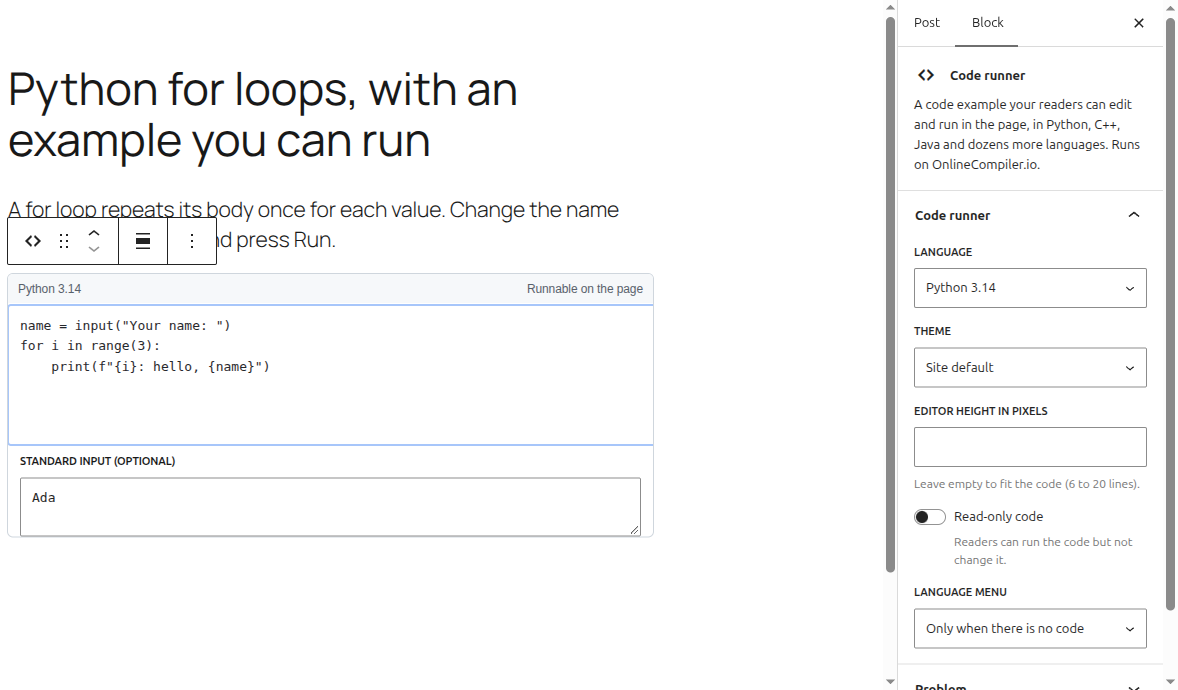
- Add a Code runner block to a post or page.
屏幕截图:
常见问题:
How do I add an online compiler to WordPress?
Install this plugin, paste your free OnlineCompiler.io widget key in Settings, OnlineCompiler.io, and add a Code runner block to any post or page. Write the starting code in the block and choose its language in the sidebar. Readers can then edit and run it in the page.
How do I let readers run Python code in a WordPress post?
Add a Code runner block and leave the language at Python (the default), or use [onlinecompiler lang="python"]print("Hello")[/onlinecompiler] in the classic editor. Readers press Run and see the output under the code.
Is it free?
The plugin is free. Running code uses your OnlineCompiler.io account, which has a free plan with no credit card; see pricing for its monthly runs and the paid plans.
Do readers need an account?
No. Readers edit and run the code without signing in. Only you, the site owner, need an OnlineCompiler.io account, for the widget key.
Does the code run on my server?
No. The code runs on OnlineCompiler.io, in a fresh sandbox for each run with no network access, and the sandbox is thrown away afterwards. Your server only serves the page.
Does it work with the classic editor?
Yes, with the [onlinecompiler] shortcode; its attributes are listed above. For code full of < and & (C++ includes, HTML), use the block: the classic editor can change such code when it saves.
Does it slow down my site?
The widget script loads only on pages that have a Code runner, and deferred, so it doesn't hold up the page. Each runner connects only when it scrolls into view; one showing a stored problem connects when the page loads.
What if the service can't be reached?
The code is in the page as text, so readers still see it. Only the Run button needs OnlineCompiler.io.
Can readers' code be checked against tests?
Readers can check their code against tests. Store a problem with tests in your OnlineCompiler.io account and put its id in the block's Problem setting: readers see the statement and starter code, and Judge checks their code against the problem's sample tests. Grading against hidden tests, with a recorded score, needs a session your own server creates for each student, which this plugin doesn't do; the widget documentation describes it, and tests written into the page with the widget's own markup.
Is the widget key secret?
No. Widget keys are made to sit in public pages: they can run code in the widget but can't call the REST API. Set the key's allowed domain to your site so other sites can't use it.
更新日志:
- First release: the Code runner block, the
[onlinecompiler]shortcode and the settings page.