
Oorly Accessibility Widget
| 开发者 | seyfettinkahveci |
|---|---|
| 更新时间 | 2026年10月20日 21:39 |
| PHP版本: | 7.4 及以上 |
| WordPress版本: | 7.1 |
| 版权: | GPLv2 or later |
| 版权网址: | 版权信息 |
详情介绍:
header.php, and there is no build step.
Free dashboard for every account
Every Oorly account, including the free plan, comes with the dashboard at dash.oorly.com:
- Daily visitors: see how many people visit your site each day.
- Widget usage: see how often the widget is opened and which controls your visitors rely on most.
- Broken links: find links on your site that lead nowhere, so you can fix them before visitors run into them.
- Accessibility errors: get every WCAG issue on your site, with the exact element and how to fix it.
- The widget helps visitors with different needs use your site today, from larger text to read aloud.
- The free WCAG report checks your pages against WCAG 2.1 AA and WCAG 2.2 and lists every issue with the exact element and how to fix it, so you can fix them in your site's code.
- Around one in six people worldwide live with a significant disability, and many more have temporary or age-related needs such as tired eyes, a broken arm or a small screen in bright sunlight.
- Text that is easier to read keeps people on the page longer, so they read further and are more likely to finish a form or a purchase.
- Many of the issues the report finds, such as missing alt text, unclear link text and skipped headings, also affect how search engines understand your pages.
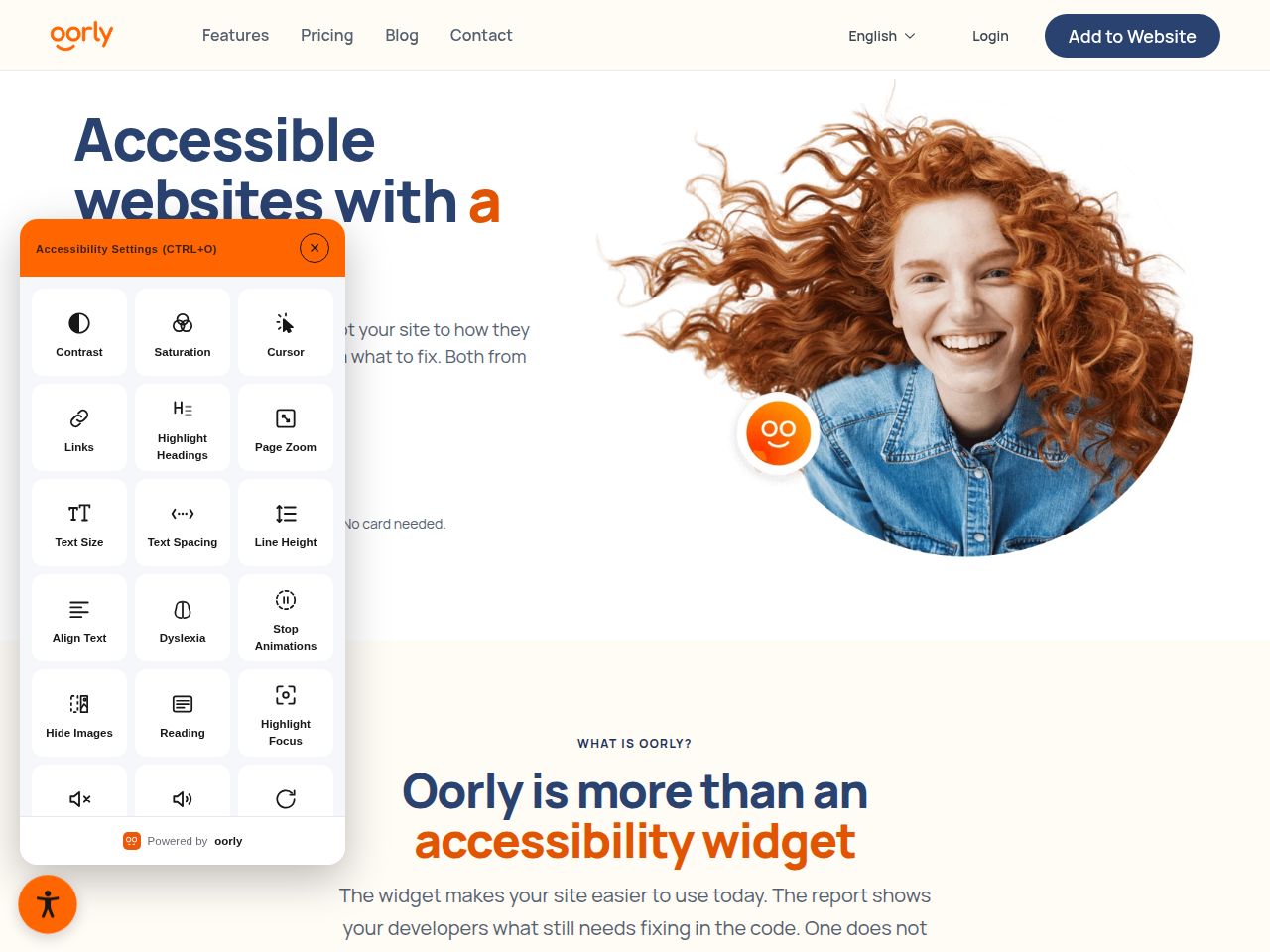
- Text size: scale the text up step by step while the layout holds together.
- Text spacing: put more room between letters and words.
- Line height: open up the space between lines of a paragraph.
- Text align: turn justified text into ragged-right text, which is easier to track.
- Dyslexia font: swap to a typeface whose letters are harder to confuse.
- Read aloud: hear the page sentence by sentence, at the visitor's own pace.
- Contrast: choose high contrast, inverted colours or a low-light mode.
- Saturation: boost, soften or remove colour completely.
- Page zoom: enlarge everything, including images and buttons.
- Big cursor: a larger pointer that is easier to spot.
- Highlight links: underline and outline every link on the page.
- Highlight headings: outline headings so the structure of the page stands out.
- Reading guide: a ruler that follows the pointer down the page.
- Focus highlight: dim the rest of the page around the section being read.
- Stop animations: pause motion, autoplay and parallax effects.
- Hide images: take decorative images away and keep the text.
- Mute sounds: silence audio that starts on its own.
- Scheduled and on-demand scans against WCAG 2.1 AA or WCAG 2.2.
- The rule and its WCAG reference for every finding, with an impact level of serious, moderate or minor.
- The exact CSS selector and markup the crawler saw, so developers find the problem straight away.
- Fix guidance explaining why each issue matters and how to fix it.
- History across scans, with regressions reopened automatically and a PDF export for clients or audits.
- Lightweight: one readable PHP file. Nothing is minified or bundled, and the plugin adds no database tables, cron jobs or REST routes.
- Plays by WordPress rules: the script is loaded with
wp_enqueue_script()and thedeferstrategy, so it never blocks rendering and can be dequeued by itsoorly-widgethandle. - Safe input: the site code is restricted to
[A-Za-z0-9_-]before it is saved, and only users withmanage_optionscan change it. - Easy to switch off: clear the code and the script is gone from every page. Deleting the plugin removes its one stored option.
- Multisite friendly: each site keeps its own code and can be switched on or off independently.
- Translatable: every string can be translated, and translations are delivered through translate.wordpress.org.
https://widget.oorly.com/widget.js on every front-end page, with that code as the c query parameter. Like any file request, this tells Oorly the visitor's IP address, user agent and the page they are on. Once running, the widget sends anonymous usage measurements to Oorly (page views and which controls are used) to produce the visitor and usage statistics shown in your dashboard. The plugin does not host or modify the script and makes no server-side calls to Oorly. What the widget does once it runs is handled on Oorly's side and tied to your site code. Clearing the site code stops the script from loading.
- Website: https://oorly.com
- Terms of service: https://oorly.com/terms-of-service
- Privacy policy: https://oorly.com/privacy-policy
安装:
- In your dashboard go to Plugins > Add New, search for "Oorly" and click Install Now, then Activate. You can also upload the
oorlyfolder to/wp-content/plugins/yourself. - Sign up at https://oorly.com (no card required) and add your domain.
- Copy your site code from the Implementation tab in the Oorly dashboard.
- Paste it under Settings > Oorly and click Save.
widget.oorly.com.
If your site sends a Content Security Policy, allow widget.oorly.com in it.屏幕截图:


常见问题:
Will this make my site WCAG, ADA or EAA compliant?
Oorly gives you what you need to get there: the widget for your visitors and a free WCAG report that lists every issue on your site with the exact fix. Compliance depends on your site's HTML, so the issues the report finds have to be fixed in your theme or content. Scheduled scans then warn you if something breaks again. Oorly does not guarantee 100% compliance. Automated testing cannot detect every WCAG issue, so a manual audit is still recommended if you need full assurance.
Is Oorly free?
Oorly is free for sites with up to 5,000 pageviews a month, and no credit card is needed to sign up. Busier sites need a paid plan; see https://oorly.com for current pricing.
Do I need to edit my theme?
No. The script is added through the standard wp_enqueue_scripts hook, so it works with any properly built theme and survives theme updates and theme switches.
Will it slow my site down?
The script loads with defer, so the browser keeps building the page while it downloads. It is served from Oorly's CDN and loads only on the front end, never in wp-admin.
Does the widget use cookies?
The widget sets no cookies. Each visitor's choices are kept in their own browser. To produce the statistics in your dashboard, the widget sends anonymous usage measurements to Oorly; see the External services section above for details.
Which languages does the widget speak?
The widget can follow the language of the page or be pinned to a language you choose in the Oorly dashboard. The plugin's settings screen follows your WordPress language.
Can I hide the widget on certain pages?
Yes. Dequeue the oorly-widget handle wherever you don't want it:
add_action( 'wp_enqueue_scripts', function () { if ( is_page( 'checkout' ) ) { wp_dequeue_script( 'oorly-widget' ); } }, 20 );
How do I turn the widget off without deactivating the plugin?
Clear the site code field and save. No script is added while the field is empty.
I changed my site code but the old one still shows up
Purge your page cache (WP Rocket, LiteSpeed, Varnish, Cloudflare and so on). The script tag is part of the HTML, so cached pages keep the old code until the cache is cleared.
Some characters were removed from my code
Only letters, digits, hyphens and underscores are accepted. Make sure you copied the code exactly. If it still doesn't work, contact Oorly support.
What is left behind when I delete the plugin?
Nothing. uninstall.php deletes the single oorly_site_code option. Deactivating the plugin keeps the code, so you can switch it back on later.
Does it work on multisite?
Yes. Each site stores its own code. Network activation is safe, but you need to enter the code once on each site.
更新日志:
- Renamed from "Oorly Integration" to Oorly Accessibility Widget; the directory, main file and text domain are now
oorly. - The widget is enqueued with
wp_enqueue_script()and thedeferloading strategy instead of being printed by hand onwp_head. Other plugins can now dequeue it by theoorly-widgethandle. - Minimum WordPress version raised to 6.3, which is where the
deferloading strategy arrived. - All functions and constants use the
oorly_prefix. - The stored option moved from
oorly_integration_client_codetooorly_site_code. - Dropped the
load_plugin_textdomain()call; WordPress loads the bundled translations on its own. - The plugin name is no longer a translatable string — "Oorly" is spelled the same in every language.
- readme rewritten: what the widget does and does not do, and a full disclosure of the external service.
- Menu entry and page title made translatable.
- Explanation of what Oorly does, and a "Get your site code" link to the dashboard, added to the settings page.
- Interface translated into Turkish (tr_TR) and German (de_DE).
- Field label renamed from "Client code" to "Site code".
- Initial release.
- Site code field under Settings.
- Widget script added via
wp_headwith thedeferattribute. - Input sanitization and a live preview of the saved tag.
- Setting removed from the database when the plugin is deleted.