
OrderProof – OTP Order Verification for WooCommerce
| 开发者 | medsalemkhattat |
|---|---|
| 更新时间 | 2026年11月14日 08:28 |
| PHP版本: | 7.4 及以上 |
| WordPress版本: | 7.1 |
| 版权: | GPLv2 or later |
| 版权网址: | 版权信息 |
详情介绍:
- A customer places a Cash on Delivery order.
- The order waits in "Awaiting WhatsApp verification". It holds no stock and no "New order" email is sent yet.
- The customer gets a 6-digit code on WhatsApp and types it on the verification page (with a copy-code button in WhatsApp).
- The order becomes a real order: stock is reserved and your usual emails go out.
- Orders that are never verified are cancelled automatically after a few hours.
- WhatsApp OTP verification for Cash on Delivery orders (WhatsApp Cloud API, no SMS)
- Worldwide phone validation: numbers are read with the calling code of the customer's billing country
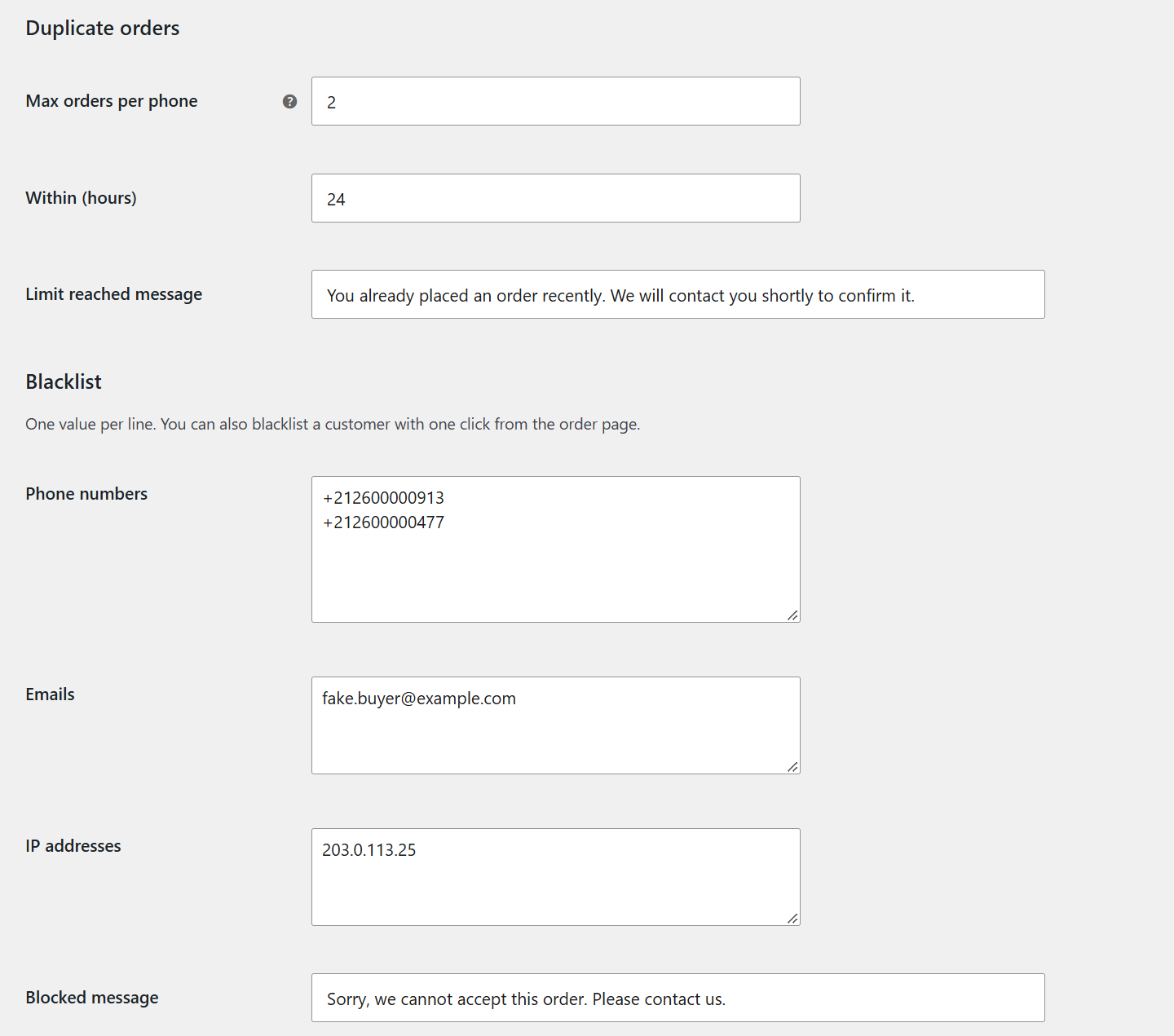
- Duplicate order limit: max X orders per phone number in Y hours
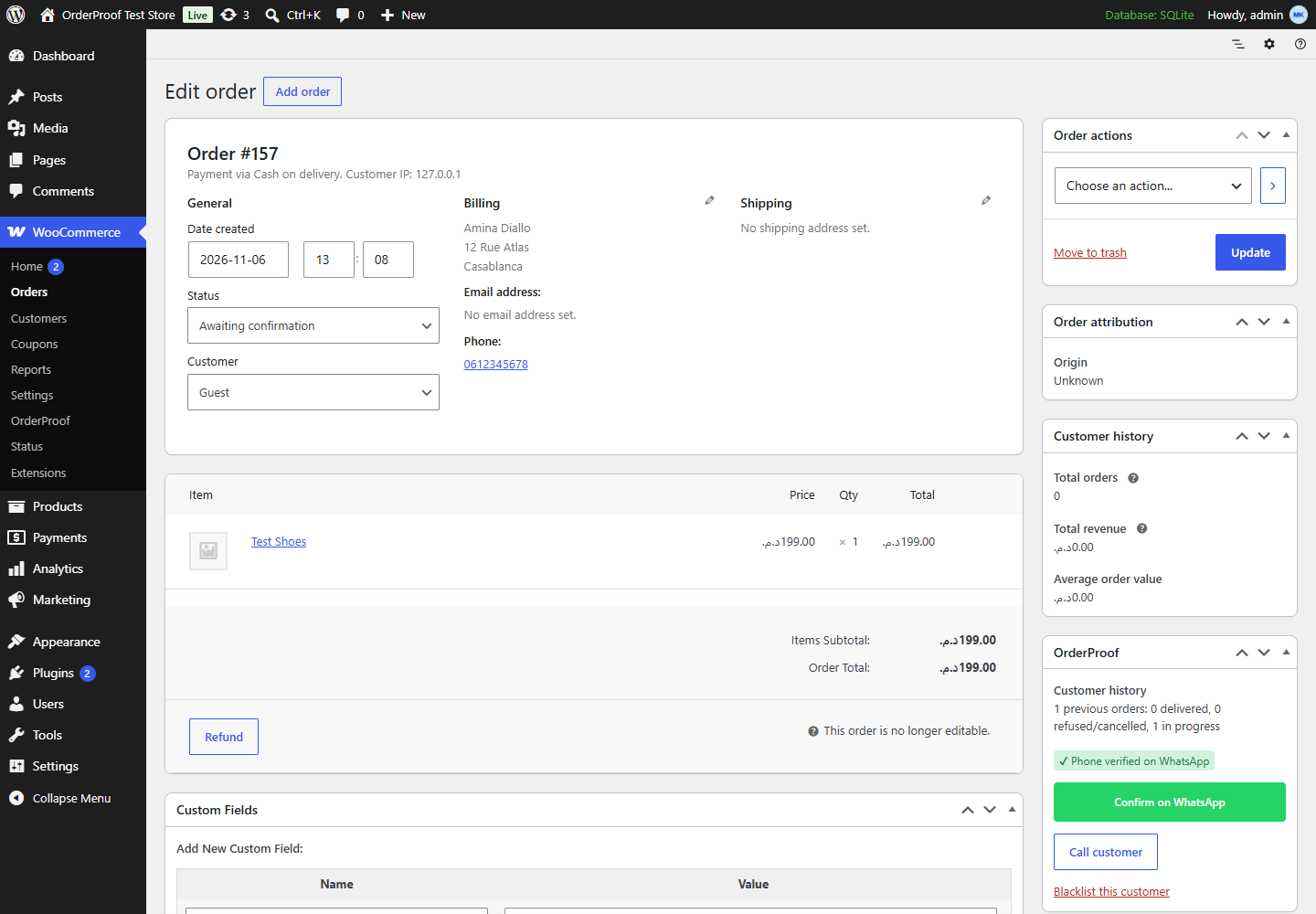
- Blacklist phone numbers, emails and IP addresses, one click from the order page
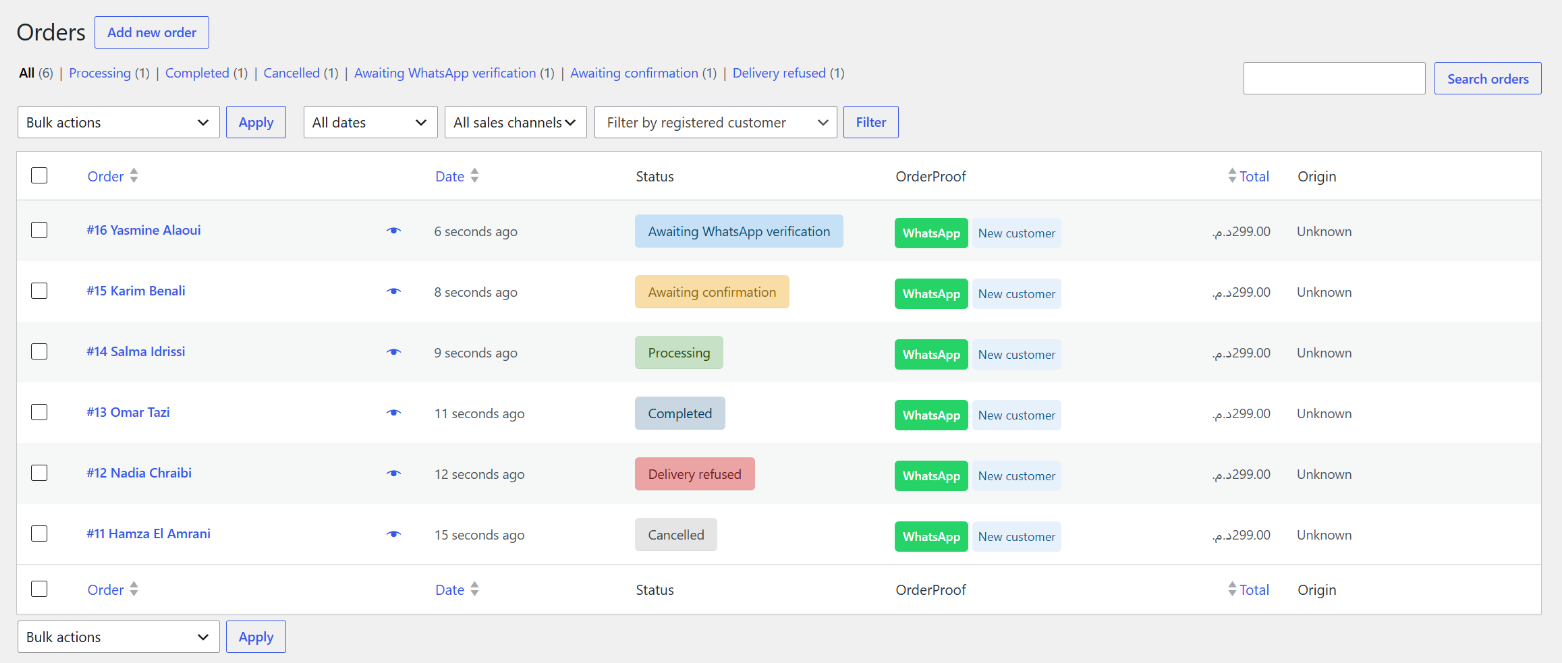
- Order statuses: "Awaiting WhatsApp verification", "Awaiting confirmation" and "Delivery refused" (which restocks products)
- One-click WhatsApp confirmation message from the order page ({name}, {items}, {total}, {address}…)
- Customer history on every order: delivered vs refused orders
- Classic checkout and the Checkout block, with or without HPOS
- Translation-ready (French and Arabic translations coming to translate.wordpress.org)
- Smart OTP: skip the WhatsApp code for trusted repeat customers
- Risk score (0–100) on every order, and automatic blocking of high-risk customers
- Auto-blacklist after X refused deliveries
- More WhatsApp templates: shipped, out for delivery…
- Delivery success-rate report
安装:
- Install and activate the plugin.
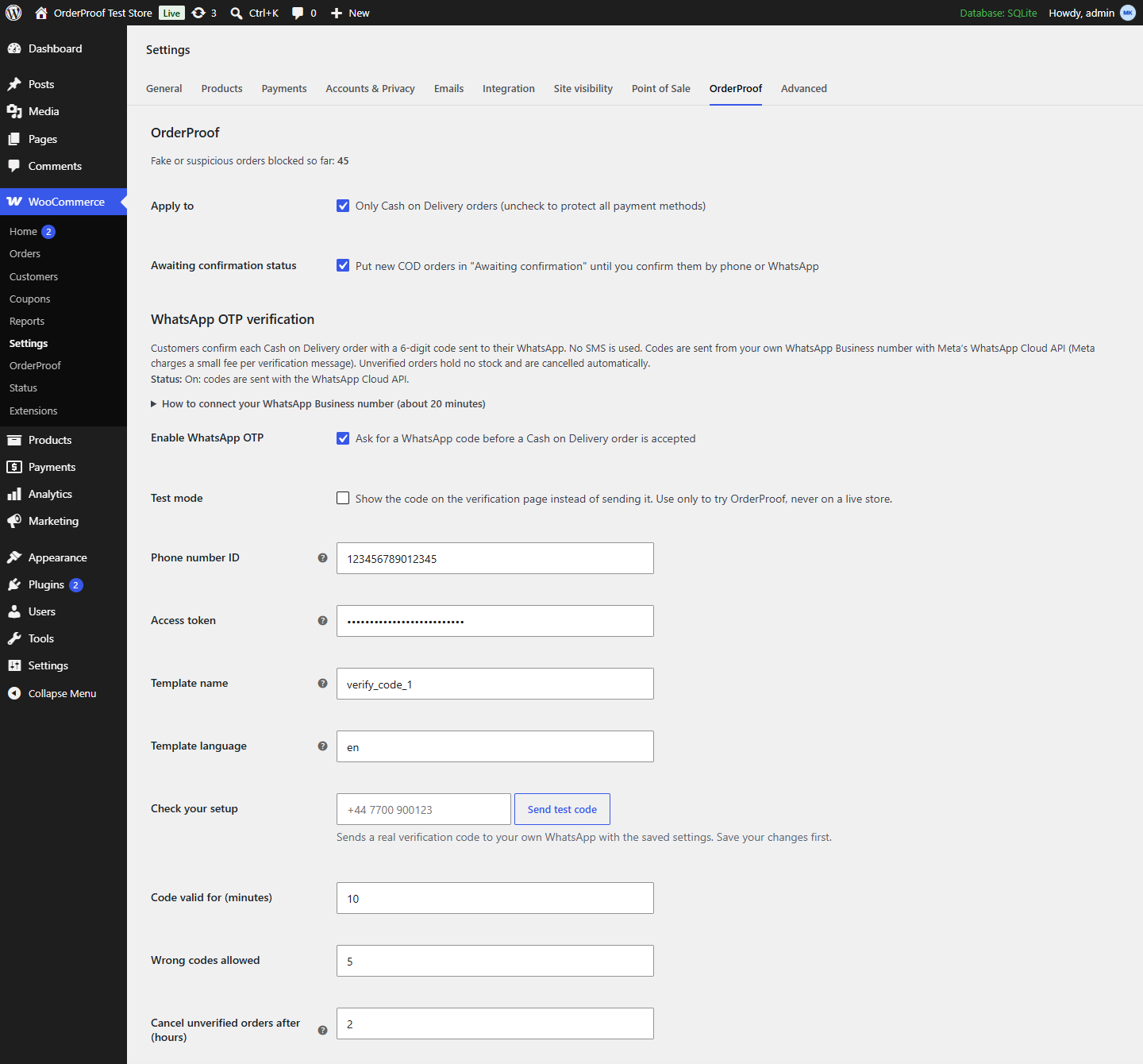
- Go to WooCommerce → Settings → OrderProof.
- Turn on WhatsApp OTP and Test mode to try the flow on your store.
- To send real codes, follow the guide on the settings page: create a WhatsApp Business app in Meta for Developers, create an approved message template of the Authentication category (with a copy-code button), and enter your Phone number ID, access token and template name. Then turn Test mode off and use "Send test code" to check the setup.
屏幕截图:
常见问题:
Does OrderProof send SMS?
No. Codes are only sent on WhatsApp, from your own WhatsApp Business number.
Can I confirm COD orders on WhatsApp without the OTP code?
Yes. Every order page has a one-click WhatsApp confirmation message ({name}, {items}, {total}, {address}…) and an "Awaiting confirmation" status, so you can confirm orders yourself. The WhatsApp OTP goes further: the customer confirms before you get the "New order" email.
What do I need to send real WhatsApp codes?
Your own WhatsApp Business number on Meta's WhatsApp Cloud API (an app you create in Meta for Developers) and an approved message template of the Authentication category. The settings page guides you step by step, and "Send test code" tells you which setting is missing or shows Meta's exact error. Test mode lets you try the whole flow first.
Does it work with the WooCommerce Checkout block?
Yes. OrderProof works with the classic checkout and the Checkout block, with or without HPOS.
Does it reduce RTO (return to origin) on COD orders?
With WhatsApp OTP on, OrderProof stops orders from unverified phone numbers before they reach your courier. It also limits repeat orders per phone and lets you blacklist customers who refused deliveries. We do not publish a reduction figure: results depend on your store and customers.
What does WhatsApp verification cost?
OrderProof does not charge per message. Meta bills your WhatsApp Business account for each authentication message; prices depend on the customer's country and are listed on Meta's pricing page.
Which countries are supported?
All of them. Each phone number is read with the calling code of the customer's billing country, so a store in France can verify customers in Belgium, Morocco or Canada.
What happens if a customer never enters the code?
The order stays in "Awaiting WhatsApp verification" without holding stock, and is cancelled after the number of hours you choose (2 by default).
Does it work with other payment methods?
Phone rules, limits and the blacklist can protect every payment method (uncheck "Only Cash on Delivery orders"). WhatsApp OTP applies to Cash on Delivery orders.
更新日志:
- A small "rate OrderProof" box on the OrderProof settings page only, after 14 days of use or 3 blocked orders. "Maybe later" hides it for 30 days; "Don't ask again" hides it for good. No notice on other screens.
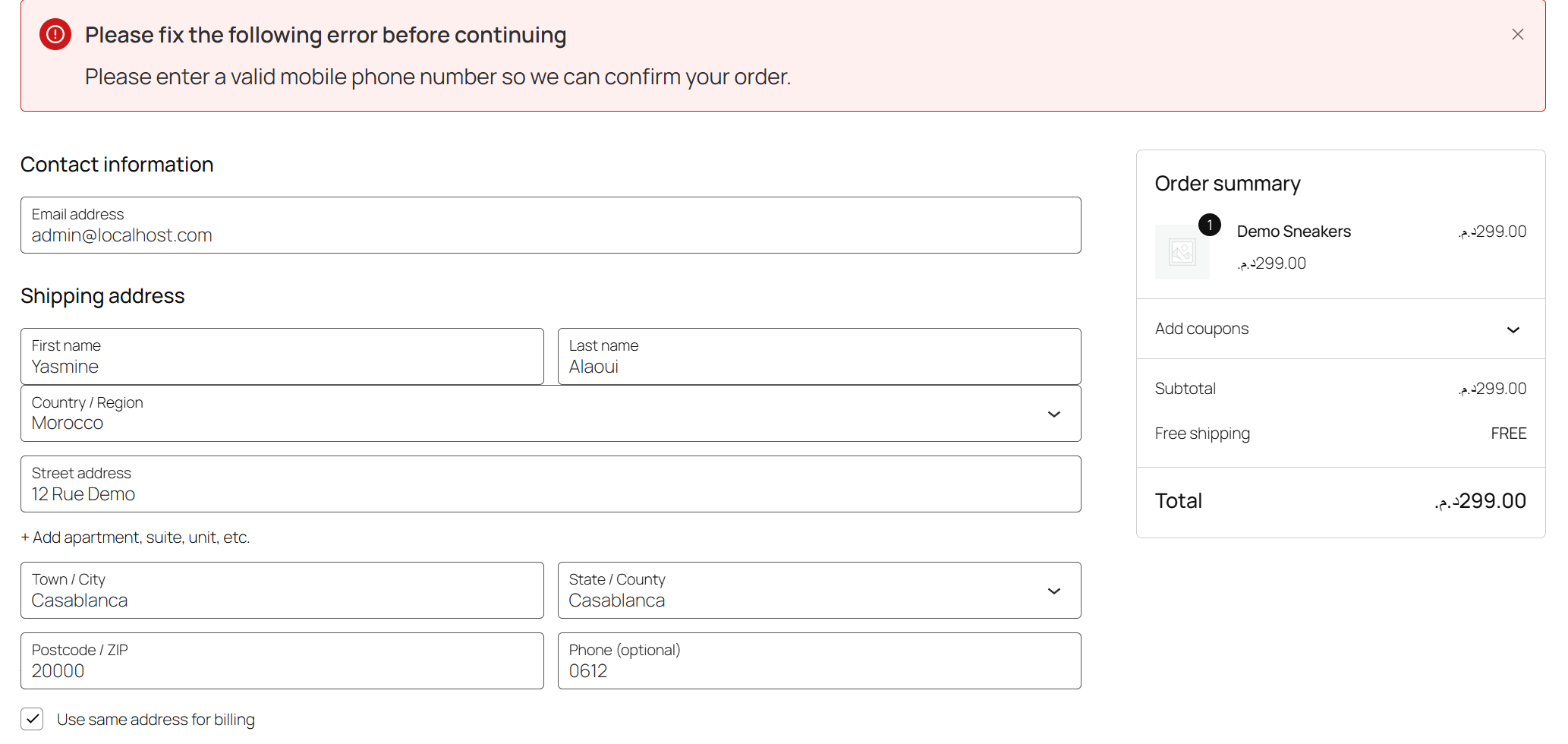
- New setting "Require phone" (on by default): the phone field is required at checkout, in the classic checkout and the Checkout block, because OrderProof needs a phone number to verify the order. Before, the Checkout block could show "Phone (optional)".
- Plugin URI now points to the product page at https://dssarl.com/orderproof/.
- No functional changes.
- Plugin author is now Digital Services SARL (https://dssarl.com/).
- Screenshots retaken from the WordPress.org version; captions match the images.
- No functional changes.
- Admin and verification-page CSS and JavaScript are now loaded with wp_enqueue_style / wp_enqueue_script.
- Translations are delivered by translate.wordpress.org.
- Faster orders list: each customer's order history is looked up once per page load.
- Plugin name in readme.txt now matches the plugin header.
- New: step-by-step guide on the settings page for connecting your own WhatsApp Business number.
- New: "Send test code" button that sends a real code to your WhatsApp and shows Meta's exact error if the setup is wrong.
- New name: OrderProof (formerly COD Guard).
- New: WhatsApp OTP verification for Cash on Delivery orders through the WhatsApp Cloud API. No SMS.
- New: worldwide phone numbers, read with each customer's billing country calling code.
- New: "Awaiting WhatsApp verification" order status; unverified orders hold no stock and are cancelled automatically.
- Fix: the store's "New order" email and the customer's "Processing" email are now sent for orders that use OrderProof statuses.
- Fix: on stores using the classic order storage, the per-phone order limit and customer history counted every order in the store instead of only that customer's orders.
- First release.