
OrderReady – Collect Customer Files & Order Details After Checkout for WooCommerce
| 开发者 | jordennabbe |
|---|---|
| 更新时间 | 2026年10月8日 23:22 |
| PHP版本: | 8.1 及以上 |
| WordPress版本: | 7.1 |
| 版权: | GPLv2 or later |
| 版权网址: | 版权信息 |
详情介绍:
- Set per product which files, texts, choices and confirmations you need after payment.
- When an order is paid, the customer receives a private link to their checklist. No account needed.
- The customer uploads files and fills in details, in stages if they want, and sends them for review.
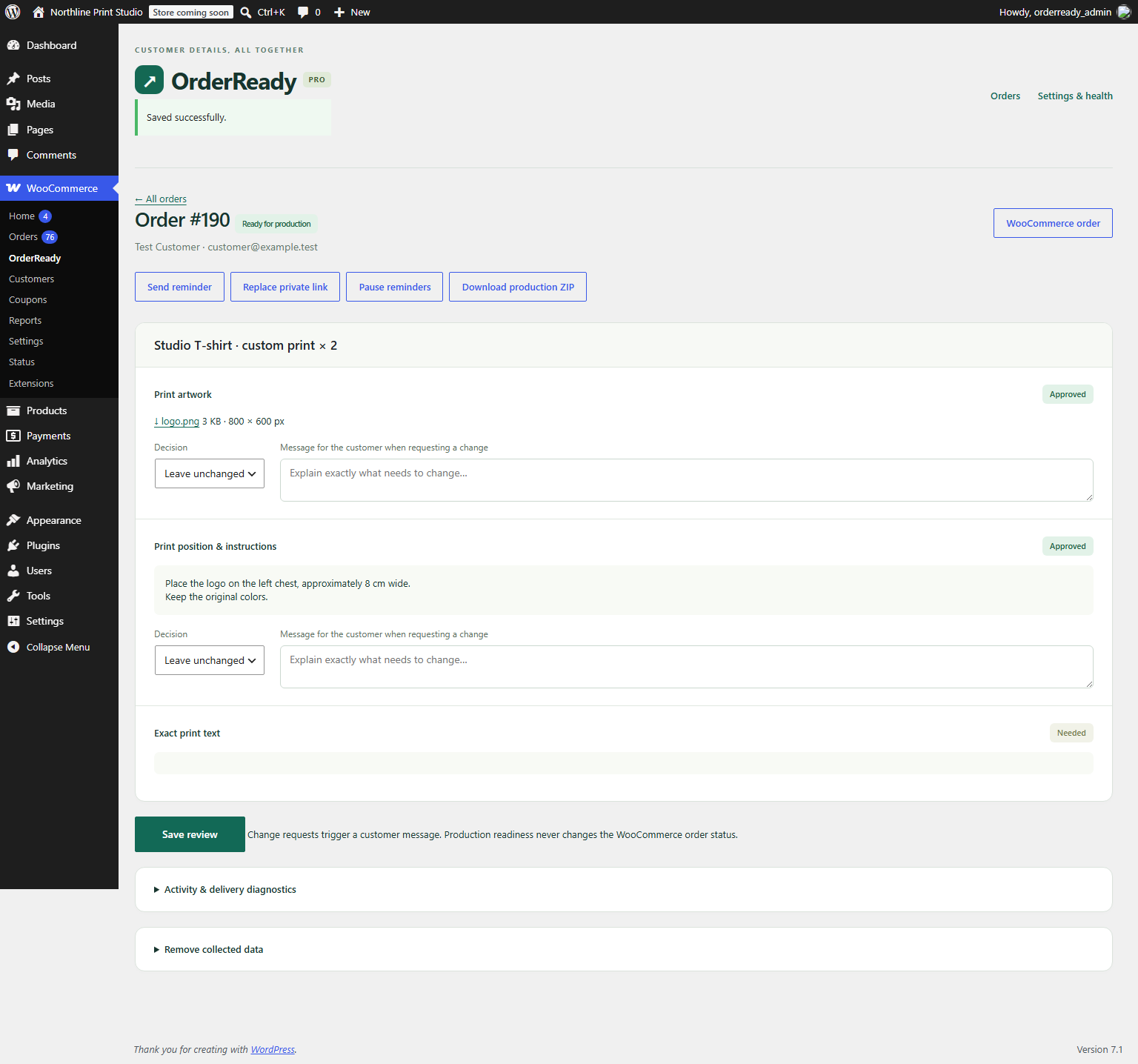
- You approve each item or explain exactly what needs to change. Approved items stay locked.
- When everything is approved, the order shows as ready for production.
- Configure up to 20 requirements per product: file, short text, instructions, selection and confirmation.
- Unlimited products and orders; no trial period or artificial order quota.
- Requirements are captured per order line. All units on that line share the same checklist. Variations inherit the parent product's requirements.
- Invite the customer after a paid order enters Processing. Customers do not need an account.
- Customers can save a draft and submit their details in stages.
- Review each supplied requirement, approve it or explain what needs to change.
- Preserve approved details when another requirement needs correction.
- Send manual reminders listing only missing or rejected requirements.
- See collection status alongside WooCommerce orders.
- Encrypt uploaded files on your hosting and serve downloads through authorized requests.
- Validate real file type, file size and optional minimum pixel dimensions.
- Replace private links, export personal data through WordPress and erase collected data.
- Automatically remove collected data after the configured closed-order retention period.
- English and Dutch interface and customer messages.
- Support WooCommerce HPOS and Cart/Checkout Blocks through server-side paid-order hooks.
安装:
- Install and activate WooCommerce, then install this ZIP under Plugins → Add New → Upload Plugin.
- Open WooCommerce → OrderReady → Settings & health. Check file limits, retention and staff email.
- Edit a product and open Product data → OrderReady. Add the requirements you need after payment.
- Place a test order. Move it through your normal payment process to Processing.
- Open the private link in the customer email, submit details and review them in WooCommerce → OrderReady.
屏幕截图:


常见问题:
Does the customer need an account?
No. A signed private link grants access to one order. Treat it like a password. A shop manager can replace it, invalidating previous links. Logged-in customers can also open the current link from their order page.
Does this block checkout?
No. It collects information after payment while the order has Processing status. Pending-payment and On hold orders are not invited until payment is confirmed. Completed, Cancelled, Failed and Refunded orders are closed for changes. Custom order statuses are not supported in version 1.0.
Can customers submit only part of the checklist?
Yes. They can save drafts and submit supplied requirements for review while the rest remain outstanding. Submitted and approved requirements are read-only; the shop can request a change to reopen them.
Which file types are supported?
JPG, JPEG, PNG, WebP and PDF. You can restrict these further per requirement. SVG, EPS, AI, ZIP and executable files are not accepted. One current file per requirement is retained. Replacing it removes the previous stored file.
What happens when I edit product requirements?
Existing orders retain their original checklist. Changes apply to future orders. Requirements apply per order line rather than separately to each unit in that line.
Does Ready for production change the WooCommerce order status?
No. It is a separate collection status. You remain in control of fulfilment and the WooCommerce order status.
Are emails guaranteed to arrive?
No. OrderReady records whether WordPress accepted the message. Your mail provider, DNS and recipient mail system determine delivery. The settings page and activity log help diagnose failures.
What are the limits?
Up to 20 requirements per product, 5,000 characters per text answer, a configurable 1–20 MB file cap and 10–200 MB current-file storage cap per order. Your hosting may impose lower upload/request/memory limits. Start with the defaults of 10 MB per file and 100 MB per order. There is no imposed number-of-orders quota.
What happens on deactivation or uninstall?
Scheduled tasks stop and collected data is retained. Use OrderReady's order erasure or WordPress privacy tools before uninstalling if you want to remove that data. Keep the encryption key in your database backup.
Is multisite supported?
Network activation is not supported in this release. Install and configure separately on ordinary single-site WordPress installations.
更新日志:
- Add an optional link to the separate OrderReady Pro add-on and the support address on the settings page. No functional changes.
- Initial release: private post-payment collection, per-requirement reviews, encrypted files, manual reminders and privacy tools.