
Orders Delivery Drivers for WooCommerce
| 开发者 |
wpsaad
arabianmido freemius |
|---|---|
| 更新时间 | 2026年6月19日 23:17 |
| PHP版本: | 7.4 及以上 |
| WordPress版本: | 7.0 |
| 版权: | GPLv2 or later |
| 版权网址: | 版权信息 |
详情介绍:
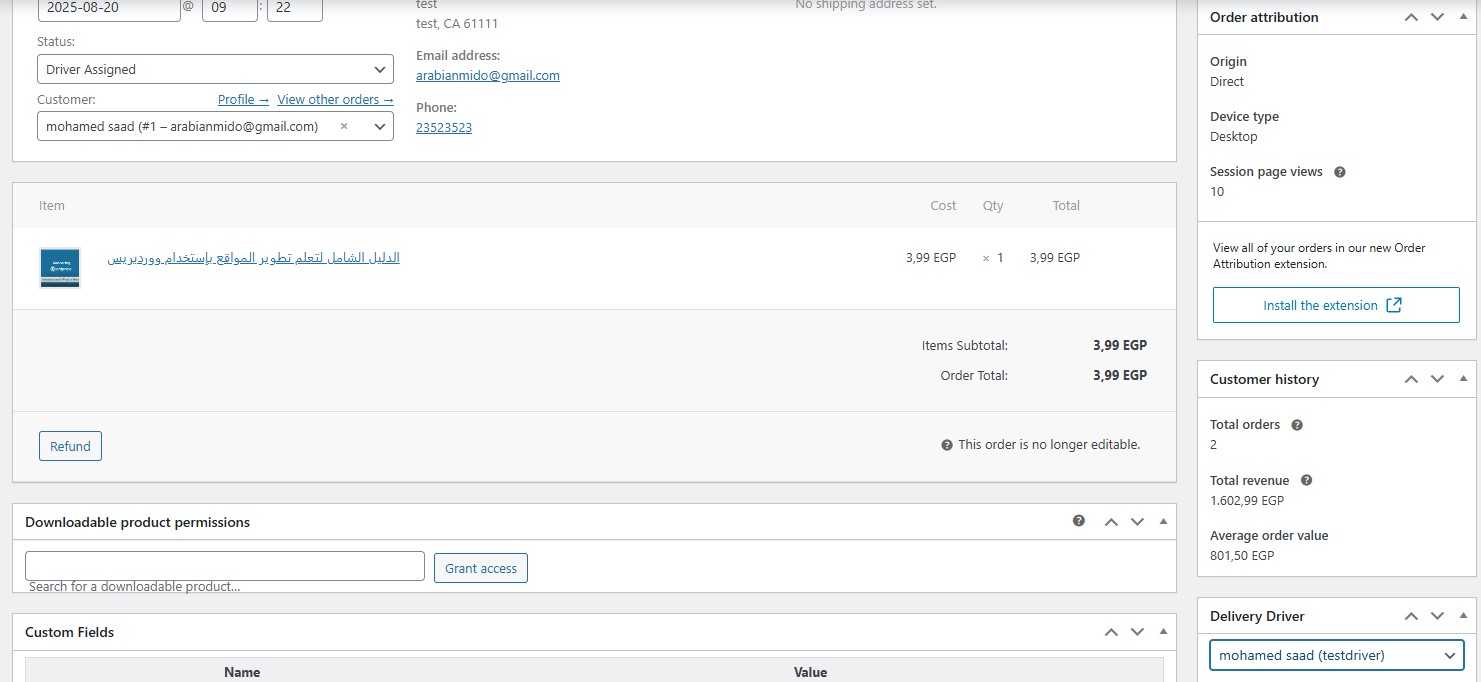
Driver role to a WooCommerce order.
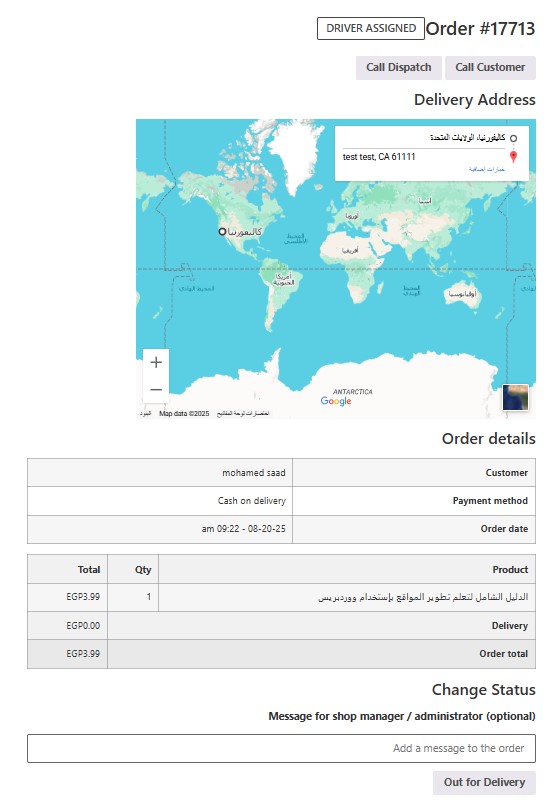
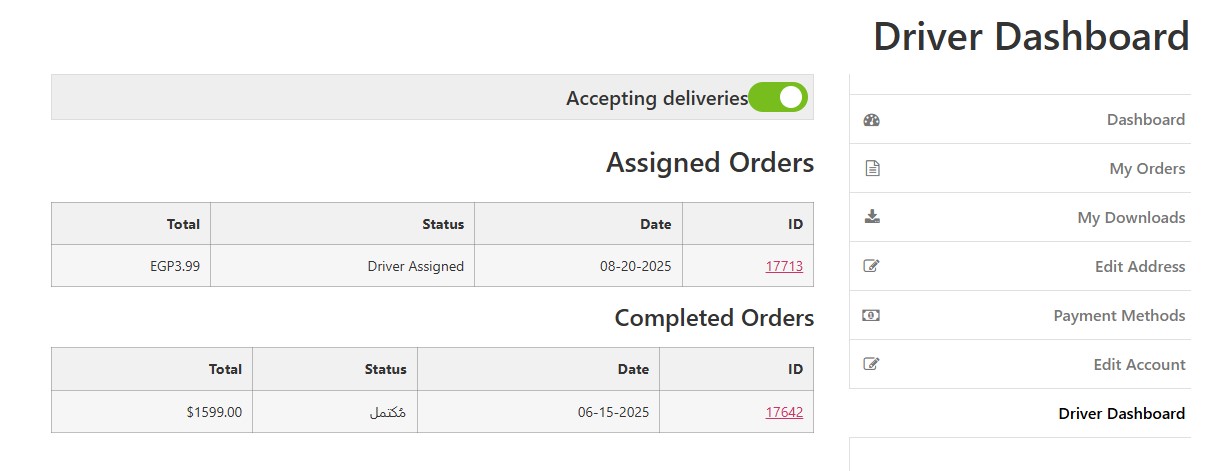
– Driver Dashboard (Frontend): Drivers can view assigned and completed orders, toggle availability, and update delivery status.
– Delivery Status Tracking: Orders support statuses like Driver Assigned, Out for Delivery, and Completed.
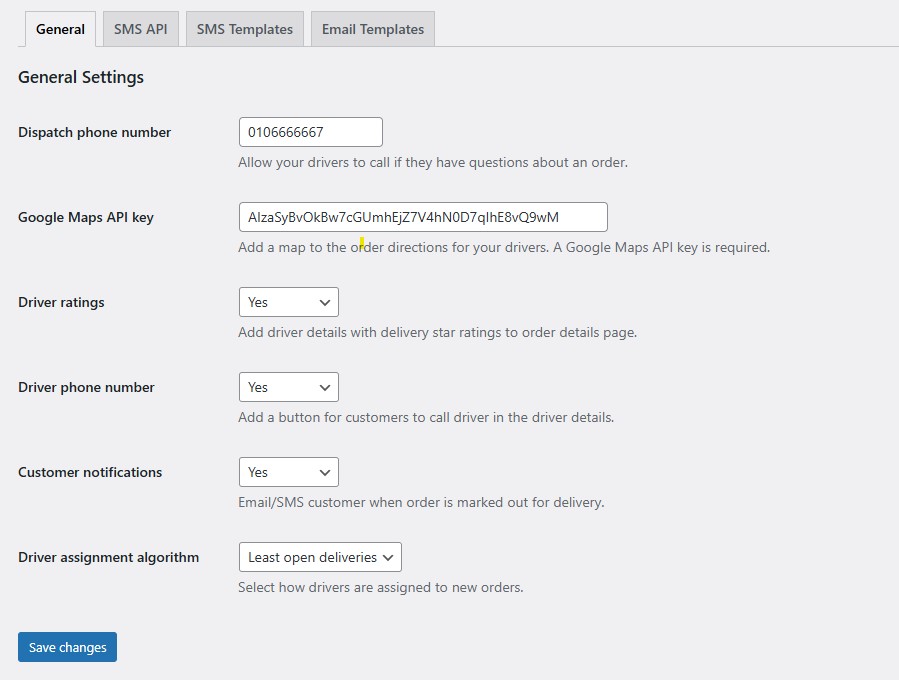
– Live Google Maps Embed: Show delivery address on a live map in the driver order view (requires Google Maps API key).
– Mobile Ready: Frontend views are responsive and optimized for drivers in the field.
– Driver Ratings: Customers can rate deliveries (stored on the order).
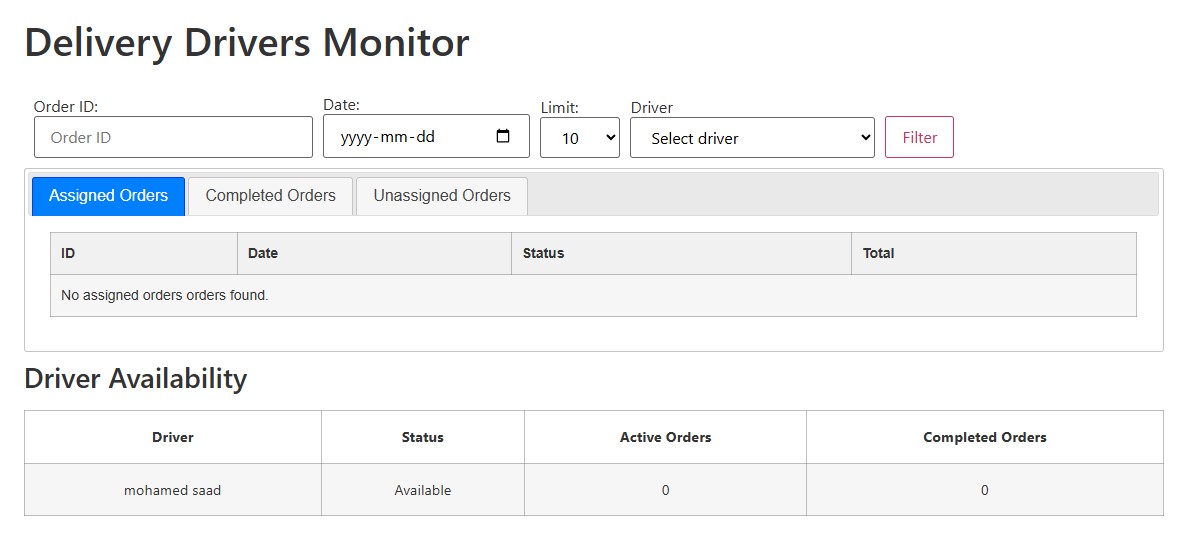
– Admin Orders Monitor: Admin dashboard with filters, tabs, and driver availability table.
屏幕截图:
常见问题:
What does the Orders Delivery Drivers for WooCommerce plugin do?
This plugin adds a complete delivery driver management system to WooCommerce, enabling you to assign drivers to orders, track delivery status in real-time, display Google Maps, and provide drivers with a dedicated dashboard to manage their assigned deliveries.
What are the minimum WordPress and WooCommerce requirements?
The plugin requires WordPress 5.5 or higher, WooCommerce 5.0 or higher, and PHP 7.4 or later.
What is the difference between the Free and Pro versions?
The Free version includes driver assignment, driver dashboard, delivery status tracking, Google Maps integration, mobile responsiveness, driver ratings, and an admin orders monitor. The Pro version adds auto-assignment of drivers to new orders, driver application management, multi-provider SMS notifications, enhanced email templates, and additional security controls.
What shortcodes are available?
The plugin provides:
[oddw_delivery_drivers_dashboard]— Driver dashboard (My Account endpoint uses this).[oddw_dashboard]— Backward-compatible alias for driver dashboard.[driver_application_form]— Public driver application form. (PRO)[delivery-drivers-orders-monitor]— Admin orders monitor dashboard. (PRO)
Is this plugin suitable for my business model?
This plugin works great for any WooCommerce business offering local delivery, including grocery and meal prep, flowers and gifts, local services (cleaning, repair), restaurants and takeout, and health and wellness providers.
How do I assign drivers to WooCommerce orders?
You can assign drivers to orders using the Delivery Driver meta box on the WooCommerce order admin panel. Simply select a driver from the dropdown list for each order. If using the Pro version, you can also enable automatic driver assignment.
How are drivers created?
Drivers are created by creating a WordPress user account and assigning them the Driver role. Alternatively, in the Pro version, you can accept driver applications from a public form and approve them within WordPress admin—this automatically creates a user account with the Driver role and saves driver profile data.
Can drivers have multiple roles in WordPress?
The plugin assigns users the Driver role, which can work alongside other roles depending on your WordPress configuration. However, the plugin specifically manages the Driver role for driver-related functionality.
How does automatic driver assignment work?
Automatic driver assignment (Pro feature) automatically assigns new orders to available drivers when they are created. The assignment algorithm can select the driver with the least open deliveries or choose a driver randomly, depending on your configuration preference.
Where can I manage driver applications?
Driver applications are managed in the WordPress admin under Users > Driver Applications, which provides three tabs: Pending (new applications), Approved (converted to driver accounts), and Rejected (declined applications).
What driver information can be collected from applications?
When drivers submit applications (Pro feature), you can collect and store vehicle details, phone numbers, and profile images, which are saved to the driver's user meta in WordPress.
What can drivers see in the Driver Dashboard?
Drivers can view assigned and completed orders, toggle their availability (Accepting Deliveries on/off), view delivery address on a live Google Map, update order status, and access call buttons to contact dispatch or customers.
What delivery statuses are available for drivers?
Orders support delivery statuses including Driver Assigned, Out for Delivery, and Completed. Drivers can update these statuses from the Driver Dashboard.
Can drivers update order status?
Yes. Drivers can mark assigned orders as Out for Delivery and Completed from the Driver Dashboard in My Account.
Is the Driver Dashboard mobile-friendly?
Yes. The frontend driver dashboard is fully responsive and optimized for drivers working in the field on mobile devices.
What shortcode displays the driver dashboard?
The main driver dashboard shortcode is [oddw_delivery_drivers_dashboard]. You can also use [oddw_dashboard] as a backward-compatible alias. This shortcode integrates with the My Account page.
How does Google Maps integration work in the plugin?
Each assigned order includes a live Google Map with the delivery address marked. Drivers can view this map from the order details page in their dashboard to visualize the route quickly before heading out for delivery.
Do I need a Google Maps API key?
Yes, a Google Maps API key is required to display the live map in the driver order view. You configure this in WooCommerce -> Settings -> Delivery Drivers.
Does the plugin provide turn-by-turn navigation?
The plugin does not provide turn-by-turn navigation. However, a Google Maps link is generated for directions using the delivery address when the driver views the order details, which they can use to open their preferred navigation app.
What personal data is sent to Google Maps?
The delivery address and store address are sent to Google Maps only when a driver opens an order containing the map. This is done to display the location accurately. Review Google's Terms of Service and Privacy Policy for their data handling practices.
Are SMS notifications required for the plugin to work?
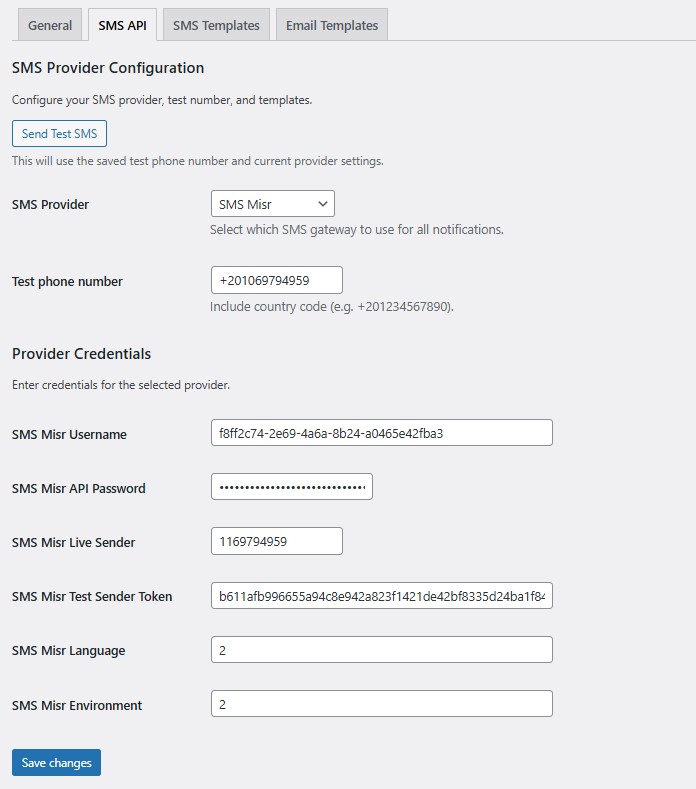
No. SMS notifications are optional and only sent when an SMS provider is configured. Email notifications work without SMS being set up.
What SMS providers does the plugin support?
The Pro version supports multi-provider SMS integration: Twilio, Vonage, MessageBird, Plivo, AWS SNS, SMS Misr (SMS Egypt), and Generic HTTP gateway.
What types of email notifications are available?
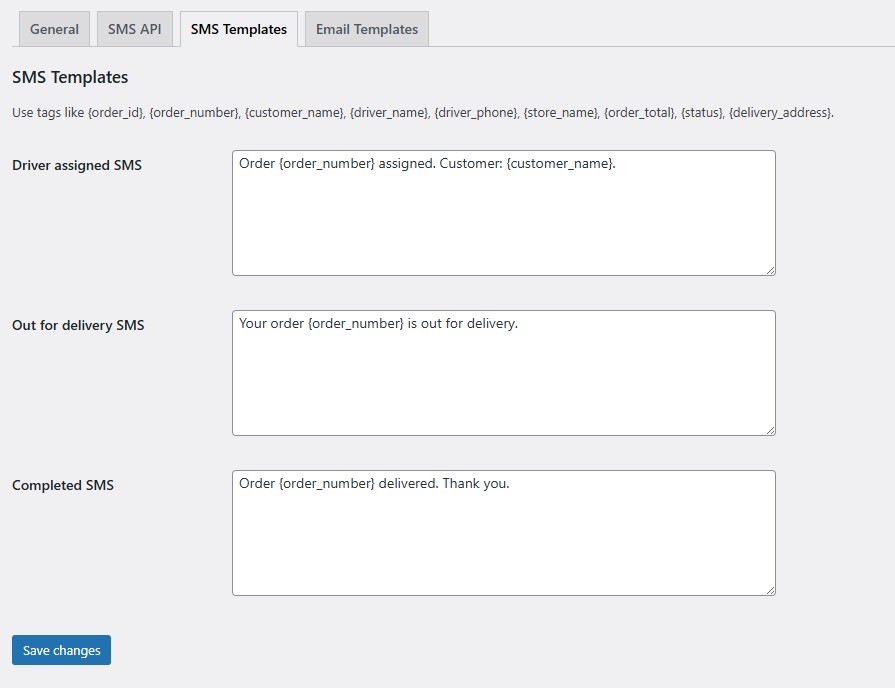
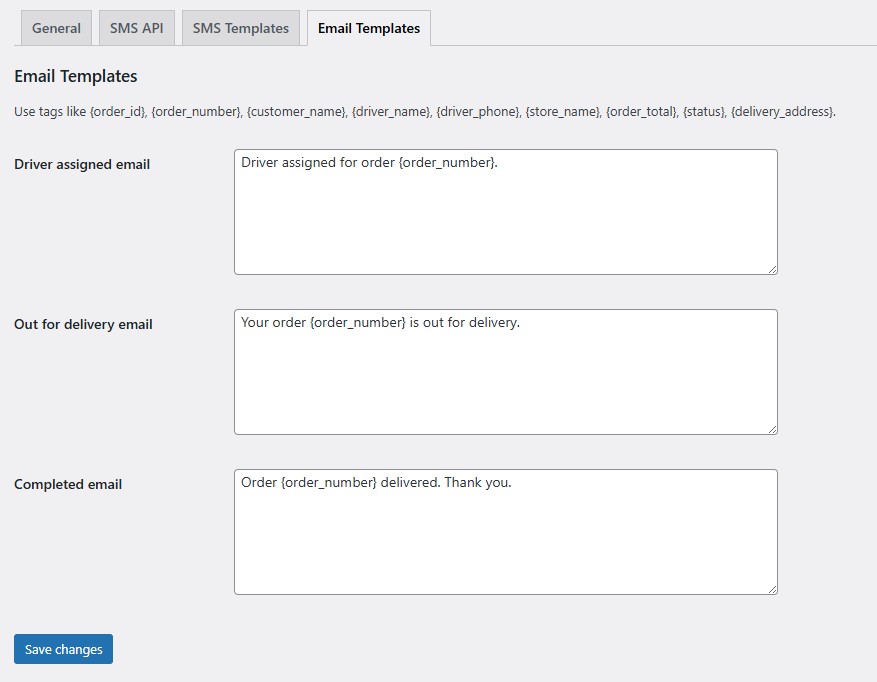
Email notifications include templates for driver assigned, out for delivery, and completed delivery statuses. Enhanced email templates are available in the Pro version.
Can I customize notification templates?
The Pro version includes enhanced and customizable email templates for driver assigned, out for delivery, and completed delivery notifications.
Can customers rate their delivery experience?
Yes. Customers can rate deliveries through the Driver Ratings feature. These ratings are stored on the order and help track driver performance.
What is the Admin Orders Monitor?
The Admin Orders Monitor is an admin dashboard with filters, tabs, and a driver availability table that lets you monitor all orders and driver availability in one view. Use the shortcode [delivery-drivers-orders-monitor] to display it.
Are there additional security controls in the Pro version?
Yes. The Pro version includes additional permissions and security controls for admin workflows to provide more granular access management.
Can customers apply to become drivers?
Yes (Pro feature). You can display a public driver application form using the [driver_application_form] shortcode, allowing interested customers or third parties to apply as drivers.
What shortcodes are available?
The plugin provides: [oddw_delivery_drivers_dashboard] (driver dashboard), [driver_application_form] (public driver application form), [delivery-drivers-orders-monitor] (admin orders monitor), and [oddw_dashboard] (backward-compatible driver dashboard alias).
How do I install and activate the plugin?
Upload the plugin folder to /wp-content/plugins/, then activate it through the WordPress admin. Go to WooCommerce -> Settings -> Delivery Drivers to configure the plugin.
What is the first step after activating the plugin?
After activation, view the plugin settings in WooCommerce -> Settings -> Delivery Drivers, then create drivers manually or approve driver applications (Pro feature).
How do I get started with driver assignment?
Create WordPress users with the Driver role, assign them to orders using the Delivery Driver meta box during order editing, then drivers will see new orders in their Driver Dashboard and can update status.
Do I need to add Google Maps integration to use the plugin?
Google Maps integration is optional but highly recommended. To use it, configure your Google Maps API key in the plugin settings. The plugin functions without it, but the map feature will not be available.
更新日志:
- Pages settings added.
- default shortcodes pages generation on activation.
- Added Settings Tabs
- New: Google Maps integration in driver order view
- Tweak: UI improvements in dashboard templates
- Fix: Compatibility with WooCommerce 6.8