
PaintClarity
| 开发者 |
paintops
freemius |
|---|---|
| 更新时间 | 2026年10月29日 11:07 |
| PHP版本: | 7.4 及以上 |
| WordPress版本: | 7.1 |
| 版权: | GPLv2 or later |
| 版权网址: | 版权信息 |
标签
下载
详情介绍:
- Quotes, estimates & bids: a scope-aware builder with reusable inclusions/exclusions, itemized or lump-sum pricing, trade calculators that add their numbers straight to the quote, printable output, and email delivery. Preview Online Quote shows you exactly what the customer will see before you send it.
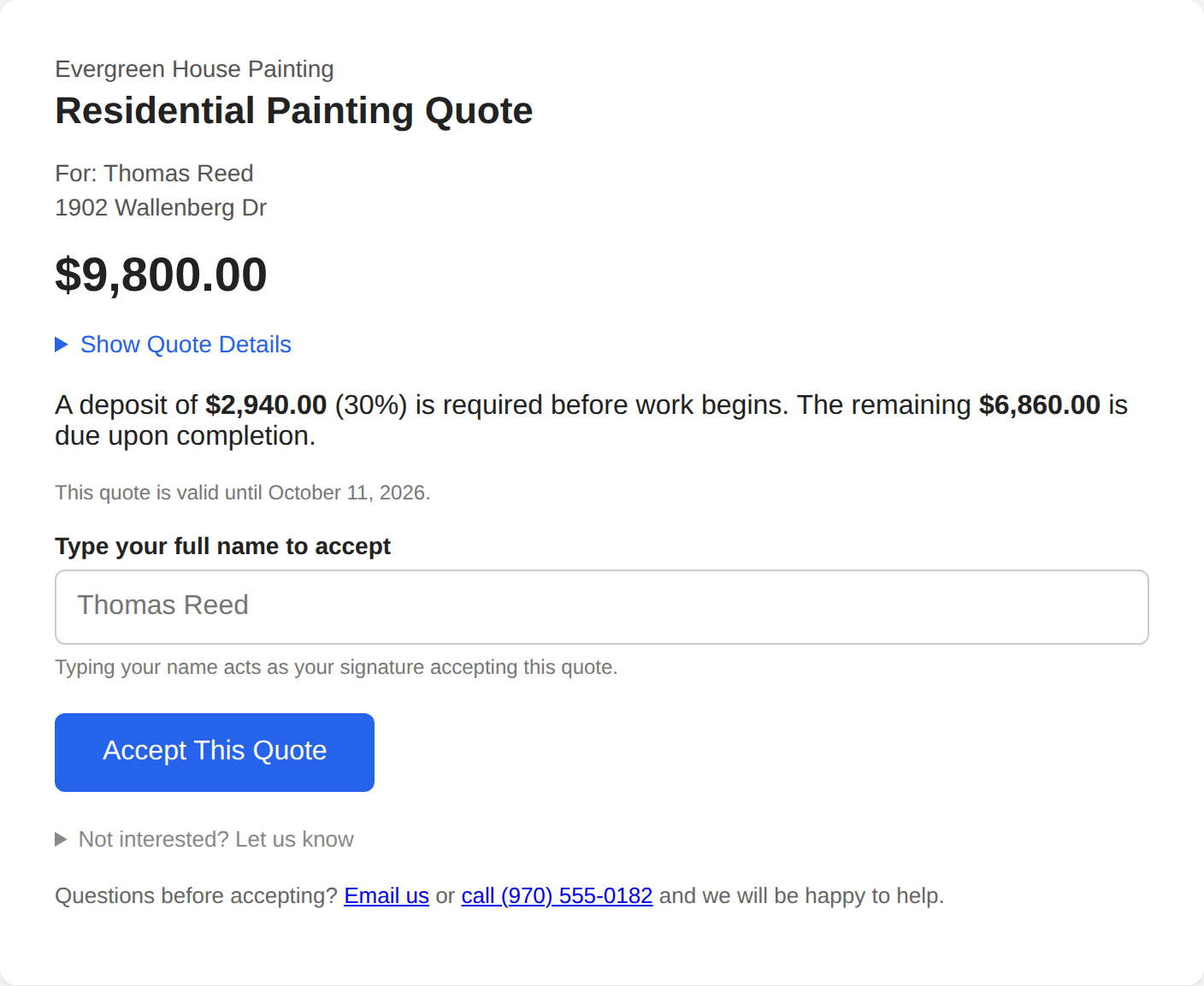
- A professional customer page: your customer opens a clean, branded page (your logo, your terms & conditions) and accepts by typing their name, an e-signature-grade record with timestamp. They can also decline with a reason, or ask a question, and you're notified either way. You see when the quote was viewed.
- Acceptance converts the quote to a job automatically, whether they paid a deposit online or you shook hands, and a "Mark as Won" button covers the phone call.
- Invoices: numbered invoices for the balance (full or partial), emailed or shared by link, payable online (Pro + Stripe) or marked paid for check/cash. Invoicing more than the job is billing asks first, so a number never slips past you.
- Payments: every job has a Payments page. Record cash, check, or in-person card payments and refunds, and see Billed, Paid, and Still Owed at a glance. A payment flips the matching invoice to paid, so balances always agree.
- Sales tax, one or two: a default rate plus any number of additional rates, each stamped on the job when it is created so a later rate change never rewrites old paperwork. Provinces that charge GST and PST (or GST and QST) on the same work can enter both, and quotes and invoices print each tax on its own line.
- Communication History: every email the plugin sent, every call or text link tapped, and every conversation you logged by hand, in one place per job, each marked by how much it can be trusted: sent by PaintClarity, link opened, or recorded by hand.
- Receivables at a glance: unpaid invoices surface on your dashboard with amounts and age, and a quote that has gone quiet shows up under Needs Your Attention with a one-tap follow-up email or text.
- Request Performance: how often your quotes turn into jobs, counted per job rather than per revision, so three rounds of edits before a yes count as one win, not two losses.
- Jobs, two ways: a row view with Requests, Upcoming, Active, and Completed sections (unpaid balances right on the Completed section), and a board / pipeline view, Quote → Active → Completed, plus a lost-leads drawer with the customer's decline reason so you can revive the ones worth re-working.
- Follow-up visits without re-entering the job: schedule a callback, a punch list, or approved add-on work (with its own price and balance) against the original job in a short form. It lands on the calendar, the board, and the crew's phones like any other job.
- Scheduling calendar with crew filtering, worker badges, time-off, and a subscribe link for Google/Apple/Outlook. Add your own recurring holiday labels.
- Crews: group your painters into named, colored crews; staff a job with one tap and filter the calendar and reports by crew.
- A real app for your painters: install-to-home-screen (PWA), a "My Jobs" home, one-tap directions (Google/Apple/Waze), per-job check-in/out that works offline and syncs, photo/receipt/note logging, a "My Hours" view of their own time and pay, and a "Mark Job Complete" button that notifies the office. Workers see only what their permissions allow, never your numbers.
- Production Rates: the one number every quote leans on and most shops only half-remember. PaintClarity already holds the hours and the paintable area of every completed job, so this screen divides one by the other over your recent jobs and shows the work, per job and as a median, measured from your own crews. It measures; it never changes a quote behind your back, and a quiet Use measured rate button copies a figure into your settings only when you press it.
- Business Checkup: nine read-only scans of the whole business on one page: completed jobs with a balance due, jobs past their end date not marked complete, won jobs never scheduled, started jobs with no hours or no expenses logged, requests waiting more than two weeks, requests with no quote document, expenses missing a receipt image, and open records with no phone or email. Every line links to the record so it can be fixed in two clicks. It also tells you when the site is not on HTTPS and which features that holds back.
- Customers: a directory with contact details, lifetime value, job history, and multiple service addresses per customer, built for landlords, realtors, property managers, and GCs whose one account means a dozen properties.
- Bring your existing records: import customers, and jobs and quotes, from a CSV under Settings. The importer recognizes exports from Joist, Housecall Pro, and Jobber as well as a plain spreadsheet, and shows you the column match and exactly what will happen before anything is written.
- Business Notes: a simple notebook for vendor account numbers, insurance renewal dates, and reminders, plus "Add a Note to a Job" to drop a note onto any open job's log without leaving the page.
- Before/After photos with camera alignment overlay and a compare slider.
- Color Visualizer: load a photo of the house or the room, select the surface, and turn a color wheel until it is the color you are proposing. The wall changes color and keeps its own shading, grain and texture. Select by fill, by matching color, or by dragging a box over a big flat wall. Handles stucco, siding, brick, concrete block and interior drywall, takes the Sherwin-Williams or Benjamin Moore number alongside it, and prints or saves the render for the customer. The Manual tab runs entirely in your browser: no photo is uploaded anywhere.
- AI Visualizer (Pro): the other tab. Upload or take a photo, pick colors by brand and name from the Sherwin-Williams and Benjamin Moore books, add a note like "paint the stone wall too, in Alabaster", and get back a realistic repainted photo to show the customer. This tab sends the photo to OpenAI under your own API key (Settings > AI), billed to your OpenAI account at a few cents per render. Renders can be saved to the job's photos. Colors on screen are approximate; brand and color names are trademarks of their owners and PaintClarity is not affiliated with any paint manufacturer.
- Trade calculators, paint-color tracking, and resource links.
- A choice of visual themes (light, dark, industrial, and more) with a modern app-style navigation bar on desktop and phone, or a full-screen sidebar layout that hides the site's header and footer.
- Works with your browser's translation. The app's own text is English. Chrome, Safari and Edge page translation, and front-end translation plugins, are supported: customer names, addresses, amounts, dates, job numbers and paint color codes are marked so they stay exactly as entered.
- Help built in: a five-minute walkthrough video with chapter links, a setup checklist, and a Setup Health panel that says what is still missing before the first quote goes out.
- Job financials & profitability: costs, materials, labor hours; gross, expenses, profit, and margin per job; a Profits dashboard with profit-by-classification, profit-per-hour rankings, and profit by crew and by worker (allocated by logged hours).
- Job Pulse: one page that answers "how is this job doing?" in whatever terms apply right now: a quote waiting on the customer, a job about to start, a job that is running (hours against the quote's labor, payroll against the price), or a finished job's after-action review.
- Expenses & receipts against any job, plus business-level and vehicle expense tracking, spend by vendor, and a duplicate-receipt check.
- Business Financial Report for your accountant: income and expenses for the year, with sales tax to remit by filing period, one table per tax name and rate, by quarter or by month, on a cash basis following the payment date.
- A quote request form for your website: the
[paintops_quote_form]shortcode files each request on a Quote Requests screen, with Cloudflare Turnstile and built-in spam checks so junk never becomes a lead. Convert to Request builds the request with the customer attached, and asks first only when someone in your directory already looks like this person. - Online payments: deposits on quote acceptance and invoice balances through Stripe Checkout, recorded automatically.
- AI tools (bring your own OpenAI key): estimate dimensions, gallons, and a Description of Work from a photo; scan receipts to auto-fill expenses; get feedback on or a rewrite of your quote wording; draft a payment reminder for an unpaid invoice.
安装:
- Install PaintClarity from the Plugins screen (Plugins → Add New → search "PaintClarity"), or upload the plugin ZIP under Plugins → Add New → Upload Plugin. Activate it.
- Create a WordPress Page and add the shortcode
[paintops_app]. This one page is your whole PaintClarity app; it routes internally. - Go to PaintClarity → Settings and set your Company Profile (business name, logo, country, currency), and review the Setup Health panel.
- (Optional) Add team members under PaintClarity → Painters/Helpers, set their permissions, and group them into Crews.
- (Optional) Add your Quote Terms & Conditions under Business Settings so customers see and sign against them.
- (Optional, Pro) Under Settings → AI Settings connect OpenAI, under Stripe Payments add your Stripe secret key AND webhook signing secret (both are required before online payment buttons appear), and add a Google Maps API key for address autocomplete.
屏幕截图:


常见问题:
Do I need a paid account to use it?
No. The free plugin runs entirely on your own WordPress site and lets you quote, schedule, and manage unlimited jobs. Pro is an optional upgrade.
What happens to my data if I deactivate or delete the plugin?
Nothing is deleted. Your jobs, quotes, customers, payments, hours, and photos stay in your WordPress database, so nothing is lost if you deactivate temporarily or reinstall later. If you truly want the data gone, delete the plugin's tables from your database and the paintops-private folder from your uploads.
Does it work without OpenAI, Stripe, or Google Maps?
Yes. Those are optional integrations. If you don't enter their keys, the related features simply stay off and everything else works, including keyless turn-by-turn directions for your crew.
Can my customers really sign a quote online?
They accept by typing their full name, which is stored with a timestamp and IP address alongside your Terms & Conditions, a solid acceptance record. They can also decline with a reason, and change their minds later.
Who pays for the AI usage?
You do, through your own OpenAI account and key, typically a fraction of a cent to a few cents per action. PaintClarity adds per-month usage caps you control so costs stay predictable.
Can my painters log in without seeing my numbers?
Yes. Painters/Helpers get a dedicated role with opt-in permissions and their own app view: My Jobs, My Hours (their own time and pay only), directions, check-in/out, photos and receipts. Financial figures are owner-level and hidden from workers unless you explicitly grant access.
Does it work in the field with bad reception?
The app installs to a phone's home screen, and Time Clock check-in/out keeps working offline and syncs when a connection returns.
Where is my data stored?
In your own WordPress database. PaintClarity doesn't host your business data on an external server. You can download all of it any time, on any plan: PaintClarity > Business > Your Data gives you a ZIP of CSV files, one per table, plus your settings.
Can I bring in my customers and jobs from another app?
Yes. Settings has two importers, Import Customers and Import Jobs and Quotes, that take a CSV file. Exports from Joist, Housecall Pro and Jobber are recognized by their column names, and any spreadsheet with a name column works. You match the columns, see exactly what will be created, and then import. Both are in the free plugin.
I charge two taxes on the same job (GST and PST). Can PaintClarity do that?
Yes. Under Business > Pricing Rules, each tax rate takes an optional second tax name and rate. A job created with that pair carries both, and quotes and invoices print the two lines separately. Shops with one tax see no change.
Is the app available in other languages?
The app's own text is English. It is built to work with your browser's page translation (Chrome, Safari, Edge) and with front-end translation plugins: customer names, addresses, amounts, dates, job numbers and paint color codes are marked so they are never altered by the translation.
更新日志:
- Changed: the paragraphs that explained a section at the top of it (Add Expense, the Payments, Hours and Invoices sections of Financials, Reach the customer and History on Communication History) sit behind a small round "?" beside the section name now. One tap or click opens the text right there and another closes it; the screens start with the task instead of the reading.
- Changed: the sentence that opened New Photo or Note repeated what the box already says; it is gone.
- Changed: the Expenses page's "Where it went" is a pie now. The bars it replaces were each scaled to the biggest item in their own group, so a small gas bar could run as long as a large materials bar; every slice is a category as a share of the whole year, with the table beside it.
- Changed: the text size and map direction switches at the foot of the side menu fold under a "Page Settings" link; open it once and it stays open on that device.
- Fixed: on hosts that run WordPress on SQLite (Playground, Studio), "Last Updated On" never moved and the "someone else saved this job" guard on the job form could not work; every change to a job now stamps the time itself.
- Fixed: pressing Back after saving a new job and then Create again could make a twin. The form no longer lets the browser put the old values back, and a second record for the same customer, title and address inside a minute is refused with a note that it was already saved.
- Added: the data export for the free plugin. PaintClarity > Business > Your Data in wp-admin downloads a ZIP of CSV files, one per table, plus your settings; it is the same download the Pro Business page offers.
- Added: a printed or PDF quote lists the optional add-ons in a short Options block with their prices, until the quote is accepted.
- Changed: the one-line descriptions under Customers, Business and Communication History describe the screen as it is (Customers shows no balances; the app's Business page is the tax year's numbers; a painter's Communication History is the reach buttons and a note).
- Fixed: the night-before and "begins today" emails went to crews on completed jobs, declined requests and lost quotes; they go out for live jobs only now.
- Changed: after an offline check-out the Time Clock offers Check In again, so a crew with no signal all day can punch the afternoon too; the punches sync in order.
- Changed: on the job page the Time Clock sits right under the job card, above the status line and Mark Job Complete, and the bar's green Check In punches in one tap when there is exactly one job today (Check Out while on the clock); otherwise it opens My Jobs.
- Changed: every job page puts the card first and keeps the heading short ("Notes & Photos", "Add Expense", "Financials"); the old "Customer / Scheduled" box under the heading is gone, the card carries that.
- Fixed: the job card's labels could run into each other on narrow phones ("Notes" against "Directions" at 360 px), and the Spanish bar wrapped at 390 px: a label that does not fit shows its short word ("Map", "Mapa"), and the bar's Spanish reads "Trabajos", "Entrada", "Salida".
- Changed: the painter's small tap targets are 44 px tall now ("Recent time on this job", "Past Jobs", the My Hours rows, "View all & add").
- Fixed: a customer's acceptance could be sent twice. A refresh of the thank-you page re-signed the quote and re-sent both emails, and anyone with the link could post again with a different name and other add-ons and change a signed total. An accepted quote now refuses a second acceptance and shows the accepted state, a decline on an accepted quote is refused, and the thank-you and decline pages are reached by redirect so Back and refresh resend nothing.
- Changed: the final invoice after a deposit and a progress invoice lists each thing received on its own line (the deposit with its date, each earlier invoice paid, any other payment) instead of one "Deposit received" line, and its tax line says how much of the whole-job figure was already shown on which invoice, so two invoices never add to more tax than the job carries.
- Fixed: Create Invoice made a second and third draft on a refresh; one render makes one invoice, and the page lands by redirect.
- Fixed: an invoice marked paid stamped the payment with the database clock and no user; it stamps site time and the person now.
- Added: an invoice paid online emails the office and sends the customer the receipt, and Communication History gets a line, the way a deposit does.
- Removed: the "Edit this quote" form, whose Update button had never saved; Job Pulse points at the quote screen, where Replace Quote makes a revision. An old link opens the quote screen.
- Changed: Permanently Delete Customer names the sent and paid invoices and the recorded payments that will go with the customer, and what that does to the year's figures.
- Fixed: Record Payment and Add Hours could record a double tap twice; both carry the one-render guard now, and the guard lives a day instead of 15 minutes, so a form resent an hour later is refused with a note.
- Fixed: the customer page embedded on the quote screen (1.2.085) could still accept the quote from the office with the Enter key. Its Accept, Decline and Pay controls are off for real now, the server refuses those three actions from anyone logged in as staff, and the Preview Online Quote link opens in the same mode.
- Added: Record acceptance on the quote screen, for a yes the customer gave by phone, in person, on paper or by email: their name as they gave it, how, and any add-on they asked for. The badge and the history say the office recorded it, no signature is claimed, and nothing is emailed.
- Fixed: Save Financials with nothing changed dropped the pay-run date, the author and the time stamp from every hours row of the job (the 1099 sheet keys on that date) and made a Stripe deposit read as recorded by whoever saved. Unchanged rows keep all three now.
- Fixed: a night-before email run that died left no next run on the schedule until the next plugin update (since 1.2.084). The next run is armed before the send, and again on any page load if it is missing.
- Fixed: after a refused save (someone else's change, a page open too long, a missing field) the job form brought back the text boxes only. Master Notes, the painters, Interior/Exterior, the payment plan, the exclude box, the status, the crew, the tax and the area come back too, and the PHP warning that path logged is gone.
- Changed: Larger text zooms the app on phones only; the larger type of 1.2.085 stays at every width. The switch and the maps-app choice are in the sidebar foot and the desktop More menu as well as the phone's More sheet.
- Fixed: a painter's save banner could be taken by the phone's own offline pre-fetch and show up in the saved copy instead. The pre-fetch leaves it alone and a saved copy never carries one. The full history is in changelog.txt in the plugin folder.