
Parolas – Comments with atproto
| 开发者 | arinspunk |
|---|---|
| 更新时间 | 2026年11月10日 00:46 |
| PHP版本: | 7.4 及以上 |
| WordPress版本: | 7.1 |
| 版权: | GPLv2 or later |
| 版权网址: | 版权信息 |
详情介绍:
- Publish the anchor post from the block editor, when you decide, in the site's AT Protocol account (Bluesky or any other server).
- Or paste an
at://URI or the post URL from bsky.app, mu.social or any compatible app, with a handle or a DID. - Unlink an entry at any time, or delete its anchor post from Bluesky when it belongs to the site account.
- Works with block and classic themes.
- Replace the native comments, or show both, one after the other.
- Choose the content types where it is active (posts by default).
- Interface and dates in your site's language.
- Scripts and styles load only on the posts that show AT Protocol comments.
安装:
- Install and activate the plugin from Plugins → Add New, or upload the plugin folder to
/wp-content/plugins/. - Optionally, review Settings → Parolas.
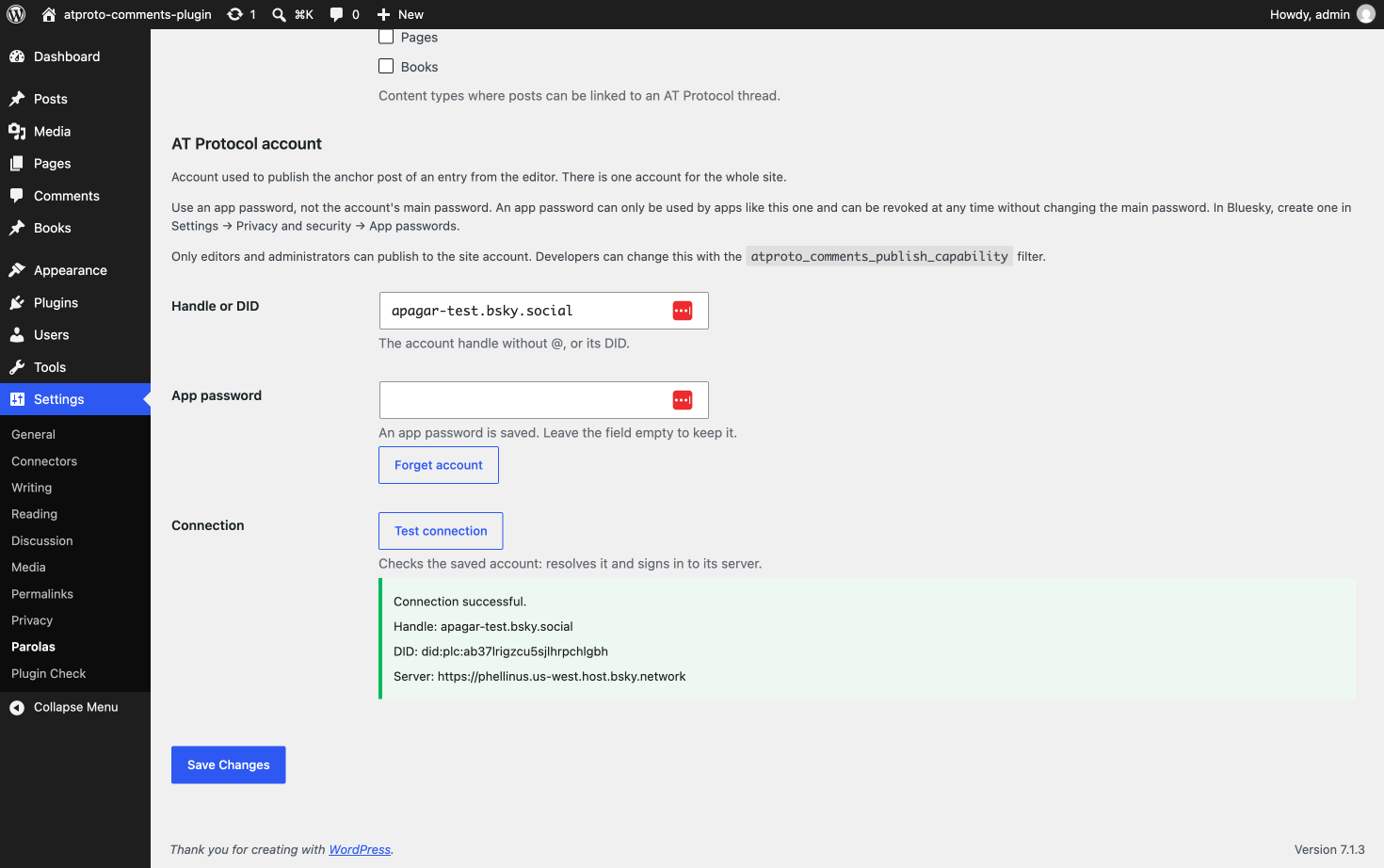
- To publish from the editor, add the site's AT Protocol account in Settings → Parolas: its handle and an app password. Click "Test connection" to check it.
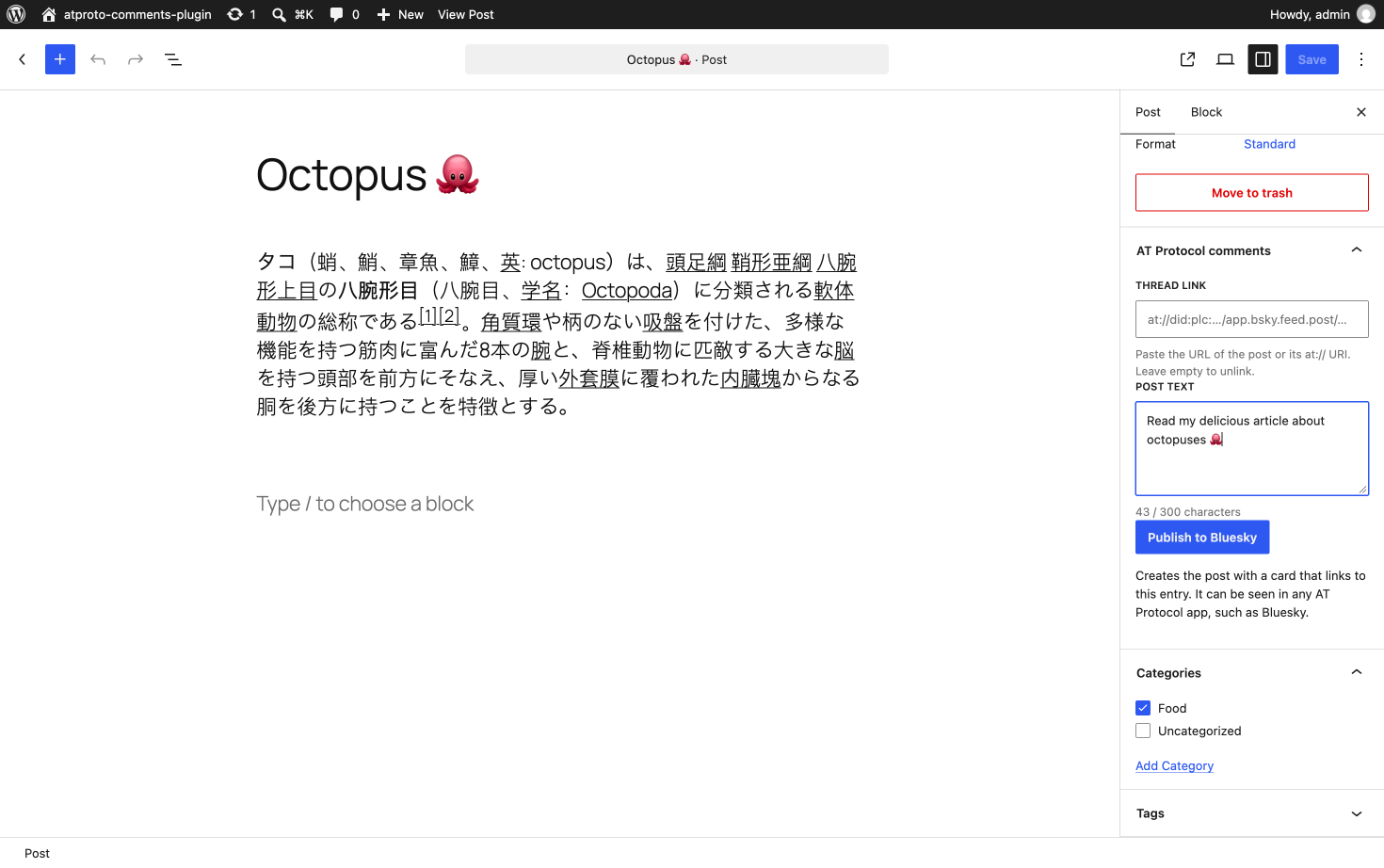
- Publish an entry. In the "AT Protocol comments" panel of the block editor, write the text of the post and click "Publish to Bluesky".
- Or share the entry yourself in any AT Protocol app, then paste the link to that post in the "AT Protocol comments" panel (block editor) or box (classic editor), and save.
屏幕截图:
常见问题:
How do I create an app password?
An app password lets an app use your account without your main password, and you can revoke it at any time. In Bluesky, go to Settings → Privacy and security → App passwords, add one (for example "WordPress") and copy it into Settings → Parolas. Other providers have a similar option. Don't give it access to direct messages: the plugin doesn't need it.
How do I publish the anchor post?
Publish the entry first and save any pending changes. Then, in the "AT Protocol comments" panel of the block editor, write the text of the post (up to 300 characters) and click "Publish to Bluesky". The post includes a card with the entry's link, title, excerpt and featured image, and the entry is linked to it automatically. Publishing or updating the entry never creates a post by itself. The classic editor can't publish; paste the link instead.
Who can publish?
Only users who can edit other people's posts, that is, Editors and Administrators, because the post goes out in the site's account, not the author's. Authors and Contributors can still paste a link. To change it, return another capability from the atproto_comments_publish_capability filter, for example in a small plugin:
add_filter( 'atproto_comments_publish_capability', function () { return 'publish_posts'; } );
With publish_posts, Authors can publish from their own entries; with manage_options, only Administrators can. The user also needs to be able to edit the entry.
Where do I get the link to the post?
Open the post in bsky.app, mu.social or another app and copy its URL, like https://bsky.app/profile/alice.bsky.social/post/3k…. You can also paste the at:// URI, like at://did:plc:abc…/app.bsky.feed.post/3k…. Links with a handle are converted to the account's DID when you save. If the handle can't be resolved, paste the URL or the at:// URI with the DID (did:…) instead.
The card has no image
The plugin uses the medium_large size of the featured image, or the original if there is no such size, and only if the file is 1 MB or less. It reads the file from your server, so there is no image if your media is stored elsewhere (for example, offloaded to S3 or a CDN). If the server is slow and there isn't enough time left, the post is published without image rather than failing.
How do I unlink an entry or delete its post?
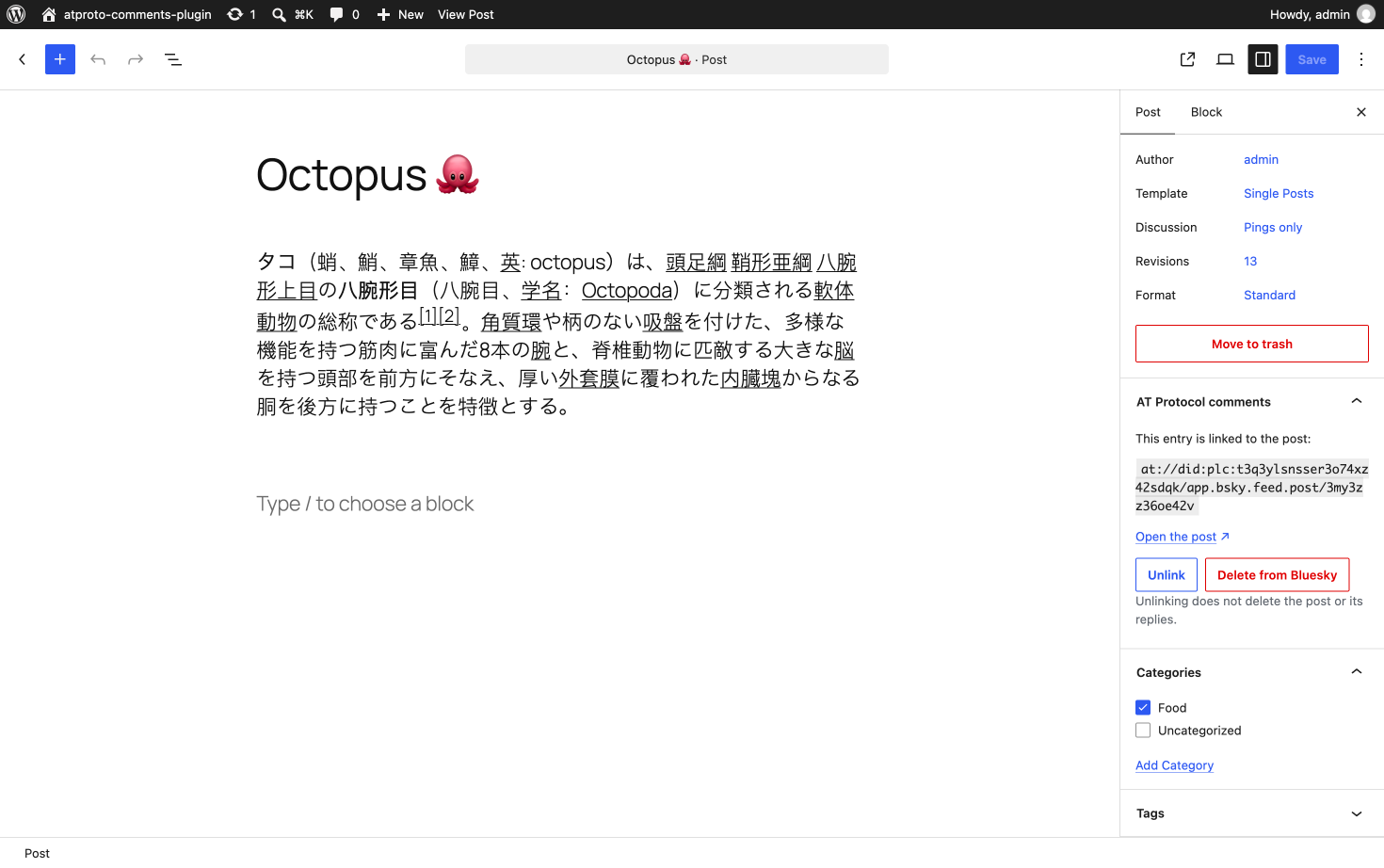
When an entry is linked, the "AT Protocol comments" panel of the block editor shows the post and two actions:
- Unlink removes the link from the entry, right away. The post and its replies stay on Bluesky; you can then paste another link or publish a new post. Anyone who can edit the entry can unlink it.
- Delete from Bluesky deletes the post from the site account and then unlinks the entry. It asks for confirmation first and shows about how many replies the post has. It is only offered when the post belongs to the site account, to the same users who can publish (see "Who can publish?") and who can also delete the entry.
What happens to the replies when I delete the post?
Replies are records in their authors' accounts, so they are not deleted. They are no longer shown in the post's thread or on your entry, but they stay on the profiles of the people who wrote them.
Does deleting or trashing the entry delete its post?
No. Trashing, restoring or permanently deleting an entry in WordPress never touches the post on Bluesky. Delete it from the panel first if you want it gone.
"Delete from Bluesky" is disabled
The site doesn't know the account's DID yet. It learns it the first time the account is resolved: when you test the connection in Settings → Parolas or publish a post. Test the connection once and the button is enabled. This can happen after updating the plugin or changing the account's handle.
It says it could not be confirmed that the post was deleted
The account's server didn't answer in time, or the request to your site timed out. The entry stays linked. Trying again is safe: if the post was already deleted, the entry is simply unlinked.
It says it is not known whether the post was created
The connection with the account's server failed after the post was sent, or the request to your site timed out. The post may or may not exist. Open the account's profile in Bluesky or another app: if the post is there, copy its link and paste it in the thread link field; if it isn't, try again. Retrying without checking may create a duplicate.
My account's server is on a private network
For security, the WordPress server only connects to public addresses, so it can't reach a PDS, a handle domain or a did:web domain on a private or local network. A developer can allow a host with the WordPress http_request_host_is_external filter.
My theme doesn't show the comments
In "Replace the native comments" mode, the plugin takes the place of the theme's comments area. Some themes, especially block themes with custom templates, don't have one in their single post template. Switch to "After the content" in Settings → Parolas, which works with any theme.
How do I turn off native WordPress comments?
In "Replace" mode the native comment list and form are hidden on linked posts, but WordPress still accepts comments sent directly (often spam). If you don't want native comments, close them on each post (Discussion panel) or for new posts in Settings → Discussion. The AT Protocol comments are still shown when native comments are closed.
Can visitors reply from my site?
Not directly. The "Comment" and "Reply" buttons open a panel where visitors choose their AT Protocol app (Bluesky, Blacksky, Deer and others, or any app by its domain). The conversation opens there, and they reply with their own account. The app they chose last time comes first.
What happens if I uninstall the plugin?
Its settings and the AT Protocol account (handle and encrypted app password) are deleted. The links stored in your posts are kept, so they are back if you install it again. Posts published on AT Protocol are not deleted.
更新日志:
- Updated the atproto-comments web component to 2.0.0.
- "Comment" and "Reply" open a panel at the bottom of the window to choose the app: Bluesky, Anisota, Blacksky, Deer, Impro, Mu, Northsky, Red Dwarf or any other by its domain. The app chosen last comes first, marked "Last used".
- The author and the date of each reply link to the profile and to the reply in the visitor's chosen app.
- Replies hidden by the thread author, and replies from accounts with labels that hide them, are no longer shown.
- The link to more replies says "View more replies", since it opens the visitor's chosen app.
- Replies more than a year old show the date in the site's language format.
- Fixed: replies from authors without a DID no longer show a broken "Reply" button; the comments load when the browser blocks
localStorageand in Firefox before 125; the "Other app" field has an accessible name. - New translatable strings for the panel.
- For themes with their own CSS or JS for the comments: the
.atproto-app-popover*classes are now.atproto-app-sheet*(the panel is a<dialog>);.atproto-reply__bylineis a link when the author has a DID; the date is inside a newa.atproto-reply__permalink, and the·before it moved from.atproto-reply__time::beforeto.atproto-reply__permalink::before; the buttons that open the panel no longer havearia-expandedorpopovertarget(use theopenattribute ofdialog.atproto-app-sheet).
- Renamed to Parolas – Comments with atproto. The plugin folder and text domain are now
parolas.
- First public version.
- Link a post to an AT Protocol post, from the block editor or the classic editor, and show its replies as the post's comments, in the site language.
- Links with a handle are accepted and converted to the DID.
- Publish the anchor post from the block editor, with a card linking to the entry and the site language.
- Site AT Protocol account with an encrypted app password and a connection test.
- Accounts on any AT Protocol server: the handle, DID and PDS are resolved, nothing is hard-coded.
- Only Editors and Administrators can publish, adjustable with the
atproto_comments_publish_capabilityfilter. - Unlink an entry from the block editor with one click, without touching the post.
- Delete the anchor post from Bluesky when it belongs to the site account, with a confirmation that shows the number of replies.
- The link to open the linked post can point to another app with the
atproto_comments_post_urlfilter.