
PausAR – 3D and AR Viewer Metrics
| 开发者 | pausarstudio |
|---|---|
| 更新时间 | 2026年10月10日 21:06 |
| PHP版本: | 7.4 及以上 |
| WordPress版本: | 7.1 |
| 版权: | GPLv2 or later |
| 版权网址: | 版权信息 |
详情介绍:
- Interactive line chart – Visual analytics dashboard with an interactive timeline showing your 3D & AR interactions over the last 7 days, right inside WordPress.
- Event distribution donut chart – Instantly see the split between 3D Viewer interactions, QR Code scans, and AR session launches at a glance.
- Summary cards – Totals for 3D viewer interactions, QR codes generated, AR launches, and pages with activity.
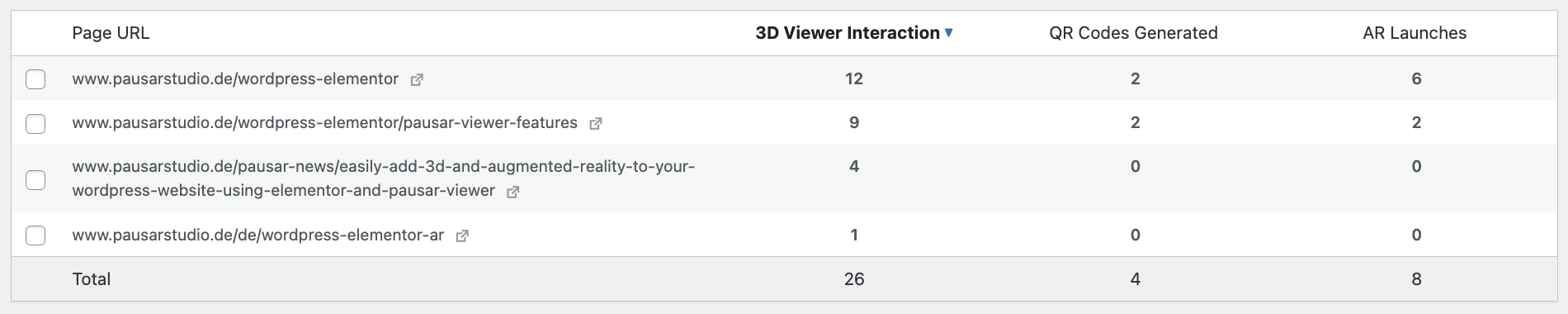
- Sortable data table – Sort your pages by 3D viewer interactions, QR codes generated, AR launches, or widget count.
- Filter data by URL – Filter the shown data by URL (e.g. /products/).
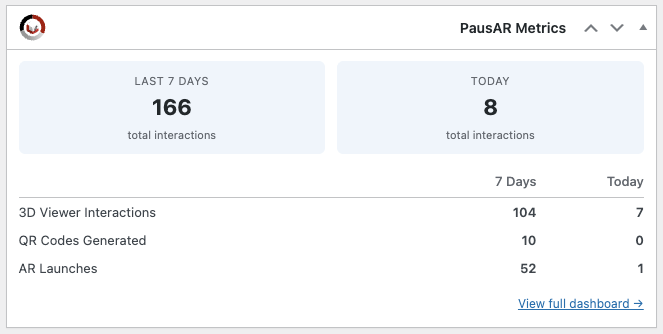
- Dashboard widget – A compact overview widget on the main WordPress Dashboard page showing key metrics for the last 7 days and today – always visible at a glance.
- Top 3 Pages – See your three best-performing pages ranked by total interactions, with a colour-coded breakdown bar showing the split between 3D Viewer, QR, and AR events.
- Data retention: 7 days – Interaction data is stored for 7 days and automatically cleaned up afterwards or manually with a click of a button.
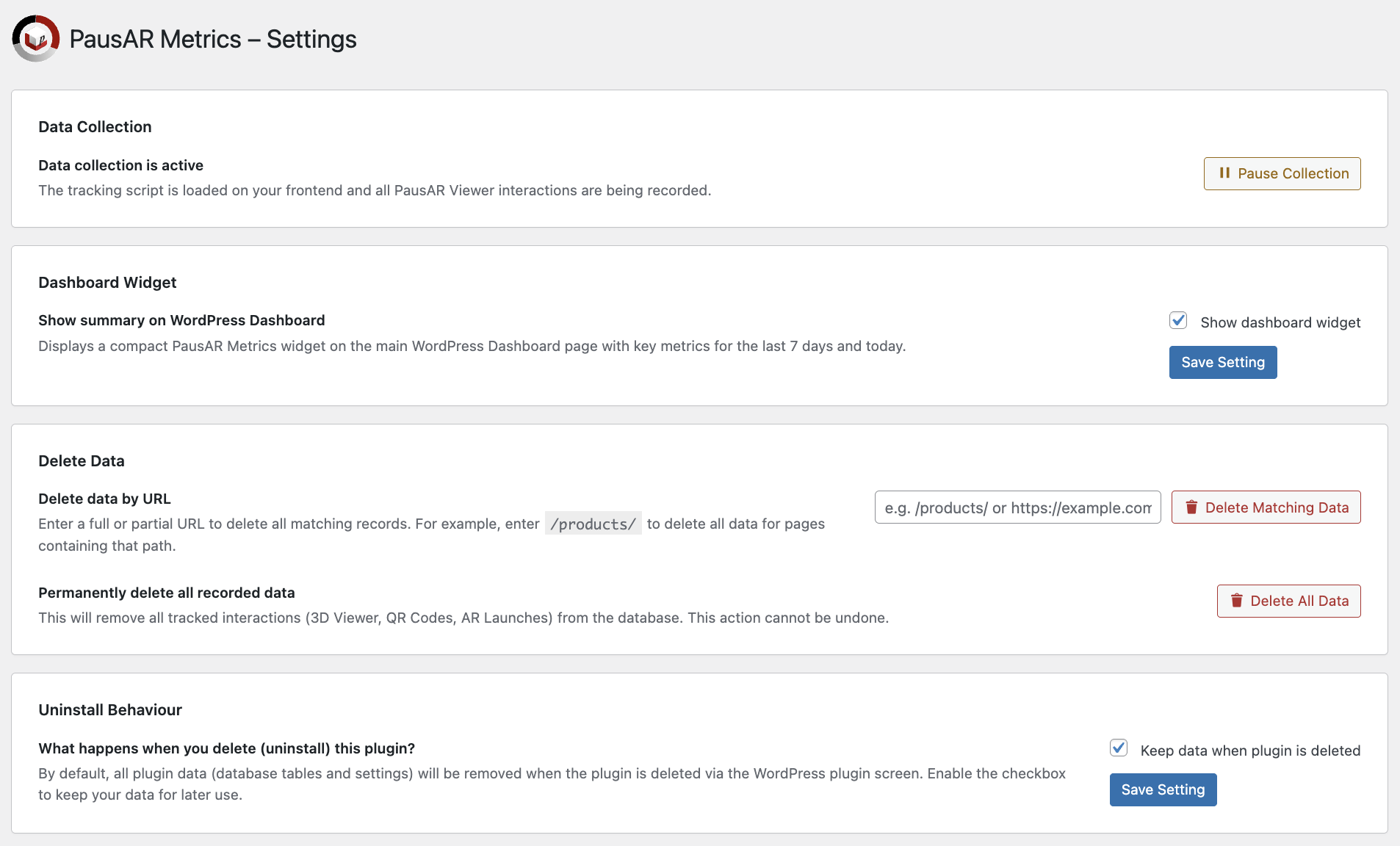
- Stop all Tracking Button: With the click of a button you can disable or enable the PausAR tracking script.
- Privacy-friendly – No cookies, no IP addresses, no device fingerprinting. Visitor data never leaves your site: only aggregated counters are stored in your own WordPress database.
- AR platform breakdown – See how AR sessions split between Apple (iOS) and Android devices with a dedicated donut chart and per-row breakdown in the data table.
- All free features included – Everything from the free version is also included in the Pro version.
- Extended data retention – Store up to 365 days of interaction data. Choose between 7, 30, 90, 180, or 365 days.
- Extended date ranges – Analyse your data over 30, 90, 180, or 365 days in addition to the default 7-day and today views.
- Detailed page analysis – Drill down to individual pages and widgets to see exactly which 3D models drive the most engagement, with per-widget statistics, model info tooltips, and date range filtering.
- Per-widget tracking – Every PausAR widget on your site is tracked individually, so you know exactly which 3D models drive the most engagement.
- Rising Stars – Discover which pages are gaining momentum with the three pages showing the biggest percentage increase compared to the previous period.
- Needs Attention – Spot pages with declining engagement at a glance – the three pages with the biggest percentage drop compared to the previous period.
- Comparison mode – Toggle "Compare vs. previous period" in the line chart to overlay dashed lines from the previous period. Available for all ranges except 365 days, with comparison data visible in the chart tooltip.
- PDF Report Export – Export a branded PDF report with your logo, custom name, and accent color, including KPI summary cards, line chart with annotations, donut chart, and a full top pages table with mini bar charts. Customize branding in Settings.
- Chart annotations – Add colour-coded notes to your timeline to mark important events like product launches, newsletter sends, or website changes. Annotations appear as diamond markers on the chart and are visible in tooltips.
- Export to Excel – Download the currently visible data table as an XLSX file with one click.
- Automated email reports – Receive weekly (every Monday) or monthly (1st of each month) HTML email summaries with total interactions, trend comparisons, and your top 5 pages.
- Priority email support – Get dedicated support for any questions or issues. Check out pricing and full features of PausAR Metrics Pro today!
- 3D Viewer Interaction – a visitor interacts with the 3D model (once per widget per page visit)
- QR Code Generated – the AR button is clicked on a device without AR support (desktop) and the QR code popup is shown
- AR Session Started – the AR button is clicked or AR autostart is launched on a device with AR support, with Apple / Android platform detection
安装:
- Make sure PausAR – 3D & AR for Elementor is installed and activated (Free or Pro).
- Go to the plugin menu on the WordPress admin page.
- Click on "Add Plugin".
- Search for "PausAR – 3D and AR Viewer Metrics" or manually add the plugin ZIP file.
- Activate the plugin in the plugin menu.
- Done! Data will appear under PausAR Metrics in the admin menu.
屏幕截图:
常见问题:
Does this plugin work without PausAR 3D & AR for Elementor?
No. PausAR Metrics tracks interactions with PausAR 3D & AR for Elementor specifically. Without PausAR 3D & AR for Elementor installed and activated, there is nothing to track. Both the free and pro versions are supported.
What data is stored?
Only aggregated interaction counters: event type, page URL, widget ID, date, and hour. No cookies, no IP addresses, no personal visitor data – visitor tracking makes no external connections. Everything stays in your WordPress database and can be completely deleted at any time.
How long is data kept?
The free version stores data for 7 days. With PausAR Metrics Pro, you can choose between 7, 30, 90, 180, or 365 days. A daily cleanup routine deletes older records automatically.
What happens if I downgrade from Pro to Free?
Your existing data retention setting is automatically downgraded to 7 days. All collected data before that time period will be deleted.
What happens when I uninstall the plugin?
By default, all plugin data is removed on uninstall. You can change this under Settings → Uninstall Behaviour to keep your data for future use.
How does Apple vs. Android detection work?
When a visitor launches an AR session, the platform is detected via the User-Agent string – a standard browser feature that does not involve fingerprinting or personal data collection.
Can I export my data?
With a Pro licence, yes! The sortable data table on the Analytics page includes an Export XLSX button that downloads the currently visible data as an Excel file and an Export PDF button that exports a stylized branded version of your analytics data, using your selected time period and URL filter. The PDF can be branded with your accent colour, name, and logo on the settings page and displays the most important information from your analytics page. The free version does not include export features.
Having trouble?
Please contact us via our support page: https://www.pausarstudio.de/support/
更新日志:
- Updated: Freemius SDK to the latest version.
- Fixed: On sites using "Plain" permalinks (?page_id=…), subpages were all counted as the homepage. Subpages are now tracked correctly.
- Improved: The database version check no longer runs on front-end requests, reducing visitor overhead for better performance.
- Fixed: Excel export could report a corrupt file when a page URL contained unusual characters (Pro).
- Fixed: Monthly email reports now reliably run on the 1st of the month (Pro).
- Fixed: PDF export no longer fails on very large logo images (Pro).
- Improved: Analytics chart tooltips now work on touch devices – tap a data column to see the details.
- Fixed: Day navigation, comparison periods and date labels could be off by one day on sites in a timezone west of UTC.
- Fixed: Exported PDF reports are now structurally valid for strict PDF readers (Pro).
- Fixed: Monthly and test email reports showed a 7-day date range in the header regardless of the report period (Pro).
- Fixed: The "required plugin" notice is now dismissible and only shown to administrators on relevant screens.
- Improved: Large data tables are paginated and sorted in the database – faster dashboards on sites with many tracked pages.
- Improved: Faster dashboard queries through an additional database index.
- Improved: Uninstall now removes all plugin settings.
- Fixed: A stray closing tag on the Settings page broke the page container and misplaced the WordPress admin footer (Pro).
- Updated: Freemius SDK to 2.13.4.
- Added: Page selection checkboxes – select pages in the table to filter chart and KPIs
- Added: AR platform breakdown (Apple vs Android) now available in the free version
- Removed: Custom update checker – using WordPress.org updates exclusively
- Removed: Freemius add-on migration helper (no longer needed)
- Improved: Modular chart script architecture
- Improved: Streamlined data retention settings
- Improved: Changes on admin pages regarding WordPress.org compliance
- Fixed: PDF export error when using the 7-day time range (Pro)
- Fixed: Line chart not rendering in PDF export for certain time periods (Pro)
- Changes regarding Wordpress.org compliance
- Fixed: Removed dead code and variables from the free build
- Fixed: Cleaned up premium-referencing comments and function documentation
- Fixed: Removed all Pro-only code artifacts from the free build to comply with WordPress.org guidelines (annotations table, XLSX export handler, email report settings, AJAX stubs)
- Fixed: Responsive layout – KPI cards and donut charts no longer overlap on narrow screens
- Improved: Added directory listing protection (index.php) to all plugin folders
- Added top 3 pages section on the analytics page with colour-coded interaction breakdown bars
- Added rising stars insight – pages with the biggest percentage increase vs. previous period (Pro)
- Added needs attention insight – pages with the biggest percentage drop vs. previous period (Pro)
- Added comparison mode – overlay dashed lines from the previous period in the line chart with tooltip support (Pro)
- Added PDF report export with full analytics view: line chart with annotations, donut charts, KPI cards, and top pages table (Pro)
- Added PDF report export branding settings – logo upload via media library, custom name field, and accent color picker (Pro)
- Improved free/pro code separation for WordPress.org compliance
- Converted inline scripts and styles to use wp_enqueue functions
- Updated footer links
- Added "Delete by URL" option on the Settings page to remove data for specific pages
- Added AR Apple and AR Android columns to the detailed page export (Pro)
- Added optional hour selection for notes on the Today view (Pro)
- Added date picker on Today tab to view historical daily data with day-by-day navigation
- Updated plugin description and footer links
- Initial release