
PeproDev Branches Map (Mapify)
| 开发者 |
peprodev
amirhosseinhpv amirhpcom |
|---|---|
| 更新时间 | 2026年10月9日 21:26 |
| 捐献地址: | 去捐款 |
| PHP版本: | 7.4 及以上 |
| WordPress版本: | 7.1 |
| 版权: | GPLv2 or later |
| 版权网址: | 版权信息 |
详情介绍:
Add branches (address, phone, social links, location) and show them on a map with a searchable list, popups and clusters. Use the Elementor widget, the WPBakery Page Builder element or the shortcode.
Map engines
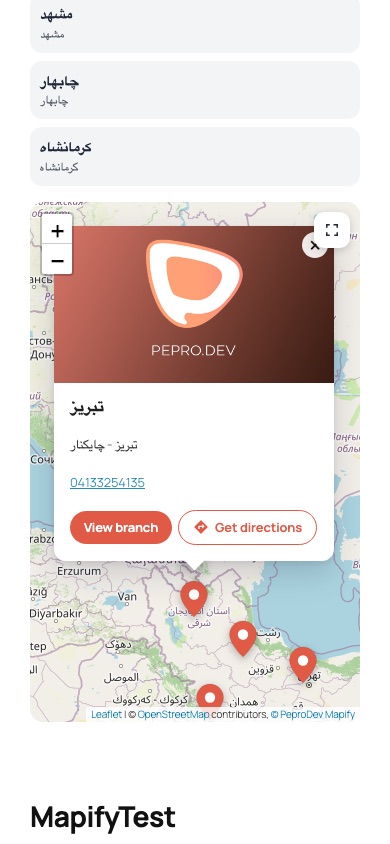
- 20 free tile styles with no key: OpenStreetMap (standard, grayscale, dark, vintage, Humanitarian, France, Germany), CyclOSM, OpenTopoMap and Esri (light, dark, street, topographic, National Geographic, satellite, satellite with labels, terrain, shaded relief, physical, ocean)
- Google Maps with five built-in styles or a cloud Map ID (Advanced Markers)
- Mapbox (built-in and Mapbox Studio styles)
- Persian maps: Map.ir, Neshan, Parsimap and Mapup (Mapup needs no key)
- Any XYZ tile server
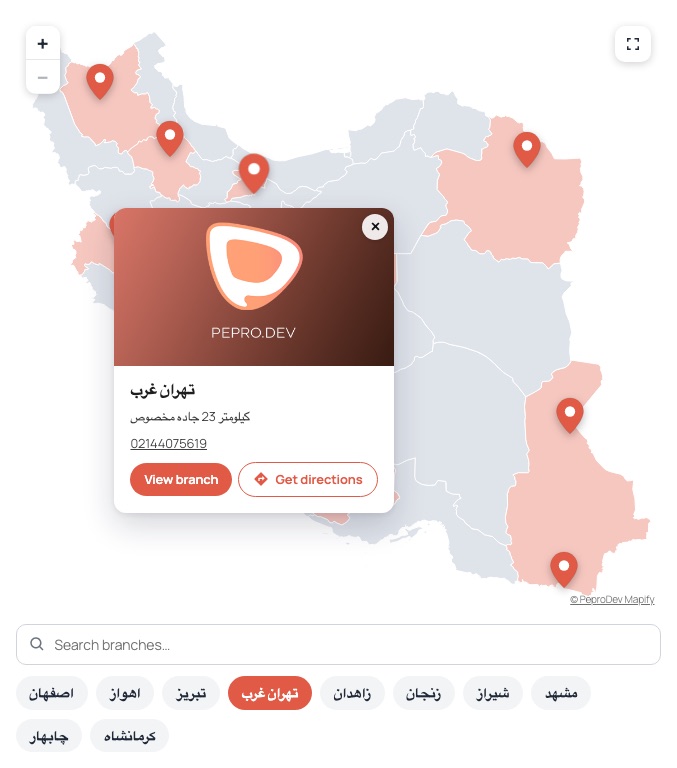
- Offline map of Iran (SVG, 31 provinces, no external requests). Branches are placed by latitude/longitude, provinces with branches are highlighted and clicking a province filters the list
- Zoom buttons, mouse wheel, double click and pinch zoom on every map, including the offline Iran map
- Elementor widget “Branches Map” with full content settings and a Style tab (map, pins, tooltip, clusters, popup, list, search box and regions — colors, typography, borders, shadows, responsive sizes)
- WPBakery Page Builder element with the same settings in tabs, a thumbnail style picker and Design Options
[pepro-mapify]/[mapify]shortcode, with a visual Shortcode Builder and live preview (Branches → Shortcode Builder)- Thumbnail gallery pickers for tile styles and Google styles in Elementor, WPBakery and the Shortcode Builder
- Three list layouts: chips, cards and a detailed list, with a search box and grouping by category
- Picking a branch in the list scrolls the page to the map and opens its popup (both can be turned off)
- Pin color and pin image per branch
- Popup template with tags; popup image from the featured image, the branch pin image, or none
- Get directions button: Android lists the map apps installed on the phone, other devices open Google Maps
- Up to 15 branches
- Branches and categories in Tools → Export and in the REST API (
wp/v2/mapify,wp/v2/mapify_category,mapify/v1/branches,mapify/v1/categories) - Settings page built with WordPress components (Branches → Map Settings)
- Branch editor with an OpenStreetMap location picker and address search
- Single branch card with directions links (Google Maps, Waze, Neshan, Balad)
- Ready for WPML (wpml-config.xml: branches, categories, branch details, widget and shortcode texts) and Polylang
- Persian (fa_IR) translation, RTL support
安装:
- Upload the plugin to
/wp-content/plugins/or install it from the Plugins screen, then activate it. - Add branches under Branches → Add New Branch.
- Optional: add API keys under Branches → Map Settings (Google Maps, Mapbox, Map.ir, Neshan, Parsimap). OpenStreetMap, Esri, Mapup and the offline Iran map work without keys.
- Add the map with Elementor, WPBakery or the shortcode.
屏幕截图:



常见问题:
How many branches can I add?
Up to 15 branches.
What happens if a provider key is missing?
The map falls back to OpenStreetMap and editors see a notice above the map.
Can I translate branches with WPML or Polylang?
Yes. Branches and branch categories are translatable post types and taxonomies, the address and additional text are translated per language, and the texts of the Elementor widget and the shortcode are picked up by WPML. Interface texts use the “pepro-mapify” text domain.
更新日志:
3.0.2
- Plugin website and links moved to peprodev.com
- Security: shortcode attributes and widget settings are validated before use. Colors, sizes, CSS classes, ids, coordinates, tile URLs and style names only accept safe values, so a user who can write posts (for example a Contributor) cannot add script through the shortcode
- Security: popup template values and fallbacks can no longer become javascript:, vbscript: or data: links
- Security: SVG maps are cleaned more strictly (animation elements, external links and style URLs are removed)
- Text domain changed to “pepro-mapify” to match the WordPress.org plugin slug, so translations from translate.wordpress.org load
- The map credit links to the plugin page on WordPress.org
- Rewritten for PHP 7.4 – 8.5, WordPress 7.1, Elementor 4.3 and WPBakery 8/9
- New map engines: OpenStreetMap (20 free tile styles), Mapbox, Map.ir, Neshan, Parsimap, Mapup, custom XYZ tiles and an offline map of Iran
- New Elementor widget with full Style controls, and a WPBakery element rebuilt with param groups and Design Options
- Thumbnail gallery pickers for tile styles and Google styles
- Settings page and Shortcode Builder with live preview, built with WordPress components
- New branch editor with an OpenStreetMap location picker and address search
- Chips, cards and detailed list layouts; picking a branch scrolls to the map and opens its popup
- Popup image setting, {image}, {pin_image}, {popup_image} and {directions} popup tags
- Get directions button (installed map apps on Android, Google Maps elsewhere)
- Zoom settings on every map, including the offline Iran map
- REST API routes for branches and categories; branch categories in Tools → Export
- WPML (wpml-config.xml) and Polylang support
- Popup templates are sanitized; no more eval()
- Removed the Google tile-URL hack ("Development mode") and the custom Google logo option
- Up to 15 branches
- Plugin Name fixes
- Javascript Issue with latest Visual Composer fixed
- Google Chrome > 84 Compatible
- Category Name fix
- Fixed Branches Data not saving
- Fixed Compatibility with WordPress 5.5
- Fixed MITM-Attack Issue
- Dependency free marker maker added
- Removed custom css styles from Visual Composer Widget
- Branches Metabox Class renamed to
PeproBranchesCPT_metabox - Directory Index Blocked for resources
- Initial release for GitHub and WordPress