
Persian Kit
| 开发者 |
mostafas1990
kashani |
|---|---|
| 更新时间 | 2026年10月14日 14:48 |
| PHP版本: | 8.1 及以上 |
| WordPress版本: | 7.1 |
| 版权: | GPLv2 or later |
| 版权网址: | 版权信息 |
详情介绍:
- Jalali dates for posts, comments, the admin screens and the block editor's date panel: ۱۲ مهر ۱۴۰۵
- Jalali archive pages (/1405/07/ lists the posts of Mehr 1405), and Jalali months and days in the Archives and Calendar widgets and blocks
- Optional Jalali dates in post links (/1405/07/09/my-post/), with old links redirected
- Optionally, the Gregorian date next to the Jalali one: ۱۲ مهر ۱۴۰۵ (2026-10-04)
- Afghan and Kurdish month names: Dari (۱۲ میزان ۱۴۰۵), Pashto (۱۲ تله ۱۴۰۵) or Sorani Kurdish (۱۲ ڕەزبەر ۱۴۰۵), chosen by the site's language or by you
- A Jalali date picker for the post date in the classic editor and Quick Edit, and for WooCommerce's order, product and coupon dates
- Persian digits in content, titles, the browser tab, widgets, menus, dates, counts and prices (off until you turn it on)
- Search that finds words typed with Arabic (ي ك) or Persian (ی ک) letters, and numbers typed with Persian (۱۴۰۵) or English (1405) digits
- Arabic ي and ك fixed to Persian ی and ک when posts, comments, categories, tags and menus are saved (off until you turn it on), and a tool that fixes existing posts after counting them first
- Half-space (ZWNJ) shortcuts in the classic and block editors, and optional half-spaces in compound words
- Persian slugs that keep Persian letters readable
- A Persian admin, in Vazirmatn, Noto Sans Arabic or IBM Plex Sans Arabic
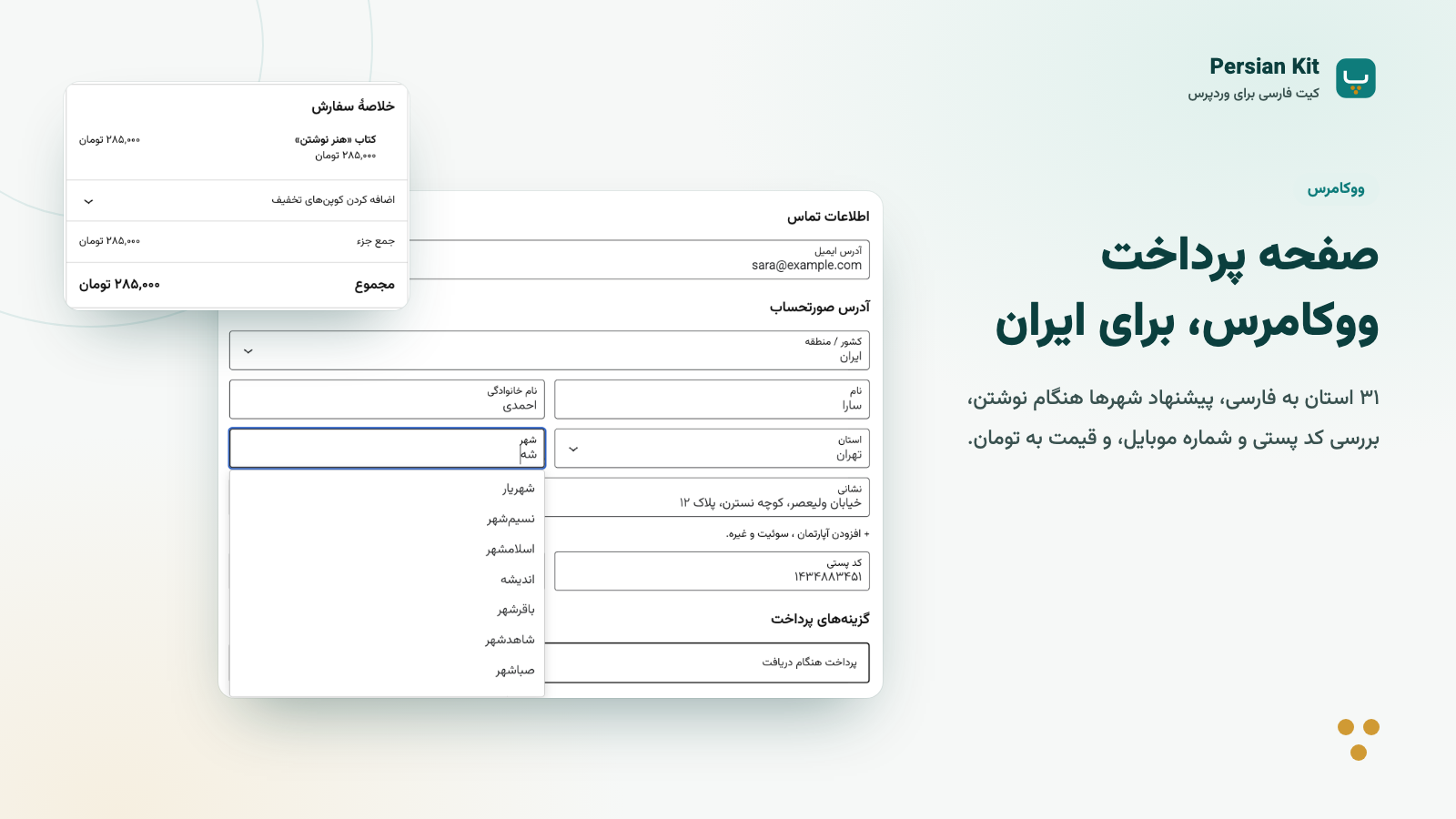
- A checkout for Iran: Persian digits in phone numbers and postcodes saved as English digits, Iranian phone numbers and postcodes checked, an optional national ID (کد ملی) field, city suggestions for each province, and only the provinces you deliver to
- A shorter checkout for courses, files and services: name, country, phone and email
- Thousand toman and thousand rial currencies, with prices in rials for search engines
- "Call for price" (تماس بگیرید) in place of an empty price
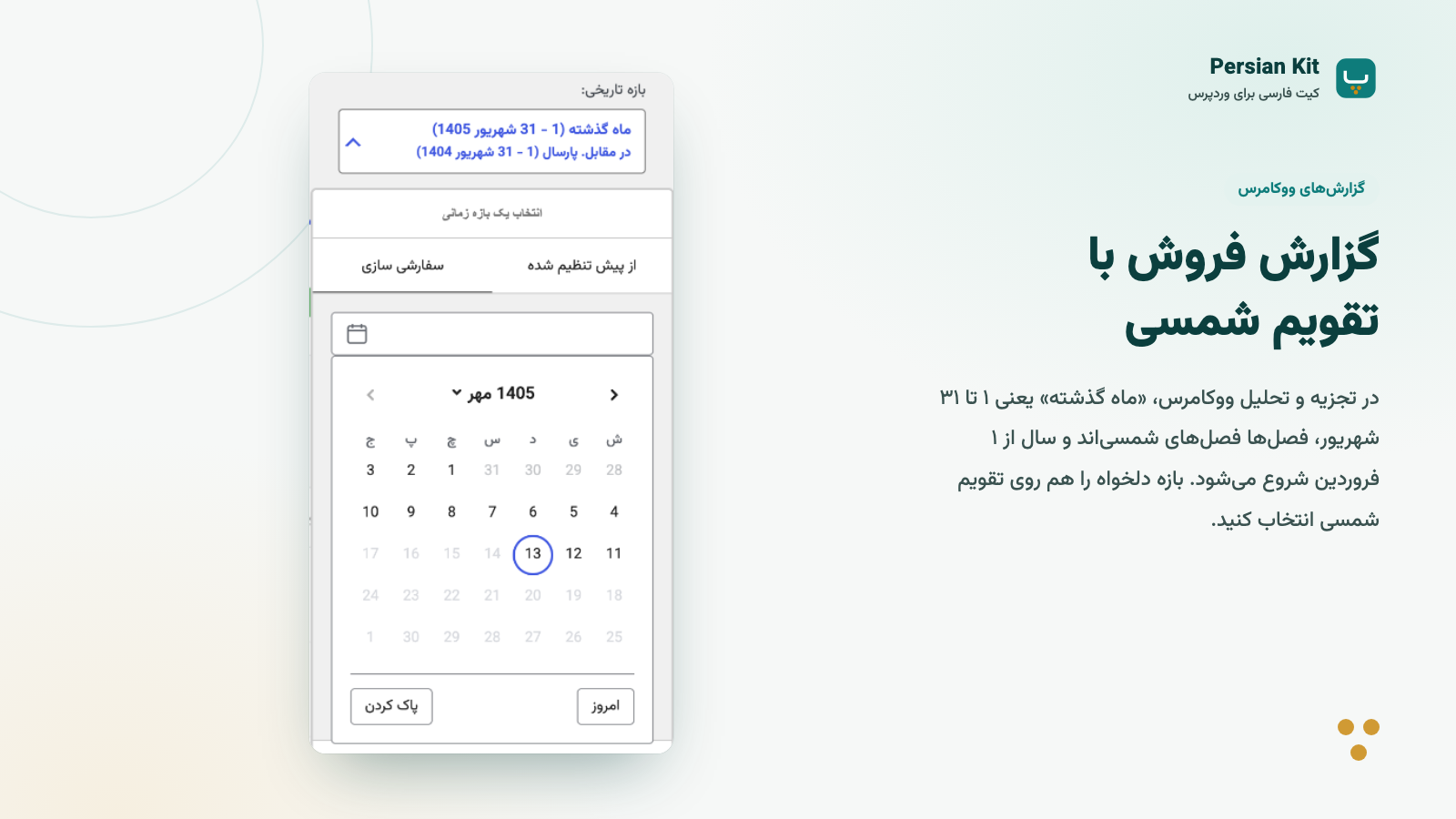
- Jalali dates on orders, and WooCommerce Analytics by Jalali months, seasons and years
- Persian digits in the cart and checkout block prices and in emails, and a Persian font in emails
- Compatible with HPOS (custom order tables) and the block checkout
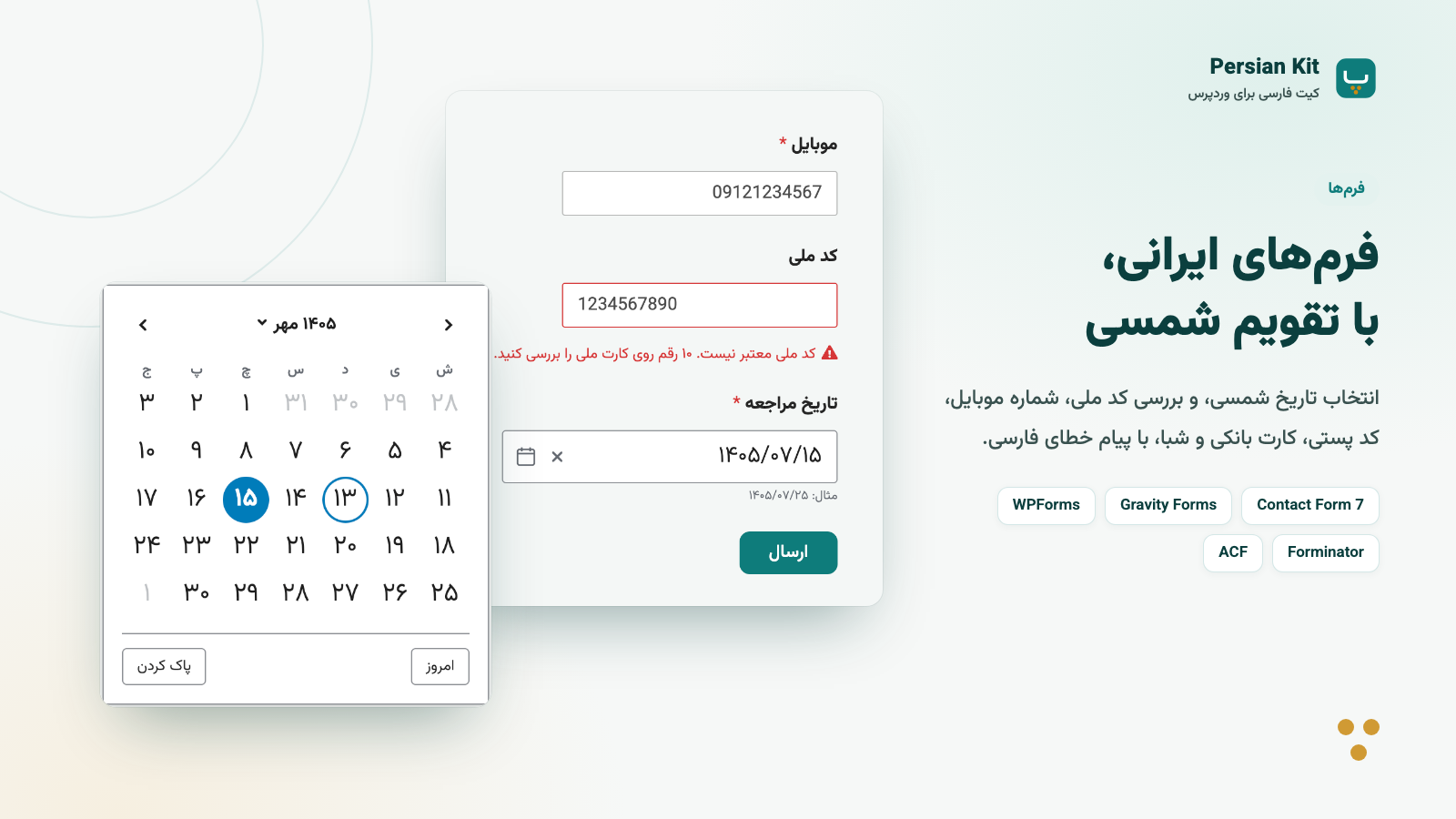
- Contact Form 7: a Jalali date picker, and mobile, national ID, postcode, card number and IBAN fields that check what is typed
- Gravity Forms: Jalali Date fields in all three styles, an "Iranian fields" group, an Iran address type, and toman and rial
- WPForms, also Lite: an "Iranian fields" group and a Jalali date field
- Forminator: a Jalali date picker, and Iranian checks with a CSS class
- ACF: a Jalali date picker for Date Picker and Date Time Picker fields
- Yoast SEO and Rank Math: search engines still get Gregorian dates and prices in rials, and date archives get Jalali titles
- WPML and Polylang: configured page languages control date and digit display; Persian, Pashto and Sorani Kurdish use Jalali by default, while writing tools follow Persian content
- Integrations default on and run when the required plugin is active and meets any minimum version
- PHP helpers for Persian text, digits, dates and Iranian data:
persian_kit_date(),persian_kit_to_persian_digits(),persian_kit_validate_national_id(),persian_kit_validate_iban()and more - Jalali companion fields in the REST API
- Filters, documented in the reference
- WP-CLI commands:
wp persian-kit normalizeandwp persian-kit import
- eram/abzar — MIT-licensed PHP utilities for Persian text and digit handling.
- eram/daynum — MIT-licensed PHP Jalali date library.
- Alpine.js — MIT-licensed JavaScript framework, bundled into the admin script together with its MIT-licensed dependencies
@vue/reactivityand@vue/shared. - Vazirmatn — Persian font by Saber Rastikerdar, licensed under the SIL Open Font License 1.1.
- Noto Sans Arabic — font by Google and the Noto Project Authors, licensed under the SIL Open Font License 1.1.
- IBM Plex Sans Arabic — font by IBM, licensed under the SIL Open Font License 1.1.
- intl-datepicker — MIT-licensed date picker Web Component, bundled into
public/js/datepicker.js. - @internationalized/date — Adobe's calendar library, licensed under the Apache License 2.0, bundled into
public/js/datepicker.js. - Tapin's list of provinces and cities, from Persian WooCommerce Shipping by Mahdi Yousefi (GPLv3), in
public/data/pws-tapin.json, to read addresses that plugin saved with Tapin's ids.
public/data/pws-tapin.json is GPLv3, the plugin as distributed is under GPLv3. The plugin's own code stays GPLv2 or later.
All bundled components are GPL-compatible. Their license texts ship with the plugin: packages/eram/*/LICENSE, public/fonts/vazirmatn/OFL.txt, public/fonts/noto-sans-arabic/OFL.txt, public/fonts/ibm-plex-sans-arabic/OFL.txt, public/licenses/ and the header of public/js/admin.js.
Source code
Plugin homepage: https://eram.dev/fa/projects/persian-kit/
Full source, build instructions, and issue tracker:
https://github.com/eramhq/persian-kit
Full guides: English and فارسی.
安装:
- Upload a built
persian-kit.zipthrough the Plugins screen, or copy the complete built folder to/wp-content/plugins/. A source checkout must have dependencies and assets built first. - Activate the plugin through the Plugins menu in WordPress.
- Visit Persian Kit in the admin sidebar to enable the modules you need.
屏幕截图:


常见问题:
Does Persian Kit support multisite?
Persian Kit is configured per site. Network activation creates the default settings on every site, and on sites added later; configure each site from its own Persian Kit screen. Uninstalling the plugin removes its options from every site in the network.
Is Persian Kit compatible with WooCommerce HPOS (custom order tables)?
Yes. Persian Kit declares HPOS compatibility and the Jalali order date filter works on both the classic orders screen and the HPOS Orders screen.
Where do translations come from?
Persian Kit ships a Persian (fa_IR) translation of its settings screen. Once a language pack for your language is available from translate.wordpress.org, WordPress installs it and Persian Kit uses that instead of the bundled file.
What does Persian Kit change when I activate it?
Nothing in your saved content. On a new install, dates are shown as Jalali, search matches both Arabic and Persian spellings of ی and ک, Persian slugs and the editor half-space shortcut are on, and the admin uses the Vazirmatn font when its language is Persian. Persian digits and fixing letters on save start off. The settings page shows a short welcome note the first time you open it. Sites upgrading from an earlier version keep their settings.
How does Persian Kit change slugs?
With "Use Persian slugs" on under Writing > Persian slugs (the default), new posts and terms with Persian titles get slugs that keep the Persian letters, with a half-space turned into "-". Titles without Persian letters are slugged by WordPress as usual. Existing slugs are never rewritten, and older URLs keep working. Turn the option off to use WordPress's percent-encoded slugs instead. Either way, links in your pages are percent-encoded, as WordPress's own Persian links are; browsers show them with Persian letters.
What does Persian Kit change in the admin?
With Jalali dates on, the dashboard's Activity widget, post lists and the admin bar show Jalali dates. The Activity widget is WordPress's own widget re-rendered with Jalali dates. The admin font applies only when the admin language is Persian or right-to-left.
How do date archives work?
With Jalali dates on, a date archive whose year is below 1700 is Jalali: /1405/07/ lists the posts of Mehr 1405, /1405/ those of the Jalali year and /1405/07/09/ those of one day, and the title reads "مهر 1405". The Archives and Calendar widgets and blocks list Jalali months and days and link to these pages; turn that off with the "Jalali archives and calendar" option.
Gregorian archives such as /2025/03/ keep working. Every Gregorian month spans two Jalali months, so their title names both (for example "اسفند 1403 – فروردین 1404").
Can post permalinks use Jalali dates?
Yes, if your permalink structure has the date, such as "Day and name". Turn on "Jalali dates in post links" under Display > Jalali dates, and posts link to /1405/07/09/my-post/ instead of /2026/10/01/my-post/. Old Gregorian links redirect to the new ones, and turning the option off again redirects the Jalali links back.
Jalali links keep working while Jalali dates are off, whichever plugin made them (Persian Kit, Parsi Date or WP Jalali): they redirect to the Gregorian links. They only work while Persian Kit is active. If you deactivate it, they return "not found", so turn the option off first; the Gregorian links then work.
Can I show the Gregorian date too?
Yes. Turn on "Show the Gregorian date too" under Display > Jalali dates, and post and comment dates read "۱۰ مهر ۱۴۰۵ (2026-10-02)". You can show it with month names ("۲ اکتبر ۲۰۲۶"), put it first, and choose parentheses, a slash or a dash between the dates. With Persian digits on for dates, it gets Persian digits too. Feeds, search engines, admin screens, emails, the store and archives keep one date.
Can I use Afghan or Kurdish month names?
Yes. Afghanistan and Kurdistan use the same calendar under other names, and Persian Kit picks them from your site's language: Dari (fa_AF) gets حمل، ثور، جوزا… ("۱۲ میزان ۱۴۰۵"), Pashto (ps) وری، غویی، غبرګولی… ("۱۲ تله ۱۴۰۵") and Sorani Kurdish (ckb) خاکەلێوە، گوڵان، جۆزەردان… ("۱۲ ڕەزبەر ۱۴۰۵"). To choose another set, use "Month names" under Display > Jalali dates. Weekdays, the Gregorian month names next to the Jalali date, the date picker and WooCommerce Analytics follow the same choice. The days and the year (1405) are the same as in Iran. On a WPML or Polylang site each language has its own choice, and Pashto and Kurdish pages get Jalali dates like Persian ones.
Do I need WooCommerce?
No. WooCommerce features, and the WooCommerce tab on the settings page, only appear when WooCommerce is installed and active.
What does Persian Kit change at the WooCommerce checkout?
With the WooCommerce module on (WooCommerce tab), what customers type is fixed before it is saved: Persian and Arabic digits in phone numbers and postcodes become English digits, and Arabic ي and ك in names and addresses become Persian ی and ک. For addresses in Iran, the phone must be a valid mobile or landline number and the postcode must have 10 valid digits. Both work in the classic checkout, the block checkout and My Account. You can also ask for the customer's national ID (optional or required); it is checked, and shown on the order screen and in order emails.
Can WooCommerce emails show Persian digits?
Yes. Turn on Display > Persian digits > WooCommerce emails. Order numbers, prices, quantities and dates in emails in Persian then use Persian digits, in the subject too. Phone numbers, postcodes, coupon codes and links keep English digits, so they can be copied and still work. A customer who pastes an order number in Persian digits into the order tracking form, or an admin who pastes it into the order search, still finds the order. Gmail may not find "123" in a subject that says "۱۲۳"; to keep order numbers in English digits, return false from the persian_kit_digit_conversion filter for woocommerce_email_order_number.
Which font do Persian emails use?
WooCommerce's emails ask for Helvetica or Arial, fonts made for English, so Persian text was shown in whatever font the mail app picked. With "Persian font in emails" on (WooCommerce > Emails, on by default), emails in Persian use Tahoma, then Segoe UI on newer Windows, the iPhone's own Persian font and Noto Sans Arabic on Android. These are installed-font preferences, so nothing is downloaded; the mail app uses a font available on the reader’s device. A font you picked under WooCommerce > Settings > Emails, or in the block email editor's styles, is kept, as are emails in other languages. On a right-to-left site, block emails read right to left too.
Does WooCommerce Analytics show Jalali dates?
Yes, with "Jalali dates in WooCommerce Analytics" on (WooCommerce > Dates, on by default). "Last month" is the last Jalali month, quarters are Jalali seasons (بهار, تابستان, پاییز, زمستان) and years start on 1 Farvardin, so reports group sales by Jalali calendar periods. Bars by month, season or year hold whole Jalali months, not Gregorian ones with Jalali names. Custom ranges are picked on a Jalali calendar, dates in tables and charts are Jalali, and CSV exports keep the Gregorian date with a Jalali date column next to it. Stored order dates are not changed; report aggregation uses Jalali periods while enabled. Turn the option off to return to Gregorian periods.
Can I sell only to some provinces?
Yes. Under WooCommerce > Checkout and addresses, choose "Only these provinces" and tick the provinces you deliver to. For addresses in Iran, the checkout, the cart and My Account then list only those, and another province is refused. With one province, it is selected for the customer. The shop admin still lists every province, and past orders keep their province's name.
Can the checkout skip the address for downloads and services?
Yes. Under WooCommerce > Checkout and addresses, tick "Shorter checkout when nothing needs shipping". When every item in the cart is virtual, the checkout asks for the name, country, phone and email, and the national ID when it's on; order notes stay. It works in the classic and the block checkout. As soon as the cart has an item that ships, the whole address is asked for again. Addresses customers saved in My Account don't change.
Can my store price in thousand toman?
Yes. Pick "Iranian thousand toman" (هزار تومان) or "Iranian thousand rial" (هزار ریال) under WooCommerce > Settings > General > Currency. Changing the currency doesn't convert prices you have saved, shipping costs or coupons, so update them yourself, and check that your payment gateway supports thousand toman first. Search engines get prices in rials, because they don't accept toman. Before you deactivate Persian Kit, switch the currency back to toman or rial.
Can products without a price show "Call for price"?
Yes. Under WooCommerce > Prices and currency, tick "Show a text instead of an empty price", and leave the price empty on the products sold on request; a price of 0 means free. The product page shows «تماس بگیرید» or your own text, and the shop, categories and related products can have a shorter one. Add a phone number or a contact page address to link the text on the product page to it, and to turn the shop button into "Call for price". These products still can't be added to the cart.
Does Persian Kit work with Yoast SEO and Rank Math?
While the relevant integration is enabled and its plugin is active, supported product structured-data amounts in IRT, IRHT and IRHR are converted to IRR. Other currencies stay unchanged, and machine dates in supported schema, Open Graph and sitemap output remain Gregorian. Date archive titles name the Jalali month. With Persian digits on, the browser tab's title gets Persian digits, while the titles in Open Graph tags and schema keep the digits you typed. Test your actual theme and SEO extensions; these integrations are not a guarantee for every output.
Does Persian Kit work with WPML and Polylang?
Yes. Once a language is set up, Persian, Pashto and Kurdish pages and emails get Jalali dates and Persian digits, and pages in other languages keep Gregorian dates and English digits. Admin screens follow each admin's own language (Users > Profile > Language). Fixing letters, Persian slugs and the half-space key apply to Persian content only, so an Arabic translation keeps its ي and ك. With Jalali dates in post links, only Persian posts get Jalali links.
Weglot isn't supported: it translates finished pages and keeps the site's language, so Persian Kit can't tell its languages apart. TranslatePress and other plugins that change WordPress's language per page can turn this on with add_filter('persian_kit_multilingual', '__return_true');.
Does Persian Kit work with Contact Form 7 and ACF?
Yes. Each turns on by itself when the plugin is active (Integrations tab). Contact Form 7's date fields and ACF's Date Picker and Date Time Picker fields get a Jalali date picker. The dates are still saved and sent as Gregorian dates, while code that parses a formatted ACF value should use its unformatted value or the documented opt-out filter; while Jalali dates is on, Contact Form 7 emails and ACF values in templates show the Jalali date. Contact Form 7 also gets [mobile_ir], [national_id], [postcode_ir], [card_ir] and [iban_ir] fields that check what is typed, with buttons for them in the form editor.
Does Persian Kit work with Forminator?
Yes, from Forminator 1.50. Date fields in the Calendar style get a Jalali date picker and still save Gregorian dates, so entries and exports are unchanged; while Jalali dates is on, emails and the Submissions screen show the Jalali date. For Iranian checks, add a class to a field's "Additional CSS Classes": persian-kit-mobile, persian-kit-national-id, persian-kit-postcode, persian-kit-card or persian-kit-iban. Persian digits typed into phone and number fields become English digits.
Does Persian Kit work with Gravity Forms?
Yes, from Gravity Forms 2.9. Date fields get a Jalali date picker, or Jalali number boxes and drop-downs, and still save Gregorian dates, so entries, exports and add-ons are unchanged; while Jalali dates is on, the Entries screens, emails and confirmations show the Jalali date. The form editor's Add Fields panel has an "Iranian fields" group with mobile number, national ID, postcode, bank card number and IBAN fields that check what is typed. The Address field gets an "Iran" type with the provinces in Persian, and the currency setting gets toman and rial. Persian digits typed into phone, number, date and price inputs become English digits.
Does Persian Kit work with WPForms?
Yes, from WPForms 1.9.1, including WPForms Lite. The builder's Add Fields panel has an "Iranian fields" group with mobile number, national ID, postcode, bank card number and IBAN fields that check what is typed, and a Jalali date field with a Jalali date picker; emails show the Jalali date. Persian digits typed into number and price inputs become English digits. WPForms' paid Date / Time, Phone and Address fields are not covered yet.
What happens to my forms if I turn an integration off?
They keep working. While the Contact Form 7 integration is off, its Iranian fields are plain text inputs that accept any text; the settings page names the forms that use them before you save. Forminator fields with a persian-kit class become plain Forminator fields, and its card names those forms too. Gravity Forms' Iranian fields become plain text inputs, and its Iran address type and toman and rial stay. WPForms' Iranian and Jalali date fields become plain text inputs. If you deactivate Persian Kit itself, Contact Form 7 shows tags such as [national_id your-id] as text, Gravity Forms shows its Iranian fields without an input, and WPForms leaves its Iranian and Jalali date fields out, so replace them first.
Can customers enter a village?
Yes. With the city list on, the city field suggests the province's cities, but customers can still type a village or any place that isn't listed.
Does the city list find a city typed another way?
Yes. It ignores spaces and half-spaces and the letters people type differently, such as Arabic ي and ك, ئ and گ: قائمشهر finds قایم شهر and مشکین finds مشگین شهر. When the order or address is saved, a city typed another way is saved under its listed name, so orders use one spelling. A place that isn't listed is saved as typed. To add villages, rename or remove a city, use the persian_kit_woocommerce_cities filter.
Where does the list of cities come from?
From the Statistical Centre of Iran's country-divisions list for 1403 (amar.org.ir): the 1,454 cities of its 31 provinces.
I use Parsi Date, Persian WooCommerce or Persian WooCommerce Shipping. Can I switch?
Yes. Persian Kit > Tools > Switch from another plugin shows what Persian Kit does with each of the plugin's settings and data before anything changes. Then deactivate the plugin with WordPress's own link (Persian Kit never deactivates another plugin) and import: settings, widgets and blocks, ACF dates, Iranian provinces and cities in customers, orders, zones and the store address, and the shipping plugin's order statuses. Old Jalali post links keep working. The report lists what could not be imported, and undo puts back what hasn't changed since. It works after the plugin was deleted too, from the data it left, and from WP-CLI: wp persian-kit import list.
What can't the switch bring over?
Payment gateways (Persian Kit has none; keep Persian WooCommerce active for them with its overlapping options off), the shipping plugin's shipping methods, per-city prices, map and text messages, and settings Persian Kit has no match for yet, which the report lists. Theme code that calls Parsi Date's functions needs the code the switch gives you, in your theme's functions.php.
更新日志:
- Changed: Persian Kit is made by Eram. The plugin homepage and the Docs links now open the guides on eram.dev.
- Changed: the settings page no longer shows notices from WordPress and other plugins above its header. Other admin pages still show them.
- Faster: the Jalali archives list keeps its post counts between page views, ACF screens load the date picker only where a date field is shown, and the checkout city list is about 2.5 times smaller.
- Fixed: the admin font now covers headings, the admin bar, footer, media library, classic editor tabs, WooCommerce settings, the block editor and Analytics.
- Added: complete English and Persian guides, developer references and navigation for the shared Eram website.
- Improved: documentation checks and explanations of settings, stored-data changes, migration recovery and compatibility limits.
- The first stable release.
- New: WPForms support, also in WPForms Lite: an "Iranian fields" group (mobile number, national ID, postcode, card number, IBAN) and a Jalali date field.
- New: Gravity Forms support: Jalali dates in Date fields in all three styles and in entries, emails and confirmations, an "Iranian fields" group, an Iran address type, and toman and rial.
- New: Jalali dates in WooCommerce Analytics: Jalali months, seasons and years, a Jalali calendar for custom ranges, and a Jalali date column in CSV exports.
- New: Afghan and Kurdish month names (Dari, Pashto and Sorani Kurdish), chosen by the site's language or by hand, also on multilingual sites.
- New: optionally, the Gregorian date next to post and comment dates: ۱۰ مهر ۱۴۰۵ (2026-10-02).
- The switch from Parsi Date also imports its month names, dual date and Analytics settings.
- Persian Kit now needs WordPress 6.8 and WooCommerce 9.9 or newer.
- New: a guided switch from Parsi Date, Persian WooCommerce and Persian WooCommerce Shipping on the Tools tab. Review shows what happens to each setting, link and kind of data before anything changes; the import brings over settings, widgets and blocks, ACF dates, Iranian provinces and cities, and the shipping plugin's order statuses, with a report and undo. Also from WP-CLI:
wp persian-kit import. - New: "Call for price" (تماس بگیرید) in place of an empty WooCommerce price, with its own text for the shop and an optional phone number or page to link to.
- New: a shorter WooCommerce checkout when every item is virtual: name, country, phone and email, and the national ID when it's on.
- New: a Persian font in WooCommerce emails in Persian, from the fonts already on computers and phones, and block emails that read right to left on RTL sites.
- Old Jalali post links keep working with Jalali dates off.
- Persian digits also in the browser tab's title, archive titles, widgets, menus, category and tag lists, and WooCommerce short descriptions.
- WooCommerce city suggestions are the plugin's own list, work with the keyboard and screen readers, and find a city however it is typed.
- Multilingual sites: the Jalali calendar, admin month filters and old links follow the current language.
- Plainer, more consistent Persian translation.
- Fixed: titles with a dash, quote or
&showed broken characters with Persian digits on. - Fixed: Yoast SEO's JSON-LD and Rank Math's breadcrumbs no longer get Persian digits.
- Contact Form 7, ACF, WooCommerce, Forminator, Yoast SEO, Rank Math, WPML and Polylang are integrations on their own Integrations tab, each on by itself when its plugin is active. WooCommerce has its own tab.
- Forminator: a Jalali date picker for Calendar date fields, checks for Iranian mobile numbers, national IDs, postcodes, card numbers and IBANs with a persian-kit class, and English digits in phone and number fields. Emails and the Submissions screen show Jalali dates.
- Contact Form 7: a Jalali date picker for [date] fields, and [mobile_ir], [national_id], [postcode_ir], [card_ir] and [iban_ir] fields with buttons in the form editor. ACF: a Jalali date picker for Date Picker and Date Time Picker fields.
- WooCommerce checkout for Iran: digits and letters fixed as customers type, checked phone numbers and postcodes, an optional national ID field, a city list per province, and a choice of the provinces you deliver to.
- WooCommerce: thousand toman and thousand rial currencies, prices in rials for search engines, Persian digits in order emails (optional), and the Jalali date picker on order, product and coupon dates.
- Yoast SEO and Rank Math: prices in rials in their schema, and Jalali month names in date archive titles.
- Multilingual sites (WPML, Polylang): dates, digits and the Persian writing tools follow each page's and each post's language.
- The post date in the classic editor and Quick Edit uses the Jalali date picker.
- Fixing letters on save also covers comments, terms and menu items; an optional half-space fix on save; search matches numbers typed in either digits.
- The admin font can be Noto Sans Arabic or IBM Plex Sans Arabic as well as Vazirmatn.
- The settings page has tabs, a short line for each option in English and Persian, and a new look.
- Fixed: with Persian slugs, a post reached by its ID could redirect to a broken address.
- Fixed: a cut-off post address under a Jalali date now redirects to the post, as WordPress does for Gregorian dates.
- Jalali date archive pages: /1405/07/ lists the posts of Mehr 1405, /1405/ those of the Jalali year and /1405/07/09/ those of one day. Gregorian archive addresses keep working.
- The Archives and Calendar widgets and blocks list Jalali months and days and link to the Jalali archive pages. An option keeps them Gregorian.
- Optional Jalali dates in post permalinks (/1405/07/09/my-post/). Old links redirect to the new ones, and back again if the option is turned off.
- The block editor shows the Jalali date as a "Publish" row of its own, also in the pre-publish and post-publish panels, and "Now" uses the site's time.
- Fixed: the REST API's
date_jalalianddate_modified_jalaliwere empty when a request asked for them with_fieldsbut not fordateormodified. - Persian (fa_IR) admin interface, used until a WordPress.org language pack is available.
- New installs start with Persian digits and fixing letters on save off, and show a short welcome that explains each module. Existing sites keep their settings.
- Search finds words typed with either Arabic (ي ك) or Persian (ی ک) letters, without changing content.
- Persian digits can also apply to Jalali dates, counts and WooCommerce prices, each with its own option.
- Fixing existing posts asks for confirmation, can count first without changing anything, and lets you choose post types.
- Fixed: date pickers allowed 30 Esfand in non-leap years (30 Esfand 1404 was saved as 1 Farvardin 1405).
- Fixed: options added in an update showed as off on the settings screen while running, and saving turned them off.
- Fixed: date archive titles named only one Jalali month, and date links built from Jalali dates led to "not found" pages.
- Fixed: the compatibility guidance never appeared next to Persian WooCommerce.
- Fixed: filters added in a theme's functions.php had no effect.
- Network activation sets up every site, including sites added later.
- Switched core utilities to the
eram/abzar(0.8) anderam/daynum(1.0.0-beta.3) libraries. - PHP helper functions for developers, all named
persian_kit_*, includingpersian_kit_currency_format,persian_kit_currency_convert,persian_kit_words_to_number,persian_kit_validate_postal_code,persian_kit_validate_plate_number,persian_kit_validate_bill_id,persian_kit_half_space_fix,persian_kit_keyboard_fix,persian_kit_persian_sort. - Persian slugs turn a half-space (ZWNJ) into
-. Slugs saved by earlier versions keep working, and posts created before activation load again. - Latin slugs and WooCommerce attribute names (
pa_color) are left to WordPress, which fixes attributes being renamed topa-color. - Fixed: feeds (RSS, Atom) showed Jalali dates.
- Fixed: post and comment times were off by the site's timezone offset, so late-evening comments showed the next day.
- Fixed: drafts showed year −1, and the dashboard Activity widget and WooCommerce dates added the timezone offset twice.
- Fixed:
the_date()printed the date for every post instead of once per day. - Digit conversion no longer runs in the admin, REST API, feeds, or on text filtered while
wp_mailruns. Email content rendered beforewp_mail()is called is still converted. - WooCommerce: one Jalali month filter per orders screen (HPOS and legacy); declared HPOS compatibility.
- The admin font loads only for Persian or right-to-left admin languages.
- Batch normalization no longer resumes by itself when the settings page opens; WP-CLI and the settings page share progress.
- Uninstalling removes all Persian Kit options, on every site in a network.
- All interface text is translatable, including JavaScript strings.
- Added Jalali media library date filters.