Linux 软件免费装
Banner图

Personyze: AI Personalization, Recommendations & A/B Testing

开发者 Personyze
personyze
更新时间 2026年8月26日 05:26
PHP版本: 7.0 及以上
WordPress版本: 7.0.3
版权: GPLv2 or later
版权网址: 版权信息

标签

woocommerce recommendations personalization ab-testing ai-chat

下载

0.3 0.19 0.12 0.17 0.21 0.22 0.23 0.25 0.6 0.14 0.10 0.13 0.15 0.16 0.18 0.24 0.4 0.11 0.20 0.26 0.27 0.5 0.7 0.8 0.9

详情介绍:

Personalize your WordPress site for every visitor — and describe what you want in plain words instead of building it. Personyze is a complete personalization platform: recommendations, targeting, A/B testing, pop-ups, dynamic landing pages, web push and email personalization, all driven by unified visitor data. This plugin is the bridge between your WordPress site and your Personyze account. Activate it and the tag is on every page, your posts become a recommendation catalog, and your WooCommerce products sync automatically. No theme edits, no developer ticket, no code. Build campaigns by asking for them Personyze AI runs inside WordPress. It has its own screen under the Personyze menu, and a launcher in the corner of every admin screen — and of your own site while you are signed in as an administrator, where it is told which page you are looking at, so you can ask about the page in front of you. The prompt box shows how many AI actions your account has left this month. Tell it what you want and it does the work — it scans your site first, reads your brand colours, fonts, button style and tone of voice, and builds the campaign to match. What comes back looks like your site, not a template dropped on top of it. Don't like a choice? Say "try a different colour" or "make the button square" and it restyles on the spot. You never touch CSS. Things people actually ask it: Describe who should see it and the agent compiles that into real targeting conditions and reads them back to you, so nothing subtly different from what you asked slips through. New campaigns are created in staging and shown only to visitors arriving from a staging IP — your live site is untouched until you publish. Changes that affect live traffic are named and confirmed one at a time. Ask "what should I improve this week?" and it looks across your pages, products and campaigns and comes back with ranked opportunities — a page leaking returning visitors, products people view but rarely buy, a campaign that has quietly stopped showing — each with a one-tap action to fix it. Full details in the Personyze AI Agent guide. Rewrite a landing page with one prompt The WYSIWYG visual editor opens any page of your site as a canvas. Click an element to change text, swap an image, restyle it, hide it or move it. Or hand the whole page to the page-level AI: The AI inspects the page, applies its edits as ordinary change records, and tells you what it did in a couple of plain sentences. Every change — yours or the AI's — lands in a reviewable list with Undo, Focus on page and Show original, so you can compare against the untouched page before saving. Two things worth knowing. Nothing is written back to your WordPress content: edits are stored as a Personyze action and rendered for the audience you target, so your posts, pages and theme stay exactly as they are. And scope is yours to set — by default an edit applies to every page sharing the same element structure (edit one product page, cover the whole template), or you can limit it to a single URL or a page group. Both editors are also reachable from Claude, ChatGPT and other assistants through the Personyze MCP server. Recommendations that work the moment you connect This is the part that needs no setup at all. Both feeds are on by default — your posts and pages become an article catalog, and your WooCommerce products sync as a product catalog — so content recommendations and product recommendations have something to work with immediately. No feed to build, no CSV to upload, no tagging exercise, and nothing to switch on in a second product. Both are re-read once a day, so posts you publish or edit reach recommendations on their own. You control them from Personyze → Settings in WordPress, not from somewhere else: turn either feed off and Personyze stops recommending from it. The product feed appears only when WooCommerce is active. The feed URLs are shown on the same screen, so you can open them to see exactly what Personyze reads, or point another system at the same catalog. Knowing what someone is reading takes no configuration either. The plugin reports the WordPress post or product ID directly as each page is viewed, and the catalog is keyed on that same ID — so "visitors who read this also read this" works without page groups, URL patterns or a container set up to scrape the address bar. Personyze then picks from 300+ recommendation algorithms and blends several at once, rather than making you commit to one: Filters, fallbacks and boosts let you keep recommendations on-brand — surface only one category, exclude out-of-stock products, or push a promoted post to the top. Show them anywhere: a slider under an article, a sidebar strip, a grid on the category page, inside a pop-up, or open-time in an email so the products refresh at the moment the message is opened. An AI chat agent and AI search that already know your content The same feeds do double duty. Because your posts, pages and products are already in Personyze, its AI chat agent can answer from them — searching your articles to answer a question, pulling up a product with its price and stock, linking straight to the page it came from. There is nothing to index and no knowledge base to assemble first: the catalog the plugin feeds is what it reads. Article search is available to the agent whatever kind of site you run — a publisher is not a shop, and answering "do you have anything on X?" from your own writing matters as much as answering "how much is X?". Add product search on top wherever WooCommerce is active. The same catalog powers AI search on your site: a visitor's question in plain words returns your actual posts and products, ranked by meaning rather than by keyword matching. And because both are fed daily, an article published this week is answerable this week. You can give the agent more to read — crawl the rest of your site, or add documents and answers by hand — but the content feed alone is enough to make it useful on day one, and it stays current on its own. Decide who sees what Target with 70+ conditions across behavioural data, geography, device, referral source, weather, UTM parameters, cart contents, CRM fields and returning-visitor history — combined however you like, and available to the AI agent in plain words. Geo-targeted offers, dynamic landing pages that echo the search term someone arrived on, and account-based messaging for identified companies (via an ABM data integration such as Albacross, 6sense or ZoomInfo) all run on the same engine. Not sure a change is an improvement? Run it as an A/B test instead of a guess, and compare variations by conversions and revenue rather than clicks. What else you can run on your WordPress site What the plugin itself does Who it's for Marketing and growth teams on WordPress and WooCommerce who want enterprise-grade personalization without an enterprise implementation project. Publishers use it to lift pages per session with content recommendations; stores use it for product recommendations and cart recovery; B2B sites use it for account-based and industry-specific landing pages. If you have compared Optimizely, Dynamic Yield or VWO and found them too heavy, this is the tier below in cost and effort, not in capability. A Personyze account is required. See plans and pricing, book a demo, or read the plugin setup guide.

安装:

  1. In WordPress, go to Plugins > Add Plugins, search for Personyze, install and activate it.
  2. Go to Personyze > Settings in the WordPress menu and click Connect to Personyze.
  3. Approve the connection on the WordPress screen that appears, then confirm your account on the Personyze screen that follows.
That is the whole setup. There is no account number to copy, no tracking code to paste, and no application password to create by hand — WordPress issues one itself during step 3 and hands it over, and you can revoke it at any time from Users > Profile without changing your password. You need a Personyze account to connect to; sign up here if you don't have one. There is a free package. What you get straight away Verify it worked Changing accounts, or disconnecting Personyze > Settings > Connect to a different account, or disconnect. Disconnecting revokes the application password, so the old account can no longer read the site, and stops the tag being served. Nothing you have built in Personyze is touched. This is also the way out if the integration was removed on the Personyze side — nothing there can clear this page. Setting it up by hand instead Still supported, and unchanged: create an application password in Users > Profile, then enter your site URL, username and that password in Settings > Integrations > WordPress in the Personyze panel. The plugin's settings screen has the steps.

屏幕截图:

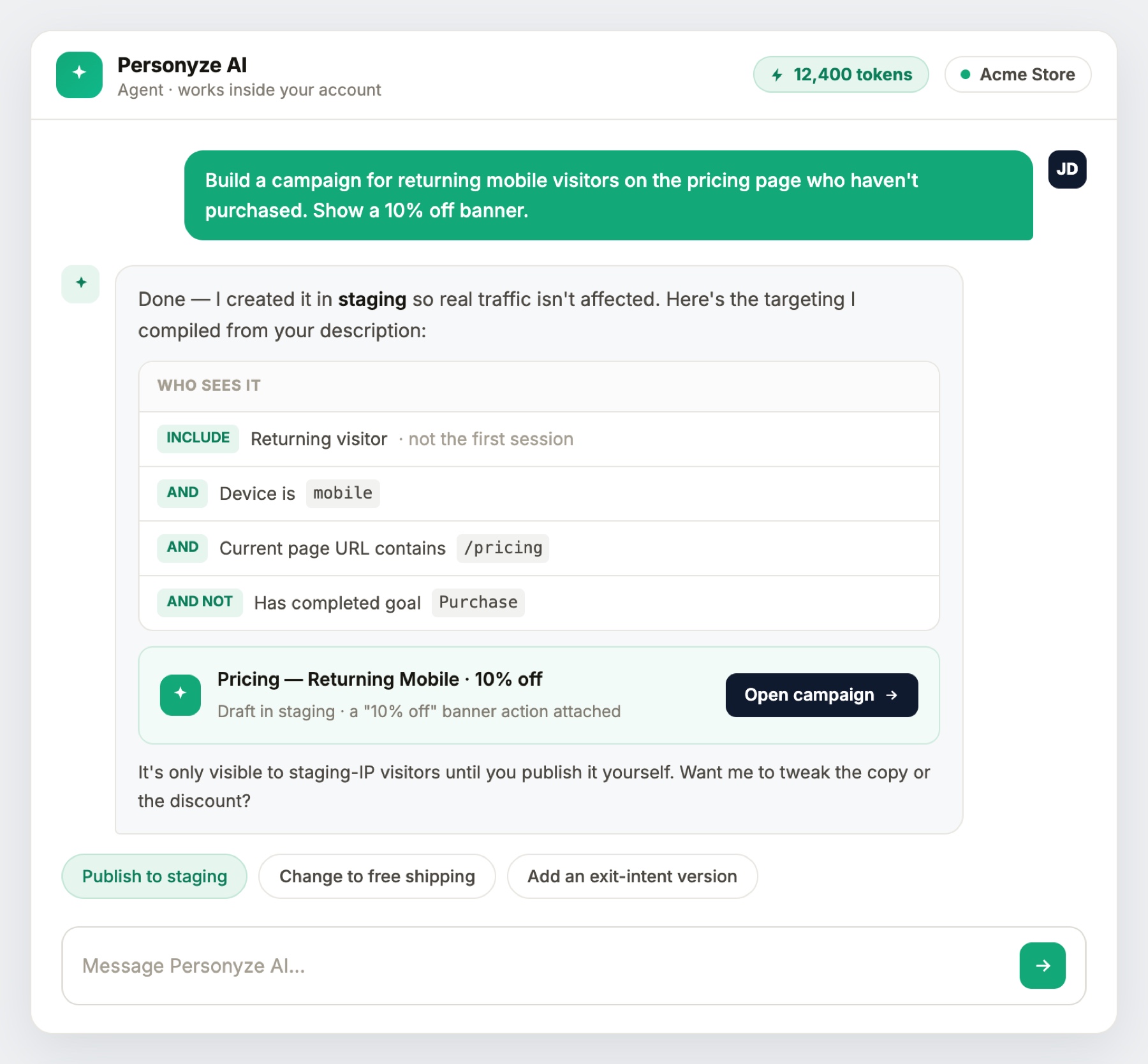
  • Plain words in, real targeting conditions out. The agent reads the rules back to you and creates the campaign in staging, so live traffic is untouched until you publish.
  • Page-level AI in the visual editor: one prompt for the whole page, with ready-made options such as "Rewrite this page for enterprise buyers".
  • The visual editor running on a real page — element toolbar, device switcher, and a reviewable list of every change with Undo and Show original.
  • Proactive suggestions: pages losing visitors, products worth discounting, campaigns that stopped showing, each with a one-tap action.
  • Ask how a campaign is doing and the agent answers from your account's real numbers, then points at the next step.
  • Connect your site: in Personyze, go to Settings > Integrations > WordPress, enter your site URL, WordPress username and application password, then switch on content recommendations, WooCommerce product sync, and add-to-cart or purchase tracking.
  • Build banners and pop-ups in the visual editor with your own images, text, coupon codes and calls to action. No coding required.
  • Start from a template: pop-ups, announcement bars, hero sliders, spin wheels, quizzes, welcome mats and more.
  • Measure the result: visits, impressions, clicks, conversions and revenue per campaign, with A/B variations compared side by side.

常见问题:

Do I need a Personyze account?

Yes. The plugin connects your site to Personyze; campaigns, recommendations and tests are built in the Personyze panel. See personyze.com for plans.

Where do I use the AI agent?

Inside WordPress. It has its own screen under the Personyze menu, and a launcher in the corner of every admin screen — and of your own site while you are signed in as an administrator, where it knows which page you are looking at. It is also in the Personyze panel, and reachable from Claude and ChatGPT through the Personyze MCP server. Same agent, same account, wherever you ask it.

What can the AI agent actually do?

Build a campaign from a description and style it to your brand, compile targeting from plain words, suggest what to improve based on your own traffic and product data, answer performance questions from your real numbers, and manage existing campaigns. New campaigns are created in staging, not on your live site, and you publish them yourself. See the AI agent guide.

Does the AI change my WordPress posts or pages?

No. Edits made in the visual editor — by you or by the AI — are stored as a Personyze action and rendered to the audience you target. Your WordPress content, theme and database are never modified, and switching the campaign off returns the page to its original state.

Can I limit a change to one page?

Yes. By default an edit applies to every page with the same element structure, which is what you want for a post or product template. Untick that option to scope it to a single URL, or use page groups for a defined set.

Does it work with WooCommerce?

Yes. Products are synced into Personyze automatically, and add-to-cart and purchase events are tracked, so you can run product recommendations, cross-sells and cart recovery.

Can the AI chat agent answer from my posts and products?

Yes, and that is the default rather than a project. The content and product feeds this plugin provides are what the chat agent and AI search read, so it can answer from your articles and pull up your products — with prices, stock and a link to the page — as soon as the site is connected. You can give it more to read later; you do not have to before it is useful.

Do recommendations need any setup?

No. Connecting the site turns your posts and pages into an article catalog and syncs your WooCommerce products, both on by default and re-read daily. Personyze blends multiple algorithms — collaborative, content-based, interest-based, trending and recently viewed — with no feed to build. You can switch either feed off, and see the feed URLs, under Personyze > Settings.

How do I connect the site to a different Personyze account?

Personyze > Settings, then Connect to a different account, or disconnect. Disconnecting revokes the application password so the old account can no longer read your site, and stops the tag being served. Nothing built in Personyze is deleted.

Why does setup use an application password instead of an API key?

Application passwords are the standard WordPress way to grant API access. You do not create one yourself — WordPress issues it during the one-click connection and hands it to Personyze, which uses it to read your content. It is listed under Users > Profile and can be revoked at any time without affecting your login; disconnecting from the plugin revokes it for you. Application passwords require WordPress 5.6 or later.

Can I use my own templates in Personyze campaigns?

Yes. Personyze actions accept WordPress shortcodes, so you can render your existing templates, including page-builder templates, inside a campaign.

Do I need to edit my theme?

No. Activating the plugin places the Personyze tag on every page.

Does the AI cost extra?

No separate subscription. Your Personyze package includes a monthly AI token allowance, and the remaining balance is shown in the assistant as you work.

更新日志:

0.27 The listing now describes the one-click connection, the AI agent inside WordPress, and the AI chat agent and AI search that answer from the content feed — the setup instructions still described the old manual flow. The content and product feeds are now re-read daily, switched on by default and controlled from WordPress rather than from the Personyze panel, so a newly connected site is already feeding its posts and products with nothing to set up elsewhere. Their URLs are shown on the settings screen and can be opened or reused. Article and product views are no longer reported on category and tag archives, where WordPress supplies a term id that was being recorded as if it were a post id. 0.26 Fixed the AI agent failing part-way through an answer with "The AI could not complete this request". The plugin was re-encoding the conversation on its way through, which turned a tool called with no arguments into a malformed one and made the following step fail. 0.25 Personyze now has its own menu in the WordPress sidebar, with the AI agent as a screen of its own. The agent is also a launcher in the corner of every admin screen — and of your own site while you are logged in as an administrator, where it is told which page you are looking at, so you can ask about the page in front of you. The prompt box shows how many AI actions the account has left this month, as it does in Personyze. 0.24 One-click connection, the AI agent on the settings screen, and a disconnect option. 0.23 Documentation update. Added the Personyze AI agent and the AI-assisted WYSIWYG visual editor, covering campaign generation from a prompt, brand detection, staged publishing, page-level rewriting and change review. Expanded the recommendations section to describe the algorithms available once the plugin is active. Added an External services disclosure and new screenshots. No functional changes. 0.22 Documentation update. Corrected the setup instructions, which described an obsolete site name and API key flow instead of the current application password integration. Documented WooCommerce product sync, content recommendations, and dynamic variables. Corrected the minimum WordPress version to 5.6, which application passwords require. No functional changes. 0.21 Tested with WordPress 7.0. Corrected the minimum supported WordPress version, which still advertised 2.0.2. No functional changes. 0.4 WP shortcodes are substituted in Personyze actions. 0.1 Initial Release.