
Peter's Post Notes
| 开发者 |
pkthree
thewpgarden |
|---|---|
| 更新时间 | 2026年10月4日 01:20 |
| PHP版本: | 7.4 及以上 |
| WordPress版本: | 7.1 |
| 版权: | GPLv2 or later |
| 版权网址: | 版权信息 |
详情介绍:
- Editorial teams and blogs: editors leave feedback on drafts; writers reply before publishing.
- Agencies and freelancers: keep client instructions and to-dos next to the page they belong to.
- Solo site owners: private reminders on posts and pages ("update this in January", "check links").
- Multi-author sites: see the latest notes on the posts you care about, straight from the dashboard.
安装:
- In your WordPress admin, go to Plugins > Add New, search for "Peter's Post Notes" and click Install Now, then Activate.
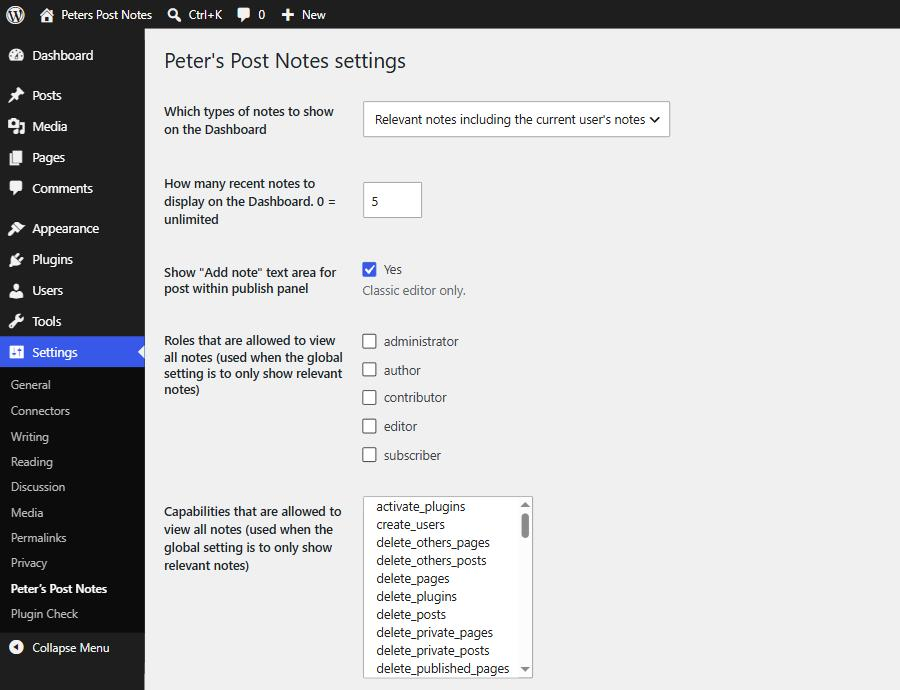
- Go to Settings > Peter's Post Notes to choose the post types, dashboard options and permissions.
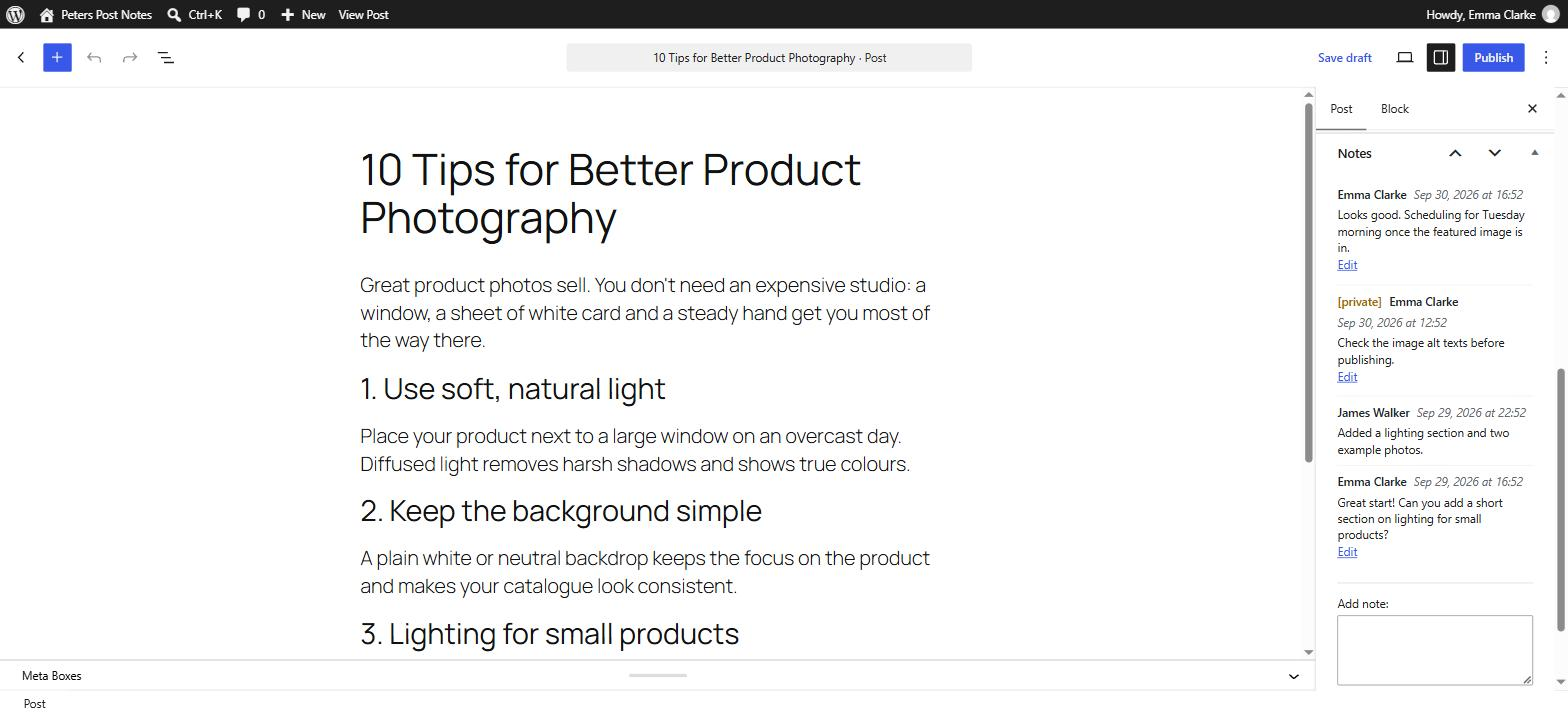
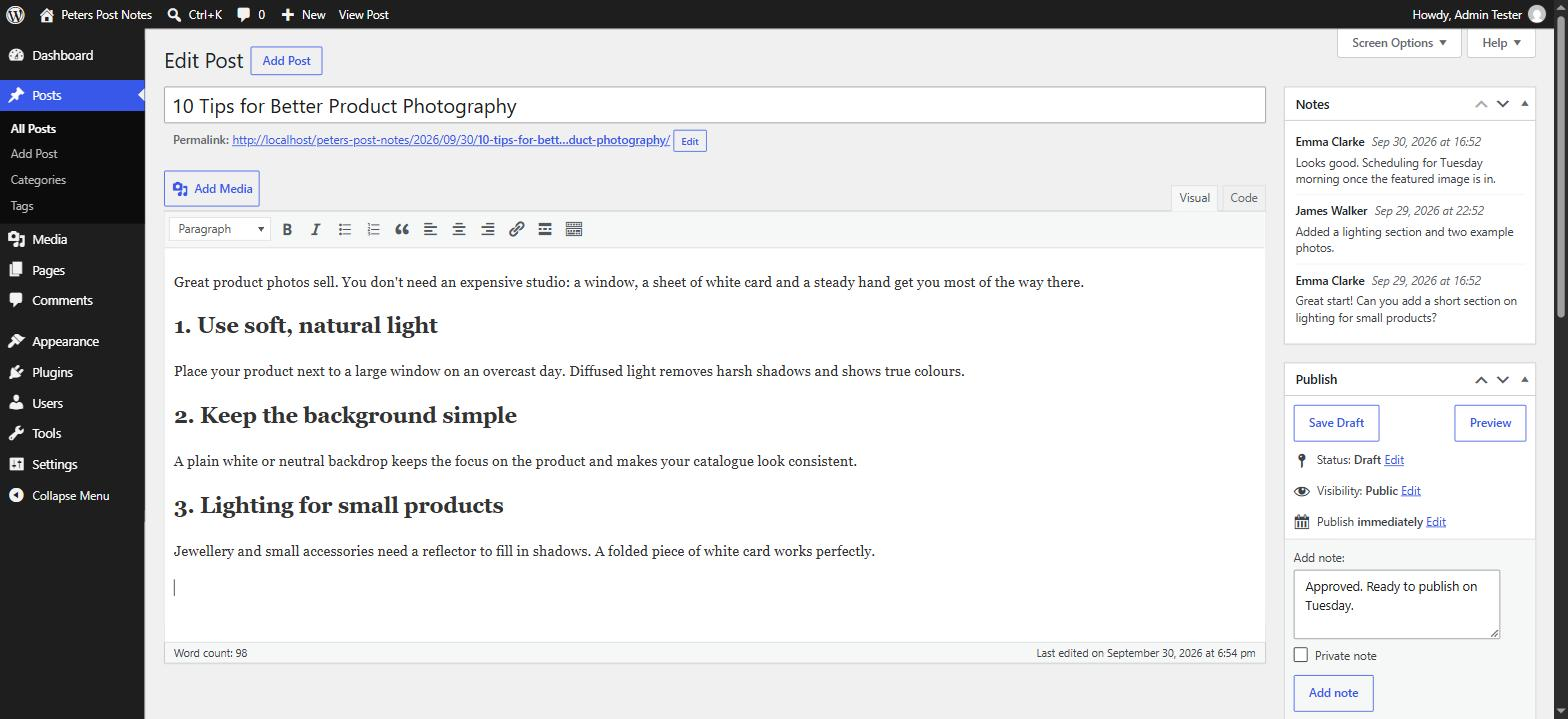
- Open any post or page: the Notes box appears in the editor sidebar.
屏幕截图:
常见问题:
How do I add a note to a post or page?
Open the post or page in the editor. In the Notes box in the sidebar, type your note and click Add note. In the block editor, a note left in the box is also added when you save the post.
Can I add private notes that only I can see?
Yes. Tick Private note before adding it. Private notes are only visible to the person who wrote them, including on the dashboard.
Who can see the notes?
Shared notes on a post are visible to users who can edit that post. Notes are never shown on the front end of your site.
Who can edit or delete a note?
The person who wrote it. In the settings you can also allow specific roles or capabilities to edit and delete other users' shared notes.
Does it work with custom post types?
Yes. Enable any post type that has an admin edit screen under Settings > Peter's Post Notes.
Does it work with the block editor (Gutenberg)?
Yes. Version 2.0.0 adds full block editor support. The classic editor is supported too.
I updated from version 1.x. Are my notes safe?
Yes. Your notes and settings are kept. The database tables are upgraded automatically the first time you visit the admin after updating. As with any update, we recommend a backup first.
What happens to my notes if I delete the plugin?
Deactivating keeps everything. Deleting the plugin from the Plugins screen removes its database tables and settings.
更新日志:
- Security: all actions now require a valid nonce (fixes cross-site request forgery on editing notes, adding dashboard notes and adding notes on save).
- Security: all output is escaped (fixes stored XSS through post titles and note content in the dashboard widgets, the meta box and the post list).
- Security: notes on a post can only be read or changed by users who can edit that post. Private notes can only be changed by their author.
- Security: settings are validated against the real roles, capabilities and post types. All database queries are prepared.
- Block editor support: add, edit and delete notes instantly. A note left in the box is added when the post is saved.
- Your own notes have a highlighted background in the notes box and both dashboard widgets, so they stand out from your team's notes.
- Replaced the deprecated tw-sack library with the WordPress REST API.
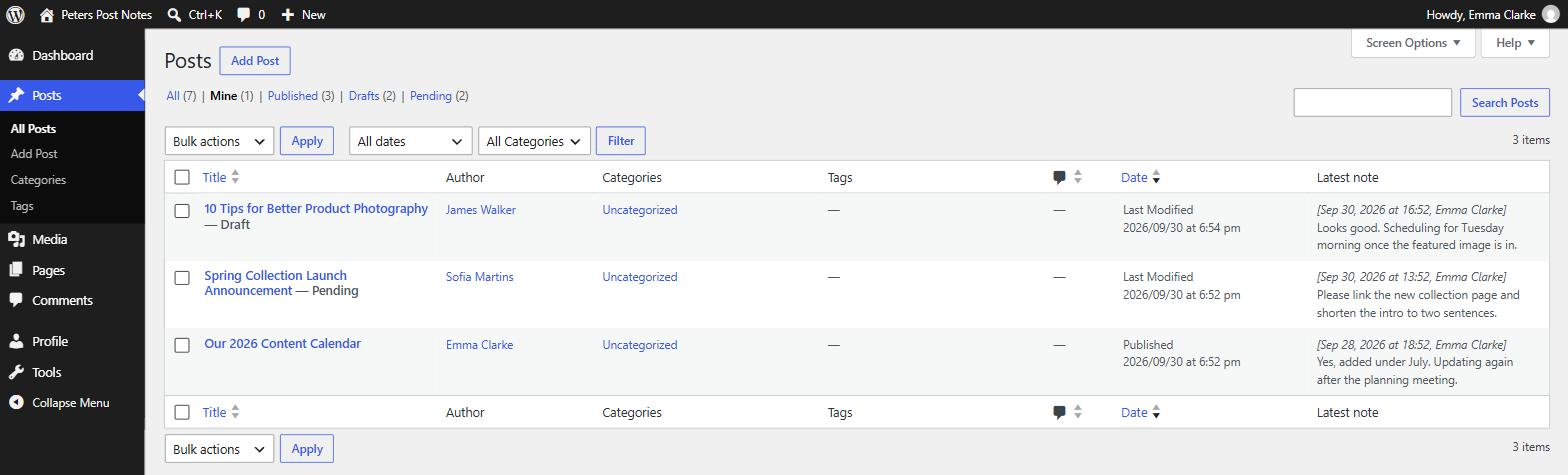
- The "Latest note" column now appears for pages and every enabled post type, and loads with a single query.
- Dashboard widget no longer uses query_posts().
- Database: added a primary key and indexes to the notes tables. Existing notes are migrated automatically on update.
- Fixed accented characters and emoji being lost on sites whose notes tables use the latin1 charset.
- PHP 8.x compatibility fixes.
- Text domain changed to "peters-post-notes" for wordpress.org language packs.
- The charset setting was removed; the site charset is used.
- 2017-11-18: Add CSRF protection to note deletions and settings updates. (Thanks Jesse!)
- 2017-03-11: In the Collaboration Notes dashboard, skip notes attached to non-existent posts. (Thanks Alex!)
- 2016-11-19: Bug fixes: do not show private notes in "Latest notes" column; fix capability check when showing "Edit" links. (Thanks Alex!)
- 2016-11-06: Fix query bug for users with no associated posts. (Thanks Alex!) Also remove code warning when displaying an unlimited number of notes.
- 2016-02-13: Improve UX by wrapping checkboxes inside labels. (Thanks Hrohh!)
- 2016-02-12: Support private notes on posts.
- 2016-01-06: Make all strings translatable and put translation files in their own folder. (Thanks Luis González Jaime!)
- 2014-05-10: Bug fix: strip slashes in Latest Note column.
- 2013-10-07: Support PHP 5 static function calls, bumping WordPress requirement to 3.2+.
- 2013-07-06: Tighten up spacing in notes displays.
- 2013-01-24: Allow editing of plugin settings via the WordPress admin interface so that settings persist after upgrades.
- 2013-01-10: Support dates formatted according to locale (Thanks Alexander!)
- 2013-01-09: Added setting $ppn_general_notes_required_capability to control who can post general notes on the dashboard. Made plugin SSL compatible (thanks llch!). Also, minor code cleanup.
- 2011-08-13: Minor code cleanup to remove unnecessary error notices.
- 2011-07-03: Added "Latest note" column to the manage posts view.
- 2010-08-02: Added a couple of settings so that you can grant specific roles and/or capabilities the ability to edit and delete any note. Also added a setting to allow basic HTML in notes.
- 2010-04-24: Added option to move "add note" box for posts to the notes window. Added a couple of settings so that you grant only specific roles and/or capabilities the ability to view all collaboration notes. Added support for custom post types. Also fixed a couple of bugs with line breaks and pagination on general notes.
- 2010-04-11: Fixed bug where line breaks weren't preserved when first adding a note. (Thanks SNURK!)
- 2010-04-02: Added a check in the "save note" function to prevent the same note from being posted twice in a row.
- 2010-01-11: Plugin now removes its database tables when it is uninstalled, instead of when it is deactivated. This prevents the notes from being deleted when upgrading WordPress automatically.
- 2009-11-24: More efficient loading of notes if there are no relevant posts for the current user.
- 2009-09-20: Fixed a bug in date translations. (Thanks Denis!)
- 2009-09-19: Fixed a bug in the query to show other users' posts on the dashboard. (Thanks martijn!) Also added proper code call to support translations. (Thanks dreb!)
- 2009-06-27: Fixed a display compatibility issue within the WordPress post form.
- 2009-06-23: Fixed minor issue where general notes database table wasn't being created on some installs.
- 2009-04-08: Added general and private notes system on the dashboard. Fixed UTF-8 encoding and line breaks in notes.
- 2009-01-17: Added "Notes" window to pages. Also added an option (in this plugin file) for the Dashboard "Notes" window: show either all notes by everybody, notes by everybody on relevant posts / pages, and notes by other people on relevant posts / pages.
- 2008-12-28: Added ability for users to edit and delete their own notes. Uses Ajax, so JavaScript must be enabled in your browser.
- 2008-11-10: First release.