
PickPair - Frequently Bought Together, Product Bundles, Upsells & Order Bumps for WooCommerce
| 开发者 | ysinnovations |
|---|---|
| 更新时间 | 2026年10月17日 21:12 |
| 捐献地址: | 去捐款 |
| PHP版本: | 7.4 及以上 |
| WordPress版本: | 7.1.3 |
| 版权: | GPLv2 or later |
| 版权网址: | 版权信息 |
详情介绍:
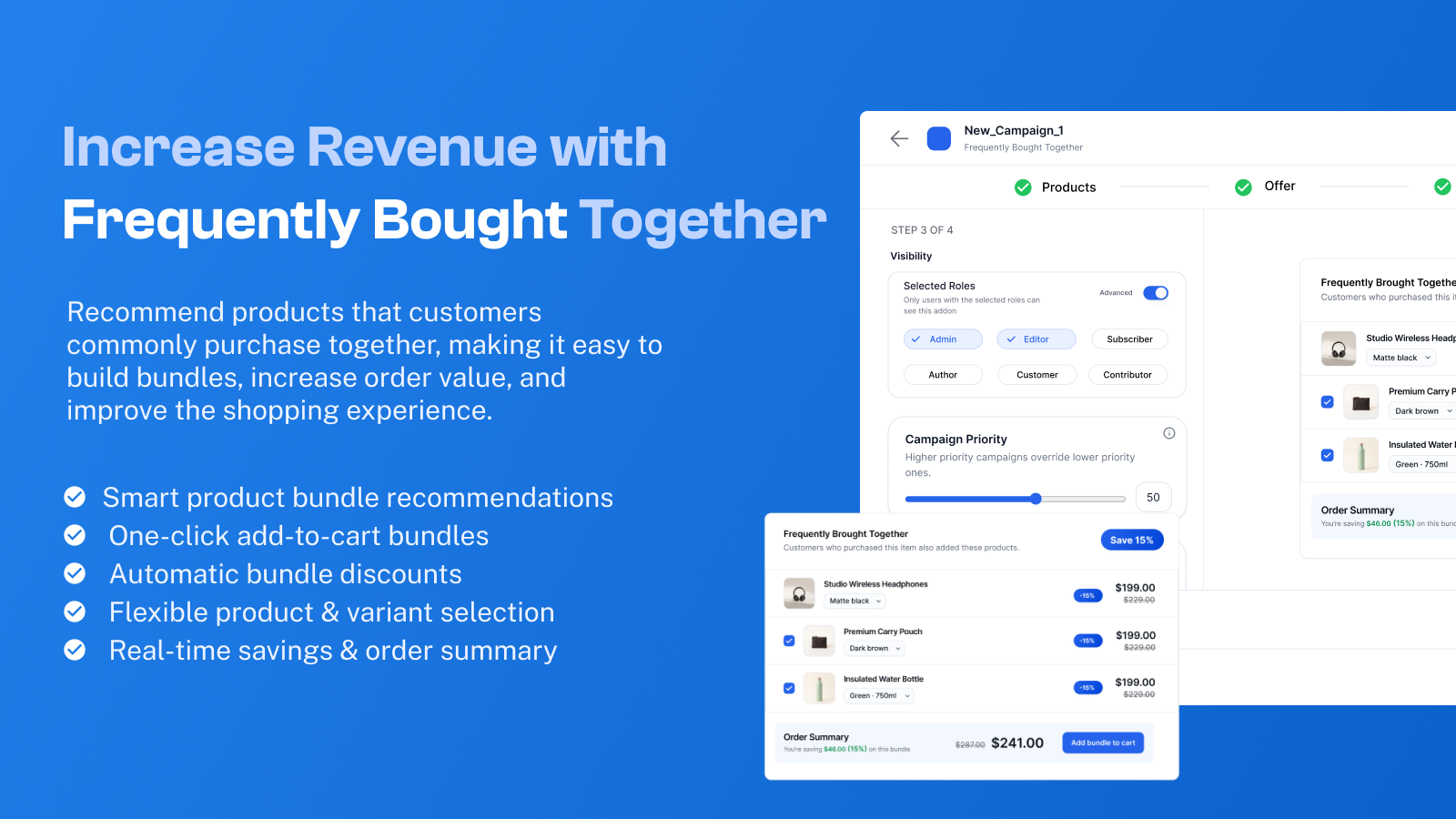
- Frequently Bought Together bundles on product pages with one-click cart additions
- Product bundles with percentage discounts, fixed discounts, or flat bundle pricing
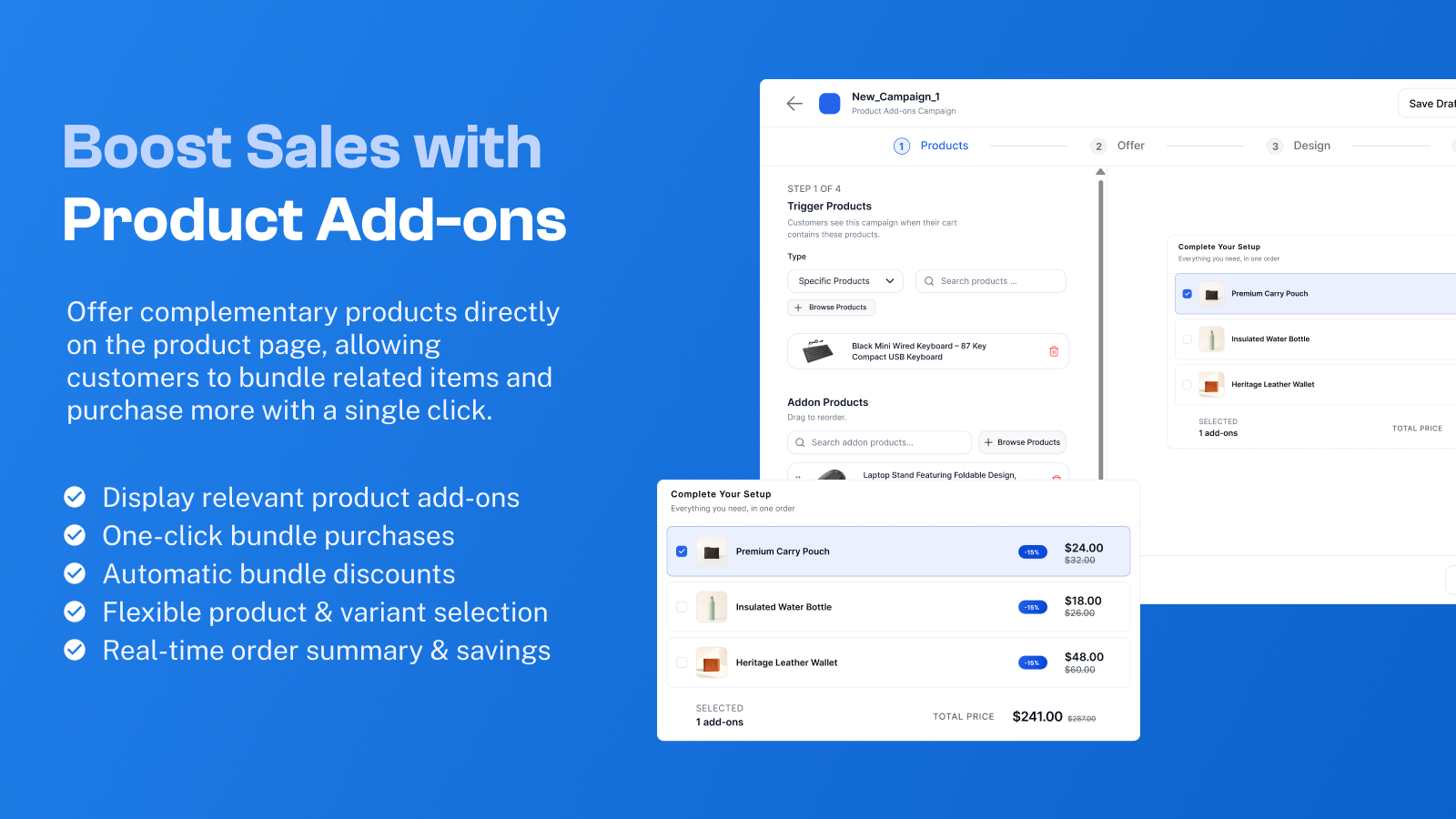
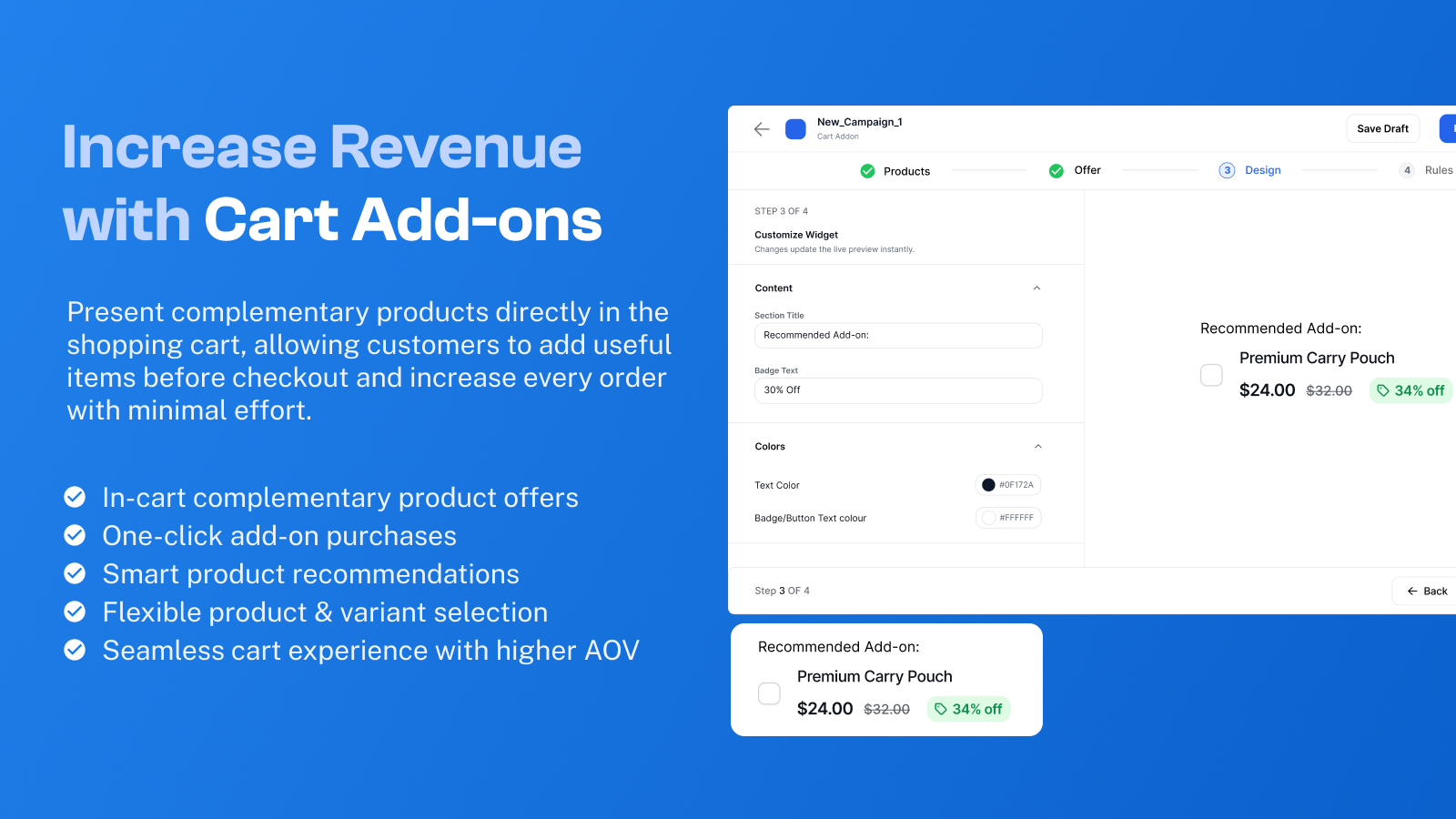
- Product Add-ons and Cart Add-ons for one-click extras like gift wrapping or warranties
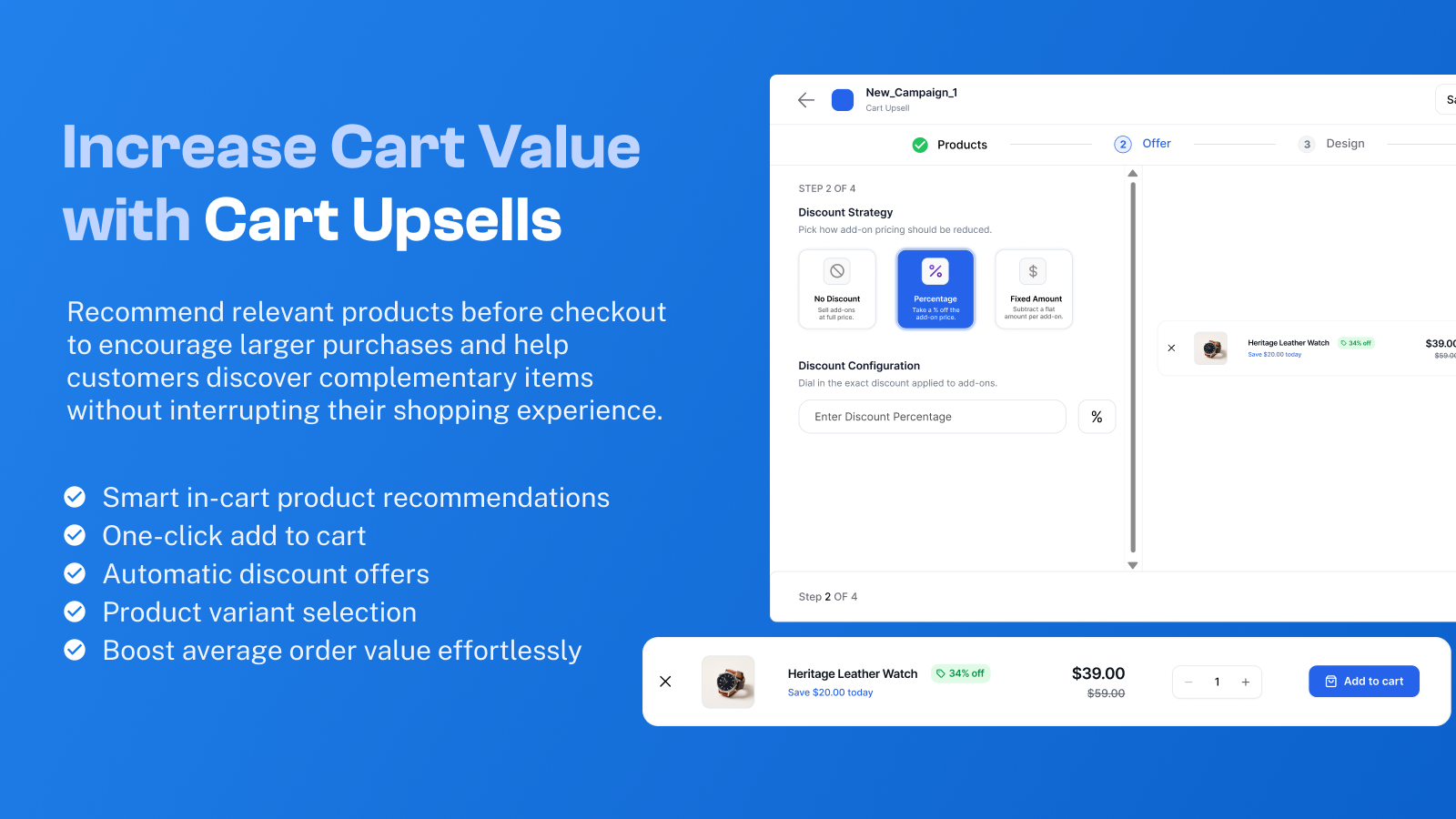
- Cart upsells and cross-sells that recommend matching items before checkout
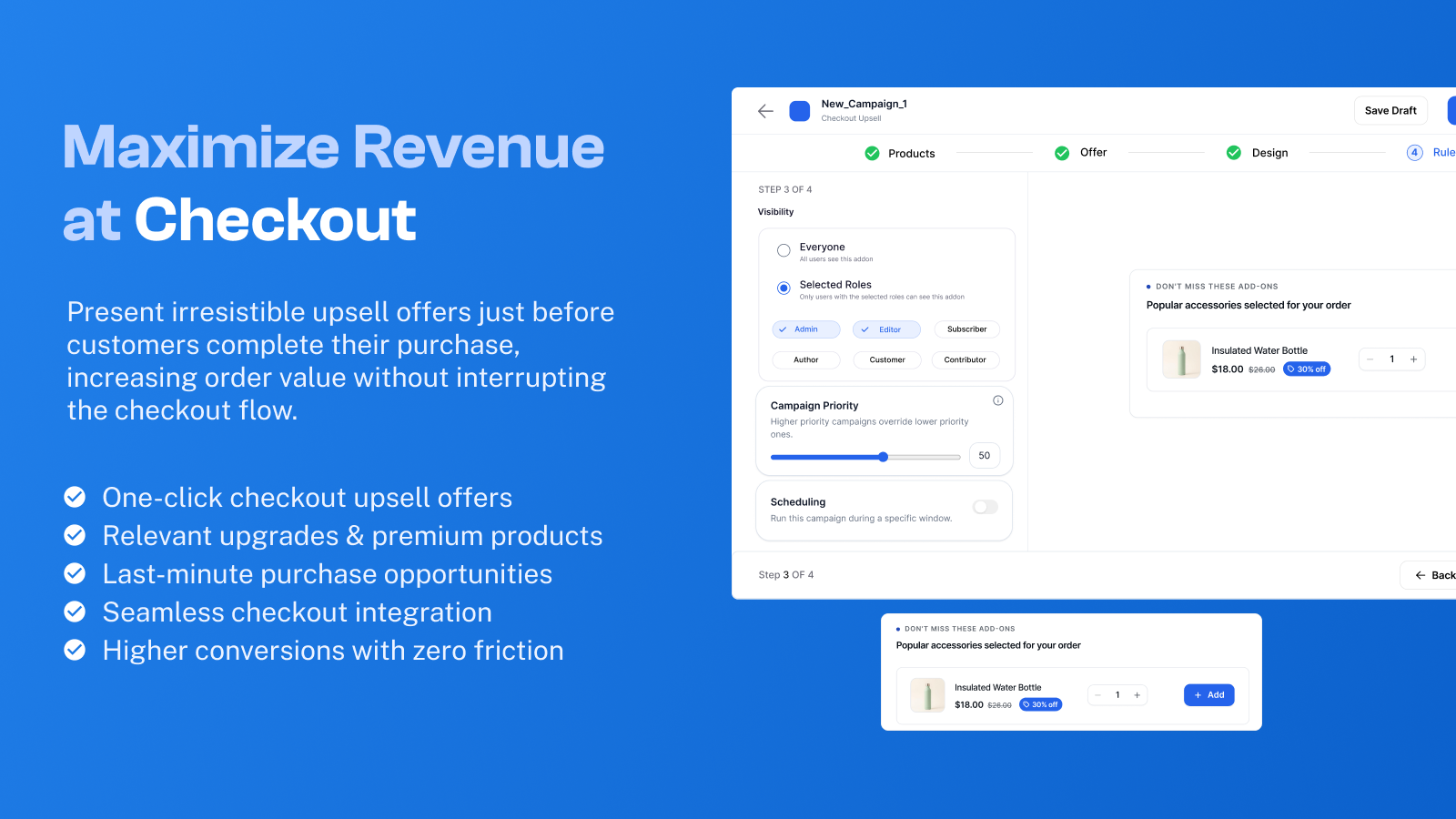
- Checkout order bumps placed right next to the payment section
- Add-to-cart pop-up offers that appear the moment an item is added to the cart
- Post-purchase offers on the WooCommerce Thank You page
- Free shipping progress bar in the cart to encourage larger orders
- Next Order Coupons sent automatically to bring buyers back for a repeat purchase
- Smart targeting rules based on products, categories, cart totals, user roles, and past orders
- Built-in revenue reports showing views, clicks, conversions, and extra sales per campaign
- Full compatibility with both classic WooCommerce pages and WooCommerce Cart & Checkout Blocks
- Frequently Bought Together (Product Page): Shows a clean recommendation box on the product page with items that pair well together. Shoppers simply check the items they want and add everything to their cart in one click.
- Product Bundles (Product Page): Group two or more products together as a package deal with a percentage discount, a fixed amount off, or one flat bundle price.
- Product Add-ons & Cart Add-ons (Product & Cart Pages): Let shoppers add simple extras like gift wrap, priority handling, or an extended warranty with a single click, either for a specific item or for the entire cart.
- Add-to-Cart Pop-up Offers (Action Triggered): Displays a targeted pop-up recommendation the exact moment a shopper adds an item to their cart, while they are still in a buying mindset.
- Cart Upsells & Cross-Sells (Cart Page & Drawer): Suggest relevant upgrades or complementary accessories directly inside the cart when a buyer is reviewing their order.
- Free Shipping Bar (Cart Page): Shows shoppers how close they are to unlocking free shipping, nudging them to add one more item to their cart.
- Checkout Order Bumps (Checkout Page): Places a high-converting, one-click offer right before the payment button. Ideal for low-cost impulse items, accessories, or protection plans.
- Post-Purchase Offers (Thank You Page): Presents a special offer on the order confirmation page right after checkout is completed.
- Next Order Coupons (Thank You Page & Follow-Up): Automatically generates a discount coupon for the customer's next order, complete with custom expiry dates, brand colors, and cart conditions to drive repeat sales.
- A shopper visits a product page in your WooCommerce store.
- PickPair displays the matching products or bundle items you have selected for that product.
- The shopper checks the items they want to include.
- With one click, all selected items are added to the cart together with your bundle discount applied automatically.
- Discount targeting: Choose whether your Frequently Bought Together discount applies to the main trigger product, the add-on products, or both.
- Three discount styles: Set a percentage discount, a fixed currency amount off, or a single flat price for the bundle.
- Sale vs. regular price calculation: Decide whether offer discounts calculate from the product's regular price or its current WooCommerce sale price.
- Out-of-stock protection: Automatically prevent a bundle from being purchased if any item inside the bundle goes out of stock.
- Smart self-exclusion: PickPair automatically makes sure a product is never recommended as its own add-on.
- Multi-currency support: Works smoothly with supported WooCommerce multi-currency switcher plugins.
- By product or category: Show specific accessories only when certain products or categories are being viewed or are in the cart.
- By cart total: Trigger an upsell or discount only when the shopper's cart value is above or below a set amount.
- By customer status: Show different offers to logged-in members, guest shoppers, or specific WordPress user roles.
- By purchase history: Target returning customers based on their past orders, or show a special welcome offer to first-time buyers.
- By page position: Choose where your offer box appears on the product page, cart, or checkout so it fits naturally with your theme layout.
- Extra revenue generated by each individual campaign and across your whole store
- Impressions and clicks for every active bundle, upsell, and order bump
- Total conversions showing how many orders included an offer item
- Quick campaign search and filtering so you can sort your offers by performance, views, or revenue right from the campaign list
- Electronics Store: A customer views a smartphone. Show a Frequently Bought Together box with a protective case and fast charger on the product page, then offer a 2-year warranty as a one-click order bump at checkout.
- Apparel & Fashion Store: A shopper adds a winter jacket to their cart. Display a cart cross-sell suggesting a matching scarf or leather belt to complete the outfit.
- Beauty & Skincare Store: Group a daily cleanser, toner, and moisturizer into a Product Bundle at 15% off so customers buy the full routine instead of a single bottle.
- Pet Supply Store: When a buyer adds dog food to their cart, trigger an instant pop-up offer for dog treats at a small discount.
- Digital & Course Store: Right after a student buys an online course, show a post-purchase offer on the Thank You page for a downloadable workbook or template pack.
- Any Repeat-Purchase Store: Display a Next Order Coupon on the Thank You page that expires in 30 days, giving first-time buyers a clear reason to come back and order again.
- Cart & Checkout Blocks Ready: Works out of the box with both classic WooCommerce shortcodes and the modern WooCommerce Cart and Checkout Gutenberg Blocks.
- Lightweight Frontend Loading: Scripts and styles load only on pages where an active offer is displayed, keeping the rest of your store fast.
- Cache Plugin Friendly: Built to work smoothly with popular caching plugins including WP Rocket and LiteSpeed Cache.
- Mobile Responsive: Every widget, pop-up, and order bump is designed to look clean and tap-friendly on phones, tablets, and desktops.
安装:
- WordPress 5.3 or higher
- WooCommerce 4.0 or higher
- PHP 7.4 or higher
- Log in to your WordPress Dashboard.
- Go to Plugins > Add New.
- Search for PickPair.
- Click Install Now, then Activate.
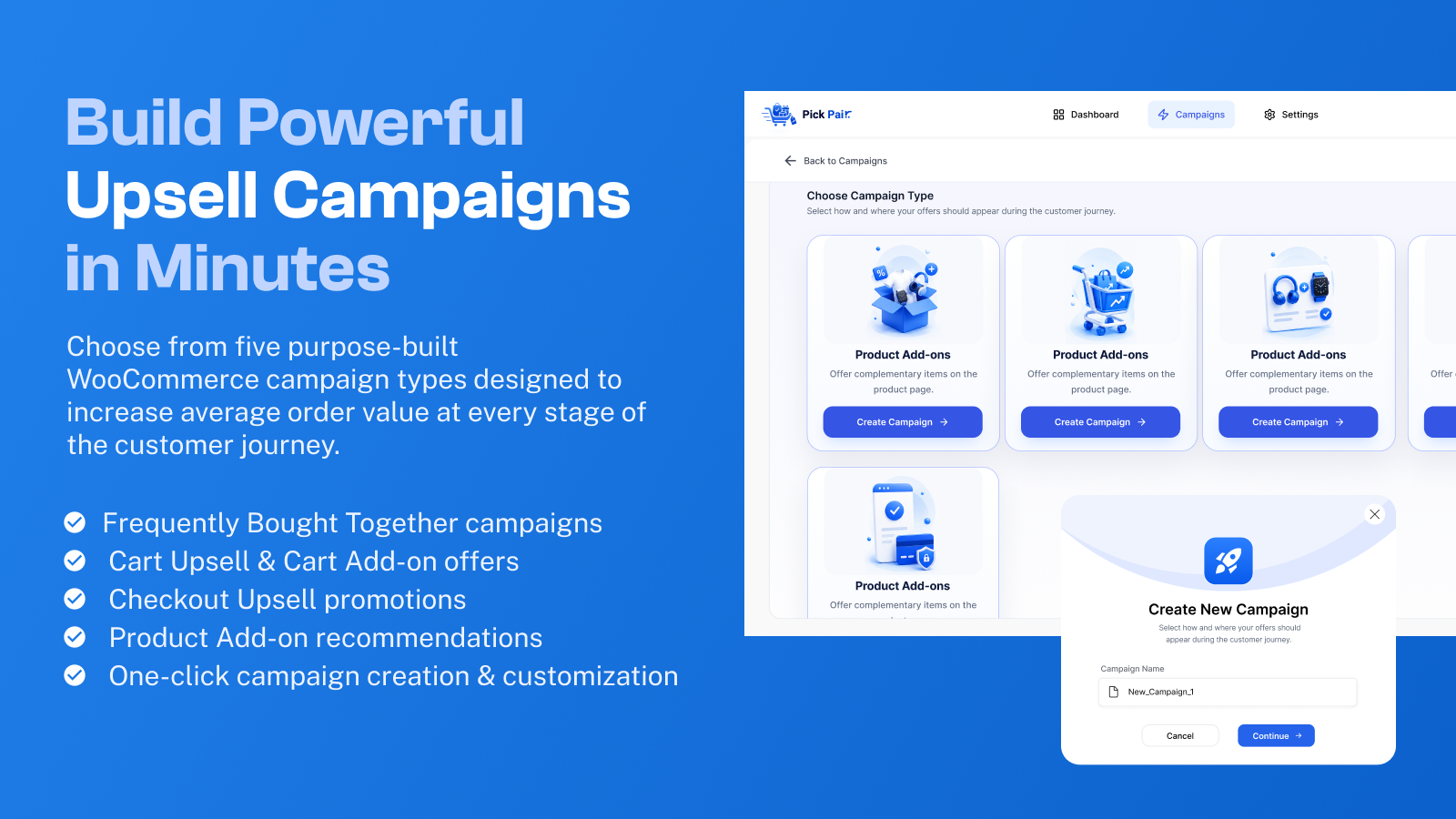
- Open PickPair from your WordPress admin menu to create your first offer campaign.
- Download the plugin ZIP file from your account.
- In your WordPress Dashboard, go to Plugins > Add New > Upload Plugin.
- Choose the downloaded ZIP file and click Install Now.
- Activate the plugin and open PickPair in your admin menu.
屏幕截图:
常见问题:
Does PickPair require WooCommerce?
Yes. PickPair is built specifically for WooCommerce and requires the free WooCommerce plugin to be installed and active.
What is the difference between an upsell, a cross-sell, and an order bump?
An upsell suggests a higher-value version or upgrade of a product. A cross-sell suggests a complementary item that goes with what the customer is buying, like batteries for an electronic toy. An order bump is a small, one-click impulse offer shown on the checkout page right before payment. PickPair lets you run all three from one plugin.
How do I add Frequently Bought Together bundles to my product pages?
Open PickPair in your WordPress dashboard, create a Frequently Bought Together campaign, select the trigger product and the matching items you want to recommend, set an optional discount, and publish. The bundle box will automatically appear on that product page.
Can I choose which items get the discount in a Frequently Bought Together bundle?
Yes. You can apply the bundle discount to the main trigger product, the recommended add-on products, or both.
Does PickPair work with the WooCommerce Cart & Checkout Blocks?
Yes. PickPair supports both classic WooCommerce cart and checkout pages (shortcodes) and the modern WooCommerce Cart and Checkout Blocks.
Will PickPair slow down my store?
No. PickPair loads its frontend scripts only on the pages where an active offer is actually displayed, keeping your storefront and checkout fast.
What types of discounts can I offer on bundles and upsells?
You can set a percentage discount, a fixed amount off, or a flat bundle price. You can also choose whether discounts are calculated from the product's regular price or its current sale price.
Can I control which customers see an offer?
Yes. Every campaign includes targeting rules so you can show offers based on specific products, categories, minimum or maximum cart totals, login status, customer roles, or whether the shopper has ordered from your store before.
Can I offer one-click extras like gift wrapping or an extended warranty?
Yes. You can use Product Add-ons on product pages, Cart Add-ons on the cart page, or Checkout Order Bumps right before payment so customers can add services or extras in a single click.
Can I show offers after a customer completes checkout?
Yes. You can display Post-Purchase Offers on the WooCommerce Thank You page, and you can also generate an automatic Next Order Coupon with an expiry date to bring the customer back for another purchase.
What happens if an item inside a bundle goes out of stock?
You can enable stock protection so a bundle is automatically prevented from being purchased when any of its required items is out of stock.
Does PickPair work with multi-currency and caching plugins?
Yes. PickPair includes multi-currency support for supported currency switcher plugins and is built to work smoothly with caching tools like WP Rocket and LiteSpeed Cache. See the features page for full details.
How can I track how much money my offers are making?
PickPair includes a built-in Reports page that shows you the exact extra revenue, views, clicks, and conversions generated by each campaign.
Where can I get support or learn more?
You can reach out in the WordPress.org support forum or visit the PickPair website for plan details and support.
更新日志:
- New: Interactive Widget Position Preview modal and trigger button for all campaign editors (Frequently Bought Together, Product Add-ons, Cart Upsell, Cart Add-ons, Checkout Upsell, Thank You Upsell, Next Order Coupon).
- Improved: Real-time automatic position preview reflection when selecting options from the position dropdown.
- Fixed: Order tracking and analytics recording reliability.
- New: Completely redesigned admin user interface with a modern dashboard layout, collapsible sidebar, and breadcrumb navigation.
- New: Unified tabbed workflow (Product, Design, Behavior) across all campaign editors for faster offer configuration and live preview simulation.
- Improved: Product variation handling, custom attribute selection, and stock checks for Cart and Thank You Page upsell offers.
- Improved: Added impression view count limits and refined targeting behavior for Cart Upsell and Product Add-on campaigns.
- Improved: Modernized revenue analytics with interactive revenue trend charts, conversion breakdowns, and top performing categories.
- Fixed: Fixed Amount discounts now correctly subtract the discount from the product price across all campaign types.
- Fixed: Products already in the cart are no longer shown in the Upsell Popup.
- Fixed: Upsell Popup now triggers correctly when adding products from single product pages.
- Fixed: Lengthy product titles in the Cart Upsell widget now wrap cleanly without breaking the layout.
- Fixed: FBT bundle variation selections and total savings calculations.
- Improved: Live preview price calculations in all campaign editors now accurately match storefront pricing.
- New: Discount targeting option for Frequently Bought Together bundles. Apply discounts to trigger products, add-on products, or both.
- Security: Fixed unauthorized bundle discount application.
- Security: Improved bundle product validation.
- Improved: Hardened campaign validation.
- New: Multi-currency support for supported currency conversion plugins.
- Fixed: Product add-on totals now use the current sale price for the main product and show regular prices in the original total.
- Fixed: Add-on discounts now calculate consistently with the selected sale or regular price setting.
- New: Next Order Coupon offer with a custom expiry date, colors, and conditions.
- New: Cart Add-on and Product Add-on offers.
- Improved: Offers can now be shown based on a customer's past orders.
- New: Pop-up offer shown when a product is added to the cart.
- New: Special offer on the Thank You page after checkout.
- New: Setting to choose sale price or regular price for offers.
- Improved: Offer prices now follow the selected price type.
- Improved: Updated plan feature management.
- Fixed: A product could no longer be shown as its own add-on.
- Fixed: Product positions and product selection in the campaign editor.
- Fixed: Labels and styling for Product Add-ons, and dropdown and card display on the offer list page.
- Improved: Layout and styling across the editor pages.
- New: Reports page with revenue, sales, and offer performance.
- New: PickPair icon in the admin menu.
- Improved: Search, filters, and sorting on the offer list page, with views and revenue shown for each offer.
- Improved: Rebuilt the admin area and sped up the admin dashboard.
- First public release.
- Frequently Bought Together offers, Product Bundles, Product Page Add-ons, Cart Recommendations and Cart Upsells, and Checkout Recommendations.
- Rules and conditions: target by products, categories, cart total, customer type, and past orders.
- Campaign reports.
- Support for WooCommerce Cart & Checkout Blocks.
- No-reload cart updates and a mobile-friendly design.
- Stock checks for bundled products.