Live Visitor Analytics – Real-Time Visitor Tracking, IP Address & Location
| 开发者 | pinnaclequant |
|---|---|
| 更新时间 | 2026年10月29日 16:39 |
| PHP版本: | 7.4 及以上 |
| WordPress版本: | 7.1 |
| 版权: | GPLv3 or later |
| 版权网址: | 版权信息 |
详情介绍:
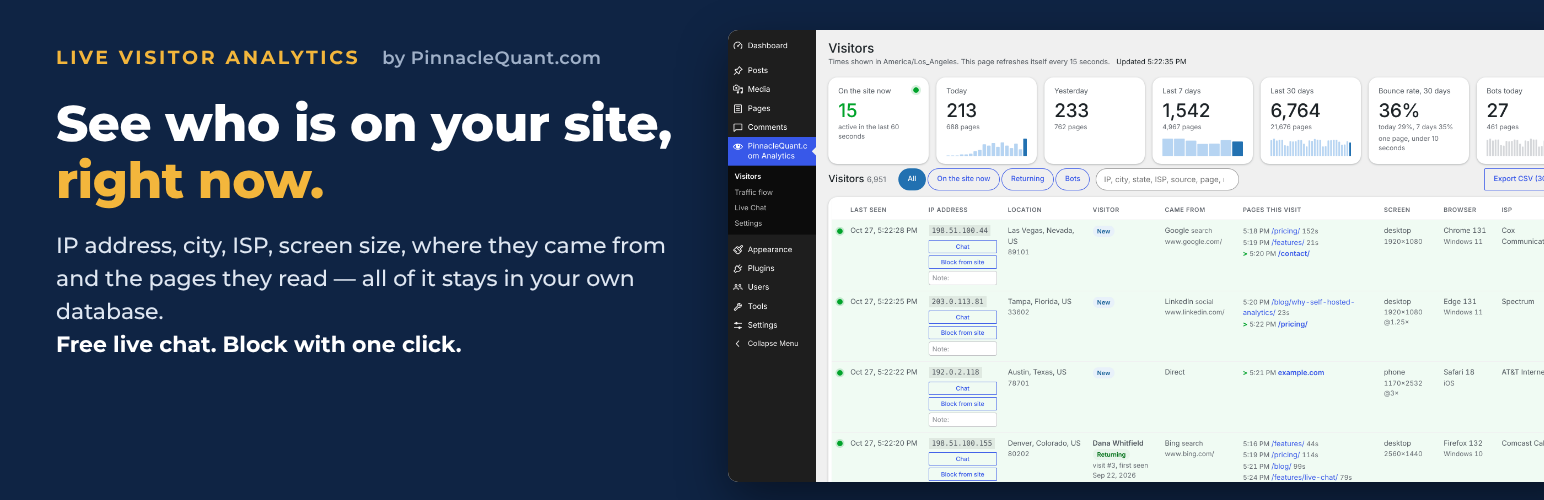
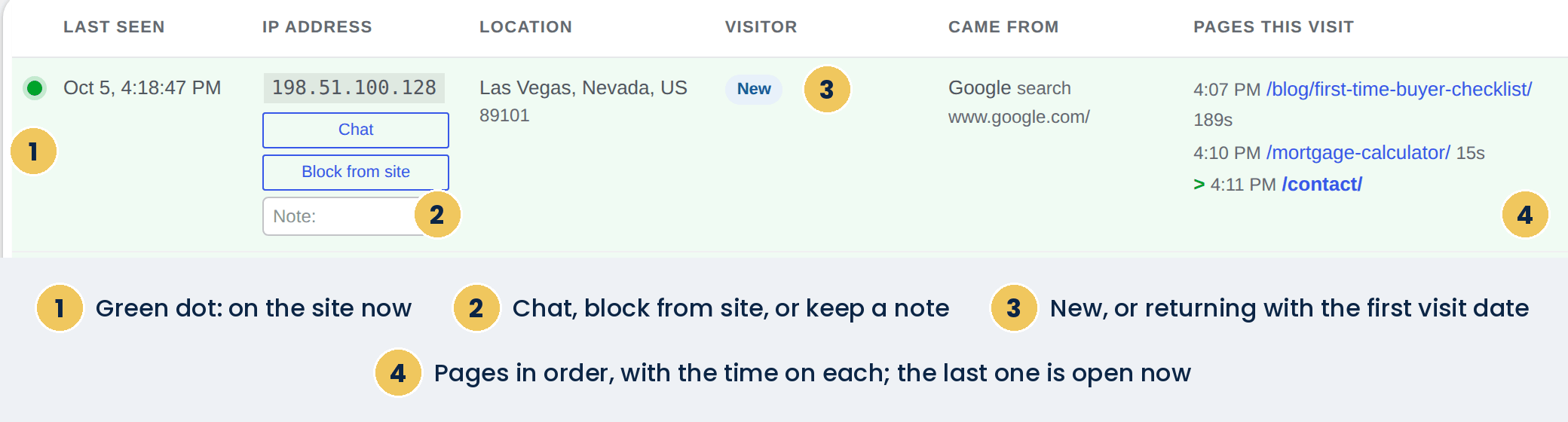
- Whether they are on the site right now
- IP address
- City, state and country
- ISP or organization
- New or returning, with the visit number and first-seen date
- Where they came from: Google, Bing, social networks, AI assistants, ads (click IDs), UTM campaigns, or another site
- The page they are reading now and every page they read, with time on each
- Screen type and resolution, browser and operating system
- One-click Block from site for any address
- No account, no key, no analytics service.
- Visitor details are written to tables in your own WordPress database and nowhere else.
- City, state and ISP are looked up on your own server from two free database files (from db-ip.com) that you download into your uploads folder with one click on the Visitors or Settings page; after that click, the plugin fetches a fresh copy once a month.
- Nothing in your visitors' browsers contacts any other server. The small script on your pages talks only to your site.
- Old visits are removed automatically after the number of days you choose (90 by default).
安装:
- Upload the plugin folder to /wp-content/plugins/ or install it from Plugins, Add New Plugin.
- Activate it.
- Open the Visitors page and click Download the location files, so city, state and ISP can fill in. Nothing is downloaded before you click.
- Open your site in a private window and your own row appears within seconds.
屏幕截图:
常见问题:
Where does the data live?
In four tables in your own WordPress database, prefixed with your table prefix and pqanalytics_. Nothing is sent anywhere else.
Does it slow my site down?
No. One small script runs on each page and sends one request to your own site, plus a tiny heartbeat every 20 seconds while the page is open, so the Visitors page can show who is on the site right now.
Why are city and state blank?
The two free location files have not been downloaded yet, or the download did not finish. Click Download the location files on the Visitors page, or open Settings, where the Location lookup table shows each file with its own Download button.
Does it set a cookie?
One small first-party cookie with a random ID, so the plugin can tell a returning visitor from a new one. It holds no personal details and is never shared. If your site shows a cookie notice, list it there. Suggested wording for your privacy policy is under Settings, Privacy, Policy Guide.
What does Block from site do?
Every request from that IP address receives a 403 Forbidden page until you unblock it. Administrators who are logged in are never blocked. Addresses are often shared by many people and change over time, so use this for clear cases.
My visitors all show the same IP address
Your site is behind a proxy or CDN. In Settings, change the visitor IP address source to the header your host uses (Cloudflare, X-Forwarded-For or X-Real-IP).
Does this work with caching plugins?
Yes. The script runs in the visitor's browser, so cached pages are counted normally. Bot counts, however, only include requests that reach PHP.
更新日志:
- Lighter on your hosting. The page signal and the heartbeat sent by your visitors' browsers, and the Visitors page's own 15-second refresh, are now answered as soon as WordPress has loaded its plugins, before your theme and the rest of WordPress start. Each call is still served by WordPress's own REST server code with its usual checks (sign-in, security token, permissions, and the filters other plugins add to the REST API); the same details are saved and shown; each call takes much less of your server's time. A call that does not match exactly is answered by WordPress the usual way, as before.
- On the plugin's own pages, WordPress's built-in Heartbeat check (admin-ajax.php) runs once every 10 minutes instead of every minute or two. The Visitors page does not use it; it keeps refreshing every 15 seconds on its own.
- Search box: type member to list every visit made by a logged-in member of your site. Members are counted only when Leave out logged-in users is unticked under Settings.
- Visitors page: find visits by the pages read. Type a page address in Visited page to see every visit that opened it, and a second address in then visited page to see only the visits that went from the first page to the second, in that order. Part of an address is enough. Both boxes suggest page addresses as you type: every page address visited in the retention period, most visited first, each with its number of visits; the list is built once when the page opens.
- Unique visitors: tick it and each visitor appears once, with their latest visit that matches. Untick it and every visit is listed; each row now says which visit it is, for example Visit 3 of 8.
- Search the Note only: a choice next to the search box limits the search to the note you keep on a visitor.
- Days and Time of day: limit the list to the days you pick, and to a time window that applies to every one of those days, for example 6:30 AM to 12:30 PM. Times follow the Time zone under Settings, and the zone and its abbreviation are printed next to the fields.
- Export CSV follows the filters that are set: the file holds the rows you see, over the last 30 days unless you picked days.
- Past visits: a returning visitor's row now has a Past visits button. It opens the pages this visitor opens most, with how many of their visits included each page, and then every visit kept in the retention period, newest first, with its date, length, source and the pages read in order.
- Fewer database writes on every page view and heartbeat: the plugin no longer keeps a request counter in the WordPress options table. Instead, each address can start at most 120 visits a minute, each visit keeps at most 60 pages a minute and 500 pages in all, and a page reports at most once every 3 seconds.
- A visitor who stays on the site for a long time is no longer dropped from the Visitors page for a minute at a time.
- The daily cleanup removes old visits in groups of 2,000 rows, so a large site is not held up while it runs, and it no longer re-reads the whole page-view table. When there is more to remove than fits in 20 seconds, it continues 5 minutes later.
- The daily cleanup also removes visitor records that have no visit left in the retention period, unless they carry a name, email, phone, note or label.
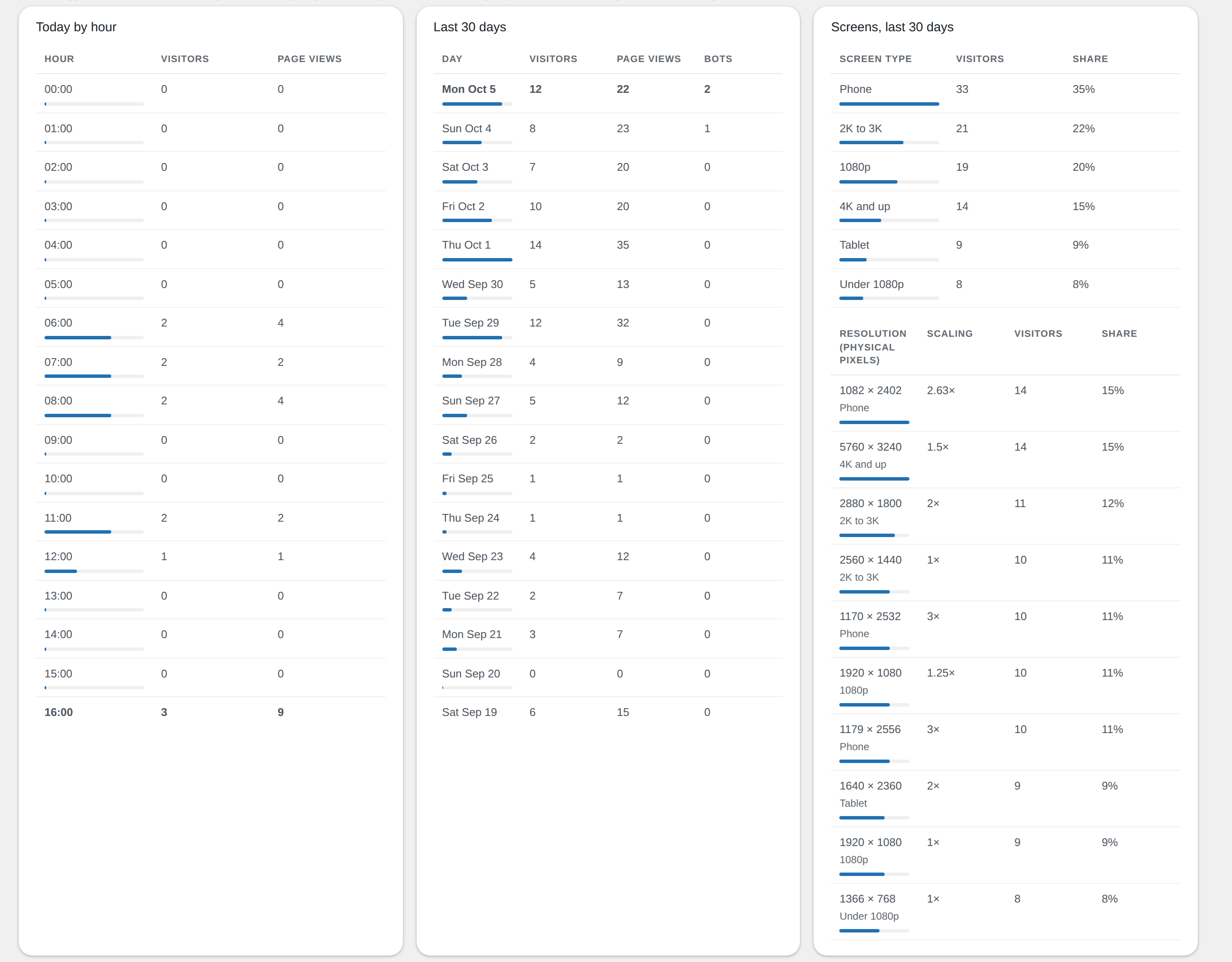
- The Visitors page refreshes its three charts (today by hour, last 30 days, screens) every 5 minutes instead of every 15 seconds. The cards, the rows and the green marks still refresh every 15 seconds.
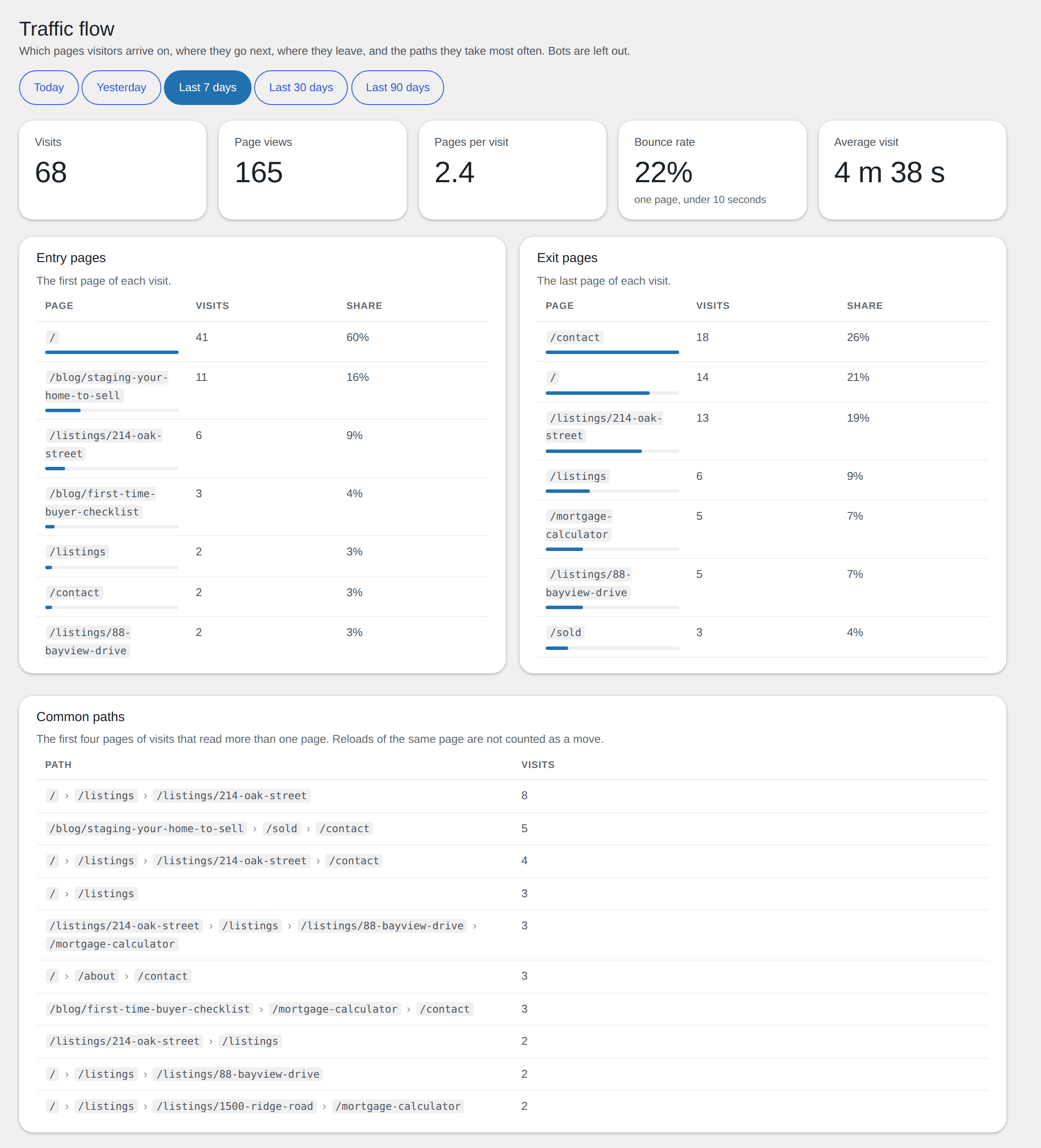
- Traffic flow page: the Entry pages and Exit pages tables, and the two tables under Where visitors go next, now share the full width instead of leaving a third of it empty.
- Lighter page views: the list of blocked addresses is prepared when the plugin is activated or updated, not during a visitor's page view.
- The plugin's admin stylesheet loads only on its own pages and on the Dashboard, where its widget is.
- Plugin header links updated.
- Visitor IP address: in Automatic mode the Cloudflare header is used only when the request comes from Cloudflare's own addresses, and the proxy headers only when the request comes from a proxy on the site's own network; when a proxy header lists several addresses, the one added by the proxy is used. A visitor can no longer pretend to be another address.
- The per-address request limit keeps its counters in a fixed number of slots, so it cannot grow with the number of addresses.
- Works on WordPress Playground and other SQLite-backed installs: the queries behind the by-hour and 30-day tables, the bounce rate, the CSV export and the daily cleanup use only portable SQL.
- Settings page: the help line under a field no longer overlaps the field, and the Email report heading has room above it.
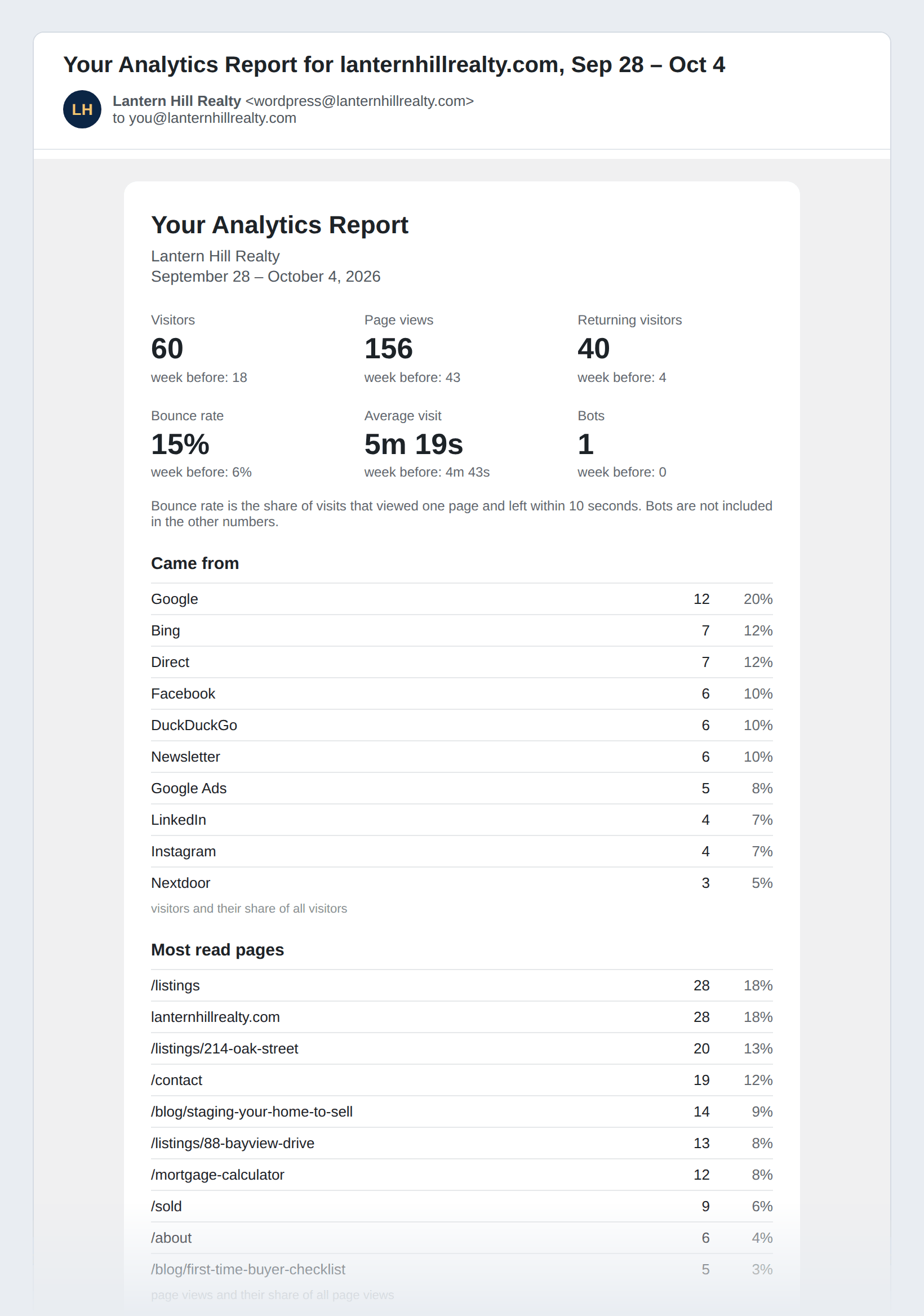
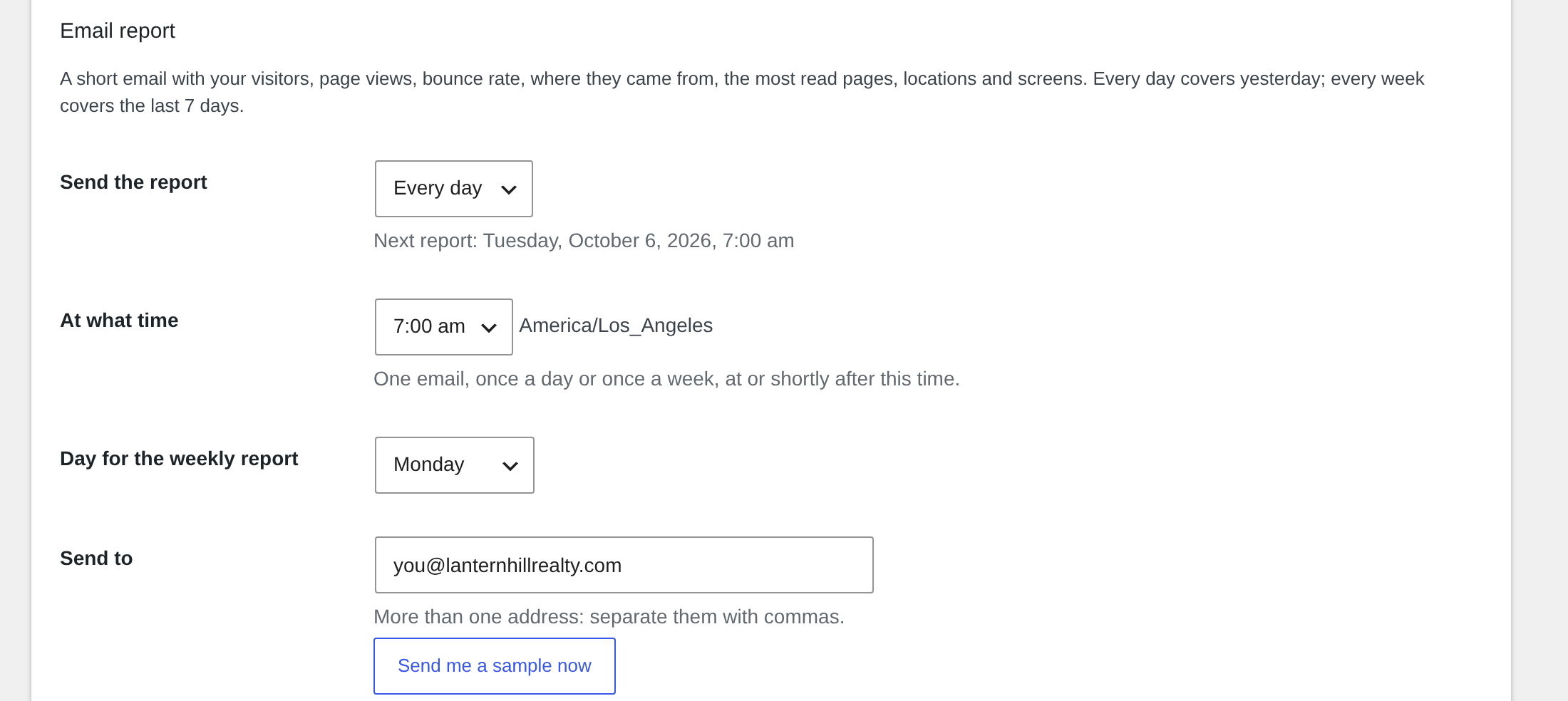
- Email report: under Settings, choose every day or every week, the time, the day for the weekly report and the address. Every day covers yesterday, every week the last 7 days, each number next to the day or week before, with the dates in the heading. A Send me a sample now button sends one right away.
- Bounce rate: the share of visits that viewed one page and left within 10 seconds. A card on the Visitors page (last 30 days, with today and 7 days underneath), the Traffic flow card formerly called Left after one page, and a line in the email report.
- Time zone setting: every time in the plugin, the day totals and the email report follow the time zone you pick under Settings; it starts out as the WordPress setting.
- A tab that reports again after more than 30 minutes starts a new visit instead of stretching the old one.
- Times in the Visitors table use one clock style, with AM and PM, in every column.
- Note box under the Chat and Block from site buttons on every visitor row: a few words that stay with that visitor and show on every later visit, in the search box and in the CSV export.
- The Live Chat add-on (1.4 or later) sends its check-in with the Analytics page signal instead of separately, so an idle visitor costs one request per interval instead of three or more.
- The monthly refresh of the location files stays on when the plugin is deactivated and activated again with the files already installed.
- The location files are no longer fetched by themselves after activation. Click Download the location files on the Visitors page (or Download on the Settings page) and the plugin fetches them, then keeps them fresh once a month. Sites that already have the files keep working as before.
- Table names are passed to the database through placeholders in every query.
- The Visitors page tells administrators, in one line, that the location files are not there yet, with the button right there.
- Requires WordPress 6.2 or newer.
- Every name the plugin uses in your database now starts with pqanalytics instead of pqa, so it cannot collide with another plugin. Existing tables, settings, blocked addresses and location files are carried over by themselves on update; nothing to redo. Only the plugin's own four tables and its own options are touched.
- Location files are moved into place with the WordPress file system class.
- The Visitors, Traffic flow and Settings pages now work on sites with plain permalinks (the address of the plugin's own data requests was built wrongly there).
- The location file reader library is updated to its current release.
- Readme: how the DB-IP location files are obtained, and the included library.
- Came from also recognizes Snapchat Ads, Taboola and Outbrain clicks, and the second ChatGPT ad parameter.
- Screen sizes are exact again for phones with a fractional pixel ratio (1080 x 2340 instead of 1079 x 2338).
- Wording on the Live Chat page and in the thank-you line.
- Visits from ChatGPT ads (the oppref click parameter) show as ChatGPT Ads, paid, in Came from.
- Visitors table: the Chat and Block from site buttons sit under the IP address, so every column fits on a laptop screen with nothing hidden, and long page paths wrap instead of being cut.
- The home page is listed by its domain name (yoursite.com) instead of a bare slash in Pages this visit and in the full page list.
- Reworded the paragraph the plugin suggests for your privacy policy (Settings, Privacy, Policy Guide).
- Visitors table: the Chat and Block buttons stay in view on the right while the rest of the table scrolls sideways, on a phone as much as on a narrow window. Pages this visit shows the page path without its tracking parameters (the full address is in the link).
- A page loaded again within a minute and a half of the last time it was on the visitor's screen (a refresh, or the browser reloading it) now stays one line in Pages this visit, with the time on page adding up, instead of a new line and a new page view.
- Settings: "Let Editors see the Visitors and Traffic flow pages too". Blocking, the CSV export and the Settings page stay with Administrators.
- When logged-in users are counted, a member's visit shows their first and last name in the Visitor column (never the login name or email; a member without a name shows as Member #ID). The name is also in the CSV export and in the search box.
- Hosting resources: a setting for how often an open page reports, 10 to 120 seconds.
- A note under the cards explains that logged-in users are left out, so you do not count yourself while logged in.
- New look: rounded cards, small bar charts in the cards for today, 7 days, 30 days and bots, and bars behind the numbers in every table.
- The location files download by themselves after activation.
- Visitors page: the pages of each visit are listed in the row, with a green mark on the current page and a link to the full list.
- Traffic flow page: plainer labels.
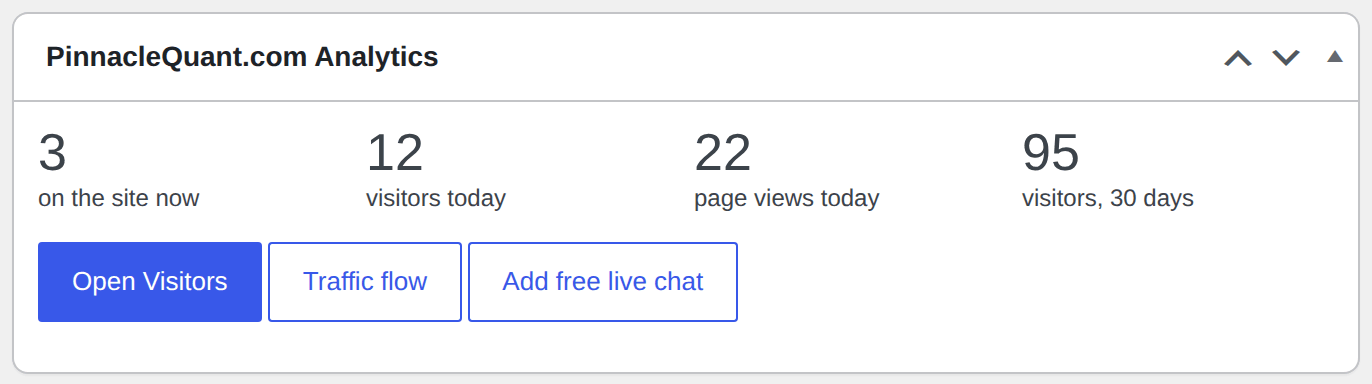
- Live visitors are shared with the Live Chat add-on for its "On the site now" list.
- Suggested privacy policy wording under Settings, Privacy.
- Traffic flow page: entry pages, exit pages, next pages from any page, common paths, all pages with time on page.
- The page path of each visit is included in the CSV export.
- Visits that move between pages without a full reload are counted.
- The open page path on the Visitors page refreshes with the rest of the page.
- Free DB-IP databases only; no account needed.
- Visitor name, email and phone columns, filled in by the chat add-on.
- Live Chat page with the steps to add the free chat.
- Clearer wording throughout.
- First release.