
Pixel Made Simple
| 开发者 | seitzdominik |
|---|---|
| 更新时间 | 2026年10月10日 20:02 |
| PHP版本: | 7.4 及以上 |
| WordPress版本: | 7.1 |
| 版权: | GPLv2 or later |
| 版权网址: | 版权信息 |
详情介绍:
- Sales and leads counted twice, or not at all. A visitor reloads the thank-you page, or the browser and server each send the same lead. Without a shared event ID, the platform can't tell it's the same one, and your ads learn from wrong numbers.
- You can't tell whether tracking works. A pixel doesn't complain when it stops. The Overview, the connection test and the event log show you what runs and what was sent.
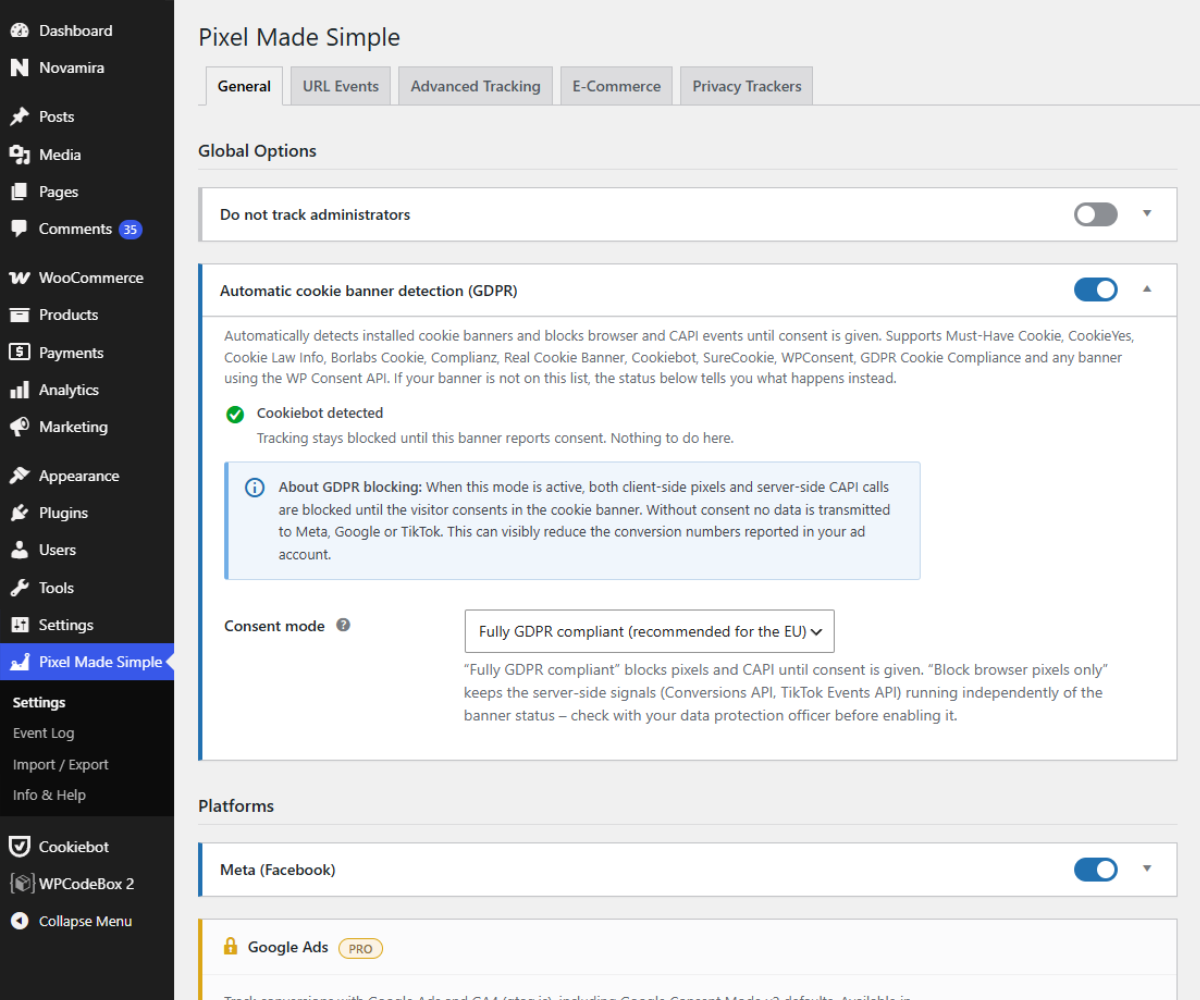
- Banner on, pixel loads anyway. Many banners and pixels don't talk to each other. Pixel Made Simple reads your cookie banner directly: no Meta or TikTok before a yes, and after "Accept" tracking starts right away, without a reload.
- Meta Pixel + Conversions API: browser pixel and server events from the same request, with one event ID for both, so Meta deduplicates the pair. Server events are sent without slowing down your page.
- Google Ads and GA4: with Google Consent Mode v2. After a marketing yes, the plugin sets Google's advertising signals itself, so Google Ads can count the conversion. Form leads carry Enhanced Conversions data.
- TikTok Pixel: web events with the same event ID as the matching Meta event.
- Automatic form leads (off by default): Contact Form 7, WPForms, Gravity Forms, Fluent Forms, Ninja Forms, Forminator, Elementor Pro, SureForms, Bricks, Divi and plain HTML forms. One lead per form sent, sent to Meta, Google Ads and TikTok. Contact data is hashed before it leaves your server. Cart, checkout and login forms never count.
- Page events: fire a standard or custom event on any URL, e.g.
Leadon/thank-you/. A form and its thank-you page share one event ID, so a lead counts once, and the thank-you page saves it if the form's own event got lost on the way. - Cookie banner detection (on by default): detects 10 popular banners, including Borlabs Cookie, Complianz, CookieYes, Cookiebot and Real Cookie Banner, plus the WP Consent API. Your banner isn't on the list? Describe its consent cookie yourself. Consent is never cached with the page, so one visitor's yes is never passed on to the next.
- Overview: one sentence says whether tracking is running. "Needs your attention" lists what to do, each with one action. A fresh install gets four setup steps.
- Connection test: one click checks whether Meta accepts your access token for your pixel, without sending an event.
- Duplicate pixel warning: moving over from another tracking plugin? You get a warning when a known plugin sends to the same pixel or measurement ID. A page check also finds snippets in your theme, a code snippet plugin or a page builder.
- Event log: recent browser and server events with event name, event ID, route, status and match keys. Filter by status, event or platform.
- Consent statistics: how much of your tracking does the cookie banner hold back? Daily counts only: no IP address, no visitor profile.
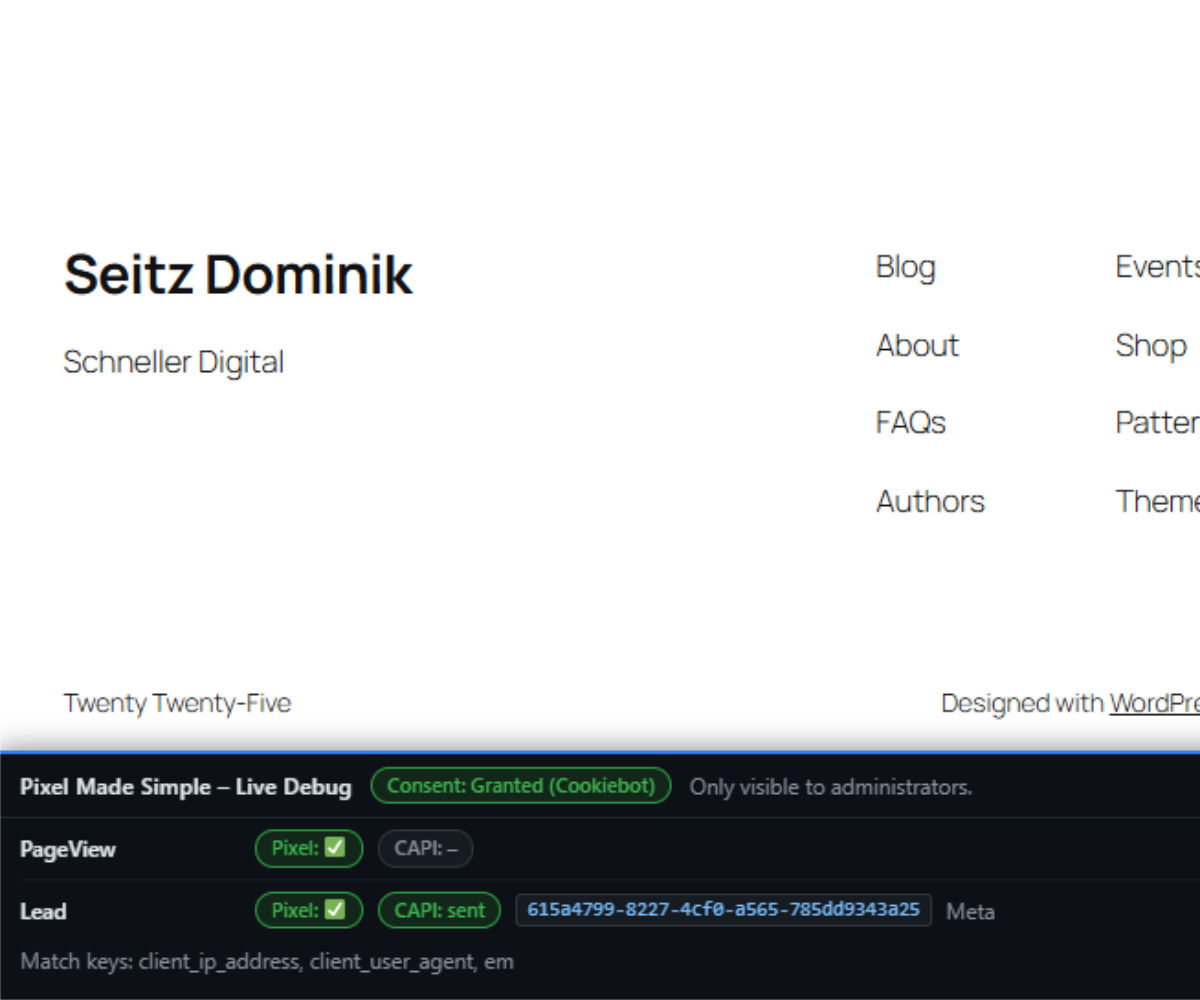
- Live debug bar for administrators: see consent status, fired events and the server response on the page itself. Regular visitors get zero extra bytes.
- Cookieless analytics: Plausible, Umami or Rybbit, set up in the same place.
- AI assistants: with WordPress 6.9 or newer and an MCP adapter, Claude and other AI tools can read the status, explain the event log and run the connection test, signed in as you. They can never change your settings or see your access tokens. The plugin itself sends nothing to an AI provider.
- Export & import: move your whole configuration to another site in one step.
- 80–90 % less JavaScript than common alternatives: around 6–9 KB instead of 50–80 KB. With only Pixel, Conversions API and GA4, there is no extra file at all, just about 1 KB of inline code. No jQuery, no frameworks. (Measured against the same page without a tracking plugin. Scripts from Meta, Google and TikTok are not counted, because every plugin loads those.)
- No extra database queries on a normal page view.
- Ad blockers stop the pixel, not your server events. Tested with real filter lists: leads and page events still reach your server, which sends them on through the Conversions API.
- One lead per form sent. Not two, not zero. Tested with Contact Form 7, WPForms, Gravity Forms, Fluent Forms, Ninja Forms, Forminator and Divi.
- Works with speed plugins that delay JavaScript: form leads always reach the server, even when scripts are delayed.
- WooCommerce and SureCart tracking: ViewContent, AddToCart, InitiateCheckout and Purchase for Meta, Google Ads, GA4 and TikTok, including the block checkout.
- Sales that don't get lost: a server-side fallback reports the purchase even when the buyer never returns to the thank-you page. Reloading the thank-you page doesn't send a second sale.
- Click events: a click on your phone number, email address or WhatsApp button counts as a conversion for Meta, Google Ads and TikTok.
- TikTok Events API for server-side purchase events.
- First-touch / UTM attribution with automatic form fill.
安装:
- Install the plugin from the WordPress.org plugin directory (or upload it via Plugins → Add New → Upload Plugin) and activate it.
- Open Pixel Made Simple in the admin menu. The Overview walks you through four setup steps. In the Platforms tab, switch Meta on and paste your Pixel ID – every field saves itself.
- Optional: paste your Conversions API access token (Meta Events Manager → Data sources → Settings → Conversions API) – the Conversions API switches on automatically. Click Test connection at the top of the Meta card to check that Meta accepts the token for your pixel.
- In the Events tab, add rules for your thank-you or confirmation pages. For forms without a redirect, switch on Form leads in the Forms tab instead.
- Check the Overview and the Log tab – or the live debug bar in the frontend, visible to administrators only – to see what was sent.
屏幕截图:


常见问题:
Will my Ads Manager match my shop after this?
Not exactly, and no plugin can promise that. Visitors who decline cookies aren't tracked, and each platform counts by its own rules. What changes: no event is sent twice, and with Pixel Made Simple Pro, sales that never reach the thank-you page aren't lost.
Is it GDPR compliant?
No plugin can make a site compliant on its own. What Pixel Made Simple does: Meta and TikTok load nothing before your visitor says yes in your cookie banner, and nothing after "Reject". Google loads in its "denied" mode until there is a yes (Consent Mode v2). Whether your whole setup is compliant also depends on your banner settings and your privacy policy.
Meta offers a free one-click connection. Why use this plugin?
That connection covers Meta. Pixel Made Simple sends to Meta, Google and TikTok with the same event ID, works with your cookie banner and shows you every event it sent.
I already use another tracking plugin. How do I switch?
Install Pixel Made Simple, enter your IDs and turn off the old plugin. If the same pixel still runs somewhere else – in another plugin or in your theme – the Platforms tab warns you. See "Does the plugin notice when a pixel runs twice?" below.
Will it slow down my site?
It adds 0 to 2 small files, around 6–9 KB, and no extra database queries on a normal page view. It works with speed plugins that delay JavaScript, too – see "Does the plugin work with page caching?" below.
I build sites for clients. Anything I should know?
Your settings can be exported from one site and imported on the next – then change the IDs. The duplicate pixel warning finds old tracking code left behind by a previous setup. And the free version shows no upgrade banners in your clients' dashboards.
What can an AI assistant see and change?
Only what you allow, and only signed in as you. With WordPress 6.9 or newer, Pixel Made Simple registers its functions as WordPress Abilities. An MCP adapter plugin on your site, such as the official MCP Adapter, makes them available to AI tools like Claude. Your AI tool signs in with an application password and acts with your user rights – only administrators can use the abilities. An AI tool can read the tracking status, the event log, the consent statistics and your page events, check for duplicate pixels and test the connection (a request without an event). Access tokens are never part of an answer – it only learns whether one is saved. Creating and changing page events (and, in Pixel Made Simple Pro, click events) and switching them on or off works only after you turn on Allow AI to create and change events in the AI assistants tab. An AI tool can never delete anything or change your settings. The plugin itself sends nothing to an AI provider. Your AI tool fetches the data from your site; what happens to it there depends on the tool and its provider.
Which services does the plugin contact?
Only the ones you configure yourself. With no platform set up it writes no third-party script, image or request into your pages at all. Every address it can contact, what is transmitted and when, is listed under External services below.
How do I test the Meta server events?
Enter the test event code from the Events Manager (tab Test events) in the Meta card of the Platforms tab. Server events then show up there in real time. The code is removed automatically after 12 hours. For debugging you can make the request blocking, after which the raw Meta response is written to the debug log when WP_DEBUG_LOG is enabled:
add_filter( 'pxms_capi_blocking', '__return_true' );
Do the privacy trackers need a cookie banner consent?
That is your decision, and the plugin lets you make it per provider. By default every privacy tracker runs through the same marketing consent gate as the Meta and TikTok pixels – nothing loads until the visitor accepts, and it then starts without a page reload. The Load without cookie consent switch changes that for one provider only; it does not change how any advertising platform loads. Google Ads and GA4 follow the Consent Mode v2 setting: with it they load right away, with every consent signal set to “denied”. The background: Section 25 TDDDG covers storing information on, or reading it from, a visitor’s device. A tracker that sets no cookie and uses no local storage is not covered by it; the GDPR level applies regardless. Whether that reasoning holds depends on the specific service and where it is hosted, and it is legally contested. Pixel Made Simple makes no claim about any third-party service being compliant – it only provides the setting.
Which script URL do I enter for Plausible, Umami or Rybbit?
The one from your own dashboard, copied verbatim – for example https://plausible.io/js/pa-XXXXXXXX.js, https://cloud.umami.is/script.js or https://app.rybbit.io/api/script.js. Self-hosted instances use your own domain instead. For Plausible, both snippets work: with the newer pa-….js script the plugin adds Plausible's plausible.init() itself and the domain field stays empty; the older script.js needs the domain.
The plugin deliberately does not assemble that address from a host name. All three providers have changed their paths at least once (Umami moved from /umami.js to /script.js, Plausible issues newer accounts a per-site tracker filename, Rybbit switched from an attribute to a query parameter). A path guessed by the plugin would eventually be silently wrong: the script loads and no data arrives.
Do the privacy trackers show up in the event log or the consent statistics?
No, and that is intentional. They are not conversions, they never go through the Conversions API, and counting them would dilute exactly the numbers you use to investigate missing advertising conversions. The event log and the consent statistics keep reporting on Meta, Google and TikTok only.
How does the plugin work with my cookie banner?
The automatic cookie banner detection (on by default) checks the consent cookies of the supported banner plugins and the WP Consent API on the server. Without marketing consent the browser scripts are deferred (they listen for the banner’s consent events and start right after the click on “Accept”) and, with the default setting “Server-side events: Wait for consent”, the Conversions API request is not sent. Google Ads and GA4 are the exception while Google Consent Mode v2 is on: gtag.js then loads right away with every consent signal set to “denied”. Once the visitor grants marketing consent, the plugin lifts Google’s three advertising signals (ad_storage, ad_user_data, ad_personalization) itself, so Google Ads can count the conversion. analytics_storage for GA4 stays your banner’s decision – turn on Google Consent Mode in your banner, otherwise GA4 only measures without cookies; the Cookie Banner tab tells you when it is off. Must-Have Cookie blocks gtag.js until the next page view after “Accept”; if Google Ads should not miss a conversion on that first page, exclude gtag.js from its blocking. If no supported banner is detected, the Cookie Banner tab asks what to do – track everyone (your site has no banner), block until consent, or check a consent cookie you describe yourself. Until you answer, every visitor is tracked.
For unsupported banners you can provide the consent result yourself:
add_filter( 'pxms_has_marketing_consent', function ( $consent ) { return my_marketing_consent(); } );
And you can suppress all tracking server-side:
add_filter( 'pxms_allow_tracking', function ( $allow ) { return my_consent_check(); } );
Does the plugin work with page caching?
The browser pixel: yes. The Conversions API is normally only triggered when PHP actually renders the page, so with aggressive full-page caching you should exclude your conversion pages from the cache – otherwise CAPI events are not sent at all, and every visitor shares the one event ID baked into the cached HTML. One exception, since 0.11.0: a URL event that participates in the handover to the confirmation page is sent from the browser and generates its event ID per visitor. That one works on a cached page. All other URL events still need the page to be excluded from the cache. Form leads are sent from the browser as well, so they work on cached pages. Since 0.17.1 that also holds when a page has been cached for days: WordPress’s security check (the nonce) in a cached page expires after 12 to 24 hours, and the plugin then fetches a fresh one before it sends – for form leads and for the handover event on the confirmation page. Pages that were rendered recently send no extra request. In Pixel Made Simple Pro, click events and shop events do without a nonce altogether. Speed plugins that delay JavaScript until the first interaction (LiteSpeed Cache, WP Rocket, xSpeed and others) leave the scripts that record form leads, clicks and shop events alone since 0.19.0 – otherwise a tap on your phone number as the first interaction would get lost. The pixels of Meta, Google and TikTok stay delayable. Consent is not cached along with the page. When a cookie banner is detected, the page contains no decision – the visitor’s browser checks the consent cookie on every page view, so a cached page never hands one visitor’s consent to the next.
Does the plugin notice when a pixel runs twice?
Yes, in two ways. The Platforms tab recognises the common tracking plugins (PixelYourSite, Meta for WooCommerce, Meta pixel for WordPress, Site Kit by Google, MonsterInsights, ExactMetrics, Google Analytics for WooCommerce, Google for WooCommerce, Pixel Manager for WooCommerce, TikTok for WooCommerce) and warns you when one of them sends to the same ID. And Check for duplicate pixels at the end of that tab loads a page of your site and looks for tracking code that does not come from Pixel Made Simple. Limits of the page check: the contents of a Google Tag Manager container cannot be seen, only the container itself. A pixel that a cookie banner only adds after consent is not in the page yet – unless the banner keeps it as blocked code in the HTML. One check covers one page; for a pixel that only runs on your thank-you page, enter that address. If your host blocks requests from the site to itself (password protection, a firewall, maintenance mode), the check says so instead of guessing.
How do I know that my access token works?
Click Test connection at the top of the Meta card in the Platforms tab – the button appears once a token is entered. The plugin sends one request with your saved token that Meta rejects on purpose after checking the token – it contains no event, so nothing is recorded. The answer says in plain words whether the token works for your pixel, belongs to a different pixel, or is invalid or revoked. The same test exists for the TikTok Events API token in Pixel Made Simple Pro. Why a test at all: server-side events are sent without waiting for the answer, so pages stay fast. The log therefore lists them as “Sent” – whether the platform accepted them, only the test (or the live debug bar) can tell.
Does a click on my phone number count as a call?
It counts the intent, not the call. Pixel Made Simple Pro can count a click on a phone number, an email address or a WhatsApp button as a conversion (Click Events in the Events tab). Whether the call really happens, no website can know – on a computer, a phone link often opens nothing at all. Each rule counts at most once per visit, so repeated taps do not inflate your numbers. WhatsApp chat plugins such as Joinchat and Click to Chat can report clicks to Meta and Google themselves. If that is switched on there as well, the same click counts twice – use one of the two.
My thank-you page is on a different domain. Does the handover still work?
No. sessionStorage belongs to exactly one origin, so nothing travels to another domain or subdomain – the same applies to a form inside an iframe from a different origin. In those cases both events are counted separately, exactly as before version 0.11.0. If the confirmation page is on a subdomain, moving it to a path on the main domain (/thank-you/ instead of thanks.example.com) is enough to get the full match.
My site is multilingual. What do I enter as the URL rule?
The rule compares the address as visitors see it, language prefix included. With Polylang or WPML and English under /en/, an “exact path” rule for /thanks/ does not match /en/thanks/. Add one rule per language, or use “URL contains” with /thanks/ if the slug is the same in every language.
Google Ads shows no enhanced conversions data. What is missing?
Three things have to line up. In your Google Ads account, Enhanced Conversions must be enabled for that conversion action and the customer data terms accepted – without that Google discards the data silently and still counts the conversion. In the plugin, the event needs a conversion label. And for the phone number Google requires the international format: if your form collects 0151 … without a country code, only the email address is sent. The filter pxms_normalize_phone can add the country code.
Which filters are available?
pxms_allow_tracking– allow or suppress tracking globally.pxms_has_marketing_consent– override the result of the cookie banner detection (guards the browser pixel).pxms_has_server_consent– the same for server-side signals (Conversions API, TikTok Events API). Only relevant when “Server-side events” is set to “Always send”.pxms_consent_banner_active– register your own banner with the detection.pxms_consent_events– additional banner events for the frontend listener.pxms_capi_event_data– modify a single CAPI event before it is sent (e.g. addcustom_data).pxms_capi_user_data– modify theuser_datapayload.pxms_normalize_phone– adjust the normalised phone number before hashing (e.g. add a country code). Also decides whether Google gets a phone number at all: without a country code there is no valid E.164 value, and none is sent.pxms_graph_api_version– override the Graph API version.pxms_capi_blocking– send the CAPI request blocking (debugging).pxms_tiktok_capi_blocking– the same for TikTok Events API requests (Pixel Made Simple Pro, debugging).pxms_client_ip– the visitor’s IP address for the Conversions API and the TikTok Events API, for a proxy the plugin does not know (Cloudflare is recognised automatically). Only take a header such asX-Forwarded-Forif your own proxy sets it – otherwise every visitor can choose its value.
lmpct_*. Custom code that hooks into one of them must be updated to the pxms_* names – see the 0.6.0 changelog entry.
How do I translate the plugin?
Source strings are English. The free version gets its translations from translate.wordpress.org, and WordPress installs them automatically – its /languages folder only holds the POT template. Pixel Made Simple Pro additionally ships the finished German translation (-de_DE.po/.mo). Custom translations made with Loco Translate are best stored under “System” (wp-content/languages/loco/plugins/) so they survive updates.
What does the plugin store, and what stays private?
- Personal data is only ever sent to the platforms above, never stored by the plugin. Email addresses and phone numbers from form submissions are hashed (SHA-256) in memory and discarded.
- The event log stores event names, event IDs, status codes and the names of the match keys used (e.g.
em, fbc) – never the values. - The consent statistics store aggregated daily counters only: one row per calendar day with three integers (sent, blocked by consent, not configured). There is no IP address, no user agent, no event ID and no timestamp below day level – the plugin does not and cannot track who declined consent. Rows older than 30 days are deleted automatically.
- The handover to the confirmation page uses the browser’s
sessionStorageand holds an event ID plus SHA-256 hashes – four of them since 0.11.1 (Meta and Google normalise differently), never a plain-text email address or phone number. The entry is never sent to the server, does not survive closing the tab, expires after 10 minutes and can be used exactly once. In the default consent mode it is not created at all without marketing consent. - The first-touch attribution cookie
pxms_attribution(Pro, off by default) stores UTM parameters and click IDs for 30 days in a first-party cookie. - To limit abuse, the requests that send form leads – and in Pixel Made Simple Pro click and shop events – are counted per visitor for one minute (with IPv6 per /64 network). The counter sits in a small table of the plugin under a salted hash of the address, never the address itself, and the daily cleanup removes it. What remains is the number of requests turned away per day, kept for 30 days.
- Please check with your data protection officer whether “Server-side events: Always send” is permissible for your site; the default (“Wait for consent”) holds back server-side events as well.
- WooCommerce purchases (Pro): when an order is placed, the plugin stores the customer’s consent decision with the order and – only if they consented – their
_fbp/_fbcvalues. The server-side fallback uses them, together with the IP address and user agent WooCommerce stores anyway, when a purchase is reported later (for example after a bank transfer arrives). This way an administrator who updates the order never sends their own data or consent in place of the customer’s. The values stay with the order like WooCommerce’s own customer data.
Is all data removed on uninstall?
Yes, as soon as neither variant (free or Pro) is installed anymore. uninstall.php then deletes all plugin options including the stored access token, the event log table and the scheduled cleanup task. Switching from free to Pro (or back) keeps your configuration – both use the same option keys.
更新日志:
- Fixed: a lead, a page event with form handoff or a shop event (ViewContent, AddToCart, InitiateCheckout) that happened while Meta’s pixel script was still loading showed only “Server” in the event log, although the pixel fired a moment later. The browser now reports back once the pixel has actually gone out, and the row changes to “Browser + Server”.
- Fixed (Pro): purchases always showed “Server” – for WooCommerce because the order is often sent server-side before the thank-you page loads (cash on delivery, bank transfer), for SureCart because the purchase is sent in SureCart’s own request. The thank-you page now reports the pixel back as well. A pixel blocked by an ad blocker or by missing consent still leaves the row at “Server” – the log only claims what was seen.
- Fixed (Pro): a SureCart customer who came back from a payment page (PayPal and other payment methods with a redirect) triggered AddToCart and InitiateCheckout a second time – SureCart reloads the checkout there and reports every item as newly added. Each cart item and each checkout now counts once per visit; a real change of quantity still counts.
- New (Pro): when a customer accepts an upsell after a SureCart purchase, it counts as its own Purchase – at Meta (pixel and Conversions API), Google Ads (with the purchase conversion label), GA4 and TikTok (pixel and Events API), with the amount of the upsell, not the whole order. Until now nobody counted it: the plugin switches SureCart’s own tracking off to avoid double purchases, and that tracking was the only one listening to upsells. The original purchase still counts once, and a declined offer or the preview of an offer never counts.
- New: Plausible’s new script works. Plausible gives newer sites a script of their own (
pa-….js) that only counts afterplausible.init(). Until now that address loaded and counted nothing. The plugin now recognises it, adds Plausible’s own init snippet in front of it (or into the consent bootstrap, until the visitor agrees) and leaves outdata-domain– the domain field stays empty. The olderscript.jswith a domain works as before. - Changed: with SureCookie and without the WP Consent API, a visitor whose browser sends Global Privacy Control no longer counts as consenting to marketing – the same rule SureCookie 1.6 applies itself. Only a real
truein its cookie counts. - Changed: the small “Pro” tag next to Shop in the sidebar of the free version is gone. The tab itself still explains what Pro adds.
- New (Pro): test and staging sites are recognised (local addresses,
.local/.test/.dev,staging.anddev.subdomains, temporary domains of hosts such as WP Engine, Kinsta, Cloudways or xCloud). There, the plugin no longer asks for a license: no notice, no counter, and the License tab explains that an activation there uses one of the license’s site activations. The filterpxms_is_staging_sitecorrects the detection.
- Fixed: the Overview listed WooCommerce or SureCart under “What is measured” as soon as the shop was installed, even with its tracking switched off. A shop now appears there only when its switch is on; otherwise the card says “Shop tracking is off”.
- Changed: the empty “Latest events” box on the Overview now says what shows up there – conversions like leads, clicks and purchases, not page views.
- Fixed: a code comment for the WordPress Plugin Check sat two lines below the database query it explains, so the check reported the query.
- New: the Overview tab opens first. One sentence says whether tracking runs, “Needs your attention” lists what to fix – each with exactly one action –, and you see your platforms, what is measured, consent of the last 7 days and the latest events. A fresh installation gets four setup steps instead, which you can skip.
- New: the sidebar is grouped into Set up, Check and More and shows a count on each tab instead of a dot. On a phone, a header bar with a Menu button opens the full menu.
- New: the same Google Ads conversion label for different kinds of conversions (form, page event, click, purchase) is flagged – Google would count leads and purchases as one conversion. So are two active page events with the same rule and the same Meta event, and click events without a Google Ads label while Google Ads is set up.
- Changed: the page and click event editors save themselves, like every other field. A new event stays off until its name, page and a platform are set.
- Changed: warnings stand where the decision is made, as a short amber line, instead of in yellow boxes; harmless hints are a grey card; side matters moved into the card footer. About 40 % fewer tooltips – only on fields that need one.
- Changed: Cookie banner is one card. “Server events: Wait / Send right away” is the one choice before consent; what is set automatically is listed below it.
- Changed: the Log tab shows the event log first, then the consent statistics. In the statistics, “visitor declined” is grey and “lost – setup missing” is amber, as on the overview.
- Changed: the platform cards show exactly one latest event per platform in the footer; an error of the last 24 hours replaces it. The field is now called “Google Ads tag ID”.
- Changed: the AI assistants tab connects in three steps, with ready-to-copy settings for Claude Desktop and Claude Code.
- Changed: Help sends a support email with a short system report (never tokens, IDs or error messages) and can copy it. The Load without consent switch of the privacy trackers is now called Load without cookie consent.
- Changed: wide screens show two columns where it helps (Forms, Log, AI assistants, Backup, Help).
- Fixed: the rate limit of the public endpoints counted every IPv6 address on its own, so one visitor could get around it from their own network. It now counts per /64 network. The Conversions API still receives the full address.
- Changed: the rate limit now keeps its counters in a small table of the plugin instead of two entries per visitor in the options table, and counts reliably when requests arrive at the same moment.
- New: the Log tab says when the rate limit turned requests away, and the Platforms tab says when your server sees every visitor with the address of a proxy – then all visitors share one limit. Behind such a proxy, the limit for shop events is ten times higher.
- Changed: only users who may add their own JavaScript (the
unfiltered_htmlcapability) can change the script URL of Plausible, Umami or Rybbit – also through an import. On a multisite, a site administrator could otherwise load any script for all visitors. An address withouthttps://is no longer completed withhttp://; it is rejected. - Changed (Pixel Made Simple Pro): SureCart’s purchase details for Google Enhanced Conversions are only handed out within an hour after payment, from your own site and within the rate limit.
- Fixed (Pixel Made Simple Pro): a SureCart purchase with a manual payment method (bank transfer, invoice) reached Google without Enhanced Conversions, because the purchase details were only handed out for paid orders. Orders in processing now count as well.
- Fixed: custom event names with
&,",<or>were called differently in the browser than in the Conversions API, so Meta could not deduplicate them. Both now use the same name. - Fixed: a busy log hid errors older than about two hours from the dot in the sidebar and from “Last error” in the platform cards. Errors of the last 24 hours are now found reliably.
- Changed: form leads, clicks and shop events no longer load the admin interface on every request, and the AI abilities load only when an AI tool asks for them.
- Changed: smaller fixes – a value sent as a list is saved empty instead of as “Array”, token fragments are removed from what an AI tool sees, the event log writes and cleans up in smaller steps, and the purchase on the thank-you page waits for consent without polling.
- Fixed: on SureCart product pages, every click on “Add To Cart” counted as a form lead – for Meta, Google Ads and TikTok. The forms of the SureCart 4 blocks (product page, product cards, quick view, coupon, reviews) are now shop forms and never a lead, with or without Pixel Made Simple Pro.
- Fixed: Bricks forms counted as a lead as soon as they were submitted – even when Bricks then reported an error (mail failed, captcha, validation). They now count only when Bricks reports success; a redirect to a confirmation page keeps the form handover.
- Changed: with a detected cookie banner and Google Consent Mode v2, Pixel Made Simple now grants Google’s three advertising signals (
ad_storage,ad_user_data,ad_personalization) itself once the visitor has given marketing consent – also right after “Accept” without reloading. Until now it left that to the banner, and in their standard setup most banners never sent it: Google Ads stayed on “denied” for every consenting visitor.analytics_storagefor GA4 remains the banner’s decision. - New: the Cookie Banner tab says when your banner itself doesn’t send Google Consent Mode and GA4 is set up – GA4 then only measures without cookies. Readable for CookieYes, Complianz, SureCookie, Must-Have Cookie and Real Cookie Banner.
- Fixed: on Divi sites with the default settings, a confirmation page never sent its lead – neither the pixel nor the Conversions API – and with a detected cookie banner, tracking only started on the next page after “Accept”. For visitors, Divi puts a placeholder where jQuery belongs, and the plugin took it for the real thing. It now waits for the real jQuery, and one plugin’s error no longer stops the rest.
- Fixed: WPForms with AJAX submission counted no lead at all when jQuery loaded after the plugin’s script (WPForms Lite on block themes). The plugin now picks up jQuery whenever it arrives.
- Fixed: Gravity Forms without AJAX counted no lead, and WPForms without AJAX counted rejected submissions too. Both now count the confirmation – on the same page, or after a redirect to another page of your site.
- Fixed: the Divi contact form and Forminator counted rejected submissions as leads, and Ninja Forms counted none. All three now count a successful submission only.
- Fixed: speed plugins that delay JavaScript until the first interaction (LiteSpeed Cache “Delayed”, xSpeed, WP Rocket and others) also held back the scripts that record form leads, clicks and shop events. A tap on your phone number as the first interaction, or a confirmation page nobody touched, got lost. These scripts are now excluded from delaying, also with Perfmatters “Delay All Scripts”; the pixels of Meta, Google and TikTok stay delayable as you set them.
- Fixed: page builder views (Bricks, Etch, Elementor, Oxygen, Beaver Builder, Divi, Breakdance) were tracked as visits – for editors with builder access even with Do not track admins. Only for logged-in users, so a visitor can’t switch tracking off with a URL parameter.
- Fixed (Pixel Made Simple Pro): with SureCart 4, only ViewContent was sent from the browser – no AddToCart, InitiateCheckout or Purchase, and with it no Google Ads purchase conversion. The plugin now listens to SureCart’s own events. InitiateCheckout is no longer sent for an empty cart.
- Fixed (Pixel Made Simple Pro): a SureCart purchase sent up to ten products from other orders to Meta and TikTok. Only the products of this checkout are sent now.
- Changed (Pixel Made Simple Pro): while SureCart tracking is on, SureCart’s own Meta and Google tracking is switched off, including the scripts of the SureCart 4 blocks. It sent the same events a second time – the purchase with a different event ID, so Meta counted every purchase twice.
- Fixed (Pixel Made Simple Pro): the WooCommerce block “Product Button” (the shop page of block themes) put products in the cart without an AddToCart event.
- Fixed (Pixel Made Simple Pro): GA4 never received “add to cart” from a WooCommerce product page, because the page reloads right away. The event is now kept for a moment and sent to GA4 on the next page. AddToCart now carries value and currency, and GA4 checkout and purchase items carry the product name.
- Changed: when an ad blocker stops the Meta or TikTok pixel, the event log now shows “Server” instead of “Browser + Server”, and the debug bar says the pixel didn’t load.
- Changed: the frontend scripts are delivered minified – about a quarter of the size. With
SCRIPT_DEBUGthe readable files load. - Changed: the AI ability get-status says when a platform is simply not set up and when you confirmed that your site has no cookie banner, so AI tools don’t report them as problems.
- New: the AI assistants tab. With WordPress 6.9 or newer, Pixel Made Simple offers its tracking status, event log, consent statistics, page events, duplicate check and connection test as WordPress Abilities. An MCP adapter on your site, such as the official MCP Adapter, makes them available to AI tools like Claude. The tab shows whether everything is ready, the address your AI tool connects to and a button to create an application password, plus a step-by-step guide with a ready-made configuration. The plugin sends nothing to an AI provider – your AI tool fetches the data itself, signed in as you, and access tokens are never included.
- New: with Allow AI to create and change events switched on (off by default), an AI tool can create page events, change them and switch them on or off – never delete them or change settings. In Pixel Made Simple Pro the same goes for click events, including the quick start for calls, email and WhatsApp.
- Fixed: findings of the WordPress Plugin Check – an error message of the duplicate check lacked its note for translators in two places, and in Pixel Made Simple Pro the SureCart event endpoint now cleans product, price and checkout IDs the way WordPress expects (a list sent instead of an ID caused a PHP warning).