
PixelSync – Pixel & Conversions API for TikTok
| 开发者 | compiledlab |
|---|---|
| 更新时间 | 2026年11月1日 03:07 |
| PHP版本: | 8.0 及以上 |
| WordPress版本: | 7.1 |
| 版权: | GPLv2 or later |
| 版权网址: | 版权信息 |
详情介绍:
event_id so TikTok counts every action once.
Key features
- Pixel and Conversions API together: Browser and server events share one deterministic
event_id, so TikTok can merge them into a single event. - Standard and same-page checkouts: Purchases are tracked on the normal WooCommerce thank-you page, and also when an order is placed from a single-page form with no redirect. Several orders placed on the same page without reloading are each tracked.
- Standard e-commerce events: PageView, ViewContent, Search, AddToCart, InitiateCheckout, AddPaymentInfo, CompletePayment and CompleteRegistration. Each one can be switched on or off.
- Advanced Matching (optional): Email, phone number and city are hashed with SHA-256 before they are sent, which can improve event match quality.
- Duplicate protection: Each order is flagged when its Purchase event is sent, so refreshing the thank-you page does not send it again.
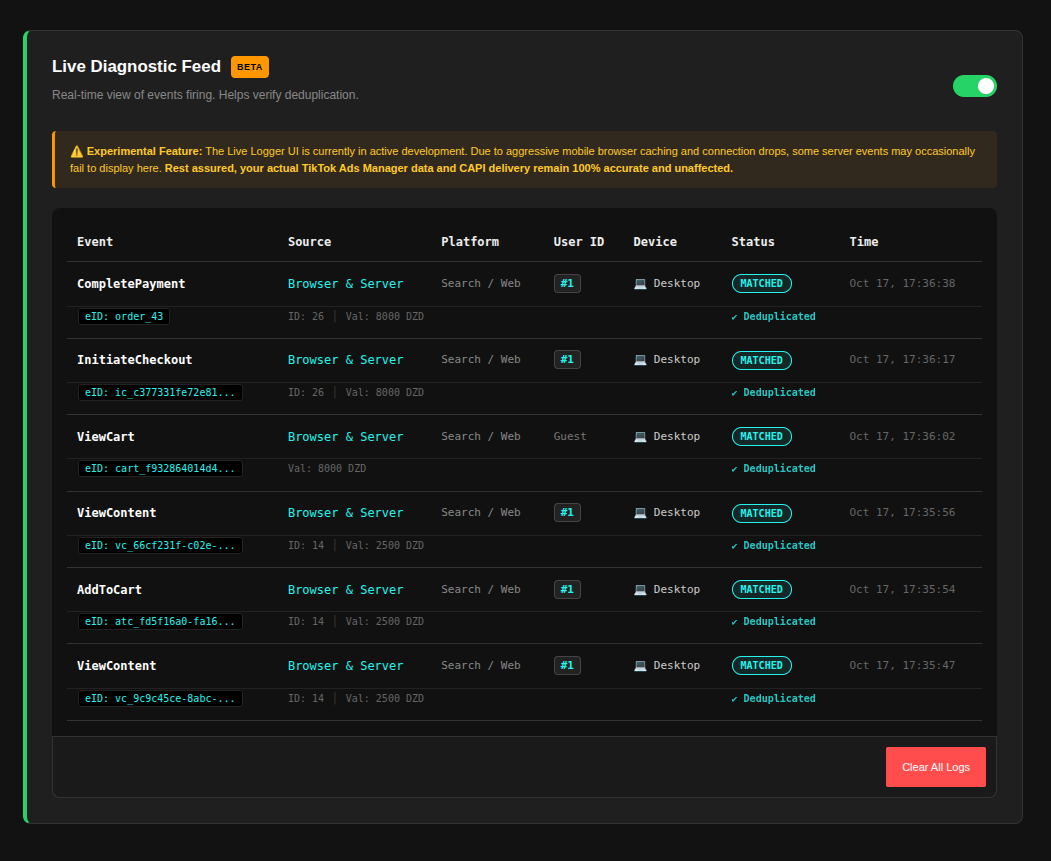
- Live Diagnostic Feed (beta): An optional log in your admin that shows the events being sent, so you can check deduplication.
- Product catalogue feed: A private feed URL you can give to TikTok Catalog.
安装:
- Make sure WooCommerce is installed and active.
- Upload the
pixelsyncfolder to/wp-content/plugins/, or install the plugin from the Plugins screen. - Activate PixelSync through the Plugins menu.
- Open PixelSync in the admin menu and enter your TikTok Pixel ID and, for server events, your Events API access token.
- Choose which events to track, save, and check them with TikTok's Test Events tool (you can enter a test event code in the settings).
屏幕截图:
常见问题:
How does event deduplication work?
PixelSync creates an event_id on the server and gives the same ID to the browser script. The browser Pixel and the server Conversions API both send that ID, so TikTok merges them into one event.
Do I need the Conversions API access token?
No. Without a token only browser events are sent. With a token, server events are also sent, which helps when browsers block tracking.
Is my customer's personal data sent to TikTok?
Only what TikTok needs to match events. Email addresses and phone numbers are hashed with SHA-256 before they are sent, and only when Advanced Matching is on. Technical data such as the visitor's IP address, browser user agent and the TikTok cookie and click ID (ttp, ttclid) are sent as they are, because TikTok uses them for matching. See the External Services section below.
Will this slow down my site?
The Pixel script loads asynchronously. Server events are sent while WordPress handles the request, with a 20-second timeout. If TikTok does not accept an event, the plugin retries it in the background using Action Scheduler, which comes with WooCommerce.
Does it work with page caching?
Yes, with one thing to watch. Some caching plugins can serve a stored page after an add-to-cart redirect, so the browser AddToCart event may be late or missing on that page. If you see this, exclude the cart and checkout pages from caching, and clear your site cache after updating the plugin.
Can I see what is being sent?
Yes. Turn on the Live Diagnostic Feed in the settings. It lists each event with its source (browser or server), status and event ID.
更新日志:
- First public release.
- Browser Pixel and server Conversions API with shared event IDs.
- Purchase tracking for standard and same-page checkouts.
- Advanced Matching with SHA-256 hashing.
- Live Diagnostic Feed and catalogue feed.
- Automatic upgrade of settings from earlier private versions.