Player Transfers for SportsPress
| 开发者 | savvasha |
|---|---|
| 更新时间 | 2026年10月15日 01:44 |
| PHP版本: | 7.4 及以上 |
| WordPress版本: | 7.1 |
| 版权: | GPLv2 or later |
| 版权网址: | 版权信息 |
详情介绍:
Player Transfers for SportsPress is for clubs, leagues and sports websites that run on SportsPress, whether you cover football (soccer) or any other team sport. SportsPress keeps a player's current and past teams, but not the transfers themselves: who moved, between which clubs and when. This plugin gives every transfer its own structured record (player, season, leagues, club in, club out and transfer date) and lets you publish transfer lists and history anywhere on your site.
Requirements: SportsPress and Meta Box must be installed and active. The plugin prompts you to install them if they are missing.
Live demo: See the plugin in action.
Free Features
- Player Transfers post type: a dedicated "Player Transfers" menu in your dashboard to add, edit and manage transfer records.
- SportsPress integration: pick the player from your SportsPress players, the clubs from your SportsPress teams, and the season and leagues from your SportsPress seasons and leagues. Each transfer is titled after the player automatically.
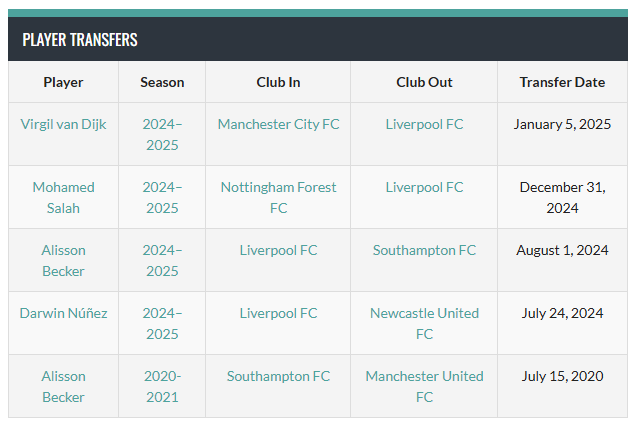
- [player-transfers] shortcode: show a table of transfers (player, season, club in, club out, transfer date) on any page or post, filtered by season, club, player or date range. Transfers are ordered by transfer date.
[player-transfers]
Example with all attributes:
[player-transfers title="Summer Transfers 2024" season="2024-2025" club_in="123" club_out="456" player="789" date_from="2024-06-01" date_to="2024-08-31"]
Example with title only:
[player-transfers title="Latest Transfers"]
Example with date range:
[player-transfers date_from="2024-01-01" date_to="2024-01-31"]
Example with club filters:
[player-transfers club_in="123" club_out="456"]
Shortcode available attributes:
title: Select a custom title (default title is "Player Transfers").season: Show all transfers made during a specific season (use season slug i.e. "2024-2025").club_in: Show all incoming transfers of a specific club (use club id).club_out: Show all outgoing transfers of a specific club (use club id).player: Show all transfers of a specific player (use player id).date_from: Show all transfers from a date and after (use date format YYYY-MM-DD).date_to: Show all transfers until a date (use date format YYYY-MM-DD). Need more than a transfer list? See everything Player Transfers for SportsPress Premium adds.
- Frontend submission: let users submit player transfers from the frontend with the
[submit-player-transfers]shortcode (saved as drafts for review by default). - Player Transfers templates for Teams and Players: add incoming and outgoing transfer tables to team pages, and a transfer history table to player pages, through the SportsPress layout settings.
- Career Total option: add the new season to the player's "Career Total" table upon transfer.
- Automatic player updates: for each transfer you choose whether to apply the changes to SportsPress. If you do, the player's current team, past teams and league, season and team assignments are updated for you when the transfer is saved, and a summary of the changes is stored with the transfer.
- Advanced filtering and sorting on the backend: admin columns for season, clubs, transfer date and transfer fee, with sorting by season and search and filters by season and club.
- Bundled Meta Box extensions: Admin Columns, Columns, Conditional Logic and Frontend Submission are included, plus an extra Transfer fee field.
- Compatible with the SportsPress Pro "Midseason Transfers" feature.
- Free version questions: WordPress.org support forum.
- Premium customers: contact us directly.
安装:
- Ensure that SportsPress and MetaBox are installed and activated.
- Upload the plugin files to the
/wp-content/plugins/player-transfers-for-sportspress/directory, or install the plugin through the WordPress plugins screen directly. - Activate the plugin through the 'Plugins' screen in WordPress.
屏幕截图:
常见问题:
Does this plugin work without SportsPress?
No, this plugin is an extension for SportsPress and requires it to function properly.
Does this plugin work without MetaBox plugin?
This plugin depends on extensions of MetaBox so is required to function properly.
Can I use this plugin for sports other than football (soccer)?
Yes! As long as you use SportsPress, the plugin can be used for any team-based sport.
Is there a free trial of Premium?
Yes. You can try every Premium feature free for 14 days, no credit card required.
Can I upgrade without losing data?
Yes. The free and Premium versions store transfers in the same post type and fields, so every transfer you have already recorded is kept when you upgrade. Premium only updates SportsPress player data when you save a transfer with "Apply changes to SportsPress" set to Yes.
更新日志:
1.5.0
- NEW: 14-day free trial of Premium, no credit card required.
- FIX: Setting "Apply changes to SportsPress" to No now leaves the player's SportsPress data unchanged (Premium version only).
- FIX: DataTables scripts and styles now load from the correct URL (Premium version only).
- MISC: Improved readme.
- Updated Freemius SDK to the latest version
- Update Freemius SDK to 2.13.1.
- NEW: Added "Career Total" update option for player transfers (Premium version only).
- CHANGE: Updating SportsPress data is now a required option for player transfers (Premium version only).
- Update Freemius SDK to 2.13.
- Update Freemius SDK to 2.12.2.
- NEW: Added date shortcode attributes.
- FIX: Support for MetaBox AIO.
- NEW: Added frontend submission functionality for Player Transfers, allowing users to submit transfers directly from the frontend (Premium version only).
- FIX: Resolved compatibility issue with latest WordPress version.
- TWEAK: Implemented TGM Plugin Activation for managing required plugin dependencies.
- TWEAK: Enhanced code structure for better performance.
- FIX: Player transfers should be ordered by date of transfer.
- NEW: Player Transfers template for Teams (Premium version only).
- NEW: Player Transfers templatge for Players (Premium version only).
- Add "title" attribute to shortcode.
- NEW: Add the option to update or not SportsPress data (Premium version only).
- NEW: Add a brief description of what was changed and when (Premium version only).
- Minor bug fixed.
- Minor bug fixed.
- Initial release.