Plug Chat
| 开发者 |
Themeplugs
themeshape themeplugs shagors |
|---|---|
| 更新时间 | 2026年4月5日 05:41 |
| PHP版本: | 7.4 及以上 |
| WordPress版本: | 6.9.4 |
| 版权: | GPL-2.0-or-later |
| 版权网址: | 版权信息 |
详情介绍:
- Get your Chat Plugin code from Meta Business Suite.
- Paste it into Plugchat settings.
- Choose left or right position.
- Save. Your Messenger chat widget is live.
- Simple embed code setup — paste and save.
- Position control — left or right side of the screen.
- Zero external scripts loaded by the plugin — Meta's embed code handles everything.
- Fully compatible with WordPress 6.9.
- Clean uninstall — all settings removed when you delete the plugin.
- Existing users with legacy settings are not affected — old configuration is preserved and accessible.
安装:
- Upload the plugin files to
/wp-content/plugins/plugchat, or install through the WordPress plugins screen. - Activate the plugin through the 'Plugins' screen.
- Go to Plugchat in the admin sidebar.
- Follow the on-screen guide to get your embed code from Meta Business Suite.
- Paste the code and save.
- Go to Meta Business Suite and select your Facebook Page.
- Click Inbox in the left sidebar, then the Settings gear icon.
- Select Chat Plugin.
- Click Set Up and customize your widget (color, greeting text, language).
- On the installation step, click Copy Code.
- Paste the full code into the Plugchat "Embed Code" field.
屏幕截图:
常见问题:
The chat widget is not showing on my website?
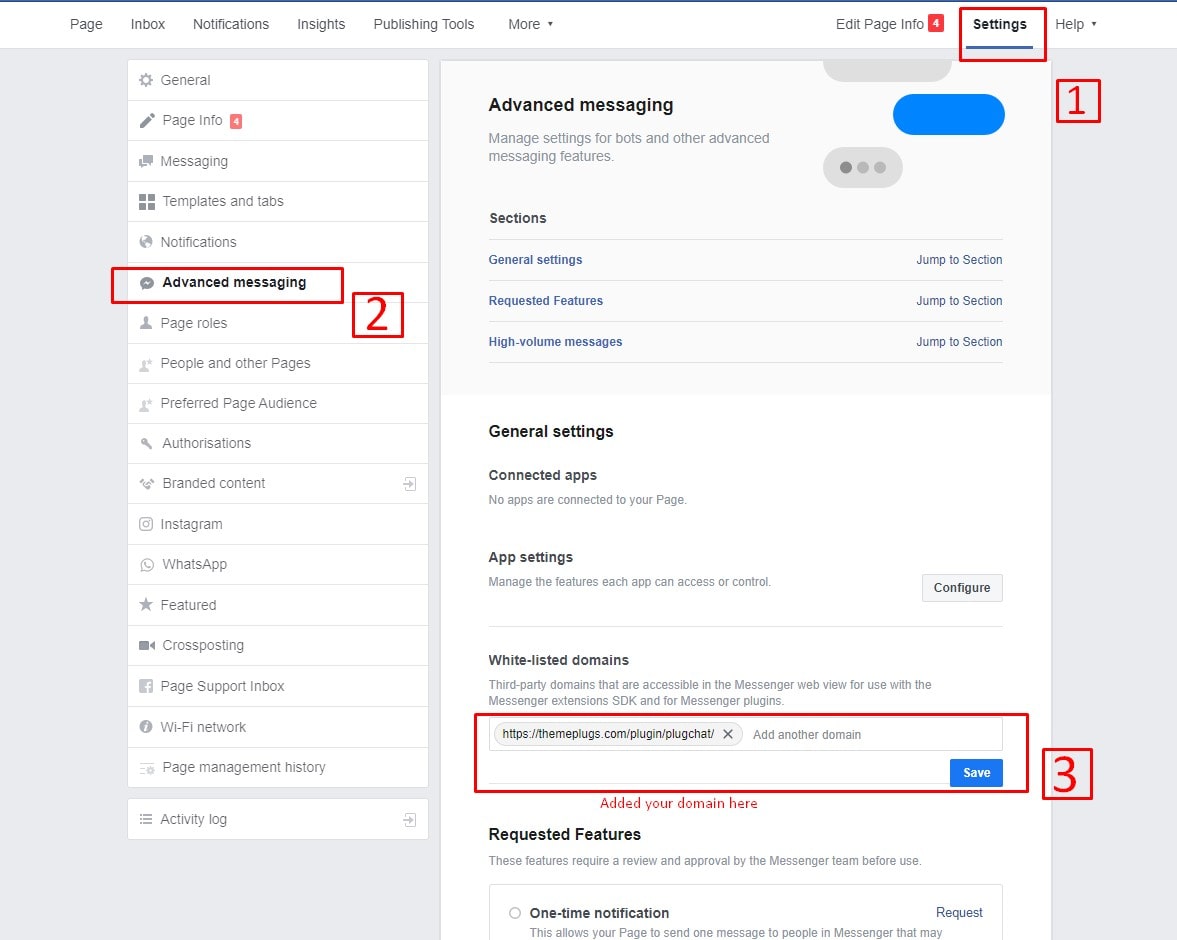
Make sure you have pasted a valid Meta Chat Plugin embed code in the settings. The code must contain a reference to facebook.com or messenger.com. Also ensure your domain is whitelisted in your Facebook Page's Chat Plugin settings.
I was using the old version with a Page ID. What should I do?
Your old settings are preserved under "Legacy Settings" on the Plugchat settings page. Follow the setup guide to get the new embed code from Meta Business Suite. Once you paste the new code and save, the new method takes priority automatically. Your old settings remain available for reference.
Can I display multiple chat widgets?
No. Only one Messenger chat widget can be active per page.
Does Plugchat collect any data?
No. Plugchat stores only your settings in the WordPress database. The chat itself runs entirely through Meta's servers.
What happens when I uninstall the plugin?
All plugin settings (embed code, position, and any legacy settings) are removed from your database. Deactivating the plugin does not delete settings.
The embed code field shows an error when I save?
The plugin validates that your code contains a reference to a Meta/Facebook domain. Make sure you are pasting the exact code from Meta Business Suite without modifications.
更新日志:
- Major rebuild: Plugin now uses Meta's Chat Plugin embed code instead of the retired SDK.
- New: Embed code textarea — paste your code from Meta Business Suite.
- New: On-screen setup guide with step-by-step instructions.
- New: Status indicator showing Active, Legacy Mode, or Not Configured.
- New: Admin notice on plugins page prompting setup or migration.
- New: Embed code validation — only accepts snippets with Meta/Facebook domains.
- Improved: Legacy settings preserved and accessible in a collapsible section.
- Improved: New embed code takes priority; legacy settings used as fallback only.
- Improved: No external scripts loaded by the plugin — Meta's embed handles its own SDK.
- Improved: Frontend CSS updated for new embed wrapper positioning.
- Backward compatible: All existing option values preserved. No data lost on upgrade.
- Security: Added sanitization callbacks to all settings.
- Security: Fixed unescaped output in frontend widget.
- Security: Added capability check on admin page.
- Performance: Admin assets scoped to plugin page only.
- Performance: Frontend assets skip loading when unconfigured.
- Updated: Facebook SDK URL updated.
- Updated: WordPress 6.9 compatibility.
- Fixed: uninstall.php now cleans up all options.
- WordPress 6.1.1 Version Compatibility Check.
- Initial public release.