Plugiva ClientGuard
| 开发者 | amitbiswas06 |
|---|---|
| 更新时间 | 2026年10月18日 22:34 |
| PHP版本: | 7.4 及以上 |
| WordPress版本: | 7.1 |
| 版权: | GPL v2 or later |
| 版权网址: | 版权信息 |
详情介绍:
define( 'PCGD_LOCK_CLIENT_MODE', true );
This can be added in wp-config.php or defined programmatically in custom code.
When enabled, Client Mode is forced on and cannot be turned off from the dashboard, helping maintain consistent protection.
ClientGuard also provides Sentinel, an activity and lifecycle event log for protected operations, configuration changes, bypass activity, and other ClientGuard events. Sentinel helps make changes and protection activity visible rather than leaving them unexplained.
On multisite installations, ClientGuard supports site-specific protection and Sentinel event handling while also covering relevant network-level operations.
Instead of blocking access aggressively, ClientGuard applies practical guardrails that let users continue working while reducing the chance of unintended changes.
ClientGuard is ideal for:
- Site owners managing their own WordPress site
- Developers handing off sites to clients
- Teams that want a simplified and safer admin experience
- Sites where administrative changes need to remain controlled and observable
安装:
- Upload the
plugiva-clientguardfolder to/wp-content/plugins/ - Activate the plugin through the Plugins menu
- Go to Settings → ClientGuard
- Enable Client Mode or configure individual protections as needed
屏幕截图:

常见问题:
Does this plugin completely block access?
No. ClientGuard simplifies access and guards critical operations. Protection is applied to specific operations and areas rather than blocking administrators entirely.
Does Client Mode prevent content editing?
No. Client Mode is designed to reduce administrative risks while allowing normal content management activities. Editors and administrators can continue managing content unless specific content has been protected using Content Protection.
What is the difference between Client Mode and individual protections?
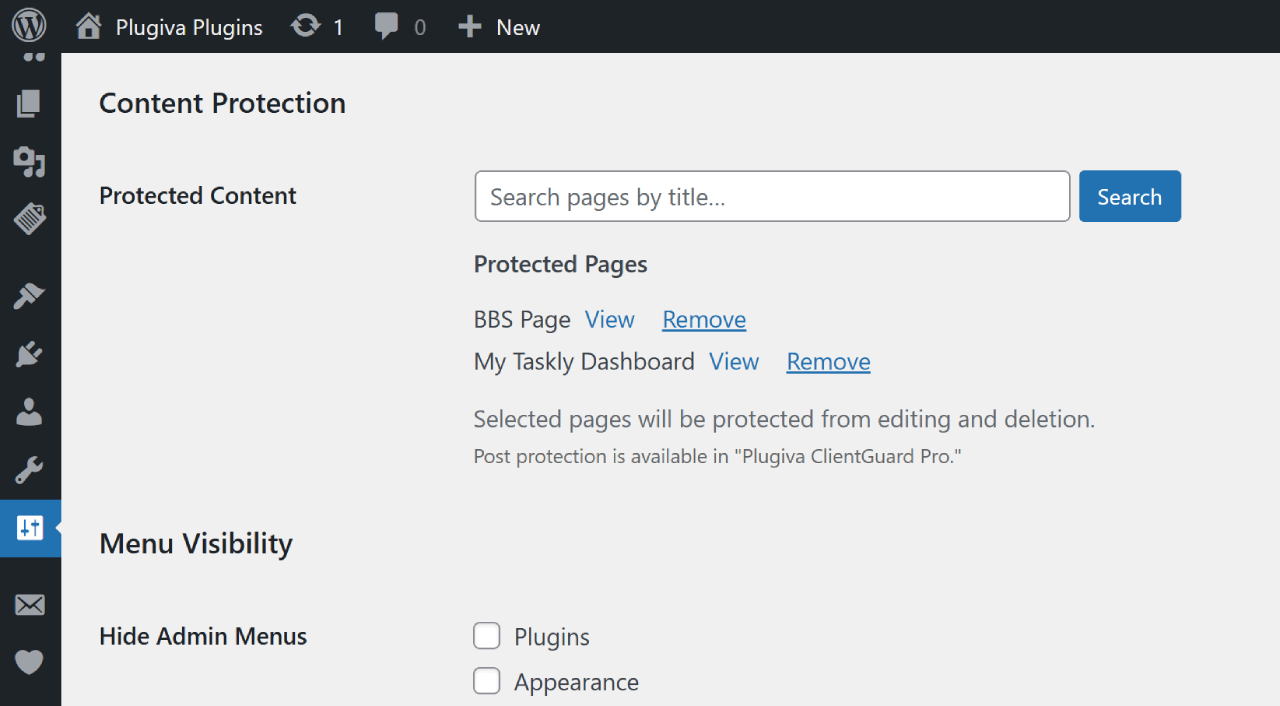
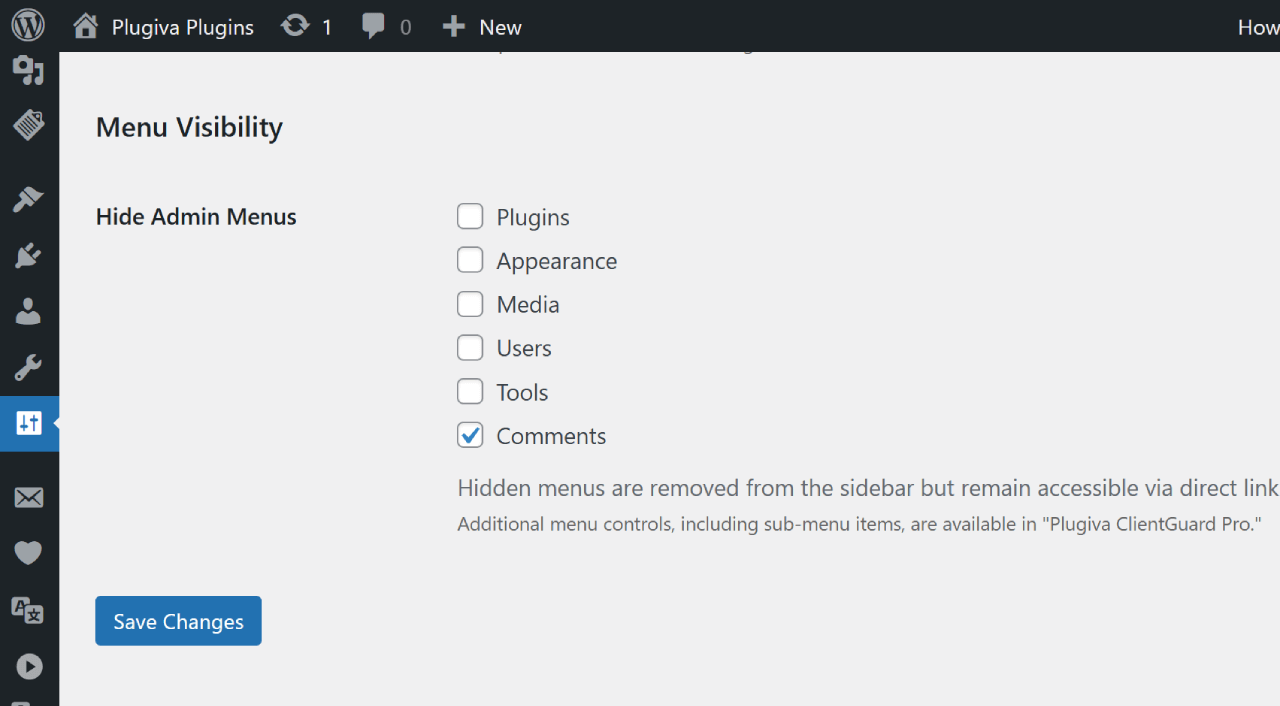
Client Mode applies a recommended set of protections automatically. Individual protections allow site owners to choose exactly which areas should be restricted, such as plugins, themes, Appearance management, protected content, or selected administrative menus.
Is this a security plugin?
No. ClientGuard is designed to prevent unintended changes and control sensitive WordPress operations, not to protect WordPress from attacks.
What happens to hidden admin areas?
ClientGuard simplifies the admin experience by hiding or managing certain areas to help prevent unintended changes.
Does it work with ACF (Advanced Custom Fields)?
Yes. ClientGuard can hide the ACF admin panel automatically when Client Mode is enabled, helping prevent accidental changes to custom fields.
Does ClientGuard work with WordPress AI and Connectors?
Yes. ClientGuard governs available WordPress AI and Connector administration areas through Client Mode, helping prevent unintended changes to these settings and operations.
Does ClientGuard work with multisite?
ClientGuard supports multisite installations, including site-specific protections and Sentinel event handling. Network-level plugin and theme operations are also covered where applicable.
What happens on uninstall?
ClientGuard removes its plugin settings and other plugin-specific data cleanly when it is uninstalled. Sentinel event logs are preserved by default and can be removed separately when developer cleanup is explicitly enabled.
更新日志:
- Strengthened protection for the active theme's
templateandstylesheetoptions against unauthorized updates and deletion. - Added protection against deletion of the
active_pluginsoption to prevent unintended deactivation of all plugins. - Improved no-op handling in Appearance and Site Identity option guards to avoid blocking or logging unchanged values.
- Improved consistency in protection checks for sidebar widgets, widget block settings, and Site Identity options.
- Fixed plugin deletion protection for plugins with their main file located directly in
wp-content/plugins/. - Improved filesystem path handling for both root-level and directory-based plugins.
- Added operational protection for plugin and theme installation, deletion, activation, deactivation, switching, and editing.
- Extended protection to critical settings, including Permalinks and Site Identity options.
- Extended Content Protection to prevent protected pages from being trashed or permanently deleted.
- Added protection for Site Editor and sidebar widget operations.
- Added protection for theme and plugin editor operations.
- Added Sentinel for ClientGuard-related configuration, operational, bypass, and lifecycle event logging.
- Added site-scoped Sentinel event history with retention, clearing, and export tools.
- Added multisite support for Sentinel event handling and network-level protection.
- Added developer filters for customizing protected Site Identity and Permalink options.
- Improved multisite handling, uninstall cleanup, and Sentinel lifecycle management.
- Added Appearance Governance to help prevent unintended changes to menus, widgets, customizer, and site editor settings.
- Added Lock Appearance Management as a standalone protection.
- Improved Client Mode governance to include Appearance management controls.
- Improved settings state handling for governance-managed options.
- Improved menu visibility UI consistency when Appearance Governance is active.
- Added dashboard governance for improved admin consistency.
- Hide WordPress AI dashboard widgets in Client Mode.
- Hide Activity and At a Glance dashboard widgets in Client Mode.
- Hide Activity and At a Glance dashboard widgets when admin menus are hidden.
- Improved dashboard simplification and client-facing usability.
- Improved admin bar consistency by respecting ClientGuard menu visibility settings
- Hidden menus are now also removed from relevant admin bar navigation shortcuts
- Protected content no longer shows frontend Edit shortcuts when editing is restricted
- Improved Client Mode navigation consistency across admin and frontend views
- Refined frontend admin bar governance architecture
- Improved compatibility with modern WordPress operational workflows introduced in WordPress 7.0
- Extended plugin installation protections to REST-based provisioning workflows
- Added Client Mode governance for WordPress AI and Connectors admin surfaces
- Suspends WordPress AI runtime features while Client Mode is active
- Improved operational consistency across admin and REST contexts
- Simplified admin experience by removing unnecessary notices
- Introduced centralized Client Mode messaging
- Added guided onboarding for Client Mode
- Hid critical settings like Site URLs from General Settings
- Improved UX by reducing friction and confusion
- Added nonce validation for secure actions
- Add configuration-based lock for Client Mode via
PCGD_LOCK_CLIENT_MODE - Introduce centralized settings state resolver for consistent UI behavior
- Improve settings and menu UI consistency under Client Mode
- Added Site URL protection to prevent login and access issues
- Added Permalink settings guard in Client Mode
- Improved admin safety with critical settings protection
- Added Client Mode for one-click admin protection
- Improved menu control and UI behavior
- Added ACF integration (auto-hide in Client Mode)
- Enhanced capability handling for plugins and themes
- Improved admin experience with clearer controls
- Refined plugin description and tags for improved clarity and discoverability.
- Initial release.