
Plugixa Team
| 开发者 |
zakaria04
freemius |
|---|---|
| 更新时间 | 2026年9月16日 18:41 |
| PHP版本: | 8.0 及以上 |
| WordPress版本: | 7.1 |
| 版权: | GPLv2 or later |
| 版权网址: | 版权信息 |
详情介绍:
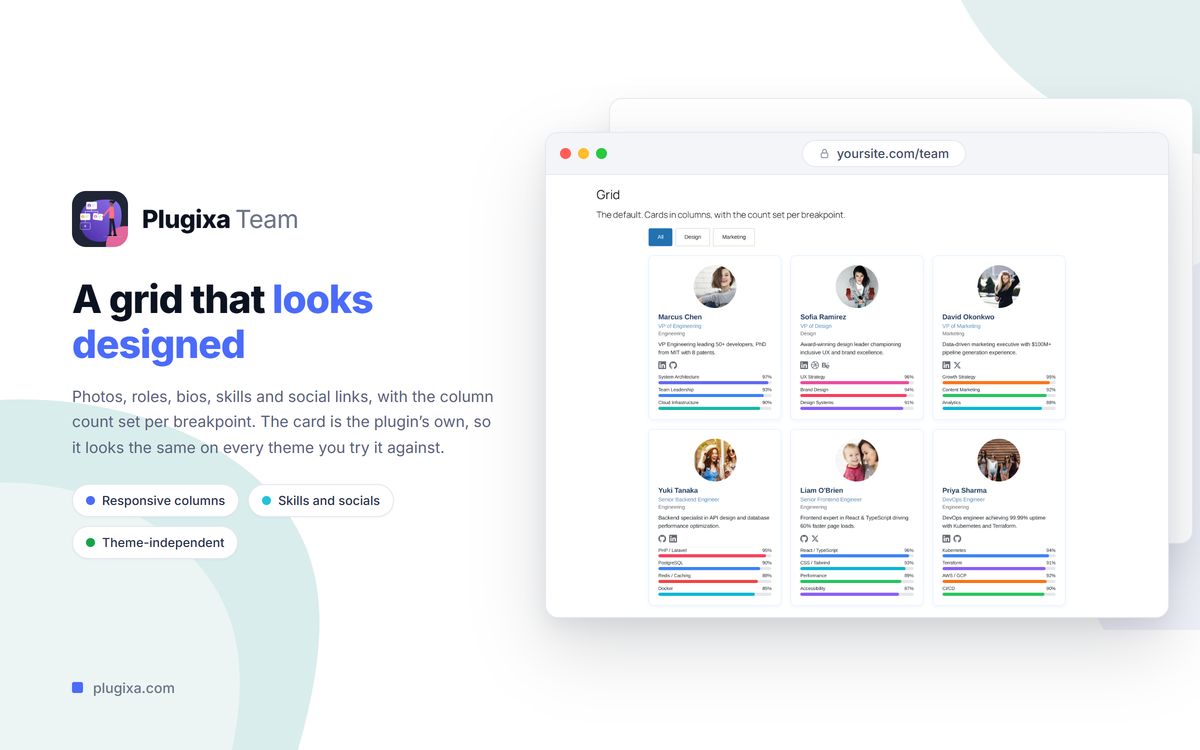
- Add your team members - photo, job title, department, bio, skills and social links
- Pick a layout and save it as a reusable View
- Drop in the
[plugixa_team]shortcode or the Plugixa Team block, and publish
- Fast, Material UI-based admin for members, groups, views and shortcodes
- Unlimited team members and groups
- Rich member profiles - photo, job title, department, full and short bio, email, phone, location, website and hire date
- Skills with progress bars, and links to 15 social platforms plus a website
- Ribbon badges and featured members
- Drag-and-drop ordering, across the whole team or per group
- Bulk publish, draft, feature and delete
- Grid and list layouts with built-in dark mode
- Unlimited saved Views and saved shortcodes, with a visual shortcode builder
- Visual view editor with live preview - layout, colours, typography, spacing, skill bars, social icons and group navigation
- Group navigation as tabs, pills or a dropdown, with optional member counts
- Numbered, Load More and infinite scroll pagination
- Gutenberg block for placing a team anywhere
- schema.org Person, Organization and ItemList JSON-LD, merged into the Yoast SEO and Rank Math graph when either is active
- WPML and Polylang support, including translatable members and groups
- Dashboard with team statistics
- REST API (
plugixateam/v1) and action/filter hooks
- Seven more layouts - masonry, carousel, table, inline, filter, accordion and org chart
- AI Team Generator - draft member profiles from a topic, a URL or a document
- Custom fields - 11 field types added to member profiles and templates
- Import and export - import from CSV or JSON, export to CSV, JSON or PDF
- Frontend member submission with
[plugixa_team_form], with optional Cloudflare Turnstile captcha - Elementor widget
- WooCommerce integration - a team tab on product pages
- One-click demo content to explore the plugin quickly
- Priority support
[plugixa_team]
Use a saved shortcode from the Shortcode Builder:
[plugixa_team id="3"]
With options (designs are configured via saved Views in the admin):
[plugixa_team view="list" group="leadership" limit="6"]
安装:
- WordPress 6.5 or greater
- PHP version 8.0 or greater
- MySQL version 5.7 or greater (or MariaDB 10.3 or greater)
- In your WordPress admin, go to Plugins > Add New
- Search for "Plugixa Team"
- Click Install Now, then Activate
- Open "Plugixa Team" in the admin menu and add your first team member
- Download the plugin ZIP
- Go to Plugins > Add New > Upload Plugin, choose the ZIP and click Install Now
(or upload the
plugixa-teamfolder to/wp-content/plugins/over FTP) - Activate the plugin through the Plugins menu
- Open "Plugixa Team" in the admin menu to add your team members
- Use the
[plugixa_team]shortcode or the Plugixa Team block to display them
屏幕截图:




常见问题:
Q. How do I add a team member?
After activating the plugin, open Plugixa Team in the WordPress admin menu, go to Members and click "Add Member". You get fields for the photo, job title, department, bio, contact details, skills and social links.
Q. How do I display my team on my site?
Use the [plugixa_team] shortcode or the Plugixa Team block on any page, post or widget area.
Q. What is a View?
A View is a saved, reusable display design - layout, colours, typography, spacing, group navigation and pagination. Reference it from a shortcode or the block, and editing the View updates every placement at once.
Q. Can I show only one department or group?
Yes. Add group="..." with a group slug, name or ID - several can be separated by commas - or pick the groups in the Shortcode Builder. department="..." filters by the member's department instead.
Q. Does it output structured data for SEO?
Yes. Every team is marked up with schema.org JSON-LD - Person, Organization and ItemList - so search engines can read it. When Yoast SEO or Rank Math is active, the team is added to their schema graph. Schema output can be switched off in the settings.
Q. Is it compatible with page builders?
Yes. The shortcode works in Gutenberg and major page builders, and the Plugixa Team block is included.
Q. Does it support translations?
Yes. Plugixa Team is compatible with WPML and Polylang, including translatable members and groups.
Q. Does it slow down my site?
No. The plugin's CSS and JavaScript load only on pages that display a team, and every asset is bundled with the plugin and served from your own server rather than a CDN.
Q. What is the difference between the free and Pro versions?
The free plugin is a complete team manager - grid and list layouts, Views, saved shortcodes, skills, social links, groups, pagination and schema.org structured data. Pro adds seven more layouts, the AI Team Generator, custom fields, import and export, frontend member submission, the Elementor widget, WooCommerce integration and demo content. See the Pro features.
Q. Where can I find the documentation?
Full documentation - installation, members and groups, Views, shortcode reference, multilingual setup and developer hooks - is at https://www.plugixa.com/documentation/plugixa-team
更新日志:
- Initial release
- React admin panel for team members, groups, views, and shortcodes
- Grid and list layouts with saved views and shortcodes
- Skills with progress bars and social links for every member
- Group navigation with numbered, Load More, and infinite scroll pagination
- schema.org Person, Organization, and ItemList JSON-LD with Yoast SEO and Rank Math integration
- Gutenberg block
- WPML and Polylang multilingual support
- REST API and developer hooks