
Polyreply – AI Helpdesk & Live Chat for WooCommerce Customer Support
| 开发者 | polyreply |
|---|---|
| 更新时间 | 2026年11月10日 04:25 |
| PHP版本: | 7.4 及以上 |
| WordPress版本: | 7.1 |
| 版权: | GPLv2 or later |
| 版权网址: | 版权信息 |
详情介绍:
- Live chat on your store. The chat appears on every page as soon as you connect, in the visitor's language. No theme edits.
- One inbox for chat and email. Statuses, assignment, internal notes and tags, for a team of one or twenty.
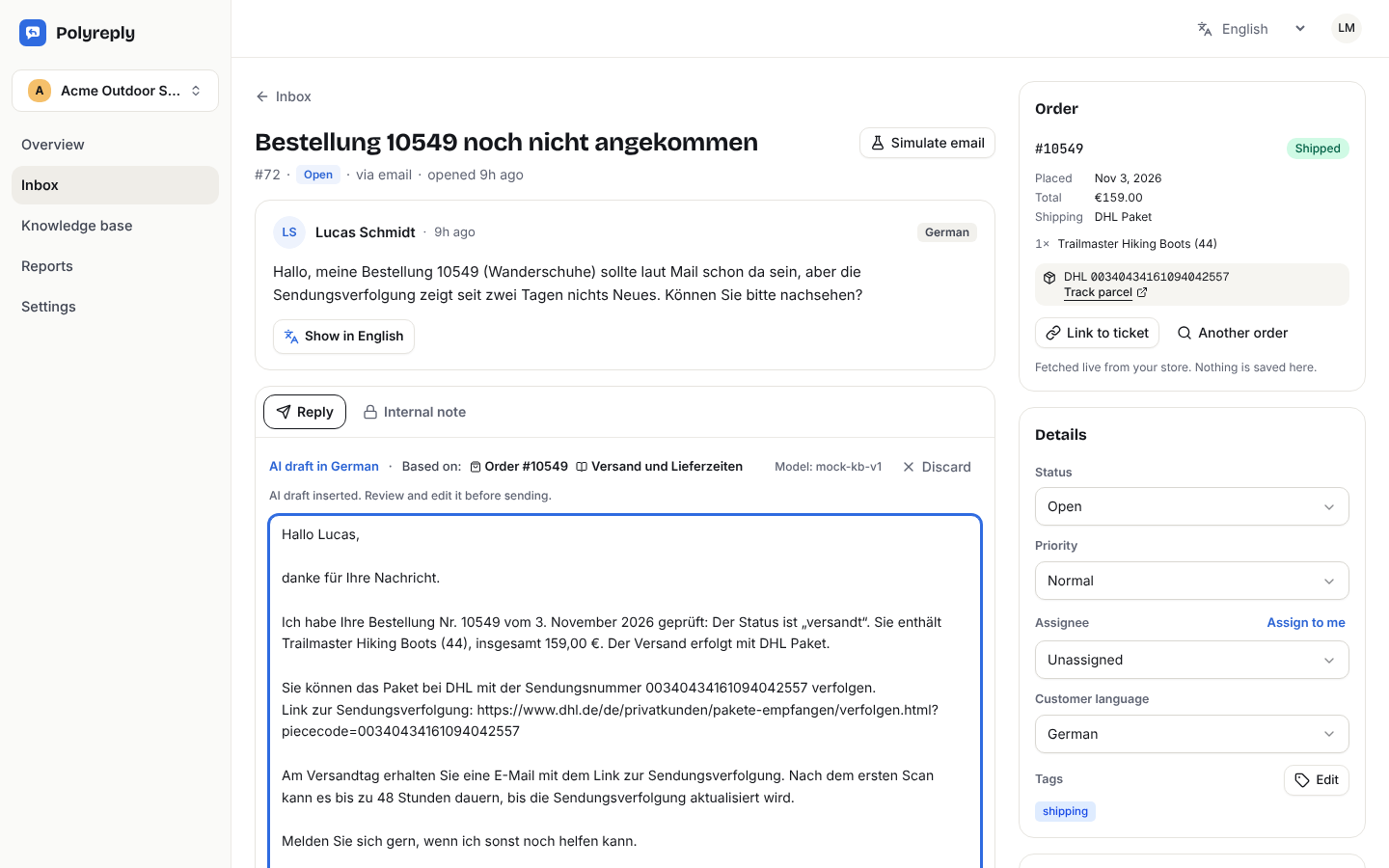
- Orders next to every conversation. Status, products, total, shipping method and tracking number, read live from your store when an agent opens the conversation.
- AI reply drafts in the customer's language. Drafts are based on your help articles and the real order status. Customers can write in 28 languages; the plugin and the dashboard are in English, Spanish, German, French, Portuguese and Italian.
- Tracking from the plugins you already use. WooCommerce Shipment Tracking, Advanced Shipment Tracking, YITH WooCommerce Order & Shipment Tracking, Orders Tracking for WooCommerce and AfterShip are read automatically.
- Connect in one click. Create a free account (or sign in) from WordPress and come back with the store connected. No API keys to copy.
- An order is only shown when its number and the customer's email address both match.
- Orders are read live and never copied. Only the order number is saved with the conversation.
- Addresses, phone numbers, payment details and order notes never leave your store.
- Every request between your store and the service is signed and expires after five minutes.
- The "Powered by Polyreply" line in the chat is off unless you turn it on.
polyreply_wc_order_trackingfilters the tracking numbers of an order.polyreply_wc_order_datafilters the order data that is shared.polyreply_wc_show_widgethides the chat widget on chosen pages.- Order numbers from sequential order number plugins are supported through WooCommerce's
woocommerce_shortcode_order_tracking_order_idfilter.
安装:
- Install and activate WooCommerce.
- Install this plugin from Plugins → Add New, or upload the zip file, and activate it.
- In WordPress, go to WooCommerce → Polyreply and click Create a free account and connect, or I already have an account.
- Create your account or sign in, choose the workspace and click Connect. You are sent back to WordPress with the store connected.
- Optional: click Test connection, then open your store and send a test message from the chat.
屏幕截图:


常见问题:
Is Polyreply a helpdesk, a ticket system or a chatbot?
It is a helpdesk with live chat. Every chat or email becomes a ticket (a conversation with a status, an assignee, notes and tags) in one shared inbox. It is not a chatbot that answers customers on its own: the AI only drafts replies, and a person on your team sends them.
Does it cost anything?
The plugin is free. The Polyreply service has a Free plan (2 team seats, 100 new conversations and 30 AI drafts per month) and paid plans with higher limits; prices are at https://polyreply.app/#pricing. Nothing is charged unless a store owner chooses a paid plan.
Will the AI answer my customers on its own?
No. The AI only writes drafts. Every reply is read and sent by a person on your team, and you can stop using drafts at any time.
Is it GDPR compliant? What data leaves my store?
Nothing is sent before you connect. After that, visitors who use the chat send their messages, name and email; the service reads one order at a time, only when the number and the customer's email match, and never copies it. Addresses, phone numbers and payment details stay in your store. Polyreply offers data processing terms (Article 28 GDPR) in its terms of service, and the plugin adds suggested text to your privacy policy under Settings → Privacy. The full list of data is under "External services" below.
Will it slow down my store?
No. The chat loader is a small script that loads asynchronously in the footer after your page, and the chat itself opens in a separate frame only when a visitor clicks it. Nothing runs on checkout or in your database while visitors browse.
Do I need to create WooCommerce API keys?
No. Connecting sets up a secret that only your store and Polyreply know. It signs every request, and the plugin only answers the requests it was built for.
Is the one-click connection safe?
It follows the OAuth authorization code flow with PKCE. The code that comes back through your browser is single use, expires after 10 minutes, and only works together with a secret that never leaves your WordPress, for the address the flow started from. The connection is only made after you confirm it while signed in to Polyreply.
The connection says the attempt has expired. What now?
Click the button again. An attempt is valid for 30 minutes and only for the WordPress user who started it. If your WordPress admin and your store use different domains, connect with a code instead.
Which languages are supported?
Customers can write in any language: replies are drafted in the language they used. The plugin's own screens are available in English, Spanish, German, French, Portuguese and Italian, and more languages can be added on translate.wordpress.org.
Can my agents see all my orders?
No. An order is only shown when the customer's email address matches the order's billing email, and only one order is read at a time.
What happens if I disconnect or delete the plugin?
Disconnecting removes the chat widget from your store and stops order lookups. Deleting the plugin also removes all its settings from your database. Your conversations stay in your Polyreply account, and you can export or delete them there.
How do I hide the chat on some pages?
Use the polyreply_wc_show_widget filter, for example add_filter( 'polyreply_wc_show_widget', function () { return ! is_checkout(); } );.
更新日志:
- Clearer plugin name and description on WordPress.org. No functional changes.
- New setting: show "Powered by Polyreply" in the chat. Off unless you turn it on.
- Your refund, shipping, terms and FAQ pages can be imported into Polyreply as draft help articles, so AI drafts know your policies from day one.
- Chat script updated: it can show an optional greeting bubble (not used by the plugin unless you add one).
- One-click connection: create a free account or sign in and come back connected, with no code to copy (OAuth-style, with PKCE).
- New "Test connection" button and a link to send a test message from your store.
- A short welcome notice after activation.
- The plugin follows the service if it moves to a new address.
- Links to
#open-chaton your store open the chat.
- First release: connection by code, chat widget, signed order lookups with tracking, translations in six languages.