
Portrait-Archiv Photostore – Sell Photos & Client Galleries
| 开发者 |
Thomas Schiffler
tschiffler |
|---|---|
| 更新时间 | 2026年9月11日 00:57 |
| 捐献地址: | 去捐款 |
| PHP版本: | 8.1 及以上 |
| WordPress版本: | 7.1 |
| 版权: | GPLv2 or later |
| 版权网址: | 版权信息 |
标签
下载
详情介绍:
- Built for school & kindergarten photography (QR codes). Shoot whole classes with per-child QR codes: on upload every child’s photos are sorted into their own protected folder. Parents enter the personal code from their child’s card and see only their own child plus the group photos — never another family’s children. Enforced on the server for real privacy (GDPR), with a 7-day, encrypted share link for grandparents. This is a genuine unique selling point for your studio.
- Publish as many galleries as you like — portraits, weddings, events, and specialised jobs like school and kindergarten photography.
- Not just downloads. Your customers order real photo prints, wall art, canvas, gifts and digital downloads — you decide which products and at what price.
- Full fulfilment through us. Order intake, payment processing, production and direct shipping to the end customer all happen through Portrait-Service. You never touch an order.
- Monthly commission payout with a clear statement — you keep the margin between the lab price and your own sale price.
- Access-protected galleries for sensitive jobs: public list, guest password or gallery code (ideal for schools and kindergartens).
- Volume discounts (tiered prices) to encourage larger orders — shown to your customers automatically.
- Edit only what actually sells. Upload your photos straight out of the camera and mark them as unedited. Customers see and order them as they are; you retouch just the ordered ones and upload the finished file, and only then does production start. A whole shoot no longer has to be retouched on spec.
- Connect your Portrait-Archiv account in one step, or create a new free account right from WordPress — no tokens to copy.
- Manage galleries: create them, upload images, set visibility and edit title, date and price list. Uploads go into the gallery folder of your choice — pick an existing subfolder or name a new one — and you decide per upload whether the photos are finished or still to be edited.
- Manage price lists: your purchase price, your sale price and your net profit at a glance; add or remove products; set tiered prices.
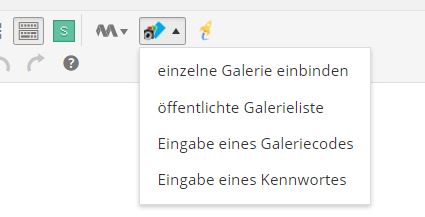
- Embed a gallery with a Gutenberg block (just pick it from a dropdown) or a shortcode.
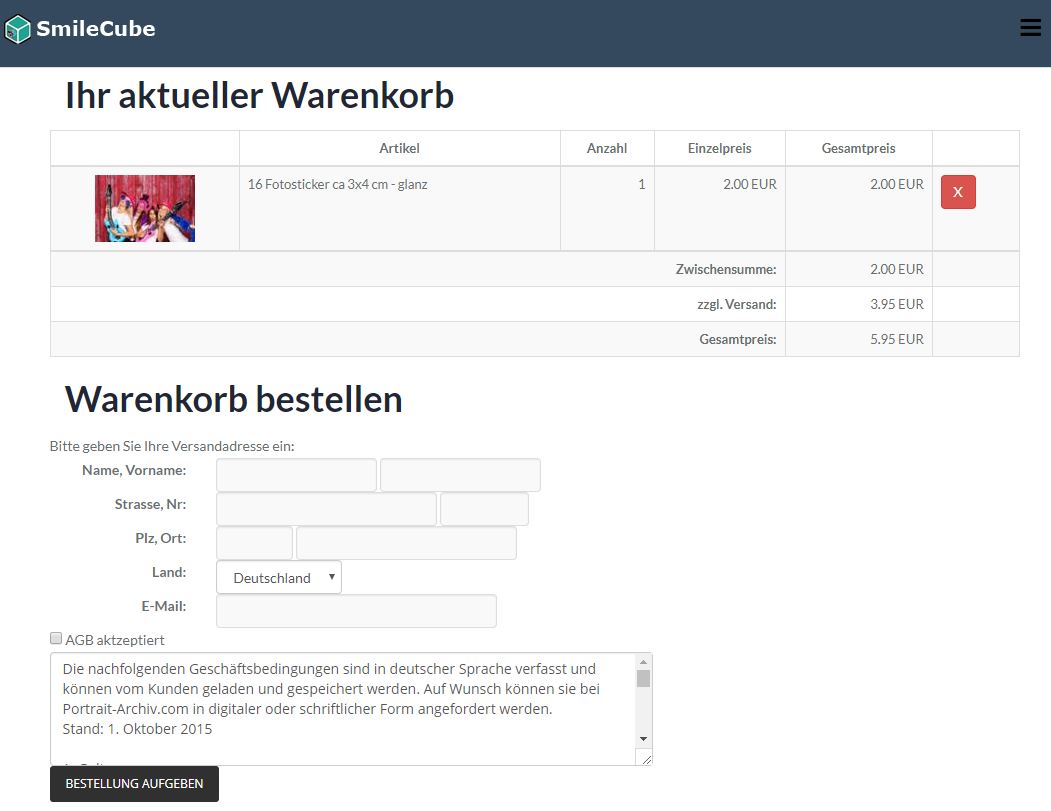
- Give the cart its own page - one block, and every cart link leads there.
- See how often each gallery was opened: a "Views" column in the gallery list and a day-by-day chart per gallery, with the visitors from your own website and those from Portrait-Archiv.com side by side.
- Make the galleries look like your website — without writing CSS: accent color for buttons, links and prices, preview images cropped to squares or shown as whole photos, their size, rounded or square corners, and what shows behind them. With a live preview right next to the settings.
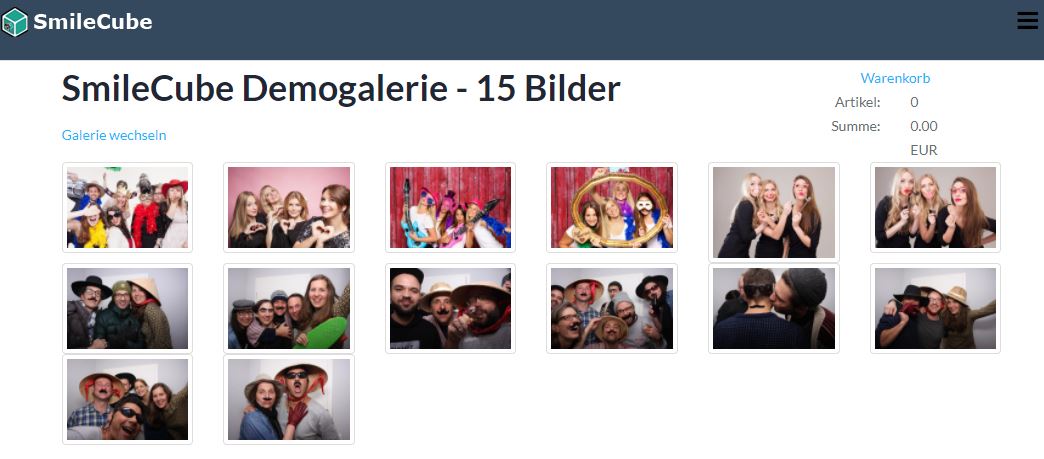
- A modern, fast, mobile-friendly shop for your visitors; payment by prepayment or PayPal. Your public list of galleries is split into pages, so even a large archive opens quickly.
安装:
- Upload the plugin folder 'portrait-archiv-shop' to wp-content/plugins (or install it from the Plugins screen).
- Activate the plugin on the "Plugins" screen in the WordPress admin.
- Open "Portrait-Archiv > Account" and connect your Portrait-Archiv account (sign in, or create a new account).
- Add a gallery to any page using the "Portrait-Archiv: Gallery" block or a shortcode. See "Portrait-Archiv > How-To" after activation for a full walkthrough of every feature.
屏幕截图:



常见问题:
How do I earn money with this?
You set your own sale price for every product. You keep the margin between the lab's production price and your sale price. Portrait-Service handles order intake, payment, production and shipping for you and pays out your earnings every month with a detailed commission statement. See portrait-service.com for the current terms.
What does it cost?
Creating a Portrait-Archiv.com account and using this plugin is free. There is no monthly fee; Portrait-Service earns through the production of ordered prints. You always define your own sale prices.
Do I need a Portrait-Archiv.com account?
Yes. The plugin is the WordPress front end for your Portrait-Archiv.com account. You can create a free account directly from the plugin ("Account" page) or connect an existing one — no tokens to copy.
Can I use it for school and kindergarten photography?
Yes — that is one of the plugin's key strengths. You create the QR-code event and generate the per-child QR codes on Portrait-Archiv; embedding the gallery, the code entry and ordering then run through this plugin. Each child gets a personal code; parents see only their own child plus the group photos and never another family's children. The access check runs on the server (GDPR-friendly), and parents can share a 7-day, encrypted link with relatives.
Can I use the plugin outside of Germany?
In principle yes. Please note, however, that some labs only ship photo prints, posters or canvases within Germany. Selling digital products is of course possible worldwide. To register a Portrait-Archiv.com account from abroad, please contact us via Portrait-Service.com.
How do I publish galleries?
Open "Portrait-Archiv > Galleries" and create a new gallery (optionally choosing a price list), then upload your images. Galleries you already published on Portrait-Archiv.com appear in the list automatically.
Can I upload photos before I have edited them?
Yes. On the upload page you mark an upload as unedited. Customers see and order those photos as they are; each order containing one of them waits for you, and production starts once you have uploaded the retouched file. So you only edit the photos that actually sell. Customers are told in the shop that such an order takes a little longer — you can reword that notice under Settings. Finished and unedited photos can sit side by side in the same gallery.
Can I sort a shoot into folders?
Yes. Before uploading you pick the target folder: the gallery’s main folder, an existing subfolder, or a new one you name right there. One folder per group, class or family keeps a large shoot tidy, and visitors switch between the folders inside the gallery.
Can I see how often my galleries were opened?
Yes. "Portrait-Archiv > Galleries" shows the views of the last 30 days per gallery, and every gallery has a statistics page with the daily course: visitors who came through your own website, visitors who came through Portrait-Archiv.com, and the orders of the same day — for 30, 90 or 365 days. A visitor counts once per gallery and browser session, so reloading a page does not inflate the number. The counting happens at Portrait-Archiv, so both routes are measured the same way and the plugin only displays the result.
I published a new gallery but it does not show up
The plugin keeps a small local cache to speed up page loads and avoid unnecessary requests. Galleries are synced automatically in the background (the interval is configurable under "Portrait-Archiv > Settings"). For an immediate update, click "Refresh galleries now" on the Settings page.
更新日志:
- Shipping costs are no longer a surprise at the end. While browsing, the image view now shows the cart as a subtotal with the shipping on its own line right underneath, so nobody has to guess whether shipping is still to come; where shipping costs nothing, it says so instead of showing "0.00". The cart page also names the country the shipping was calculated for, recalculates as soon as a different country is chosen, and says plainly when the items cannot be shipped there - previously it always quoted the German rate and a failed calculation could even read as free shipping. The cart button above the photos now shows just the number of items: a price there was a number without context, since it is the picture and the cart that carry the prices.
- Browsing galleries feels quicker and works the way a phone should. Turning to the next page used to do nothing visible until the server answered, and then the whole grid jumped into place; the page now fills with grey placeholders the moment you click, in the same size and shape as the photos, so nothing shifts around once the pictures arrive. In the image view you can swipe left and right to move between photos instead of aiming for the small arrows - the arrows and the arrow keys keep working as before, and swiping up and down still scrolls as usual.
- A link to a single photo works again. Sharing or bookmarking one photo used to open a page with an empty frame - no title, no photo, no product list. Such a link now opens the gallery and shows that photo right away in the normal image view, with product choice, cart and the arrows to browse on. Galleries that are inactive or password-protected stay that way: the link leads to the password prompt, not past it.
- The public gallery list is much faster and no longer chokes on large archives. It used to load every single gallery in full - images and price list - just to show a title and a preview, so a site with a few hundred galleries took forever to appear. Titles and links now come straight from WordPress and are there instantly (search engines finally see them, too), the list is split into pages - you decide how many galleries per page under Settings - and a preview image is only fetched for the galleries a visitor actually scrolls to.
- You can now adapt the look of your galleries to your own website, without writing a single line of CSS: pick an accent color for buttons, links and prices, decide whether preview images are cropped to squares or shown as whole photos (portraits are no longer cut off), choose how large the photos appear in the grid, switch corners between softly rounded and square, and let your own page background show through behind the photos. Everything sits under Settings, with a live preview next to the controls, and the text on colored buttons switches between white and dark on its own so it always stays readable. Galleries you never touch keep exactly the look they have today.
- You can now see how often each gallery was opened, without leaving WordPress. The gallery list has a "Views" column for the last 30 days, and every gallery has a statistics page: a chart of the daily course, the two access routes side by side - visitors who came through your own website and visitors who came through Portrait-Archiv.com - and the orders of the same day, for 30, 90 or 365 days. The numbers are the ones Portrait-Archiv keeps for both routes; WordPress deliberately keeps no second count of its own, because two counts would inevitably drift apart (caching, bots, deleted cookies) and each would only ever see one channel.
- Visits to your galleries on your own website are now reported to Portrait-Archiv, so the gallery statistics there finally show them. Until now that column stayed empty: the plugin caches its gallery requests, so no matter whether one visitor came or a hundred, Portrait-Archiv saw at most one request every five minutes. A visit is now counted once per gallery and browser session, at the moment a visitor actually enters the gallery - not when a preview image loads in the gallery list, and in a QR-code event only once the access code has been entered. The report is sent in the background and never delays your page, and a session cookie (
pawps_visits) makes sure the same visitor is not counted twice; it holds no personal data.
- In a QR-code event, you can now decide what visitors see first: the photos of their own children, or the group photos. Until now the group photos always came first, so parents had to scroll past them to reach the pictures they entered the code for. The new default is children first; switch it under Settings if you prefer it the other way round. Paging and the arrows in the image view follow the order you chose.
- Student ID cards can now be ordered from your website. Until now they behaved like an ordinary print: the customer could buy one, but the details that belong on the card - name, class, date of birth - were never asked for, so the order arrived unproducible. Cards now open a form with exactly the fields you defined in your card template, and a live preview shows the finished card while the customer types. Cards only appear in galleries you assigned a template to, and only on portrait photos - a landscape shot would end up on the card in the wrong proportions. The entered details are listed in the cart, so nobody orders a card with a typo in the name.
- The cart can now live on a page of its own: add the "Portrait-Archiv: Cart" block to a page and every cart link leads there, so you can put "Cart" in your menu. Until now the cart took over whichever gallery page the visitor happened to be on — the page title then said one thing while the content showed another. Nothing changes for existing sites without such a page.
- Customers now see a note on photos you uploaded as unedited - in the image view and in the cart - so nobody is surprised that such an order takes a little longer. The wording is yours: leave it as it is, or write your own under Settings.
- Photos can now be uploaded into a subfolder of a gallery. Until now every upload landed in the gallery’s main folder, no matter how big the shoot was. The upload page now offers the gallery’s existing folders and lets you create a new one by simply typing its name - one folder per group, class or family, for example. Visitors switch between the folders inside the gallery.
- New: you can mark an upload as unedited and retouch each photo only after it has been ordered. Customers see and order the photos as they are; every order containing an unedited photo then waits for you, and production starts once you have uploaded the finished file. That saves editing a whole shoot up front - you only work on what actually sells. The upload page explains the workflow, remembers your choice per gallery and marks such galleries in the list. Both states can be mixed inside one gallery.
- Adding a photo to the cart is now clearly confirmed. Until now the confirmation appeared as a small note at the very bottom of the browser window - several hundred pixels away from the button you had just clicked in the image view - and disappeared after two seconds. Many customers never saw it and were left unsure whether the item had been added at all. The button itself now confirms the success, and a permanent cart line appears right underneath it: number of items, total, and a link straight to the cart.
- Fixed: the cart columns were all left-aligned. A base rule for table cells (
[data-pawps-basket] td) outweighed the alignment helper classes the templates were setting, so quantities, unit prices, totals and the subtotal block all sat on the left - and prices no longer lined up at all once one of them reached two digits. Prices now sit right-aligned with fixed-width digits, and the subtotal lines sit next to their amounts. - The quantity of a digital download is shown in the same kind of field as an editable quantity, just not editable. It stays fixed at one per photo, as before, but a bare number sat visibly offset from the input fields in the rows above and below it. The number itself is shown in full contrast - dimming the whole field made it hard to read.
- The payment method selection is styled at all now. It had no styling whatsoever, so the browser drew a default fieldset and ran the radio button, its label and its description together into one block of text - the description ended up under the radio button instead of under the label it belongs to. Each method is now a clickable card with the description beside the radio button, and the selected one is highlighted. The bank details on the order confirmation got the same treatment.
- Fixed: with the gallery list on your front page, clicking a gallery showed your blog posts instead of the gallery. The plugin registered its own URL parameters as WordPress query variables; that makes WordPress leave a static front page and fall back to the post list. No code ever read them that way, so they are gone.
- The gallery code and guest password forms now look like the rest of the shop. They were plain unstyled forms carrying a WordPress admin button class that does nothing on the front end, so they showed up as bare browser defaults next to the styled gallery. Both now use the same card layout as the QR code prompt, and an error message appears inside that card.
- The gallery list is centred. Cards used to stretch across the full row, which made a single gallery enormous and a half-filled last row look pushed to the left. Cards now keep their size and the row is centred - one gallery sits in the middle, two sit side by side.
- Galleries are no longer squeezed into the text column. The gallery and gallery-list blocks now offer WordPress's standard "Wide width" and "Full width" settings from the block toolbar, and use wide by default. Modern block themes give ordinary page content only around 620 pixels — too narrow for the thumbnail grid, and narrow enough that the two-column image detail view collapsed into one. Existing gallery blocks pick up the wider layout automatically; use the block toolbar to change the width of an individual block, or the shortcode if you want the plain content width.
- Fixed: a gallery list that could stay empty after a failed update. The plugin remembers when it last fetched your galleries so it only has to ask for what changed. That marker was moved forward even when the request had failed - after which every unchanged gallery counted as "already known" and was skipped, and the list stayed empty until you happened to edit a gallery. The marker now only moves after a successful fetch, and an empty local list always triggers a full fetch, so an affected site repairs itself on the next update.
- Fixed: entering a wrong gallery code or guest password now tells you so. The message was there in the code but never reached the page - the form simply came back blank, which looked like the site was broken.
- Fixed: on a WordPress that stores its data in SQLite instead of MySQL, the plugin failed to create one of its own tables, and the whole front end came up empty - gallery lists, embedded galleries and gallery codes all reported that the gallery was not available, while the admin screens looked perfectly fine because they read live from Portrait-Archiv. One column used the MySQL type name LONG, which the SQLite driver rejects. Existing sites are repaired on update; your per-gallery visibility settings and guest passwords are kept.
- The checkout no longer asks customers to “accept” the privacy policy: the policy is still shown in full before ordering, but as information rather than a tick box. Its purpose is to tell you how your order data is handled, which is required by law anyway — you cannot decline it and still order, so demanding a tick was misleading. The terms and conditions still require an active tick, as before.
- Sign-up now asks you to accept Portrait-Service's terms and conditions: the “create a free account” form has a required checkbox with a link to the terms, and the account is only created once you have ticked it. Signing up through the plugin concludes a contract with Portrait-Service, so you should see the terms first. Your data is handled as described in the linked privacy policy — that is information, not something you have to tick.
- Price lists now load through Portrait-Archiv’s dedicated price list interface. Your lists, prices, volume discounts and product sets are unchanged — but the plugin now gets a precise answer when something goes wrong, instead of a generic failure it has to guess about.
- Clearer message on the price list page when your account link has not been confirmed yet: you are told to confirm the activation email, instead of being shown an empty list that looks like you have no price lists.
- Protected image delivery: photos are now served through signed, short-lived image addresses. Copying an image URL out of a gallery no longer gives lasting access — the address stops working after a few hours. This matters most for school and kindergarten photography, where a child's portrait must not stay reachable for anyone who once got hold of the link.
- The plugin now ties its own caching to the lifetime of those image addresses. Cached gallery data and link previews (Open Graph / Twitter cards) can never hand out an address that the image server has already stopped accepting, so preview images in messengers and social networks keep working.
- QR code events (school & kindergarten photography): galleries where every child has its own password-protected folder are now fully supported. Visitors first enter the personal access code from their child's photo card; only then are that child's photos and the group photos shown — together, as one simple gallery (no folder navigation). Parents with several children in the same class can add each code and see all of their photos at once.
- Privacy by design (GDPR): for QR code galleries the plugin never reveals protected folders, image lists, thumbnails or single images before a valid code has been entered — the access check is enforced on the server, one child's code never unlocks another child, and such galleries can no longer be added to the public gallery list.
- Share link for QR galleries: the “Share gallery” button now creates a link that opens the unlocked photos directly for the recipient (e.g. to share with grandparents) — valid for 7 days, encrypted so the actual access code is never exposed in the link.
- Digital downloads are now limited to one per photo: the quantity is fixed at 1 in the order dialog and in the cart (you can't order the same download of a photo multiple times). Enforced on the server as well.
- Volume discounts are now applied reliably in the order dialog even when a product has several price tiers (the correct tier price is always shown for the chosen quantity).
- The image lightbox now steps through photos smoothly with the arrows/keyboard, wrapping around at the first and last image instead of showing a “could not load the image” error at the ends.
- On the gallery-code page, visitors can now reset an entered code and enter a different one (the “switch gallery” link works there too).
- Product sets (bundles): photographers can now offer several products as one package with a single fixed price, right in the pricelist editor. Customers buy the set in the shop; multi-motif sets open a configurator to assign photos to the parts of the set.
- Set configurator: the photo picker now offers subfolder selection and pagination just like the normal gallery view, and the cancel / add-to-cart buttons sit directly below the set's items (before the photos) instead of getting lost at the bottom.
- Pricelist editor: products and articles are now sorted alphabetically (letters before numbers), so e.g. "Fotoabzüge" comes first and "16 Fotosticker" last instead of the raw catalog order.
- Pricelist editor & shop: products are now grouped by article category (in the category order from your lab cockpit), with clear category headings in the editor and category groups in the shop's product picker.
- Shop: the image lightbox (add-to-cart) now has a solid, high-contrast panel so the gallery title, product and price are always clearly readable.
- German is now bundled in both address styles — informal ("du", de_DE) and formal ("Sie", de_DE_formal). WordPress automatically serves the variant matching your site language.
- Localized plugin title for better discoverability in the German plugin directory and search.
- The “Connect your Portrait-Archiv account” admin banner can now be dismissed permanently (per user) — handy for demo or test installs that will never be connected.
- Connect in one step: create a free Portrait-Archiv account or link an existing one, right from WordPress (no tokens to copy).
- Manage galleries in WordPress: create galleries, upload images, edit title, date and price list, and set each gallery's visibility (public list, guest password or gallery code).
- New: choose the default visibility for newly imported/created galleries under Settings — so a new gallery is live right away instead of hidden.
- Manage price lists: see your purchase price, your sale price and your net profit per product at a glance; add or remove products.
- New: tiered (volume) prices per product. The shop applies the cheaper unit price automatically and shows the available discounts to your customers to encourage larger orders.
- Modern, fast, mobile-friendly gallery and shop. Embed a gallery with a Gutenberg block (pick it from a dropdown) or a shortcode.
- Checkout with prepayment or PayPal; availability and fees are determined on the backend.
- Only active galleries are shown; hardened security throughout.
- Passes the official WordPress Plugin Check with zero errors and zero warnings.
- Requires WordPress 6.2+ and PHP 8.1+ (tested up to WordPress 7.1).
- Bugfix für Übertragung der Bestellung
- Stabilität verbessert
- kleine Anpassungen für Wordpress 5
- Anbindung der neuen REST-API von Portrait-Archiv.com
- Umstellung auf JQuery und Bootstrap im Frontend
- starke Performanceoptimierung
- kleine Bugfixes im täglichen Update der Galerien
- Reduzierung der lokalen Datenhaltung auf ein Minimum
- Optimierung der Cron-Jobs zur aktualisierung der Galerien
- Entfernung von Verwendung von deprecated Methoden
- kleine Bugfixes im Adminbereich
- Zahlungsweise PayPal nur noch anbieten wenn Rechnungsbetrag > 0 Euro
- Anpassungen für neue Wordpress-Modulverzeichnis
- kleine Bugfixes in Verbindung mit PHP 7
- Sortierung der Galerieliste nach Datum
- Bereitstellung des Buttons zur Tagerstellung im Editor
- neue TLDs als valide Domains hinzugenommen
- kleine Anpassungen im Layout
- Bugfix bei täglichem Shooting-Refresh
- technische Backendumstellung
- Anbindung der Schweizer Niederlassung
- Einbindung von PayPal als Zahlungsweise
- neues zusätzliches Bootstrap-Template (Responsive Design)
- erste Vorbereitungen für Relaunch von Portrait-Archiv.com
- kleiner Bugfix bei Rundungen im Warenkorb
- kleiner Bugfix bei CURL Verbindungen
- Fallbacklösung falls Serverkonfiguration Remotezugriff nicht erlaubt
- Anzeige der Galerien mit Unterordnern ermöglicht
- neues Template-Tag - Einbindung über Galeriecode
- Template-Editor - Erstellen Sie direkt online Ihre eigenen Templates
- Korrektur kleinerer Fehler
- kleine Fixes
- kleine Performanceoptimierungen
- Eröffnung eines Portrait-Archiv.com Accounts direkt über das Modul
- kleine Anpassungen im Default-Template
- Erweiterung der Readme zur Anzeige der Bilder im Pluginverzeichnis
- erste initiale Veröffentlichung