
Post Duplicator
| 开发者 | metaphorcreations |
|---|---|
| 更新时间 | 2026年8月23日 00:30 |
| PHP版本: | 7.4 及以上 |
| WordPress版本: | 7.1 |
| 版权: | GPL2 |
标签
下载
详情介绍:
- Universal Post Type Support - Works with every post type WordPress supports, including custom post types from your favorite plugins and themes
- Complete Data Preservation - Automatically copies all taxonomies, custom fields, metadata, and featured images
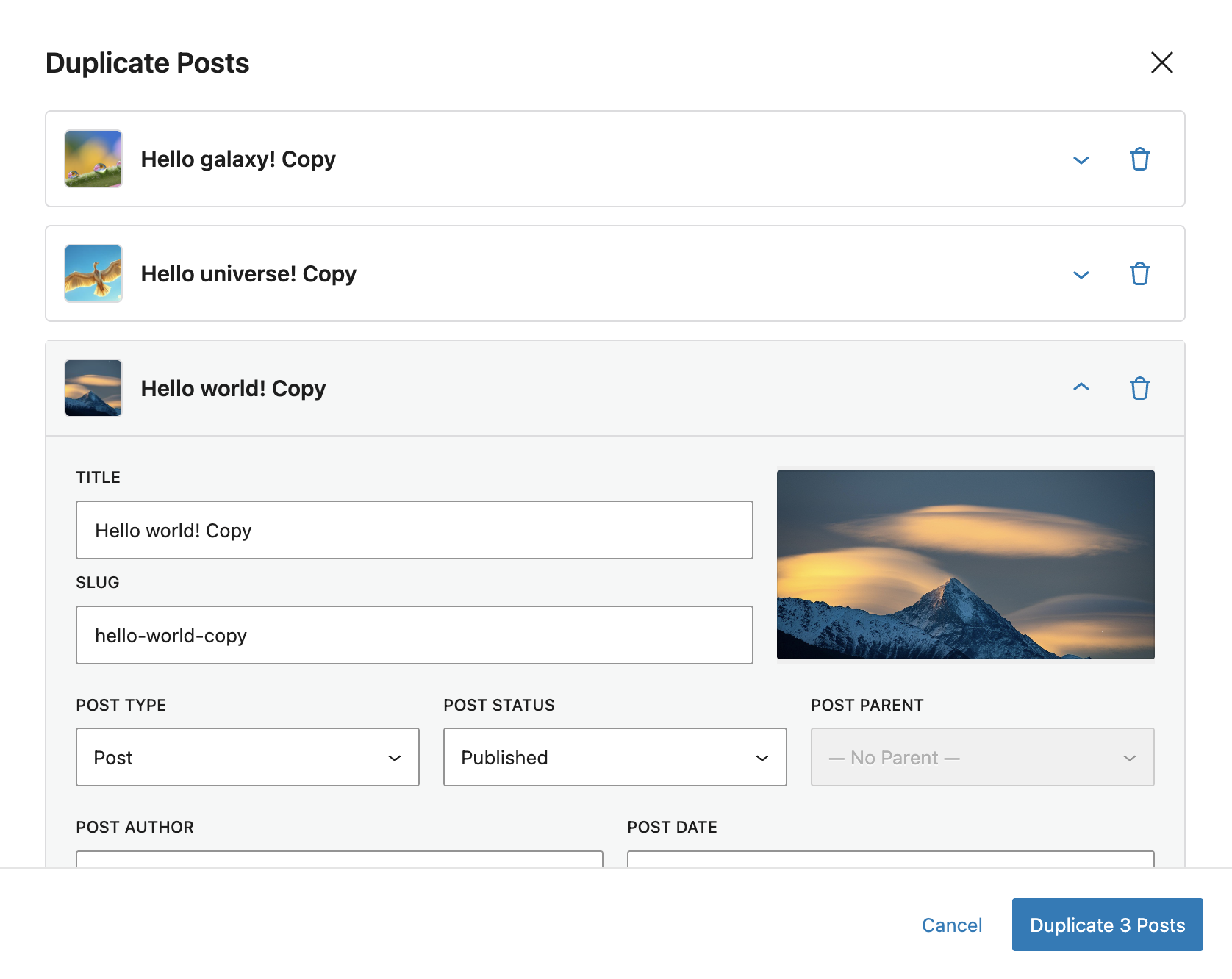
- Bulk Duplication - Select and duplicate multiple posts at once with individual settings per post
- Multiple Clones - Create multiple copies of a single post simultaneously (up to 50 clones)
- Flexible Duplication Options - Customize title, slug, status, author, date, post type, and parent for each duplicate
- Featured Image Management - Set, replace, or remove featured images directly in the duplication modal
- Smart Defaults - Configure default settings that apply to all duplications (draft status, current user as author)
- Post Types Configuration - Control which post types can be duplicated and which appear in the "Post Type" dropdown menu
- Permission Control - Granular control over who can duplicate posts with role-based permissions
- Modern Interface - Beautiful modal interface with live editing and expandable settings
- Cross-Post Type Duplication - Convert posts to different post types during duplication
- Hierarchical Post Support - Set parent posts for pages and hierarchical custom post types
- One-Click Operation - Duplicate posts from the posts list, edit screen, or block editor toolbar
- Developers - Quickly generate test content and dummy data for development using bulk or multiple clone features
- Content Managers - Create content templates and variations efficiently with one-click duplication
- Bloggers - Repurpose successful posts with different angles or formats using multiple clones
- E-commerce - Duplicate product variations and bulk duplicate similar listings across categories
- Content Marketers - Create A/B testing variations with the multiple clones feature
- Site Migrations - Bulk duplicate posts when restructuring or migrating content
- Multilingual Sites - Works seamlessly with WPML and Polylang for multilingual content
- Post content and formatting
- Title and slug (with customizable suffixes or full editing)
- All custom fields and metadata
- Categories, tags, and custom taxonomies
- Featured images (with ability to change or remove)
- Post format and excerpt
- Comment and ping status
- Menu order
- Post parent (for hierarchical post types)
- Comments (by design - prevents duplicate comment threads)
- Post ID and GUID (new unique identifiers assigned)
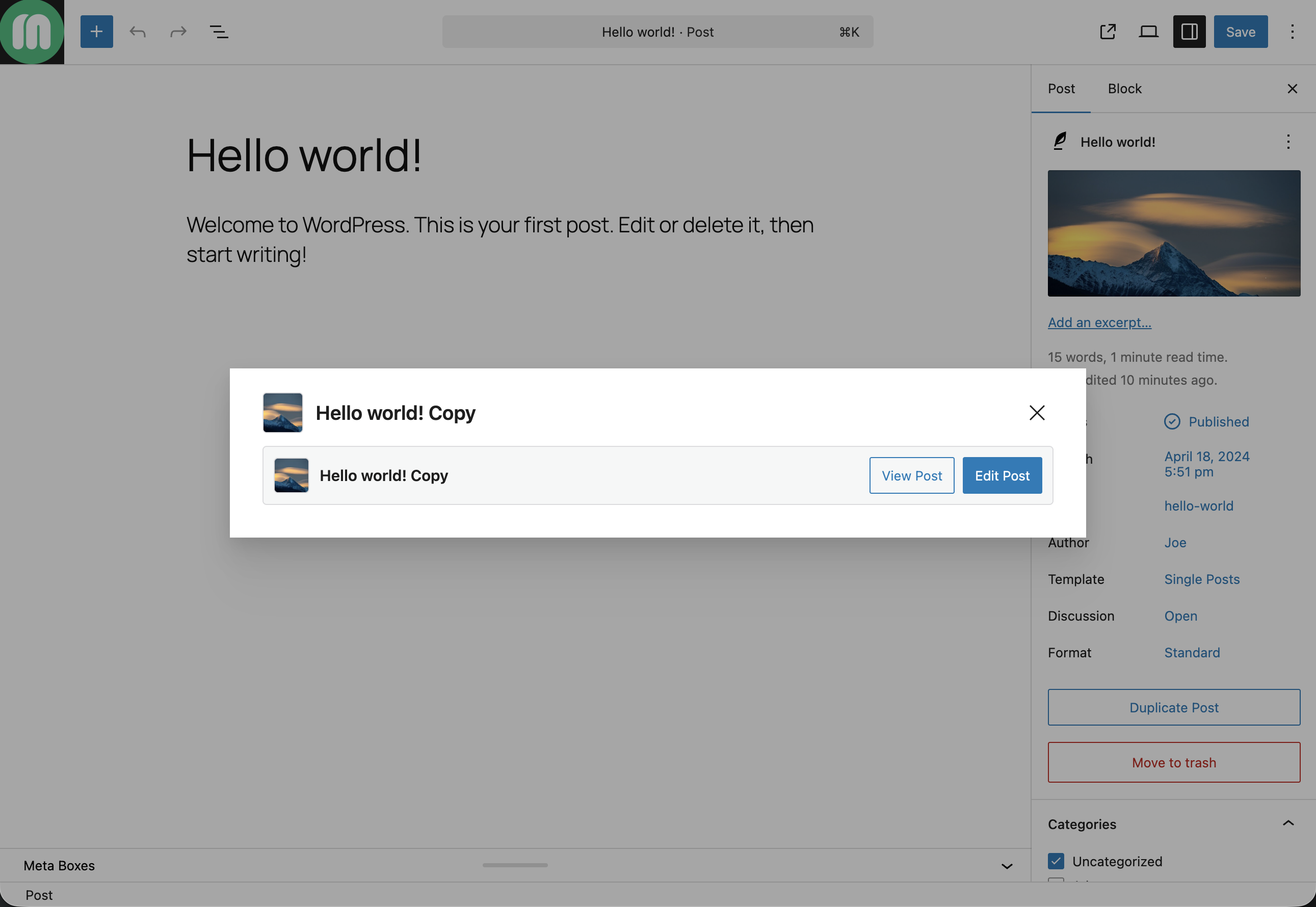
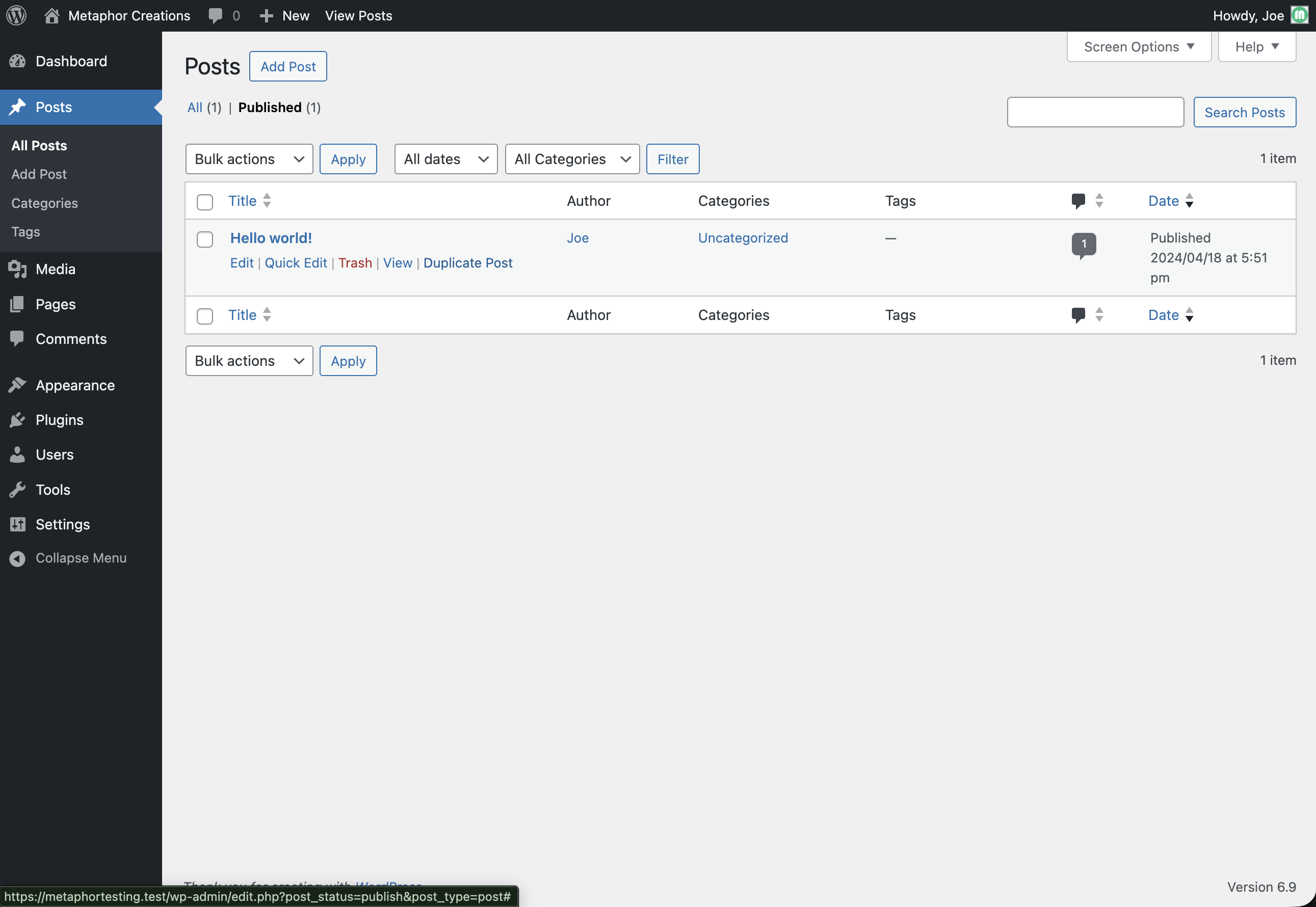
- Single Duplication: Hover over any post and click "Duplicate [Post Type]" in the row actions, or click the "Duplicate Post" button in the Gutenberg editor
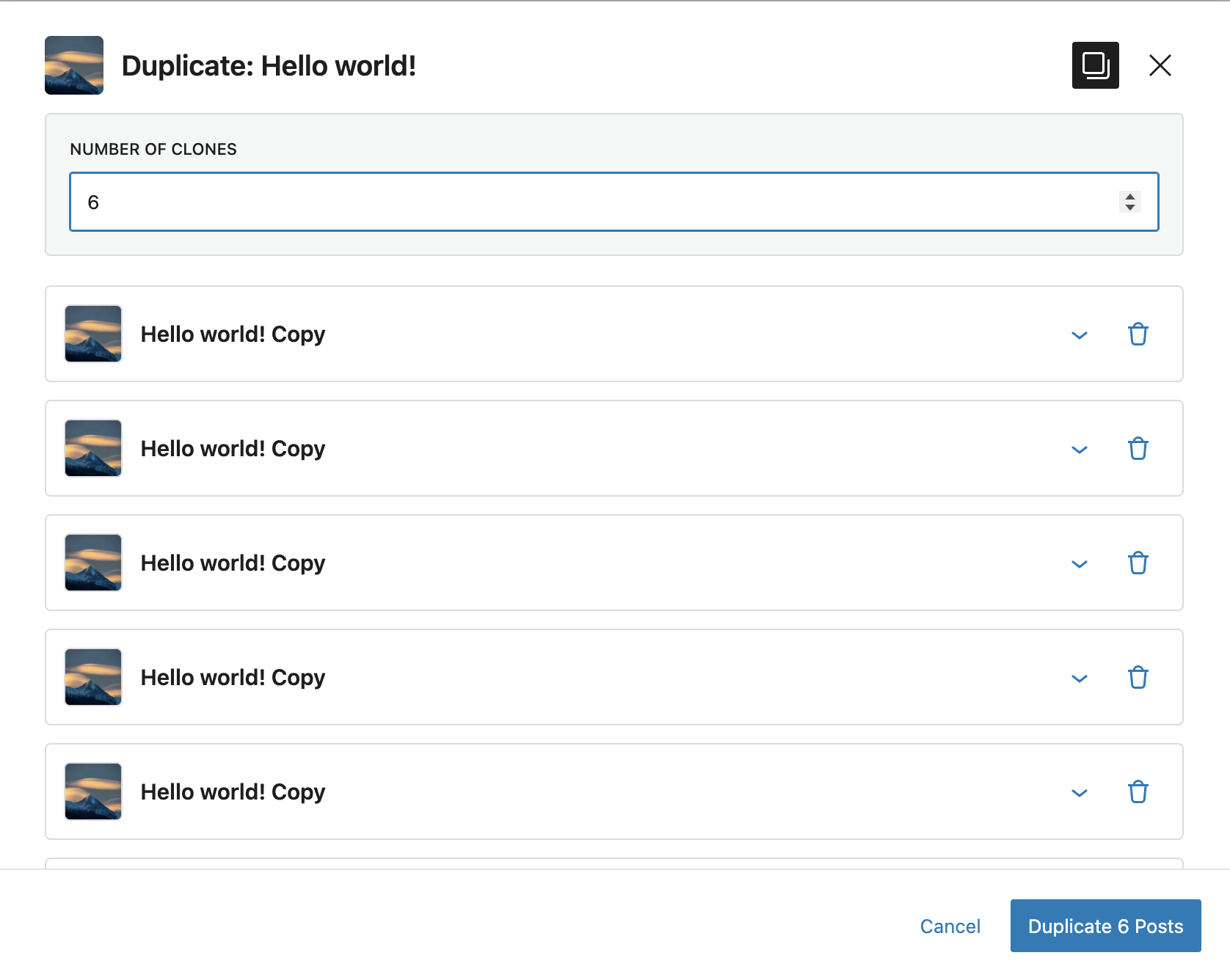
- Multiple Clones: In the duplication modal, click the copy icon to create multiple copies of a single post (up to 50 clones)
- Bulk Duplication: Select multiple posts using checkboxes, choose "Duplicate" from the Bulk Actions dropdown, then configure each post individually
- Customize Settings: Edit title, slug, status, author, date, post type, featured image, and parent for each duplicate
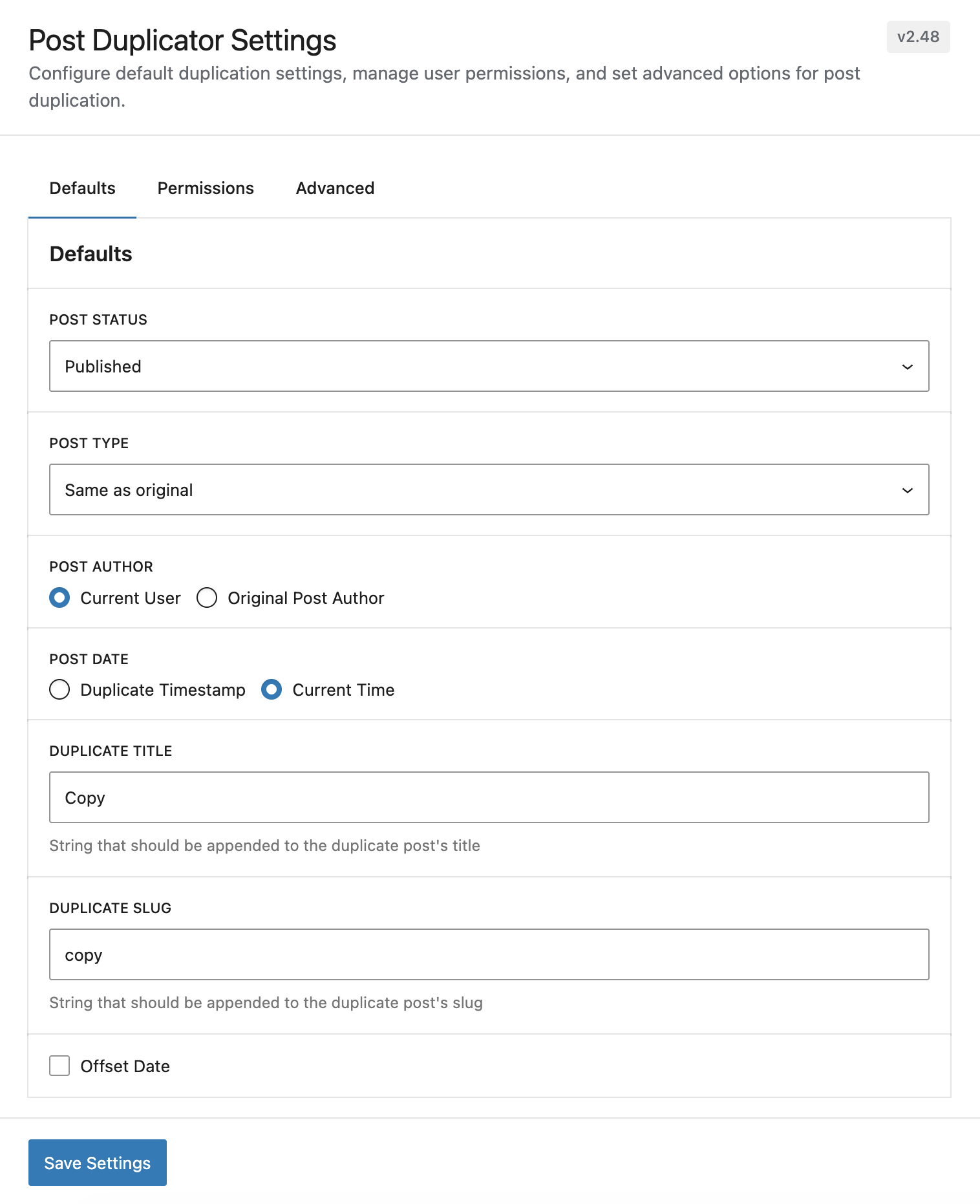
- Configure Defaults: Go to Settings > Post Duplicator to set default status, author, date, and title/slug suffixes
- Configure Post Types: Go to Settings > Post Duplicator > Post Types to control which post types can be duplicated and which appear in the "Post Type" dropdown menu
- Duplicated posts are created as Drafts (prevents accidental publishing)
- Title suffix: "Copy"
- Slug suffix: "copy"
- Author: Current User
- Date: Current Time All defaults can be customized in Settings > Post Duplicator.
- WPML and Polylang (multilingual support)
- WooCommerce (excludes review counts automatically)
- ACF (Advanced Custom Fields) - preserves all field data
- WP Customer Area (special file duplication support)
- All custom post types and taxonomies Security:
-
Users without
publish_postscapability cannot publish duplicates (forced to Pending) - Non-authors cannot duplicate unpublished posts from other users
- Granular permission system controls who can duplicate posts
- All data is sanitized and validated before duplication
mtphr_post_duplicator_createdactionmtphr_post_duplicator_meta_{$key}_enabledfiltermtphr_post_duplicator_meta_valuefilter
安装:
- Log in to your WordPress admin dashboard
- Navigate to Plugins > Add New
- Click Upload Plugin at the top of the page
- Choose the
post-duplicator.zipfile - Click Install Now
- After installation, click Activate Plugin
- Extract the
post-duplicatorfolder from the zip file - Upload the entire
post-duplicatorfolder to/wp-content/plugins/on your server - Log in to your WordPress admin dashboard
- Navigate to Plugins
- Find "Post Duplicator" in the list and click Activate
- WordPress 6.4 or higher
- PHP 7.4 or higher
屏幕截图:
常见问题:
Do I need to configure settings before using the plugin?
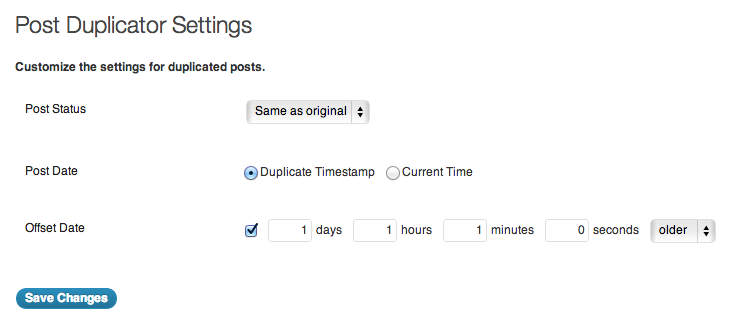
No! Post Duplicator works immediately with sensible defaults. Duplicated posts are created as drafts with the current user as the author. You can start duplicating posts right away. However, you can customize default settings by going to Settings > Post Duplicator to configure:
- Default post status (draft, published, pending, or same as original)
- Default post type (same or convert to another type)
- Default author (current user or original author)
- Default date (current time or duplicate timestamp)
- Title and slug suffixes
- Date offset options
Where can I find the duplicate option?
The duplicate option appears in four places:
- Posts List (Single): Hover over any post in the All Posts (or any post type list) screen and click "Duplicate [Post Type]" in the row actions
- Posts List (Bulk): Select multiple posts using checkboxes, then choose "Duplicate" from the Bulk Actions dropdown
- Gutenberg Editor: Click the "Duplicate Post" button in the top toolbar when editing a post
- Classic Editor: Find the "Duplicate [Post Type]" button in the Publish meta box
What information gets duplicated?
Post Duplicator creates a complete copy including:
- All post content and formatting (including Gutenberg blocks)
- Title and slug (with customizable suffixes or full editing)
- All custom fields and metadata (ACF, meta boxes, etc.)
- Categories, tags, and all custom taxonomies
- Featured images (with ability to change before duplication)
- Post format and excerpt
- Comment and ping status settings
- Menu order
- Post parent (for hierarchical post types)
- Post password (if applicable) Comments are NOT duplicated (by design), and new unique IDs and GUIDs are assigned to each duplicate.
Can I customize settings for individual duplications?
Yes! When the duplication modal opens, you can customize:
- Full title and slug - Edit the complete title and slug, not just suffixes
- Post status - Draft, published, pending, or same as original
- Post type - Convert to a different post type during duplication
- Post author - Assign to any user or leave without author
- Post date - Use current time, original date, or pick a custom date with the calendar picker
- Post parent - Set parent for hierarchical post types (pages, etc.)
- Featured image - Change, replace, or remove the featured image
- Taxonomies - Select which categories, tags, and custom taxonomies to include
- Custom meta - Choose which custom fields to duplicate For bulk duplications or multiple clones, expand each post item to customize it individually. These customizations only apply to that specific duplication and don't change your default settings.
Can I duplicate posts to a different post type?
Yes! You can convert posts to different post types during duplication:
- Open the duplication modal
- Click "Customize Settings"
- Select a different post type from the "Post Type" dropdown
- The duplicate will be created as the selected type
How do I control who can duplicate posts?
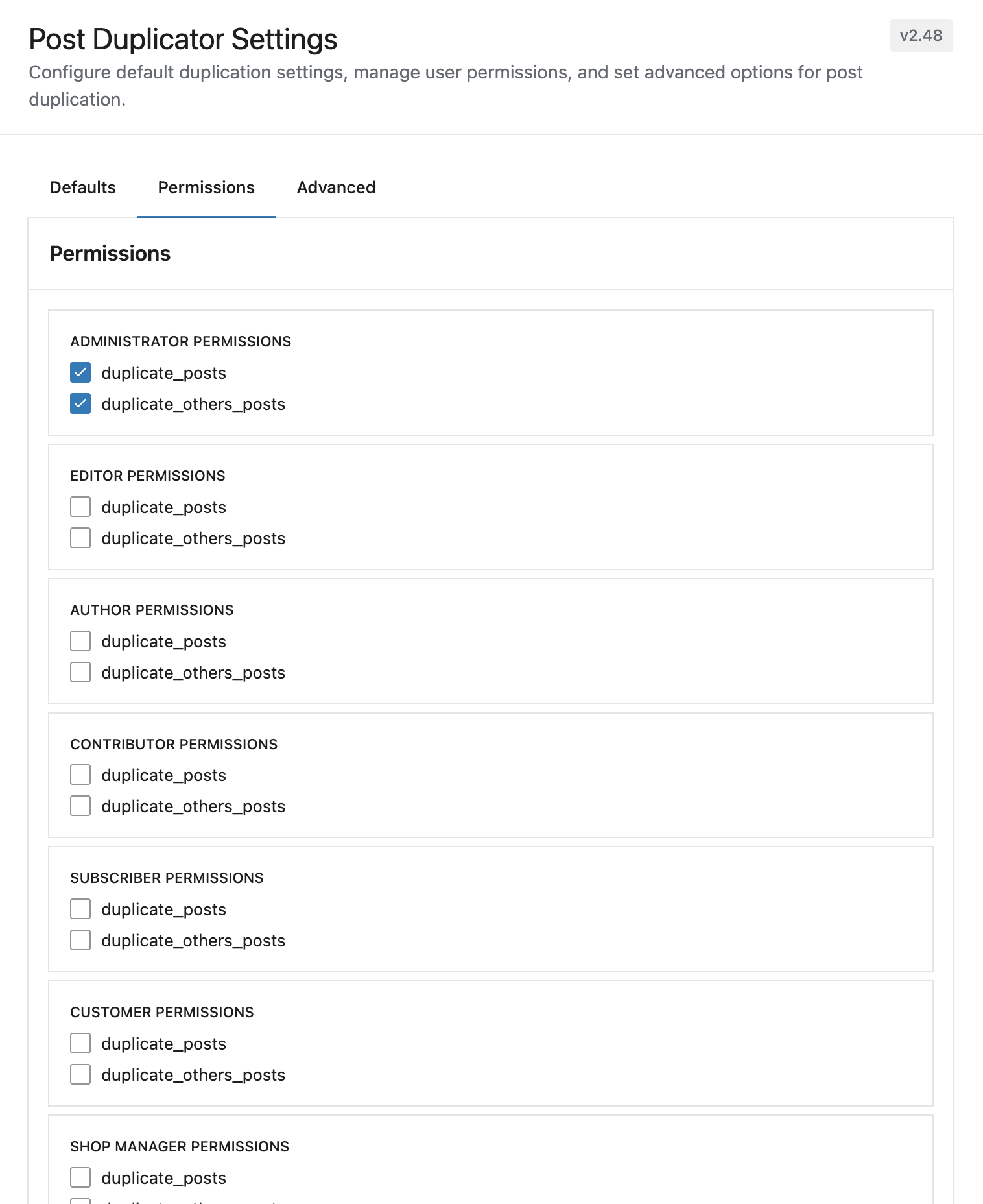
Go to Settings > Post Duplicator > Permissions to configure role-based permissions:
- Duplicate Posts: Allows users to duplicate their own posts
- Duplicate Others' Posts: Allows users to duplicate posts created by other users
Does the plugin work with custom post types?
Yes! Post Duplicator works with all post types, including:
- Standard posts and pages
- Custom post types from themes
- Custom post types from plugins (WooCommerce products, etc.)
- Any registered post type in WordPress
Will my custom fields be preserved?
Yes! All custom fields and metadata are automatically copied to the duplicate. This includes:
- ACF (Advanced Custom Fields) data
- Custom meta boxes
- Any post meta stored in the database
Does it work with multilingual plugins?
Yes! Post Duplicator integrates seamlessly with:
- WPML: Automatically handles multilingual content correctly
- Polylang: Excludes translation taxonomies from duplication
Can I schedule duplicates for future dates?
Yes! Enable the "Offset Date" option in Settings > Post Duplicator to automatically schedule duplicates:
- Enable "Offset Date"
- Set the number of days, hours, minutes, or seconds to offset
- Choose "Newer" (future) or "Older" (past) direction
- All duplicates will use this date offset
What if I don't want comments duplicated?
Comments are intentionally NOT duplicated. This prevents duplicate comment threads and maintains comment integrity. Each duplicate post starts with zero comments.
Is there a way to bulk duplicate posts?
Yes! Version 3.0.0 introduced bulk duplication:
- Navigate to the posts list (All Posts, All Pages, etc.)
- Select multiple posts using the checkboxes
- Choose "Duplicate" from the Bulk Actions dropdown
- Click Apply
- Configure each duplicate individually in the modal
- Click the duplicate button to create all posts
How do I create multiple clones of the same post?
The multiple clones feature lets you create several copies of a single post:
- Start duplicating any post (from posts list or editor)
- Click the copy icon button in the modal header to enable multiple clones mode
- Set the number of clones you want (1-50)
- Each clone appears as a separate item that you can expand and customize
- Edit the title, slug, status, author, date, featured image, and other settings for each clone
- Click the duplicate button to create all clones at once
What's the difference between bulk duplication and multiple clones?
Both features let you create multiple posts, but they work differently: Multiple Clones:
- Creates multiple copies of a single post
- All clones start from the same original content
- Perfect for creating variations of the same post
- Example: Create 5 different versions of a blog post for A/B testing Bulk Duplication:
- Duplicates multiple different posts at once
- Each duplicate is based on a different original post
- Perfect for duplicating a batch of posts with similar settings
- Example: Duplicate 10 different product posts from one category to another Both allow you to customize each duplicate individually before creating them.
Where are the plugin settings located?
Go to Settings > Post Duplicator in your WordPress admin. You can also access it by clicking the "Settings" link on the Plugins page next to Post Duplicator. The settings page includes four tabs:
- General: Configure duplication mode and post-duplication actions
- Defaults: Configure default duplication settings
- Post Types: Configure which post types can be duplicated and which appear in the "Post Type" dropdown menu
- Permissions: Control who can duplicate posts
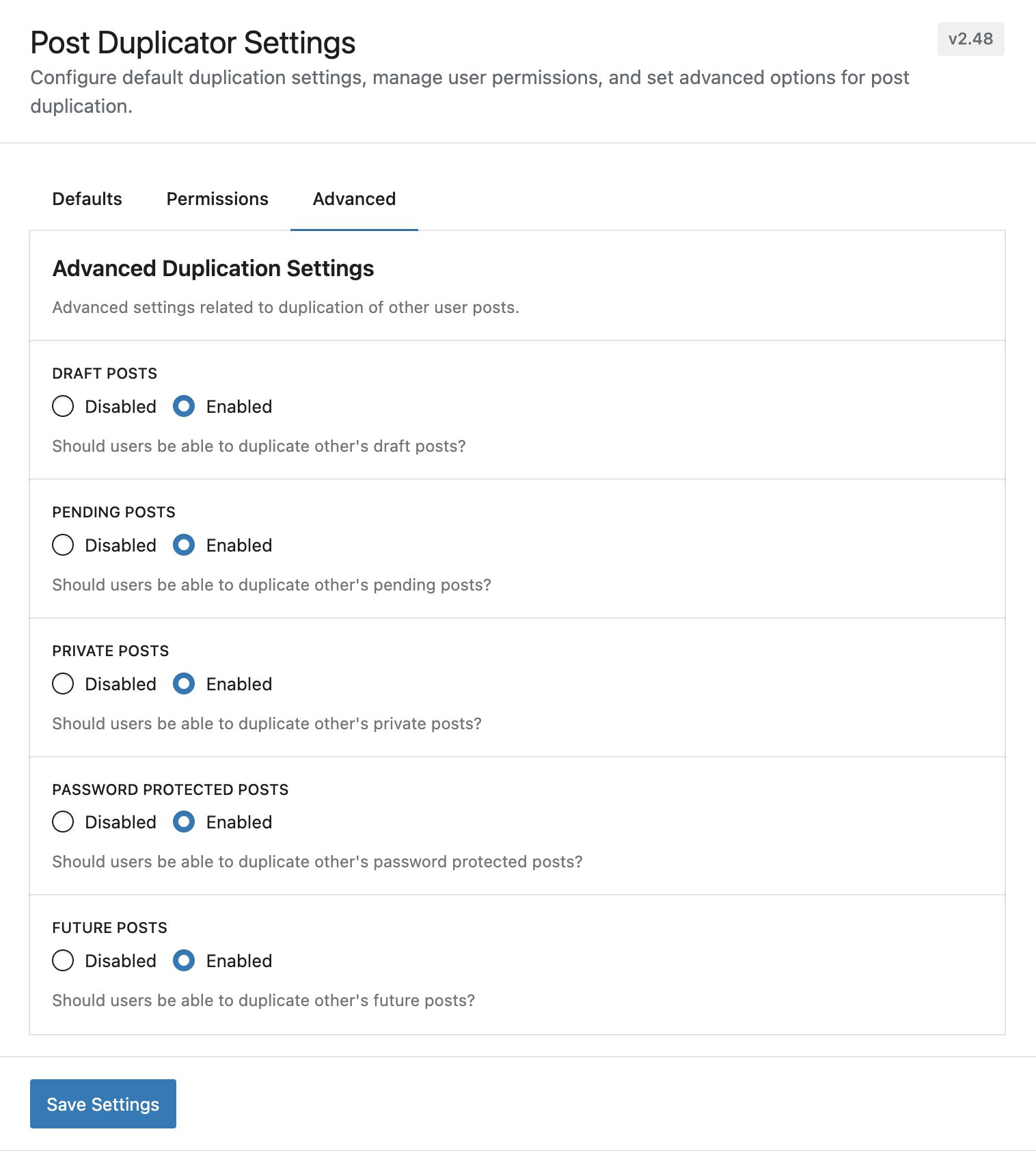
- Advanced: Settings for duplicating special post statuses
Where do I report security bugs found in this plugin?
Please report any security bugs found in the source code of this project through the Patchstack Vulnerability Disclosure Program. The Patchstack team will assist you with verification, CVE assignment, and notify the developers of this plugin.
更新日志:
- Stop loading every taxonomy term when opening the duplication modal; search terms as needed instead
- Security fix: store duplicated custom meta via
add_post_meta()so WordPress core'smaybe_serialize()neutralizes raw serialized payloads, mitigating PHP Object Injection (CWE-502)
- Added "Excluded Meta Keys" setting on the Advanced tab to allow users to specify meta keys that should never be duplicated or shown in the duplication modal
- Moved
nestedpagesandwpca-listscreen slugs from settings default value to hardcoded filter inhooks.php - Cleared
additional_screensdefault value; slugs now shown as placeholder examples in the settings field - Fixed post guid being copied to duplicate for non-public post types
- Added PHP fallback for duplicate row-action link so duplication works on any admin screen even when scripts are not loaded
- Added
mtphr_post_duplicator_additional_screensfilter and settings field for configuring extra admin screens where scripts should load - Removed WP Nested Pages and WP Customer Area dedicated integration files; their slugs are now pre-filled in the new Additional Admin Screens setting
- Extracted shared
perform_duplication()core function used by both the REST API and the PHP fallback handler
- Security fix: restrict
futureandprivatestatuses for users withoutpublish_postscapability - Security fix: enforce post type duplication restrictions in the REST API permission callback
- Security fix: prevent contributors from attributing duplicated posts to other users without
edit_others_postscapability
- Security hardening for serialized custom meta handling in REST responses
- Build dependencies: pin immutable to patched version to address prototype pollution advisory
- Build dependencies: pin @babel/runtime to patched version for moderate vulnerability remediation
- Build dependencies: pin svgo to patched version for XML entity expansion vulnerability remediation
- Divi integration: ensure Divi Library post type appears in Post Types settings
- Divi integration: force Basic mode for Divi Library duplication due to React compatibility
- Divi integration: add duplicate button on Divi Library edit screen
- Divi integration: exclude internal Divi post types from duplication
- Added filterable excluded post types list
- Added filters for mode and after-duplication actions
- Added settings filter for integration notices on General tab
- React render fallback for environments without createRoot support
- WP Nested Pages: pass parent page to duplicates in Basic mode and modal, validate parent post type on save, and use cache-busting refresh so clones appear in list
- Simple Custom Post Order integration: assign unique menu_order to duplicates to prevent order scrambling on page refresh
- Security: Fix unauthorized arbitrary protected post meta insertion vulnerability by validating meta keys against original post and using original values only for protected meta
- Fix: ACF Flexible Content and other protected meta fields now copy correctly when duplicating
- Restore: User-edited custom meta values (non-protected) are now copied when duplicating via the modal
- View Post button now uses get_permalink() for reliable URLs on sites with custom permalink structures
- WP Nested Pages integration
- Integration loads moved to plugins_loaded
- Filter for script enqueue on integration screens
- Integration folder structure rules
- Script loading updates and optimization
- Moved user query to API call
- Post meta duplication bug fixes
- Post date offset updates and fixes
- Settings sanitization bug fixes
- New Feature: Post Types settings section - Configure which post types can be duplicated and which appear in the "Post Type" dropdown menu
- Enhancement: Reusable upgrade notice system - Dismissable admin notices for version upgrades with plugin icon
- Enhancement: Upgrade notification for Post Types settings - Users upgrading to 3.0.4+ will see a helpful notice about the new Post Types configuration options
- Added general settings fields
- Added basic post duplication option
- Added after post duplication options for basic duplication
- Resolved html field duplication of ACF Pro fields
- Resolved duplication issue with Elementor & Divi
- Resolved duplciation issue with non REST post types
- Resolved component css issues
- API security updates
- Bug fix on widgets screen
- New Feature: Bulk duplication - Select and duplicate multiple posts at once
- New Feature: Multiple clones - Create up to 50 copies of a single post simultaneously
- New Feature: Featured image management - Set, replace, or remove featured images in the duplication modal
- New Feature: Post parent selection - Set parent posts for hierarchical post types
- New Feature: Interactive date picker - Calendar interface for setting custom dates
- Enhancement: Full title and slug editing - Edit complete title and slug, not just suffixes
- Enhancement: Enhanced modal interface - Expandable post items with individual settings
- Enhancement: Improved Gutenberg editor integration
- Enhancement: Real-time validation and slug sanitization
- Settings updates and performance improvements
- Mtphr Settings updates
- Bug fix
- Resolved _load_textdomain_just_in_time warning
- Resolved issue with WPML duplication
- Moved settings page to settings menu
- Added settings link to plugins screen
- Minor bug cleanup
- Default setting updates
- Default permission updates
- Added custom permissions and settings
- Added custom permissions and settings
- Added code to store current version for future updates
- Added code to resolve potential critical error for post types
- Bug fix
- Setting updates
- Removed ajax functionality
- Added WP API functionality
- Additional security updates
- Security update. Disabled duplicate post ability of non-published posts by non-authors.
- Security update. Fixed bug that allowed non-author to duplicate post.
- Allowed for center tag to be duplicated
- Added mtphr_post_duplicator_meta_{$key}_enabled filter to disable meta from duplicating
- Added mtphr_post_duplicator_meta_value filter to modify meta values before saving
- Disabled WooCommerce review count meta from duplicating
- Resolved special characters issue in duplicated title
- Ensured users without publish_post permissions can not publish posts on duplication
- Disabled Polylang post_translations taxonomy from attaching to duplicated posts
- Additional fix to issue with unicode characters in Gutenberg blocks
- Resolved issue with unicode characters in Gutenberg blocks
- Bug fix from last update
- Sanitization and validation updates
- Settings page optimization
- Removed duplicate functionality from post trash pages
- Database sanitization updates
- Asset loading path updates
- Multiple data sanitization updates
- Settings sanitization updates
- Added setting to limit post duplication to current user
- Added setting to setup duplicated post author to current user
- Set the default setting of duplicated post author to current user
- Fixed Gutenburg escaping in returns for ACF blocks
- Javascript update for WP 5.5
- Added "do_action( 'mtphr_post_duplicator_created', $original_id, $duplicate_id, $settings )" action for custom actions on duplicated post
- Added "mtphr_post_duplicator_action_row_link( $post )" function for custom post action rows
- Separated post duplicated function outsite of ajax call for custom uses
- Removed limitations of backend script to load only on specific pages
- Added Duplicate button to published post edit pages
- Modified javascript for allow duplication of duplicated page before page reload
- XSS vulnerability fix
- Language file updates
- Modified how post meta is saved to database
- Modified duplicate slug implementation
- Added file duplication support for the WP Customer Area plugin
- Added default value for duplicate post slug
- New setting to append a custom string to the duplicate post title
- New setting to append a custom string to the duplicate post slug
- Fixed bug due to "wp_old_slug_redirect" function in core
- Fixed page reload bug after duplication
- Added ability to duplicate posts to other post types
- Added page duplication support for the WP Customer Area plugin
- Now supports multiple values of a single custom field during duplication
- Added German language files
- Added Japanese language files
- Updated settings file for localization
- Modified duplicated posts data: post_date_gmt, post_modified, post_modified_gmt
- Changed the default published status to Draft
- Changed the default post date of duplicated posts to be the current time.
- Cleaned up some code.
- Updated localization code and files.
- Updated metaboxer code.
- Added a settings page to set 'post status' and 'date' of duplicated posts.
- Updated filenames and paths so the plugin works.