
Postali — Códigos postales de México
| 开发者 | gomflo |
|---|---|
| 更新时间 | 2026年9月28日 23:21 |
| PHP版本: | 7.4 及以上 |
| WordPress版本: | 7.1 |
| 版权: | GPLv2 or later |
| 版权网址: | 版权信息 |
详情介绍:
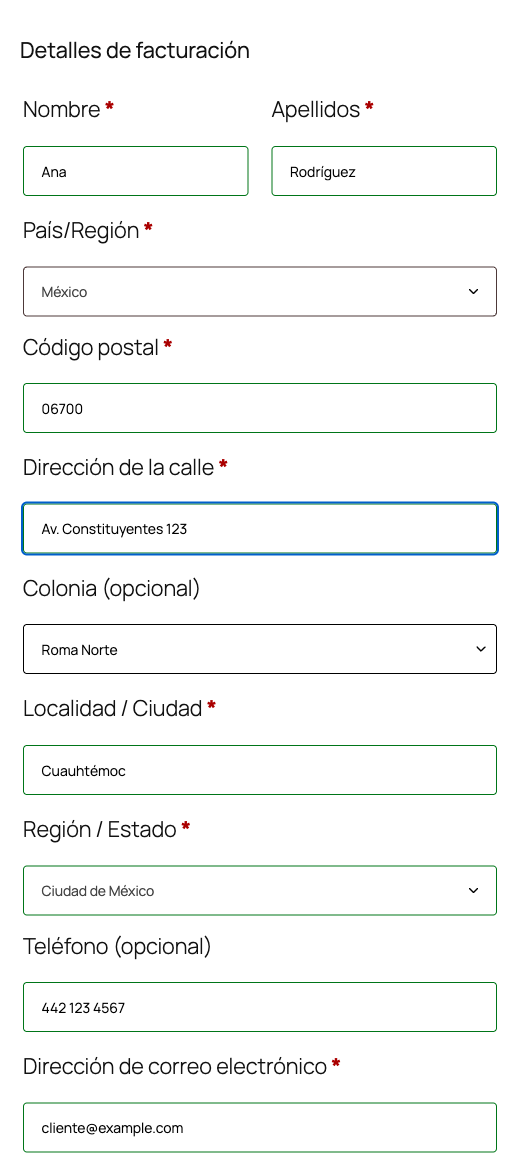
Your customers type their postal code (código postal) and the WooCommerce checkout fills in the state, the city or municipality, and shows a dropdown with every colonia (neighborhood) for that postal code. Fewer typos, fewer parcels returned for incomplete addresses.
The data comes from the official SEPOMEX catalog (Correos de México), served by the free public Postali API: no signup, no API key, no quotas.
The plugin interface is in Spanish, since it is built for stores that sell in Mexico.
Features
- When the country is Mexico and the customer types a 5-digit postal code, it fills the state (using WooCommerce's state codes), the city (municipality or alcaldía) and turns the colonia field into a dropdown.
- If the postal code has a single colonia, it is selected automatically.
- An "Otra (escribirla a mano)" option lets customers type a colonia that is not in SEPOMEX yet. Every field can still be edited by hand.
- Works for billing and shipping, and on My Account > Addresses.
- If the API is unreachable or the postal code does not exist, the customer sees a short message and fills the address manually. A network failure never blocks checkout.
- Per-session browser cache, so the same postal code is not requested twice.
- Optional server-side validation: when the order is placed, reject postal codes that do not exist or that do not match the selected state. Results are cached for a week. If the API does not answer, the order goes through.
- Optionally moves the postal code field before the street fields for Mexico, so customers type it first.
- Compatible with HPOS (High-Performance Order Storage).
address_2), relabeled "Colonia" for Mexico. This is the most common convention in Mexican stores: line 1 holds street and number, line 2 holds the colonia. The colonia then shows up with no extra setup in emails, invoices, shipping labels, exports and any integration that reads the standard WooCommerce address.
If you prefer a separate field, choose "Campo propio Colonia" in the settings. It is stored as an additional order field (_wc_billing/postali/colonia and _wc_shipping/postali/colonia, the same format the block checkout uses), and it is added to the formatted Mexican address in the order screen, emails and the thank-you page. Keep in mind that many shipping integrations only read address_2.
Classic checkout and block checkout
- Classic checkout (
[woocommerce_checkout]shortcode): fully supported. - Block checkout: supported. State, city and colonia are written to the checkout data store (
wc/store/cart), so the React form and the server see the same values. The colonia dropdown appears right below the postal code field, using the same markup as WooCommerce's own selects. Because the block checkout does not allow replacing its fields, the dropdown is the plugin's own element and writes into Address line 2 (or into the separate "Colonia" field, registered through WooCommerce's additional checkout fields API and shown only for Mexico on WooCommerce 9.9+). If a theme or plugin heavily customizes the block form, state and city autocompletion keep working even if the dropdown cannot be inserted.
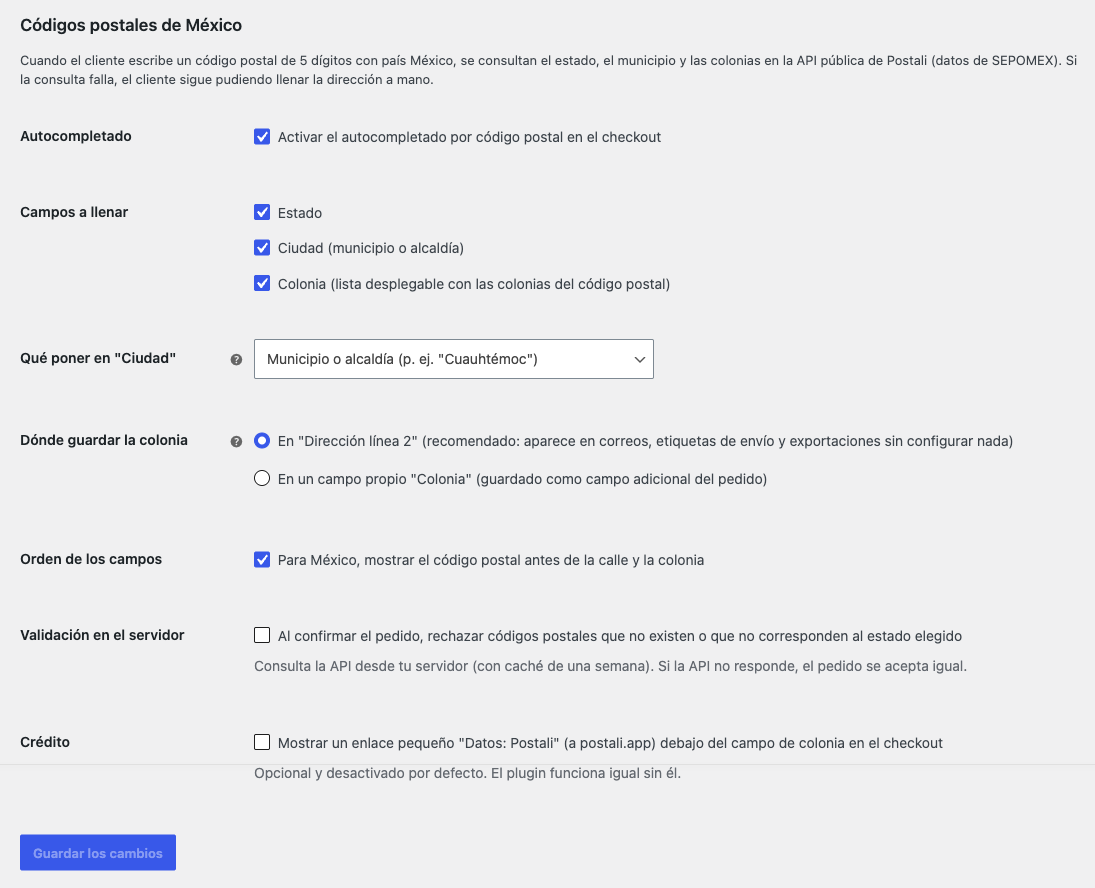
- Turn autocompletion on or off.
- Which fields to fill: state, city, colonia.
- What goes into "City": municipality/alcaldía (recommended for carriers) or the SEPOMEX city.
- Where to store the colonia: Address line 2 or a separate field.
- Show the postal code before the street (Mexico).
- Server-side validation.
- "Datos: Postali" credit link (off by default).
安装:
- Install and activate WooCommerce.
- Upload the
postali-codigos-postalesfolder to/wp-content/plugins/, or install it from Plugins > Add New. - Activate the plugin.
- Review WooCommerce > Settings > Postali. It works out of the box: it fills state, city and colonia, and stores the colonia in Address line 2.
屏幕截图:
常见问题:
Do I need an API key or an account?
No. The Postali API is public and free.
What happens if the API does not respond?
The customer sees a notice and fills the address manually. Checkout is never blocked by a network failure, not even with server-side validation enabled.
Why is Ciudad de México stored with the code "DF"?
That is the code WooCommerce uses internally for Ciudad de México ("MX" is Estado de México). The plugin maps SEPOMEX state names to those codes; customers only see the name.
A colonia is missing from the list
Choose "Otra (escribirla a mano)" and type it. SEPOMEX takes a while to register new developments.
Does it work for Colombia or Spain?
The Postali API also has data for Colombia and Spain, but this version of the plugin only autocompletes Mexican addresses.
Can I point it at my own copy of the API?
Yes. The postali_cp_api_base PHP filter changes the base URL for both the browser lookups and the server-side validation.
更新日志:
1.0.0
- First release: state, city and colonia autocompletion from the postal code in the classic checkout, the block checkout and My Account; optional server-side validation; optional credit link, off by default.