
Posti Shipping
| 开发者 |
joosev
ottok leotoikka serter k1sul1 |
|---|---|
| 更新时间 | 2026年9月10日 20:07 |
| PHP版本: | 7.1 及以上 |
| WordPress版本: | 7.1 |
| 版权: | GPLv3 or later |
| 版权网址: | 版权信息 |
标签
下载
详情介绍:
Posti is a shipping service provider in Finland. This plugin integrates Posti’s parcel shipping services into WooCommerce. To start shipping, all your WooCommerce needs is this plugin and API credentials of your account registered with Posti. Order API credentials to use the plugin. (https://www.posti.fi/yrityksille/asiakastuki/ohjeet/verkkokaupan-integraatiot)
This plugin requires at least WooCommerce version 4.7.0.
安装:
- Install the plugin through the WordPress plugins screen directly or upload the plugin files to the
/wp-content/plugins/posti-shippingdirectory. - Activate the plugin through the 'Plugins' screen in WordPress
- Use the Settings->WooCommerce Posti screen to configure the plugin
- The plugin requires WooCommerce to be installed, with shipping zones configured and this plugin activated and settings set.
屏幕截图:
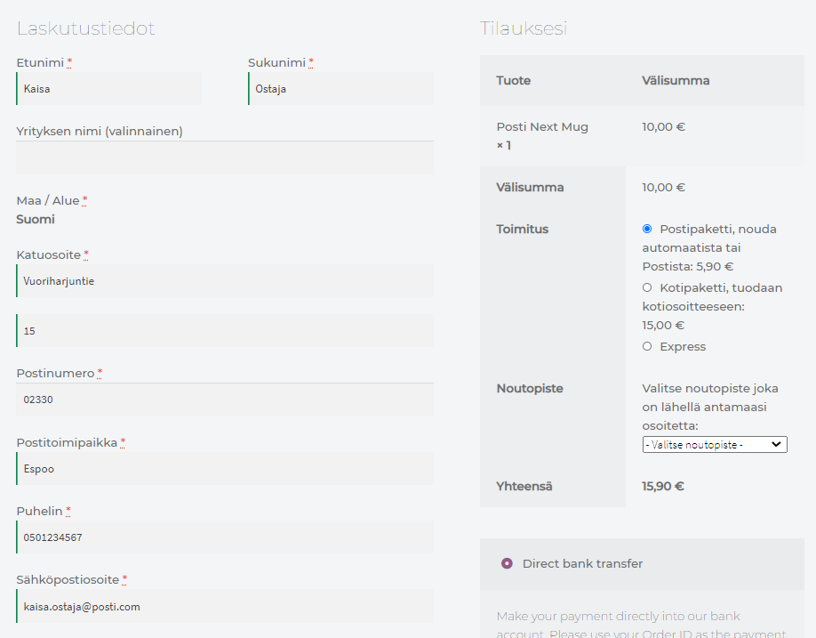
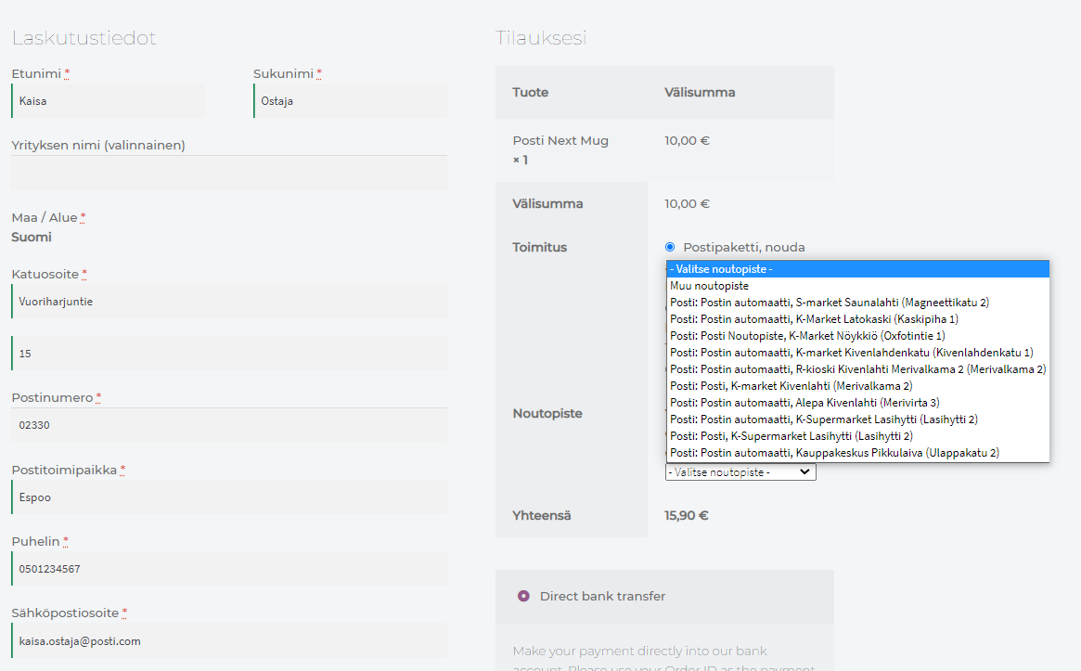
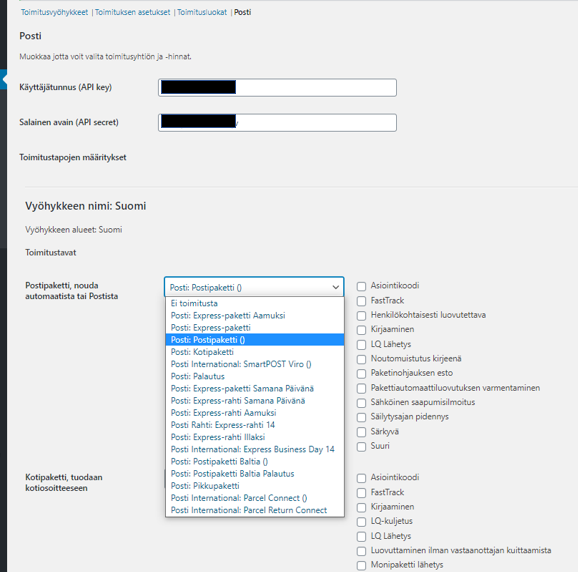
常见问题:
Is this ready for production use?
Yes! If you encounter any issues related to this plugin, please report at Posti customer service
更新日志:
3.11.0
- Bug fix for Woocommerce 11.1 with block checkout and pickup point search
- Baltic support with Posti product translations and service routes based on sender country
- Showing the selected pickup point in the thank you page
- Tested against WordPress 7.1 and WooCommerce 11.1
- Bug fix for missing LQ dangerous goods weight with variable products
- Small text changes and missing translations added
- Tested against WordPress 7.0
- Bug fix for storing unnecessary pickup point data in checkout
- Tested against WooCommerce 10.7
- Using WP cache mechanism (transient) instead of session in admin notices
- Tested against WordPress 6.9
- New label shortcode for SKU and quantity
- HS tariff number for variable products from main product
- New setting to exclude products from CN23 if no HS tariff number
- Limiting info code field value to 15 chars
- Fix for bulk label creation breaking other plugin hooks
- Fix for locking issue with multiple token calls
- Fix for pickup point search string in custom shipment
- Allowing to link Posti shipping services to inactive shipping methods
- Fix for OAuth endpoint
- Fix for shipment class load
- Tested against Wordpress 6.8 and WooCommerce 9.8.2
- Bug fix for pallet type in parcel shipments
- Bug fix for Express-parcel return
- Fix for possible Cross Site Request Forgery (CSRF) vulnerability
- Fix for possible Full Path Disclosure (FPD) vulnerability
- New feature: adding product quantities to address label
- New feature: order notes can be added to address label
- New feature: new order list column to show shipment tracking link
- Pickup points optional for Express-parcel
- Bug fix for duplicate shipments
- Bug fix for bulk order status update
- Quick fix for Legacy order storage backwards compatibility
- New feature: WooCommerce block editor support
- Return product mappings fixed
- Tested against Wordpress 6.6.1 and WooCommerce 9.1.4
- New feature: allow ignoring product weights
- New feature: HPOS support
- Various small fixes
- Fix missing variable preventing list type of pickup points showing at checkout
- Fix PHP 8.2 related fixes
- WP and Woo compatibility update
- Update to latest API library
- Various small fixes
- WP compatibility update
- Bug fix: Attach tracking info to email
- New feature: Support for order pickups
- New feature: Pickup point filtering
- New feature: Email info as template
- New feature: Custom bulk create order
- New feature: Option to create return labels automatically
- Bug fix: Weight and volume information to shipping labels if variable product
- Support for shortcodes
- Support for variable products SKU on shipping labels
- Fix small pickup point search bug
- Fix for pickup point searches
- Fix for pakettikauppa_fetch_tracking_codes -action
- Various small fixes
- New feature: Support for different label sizes
- New feature: Shipping phone number optional / mandatory settings
- New feature: LV translations
- Refactoring: Arranging settings regrading checkout settings
- Bug fix: load product class when not in admin view
- Bug fix
- New feature: LQ-shipments
- New feature: If shipping postcode is missing, use billing address
- New feature: LT translation
- Tested against woocommerce 4.6.1 and wordpress 5.9.2
- Various bug fixes
- Diagnostic tool bug fix when using Posti Shipping version
- Add error message if mass action operation fails
- Update automated tests and PHP 8.x tests
- Convert API secret as password field for added security
- Update Pakettikauppa API library to latest version
- Bug fix
- Customer facing templates (checkout & view order) can now be replaced in own theme dir
- Minumum woocommerce version is now 4.7.0 and tested against woocommerce 6.1.0
- Bug fix related to token caching
- New feature: Updated diagnostic tool to check versions and cached tokens
- New feature: Additional info to shipping labels in custom shipment
- New feature: Instuction if no configured shipping method
- Fine tuning: Wizard fixes in settings
- Fine tuning: Double check that cached token is really expired after TTL
- Bug fix: Automated test fixes
- Bug fix: Refactoring, small bug fixes
- New feature: Diagnostic tool to check everything is working correctly
- New feature: If using only one provider in pickup point searches, don't show the provider name
- Bug fix: Allow saving if more than 16 shipping methods
- Bug fix: Various small bug fixes
- Minor bugfix for token authentication
- Minor bugfix
- Fix timing issue preventing working from most installations
- Add support for additional info to shipping labels
- Various bug fixes
- Various compatibility fixes
- Backwards compatibility for bulk actions
- If product does not exists, display "unknown product"
- Change versioning to identical to Pakettikauppa plugin
- Create multiple shipping labels from order view
- Allow editing of order phone number and email address
- Make pickup point search optional
- Various bug fixes
- Fix bug in pickup point saving in checkout
- Remove Pakettikauppa shipping method option
- Add possibility to choose pickup point in order view
- Fix bug for pickup point not saving in checkout
- New pickup point chooser for checkout
- Fixing pickup point related bugs
- Some plugins brake because of forced validation of chosen pickup points. This update loosens the validation little bit
- Fix to validation that checks if pickup point is chosen
- Add checks that billing email and/or phone exists before adding those to shipping
- Fix to help to fill orders from previous versions when using pickup points as shipping method
- Many small changes: f.ex. adding new fields to checkout and to sender configuration
- Fixes compatibility with Klarna
- Fixes return shipments
- Properly catch exceptions so faulty orders don't cause a fatal error
- Allow supplying a different address for pickup point search
- Fix headers so files download properly
- Fixed a bug breaking the setup wizard
- Fixed a bug breaking shipping methods created the old way.
- Better error handling if API credentials are wrong
- Fix tracking url
- Small tweaks to UX in settings
- Ability to choose pickup point when creating custom shipment
- Removed obsolete Posti shipping method
- Various bug fixes
- Various small fixes to functionality and translations
- Tracking URL change
- Initial release for General Availability.