
PostNotify – Email Notification to Press Office, Client or Author on Publish
| 开发者 | fuska |
|---|---|
| 更新时间 | 2026年10月11日 23:06 |
| PHP版本: | 7.4 及以上 |
| WordPress版本: | 7.1 |
| 版权: | GPL v2 or later |
| 版权网址: | 版权信息 |
详情介绍:
- Online magazines and news sites: tell press offices and agencies their press release is online, so they share the link while the news is fresh.
- Press offices and PR agencies running their own site: notify the client as soon as an article goes live.
- Companies: inform a partner, a client or another office when you publish a news item.
- Multi-author blogs: let guest authors know their post has been published.
- Associations: notify a board member or a partner organisation about a new announcement.
- Set the sender name and email (SMTP optional but recommended).
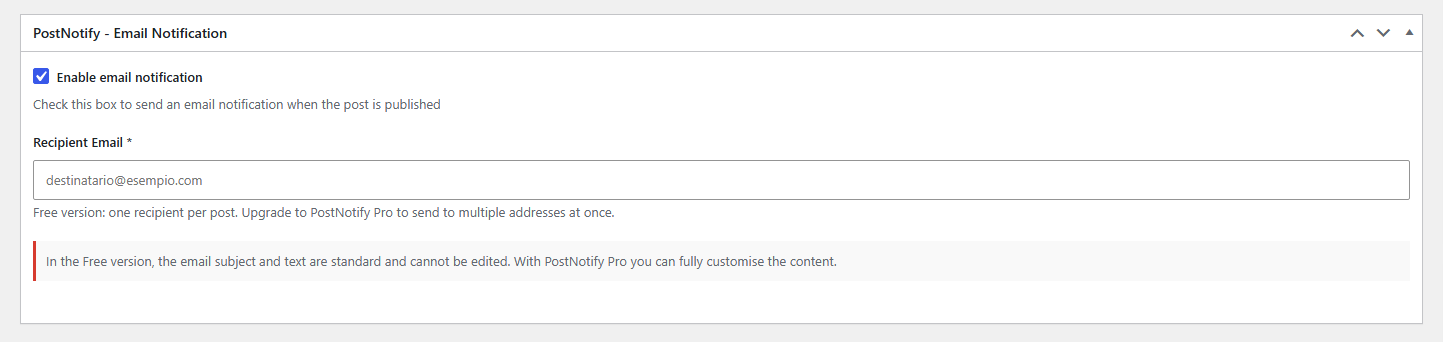
- Write your post and enter the recipient's address in the PostNotify box.
- Publish: the notification email is sent automatically, once.
- Automatic email when a post is published
- One recipient per post, set in the post editor
- On/off switch for each post
- Courtesy copy to the administrator, to check that every notification was sent
- Reply-To address, so replies reach the right inbox
- Send log directly in the post editor
- SMTP support with encrypted password and a built-in test email
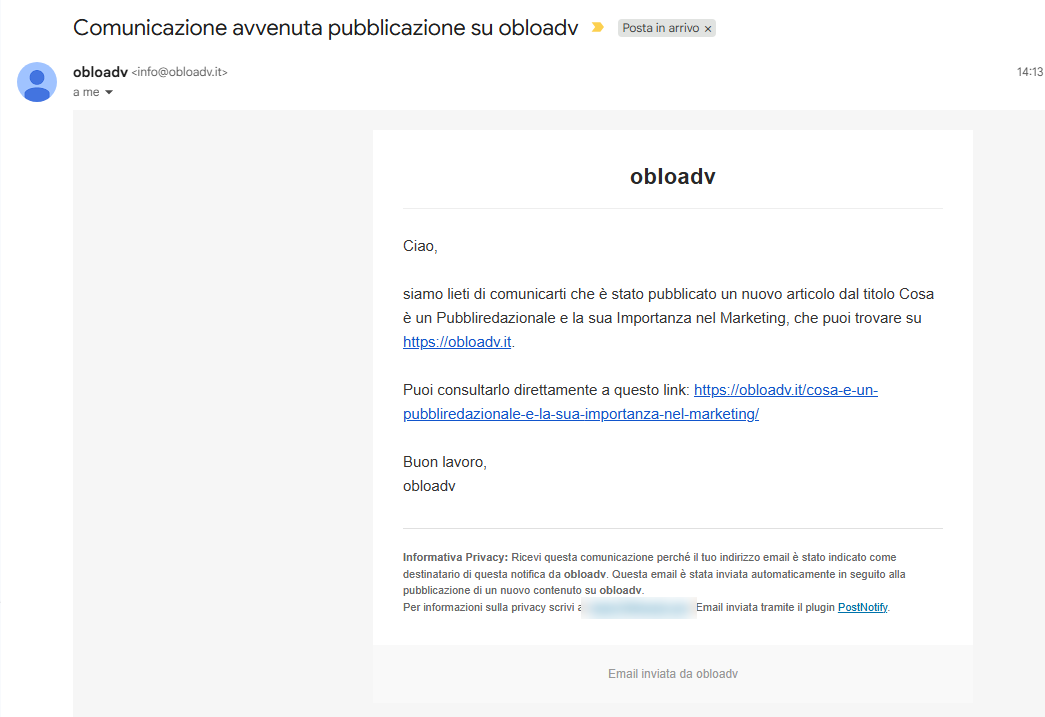
- Your site name in the email header, so the message looks like it comes from your site
- Standard subject and text with automatic title and link
- Works with the block editor and the Classic editor
- No external services: emails are sent by your own site
- Available in English and Italian, translatable on translate.wordpress.org
- Multiple recipients for each post, in BCC (nobody sees the other addresses)
- Custom subject and text for each post
- Your own logo in the email
- Sending statistics: emails sent, failed, success rate and last send
- Licences for 1 site, 3 sites or unlimited sites. Licences are permanent; updates and support are included for 12 months.
- [titolo_articolo] - Post title
- [link_articolo] - Direct link to the post
- [link_homepage] - Link to the homepage
- [firma] - Signature with sender name
安装:
- From your WordPress dashboard go to Plugins > Add New, search for "PostNotify" and click Install, then Activate.
- Go to PostNotify > Settings and set the sender name and email.
- (Optional but recommended) Configure SMTP and send a test email.
- When writing a post, enter the recipient in the PostNotify box and publish.
屏幕截图:


常见问题:
Is this a newsletter plugin?
No. PostNotify does not manage subscribers or mailing lists. It sends one notification to the person you choose for that specific post: a press office, a client, an author.
Emails are not being sent
Check that:
- The SMTP configuration is correct (if enabled)
- The sender email is valid
- The recipient address is correct
- Your server allows sending email Try sending a test email from the settings page.
Emails end up in spam
To avoid spam:
- Use SMTP with a reliable provider
- Configure your domain's SPF and DKIM records
- Use an email address from your own domain as the sender
How can I check that a notification was really sent?
Each post shows its send log in the PostNotify box. You can also set an administrator address in the settings to receive a courtesy copy of every notification.
Can I send to multiple recipients?
Not in the Free version: one recipient per post. PostNotify Pro supports multiple recipients in BCC.
Can I customize the email?
In the Free version the subject and text are standard (with the post title and link added automatically) and the header shows your site name. PostNotify Pro lets you write your own subject and text for each post and add your logo.
Does it work with the block editor (Gutenberg) and the Classic editor?
Yes, both. The PostNotify box appears in the post editor in either case.
Can I disable the notification for a single post?
Yes. Each post has its own PostNotify box with an on/off checkbox.
Does it work with pages or custom post types?
The Free version sends notifications for standard posts only.
Does the plugin send my data to external services?
No. Emails are sent directly by your own site (via PHP mail or your SMTP server). The plugin does not connect to external services and does not collect or transmit data to third parties.
Will it slow down my site?
No. The plugin only runs in the admin area and at the moment a post is published. It adds nothing to your site's front end.
更新日志:
- Improvement: in the block editor the PostNotify box now appears in the sidebar, so it is always visible (before it was collapsed at the bottom of the page). It also appears in the sidebar of the Classic editor.
- Fix: the SMTP settings of PostNotify now apply only to PostNotify emails, no longer to every email sent by the site (password resets, shop and contact form emails).
- Fix: in the block editor the notification is sent to the recipient written in the box at the moment of publishing, and a false "no recipient" error is no longer logged.
- Fix: SMTP passwords containing special characters (for example "<" or "%") are now saved correctly.
- Fix: outdated texts about the logo in the email (since 1.0.4 the header shows the site name).
- New: a box in the Info page to leave a review and discover PostNotify Pro, and a one-time thank-you notice after the first notifications (it can be closed for good).
- Tested up to WordPress 7.1
- Code cleanup: removed unused files and code
- Change: notification emails now show the site name in the header instead of the PostNotify logo, so each message looks like a communication from your own site. A discreet PostNotify credit remains in the footer.
- No other functional changes
- Internationalization: source strings are now in English (WordPress.org standard), with the full Italian translation shipped in the plugin (it_IT) — Italian sites see exactly the same texts as before
- Added the translation template (POT file) so the plugin can be translated into any language via translate.wordpress.org
- No functional changes
- New: dashboard notice when the plugin configuration is incomplete (dismissible, with a direct link to the settings page)
- New: dashboard notice when a post is published with sending enabled but no recipient set, so missed notifications are no longer silent
- New: quick links in the Plugins list — Settings, Support and Rate the plugin
- Fix: brand color consistency in the post editor metabox
- Internal code cleanup: renamed internal function/class/option/hook names to use a more distinctive "pnot" prefix, avoiding the generic word "post" (no user-facing changes)
- First public release of the Free version
- Automatic email on post publish
- One recipient per post
- Standard email subject and text with dynamic variables
- PostNotify logo in the email header
- SMTP configuration with encrypted password (OpenSSL)
- Built-in SMTP send test
- Security: XSS/CSRF protection, input validation and sanitization