
Postomatic
| 开发者 | buildomatics |
|---|---|
| 更新时间 | 2026年9月25日 10:20 |
| PHP版本: | 7.4 及以上 |
| WordPress版本: | 7.1 |
| 版权: | GPLv2 or later |
| 版权网址: | 版权信息 |
标签
下载
详情介绍:
- Product Promotion - a focused article about one product, pulling in its real name, price, description, and images.
- Product Comparison - compare up to 3 products side by side in a single, well-structured post.
- Content Goal - Single post, Bulk posts (PRO), or Boost Product Sales (PRO)
- Language - write in the language your audience reads
- Category - pick manually or let AI auto-select the best fit
- Voice / Speaker - neutral, personal ("I"), team ("We"), direct ("You"), third-person, brand voice, or narrative/storytelling
- Content Tone - conversational, professional, academic, technical, persuasive, storytelling, or humorous
- Content Length - brief, standard, detailed, or comprehensive
- Featured Image - AI-generated (PRO) or your own custom upload
- In-Body Images - attach and describe your own images for the AI to place inside the article
- Comments, Author, and Publish Status - open/closed comments, choose the WordPress author, publish immediately or save as a draft
- Runs as a normal WordPress admin screen - no page builder or theme changes required
- Generated posts always start as a draft, so nothing goes live without your review
- Floating credit tracker keeps your available balance visible while you work
- Low-credit warnings before AutoPilot tasks run out of budget
- One-time credit purchases - no forced recurring subscription to get started
安装:
- Go to your WordPress dashboard, click on Plugins > Add New, search for "Postomatic", and click Install Now.
- Activate the plugin through the Plugins menu in WordPress.
- Open the new Postomatic menu in your WordPress admin sidebar.
- Follow the on-screen setup to connect your site - this happens automatically the first time you open the plugin.
- Start generating content with your free credits.
屏幕截图:
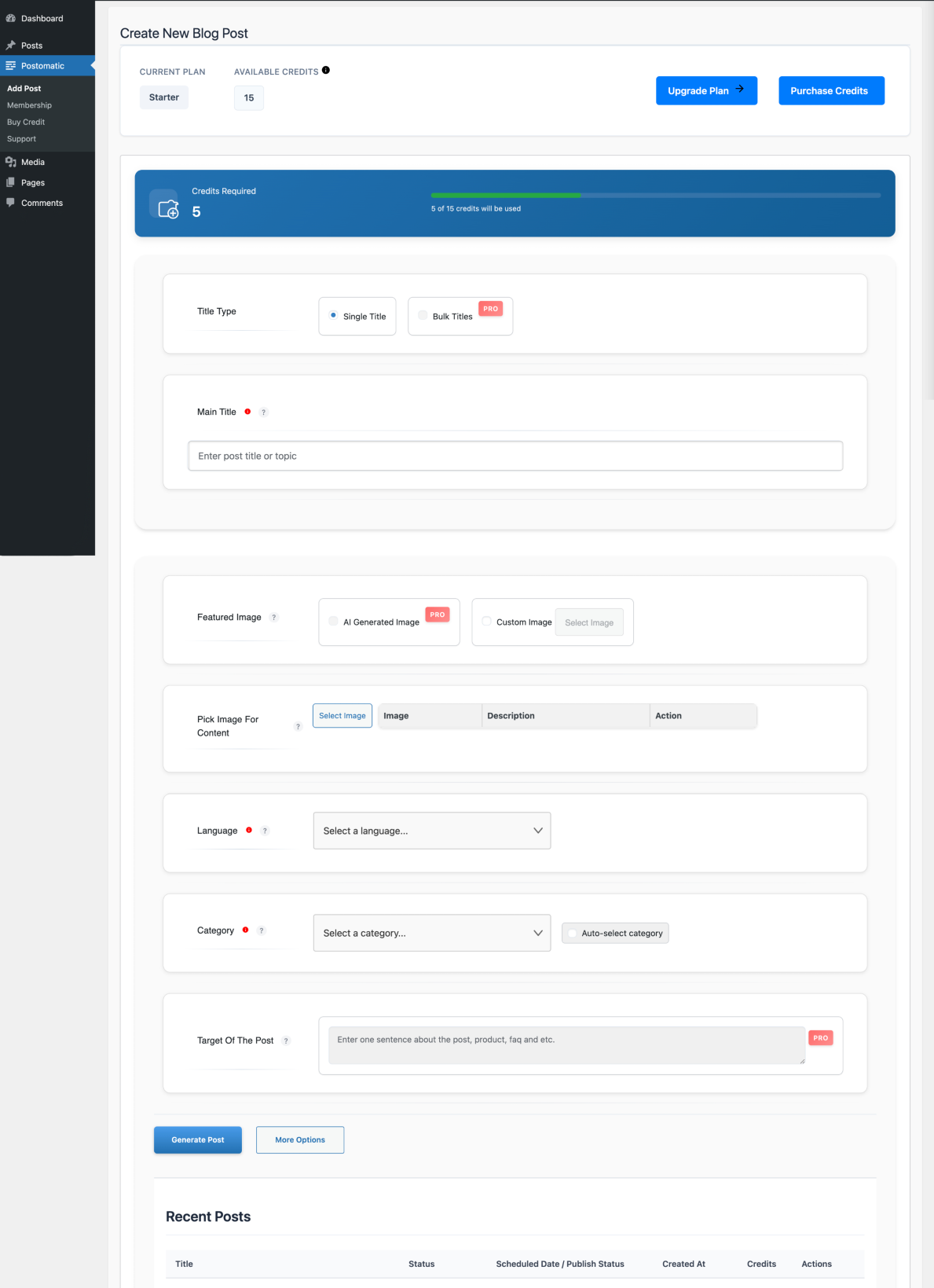
常见问题:
Does this plugin work without an external service?
No. Postomatic requires a connection to the Postomatic API to generate content, manage plans, and perform key functions. This API connection is required and is clearly explained above.
What are the payment options for Postomatic?
Postomatic offers a free tier with free starter credits. After that, you can either purchase credits to continue using the free plan or upgrade to one of our paid plans. All paid plans are one-time payments with no recurring fees and include lifetime access to features and updates while Postomatic remains under active development.
How does post generation work?
Postomatic uses AI technology to generate blog posts based on your preferences. You can specify the title/topic, language, category, voice, tone, and length, plus any images you want included. The generated content is SEO-optimized and, if you have a supported SEO plugin installed, its title/description/keyword fields are filled in automatically.
What is AutoPilot?
AutoPilot lets you configure a content plan once - a topic/goal, a publishing frequency, and a credit budget - and Postomatic will keep generating and publishing new posts on that schedule without any further manual steps, until you pause or delete the task.
Can Postomatic write content about my store's products?
Yes. If your store runs on WooCommerce, Easy Digital Downloads, or SureCart, Postomatic detects it automatically and lets you generate a "Product Promotion" post about a single product, or a "Product Comparison" post about up to 3 products, both pulling in real product data (name, price, description, images).
Can I review posts before they go live?
Yes. You can choose to save generated posts as drafts, which allows you to review, edit, and add images before publishing. You can also schedule posts for future publishing dates.
What information is shared with the Postomatic API?
Only essential data like your WordPress site URL and initialization token is transmitted to the API, and only when you initiate actions like generating content, purchasing credits, or requesting support.
Is the generated content unique and free from copyright issues?
The content is generated using AI models trained on publicly available data. While the content is typically unique, we cannot guarantee it is free from third-party copyright claims. Users are responsible for reviewing and editing all generated content before publishing.
How do I get support for Postomatic?
Support is available through the WordPress admin panel (Postomatic > Support) or via your Postomatic account dashboard.
更新日志:
- Added: AutoPilot tasks now have a "Posts" section showing generation history and the next upcoming queued titles, with a live "X done, Y left" progress count on each task card
- Added: A queued (not-yet-generated) title can now be cancelled individually or new titles can be added to an already-running AutoPilot task, without recreating it
- Added: AutoPilot can now auto-select the best category for each post instead of a single fixed category, via a new "Let AI choose" toggle
- Improved: The "Analyze Blog" keyword tool no longer calls the AI service; it now searches your blog's own existing tags instantly, scoped to the category you picked
- Fixed: The AutoPilot budget-per-post slider could be set above the 100-credit maximum the backend enforces, which made task creation fail after completing the whole wizard; the slider and input now match the real limit
- Improved: API requests now identify the installed plugin version, so an in-admin notice can point you to the Plugins page if a request ever needs a newer version, instead of failing silently
- Dev: Codebase passes WordPress Coding Standards (WPCS) with zero errors and zero warnings
- Fixed: The "Important Notice" banner on the Buy Credit and Subscription screens no longer asks you to upgrade once you are on the highest available plan; notices that are not upgrade offers (such as renewal reminders) still appear
- Security: Activation now stages new credentials and only applies them after the site confirms ownership through the callback handshake, instead of applying them immediately
- Security: The callback handshake now verifies the activation code with a constant-time comparison and rejects any code it did not generate itself; each code is single-use and expires after 30 minutes
- Security: Activation codes and connection secrets are now generated with a cryptographically secure random source
- Security: Removed anonymous-access AJAX registrations from the support ticket and title-search handlers; every admin AJAX action now checks the user's capability, not just a nonce
- Security: The connection secret comparison in the callback handshake now uses a constant-time check
- Security: The site's connection key is no longer printed into admin page HTML; the blog-sync and agreement pages now call the API through the server instead of from the browser
- Improved: Connection renewal after an expired key now returns in about a second instead of blocking for 10-30 seconds, and no longer runs two renewals in parallel
- Improved: Pricing plan and credit package lookups are now cached for a few minutes instead of being fetched from the API on every page load
- Added: Cancelled posts can now be sent back into the queue individually or all at once from the Recent Posts list (regenerating a post spends credits again, since cancelling refunds them)
- Added: The "Upgrade Plan" prompt is now hidden once you are on the highest available plan
- Improved: API requests now handle rate-limit responses with a proper wait message instead of treating them as a failure or an invalid connection
- Improved: Generated posts now retain more of the data sent by the AI (excerpt, slug, multiple categories, alt text on images, social/Open Graph SEO fields) and no longer drop a post's category, tags, or comment settings under certain payloads
- Fixed: A returning payment confirmation page reloaded that no longer double-applies credits/plan; a repeat visit is now shown as already completed instead of an error
- Fixed: Removed emoji and other 4-byte Unicode characters from readme.txt/README.md that could make WordPress's update-check silently fail to store the new version on sites whose database still uses the older utf8 (non-utf8mb4) charset, leaving the Plugins list stuck on an old version number
- Added: Quick-access "Add Post", "AutoPilot", and "Buy Credits" links on the WordPress Plugins list screen, plus "Documentation" and "Support" links
- Improved: Rewrote the plugin description and full WordPress.org listing (features, usage, FAQ) to cover AutoPilot and the WooCommerce/Easy Digital Downloads/SureCart product content support added in 1.2.70
- Updated: Confirmed compatibility and marked "Tested up to" WordPress 7.1 (removes the "not tested with your current version of WordPress" warning)
- Updated: Minimum required PHP raised from 5.6 to 7.4 to match what the plugin's codebase already required and what WordPress core itself now requires
- Added: "Boost Product Sales" content goal now automatically detects and supports WooCommerce, Easy Digital Downloads, and SureCart (previously WooCommerce only)
- Added: Required "Goal Description" and "Keywords" fields for product-focused posts on the main post generator, matching AutoPilot
- Fixed: Product lookup no longer treats an unrelated "product" post type from other plugins/themes as a store product when no supported e-commerce plugin is active
- Fixed: Post creation could leave WordPress's own content sanitization filters disabled for the rest of the request after a successful save
- Fixed: Plugin shipped a malformed "languages " directory (trailing space) that could not be used for translations
- Fixed: Missing Text Domain and Domain Path headers, so translations were never loaded
- Maintenance: Re-issued release to correct the version advertised to sites
- Fixed: Checkboxes and radio buttons showed only a coloured box and a focus glow when selected, with no visible tick or dot
- Fixed: Generated posts were sometimes saved with no author; the selected author is now always resolved to a real user
- Fixed: Duplicate "Version" line in the plugin header that left the PHP requirement undeclared
- Improved: Checkbox and radio styling consolidated into a single stylesheet loaded on every plugin screen
- Maintenance: Version bump for release packaging. No functional changes.
- Improved: Localhost restriction screen now clearly explains that Postomatic requires an internet-accessible server to connect to the AI service, with bullet points listing what fails on localhost and a tip for developers using tunnel tools
- Fixed: Autopilot credit check now validates total credits needed (budget x post count) instead of per-post budget only
- Fixed: Autopilot creation now shows a clear low-credit warning dialog before submitting when balance is insufficient
- Fixed: API error messages containing internal batch-counter suffixes (e.g. "3:3") are now cleaned before display
- Improved: Admin notice shown on all Postomatic pages when credit balance drops below 10
- Improved: Autopilot task cards now show status pill (Active / Low Credits), a credit warning banner, author, and next run date
- Improved: Credit notice transient refreshed on every credit fetch to stay accurate
- Fixed: Autopilot credit check now validates total credits needed (budget x post count) instead of per-post budget only
- Fixed: Autopilot creation now shows a clear low-credit warning dialog before submitting when balance is insufficient
- Fixed: API error messages containing internal batch-counter suffixes (e.g. "3:3") are now cleaned before display
- Improved: Admin notice shown on all Postomatic pages when credit balance drops below 10
- Improved: Autopilot task cards now show status pill (Active / Low Credits), a credit warning banner, author, and next run date
- Improved: Credit notice transient refreshed on every credit fetch to stay accurate
- Fixed: 401 auto-recovery mechanism was not working (handler was never loaded)
- Fixed: API error messages now display correctly instead of generic fallback text
- Fixed: Post deletion failure is now surfaced to the user instead of silently ignored
- Fixed: Support ticket modal shows a proper error state on failure
- Fixed: Duplicate AJAX hook registrations for delete-post and blog-analyzer handlers
- Improved: Floating credit tracker no longer overflows on small screens
- Improved: Post details popup adapts to viewport width on mobile/tablet
- Improved: Setting-group grid no longer causes horizontal overflow
- Dev: Added WordPress Coding Standards tooling (PHPCS + WPCS 3.3)
- Dev: Codebase passes WPCS with zero errors
- Minor fixes and improvements
- Minor fixes
- Added improved screenshot images for WordPress.org plugin directory
- Enhanced UI for better user experience
- Improved API connection stability
- Added more detailed error messages for troubleshooting
- Updated compatibility with latest WordPress version (6.8)
- Performance optimizations for faster post generation
- Updated screenshots for better plugin representation
- Fixed minor UI issues in the admin dashboard
- Added support for WordPress 6.8
- Improved compatibility with PHP 8.0+
- Fixed compatibility issues with some themes
- Improved mobile responsiveness of the admin interface
- Fixed UI issues in the admin panel
- Enhanced error handling for API connections
- Fixed minor bugs
- Improved performance of post generation
- Fixed initial setup issues
- Improved activation process
- Initial release
- Basic AI-powered post generation functionality
- Free credits system
- Admin dashboard interface