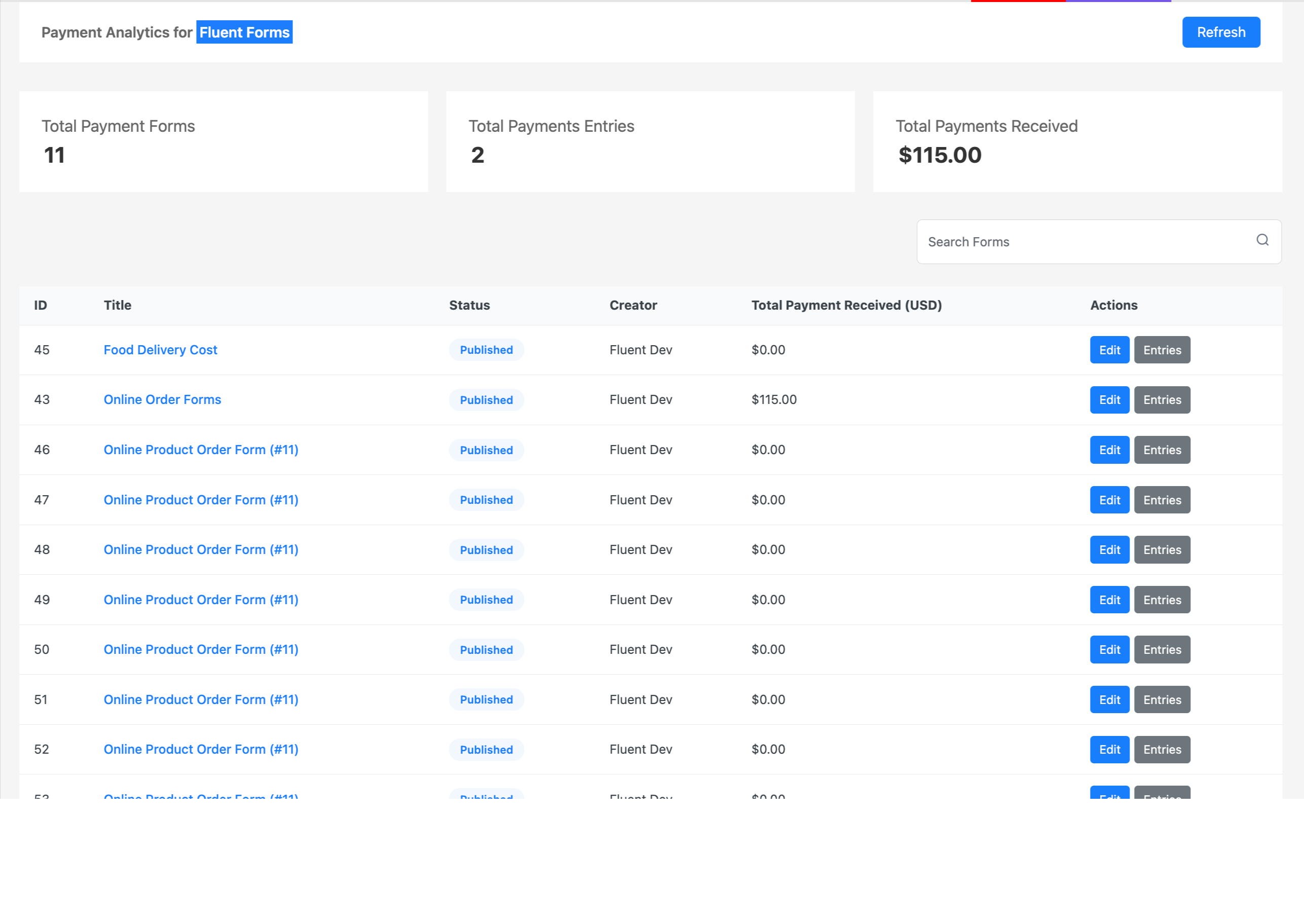
Payment Analytics for Fluent Forms
| 开发者 |
suitepress
algorithmsunlocks |
|---|---|
| 更新时间 | 2026年8月2日 21:27 |
| 捐献地址: | 去捐款 |
| PHP版本: | 8.0 及以上 |
| WordPress版本: | 7.0 |
| 版权: | GPLv2 or later |
| 版权网址: | 版权信息 |
详情介绍:
Advanced Payment Analytics & Revenue Reporting for Fluent Forms
Fluent Forms Paytails is a powerful payment analytics and revenue reporting addon built exclusively for Fluent Forms users. Designed for WordPress websites that accept online payments, Paytails gives you a complete overview of your payment activities, transaction performance, and revenue growth from a single centralized dashboard.
Whether you collect payments for products, services, subscriptions, registrations, or donations, Fluent Forms Paytails helps you monitor and analyze every transaction with real-time insights and easy-to-understand visual reports.
Managing payment data across multiple forms and payment gateways can become overwhelming. Fluent Forms Paytails simplifies the process by consolidating all your Fluent Forms payment information into one modern analytics dashboard.
The plugin supports popular payment gateways integrated with Fluent Forms, including:
- Stripe
- PayPal
- Razorpay
- Mollie
- Paystack
- Square
- Paddle
- Test payments and other supported Fluent Forms payment integrations
- Centralized Payment Dashboard - Get an instant overview of your total revenue, completed transactions, payment trends, and earnings from all payment-enabled Fluent Forms.
- Form-wise Revenue & Transaction Reports - Analyze payment performance for individual forms with detailed statistics including total payment amount, transaction count, revenue growth, and form-specific performance metrics.
- Interactive Graphs & Visual Analytics - Understand your business performance through clean charts and visual reports that help you identify payment trends, top-performing forms, and revenue patterns over time.
- Real-Time Payment Insights - Monitor payments as they happen and access up-to-date revenue data directly from your WordPress dashboard.
- Secure Payment Data Handling - Your analytics data stays securely within your WordPress website. Fluent Forms Paytails does not share or transmit sensitive payment information externally.
- Seamless Fluent Forms Integration - The plugin works smoothly with existing Fluent Forms payment integrations without requiring complicated setup or coding.
- Optimized for High Performance - Built for speed and scalability, Fluent Forms Paytails can handle large volumes of payment data without slowing down your WordPress admin experience.
- Beginner-Friendly Interface - The clean and intuitive dashboard makes payment tracking simple for freelancers, agencies, store owners, nonprofits, and businesses of all sizes.
- E-commerce websites using Fluent Forms for payment collection
- Freelancers and agencies tracking client payments
- Nonprofit organizations monitoring donations
- Coaches, consultants, and service providers accepting online payments
- Small businesses needing advanced Fluent Forms payment reporting
- Website owners looking for affordable WordPress revenue analytics tools
安装:
- Upload the plugin to
/wp-content/plugins/ppa-for-fluentforms/or install it from the WordPress Plugin Repository. - Activate the plugin from your WordPress dashboard.
- Make sure Fluent Forms is installed and configured with your preferred payment gateway.
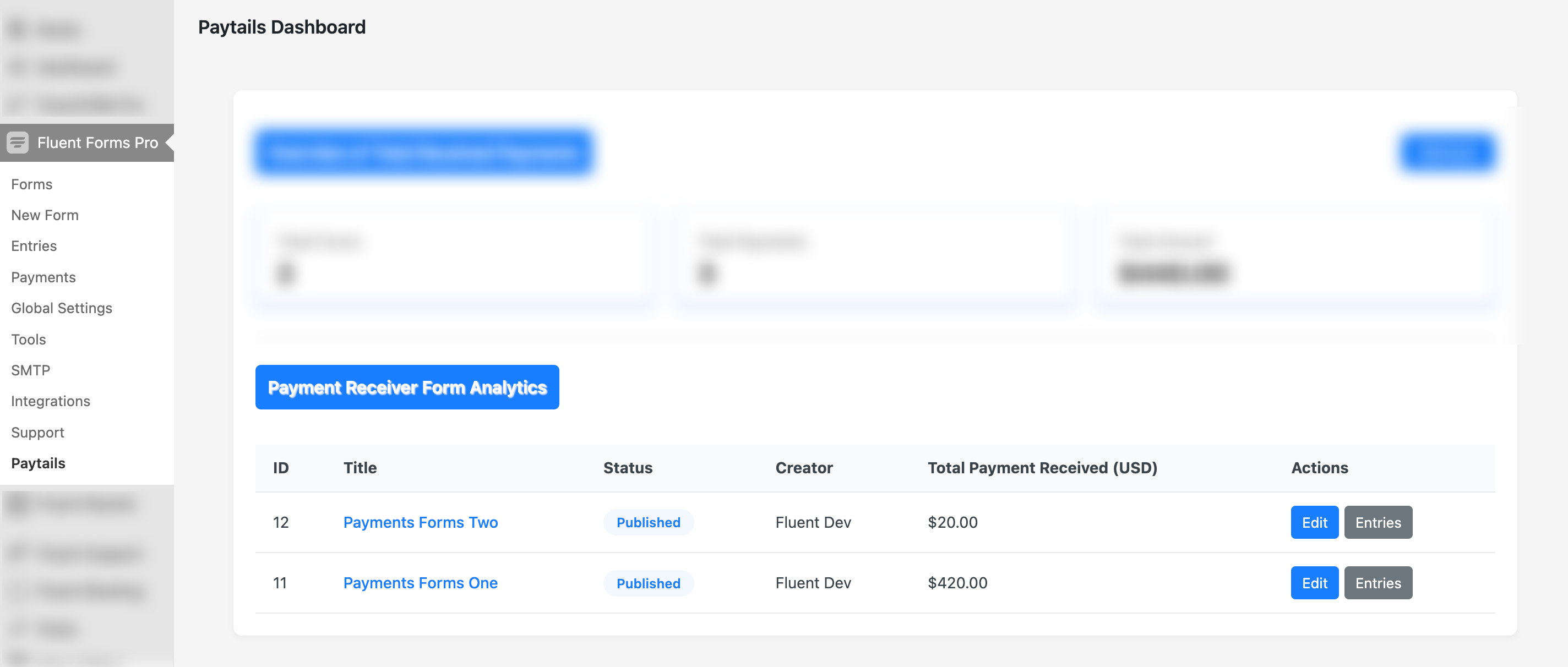
- Navigate to Fluent Forms → Paytails to access your payment analytics dashboard.
- Open the Paytails dashboard from the Fluent Forms menu.
- View your complete payment summary instantly.
- Click on individual forms to analyze total earnings, number of transactions, date-wise payment performance, revenue insights, and trends.
屏幕截图:


常见问题:
Does this plugin require Fluent Forms to work?
Yes, Fluent Forms Paytails is an add-on for Fluent Forms and requires the core Fluent Forms plugin to function.
Which payment gateways are supported?
The plugin supports all payment gateways compatible with Fluent Forms, including PayPal, Stripe, and more.
Is the plugin secure for handling payment data?
Absolutely. The plugin uses secure data handling practices and complies with WordPress standards.
Does it work on multisite WordPress installations?
Yes, Fluent Forms Paytails is compatible with both single-site and multisite WordPress environments.
更新日志:
11.5.4 – August 2, 2026
- Maintenance: Version bump and general maintenance update
- Maintenance: Version bump and general maintenance update
- Maintenance: Version bump and general maintenance update
- New: Confirmation modal with focus trap and keyboard support for safe destructive actions
- New: Empty data state component with contextual guidance messages
- New: Sparkline chart component for inline trend visualization
- Improvement: Robust error handling with retry logic, input validation, and system status indicators
- Improvement: Offline/online detection with automatic data refresh on reconnection
- Improvement: Responsive layout improvements across all dashboard components
- Improvement: Text overflow handling and accessibility enhancements throughout the UI
- Improvement: Backend query optimizations for failed transactions and revenue trends
- Improvement: Added total_attempts and success_rate fields to revenue trend and form stats API
- Improvement: CSS isolation refinements and responsive breakpoints for mobile devices
- Bug Fix: CSV/PDF export now shows confirmation dialog with popup blocker detection
- Bug Fix: Date range validation prevents future dates and excessive ranges
- Bug Fix: Currency code and payment method labels no longer overflow containers
- New: Live/Test mode toggle to filter analytics by payment mode
- New: Period comparison badges showing % change on all KPI cards
- New: Custom date range picker for flexible reporting periods
- New: Failed & Pending Payments panel with real-time status display
- New: Refund details section inside the Form Detail Panel
- New: Top Customers table ranked by total paid
- New: Monthly Revenue Goal tracker with animated progress bar
- New: Weekly email digest with configurable recipients and schedule
- New: WordPress dashboard widget for at-a-glance revenue summary
- New: Print/PDF export for the full analytics report
- New: Form Detail Panel with revenue trend chart and recent transactions
- Improvement: Dynamic currency symbol from Fluent Forms global settings (Euro, GBP, etc.)
- Improvement: Section headers and UI fully isolated from WordPress admin CSS conflicts
- Improvement: Revenue Over Time chart now correctly groups and orders data by date
- Bug Fix: Form Detail Panel no longer shows "Failed to load details" on valid data
- Bug Fix: Currency symbol now reads from Fluent Forms payment settings instead of hardcoded $
- Bug Fix: Revenue trend chart groupBy/orderBy query fixed for all date periods
- New: Table search
- New: Table pagination
- New: Dashboard header
- UI updated
- Bug Fix: Payment forms count issue fixed
- Initial public release
- Payment overview dashboard
- Form-specific analytics
- Real-time data updates