
Precious Metals Product Prices for WooCommerce
| 开发者 | nfusionsolutions |
|---|---|
| 更新时间 | 2026年5月12日 05:00 |
| PHP版本: | 7.4 及以上 |
| WordPress版本: | 6.9.4 |
| 版权: | GPLv2 or later |
| 版权网址: | 版权信息 |
标签
下载
详情介绍:
- Update product pricing automatically based on real-time precious metals markets
- Sync wholesaler premiums with all your metals products on WooCommerce
- Automate wholesale order flow with drop-shipping support
- Synchronize products across your enterprise and all sales channels
- Protect margins from rapid market movements
- Lower pricing risk through reliable automation
- Reduce manual work using rock solid synchronizations
- Eliminate stale pricing with always live pricing
- Operate more efficiently by reducing manual bottlenecks
- Expand product selection with a scalable platform built for bullion
- Keep product pages current and reduce manual maintenance
- Stop carrying unnecessary inventory through effective use of drop-shipping
安装:
- Upload the plugin folder to
/wp-content/plugins/or install via the WordPress plugin installer - Activate the plugin through the Plugins menu in WordPress
- Navigate to nFusion Settings in the WP Admin sidebar to enter your API credentials
- Optional: Install the Action Scheduler plugin to enable background product syncing, product re-indexing, and the retail order sync batch job
屏幕截图:
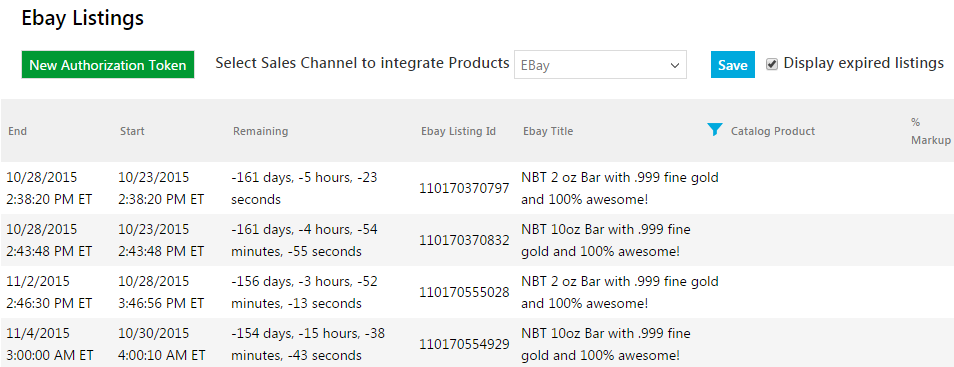
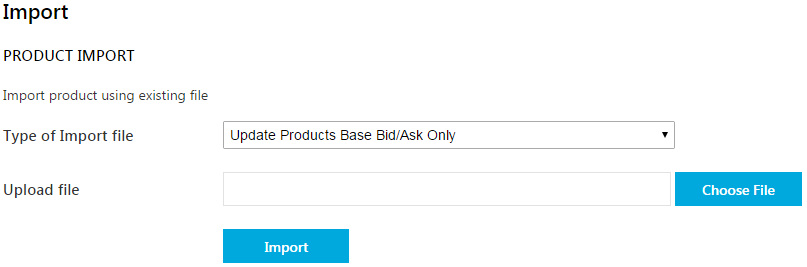


常见问题:
Do I need a subscription to use this plugin?
Yes. The plugin requires an active subscription for live pricing, product sync, and wholesale order automation features. Contact us at 1-888-806-3081 (option #1 for Sales) or Email Sales to get started.
How accurate and reliable is the price data?
nFusion Solutions metals price and currency rates data is powered with professional-grade data feeds. Live spot prices follow the Globex market schedule. For a detailed explanation of our Global Precious Metals Spot prices and how they are derived read our full guide on Precious Metals Spot Prices
How often do product prices update?
By default, prices refresh every 60 seconds. You can configure this interval in the plugin's Pricing settings tab (minimum 10 seconds).
Who is this plugin for?
It is built for precious metals businesses using WooCommerce, including bullion dealers, coin shops, wholesalers, and stores selling gold, silver, platinum, and palladium products online.
How many products can be automatically priced?
Clients with thousands of WooCommerce products use this plugin to price all of their products automatically in real time. There is no product limit built into the plugin.
Does retail order sync work with manually created admin orders?
Yes. Orders created directly in the WP Admin (without going through the checkout) are fully supported. When the order status is set to Processing, prices are snapshotted from the live Bullion Pricing Engine at that moment and the order is queued for submission.
What checkout flows does the order sync support?
The plugin supports the classic WooCommerce checkout, the Gutenberg block-based checkout, admin-created orders, and orders completed via the WooCommerce customer-pay page (the pending → on-hold → processing flow).
Do I need Action Scheduler for the order sync to work?
Yes. Retail Order Sync uses Action Scheduler to run the batch submission job on a schedule. The product background sync and re-indexing features also require Action Scheduler. This is a free, standalone plugin available on WordPress.org or via WooCommerce.
How does the plugin match WooCommerce products to the nFusion Platform?
The plugin matches products using either the standard WooCommerce SKU field or a dedicated nFusion SKU meta field (nfs_catalog_plugin_sku) on the product. If both are present, the nFusion SKU takes priority. The highlighted SKU on the Product Sync matched table shows which field is actively driving pricing.
Can I use this plugin for wholesale / dealer pricing?
Yes. There is a Wholesale Pricing mode in the Advanced settings tab that switches the plugin to use wholesale prices and tiers from the nFusion API. This mode is only available to accounts with a wholesale subscription.
How can I add charts and spot price widgets to my site?
See our precious metals charts and tickers page for the full range of market data visualization options.
Do I get support and ongoing maintenance?
Yes. All subscribed customers receive ongoing maintenance for subscribed services and access to the nFusion support team. We also provide onboarding training to help you get the most out of every feature.
Does it support live gold and silver pricing?
Yes. The plugin supports automated pricing workflows for gold and silver products, with configurable refresh intervals.
Does it also support platinum and palladium?
Yes. The plugin supports pricing workflows for gold, silver, platinum, and palladium products.
Can I use it for bullion products like coins and bars?
Yes. It is well suited for bullion, coins, bars, rounds, numismatics, and other precious metals products.
Does it support tiered or volume pricing?
Yes. Tiered and volume-based pricing can be configured for eligible products.
Can it show buy prices on product pages?
Yes. Optional buy price display is supported.
Does it support wholesale pricing?
Yes. The plugin includes a wholesale pricing mode for dealer and wholesale workflows.
How does product sync work?
Products are matched by SKU and managed through a sync workflow that helps keep product data aligned between WooCommerce and the nFusion Platform.
What is the main advantage of the order automation feature?
It reduces manual processing and supports wholesale fulfillment workflows, including drop-shipping models that let dealers sell products they do not have to stock themselves.
Why is drop shipping valuable in the bullion industry?
It helps dealers expand product selection, reduce capital tied up in inventory, and lower fulfillment overhead.
Is this suitable for stores with thousands of products?
Yes. The plugin is designed to support thousands of products and includes background processing to efficiently manage sync-related operations.
Does it support WooCommerce High-Performance Order Storage?
Yes. The plugin supports modern WooCommerce order storage workflows.
Can I install it and then request a demo?
Yes. Install the plugin, then contact our Sales Team to schedule a demo and start your trial.
更新日志:
- Added Retail Order Sync — completed WooCommerce orders are automatically submitted as retail orders to the nFusion Dashboard via a scheduled batch job
- Added Order Sync History admin page with pagination, multi-column sorting, and filters by order number, customer name, date, status, and nFusion Retail Order ID
- Added bulk retry for failed orders — select one or many failed orders and re-queue them with a single bulk action; checkout prices are always preserved on retry
- Added nFusion Retail Order meta box on the WC order edit page showing sync status and a direct link to the nFusion Dashboard order
- Added checkout price snapshotting — spot and ask prices are captured per line item at the moment of checkout for price integrity
- Added support for admin-created orders and customer-pay-page orders (pending → on-hold → processing flow)
- Added Orders API Key setting and configurable order sync interval
- Refactored Product Sync tables to use WP_List_Table native bulk actions (replaced custom buttons with dropdown bulk action selectors)
- Updated externalSource field to include platform name and store domain for constructing WC admin links from the nFusion Dashboard
- Moved wholesale price toggle to Advanced settings tab
- Added support for wholesale pricing mode
- Improved per-request cache lookup latency
- Fixed legacy nFusion SKU metadata name during retrieval
- Replaced PHP 8 syntax for broader PHP version compatibility
- Fixed file directory issue
- Updated WordPress tested-up-to version
- Added two-way product syncing between the nFusion Catalog and WooCommerce
- Added Product Sync admin page with Matched, Catalog Only, and WooCommerce Only tables
- Added product attribute management (Metal, Product Family, Asset Class, UOM, Weight)
- Added Bulk Edit for WooCommerce-only products
- Added background product sync via Action Scheduler
- Performance and UI/UX enhancements
- Product cache improvements
- Updated tested versions
- Improved cache maintenance
- Improved product re-indexing memory efficiency
- Added compatibility with Stripe-based payment methods during processing fee calculation
- Allow decimal values in credit card fee field
- Apply credit card pricing only to synced products
- Enhanced cache clearing
- Added configurable product price update interval
- Prevented plugin CSS from affecting unrelated WP Admin pages
- Display quantity range on Volume Discounts table
- Refactored settings to use the WordPress Settings API
- UI/UX enhancements throughout
- Exempt BACS payment method from credit card fee
- Re-ordered tiered pricing table columns
- Credit card fee calculation improvements
- Added support for credit card payment fees applied through the checkout process
- Updated supported versions
- Added async product re-indexing via Action Scheduler
- Use lowest price during product re-indexing
- Minor code improvements
- Product re-indexing using WC price field
- Added compatibility for variable products
- Added custom labels for card and check payment methods
- Improved multi-currency caching
- Added cache clearing mechanism
- Minor bug fixes
- Added custom pricing labels
- Caching improvements