
Pressed Hog – Analytics for PostHog
| 开发者 | seainthetrees |
|---|---|
| 更新时间 | 2026年10月20日 17:29 |
| PHP版本: | 7.4 及以上 |
| WordPress版本: | 7.1 |
| 版权: | GPLv2 or later |
| 版权网址: | 版权信息 |
详情介绍:
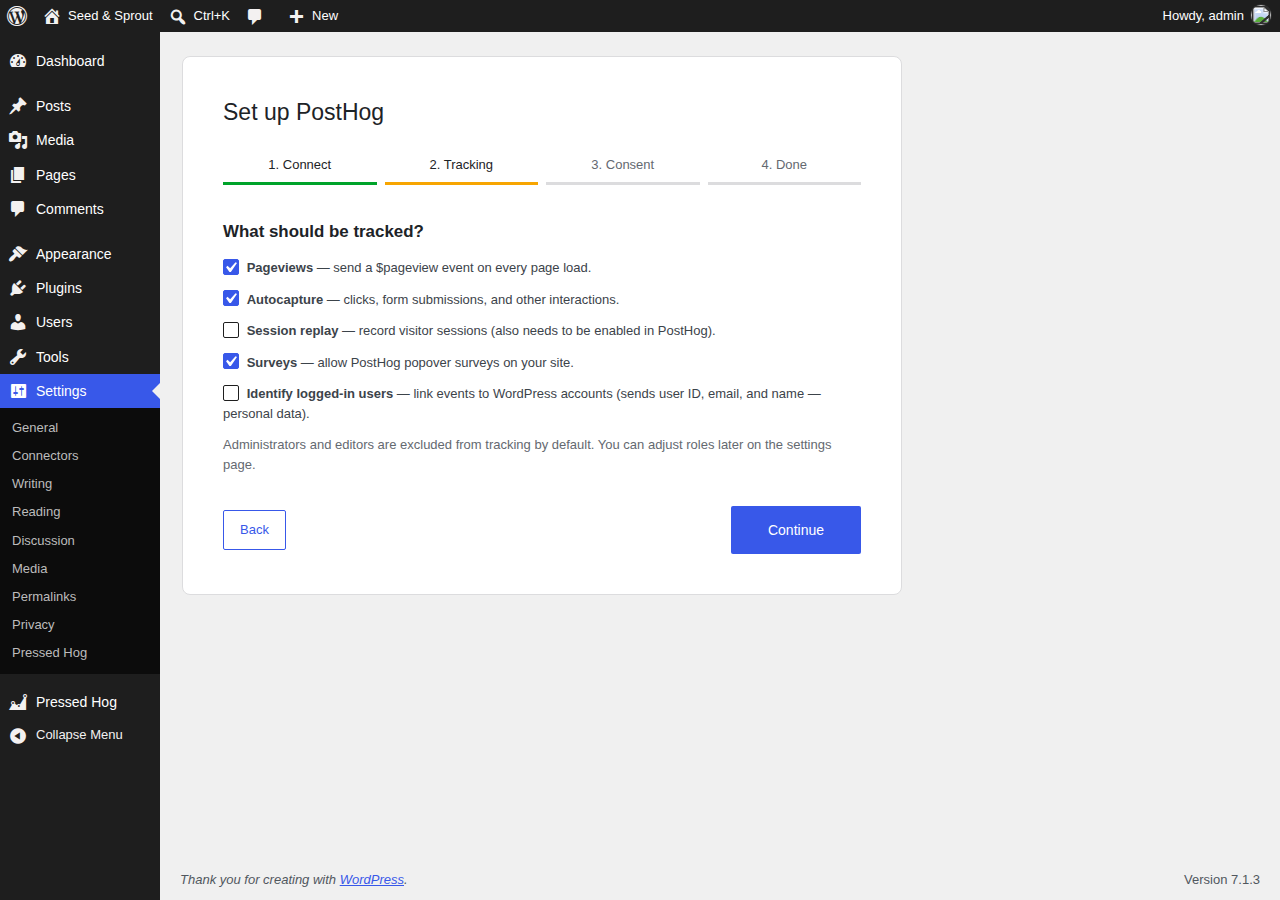
- Guided setup wizard on activation: pick your region, validate your API key live against your PostHog host, choose tracking and consent options, and send a test event to confirm everything works end to end.
- Injects the official posthog-js snippet with your project API key and host.
- Toggles for pageview capture, autocapture, session replay, and popover surveys.
- Optionally identify logged-in users, linking events to their WordPress account.
- Exclude roles (administrators, editors, …) from tracking so your own clicks stay out of your data.
- Consent handling with three modes: no gate, a built-in cookie banner, or integration with an external consent plugin via a cookie or JavaScript API.
- WooCommerce events:
product_added_to_cart,checkout_started, andorder_completed(with order totals and line items, deduplicated per order). - Server-side feature flags: a
[posthog_flag key="my-flag"]…[/posthog_flag]shortcode to gate content, pluspressed_hog_is_feature_enabled()andpressed_hog_get_feature_flag()template helpers. - Reverse proxy: serve PostHog through your own domain (e.g.
yoursite.com/phog/…) so analytics requests are first-party and delivered more reliably. - In-dashboard analytics: a Pressed Hog admin page with pageviews, unique visitors, a traffic chart, top pages, referrers, and devices — plus a WordPress dashboard widget and an optional link to a PostHog shared dashboard. Requires a personal API key with read-only Query scope.
- QR codes & trackable links: turn any URL of your own into a campaign-tagged link (UTM parameters plus a unique per-link id so PostHog can attribute each QR individually), generate its QR code right in the browser (nothing is sent to a third-party QR service), keep a saved list of your links, and export the whole list as a downloadable CSV spreadsheet. Download each QR as PNG or SVG.
window.pressedHog.grantConsent(); or window.pressedHog.denyConsent();
Hooks
pressed_hog_is_active— filter whether the snippet is output for the current request.pressed_hog_init_config— filter theposthog.init()config array.
安装:
- Upload the plugin to
/wp-content/plugins/pressed-hog-analytics-for-posthog, or install it via the Plugins screen. - Activate it — you'll be taken straight to the setup wizard.
- Follow the wizard: pick your PostHog region, paste your project API key (starts with
phc_), choose tracking and consent options, and send a test event.
屏幕截图:


常见问题:
Where do I find my project API key?
In PostHog, open Settings → Project. The key starts with phc_ and is safe to expose publicly.
Does this work with self-hosted PostHog?
Yes — choose "Self-hosted / custom" as the host and enter your instance URL.
Does the plugin send any data to PostHog on its own?
Only what you enable. The tracking snippet runs in visitors' browsers; the only server-side request is feature flag evaluation (when you use the shortcode or helpers), sent to your configured PostHog host.
Does the reverse proxy work on any host?
It needs pretty permalinks enabled (Settings → Permalinks). Every tracked event then passes through your server as a lightweight relay to PostHog — fine for most sites, but consider a CDN-level proxy for very high-traffic sites.
How do the QR codes track scans?
Each trackable link appends standard UTM parameters (source, medium, campaign) plus a unique phg_qr id to your destination URL. When someone scans the code and lands on your site, posthog-js captures those parameters on the $pageview event, so you can break scans down by campaign — or by individual QR code — in PostHog. The QR image itself is generated in the visitor's/your browser; the URL is never sent to an external QR service.
Where are my links stored, and can I export them?
They're saved in your WordPress database (the pressed_hog_links option) and listed on the QR Codes page. Use "Download sheet (CSV)" to export every link — label, destination, full tracked URL, UTM values, tracking id, and created date — as a spreadsheet you can open in Excel or Google Sheets.
Is my personal API key safe?
It is stored in its own non-autoloaded WordPress option. Public tracking requests load a separate settings option and do not retrieve the credential. It is only ever used server-side (never printed on the front end). Create it with the read-only Query scope so it can't modify anything.
更新日志:
- The optional PostHog shared dashboard is now linked from the analytics page instead of embedded in an iframe.
- The reverse proxy now relays only PostHog's JSON API responses; library files load directly from PostHog's asset host.
- Text domain changed to
pressed-hog-analytics-for-posthogto match the WordPress.org plugin slug. - All admin output is escaped at the point of output.
- Fixed a PHP deprecation notice on the setup wizard screen.
- Renamed to "Pressed Hog – Analytics for PostHog"; the admin menu is now labelled "Pressed Hog" and no longer sits at the top of the menu.
- The tracking snippet, settings script, and dashboard-widget styles now go through the WordPress script and style loaders instead of inline tags.
- With a consent mode on, posthog-js no longer stores cookies or localStorage until the visitor consents.
- The "connect PostHog" reminder now appears only on the Plugins screen.
- Uninstall now also removes WooCommerce order meta and cleans up every site on a multisite network.
- Documented the external services the plugin uses.
- New "QR Codes" page (under the PostHog menu): create trackable links from your own URLs with UTM tags and a unique tracking id, generate QR codes, save your links, and download the list as a CSV spreadsheet. QR codes are generated entirely in the browser and can be downloaded as PNG or SVG.
- Security hardening: restrict the reverse proxy to known PostHog paths and methods with a request-body size cap; validate the wizard's key-check host (HTTPS only, via wp_safe_remote_post) to prevent internal-network probing; stop exposing the personal API key in the setup wizard's page HTML and keep it out of the autoloaded options cache; reject numeric anonymous feature-flag identifiers.
- Reverse proxy for ad-blocker-resistant tracking through your own domain.
- In-dashboard analytics page, dashboard widget, and optional embedded shared dashboard.
- Initial release.