
PressGo AI — Landing Page & Website Builder for Elementor
| 开发者 | acehobojoe |
|---|---|
| 更新时间 | 2026年8月12日 00:04 |
| PHP版本: | 7.4 及以上 |
| WordPress版本: | 7.0 |
| 版权: | GPLv2 or later |
| 版权网址: | 版权信息 |
详情介绍:
- Chat-driven AI Builder with streaming responses, screenshot self-review, and viewport switching (desktop/tablet/mobile)
- Drop, paste, or click-to-attach reference screenshots directly into the chat
- "AI-enable" any existing Elementor page to keep iterating on it via chat
- MCP server with OAuth 2.1 + 11 tools for power users on Claude Desktop / Cursor
- Live Elementor editor sync: chat edits appear without reloading
- Pause-and-resume: open the Elementor editor mid-build and the agent pauses automatically so your drag-and-drop edits stay safe
- "Watch URL": share a live preview link with clients while you build
- 19 section types with 56 layout variants
- Every element is native Elementor, fully editable
- Embeds your existing WPForms / Contact Form 7 / Gravity / Ninja / Fluent forms as real working forms
- Mobile-responsive out of the box (auto-calculated tablet and mobile sizes)
- Runs on current Claude models, matched to each job; bring your own Anthropic key and pick a model (Sonnet, Opus, or Haiku) if you prefer
- Works with Elementor Free, no Pro required
- Hero (6 variants: default, split, image, video, gradient, minimal)
- Stats (3 variants: default, dark, inline)
- Social proof (2 variants: light, dark)
- Features (6 variants: default, alternating, minimal, image cards, grid, bento)
- How-it-works steps (3 variants: default, compact, timeline)
- Results / metrics (2 variants: default, bars)
- Competitive edge (4 variants: default, image, cards, us-vs-them comparison)
- Testimonials (4 variants: default, featured, grid, minimal)
- Pricing (3 variants: default, compact, service/menu price list)
- FAQ accordion
- Team profiles (3 variants: default, compact, solo spotlight)
- Gallery (4 variants: default, cards, before/after pairs, videos)
- Newsletter (2 variants: default, inline)
- Logo bar (2 variants: light, dark)
- Google Maps embed (2 variants: default, contact card with hours)
- Final CTA (4 variants: default, card, image, split with checklist)
- Footer (2 variants: dark, light)
- Blog posts grid (requires Elementor Pro)
- Form embed (your existing form-plugin form in a styled card)
- Legal disclaimer
- Install the plugin and create your free account right inside the builder: enter your email, click once, done. 10 free builds a month, no card needed
- Your key saves itself on that one click. Signed up on the web instead? Paste the key from your welcome email into PressGo → Settings, once
- Go to PressGo → AI Builder and click "+ New page" (or AI-enable an existing page)
- Describe the page in chat, drop in reference screenshots if you have them, and watch it build in the live preview
- Keep chatting to iterate: change colors, swap sections, rewrite copy. Say "review my page" anytime and the agent screenshots its own work and self-corrects
- Click "Edit in Elementor" anytime to drop into the native editor for hands-on tweaks
安装:
- Upload the
pressgo-builderfolder to/wp-content/plugins/ - Activate the plugin through the "Plugins" menu in WordPress
- Go to PressGo → Settings and choose your API mode:
- PressGo API (recommended) — Create a free account at pressgo.app/register and paste your API key. 10 free credits/month.
- Own API Key — Enter your Anthropic API key from console.anthropic.com
- Click PressGo in the sidebar — the AI Builder list opens. Click "+ New page" to start your first chat-driven build.
屏幕截图:
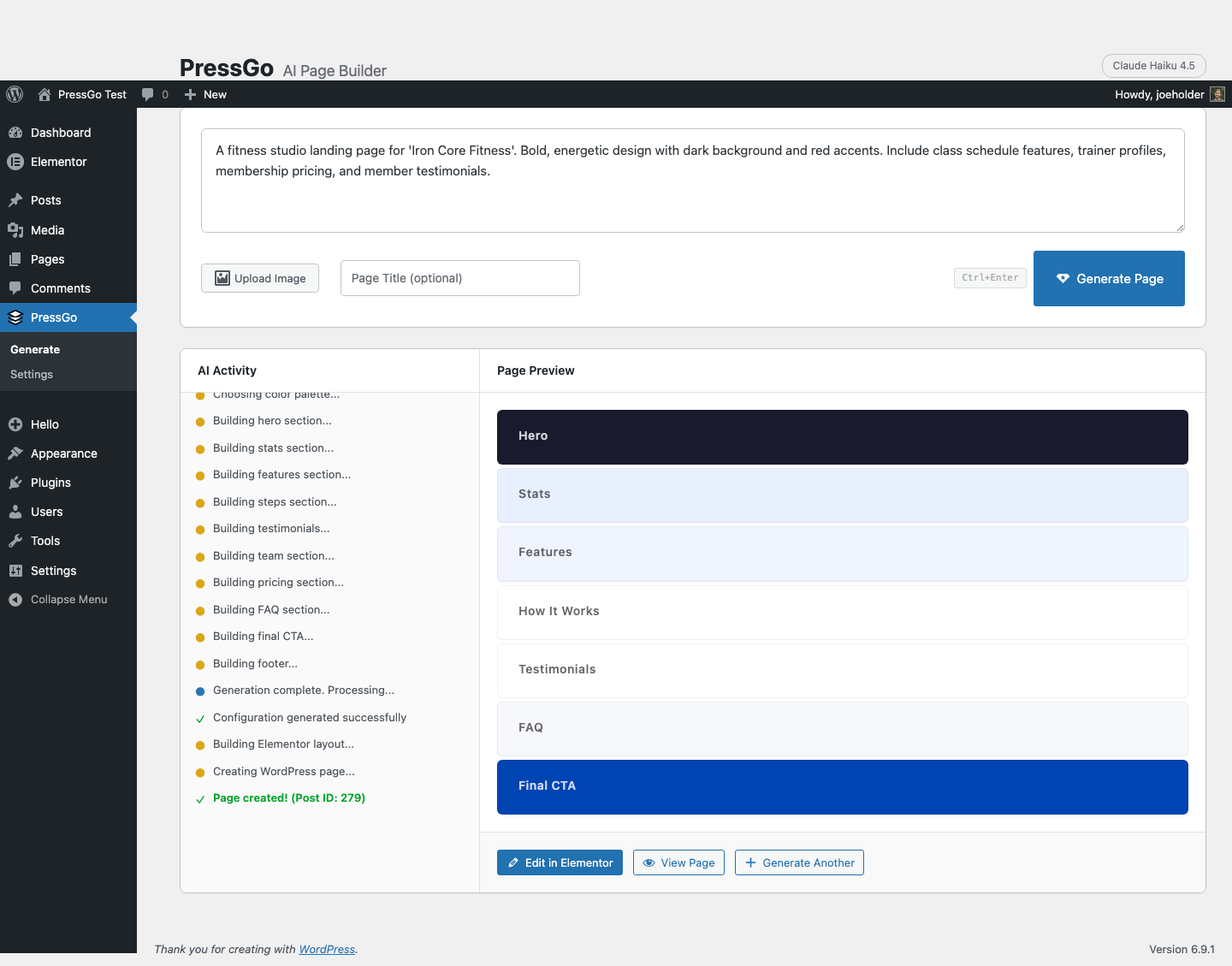
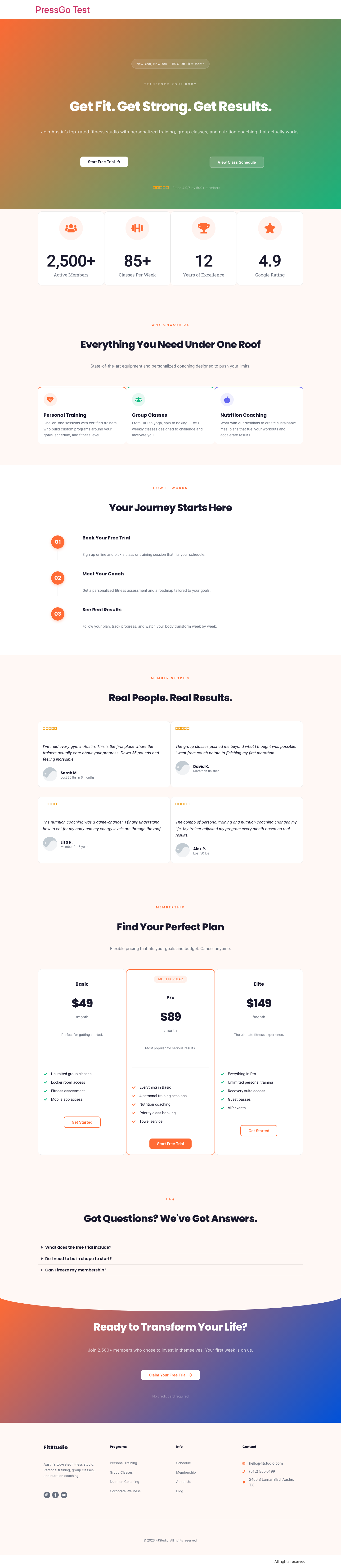
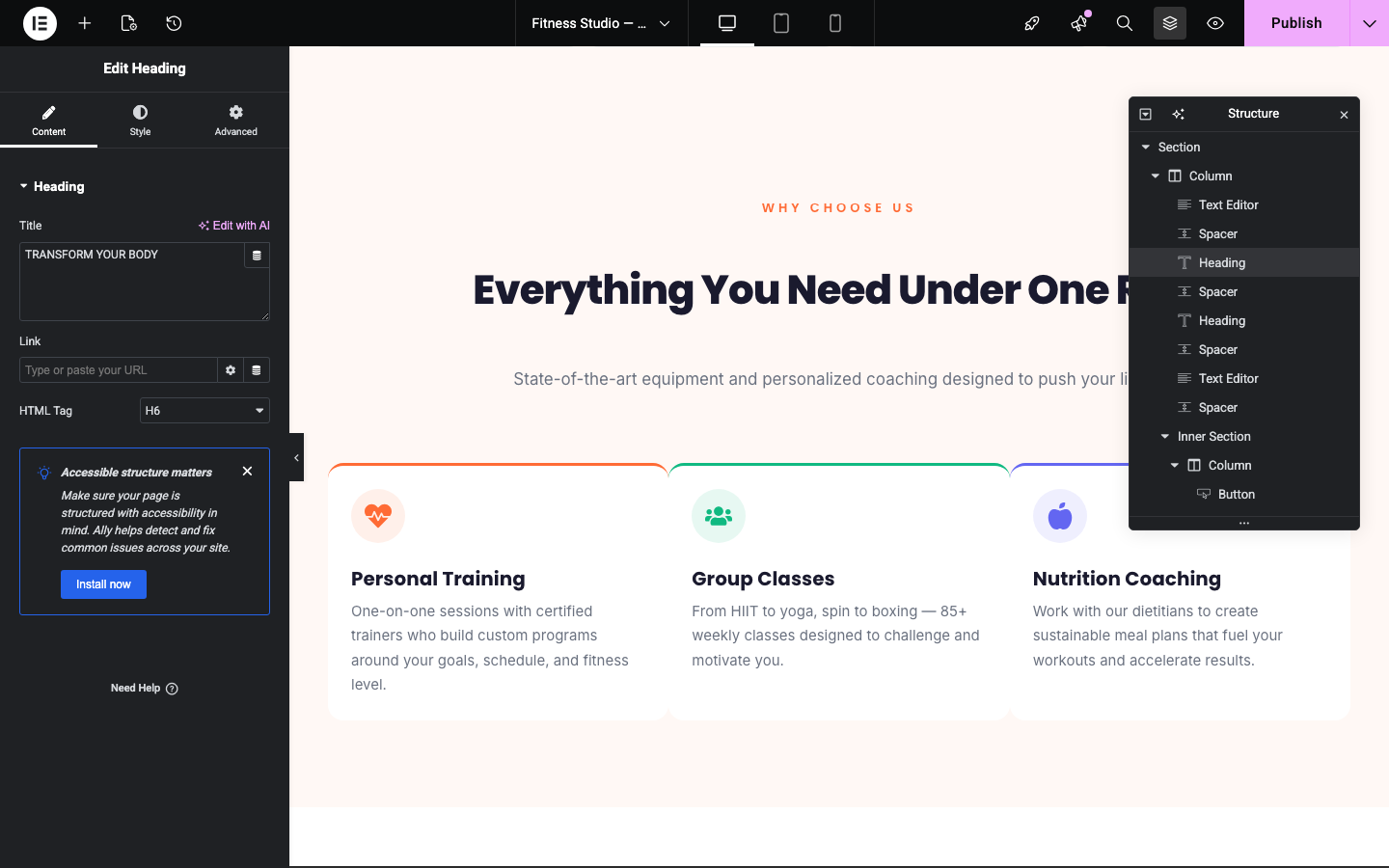
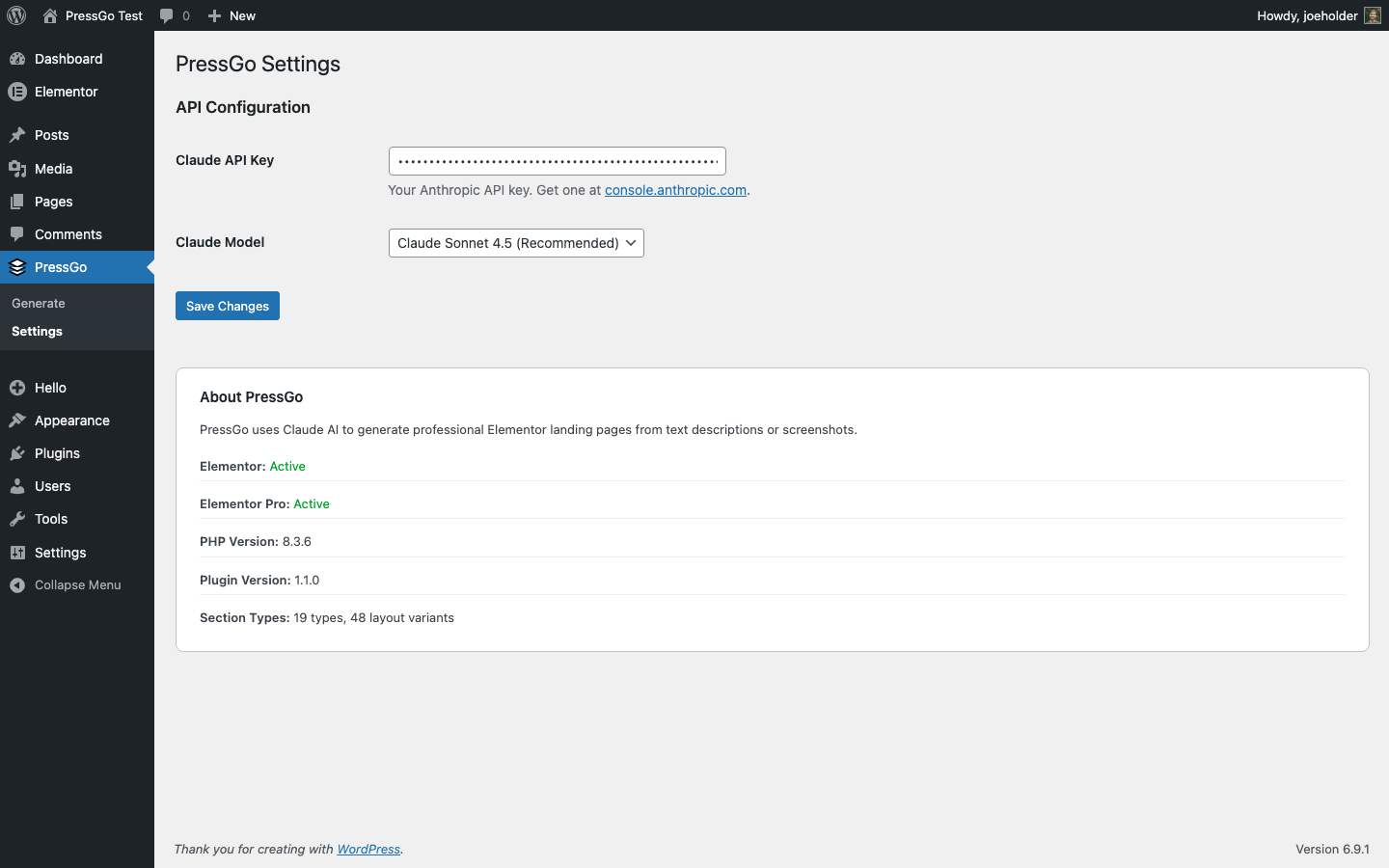


常见问题:
Do I need an API key?
Start free, no credit card. Create your free PressGo account with one click inside the builder (or at pressgo.app/register) and you get 10 free builds a month. From there you have two ways to power it: (1) keep using your free PressGo account (recommended; top up or upgrade anytime), or (2) bring your own Anthropic API key from console.anthropic.com and pay per token directly.
How much does it cost per page?
With a PressGo account: 10 free builds a month included. Beyond that, a $15 one-time pack adds 75 credits, or upgrade: Pro $25/mo, Max $59/mo, Ultra $149/mo (annual saves about 20%). Every paid plan includes hosting, where the agent hosts and runs your whole site. A build (or a significant chat-driven edit) costs one build or credit; just chatting is free until the page actually changes. With your own Anthropic key, a typical Haiku page costs ~$0.02-0.05, Sonnet ~$0.10-0.30, and Opus is the most capable at higher cost.
Do paid plans include hosting?
Yes. Every paid plan (Pro, Max, and Ultra) includes hosting: the agent stands up a real WordPress site, then hosts and runs the whole thing for you. You keep your own wp-admin password and SSH access, everything is native Elementor, and you can export anytime. Prefer your own hosting? Keep the plugin on your own site. Your call.
Does the AI Builder chat work with my own Anthropic key?
The chat-driven AI Builder runs on a PressGo account key (pg_...); it's how pages stream, get reviewed, and stay in sync. "Own API Key" mode powers the legacy one-shot generator only. A free PressGo account (10 free builds a month, no card) unlocks the full chat builder.
What data is sent to external servers?
When you click Generate, your text prompt and optional image are sent to Anthropic's API (api.anthropic.com) over HTTPS using your API key. The response is a JSON configuration that the plugin converts to Elementor elements locally. No data is collected by PressGo.
Do I need Elementor Pro?
No. PressGo works fully with Elementor Free. The blog posts section uses the Posts widget which requires Elementor Pro; it will be skipped automatically if Pro is not installed.
Can I edit the generated pages?
Absolutely. Every generated page uses native Elementor widgets and sections. Open it in the Elementor editor and customize anything: text, colors, images, layout.
Which Claude model should I use?
On a PressGo account key you don't pick a model. The agent runs on current Claude models and matches the model to the job. With your own Anthropic key, Sonnet gives the best balance of quality and cost, Haiku is faster and cheaper but may produce simpler layouts, and Opus produces the most detailed results at higher cost.
更新日志:
- Out-of-builds screen now offers your next tier up (Max for Pro users, Ultra for Max) instead of a plan you already have
- Usage meter shows "resets in N days" for the weekly window instead of a huge hour count
- Weekly build allowance: free builds now reset weekly (Monday) instead of daily, so what you have is clearer and lasts the week
- Out-of-builds screen: when you run out mid-page, one click gets Pro or a $15 build pack right inside the plugin, no dashboard login needed
- Faster answers on imported pages: pages PressGo didn't build are detected instantly and you get a one-click "Build on a copy" instead of a long wait
- Clearer messaging on what resets when
- Renamed: "MCP Server" is now "Connect & license". Same place in the PressGo menu, clearer name. Your bookmarks and existing links keep working.
- Clearer usage language. The plugin now talks about builds ("12 builds left") instead of credits everywhere. Nothing about your allowance changed, only the words.
- Friendlier low-usage notice and connection messages.
- Under the hood: hardening follow-up (verified file writes, bounded inputs, more thorough cleanup).
- Fixed: paid PressGo plans (Pro/Max/Ultra and legacy Plus/Agency) are now recognized by the MCP tools and daily build meter; previously some paid accounts were limited as free.
- Security hardening for the MCP server: tool-call logs no longer store full arguments and are pruned after 30 days, OAuth client registration is rate-limited, and authorization codes and refresh tokens are strictly single-use
- Security hardening: site-wide MCP tools (brand foundation, global header/footer) now require administrator capability, and page/media listings respect each connected user's WordPress permissions
- Housekeeping and hardening: preview screenshots no longer run with elevated permissions, uninstall now removes every table, setting, and cached file the plugin created, and internal release tooling is stricter
- Your manual Elementor edits are now protected: when you edit a PressGo page in Elementor, PressGo detects it and will pause its automatic re-renders (brand repaint, chat patches, global re-styles) instead of overwriting your changes
- A fresh look: the builder and settings now share PressGo's new design. Warm paper background, one blue, cleaner pill buttons
- Clearer language everywhere: the agent hosts and runs your whole site on paid plans, and the plugin now says so the same way pressgo.app does
- Add your own content, your way: type your own answer to any setup question, paste in as much copy as you want, or drop in a text file and the builder builds from it. The prompt box is bigger and makes it obvious
- Cleaner service and feature cards: when a card has a photo, the small icon no longer floats between the photo and the title
- Never an empty lead form: on Elementor Free with no form plugin, a form now falls back to a working call or contact button so the page can still capture leads
- Swap images without leaving the builder: a new Upload button opens your media library right in the image picker
- More accessible pages out of the box: stronger text contrast, bigger tap targets on phones, larger mobile body text, and tidier headings
- Faster pages: hero images load right away, unused fonts are dropped, and section background images stick on re-renders
- Clearer plans: the account panel now shows that every paid plan includes hosting, and running low on builds points you to the right upgrade in one click
- Smarter setup: Freeform now asks a few sharp, tailored questions about your business instead of a fixed form, and gets to building faster. Give it a rich description and it may not need to ask at all
- On brand automatically: builds match your saved brand, your colors, fonts, and voice, and a page can't drift off-brand even on a big custom layout. No brand yet? It designs a fresh look you can save
- Cleaner reviews: a testimonial with no real quote yet shows a clear "add a real review" prompt instead of an empty card, and a reviewer with no photo gets a tidy initials monogram
- Sharper hero trust lines: short trust points render as neat inline check chips
- New plans, Pro / Max / Ultra: pick or change your plan right inside WordPress, with a monthly or annual toggle (annual saves about 20%). Every paid plan now includes agentic hosting, where we stand up and run a real WordPress site for you and the AI builds straight on it. Or keep the plugin on your own site. Your call
- Know exactly where your plan stands: the plans panel shows when your plan renews, and if you cancel it shows the date it stays active until with one-click Resume. Manage billing opens your billing portal without leaving WordPress
- Sharper custom builds: Freeform now composes on Claude Sonnet for real design quality, and a mid-build hiccup retries on the same strong model instead of dropping to a weaker one that padded pages with empty spacing
- Clearer mode names: the two build modes are now simply Quick (fast, reliable page builds) and Freeform (builds anything, custom layouts). Same two modes, plainer names
- Name your page as you create it: the New page button now has an optional name field, so a page starts with the title you want instead of a timestamp. Leave it blank and your first build still names it for you
- Fixed: icons now render at the size intended. A sizing bug could make an icon oversized, or on some pages stop the page from building at all
- Asking "did you build it?" is now answered instantly from the page's real state, free, instead of triggering another build
- Every "Built" confirmation includes a View page link, so you always know where your page is
- A build is only marked "Built" after the plugin verifies the page content actually saved; if the save silently failed you get an automatic refund instead of an empty page
- The page reviewer fails a blank page instead of passing it
- Large custom builds no longer time out mid-stream: the builder now only gives up if the connection actually stalls
- Reliability: fixed a telemetry heartbeat that never reached the server
- Build from a PDF brief: drop in a project brief and PressGo builds the page section by section from it, in both quick and custom modes
- Testimonials never ship with placeholder text: bracketed filler like "[customer review]" is dropped instead of landing on your page
- "Why choose us" cards stay aligned: four benefits no longer leave one card stretched full-width
- Hero checklists show up: the bullet list under your headline now renders on every hero style
- Feature cards keep their details without a photo: price, label, and button stay put even when there is no image
- Better-timed prompts: the review request waits until you have built a few pages, and the review and hand-raise prompts no longer appear together
- Paste one key, everything connects: entering your Plus license now automatically connects your account too — no more hunting for a second key
- Forms work everywhere: on Elementor Free, AI-built forms now render your real Contact Form 7 / WPForms form (previously they could silently disappear), and asking for a specific form plugin is honored even when Elementor Pro is installed
- Embedded forms now look designed: styled labels, inputs, and buttons that match your page, on light and dark layouts
- Connection-drop recovery: if your connection hiccups mid-build, the builder now checks what actually finished and shows it instead of leaving you on a spinner
- Smarter layouts when you have no photos yet: no more empty image slots or dead space
- Refocused for landing pages: starter ideas and copy now speak to lead generation — calls, bookings, and form fills
- Optional human help: PressGo is built by a working marketing agency (PressGo Digital), and you can now raise your hand for a free site review — a card in the builder after your second build, or a checkbox when you create your account. Totally optional, one click to dismiss forever
- Listing copy refresh
- REAL FORMS: the AI can now place your existing WPForms, Contact Form 7, Gravity Forms, Ninja Forms, or Fluent Forms form on any page it builds — ask for "the contact form" and it embeds the actual working form (its styling and submissions stay with your form plugin). If the form you want doesn't exist yet, it tells you exactly where to create it instead of faking one
- "Change it back" now actually changes it back: saying undo/revert in chat instantly restores the page's previous snapshot — no AI call, no credits used, and History (the clock icon) still holds every earlier version
- The AI is now explicit about edit scope: chat edits touch only the page you have open, and it tells you when a site-brand change will restyle other PressGo pages
- Failed applies now report why they failed, and the credit refund carries the reason — so those rare "built but didn't render" moments get fixed instead of shrugged at
- One-click account creation: fresh installs can now create their free PressGo account (10 builds/month) right inside the builder — enter your email, click once, start building. No more copying keys between browser tabs
- Smoother screenshots: parallel screenshot requests now queue briefly instead of failing with a rate-limit error
- Simpler mode picker: two honest choices — Ada (fast, reliable, a full page in ~15 seconds) and Nova (custom freeform, builds anything). The old middle mode (Iris) is retired: its self-review now runs automatically on your first build and whenever you say "review my page", in every mode — no 3x-cost toggle to reason about
- The self-review is stricter with itself: it either fixes what it finds or gives one clear all-clear — it will never list problems and walk away
- Better with menus and headers: asking for a menu builds a real top bar on the page and tells you plainly how to get a site-wide menu (theme or Theme Builder) instead of silently skipping it
- Better at copying screenshots: the AI now enumerates what it sees, says up front what it can't reproduce, and fixes the worst-matching section when you say it doesn't match
- NEW BILLING MODEL: every account gets a daily allowance of included builds that resets at midnight UTC — Free covers a full page every day (8 section builds/day + 10 bonus credits a month), Plus ($12/mo) covers ~8 pages a day (64/day + 100 bonus credits), and the new Agency plan ($49/mo) covers ~40 pages a day (400/day + 400 bonus credits) for client work
- The usage bar in the builder shows your real account allowance and when it resets; credits become bonus overflow, only spent after the day's included builds
- Upgrade, manage, or CANCEL your plan without leaving WordPress — the usage bar opens a plans panel with live checkout and a Stripe billing portal link, and PressGo → Settings has a full Account & plan section (connected account, plan, today's builds, credits)
- Canceled plans show exactly when they end ("Ends Aug 6") in the builder and in Settings
- Edits, reorders, palette changes, quality passes and chat are free at every level and in every mode — even when the day's builds are spent
- Failed builds auto-refund whichever bucket they charged (daily allowance or credits), including builds the renderer rejects — and "try again" now genuinely retries your last request
- HONEST EDITS: if an edit didn't actually change anything, the builder says so instead of claiming success; if a requested color or wording didn't land, it flags it so you can check the preview
- NO INVENTED SOCIAL PROOF: testimonial and stats sections built without real quotes or numbers now use clearly-marked placeholders you replace — never fabricated reviewer names, ratings, or statistics
- Undo now also restores your site's brand colors if a repaint changed them
- Links inside text always match your palette (no more theme-default magenta on dark sections)
- One honest meter: on PressGo API sites the credits pill is the single gauge (it updates live as sections build); the daily usage bar now only appears for own-OpenRouter-key setups, and the old tier popup is gone
- Edits really are free: scoped section rewrites, hero restyles, and quality-pass fixes no longer spend credits — only NEW sections cost 1
- Automatic refunds: if a section build fails after being charged (model returned something unusable), the credit is returned to your balance within seconds
- Voice notes: recording size capped safely under the API body limit so long memos error clearly instead of failing silently
- Nova now works everywhere: freeform builds, the visual quality pass, screenshot understanding, chat, and voice transcription all run through your PressGo API key out of the box — no extra keys or setup. Section builds cost 1 credit each (edits, reorders, palette changes, and chat remain free).
- Clear "out of credits" message with a top-up link, instead of a generic failure
- Sites with their own OpenRouter key keep talking to OpenRouter directly, unchanged
- New: whole-page builds — describe your business once and Nova plans and builds a complete landing page (hero, trust strip, story, proof, offer, final CTA), then offers "Go deeper" sections to extend it
- New: "make it perfect" visual quality pass — the builder screenshots your page on desktop and mobile, critiques it section by section, and fixes what it finds
- New: talk to it like a person — move sections around, change the palette by mood or color name ("make it peach"), merge fixes and style changes in one message, undo when you change your mind
- New: drop photos straight into chat and they're uploaded and placed
- Improved: edits stay on YOUR page's story — a section rewrite can't drift into inventing a different business
- Improved: header and footer are handled as page chrome — cleanup passes will never remove or reorder them, and canvas vs. theme-template pages each keep the right chrome
- Improved: builds keep running if you refresh the tab mid-build
- Improved: daily usage rebalanced — Free now covers one complete page plus a quality pass every day (Starter ~3 pages/day, Pro ~8/day); the visual quality pass counts like one build, all other edits stay free
- Improved: clearer errors and faster model fallback when a compose takes too long
- Under the hood: full uninstall cleanup (options, transients, page metadata), debug logging only when WP_DEBUG is on
- New: Brand panel in the AI Builder topbar — view and edit your site's colors, fonts, name and voice, or clear it to relearn from your next build
- New: Manage pages without leaving the builder — publish/unpublish with a live status pill, rename inline, plus Duplicate and Trash on the page list
- Fix: the "leave a review" prompt now only counts a view when it's actually shown (it could previously be used up just by opening the builder)
- Fix: clearer note that the chat AI Builder uses a PressGo key even in Own-API-Key mode
- Fix: pages no longer scatter the same contact details across several sections — contact info stays in one place
- Repeatable sections: a page can now have two galleries, several schedule blocks, multiple feature groups ("gallery#2" works in edits too)
- 14 new section recipes: schedule (class/event timetables), sticky call bar, logo marquee, mesh + split-screen heroes, hero with built-in lead form, donation pricing, course modules, editorial steps, testimonial wall, stats ticker, tabbed features, gallery carousel, gradient headlines
- Real lead-capture forms (Elementor Pro): hero forms, final-CTA forms, and newsletter sections that actually collect emails — with graceful fallbacks on Elementor Free
- Continuous branding: the site's colors, fonts, and identity carry across every new page automatically (toggle in the builder topbar)
- Next-page chips: after a build, one tap starts About / Services / Contact / 404 with the same brand
- Test Connection now saves a key that validates — no more "tested green, builder says no key"
- Credit pill warns at 3 credits left; clearer out-of-credits guidance
- Version History panel: every AI change snapshots the page first, one-click restore
- Fixed: stored unicode characters (· — etc.) rendering as literal "u00b7" after edits
- Fixed: settings page said "3 free credits" — it's 10/month
- Elementor is now declared as a required plugin
- MCP: OAuth endpoint responses now include an X-PressGo-OAuth header, so connector errors (like a security plugin or WAF intercepting registration with a 403) are instantly distinguishable from plugin responses. If your AI client fails to connect with a 403, check whether the response has this header: no header means something in front of WordPress blocked the request, and allowlisting /wp-json/pressgo/v1/oauth/ in your security plugin fixes it.
- Fixed: images you attach as references (like a screenshot showing which photos to remove) are no longer placed on the page as if they were photos.
- Fixed: asking for a Pexels or Unsplash image now fetches real stock photos, even if you don't use the word "stock".
- Improved: the AI now says which of your library photos it used instead of guessing what they show, and chat screenshots stay out of other pages' photo pools.
- Improved: the AI self-review now catches wrong-industry photos and webpage screenshots placed as images.
- New: History panel in the AI Builder. A version of your page is saved automatically before every AI change, and you can restore any earlier design with one click. Restoring saves the current design first, so nothing is ever lost.
- New: ask for stock photos and the builder pulls in real, license-free stock images matched to your business (your own uploaded photos always come first).
- Fixed: page thumbnails in the AI Builder list now load reliably and are much lighter.
- Fixed: small edits like "make it a bit more green" no longer fail on pages built before this version.
- Fixed: chat history could look empty on busy servers. It now retries, and never overwrites a conversation in progress.
- Improved: the page list is simpler. The per-page AI toggle is gone; just open any page to edit it with AI.
- Improved: every section now stays strictly on your business and industry, and the AI self-review flags wrong-business content automatically.
- Your photos now appear on the FIRST build — drop image URLs or media-library photos into chat and they land in the hero, service cards, and galleries automatically.
- 8 new layouts (56 total): service/menu price lists (restaurants, salons, trades), a "Visit Us" contact + hours + map section, before/after photo pairs, video galleries, us-vs-them comparison cards, solo-professional team spotlight, asymmetric bento feature grids, and a split final CTA with a trust checklist.
- Full dark theme: ask for a dark premium look and every section renders dark with frosted cards — no more white strips breaking the design.
- New hero options: slim header bar (brand + tap-to-call + button), left content panel over your photo, and trust bullet checklists.
- Honest pages by default: the AI no longer invents testimonials, review counts, ratings, or statistics — placeholder content is clearly labeled for you to replace.
- Conversion polish: repeatable section CTA buttons, dead links auto-route to your phone number, phone-number buttons never wrap mid-digit.
- Dozens of layout/robustness fixes: counters and checklists now use your brand fonts, balanced card grids on every screen size, mobile spacing fixes, smarter icon handling, and graceful handling of any data the AI produces.
- Much better pages out of the box. A large quality upgrade to the AI builder. Your first build now uses a stronger model, and the AI gets a real design brief — an opinionated page recipe, when to use each section layout, what makes a strong hero, and light/dark visual rhythm — instead of improvising. New pages come out richer and more intentional.
- No more broken sections. The generator now refuses to render a section with no content, drops layouts the AI hallucinates, and reconciles its section list against the actual content — so empty cards, orphaned headers, and blank panels are structurally impossible.
- Smarter design defaults. Font pairings are chosen by industry (no more Inter on Inter), accent colors are derived from your brand instead of a fixed green, cards get layered depth, heroes use larger display type, and the dated curved section dividers are gone.
- Human copy, enforced. Built-in guardrails strip em dashes, AI cliches (Elevate, Unlock, Seamless, etc.), and generic CTAs, cap headline and feature lengths, and stop the AI from inventing fake testimonials for a brand-new business.
- Sharper self-review. A(eyes) is now a concrete pass/fail checklist and reviews the mobile layout too, and it runs automatically on your first build.
- Real margins, not a forest of spacers. Vertical spacing now lives as margins on the widgets themselves (editable under Advanced) instead of dozens of separate spacer widgets, so pages are far easier to tweak in Elementor and ship lighter HTML.
- Lighter pages. Modern unicode star ratings (no FontAwesome dependency), and the Phosphor icon CSS now loads only on pages that actually use it instead of every Elementor page.
- Edits go live immediately. Editing a page in the native Elementor editor and clicking Update now purges the caches, so you see your changes right away instead of the old version.
- Use your own photos. Drop one or several photos into the builder (multi-select, drag-drop, or paste) and they're resized, saved to your Media Library, and placed on the page by the AI — the strongest as the hero, the rest in a gallery or features — and used as visual references. Large photos attach instantly now instead of failing with an upload error.
- Streamlined menu. The top-level PressGo menu now opens the AI Builder directly. The old one-shot "Generate" page is retired — the chat builder does everything it did, and more.
- Straight into the builder. Once your API key checks out on the settings page, PressGo now drops you right into the AI Builder with an example prompt already filled in and one-tap starter ideas (Roofing, Yoga studio, SaaS, Dentist, Restaurant). No more landing on a blank screen wondering what to type — edit the example or tap a starter and hit Send.
- Bigger pages, fewer cut-offs. Raised the generation length limit so longer pages finish in one pass. If a page ever does hit the limit, the builder now tells you plainly and suggests how to finish it.
- "Thinking… 12s" timer. The Send button now shows elapsed time during a build (a full page is usually ~30 seconds) so a longer generation doesn't feel stuck.
- Cleaner icons. Pages now build with the modern Phosphor icon set (open-source, MIT) for a more consistent, lighter look than the older FontAwesome style. Brand/social logos and any existing pages are unaffected.
- Clearer guidance when an attached screenshot is too large to upload.
- Fix: the site-wide header could fatal on PHP 8. The Plus
set_headertool built its container with the wrong layout arguments, producing an undefined-index error and a malformed header. Rebuilt so the header renders correctly (logo left, nav + CTA right) on every PressGo page. The footer was unaffected. - NEW — Lock global styles. A toggle in PressGo → MCP Server stops the AI from changing your site-wide colors, fonts, and layout. When locked, the AI keeps your brand palette and matches it instead of redesigning — it can still build and edit pages. Override per request by telling it to change the site-wide design.
- NEW — Brand foundation. The AI can save a reusable design system for your site — brand name, logo, voice, colors, fonts, and layout tokens (
set_brand_foundation). New pages inherit it by default and it loads into every chat, so PressGo stops re-deriving a palette from scratch and builds a consistent site instead of one-off pages. - Pricing copy corrected to PressGo Plus ($12/mo).
- Listing & discoverability refresh. Updated the plugin title, tagline, tags, and description so PressGo surfaces for "AI page builder", "landing page builder", and "AI website builder" searches. Corrected the screenshot captions (all eight are now labeled in order). No changes to the builder itself.
- Tested up to WordPress 7.0.
- Content cleanup. Plugin description, FAQ, and How-It-Works rewritten around the AI Builder as the headline flow (the legacy one-shot Generator is no longer the primary path; chat-driven editing covers everything it did). Pricing references updated to the current SKUs (10 free credits/month, $15 one-time pack, $12/mo Plus subscription).
- Removed the legacy "Generate" submenu. Top-level PressGo menu now lands on the AI Builder list directly. The old single-prompt page is still reachable internally as a fallback but no longer surfaces in the sidebar — fewer redundant entry points, one clear way in.
- NEW — AI Builder admin page. Chat-driven page builder under PressGo → AI Builder. Page list with screenshot thumbnails, AI-enable toggle on any Elementor page, and a "+ New page" button. Click into a page to open a fullscreen builder with a chat panel on the left and a live preview on the right (no wp-admin chrome, no theme chrome — clean visitor-style preview).
- NEW — Iterative chat with streaming. Send a message, watch tokens stream into the assistant reply live (no more 30-second silent waits). Each successful build produces a "Built:" bubble and the preview iframe hot-reloads. Chat-only messages are free; credits only burn when the AI actually changes the page.
- NEW — A(eyes) self-review. Optional toggle. When on, after every build the AI screenshots the rendered page, vision-reviews it against the user's request, and applies one correction pass if it spots a visual issue. Catches color/styling drift that text-only iteration misses. ~3× tokens for noticeably better accuracy.
- NEW — Desktop / Tablet / Mobile viewport switcher in the preview. Standard 1440 / 820 / 390 widths with smooth transitions and centered framing.
- NEW — Drop / paste / pick screenshots into the chat. The attach paperclip morphs into a thumbnail when an image is staged; hover shows X to remove. Drag a competitor's site, paste a Figma palette, or drop a sketch.
- NEW — Signed preview tokens let the screenshot service render draft pages (no more "AI sees a 404" hallucination). Tokens TTL 10 minutes and are scoped per-post.
- NEW — Clear chat button in the topbar resets just the conversation, never the built page.
- Features section now config-driven. AI can change icon position/alignment ('top'/'center'), card top border, gap, background — overrides that were previously hardcoded into the builder.
- Out-of-credits error in the AI Builder now includes direct buttons to the dashboard's Plus subscription and one-time credit-pack checkouts — one click to billing instead of a five-step scavenger hunt.
- Aggressive Elementor cache clear on every build (post meta + on-disk per-post CSS file + WP Rocket + object cache) so successful AI edits actually appear without a hard refresh.
- Friendlier error copy. Network failures now read "Network error — check your connection and try again" instead of the raw "Unexpected token '<'" JS exception.
- List view: lock column widths so a hovered thumbnail's shadow can't push action buttons off-screen. Add per-column max widths so the table fits at any reasonable viewport.
- Opt-in usage telemetry on the built-in generator. The MCP path has had opt-in telemetry since 2.0; the built-in text generator did not. With this release, after admins click "Allow & continue" on the one-time opt-in notice, each successful page create sends an anonymized heartbeat: a hashed site identifier (MD5 of home_url, not the URL itself), plugin version, WordPress version, free/pro tier, and a count of pages created today. Users who click "Skip" send nothing. The setting can be changed anytime in PressGo → MCP Server. No prompt text, page content, or personal data is ever transmitted. The request is non-blocking (500ms timeout) and never affects page generation if it fails.
- Fix: "Config missing required key: colors" hard error in the generator. The validator was rejecting any AI output that didn't include
colors,fonts, orlayoutat the top level — usually triggered when the AI hit max_tokens mid-stream and the JSON got truncated before those fields were emitted. Validator now fills sensible defaults instead, so the page builds with a neutral palette and the user can edit colors after. Same fallback applied to the six required color tokens (primary, dark_bg, light_bg, white, text_dark, text_muted). - Fix: "Invalid PressGo API key" after pasting a new key. The Test Connection button was reading the LAST-SAVED key from the database, not the value currently in the input field — so users who pasted a fresh key and tested before clicking Save Changes saw "Invalid" because the server was testing their old (revoked) key. Test now POSTs the live field value. Added a clear hint when the typed value doesn't match the saved one: "click Save Changes — what you typed has not been saved yet." Same fix applied to the Anthropic API key in direct mode.
- New MCP tool —
screenshot_url: capture a screenshot of any public URL (competitor sites, aspirational designs, another WordPress install you own, a non-PressGo blog post on this same site). Same modes asscreenshot_page(viewport=desktop|tablet|mobile|all,full_page,section_index) but takes a URL instead of apost_id, so AI clients can render pages this plugin doesn't manage. Counts against the same per-site daily quota; private/local IPs are still rejected by the screenshot service. Internal refactor:screenshot_pageandscreenshot_urlnow share a singlefetch_screenshot_viewports()helper, removing ~70 lines of duplicate request/packing code.
- Fix: dark-theme color logic — text invisible on white cards. When the user supplied a dark-themed palette (text_dark set to a light color so it contrasts against a dark section bg), any builder that placed text inside a white card_style() container was using text_dark directly — making the text invisible on the white card. Affected: features.grid card titles, features.minimal titles + descriptions, competitive_edge.cards titles, competitive_edge.default benefit list, pricing card content (both default and compact variants), pricing non-highlighted outline buttons, cta_final.card content, hero.gradient primary CTA label, section_header eyebrow/headline across every section that uses a white surface. Introduced
card_text()(fixed near-black) for content inside white surfaces, andtext_on_color($hex)(contrast-aware white/black) for content on dynamic backgrounds like the primary gradient or the highlighted pricing CTA. Pages with light primaries (electric yellow, blush, lime) now render correctly without the workaround of forcing dark text manually. - Fix: "Elementor randomly deactivated" — pages rendering with default cyan styling after update_section. Root cause: element IDs are randomized on each rebuild, so the cached per-post CSS file's selectors didn't match the new HTML's IDs — the page enqueued a CSS file full of selectors that no longer existed. Now
write_elementor_datahard-deletes the on-disk CSS file (not just the meta), re-asserts_elementor_edit_mode = builder+_elementor_template_type = wp-page+_wp_page_template = elementor_canvasin case any save_post hook stripped them, and clears Elementor's shared files-manager cache. Removes the "publish from editor to fix" workaround. - Fix: page template was
elementor_header_footerinstead ofelementor_canvas. New pages inherited the WordPress theme's header/footer chrome, which leaked the site title above the hero and overrode Elementor's typography on published views. All threecreate_pagepaths (text generator + MCP create_page + MCP clone_page) now useelementor_canvasfor clean edge-to-edge rendering. - Fix: update_section silently switched variant when caller omitted the variant arg. A hero/split section calling
update_section({type: "hero", data: {...}})(no variant) was getting rebuilt as hero/default — wrong builder, lost the image column. Now preserves the existing variant from_pressgo_sectionsrecords when not explicitly passed. - Fix: image fields rendering as broken nested objects. When AI passed
image: {url: "...", alt: "..."}(the brain's documented media shape) to a section like hero/split, the URL was getting wrapped in a nested object inside Elementor's image setting, breaking display.image_w()now normalizes both string and{url, alt}shapes; same fix applied to the background_image paths. Fixes "image just shows as a placeholder block" symptom across all hero/competitive_edge/cta_final variants that take an image. - Fix: stats/dark variant rendered counters in random pastels and dropped configured icons. Per-counter colors now default to the brand
accent(caller can override per item withcolor). Icons configured on stats items now render above the counter as circle-stacked Elementor icon widgets, matching the look of the default stats variant. - Fix: steps/compact variant only showed the number pill on step 1. Items 2+ got a near-invisible 10%-alpha background. Now all steps get the same solid primary pill.
- Fix: map widget rendered silently empty when address lacks city/state/ZIP. Bare addresses like "123 Johnson St" embedded an empty Google Maps iframe with no error. Heuristic now detects incomplete addresses and renders a visible "Map unavailable — address needs a city or ZIP" message instead.
- Screenshot service: disabled Puppeteer HTTP cache. Rapid update_section → screenshot_page sequences were returning stale renders for 30+ seconds because Chromium's internal HTTP cache served the prior version.
page.setCacheEnabled(false)forces every screenshot to re-fetch. - Brain: documented several silent-failure modes. Added FA5-only icon catalog (FA6 names render as nothing), update_section variant-preservation contract, map address requirements, and a warning about passing raw Unsplash/Pexels photo IDs that may serve unrelated photos.
- Fix: stats counters showing 0 in screenshots. Elementor's counter widget uses Intersection Observer for the count-up animation, which doesn't fire in headless screenshots — so AI clients calling
screenshot_pagesaw "0" instead of the real values. Counters now start at the target number, so the value always displays correctly regardless of scroll state. (Trade-off: no animated count-up, but stats are reliably readable.) - Fix: accent_hover defaulting to bright green. When a user supplied a custom
accentcolor (e.g. gold),accent_hoverwas falling through to a hardcoded#009E15green default. Now derived via darken-by-20 from the supplied accent. Stats parser also handles comma-separated numbers correctly ("$2,500+" → 2500, not 2). - Fix: watch URL drop zone uploaded every file twice. Both window-level capture and overlay-level bubble drop handlers were firing for the same event — every dropped image landed twice in the media library. Removed the duplicate listener.
- Watch URL: multi-file drops + parallel uploads. You can now drop multiple images at once (or drop more while a previous upload is still in flight). Button shows "Uploading N…" with live count; toast stack shows the last 6 uploads with copy-URL buttons.
- MCP context — anti-confusion guidance. Added routing rule: when user says "I dropped an image," AI's first call is
list_recent_media({since_minutes: 5}), notls /mnt/user-data/uploads/. Added explicit "do not curl these URLs" note tolist_recent_mediadescription since the host isn't in Claude's sandbox network allowlist — bytes are delivered inline as MCP image content blocks instead. - Watch URL drop-zone reliability. Fixed iframe ReferenceError that broke drop detection on first page load. Drag-and-drop on the watch URL now binds correctly through to the iframe document and stays bound across same-origin iframe reloads.
- Image upload — better default flow. Real-world testing of
upload_media_chunkedshowed AI clients (Claude / Cursor) can't reliably output enough base64 in a single tool call to upload a real photo, even with chunking. New approach:list_recent_mediatool + AI tells the user "drop your image into wp-admin/upload.php, say done when ready" → AI finds it and uses the URL. Works for any image size, ~5 seconds of user effort. - Tightened chunked-upload chunk-size recommendation to 16,000 base64 chars (~12KB raw / ~4K output tokens) per call. Server-side limit is 10MB total, but the per-call constraint comes from the AI client's per-response output budget.
- Updated MCP instructions to clarify reference-vs-on-page distinction: sketches, layout references, palette inspiration, and competitor screenshots stay in chat (AI uses vision to read them); only images that actually go on the page need the upload flow.
- New MCP tool — upload_media: AI clients (Claude / Cursor / etc.) can now upload images directly. Pass base64 bytes when the user pastes an image in chat, or pass a URL to fetch and copy from a public source. Returns a permanent WordPress media-library URL ready to use in any image field.
- New MCP tool — upload_media_chunked: for larger images that overflow Claude's per-response token budget. Split the base64 into ~70KB chunks; the server reassembles and sideloads on the final call.
- New MCP tools — set_user_profile / get_user_profile: first-time users now get a 3-4 question welcome wizard (designer / developer / marketer / business owner; small business / blog / portfolio / etc.; beginner / intermediate / advanced; voice preference). Answers persist per WP user across all future chats, so the wizard runs once. The MCP server auto-injects the saved profile into the initialize instructions block, so Claude calibrates tone + technical depth without re-asking.
- Brain doc additions: get_brain now bundles new
section_schemas(per-section field requirements),validation_behavior(what fails hard vs silent-coerces),quickstart_minimal_configs(copy-pasteable starter snippets),known_gotchas, andagent_instructionsreference docs so AI clients build correct pages on the first try. - Security hardening: all CTA URLs now run through a sanitizer that strips javascript:, data:, file: schemes. Heading content is escaped (no raw tags). Text-editor content runs through wp_kses_post. URL sanitizer applies at every link surface (hero/features/pricing/cta_final/footer/etc.).
- Field aliases for forgiveness: features and steps accept
descriptionas an alias fordesc; footer columns acceptitemsas an alias forlinks. Eliminates the "Lorem ipsum leaking through because the field name was wrong" failure mode. - Cache invalidation tightened: write_elementor_data now clears
_elementor_css,_elementor_inner_section_css,_elementor_page_assets, and_elementor_controls_usagepost meta + fires the clean_post_cache action + WP Rocket hook. Fixes the "rapid add_sections then screenshot returns stale render" race. - Hero validator relaxed: only
headlineis strictly required. Subheadline, CTAs, and eyebrow are all optional and simply suppress their respective widgets when missing. - Testimonials: items with empty quote are skipped entirely. No more "John Doe / designer" placeholder leaking to published pages.
- Watch URL polish: top-left now has "Edit" and "WP Admin" pills so users can jump from preview into the editor. Top-right status pill now distinguishes Live / Idle / Connection error states with a "N sections · updated Xs ago" meter. Admin bar suppressed inside the iframe so the preview looks like what a real visitor would see.
- MCP setup page: rewrote the PressGo > MCP Server admin page as a clear 3-step flow with one-click URL copy and per-client setup snippets opened by default. New users now see what to do without clicking around.
- Major release — adds an MCP server so you can connect Claude Desktop, Cursor, claude.ai, Claude Code, or any MCP client to your site and build Elementor pages by chatting with your own AI subscription.
- Live editor sync — toggle the "Live" pill in the Elementor editor and chat-driven edits appear in real time without reloading. Drag-and-drop alongside the AI.
- Pause-and-resume — when you open the Elementor editor on a page the AI is working on, the AI pauses automatically using WordPress's
_edit_lock. Your manual edits stay safe; tell the AI to continue when you're done. - Watch URL — every chat-built page gets a
pressgo-watch/{id}link with a status pill (live / idle / connection error) so you can show clients real-time progress on any device. - PressGo Pro tier — $10/mo subscription adds site-wide custom header/footer, lifts the daily build cap, raises screenshot quota to 1,000/day, and unlocks all future Pro features. License-key activation in PressGo > MCP Server.
- Free-tier daily limit — free MCP users can create up to 3 pages per UTC day. Iteration on existing pages is unlimited.
- OAuth 2.1 with PKCE + dynamic client registration for the MCP endpoint, so AI clients can authenticate cleanly.
- 11 MCP tools — create_page, add_section, add_sections (batched), update_section, set_globals, list_pages, get_brain, screenshot_page, clone_page, undo_last_change, inspect_page (plus Pro-gated set_header/set_footer/get_header/get_footer).
- Designer-consultant flow — the MCP server tells AI clients to interview the user before building, build the hero first for buy-in, ask for photos / voice memos / aspirational links, and offer to build a /style-guide/ page first if one isn't on the site.
- Migrated screenshot service to a dedicated
screenshot.pressgo.appPuppeteer endpoint so generation never bottlenecks on the main pressgo.app box. - Existing built-in text generator and credit-based billing are unchanged — both flows now coexist in one plugin.
- Added PressGo API mode — create a free account at pressgo.app, get 3 credits/month, and generate pages without managing your own API key
- New API mode toggle in Settings: choose "PressGo API" or "Own API Key"
- Live credit balance display on the settings page
- Connection test works with both API modes
- Existing "Own API Key" mode unchanged — bring your own Anthropic key as before
- Moved inline JavaScript to properly enqueued external file using wp_enqueue_script and wp_localize_script
- Replaced inline style attributes with CSS classes in the settings page
- Fixed container centering — pages now render properly centered on all screen sizes
- Fixed layout shift caused by images loading without reserved dimensions
- Added responsive font sizes for counters, pricing headings, and large text across all sections
- Logo bar wraps into 3 columns on mobile instead of stacking single-column
- Social proof pills wrap into 2 columns on mobile
- Improved mobile padding on card sections (steps, results, CTA, newsletter)
- Better footer contrast — increased icon and text opacity for readability
- Fixed custom CSS selectors for Elementor container layout (hover effects now work)
- Config validator: added type safety for array fields and CTA URL fallbacks
- Raised minimum mobile row gap from 10px to 16px for better spacing
- Added automatic update notifications via GitHub releases — future updates appear on the Plugins page
- Direct Anthropic API integration — uses your own Claude API key
- Added 7 new section types: pricing, team, gallery, newsletter, logo bar, map, footer
- 56 layout variants across 19 section types
- Model selector: Sonnet 4.5, Opus 4.6, Haiku 4.5
- Improved social proof with native editable button widgets
- Auto-responsive mobile and tablet sizing
- Live streaming progress with section-by-section updates
- Image upload support for screenshot-to-page generation
- Initial release