PrettyLinks – Affiliate Link Management, URL Shortener, Link Cloaking, Tracking & Branded Short Links
| 开发者 |
supercleanse
cartpauj sethshoultes |
|---|---|
| 更新时间 | 2026年10月21日 21:49 |
| 捐献地址: | 去捐款 |
| PHP版本: | 7.4 及以上 |
| WordPress版本: | 7.1 |
| 版权: | GPLv2 or later |
| 版权网址: | 版权信息 |
标签
下载
详情介绍:
yoursite.com/recommends/widget — clean, memorable, and unmistakably yours. No more renting your links from bit.ly, tinyurl.com, or whichever shortener raised its prices this year.
Here's the part people love most: your links and your click data live on your site, not someone else's. You own the branding. You keep the analytics. And if a destination URL ever changes, you update it once and every link you've ever shared just keeps working.
Why people pick PrettyLinks 🌠
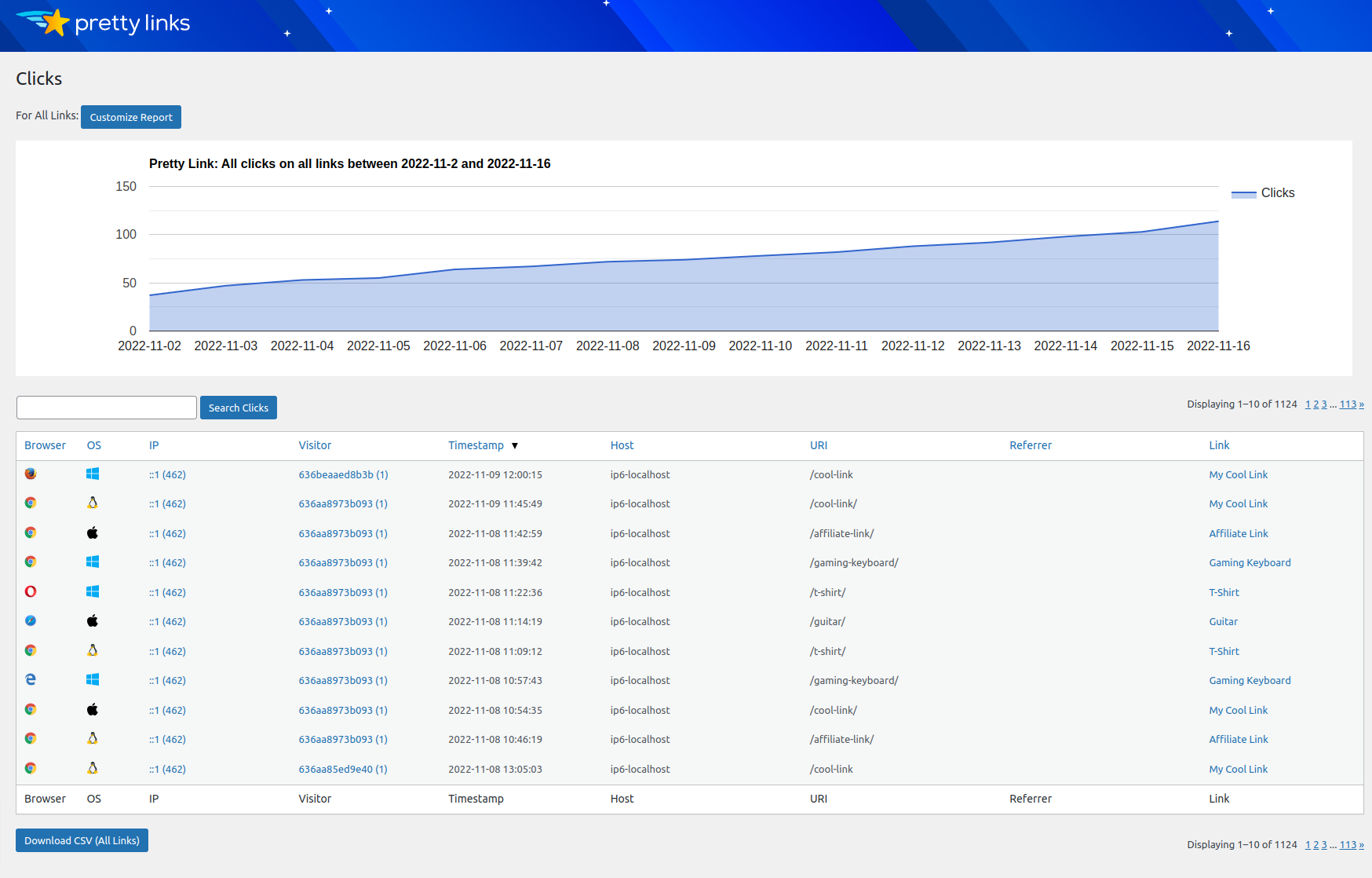
If you share links for a living — affiliate marketers, bloggers, podcasters, social media folks — you want three things: links that look professional, the freedom to change where they point, and a real picture of what's getting clicked. PrettyLinks does all three. Every click is logged with referrer, browser, OS, and host, so you're never guessing about what's working.
And version 4.0 is a big one. We rebuilt the whole thing from scratch on a fast, modern React admin, then added smarter bot filtering, built-in privacy controls, and CSV link importing — all of it free.
PrettyPay™ Links 💵
Want to sell something? PrettyPay™ lets you spin up a one-click Stripe checkout link and share it anywhere — e-books, courses, downloads, subscriptions, you name it. It all runs through your own domain and brand. Share the link, get paid. No store required.
Lite Features ✔️
🔗 Branded Short Links on Your Own Domain
Turn any long URL into a clean, branded short link in seconds.
💰 PrettyPay™ Stripe Checkout Links*
Create one-click payment links with Stripe. Share anywhere and start selling instantly.
🔃 301, 302 and 307 Redirects
Choose between Permanent (301) and Temporary (302/307) redirects per link.
⚙️ Custom or Auto-Generated Slugs
Pick your own slug or let PrettyLinks generate one. Reserved Slug Patterns protect critical WordPress paths from accidental collisions.
🔎 Click & Unique-Click Tracking
Every click logged with referrer, IP, browser, OS, and host data.
🤖 Modern Bot Filtering
Keep AI crawlers and bots out of your stats out of the box — with Cloudflare bot-header support and your own custom user-agent rules.
🔐 Built-In Privacy Controls
IP anonymization and a configurable click-retention window help you stay GDPR-friendly.
📊 Customizable Click Reports
Filter charts by date range, link, and unique vs. total clicks.
⬆️⬇️ CSV Import & Export
Bulk-import links from a spreadsheet and export click history to CSV anytime — link importing is now free.
🖱️ One-Click Sharing & Copy
Copy any link to the clipboard from the links list, the editor, or a Gutenberg block.
💡 Modern Admin Experience
A fast, clean React-based admin UI with bulk actions, one-click duplicate, and auto-saving options.
... and much more. Visit our site to see everything PrettyLinks can do.
* Pro users pay no added processing fees. Free users have a small 3% per-transaction fee added on PrettyPay™ links.
PrettyLinks Pro 💪
When you're ready for more, PrettyLinks Pro adds the automation, advanced redirects, and deeper reporting that power users tend to grow into:
- Keyword & URL Replacements Map keywords to links and PrettyLinks automatically turns them into your branded links across your site's content.
- Advanced Redirect Types Cloaked, JavaScript, Meta-Refresh, Tracking Pixel, and branded Splash Page redirects on top of the standard 301/302/307.
- Geographic, Device & Time Targeting Send visitors to different destinations based on country, device, browser, OS, day, or hour.
- Link Rotation & A/B Split Testing Distribute traffic across multiple destinations by weight or round-robin, and split-test which one converts.
- Expiring Links Set an expiry date or click limit and choose where expired traffic goes.
- Categories & Tags Organize and filter a large link library with full taxonomy-style grouping.
- Auto-Create Links for Posts & Pages A pretty link is created automatically every time you publish.
- Link Health Monitoring Scheduled scans flag broken destinations, with email digests so you can fix them fast.
- QR Codes Auto-generate a downloadable QR code for every link, with an optional inner logo.
- Pretty Bar Branding Frame third-party destinations in a branded top, bottom, or floating bar with your CTA.
- Advanced Reports & Conversions Rich click-history breakdowns, KPI cards, charts, and a conversion-tracking pixel for your thank-you pages.
- Redirect Turbo Mode Answer link requests before the rest of WordPress loads — built for high-traffic affiliate sites.
- Link in Bio — Build customizable "link in bio" landing pages for Instagram, TikTok, and other social profiles, hosted on your own domain.
- Product Displays — Drop styled, responsive product cards into any post or page to showcase affiliate products.
- Splash Pages — Show a branded interstitial (with optional CTAs) before forwarding visitors, with a per-link conversion funnel report.
- UTMs — Build and append Google Analytics UTM parameters from a dedicated tab on the link editor.
- User Links — A front-end dashboard letting logged-in visitors create and manage their own pretty links.
- Developer Tools — API tokens and webhooks for integrating PrettyLinks with external systems.
- MonsterInsights — Surface PrettyLinks click data inside the MonsterInsights dashboard.
- CookieYes — Automatic cookie consent compliance for click tracking.
- Easy Affiliate — Use PrettyLinks as the affiliate link layer in your Easy Affiliate program.
- Gutenberg & Classic Editor — Native block + toolbar buttons for inserting links inline.
- MemberPress — Full-featured membership and course platform for WordPress with Stripe, PayPal, and Authorize.net support.
- Easy Affiliate — Run your own self-hosted affiliate program and grow your traffic with referral marketing.
- Members — Roles and capabilities management plugin for fine-grained access control.
安装:
- Upload
pretty-link.zipto/wp-content/plugins/(or install via Plugins → Add New). - Activate the plugin through the Plugins menu in WordPress.
- Make sure your permalink settings (Settings → Permalinks) are set to anything other than "Plain". Custom permalinks like
/%year%/%month%/%postname%/work great. - Open PrettyLinks in the admin menu and follow the onboarding wizard to create your first link.
屏幕截图:
常见问题:
Who will find PrettyLinks useful?
Affiliate marketers, bloggers, podcasters, course creators, social media managers, e-commerce merchants, and anyone else who needs to brand, organize, and track outbound links.
Can I use PrettyLinks with any WordPress theme?
Yes. PrettyLinks operates primarily in the WordPress admin and the front-end pieces are theme-agnostic.
How do I get started?
The in-plugin onboarding wizard walks you through the basics. For deeper docs, see our Getting Started page.
Is upgrading from 3.x to 4.0 safe?
Yes. 4.0 is a drop-in upgrade — all of your existing links, clicks, and settings keep working with no migration step. As with any major update, back up your site first.
What add-ons are available for PrettyLinks Pro?
Pro includes six add-ons: Link in Bio, Developer Tools, Product Displays, Splash Pages, UTMs, and User Links. Link in Bio and Developer Tools are available on Marketer and above; the rest are on Executive. See the add-ons page for details.
Is PrettyLinks translatable?
Yes. PrettyLinks is fully translation-ready — see our translation guide for instructions.
What's the difference between 301, 302, and 307 redirects?
301 (Permanent) tells search engines the URL has permanently moved — link equity is passed to the destination. 302 and 307 (Temporary) signal a temporary redirect, so search engines keep indexing the original URL. Pro adds Cloaked, JavaScript, Meta-Refresh, Tracking Pixel, and Splash Page redirect types on top of these.
Are there any fees for using PrettyPay™?
Stripe's standard processing fees always apply. PrettyLinks adds no extra fee for Pro users. Free users have a small 3% per-transaction PrettyLinks fee added on top of Stripe's fees.
更新日志:
- The Broken links view now always shows while Link Health is on, with a count of broken links.
- Link Health columns are now included in the CSV export.
- Fixed a crash on activation caused by an error in the automatic update system.
- Link Health now flags links whose domain no longer exists.
- Fixed table creation failing on sites with an invalid database collation setting, and install errors now show the actual database error.
- License and add-on error messages now display cleanly instead of showing raw HTML.
- Fixed the admin menu losing its position when the page height changes.
- Updated bundled libraries.
- Licensing, plugin updates, and add-on installs now run through our new licensing service. Your existing license key keeps working — no action needed.
- Country lookups for clicks now only happen in Extended tracking mode. Normal mode no longer sends visitor IP addresses to a geolocation service.
- Faster redirects: reverse DNS lookups for Extended tracking now run in the background instead of during the click.
- Fixed links whose target points back to their own pretty URL redirecting forever. The link editor now warns you, and the link stops redirecting instead of looping.
- Fixed 301 and 307 redirects being sent as 302s when Turbo Mode is on, and Turbo Mode now picks up fixes automatically after updates.
- Fixed query parameters with special characters (like
%20) being changed on their way to the target URL. - Fixed links with non-Latin slugs (for example Cyrillic or Chinese) not resolving.
- Fixed language-prefixed links (for example
/nl/go/examplewith WPML) all going to the same target. - Fixed saving a link with a slug that's already in use. It's now rejected instead of creating a duplicate.
- Fixed duplicated links missing some of the original link's settings.
- Fixed click-based link expiration never triggering in Simple tracking mode.
- Fixed admin screens not loading correctly when the WordPress admin is in a language other than English.
- Fixed downloading QR codes on some sites.
- Fixed the onboarding wizard creating duplicate links, and add-ons picked during onboarding not installing or activating. The Finish step now lists the add-ons that were installed.
- Fixed a Lite install with a Pro license losing the option to install Pro a day after activating the key.
- Improved the Links list: columns size to their content, long notes no longer break the layout, and the list switches to cards on small screens.
- The link editor now has a Save button in the header and more room for the Target URL.
- Charts now label month and year periods correctly, and Click History filters by link and sorts by country.
- Extended tracking now filters out browsers it can't identify as bots, like 3.x did.
- Confirmation pop-ups now use the plugin's own dialogs instead of the browser's.
- Requires WordPress 6.5 or newer.
- Pro: Custom Reports stay visible in Simple tracking mode, with a note explaining they need Normal or Extended tracking.
- Pro: Fixed keyword and URL replacement corrupting
&in post content or linking text inside HTML attributes. - Pro: Fixed the broken-links digest email linking to the wrong edit page.
- Added an option to record clicks immediately rather than after the page finishes loading. Turn this on if your click counts are stuck at zero — some security and optimization plugins end PHP early and the click was silently discarded. Off by default, because the standard method keeps redirects faster.
- Fixed the Pretty Links menu appearing for users who can't actually open it. Editors and other roles without permission saw a menu with an empty flyout that led to the pricing page; it's now hidden from them entirely.
- Fixed click times and report date ranges being worked out in UTC instead of your site's timezone (Settings → General → Timezone). The Clicks list, CSV exports, report totals, and chart days now agree with each other and with your own calendar day.
- Fixed the slug box being left blank when you create a Pretty Link from the post editor. It now suggests one automatically, the same as Add New does, and honors your configured prefix.
- Fixed redirects being held up on links that use country targeting — the country is no longer looked up twice for the same click, and a lookup that fails or times out no longer delays the visitor.
- Pro: Fixed a link's categories and tags showing as empty in the link editor, and being wiped when you saved the link.
- Pro: Fixed keyword replacement never linking a keyword on posts that were already published. The record of which keywords appear in which post could fall permanently out of date, and re-saving each post was the only way to recover.
- Pro: Fixed keywords not linking when the word only appears once the page is built — text coming from a shortcode, a block, or a page builder. Re-saving didn't help in that case, because the word isn't in the saved post content.
- Pro: Fixed your disclosure text showing up in post excerpts and archive listings, where the keyword link itself is stripped out anyway.
- Fixed the redesigned admin interface still displaying in English even when a translation was installed — translations created with Loco Translate (or provided by WordPress.org) now load correctly on the new React-based screens, not just the classic menus.
- Fixed translations not applying to the redesigned admin interface — the new screens now display in your site's language whenever a translation is available (for example one created with Loco Translate or a WordPress.org language pack), matching what already worked for the older menus.
- Fixed add-on notices that kept showing after the problem they warned about had already been resolved.
- Pro: Fixed automatic link creation firing for your Alternate Domain — auto-created links now correctly skip the alternate shortlink domain.
- Pro: Fixed Link Health reporting working links as broken. Destinations that block automated checks (returning 403, 405, 429, and similar) are no longer flagged — only genuine "not found" responses (404 and 410) count as broken, and a link must fail two checks in a row before it's reported. Added a per-link "Exclude from link health checks" option for affiliate or cloaked links whose destinations block bots.
- Pro: Fixed link categories and tags still appearing blank after upgrading from 3.x on some sites. The upgrade now detects a failed migration and retries it instead of silently giving up, re-runs once to heal affected sites, and — if it still can't finish — shows the exact error, with a Retry button, in the admin and under Tools → Site Health.
- Added an "Export CSV" button to the Links list that downloads the links you are currently viewing — any search, category, tag, or status filters (including Broken links) carry over to the export. Large lists download in the background so the page stays responsive.
- The edit button on the Links list is now a real link, so you can Ctrl/Cmd-click or middle-click it to open a link's edit screen in a new browser tab.
- Fixed the Cancel button shown during a CSV export so it now actually stops an in-progress export instead of letting it run to completion.
- Fixed the "Manage License" link on the WordPress Plugins page so it takes you to the Pretty Links license screen.
- Fixed a load-order issue that could cause errors on some sites by running the database upgrade slightly later in WordPress's startup, after theme and pluggable functions are available.
- Pro: Restored time-of-day support for date-range redirect rules — "between" date targeting rules again keep their start and end times, evaluated in your site's timezone.
- Pro: Added a new
prli_targeting_countriesfilter for developers, bringing back the ability to add custom aggregate regions (for example an "EU" option) to the geo-targeting country picker, matching 3.x'splp_search_countries_list.
- Fixed a fatal error ("Class PrettyLinks\Bootstrap not found") when WordPress is loaded outside the site root — for example MemberPress protected downloads (
lock.php) or membership PayPal IPN callbacks — by anchoring the plugin entry-file includes to the plugin directory again, matching 3.x. - Fixed pretty links whose slug contains a space returning a 404 after upgrading from 3.x — those links resolve again. New slugs still convert spaces to dashes; sites that already used spaces get an option under Pretty Links → Options → Links to keep them.
- Pro: Fixed link categories, tags, and groups still showing blank after upgrading from 3.x on sites whose database used a different text collation — a collation mismatch was silently stopping the 4.0.9 repair from writing the assignments. The repair is now collation-safe and re-runs automatically on the next load, restoring categories, tags, and groups (and their link counts) with no manual re-tagging.
- Pro: Fixed pretty links returning a 404 when your Alternate Domain includes a path (for example
https://example.com/klik/) — links served under that path now resolve again, matching 3.x. Nothing stored is changed.
- Pro: Fixed link categories and tags appearing blank in the admin after upgrading from 3.x, even though the assignments still existed — an automatic one-time repair restores them (and their link counts) on the next admin load, with no manual re-tagging needed.
- Pro: New — you can now export Custom Reports and Split Test results to CSV.
- Pro: Fixed cloaked links falling back to a visible redirect for destinations that actually allow framing, so more links stay cloaked. The framing check is now also cached per destination (24 hours by default), so repeat cloak and Pretty Bar visits skip the extra lookup and load faster.
- Pro: Link Health — "Force check now" now re-checks every link, and checks fall back to a GET request when a destination rejects the lighter HEAD request, reducing false "broken link" results.
- Pro: Link Health — fixed a scheduled recheck occasionally overwriting a more recent "Force check now" result.
- Pro: Fixed licensed Pro installs being silently replaced by the free build during an update when the license couldn't be verified at that moment (a brief connection hiccup, or right after a major update) — which locked every Pro feature even though the license still showed Active. Updates now stay on your licensed Pro build, and the free build can no longer overwrite it; a wrong-edition install still shows the reinstall prompt on the Plugins screen.
- Fixed every Pretty Link returning a 404 on WordPress installs located in a subdirectory (for example, a site at example.com/blog) — the redirect engine now correctly accounts for the site's base path.
- Fixed Pretty Links whose slug contains characters such as ".", "=", "~" or "+" returning a 404 — the full range of slug characters supported in 3.x works again, and those characters are no longer stripped when you save a link.
- New: added a per-link "Reset clicks" action to the Links list, available in every tracking mode.
- Pro: you can now paste a whole list of countries into a geo targeting rule (comma-, space-, or bracket-separated country codes or names) instead of adding them one at a time.
- Pro: expiring links can now be set to move to the Trash on their first expired visit, in addition to the existing "redirect to another URL" option.
- Pro: clarified the compound targeting rule label to "All conditions match (AND)" so it's clear every condition must be met.
- Pro: Fixed geo targeting never matching on hosts without CDN country headers — country resolution now falls back to IP geolocation like v3, so country rules work everywhere.
- Pro: When the visitor's country can't be determined, country rules no longer match and the link's normal target URL is used.
- Geo lookups are now cached per network block (up to a month when the geolocation database confirms the whole block shares one country), greatly reducing lookup calls on busy links.
- The IP anonymization setting is now honored by all geolocation caching; nothing derived from the full IP is stored when it's enabled.
- Fixed IPv4-mapped IPv6 addresses (dual-stack servers) being anonymized down to an unusable value in click records.
- Cloudflare's "XX" unknown-country pseudo-code is no longer treated as a real country by geo rules.
- Pro: Restored QR code downloads (PNG and SVG) from the Links list and link editor, added logo support to SVG QR codes, and improved scannability for codes that include a logo.
- Pro: The per-link QR code preview now encodes the link's own pretty URL.
- Fixed a fatal error (TypeError) in the admin footer text when another plugin or host sets it to a non-string value.
- Fixed a fatal error on hosts that run OPcache with doc-comments disabled (opcache.save_comments=0), such as Kinsta.
- Refreshed the "What's New in 4.0" page copy.
- Maintenance: distribution packaging cleanup; no functional changes.
- Complete rewrite — brand-new React-based admin UI, REST-first API, and custom-table data model
- PHP 7.4+ required; full PHP 8.x compatibility
- Drop-in upgrade — no migration required, all 3.x data continues to work
- Performance: faster click tracking, lighter admin pages, and leaner database queries
- New: IP-anonymization toggle that truncates IPv4 / IPv6 addresses before they're stored
- New: configurable click-retention window — 30 days up to 2 years (was hardcoded to 90 days, on/off only)
- New: automatic safety wipe of click counters when switching between Simple and Normal/Extended tracking modes
- New: modern bot detection — catches AI crawlers (GPTBot, ClaudeBot, PerplexityBot…), honors Cloudflare Bot Management headers, and adds behavioral signals, plus your own custom user-agent patterns
- New: PrettyPay™ master on/off toggle (no longer always-on once Stripe is connected)
- New: Reserved Slug Patterns moved from Pro into Lite, with a new admin-bypass toggle and distinct slug prefixes for admin-, user-, and frontend-created links
- New: CSV link import is now free (was Pro-only in v3), with a downloadable starter template
- New: chunked CSV export that handles large link libraries without timing out
- New: click-history CSV export across all links, with date-range and link-ID filters
- New: one-click "Duplicate" on any link
- New: bulk "turn nofollow on/off" and "turn sponsored on/off" actions across selected links
- New: one-click slug regenerate button on the Add/Edit Link form
- New: per-user "items per page" picker and column show/hide on the Links list, saved to your account
- New: Options page auto-saves — change any field and it saves on its own
- New: Connect-Stripe step inside the setup wizard
- New: CookieYes integration — auto-tags pretty-link redirects so they're consent-gated by your cookie banner
- PRO: Redirect Turbo Mode — opt-in must-use plugin that answers pretty-link requests before the rest of WordPress loads
- PRO: no_enforce_url_scheme option — disable the automatic http:// prepend so you can target custom protocols (app://, tel:, etc.)
- PRO: Link Health — choose how often destinations are checked and how often you get the broken-link digest, separately, plus a multi-status filter on the Links list
- PRO: Keyword & URL Replacements — case-sensitive matching toggle, a new per-post total-links cap (defaults to unlimited), and distinct nofollow / sponsored / open-in-new-window and custom-CSS settings for URL-replaced anchors
- PRO: Rotations — pick Weighted Random or Sequential round-robin (v3 was random-only with weights ignored)
- PRO: Smart targeting — new operators: exclude-country, hour-of-day range, day-of-week, plus compound AND-rules
- PRO: Pretty Bar — multiple branded templates instead of one global look, plus a Media-library logo picker
- PRO: Custom Reports — new [pretty_link_pixel] shortcode and Gutenberg block to drop a tracked-conversion pixel onto any thank-you page
- PRO: Link list filter segments — "Expired" and "Split tests" segments, and the search box now matches category and tag names
- PRO: Click History extras — KPI cards, an over-time line chart, a top-links list, and breakdown tabs by country / referrer / device / browser, each with a donut chart
- PRO: Dashboard extras — KPI tiles become clickable, drilling into Click History pre-filtered to the matching date range and link
- PRO: Splash Pages add-on (new) — branded "splash" interstitial redirect type with up to two CTAs and a per-link conversion funnel report
- PRO: UTMs add-on (new) — dedicated UTM tab on the link editor for all six Google Analytics UTM parameters, no URL hand-editing
- PRO: User Links add-on (new) — front-end self-service dashboard for logged-in visitors to create and manage their own pretty links
- PRO: Link in Bio add-on — rebuilt on the v4 foundation with three frontend templates; existing v3 pages migrate automatically
- PRO: Product Displays add-on — rebuilt on the v4 foundation with a shortcode and server-rendered Gutenberg block
- PRO: Developer Tools add-on — rebuilt on the v4 foundation with API keys, HMAC-signed webhooks, an event registry, and a v3-compatibility REST layer