
PreviewShare
| 开发者 | mehul0810 |
|---|---|
| 更新时间 | 2026年8月29日 14:32 |
| PHP版本: | 8.0 及以上 |
| WordPress版本: | 7.1 |
| 版权: | GPLv3 or later |
| 版权网址: | 版权信息 |
详情介绍:
- Share a WordPress draft post with a client before publishing.
- Send a private preview link for a pending page, scheduled campaign, or unpublished landing page.
- Let stakeholders review content without giving them a WordPress login.
- Create separate labeled preview links for legal review, client review, editorial review, or team approval.
- Revoke access after feedback is complete or when a preview link should no longer work.
- Keep search engines from indexing private preview URLs with robots directives.
- Generate secure public preview links from the block editor, Classic Editor, post list table, or Preview dropdown.
- Share pretty URLs such as
https://example.com/preview/exampletoken. - Set a default expiration time for preview links from the PreviewShare settings screen.
- Override the expiration time per post or page.
- Create multiple labeled preview links for different reviewers.
- Revoke preview access when a link should stop working.
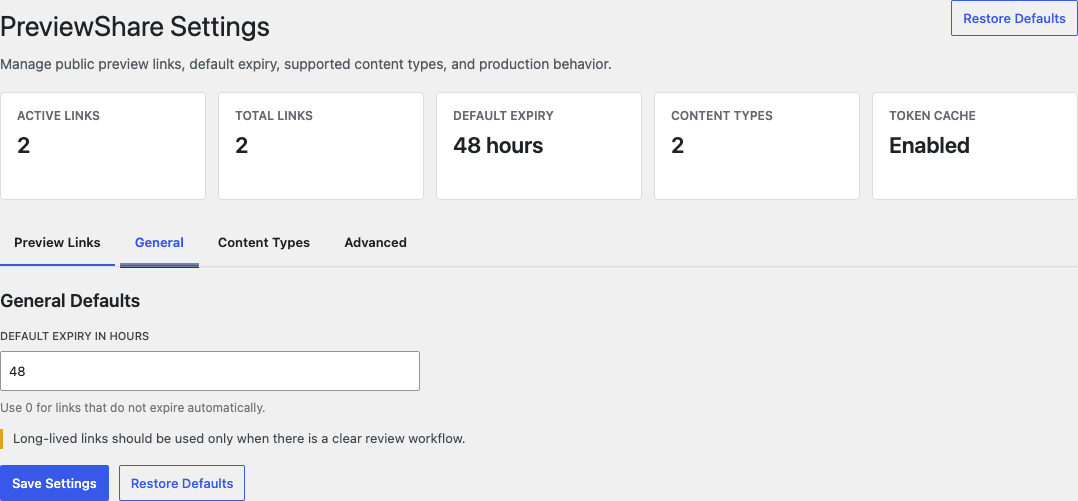
- View and manage preview link status, expiry, labels, and view counts from the settings screen.
- Choose which public post types support public preview sharing.
- Keep token lookup fast with optional object cache support.
noindex, nofollow, noarchive, nosnippet, and noimageindex directives for preview requests.
Anyone with a valid preview URL can open that preview, so links should still be shared only with intended reviewers.
安装:
- Upload the
previewsharefolder to the/wp-content/plugins/directory, or install the plugin ZIP from the WordPress admin. - Activate the plugin through the Plugins screen in WordPress.
- Open Settings > PreviewShare to review the default expiration and caching options.
- Open a supported post type in the block editor or Classic Editor.
- Enable public preview from the PreviewShare panel and copy the generated preview URL.
屏幕截图:

常见问题:
What does PreviewShare do?
PreviewShare creates public preview links for WordPress drafts and other enabled content statuses. Reviewers can open the preview URL without a WordPress account, while editors keep control over expiration, labels, view counts, and revocation.
Is PreviewShare a public preview plugin for WordPress?
Yes. PreviewShare is designed for public preview links, private draft previews, client review links, and editorial approval workflows in WordPress.
How do I share a draft WordPress post with a client?
Open the draft in the block editor or Classic Editor, enable public preview in the PreviewShare panel, and generate a preview link. You can copy the generated URL and send it to the client for review.
Who can generate preview links?
Users must be able to edit the content item before they can generate or revoke a preview link for it.
Does PreviewShare work with the block editor and Classic Editor?
Yes. PreviewShare supports the block editor, Classic Editor, post list table actions, and the Preview dropdown.
Can I change how long preview links remain active?
Yes. You can set a global default expiration in Settings > PreviewShare and override it for individual content items in the editor panel. A value of 0 means no automatic expiration.
Can a preview link be revoked before it expires?
Yes. Disable public preview from the editor panel, revoke links from the Classic Editor panel, or revoke individual links from the PreviewShare settings screen.
Can I create different preview links for different reviewers?
Yes. PreviewShare supports multiple labeled preview links, so you can create separate links for client review, legal approval, editorial review, or team feedback.
Will preview links be indexed by search engines?
PreviewShare adds robots directives to preview requests, including noindex and nofollow, and displays a preview banner on shared preview pages. Treat preview URLs as private links and share them only with intended reviewers.
Where are preview tokens stored?
PreviewShare stores token hashes and token metadata in wp_postmeta. Raw tokens are used in preview URLs but are not stored as plain text.
What happens when a token expires?
Expired tokens stop resolving to content. The editor panel will show the expired state and re-enabling preview sharing generates a fresh token.
Does PreviewShare expose private content publicly?
PreviewShare only exposes a specific content item to visitors who have a valid preview URL. Treat preview URLs like private sharing links and send them only to intended reviewers.
更新日志:
- Validated preview-link editor and admin workflows with WordPress 7.1.
- Prepared editor controls for the WordPress 7.1 component API.
- Added safer diagnostics and recovery guidance for invalid preview links.
- Reduced npm development-tooling audit findings and documented remaining dev-only findings.
- Expanded CI coverage for release branches and updated GitHub Actions runtime pins.
- Limited WordPress.org readme tags to five focused tags and added validation for the tag cap.
- Improved WordPress.org readme tags and opening copy for public preview workflows.
- Initial release.
- Added secure preview links for enabled public post types.
- Added support for configurable public post types, multiple labeled links, view counts, noindex/nofollow previews, Classic Editor entry points, post-list actions, and Preview dropdown generation.
- Added global settings for default expiration, logging, and object cache lookup.
- Added post meta based token storage with hashed token lookup.