
ProdTabs: Multilingual Product Tabs for WooCommerce
| 开发者 | tsoudaz |
|---|---|
| 更新时间 | 2026年10月24日 01:48 |
| PHP版本: | 7.4 及以上 |
| WordPress版本: | 7.1 |
| 版权: | GPLv2 or later |
| 版权网址: | 版权信息 |
详情介绍:
- Add as many tabs as you need to a product, with the WordPress editor: text, images, embeds, shortcodes.
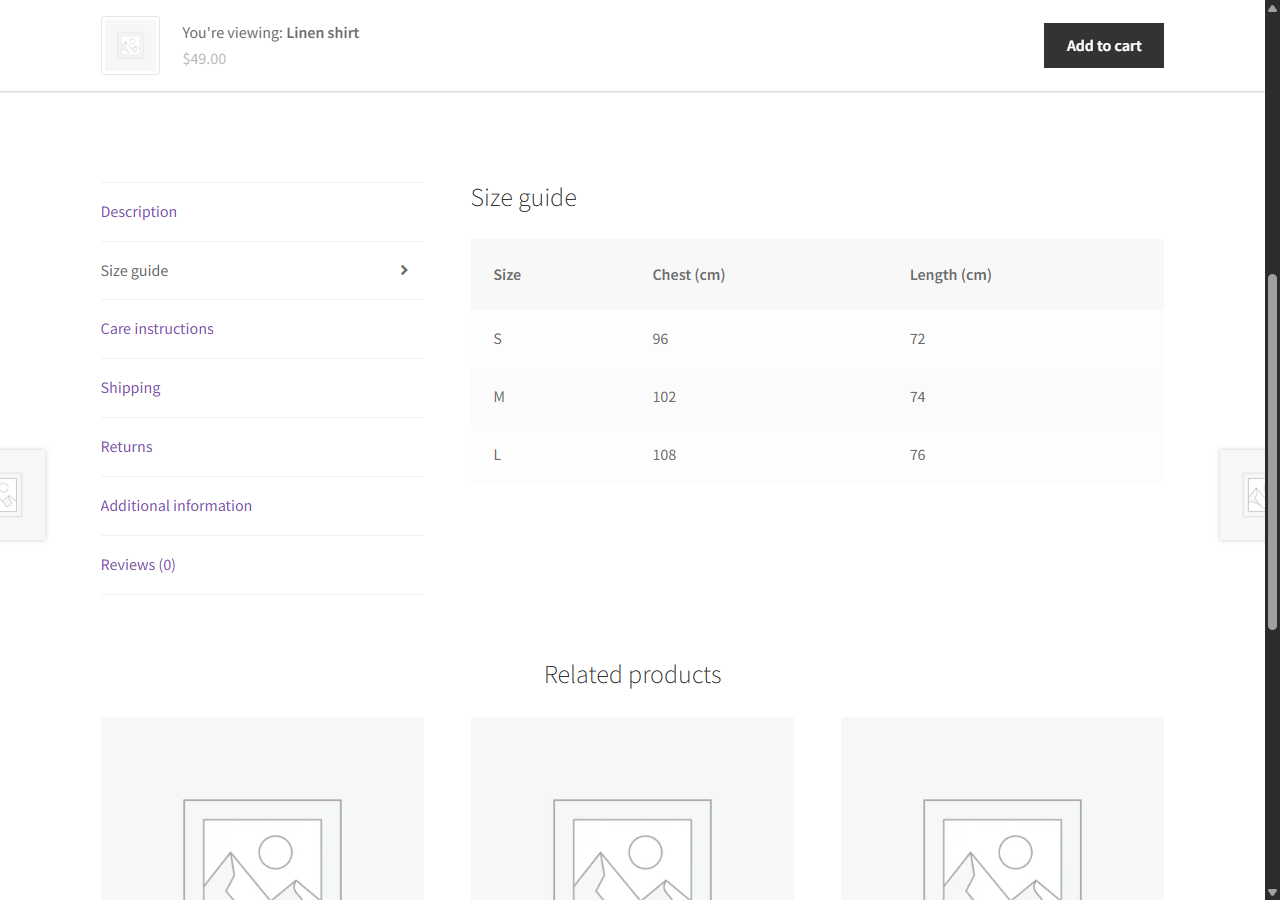
- Put all the tabs of a product in the order you want, WooCommerce tabs included, by drag and drop or with the arrow buttons.
- Hide a tab on one product without deleting it.
- Link straight to a tab:
#tab-shippingat the end of the product address opens the tab.
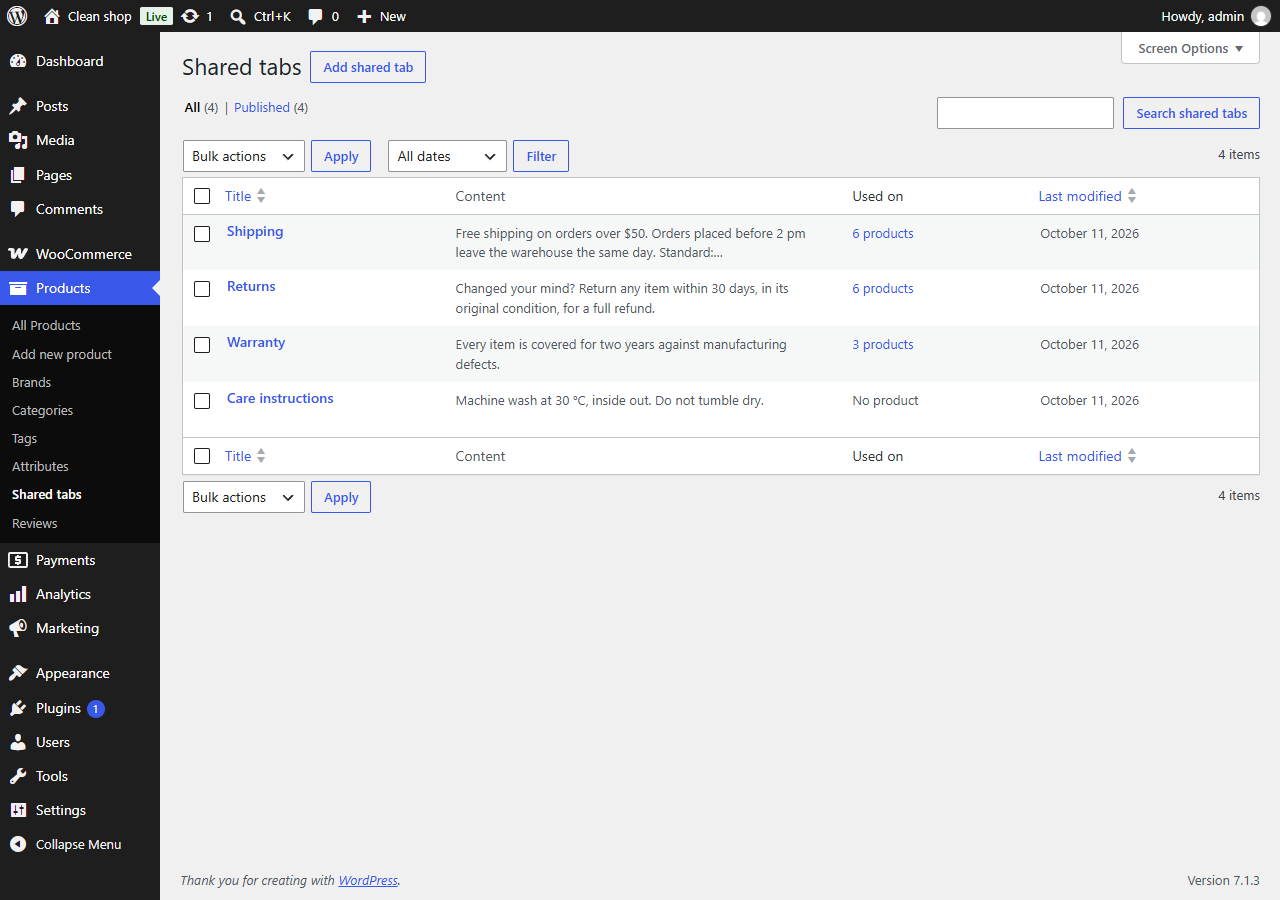
- Write a tab once (shipping, returns, warranty) and add it to as many products as you like.
- Or show it on all your products in one setting. A product can still hide it, or move it.
- Edit it once, with the block editor: every product that uses it is updated.
- Give it a title for the shop and keep another name for yourself.
- Customize a shared tab on one product, and go back to the shared version whenever you want.
- See which products use each shared tab.
- Rename, hide or reorder Description, Additional information and Reviews for the whole shop.
- Show or hide the heading that repeats the tab title at the top of each tab.
- With the accordion of the Product Details block (block themes), your titles, order and hidden tabs apply too.
- On phones, the tabs become an accordion: each section opens on a tap and several can stay open. You choose the screen width where it starts, or keep the tabs everywhere.
- Headings and buttons that screen readers and keyboards understand, following the accordion pattern of the W3C.
- Every tab is in the HTML of the page, nothing loads on a click: search engines and AI assistants read all of it. In browsers that support it, a closed section opens when a visitor searches the page for a word it holds.
- A tab with a title and nothing in it is left out of the page.
- WPML and WooCommerce Multilingual: a
wpml-config.xmlfile is included. The list of tabs is copied to every language; the titles and texts of the tabs are what you translate, tab by tab. Texts are stored by tab, not by position, so reordering tabs does not change them. Tested with WPML 5.2, String Translation and WooCommerce Multilingual 5.7. - Polylang: Polylang reads the same file. The list of tabs stays the same in every language, wherever you change it, and each language keeps its own texts. Tested with Polylang 3.8.
- Shared tabs are translated like your posts. A translated product shows the translated shared tab, or the original one until it is translated.
- A text not translated yet shows in the original language instead of disappearing, or stays hidden until it is translated if you prefer. The overview counts the tabs left to translate in each language.
- Links to a tab (
#tab-shipping) are the same in every language. - The titles you give to the WooCommerce tabs are translated in WPML String Translation or in Polylang's Translations screen.
- TranslatePress and Weglot translate tabs on the page, like the rest of your content: everything is in the page, nothing is loaded later. Tested with TranslatePress 3.3 and Weglot 6.4.
- ProdTabs finds the tabs of Custom Product Tabs for WooCommerce and imports them: the tabs of each product, and the saved tabs, which become shared tabs.
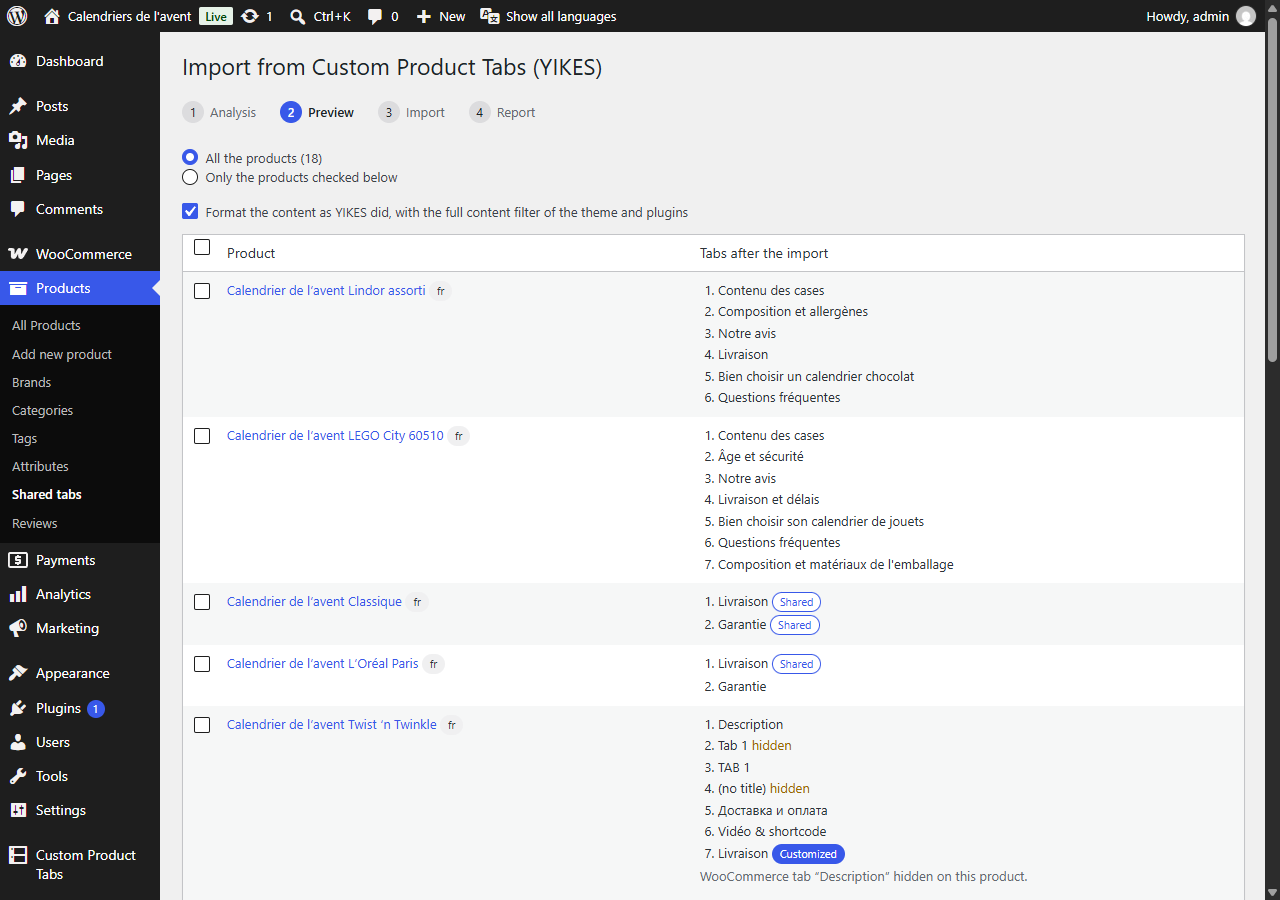
- An analysis and a preview come first, then the import runs in batches and resumes if you close the page. A report lists what to check.
- Your products keep their look: same tabs, same order, same links to tabs. Tabs that YIKES did not show (two tabs with the same title, tabs without a title) are imported hidden, so that you can check them.
- On a multilingual site, a product and its translations are imported together, and saved tabs written once per language become one shared tab with its translations.
- Customizations made for YIKES in your theme keep working: ProdTabs applies its filters and classes to the imported tabs.
- YIKES can stay active during the move: once a product is imported, its YIKES tabs are no longer shown, so nothing appears twice.
- The data of Custom Product Tabs is never changed or deleted, and the import can be run again.
- Changed your mind? Undo the import in one click: the imported products get back what they had before, and show the YIKES tabs again while YIKES is active.
- The
[prodtabs]shortcode shows the tabs of a product where you want them: in a theme or a page builder that does not show the WooCommerce tabs, or on another page with[prodtabs product="123"]. - One tab on its own, without the tab titles:
[prodtabs tab="shipping"](the anchor of the tab, #tab-shipping), for a size guide in a page or shipping terms next to the price.title="no"leaves its heading out. - A shared tab on its own, on any page and in the language of the page:
[prodtabs shared="45"]. - No guessing: each tab shows its shortcode, ready to copy, in the Tabs panel of the product, and each shared tab on its own screen. The overview sums it up.
- The same in the block editor with the "Product tabs (ProdTabs)" block, previewed as the shop shows it. In a product template, a Single Product block or a product list, it takes the product from there.
- The product CSV export and import of WooCommerce keep your tabs, and the links to shared tabs hold from one site to another (staging to production): each shared tab goes out with a reference and comes back pointing to the same shared tab on the other site.
- The WordPress export and import (Tools > Export, then Tools > Import > WordPress) carry the shared tabs, and the imported products are pointed to them, whatever the order of the files.
- A shared tab that cannot be found on the new site is left out of the product, never replaced by another one, and a notice tells you to import the shared tabs first.
- Classic themes and block themes, including the Product Details block of WooCommerce. Tested with Storefront and Twenty Twenty-Five.
- Elementor: a product whose description is built with Elementor keeps its tabs, in the shop and in the Elementor editor.
- Compatible with High-Performance Order Storage (HPOS) and the cart and checkout blocks.
- Accessible: tabs can be reordered with the keyboard, screen readers announce the changes, right-to-left languages are supported.
- Ready for translation: the admin screens are translated on translate.wordpress.org and delivered as language packs.
- WP-CLI commands for large shops:
wp prodtabs import-yikesandwp prodtabs list. - Cache plugins: when a shared tab or the settings change, the product pages concerned are purged in LiteSpeed Cache, WP Rocket, W3 Total Cache, WP Super Cache and WP Fastest Cache.
- Your tabs survive the product CSV export and import of WooCommerce: check "Export custom meta" when exporting, and they come back as they were.
- An overview of your shop: WooCommerce tabs, shared tabs, products with tabs, languages, and what Custom Product Tabs left behind. A support report, ready to copy, lists versions, settings and active plugins when you ask for help.
- No ads in your dashboard, no tracking.
安装:
- Install and activate ProdTabs from Plugins > Add New, or upload the plugin folder to
/wp-content/plugins/. WooCommerce must be active. - Edit a product and open the Tabs panel of the Product data box.
- Manage reusable tabs under Products > Tabs.
- Set the WooCommerce tabs under WooCommerce > Settings > Products > Tabs.
- Coming from Custom Product Tabs (YIKES)? Follow the notice, or open WooCommerce > Settings > Products > Tabs > Tools.
屏幕截图:


常见问题:
How do I import my tabs from Custom Product Tabs (YIKES)?
Keep Custom Product Tabs installed, then open WooCommerce > Settings > Products > Tabs and click "Import from Custom Product Tabs (YIKES)" in the Tools section. Check the analysis and the preview, then start the import. On large shops, wp prodtabs import-yikes --dry-run shows the plan, and wp prodtabs import-yikes runs it.
Will my YIKES data be deleted?
No. ProdTabs only reads it. Once you have checked your products you can deactivate Custom Product Tabs. Do not delete that plugin before checking: deleting it erases its own data.
Do I have to deactivate YIKES before importing?
No. While both are active, a product shows the ProdTabs tabs once it is imported, and the YIKES tabs before. If something looks wrong, "Undo the import" in the import report (or wp prodtabs import-yikes --undo) gives the products back what they had before the import and moves the shared tabs it created to the trash; your products then show the YIKES tabs again.
How do I translate tabs with WPML?
Translate the product as usual. The titles and texts of its tabs appear in the translation editor; the list of tabs, their order and their visibility follow the original product. Shared tabs are translated in Products > Shared tabs, like posts.
How do I translate tabs with Polylang?
Create the translation of the product: its tabs show the texts of the original, marked as not translated, until you type their translation in the Tabs panel. The list of tabs stays the same in every language. Shared tabs are translated in Products > Shared tabs.
Does it work with my theme?
ProdTabs adds its tabs through the standard WooCommerce tabs, so it works with themes that display them, classic or block themes. With the accordion layout of the Product Details block, the titles, visibility and order of the WooCommerce tabs apply as well. Themes that draw tabs of their own keep them: the accordion for phones only changes the tabs of WooCommerce.
My theme or page builder does not show the tabs
Add the [prodtabs] shortcode, or the "Product tabs (ProdTabs)" block, where the tabs should go. On a product page, it shows the tabs of that product; elsewhere, give the product: [prodtabs product="123"].
How do I move products and shared tabs to another site?
Export the shared tabs from Tools > Export on the first site and import them on the other one with Tools > Import > WordPress. Then move the products, with the product CSV of WooCommerce (check "Export custom meta") or with the WordPress export. Their shared tabs are found again on the new site.
Can I link to a tab?
Yes. Each tab has an address, such as #tab-shipping, shown in the Tabs panel. Add it at the end of the product address.
A shortcode or an embed does not show in a tab
Turn on "Format tab content with the full content filter of the theme and plugins" in WooCommerce > Settings > Products > Tabs.
Where are the tabs stored?
The tabs of a product are stored in two product meta fields: _prodtabs_layout (the list of tabs) and _prodtabs_texts (the titles and texts). Shared tabs are posts of the type prodtabs_tab. No tab content is stored in the options that WordPress loads on every page.
Which hooks can developers use?
Filters: prodtabs_product_entries, prodtabs_product_tabs, prodtabs_tab_heading, prodtabs_tab_heading_html, prodtabs_tab_raw_content, prodtabs_tab_content, prodtabs_untranslated_library_tab, prodtabs_settings_fields, prodtabs_shared_tab_scopes, prodtabs_shared_tab_applies. Actions: prodtabs_product_panel_after, prodtabs_purge_cache (product pages whose tabs changed, for a host cache). Shortcode: [prodtabs] (attributes product, tab, shared, title). Block: prodtabs/product-tabs.
更新日志:
- The shortcode and the block show the original product or shared tab again while its translation in the language of the page is not published, and a shared tab shown on all products no longer disappears when its translation in the default language is not published (both broken in 0.4.5).
- With WPML, pages that contain [prodtabs] are no longer turned into strings to translate, and the language no longer stays on "all languages" for the rest of a request after a translation is saved.
- With Polylang, a new translation no longer copies the tab texts: it shows the original, marked as not translated, until its texts are typed. "Hide untranslated tabs", the overview counts and the FAQ data treat these tabs as untranslated.
- The support report and the versions travel after the # of the address: refficience.com receives them only when you send the form.
- Import from Custom Product Tabs (YIKES): a product whose tabs only hide or order WooCommerce tabs keeps its YIKES tabs and is imported; a saved tab applied twice stays visible; "Undo the import" gives a product imported again, and its translations, what they had before the first import, keeps the shared tabs they use and puts back the settings the import changed; a copy made with Duplicate is no longer treated as imported; on a network, the import no longer deactivates Custom Product Tabs on every site; the YIKES compatibility has its own setting under Tools.
wp prodtabs import-yikesrefuses a--productsvalue without a valid ID instead of importing the whole catalog.- A Single Product block placed on a page keeps Additional information and Reviews in its accordion. A shortcode or block that shows another product inside a tab shows that product's tabs, and no longer replaces an accordion item.
- The shortcode offered for a tab titled with a number, such as 2024, works. [prodtabs shared] on a product page fills in the dynamic content of ProdTabs Premium and keeps untranslated questions out of the FAQ data.
- Emptying every text of a translation shows the original again. Bulk changes reach WPML translations at once.
- When a product changes, the pages of its translations that show its texts are purged too, and a scheduled shared tab purges the pages that use it when it goes live.
- Bulk changes no longer remove embeds from tab texts when they are made by a user without the unfiltered_html capability.
- Importing shared tabs then products with the WordPress importer works under WP-CLI and on a network, and a file from an unknown site no longer keeps the IDs of another site.
- On large multilingual shops, the overview counts shared tabs and untranslated tabs correctly, and no shared tab shown on products is left out.
- Saving a shared tab while ProdTabs Premium is not active keeps its "Show on" setting, and backslashes in the shop title of a shared tab are kept.
- A FAQ of ProdTabs Premium keeps its questions when its row is moved in the Tabs panel.
- With WPML, a shared tab shown on all products no longer appears twice to visitors on translated products.
- The shortcode and the block show the product in the language of the page, with WPML and Polylang.
- The overview counts a shared tab and its translations once.
- WPML now points the product and shared tab IDs of the [prodtabs] shortcode to their translations when it translates a page.
- Thanks to the WPML compatibility team for testing ProdTabs and reporting these.
- The "Contact support with this report" button opens the support form with the report attached: you see it there, and it is sent only with your message.
- Support information in the overview: versions, settings, theme and active plugins in one report, to copy into a support request. Nothing is sent automatically.
- Translations now come from the language packs of WordPress.org instead of files inside the plugin.
- The new texts of 0.4 translated into the 24 languages of the plugin.
- The tabs of a product anywhere: the [prodtabs] shortcode and the "Product tabs (ProdTabs)" block, for all the tabs or one of them, and [prodtabs shared="45"] for a shared tab.
- The shortcode of each tab, ready to copy, in the Tabs panel of the product and on the screen of each shared tab, and a "Tabs anywhere" card in the overview.
- Moving to another site: the links from products to shared tabs hold through the product CSV of WooCommerce and through the WordPress export and import.
- First public release.