Product Publisher Info for WooCommerce
| 开发者 | adminalje |
|---|---|
| 更新时间 | 2026年5月30日 01:24 |
| PHP版本: | 7.2 及以上 |
| WordPress版本: | 6.9 |
| 版权: | GPLv2 or later |
| 版权网址: | 版权信息 |
详情介绍:
- PB: the original product author (publisher)
- LT: the last user who edited the product followed by the edit date
- Displays Publisher information in a compact stacked format
- Shows PB (publisher) and LT (last editor + date)
- Designed to fit within the default WooCommerce table layout
- Column is hidden by default and can be enabled per user
- Fully admin-only, no impact on frontend performance
- Database-safe: does not create new tables or modify data
- Lightweight: minimal memory usage and performance impact
_edit_last meta field. It may not update if edits are made via CSV imports, REST API requests, or certain bulk editing tools.
安装:
- Upload the
product-publisher-infofolder to the/wp-content/plugins/directory. - Activate the plugin through the Plugins menu in WordPress.
- Go to WooCommerce > Products.
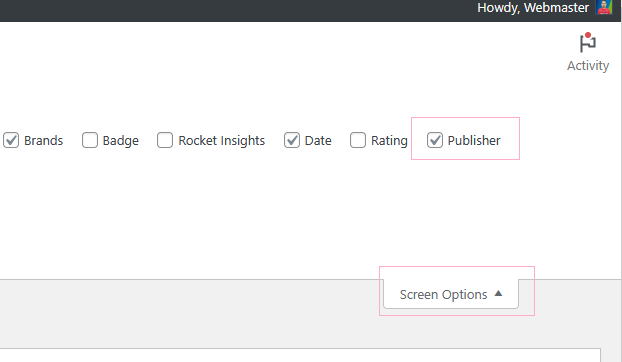
- Click Screen Options (top-right corner).
- Enable the Publisher column.
屏幕截图:
常见问题:
I activated the plugin but I don’t see the column. Is it working?
Yes. The column is hidden by default to avoid automatically changing your admin layout. To enable it:
- Go to WooCommerce > Products.
- Click the Screen Options tab in the top-right corner.
- Check Publisher.
Will this slow down my site?
No. The plugin only runs inside the WordPress admin Products list. It does not load on the frontend, so your store performance is unaffected.
Does this add anything to the database?
No. The plugin only reads existing WordPress fields: post_author, post_modified, and _edit_last. It does not create new tables or modify your database.
What if my store has hundreds or thousands of products?
WooCommerce loads products in pages (usually 20–50 per page). The plugin only reads basic fields for the products displayed on the current page, so the performance impact is minimal even for large stores.
Why does "LT" sometimes show the author instead?
If WordPress does not have a recorded last editor (for example after certain imports or API updates), the plugin safely falls back to showing the original author.
Is this compatible with the latest version of WooCommerce?
Yes. The plugin uses standard WordPress hooks and does not modify WooCommerce core files.
Can each admin user choose whether to see the column?
Yes. Screen Options are saved per user. Each administrator or staff member can choose whether to show or hide the column independently.
What is the date format of last touch date?
The date format is year-month-day.
更新日志:
- Initial release