Enquiry Cart For WooCommerce – Request a Quote
| 开发者 | gravitymaster97 |
|---|---|
| 更新时间 | 2026年7月19日 14:28 |
| PHP版本: | 7.2 及以上 |
| WordPress版本: | 7.0 |
| 版权: | GPLv2 or later |
| 版权网址: | 版权信息 |
详情介绍:
- Capture more leads – Let customers enquire about products even when they're not ready to buy.
- Flexible pricing – Perfect for B2B, wholesale, and custom-order stores where pricing isn't fixed.
- Reduce cart abandonment – Remove price friction by letting customers ask before committing.
- Full control – Choose exactly where and when the enquiry button appears.
- GDPR-friendly – Works for both logged-in and guest users.
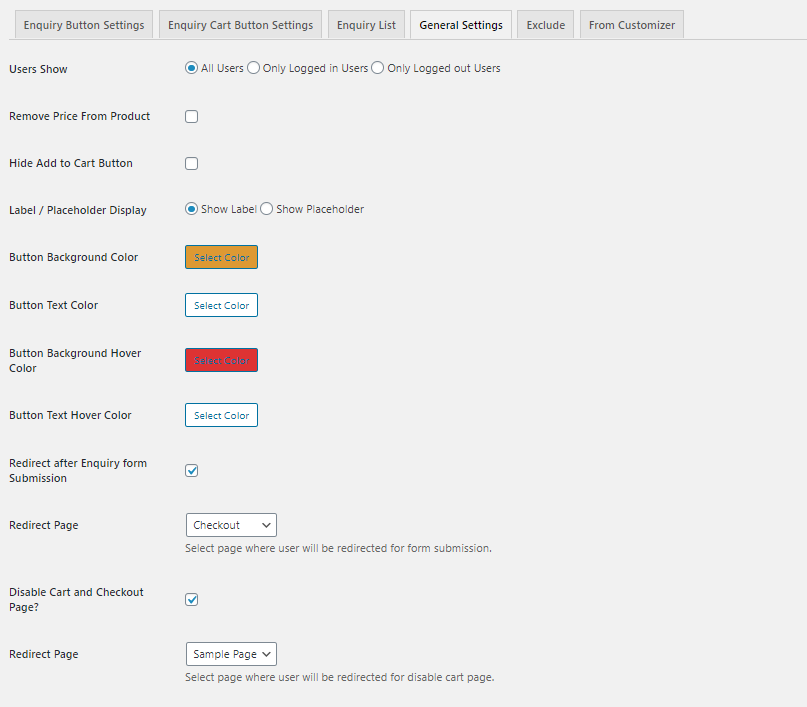
- Enable / Disable the plugin with a single toggle
- Customize the Enquiry Cart button label text
- Customize the button color to match your store branding
- Show the enquiry button for logged-in users, logged-out users, or both
- Redirect customers to a custom page after form submission Display Options
- Show the enquiry button on: Shop & Single Product Pages, Single Product Page only, or a Custom Location via shortcode
- Shortcode support:
[gmpqcw_enquiry_single_product]or[gmpqcw_enquiry_single_product id='{product_id}'] -
Set up your dedicated enquiry cart page using shortcode:
[gm_woo_enquiry_cart]Product & Cart Control - Hide the Add to Cart button
- Remove product prices from the frontend
- Show the enquiry button for out-of-stock products
- Disable the WooCommerce Cart and Checkout pages entirely
- Include or exclude the enquiry button based on product categories Enquiry Form
- Full email customizer — personalize the notification emails sent to the store owner and customer
- Webhook support — trigger a custom webhook after form submission for CRM or automation integration ⭐ Pro Features — Upgrade to Pro
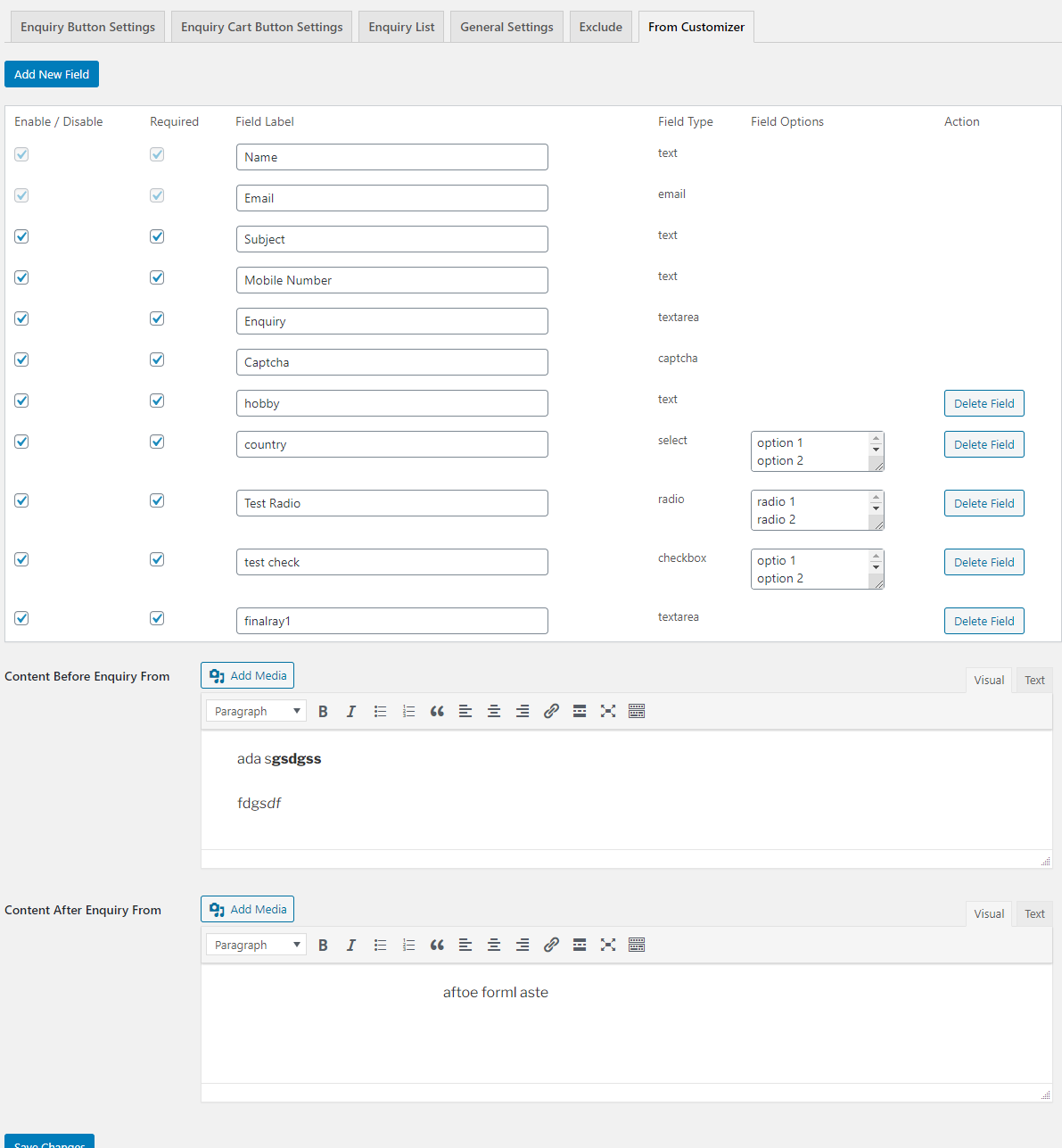
- Add custom fields to the enquiry form: Text, Select, Checkbox, Textarea, and Radio fields
- Collect additional customer information tailored to your business needs
- Build advanced enquiry forms without any coding Quote Management
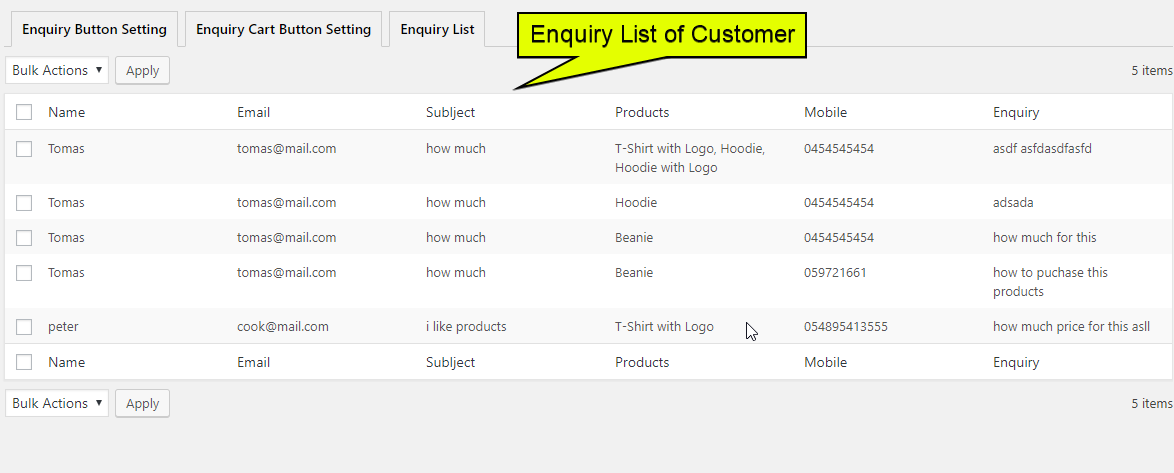
- View all submitted quote requests from the admin dashboard
- Download all quotes as a CSV file for easy processing Developer & Advanced
-
JavaScript DOM event listener (
Gm_quote_cart_submitted) for custom tracking pixels, marketing tags, or analytics after form submission - Translate-ready (compatible with WPML and Loco Translate)
- Install and activate the plugin.
- Go to WooCommerce > Enquiry Cart Settings to configure your button label, display location, form fields, and email notifications.
- Create a new WordPress page, add the shortcode
[gm_woo_enquiry_cart], and assign it as your Enquiry Cart page. - Customers can now add products to their enquiry cart and submit a quote request from the cart page.
- You receive an email notification and can view all submissions under the Quotes menu in your dashboard.
[gm_woo_enquiry_cart]— Displays the full enquiry cart and submission form. Add this to your dedicated enquiry cart page.[gmpqcw_enquiry_single_product]— Displays the enquiry button for the current product (use on single product pages).[gmpqcw_enquiry_single_product id='123']— Displays the enquiry button for a specific product by its ID.
window.addEventListener('Gm_quote_cart_submitted', (event) => { const { success, formData, result } = event.detail; if (success) { console.log("Enquiry submitted successfully:", result); } else { console.error("Enquiry submission failed:", result); } });
Use this to trigger Google Analytics events, Facebook Pixel, custom webhooks, or any third-party marketing integration.
🔗 Our Other Plugins
- Product Enquiry for WooCommerce – Popup-based enquiry form directly on product pages.
- PDF Catalog WooCommerce – Generate downloadable product catalogs with images and prices.
- Show Variations On Shop & Category Page – Display product variations directly on shop/category pages.
- Variation Dropdown to Radio Buttons – Replace variation dropdowns with radio buttons.
- Short Description & Attributes in Loop – Show product short descriptions and attributes in the shop loop.
- Restrict Payment Methods For WooCommerce – Control which payment methods are available at checkout.
- Product Shortcode – Widget – Block for WooCommerce – Display product lists anywhere using shortcodes, widgets, or blocks.
安装:
- Log in to your WordPress admin dashboard.
- Navigate to Plugins > Add New.
- Search for "Enquiry Cart For WooCommerce".
- Click Install Now, then click Activate.
- Download the plugin
.zipfile from the WordPress plugin directory. - Log in to your WordPress admin dashboard.
- Navigate to Plugins > Add New > Upload Plugin.
- Upload the
.zipfile and click Install Now. - Click Activate Plugin.
- Go to WooCommerce > Enquiry Cart to configure plugin settings.
- Create a new page and add the shortcode
[gm_woo_enquiry_cart]to serve as your enquiry cart page. - Assign this page in the plugin settings and you're ready to go.
屏幕截图:
常见问题:
Does this plugin work with all WooCommerce themes?
Yes. The plugin is designed to be compatible with all standard WooCommerce themes. It uses standard WooCommerce hooks and shortcodes, making it highly compatible across themes.
Can I use this plugin without disabling the Add to Cart button?
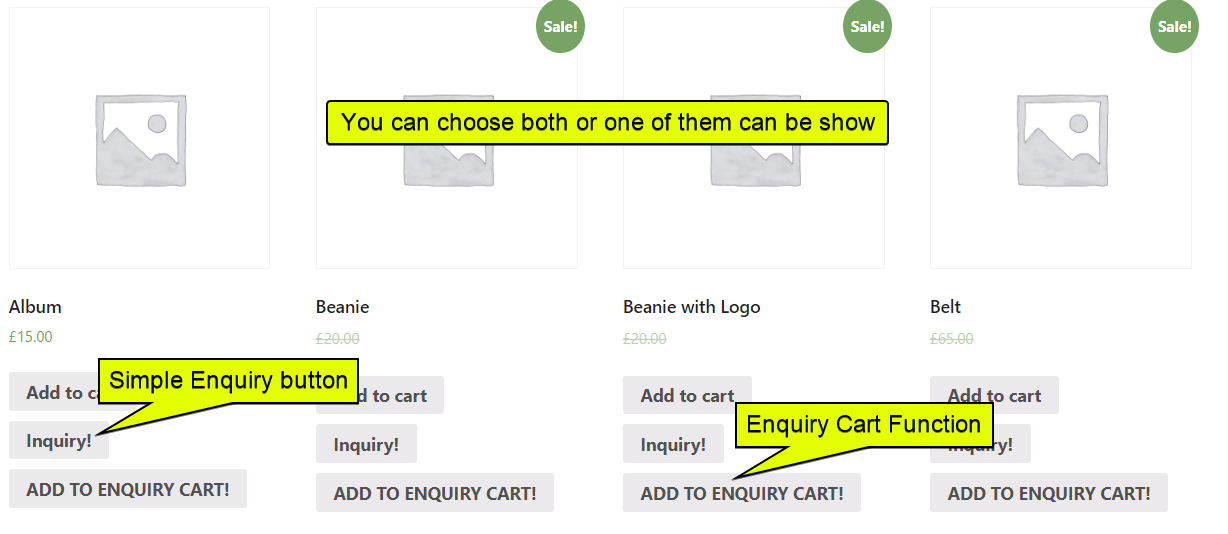
Yes. You can choose to show both the Add to Cart button and the Enquiry button simultaneously, or hide Add to Cart entirely — your choice.
Does it work for out-of-stock products?
Yes! You can enable the enquiry button specifically for out-of-stock products, so customers can still express interest and request availability updates.
Can I add custom fields to the enquiry form?
Yes, custom form fields (text, select, checkbox, textarea, and radio) are available in the Pro version. Upgrade to Pro to collect additional customer information tailored to your business needs. Get the Pro version here.
Can I export quote requests?
Yes. All submitted quotes are stored in your admin dashboard and can be exported as a CSV file at any time.
Is the plugin translation-ready?
Yes. The plugin is fully translation-ready and compatible with WPML and Loco Translate.
Can I use a webhook with this plugin?
Yes. You can configure a webhook URL in the plugin settings. The webhook will be triggered automatically after every successful enquiry form submission.
Is it possible to restrict the enquiry button to specific product categories?
Yes. The plugin includes an include/exclude filter based on product categories, giving you full control over where the button appears.
Does it work for guest (non-logged-in) users?
Yes. You can configure the enquiry button to show for logged-in users only, logged-out users only, or all visitors.
更新日志:
- Initial release.
- Enable/Disable enquiry cart functionality.
- Customizable enquiry button label and color.
- Display on Shop Page, Single Product Page, or custom location via shortcode.
- Shortcode support for cart page and single product button.
- Quote submission list with CSV export.
- Show button for logged-in / logged-out users.
- Enquiry button for out-of-stock products.
- Option to remove price and hide Add to Cart button.
- Redirect after form submission.
- Disable WooCommerce Cart and Checkout pages.
- Category-based include/exclude filter.
- Email customizer for notification emails.
- Webhook support after form submission.
- Custom form fields via Pro version (text, select, checkbox, textarea, radio).
- JavaScript DOM event (
Gm_quote_cart_submitted) for developers. - Translation-ready.