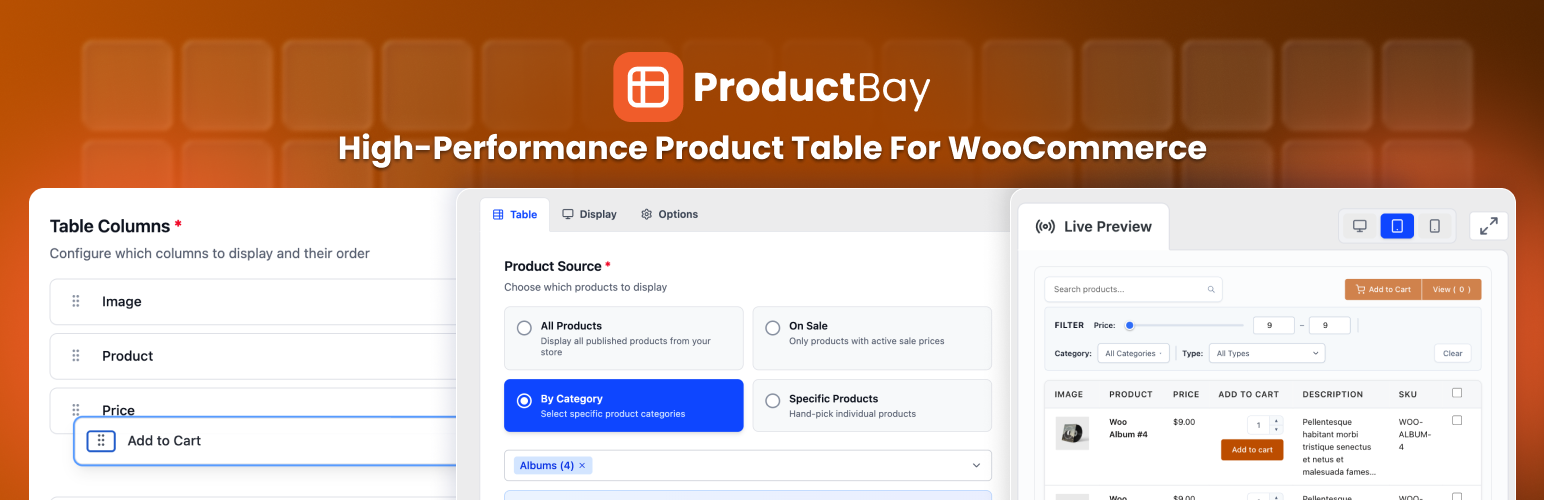
ProductBay – High-Performance Product Table for WooCommerce
| 开发者 |
wpanchorbay
forhadkhan sankarsan arifac |
|---|---|
| 更新时间 | 2026年10月22日 21:47 |
| PHP版本: | 7.4 及以上 |
| WordPress版本: | 7.1 |
| 版权: | GPLv2 or later |
| 版权网址: | 版权信息 |
详情介绍:
ProductBay requires WooCommerce to be installed and active.Perfect For
- Wholesale & B2B stores
- Large product catalogs
- Quick-order & bulk-order forms
- Price lists & product directories
- Restaurant & food menus
- Digital product libraries
- Any WooCommerce store who wants easy and efficient product listing
- Admin Panel: A fully responsive Single Page Application (SPA) built with React 18, TypeScript, and Tailwind CSS, so the table builder feels fast, fluid, and intuitive.
- Frontend Display: A lightweight, SEO-friendly rendering engine optimized for Core Web Vitals, so your customers get speed without bloat.
- Multiple Display Methods: Add product tables in any page through shortcode or Gutenberg block which allows sigle table, multiple tables and tab options.
- Permalink: View product tables in a dedicated page with unique URL.
- Activity Log: Track system events and table management actions with a file-based logging system.
- No External CDN: No external CDN, no remote scripts, no data ever leaves your server. All assets are bundled locally inside the plugin.
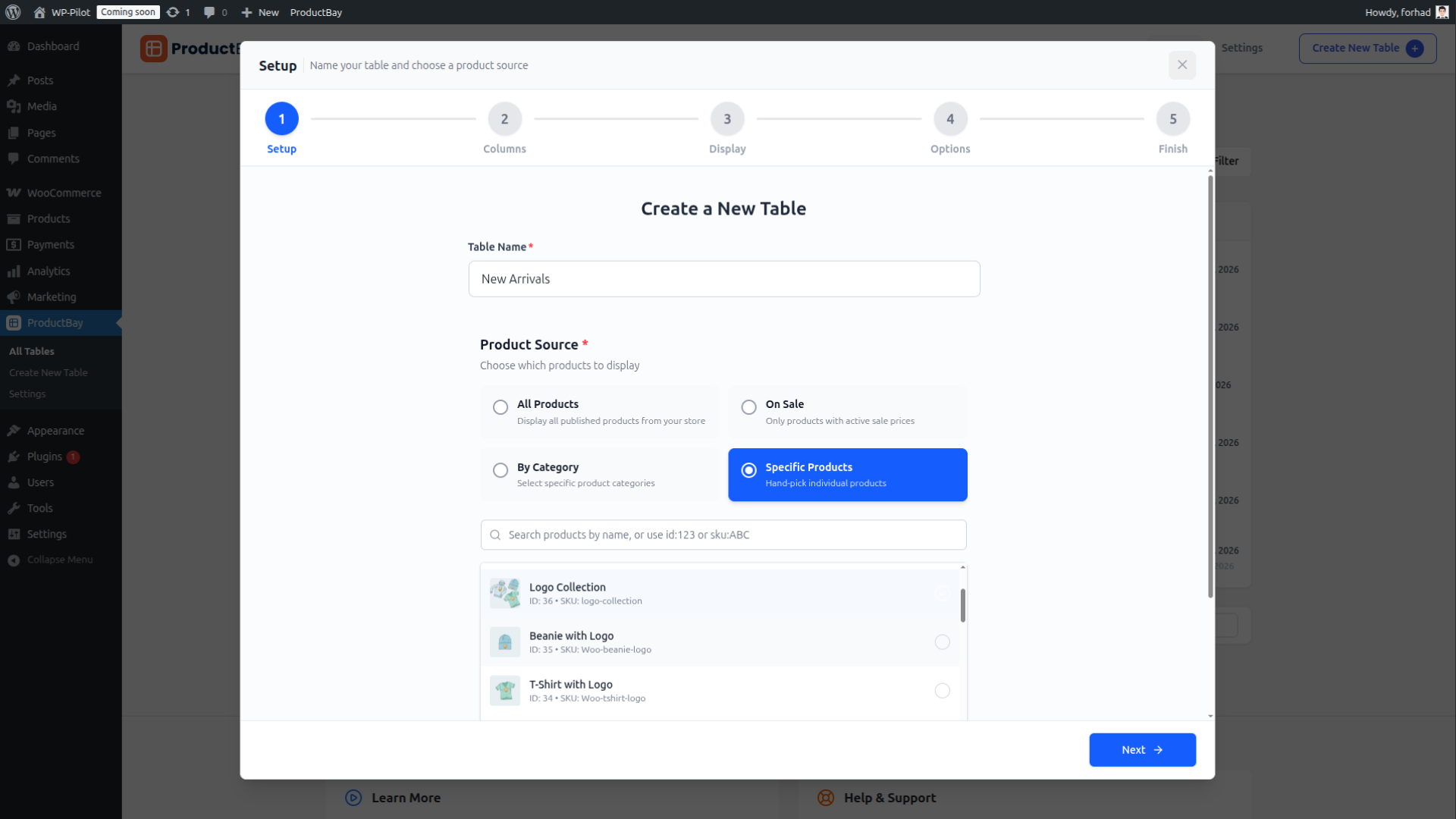
- Setup: Name your table and choose a product source
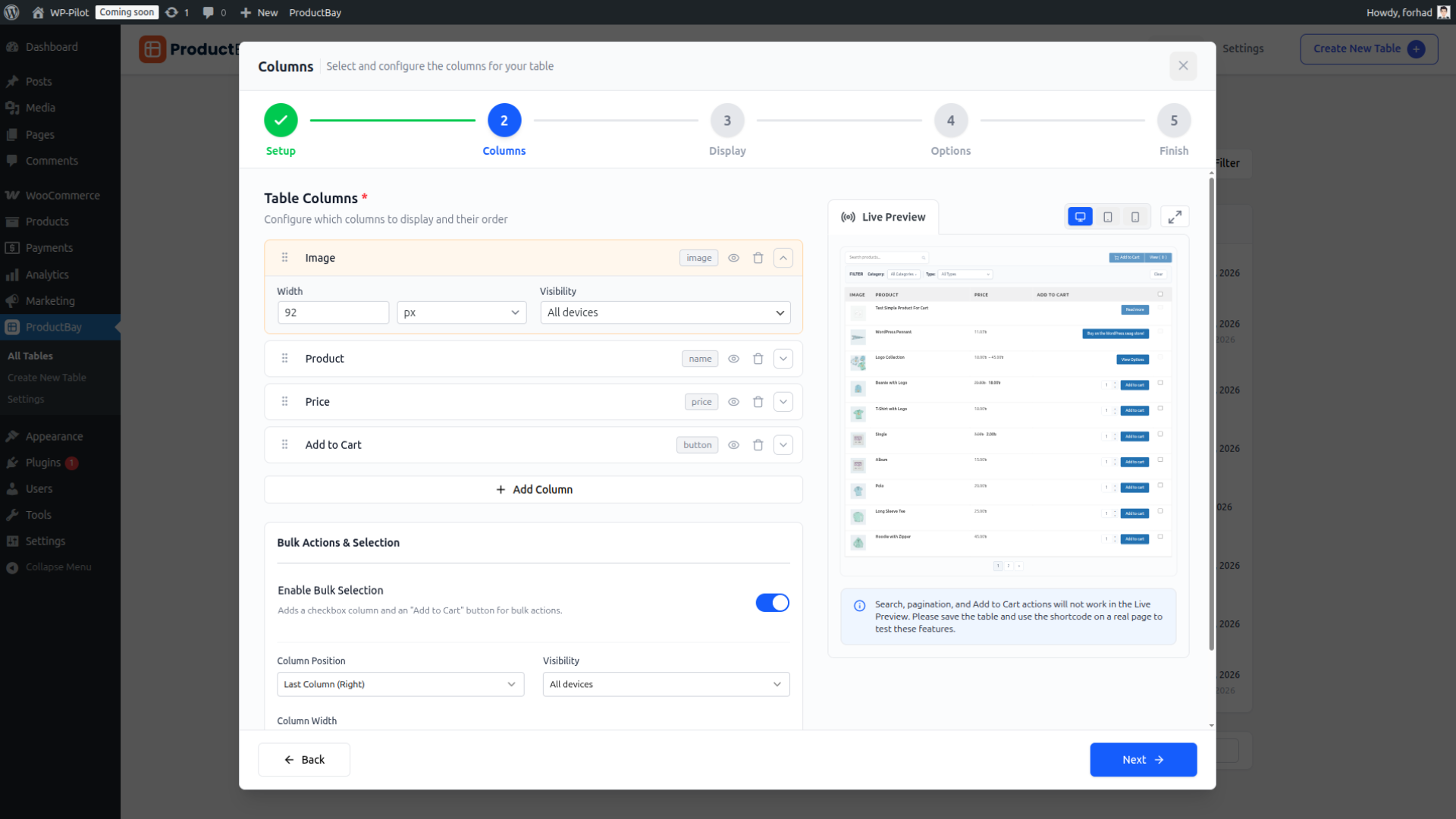
- Columns: Pick and arrange which data columns to display
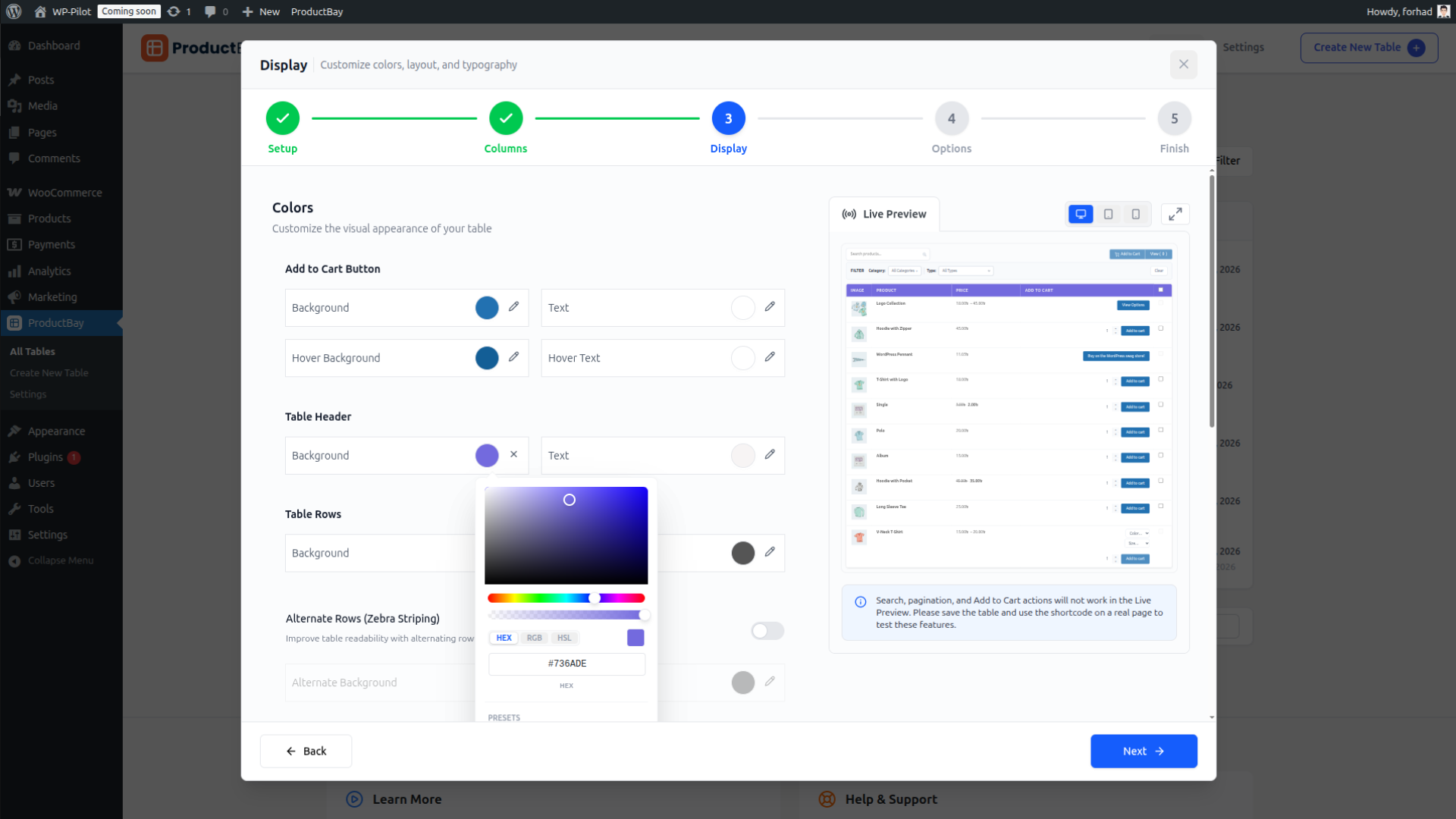
- Display: Customize colors, typography, borders, and spacing
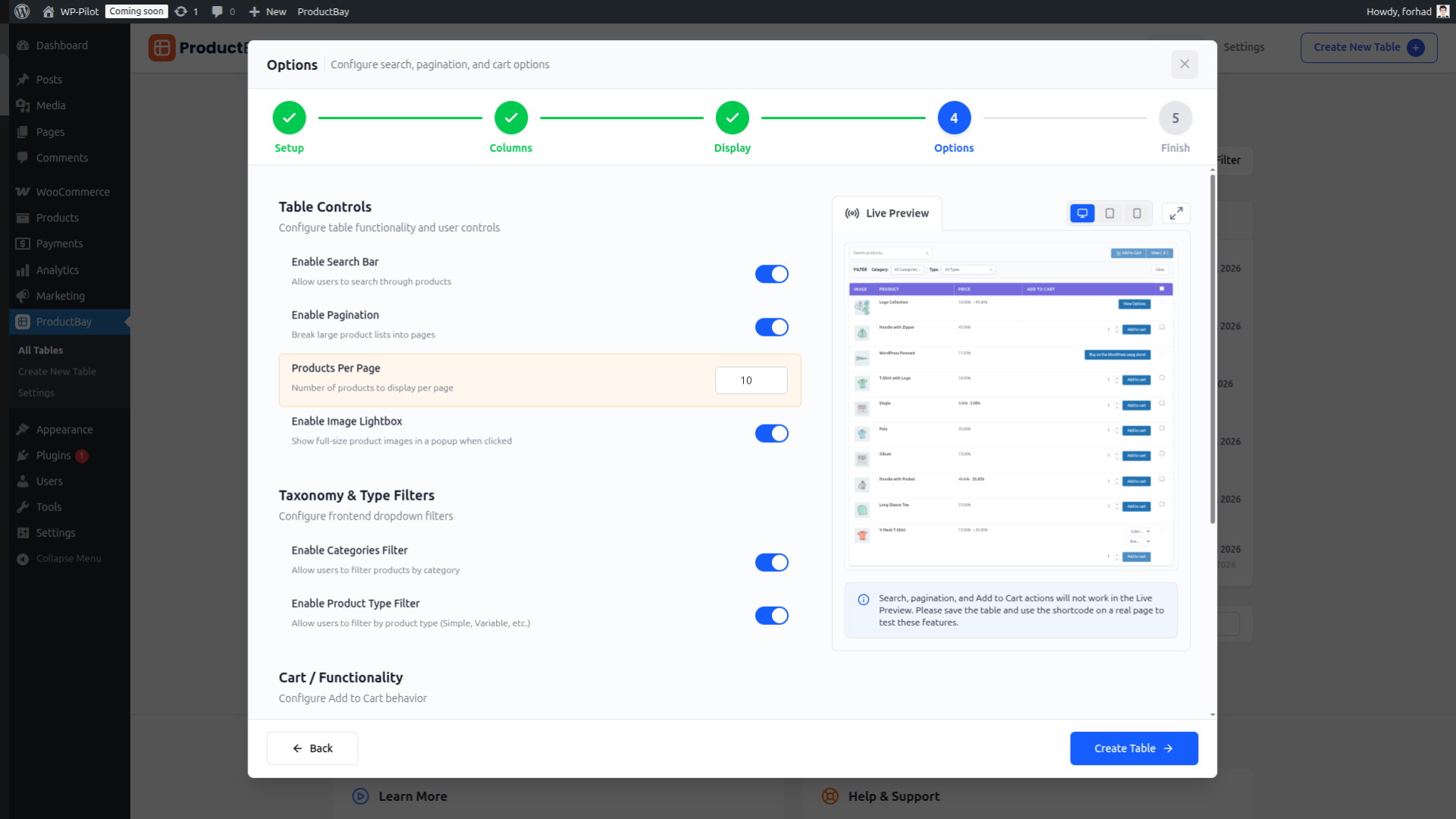
- Options: Configure filters, pagination, and sorting defaults
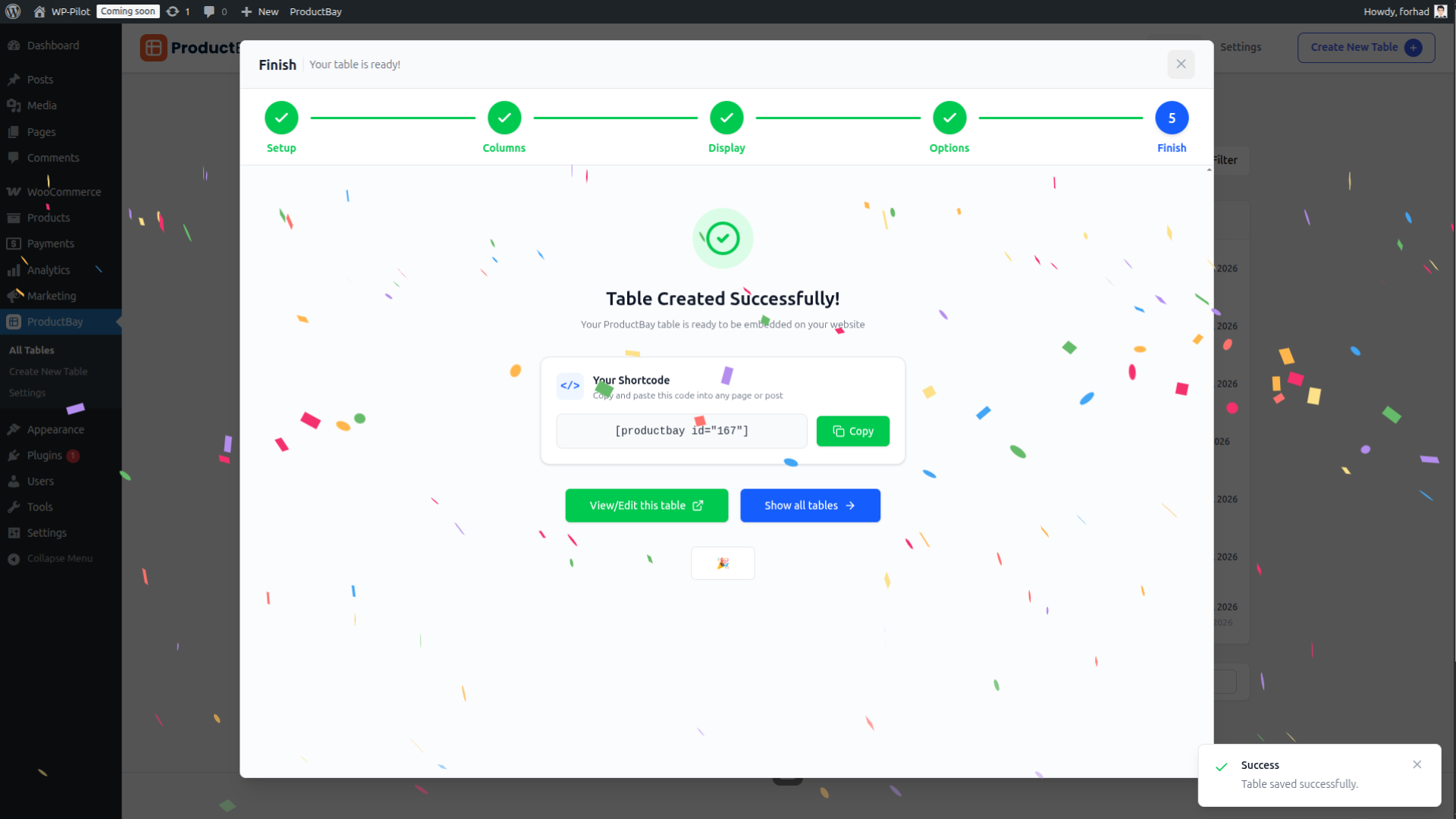
- Finish: Copy your
shortcodeand publish
- By Category: Show all products from one or more categories
- By Sale Status : Display currently on-sale products
- By Specific IDs: Handpick individual products
- All Products: Pull your entire catalog into the table
- Drag-and-Drop Reordering: Change column order visually with an intuitive interface
- Column Types: Product Image, Name, Price, SKU, Description, Add to Cart, Bulk Selection and more
- Responsive Visibility: Set custom width for each column in pixel (px), percentage (%) or auto. Configure per-column show/hide rules for desktop/laptop, tablet, and mobile independently
- Tablet & Phone Columns are optional: if left empty, the plugin falls back to your desktop column configuration automatically
- Simple Products: Standard add-to-cart button
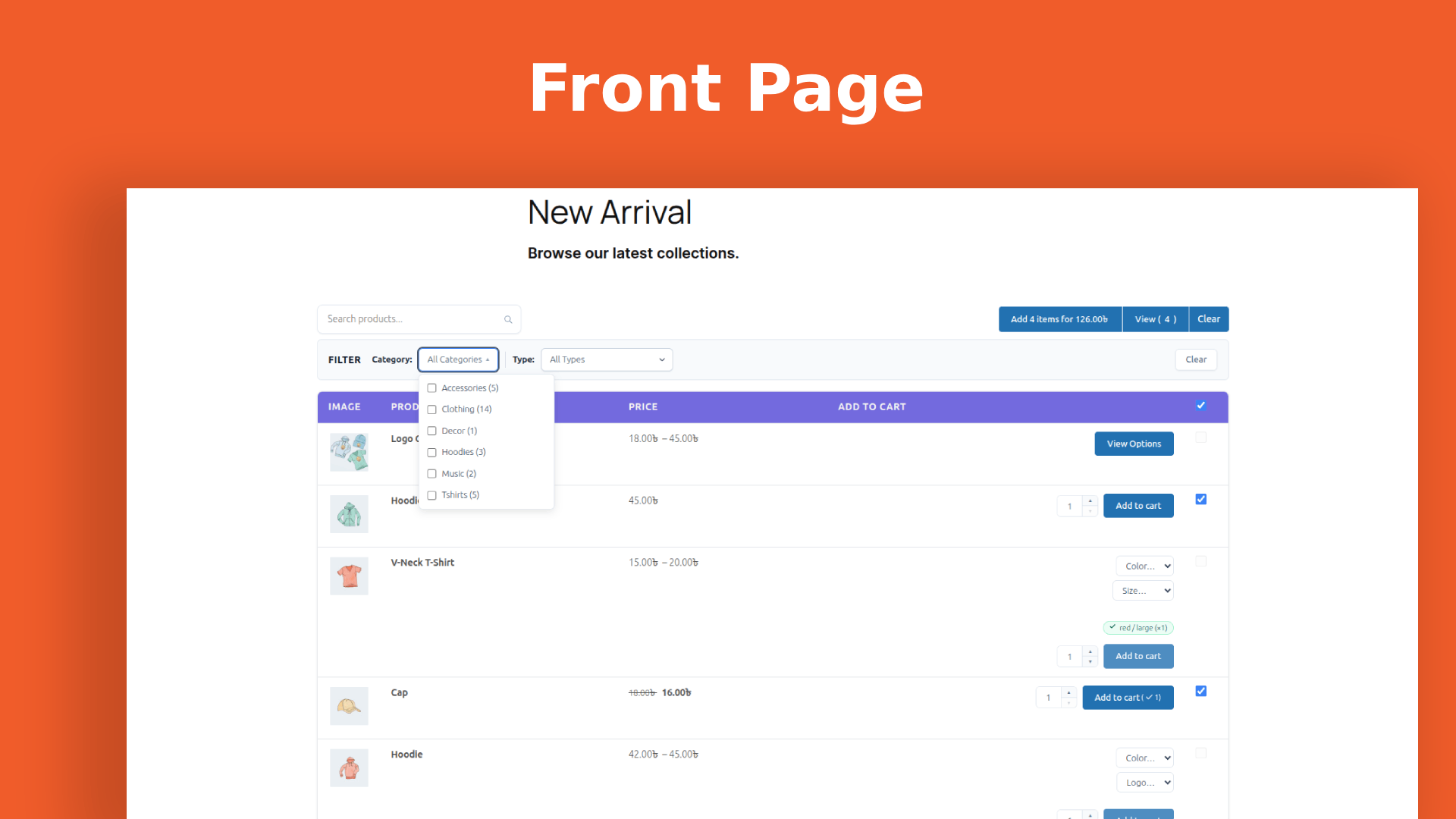
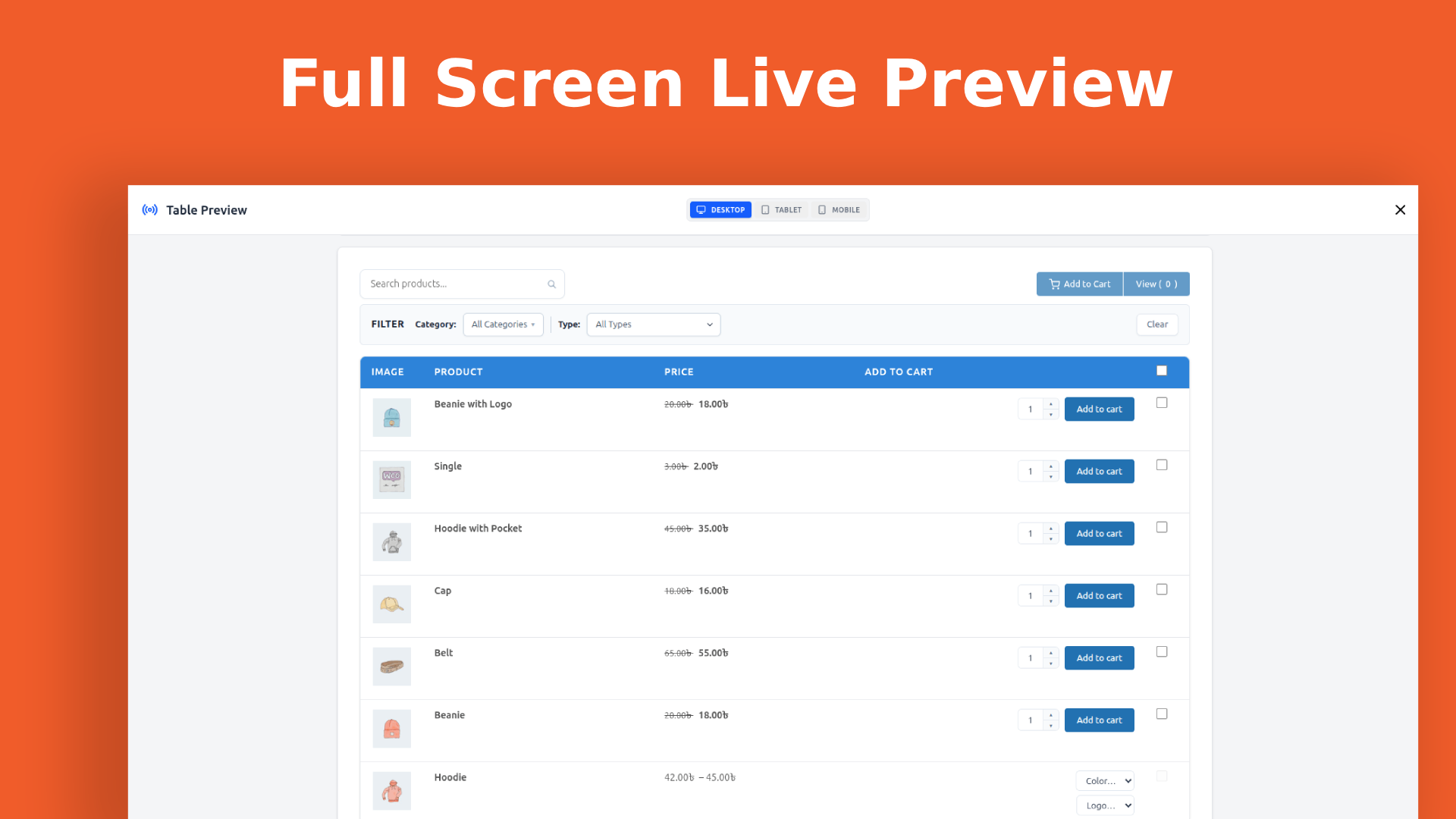
- Variable Products: Inline attribute selectors (for each variable) right inside the table row.
- Grouped Products: Inline individual and all product selectors for group items.
- External / Affiliate Products: Displays the external buy button correctly
- AJAX Add-to-Cart: Products are added without any page reload
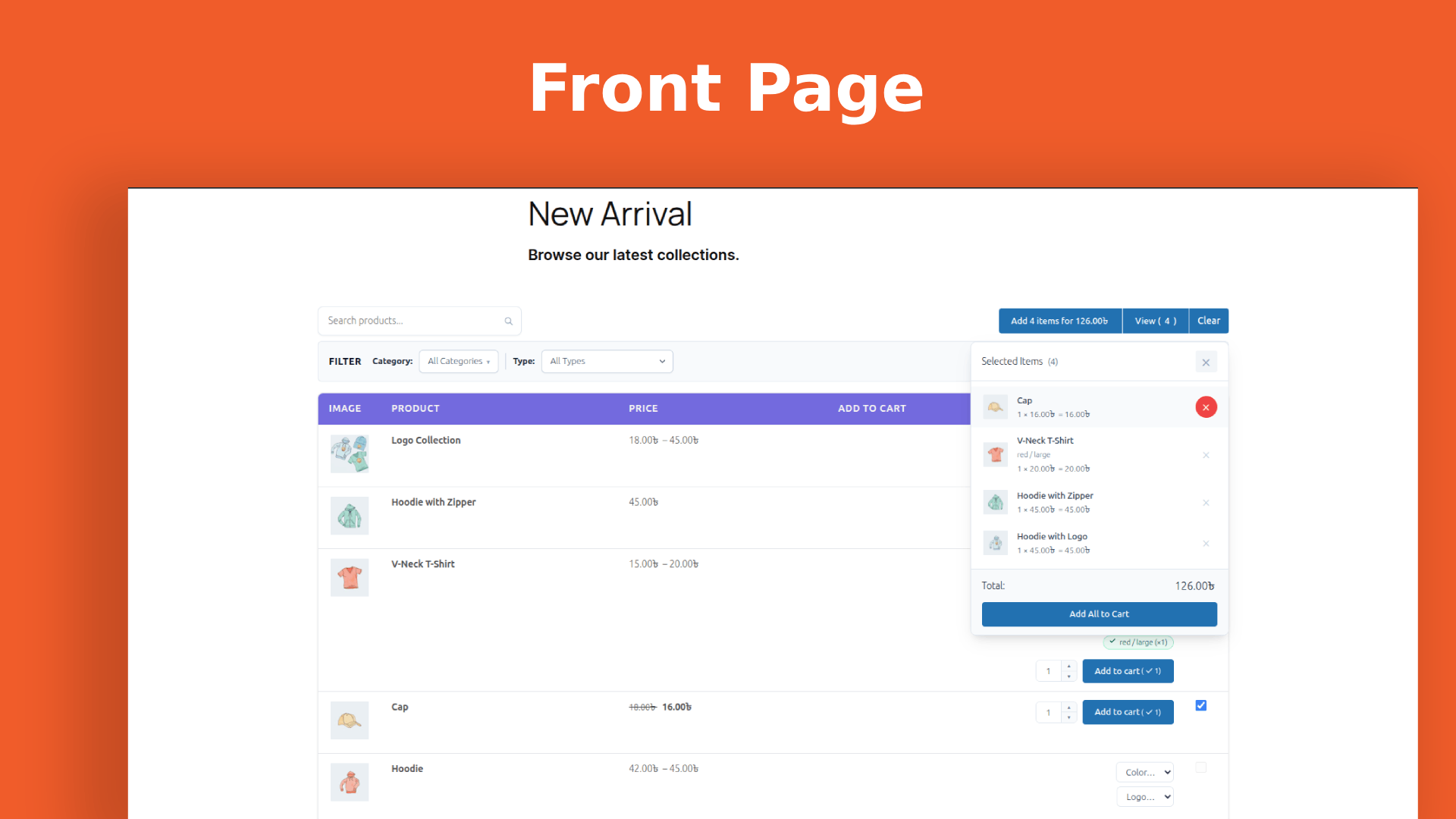
- Bulk Add-to-Cart: Customers can select multiple products, including variable and grouped products and add them all to the cart at once with a single click
- Bulk List Panel: A floating popup showing everything in the bulk list with individual quantities, pricing, and remove controls
- Instant AJAX Search: Live search that filters the product list as users type
- Category Filter: Native dropdown to filter by product category
- Product Type Filter: Dropdown to filter by Simple, Variable, Grouped, or External product type
- AJAX Pagination: Page through results without full page reloads
- Colors: Background, text, borders, alternate rows (zebra striping) and hover states
- Typography: Font size and font weight per element
- Borders: Border style, width, and radius
- Spacing: Cell padding per table
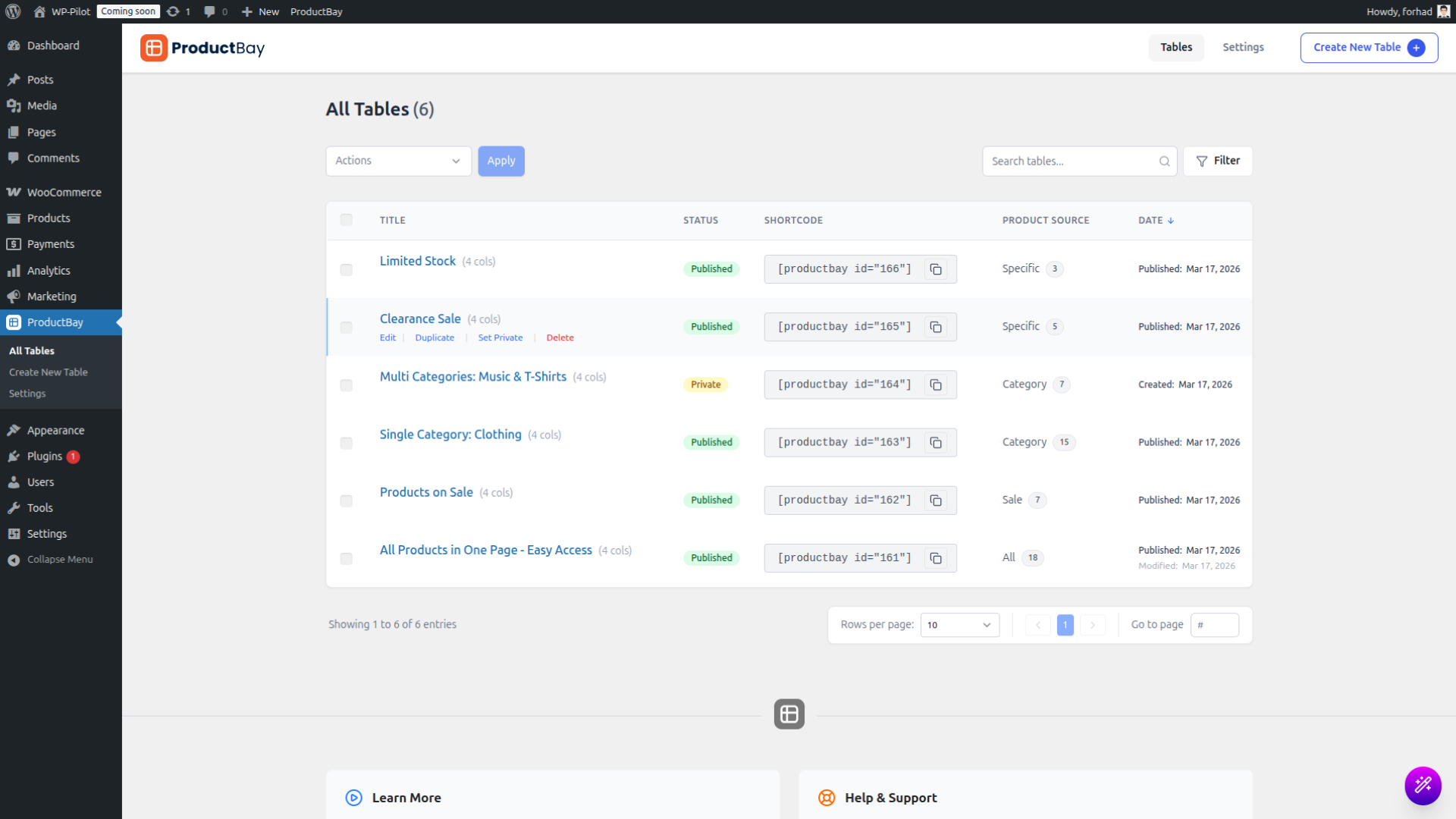
- Search Tables: Find any table quickly by name
- Filter by Status: Published or Private
- Filter by Product Source: Category, Sale, IDs, or All
- Bulk Status Update: Update status of tables at once to private or published
- Bulk Delete: Clean up multiple tables at once
- Date: See created, modified and published date for each table
- Activity Log: Monitor table changes and system events for better oversight and troubleshooting
- Hook into query arguments, cell output, table styles, and more
- A dedicated Hooks & Filters reference page is included directly in the plugin's admin area
- All frontend assets are only loaded on pages where a table shortcode is present
- Advanced Variable Product Layouts: Popup Modal, Nested Rows, or Separate Rows display modes.
- Advanced Group Product Layouts: Enhanced display options for grouped item selection.
- Price Range Filter: Interactive slider and input-based price filtering.
- Pro Columns: Advanced Custom Fields (ACF) integration and Combined Columns using template tags.
- Custom "Add to Cart" and "Select Options" Button Text: Override the default button text globally or per-table.
- Lazy Loading: Improved performance with infinite scroll or Load More button instead of pagination.
- Import / Export: Backup, migrate, and share table configurations as JSON files.
- License Management: Automated updates and professional support.
- Quick View Modal: AJAX-loaded product detail popup.
- Custom CSS Editor: Per-table scoped CSS editor in the admin.
- Advanced Filters: Sidebar/drawer layouts, attribute filters, and active filter chips.
- Premium Templates: One-click professional style presets.
- Analytics: Table impressions, click tracking, and conversions dashboard.
安装:
- In your WordPress admin, go to Plugins → Add New.
- Search for ProductBay.
- Click Install Now, then Activate.
- Ensure WooCommerce is installed and active.
- Navigate to ProductBay in the admin menu to create your first table.
- Download the plugin
.zipfile. - In your WordPress admin, go to Plugins → Add New → Upload Plugin.
- Upload the
.zipfile and click Install Now, then Activate. - Navigate to ProductBay in the WordPress admin menu.
[productbay id="1"]) to paste anywhere on your site.屏幕截图:
常见问题:
Does this plugin require WooCommerce?
Yes. ProductBay is a WooCommerce extension and will not function without WooCommerce installed and active.
Which WooCommerce product types are supported?
ProductBay supports all four core WooCommerce product types: Simple, Variable, Grouped, and External/Affiliate.
Do you support Gutenberg blocks?
Yes! ProductBay includes two native Gutenberg blocks that provide a live preview directly within the WordPress editor:
- Product Table: Easily insert a single product table.
- Tabbed Product Tables: Display multiple product tables organized cleanly within an interactive tabbed interface.
How do I display a product table on a page?
You can use the native Product Table block to insert and preview your table directly in the WordPress block editor. Alternatively, you can copy its shortcode, for example [productbay id="1"], and paste it into any page, post, or widget.
Can I display multiple tables on the same page?
Yes. Each table uses its own scoped CSS, so multiple tables on the same page will never conflict with each other's styling.
Can customers add multiple products to the cart at once?
Yes. ProductBay includes a Bulk Add-to-Cart feature. Customers can select multiple products using checkboxes and add them all to the cart in a single click. A "Bulk list" panel shows a live summary of the selection, and a "Clear All" button resets it instantly.
How do variable products work inside the table?
Variable products display inline attribute selectors (size, color, etc.) directly in the table row, no need to visit the product page to choose a variation. Variation badges then visually confirm which options were added to the cart.
Can I configure different columns for desktop, tablet, and mobile?
Yes. The column editor allows you to configure independent show/hide rules for each column per device size (desktop, tablet, and phone). Tablet and phone columns are completely optional, if left empty, the plugin automatically uses your desktop column configuration for smaller devices.
Can customers search and filter products in the table?
Yes. Every table supports instant AJAX search, a price range filter (slider, inputs, or both), a product category dropdown filter, and a product type dropdown filter, all without any page reloads.
Does the plugin slow down my site?
No. ProductBay is built with performance as a core priority. Plugin assets are only loaded on pages where a table shortcode is present. Product queries are cached for 30 minutes using a stale-while-revalidate strategy to minimize database load. The frontend rendering engine is intentionally lightweight and optimized for Core Web Vitals.
Does the plugin call any external services or load remote scripts?
No. All JavaScript, CSS, and other assets are bundled locally inside the plugin. No data is sent to any external server, and no remote CDN scripts are ever loaded.
How many tables can I create?
There is no limit. You can create as many product tables as your store requires.
Is ProductBay compatible with page builders like Elementor, Divi, or WPBakery?
Yes. ProductBay uses a standard WordPress shortcode ([productbay id="X"]), which is compatible with any page builder that supports shortcodes.
Is there a Pro version available?
Yes! ProductBay Pro is now available. It extends the free version with advanced variable layouts, price range filters, custom field support, import/export, and more. You can purchase it at wpanchorbay.com.
Is ProductBay translation ready?
Yes. All user-facing strings use WordPress localization functions and the plugin is 100% translation ready.
Where can I get support?
Use the support forum on this plugin's WordPress.org page. We aim to respond within 2 business days. You can also reach us directly at support@wpanchorbay.com.
更新日志:
- Security: Fixed an issue where the table delete endpoint did not check that the ID it was given actually belonged to a ProductBay table, so a crafted request from a logged-in administrator-level account could permanently delete another post — a page, a product, an order — without it going to the trash.
- Security: Fixed an issue where the activity log export accepted any value as its date and used it to build a file path, allowing an administrator-level account to read other
.logfiles on the server. - Security: Saving a table now checks that the ID it was given belongs to a ProductBay table. Before, a crafted save request from an administrator-level account could turn another post, such as a page or a product, into a table, overwrite its title and status, and make it deletable through the table delete endpoint.
- Security: A table's saved column identifier is now sanitized before it reaches the generated stylesheet, so it cannot break out of its own CSS rule.
- Security: The bulk add-to-cart endpoint, which visitors can reach without logging in, now caps how many products one request may carry, and checks that a chosen variation really belongs to the product being added.
- Fix: Product tables no longer show products your shop hides. A product set to "Hidden" under Product data > Advanced stayed visible in every table, and so did out-of-stock products on stores with "Hide out of stock items" switched on.
- Fix: ProductBay's stylesheet and script can now be cached by your visitors' browsers. They were being given a new version number on every single page load, so every visitor re-downloaded all of it on every page — and so did you, on every admin screen. Around 133 KB per storefront page view, and 471 KB per admin screen.
- Fix: The category and product type filters above a table no longer keep offering a choice after the products behind it have moved. That list was cached for 12 hours and expired on time alone, so a category could linger in the dropdown for up to half a day after the last product left it. It is now rebuilt whenever a product, a product's categories, or a table is edited.
- Fix: Searching or filtering a table down to a single page no longer leaves the old page links behind. The pager kept offering the unfiltered page count, and clicking one of those pages showed "No products found" even though the search had matched products.
- Fix: Deleting the plugin now also removes the cached filter choices and the cache counter it leaves in your database.
- Fix: Typing in a table's search box and then changing or clearing the text quickly could leave the table showing results for the old text. A slow answer for the earlier search could arrive after the newer one and replace it. Only the latest search, filter or page request now updates the table.
- Fix: The Add to Cart button on a variable product no longer stays stuck reading "Adding..." after a successful add. The product really was added to the cart, but the button never returned to its normal state, so the add looked like it had failed.
- Feature: A "Clear cache" button under Settings > Plugin Settings rebuilds those filter choices immediately, for the cases automatic rebuilding cannot see — products edited directly in the database, an import that bypasses WooCommerce's usual hooks, or a staging-to-live database copy.
- Dev: PRODUCTBAY_DEV_MODE now does what .env.example always described. It was defined but read nowhere; it now selects the asset version strategy.
- Improvement: Declared compatibility with WooCommerce High-Performance Order Storage and with the Cart and Checkout blocks, and added the "WC tested up to" header. Without the declaration WooCommerce counts a plugin as HPOS-incompatible, which can stop a store enabling HPOS.
- Improvement: Tables are noticeably lighter to render. Each render was also running a product count query that only the admin screen uses, and the image and category columns were each costing an extra database query per row. On a 5,000-product catalogue this saves around 8ms and 2 queries per render, and 4 more queries per render on tables with images or a category column.
- Improvement: ProductBay's script no longer cancels the deferred loading WooCommerce asks for on its own cart script, and now defers itself as well.
- Fix: Table permalink pages no longer appear in your site's search results or in the Appearance > Menus picker. They are meant to be reachable by their own URL, not browsable.
- Dev: Added a PHPUnit test suite and a GitHub Actions workflow running PHPCS and PHPUnit on PHP 7.4 and 8.3. The plugin previously had no automated tests.
- Dev: Added the
productbay_excluded_visibility_termsandproductbay_max_bulk_itemsfilters. - Dev: The REST endpoints for reading, saving and deleting a table now return proper error responses instead of reporting failures as success.
- Feature: Product tables are now mobile-responsive. On phones each row reflows into a labeled card (default), or you can keep the classic horizontal-scroll table — chosen per table under Display → Layout on phones.
- Improvement: Stacked cards are the new default and apply to existing tables automatically, so no table is left with cramped or cut-off columns on small screens.
- Improvement: Mobile cards lead with the product name, then the add-to-cart controls, with bulk selection as a full-width "Add to bulk list" button instead of a small checkbox — far easier to tap on a phone.
- Improvement: Card controls now fill the width of the card on phones. The variation and grouped-product dropdowns, the quantity stepper, and the add-to-cart button all share one height, and the stepper is now a minus / field / plus control sized for thumbs.
- Improvement: Grouped products keep their dropdown and quantity stepper on a single row wherever there is room, stacking only on very narrow screens.
- Improvement: Every storefront control on phones now meets the 44px minimum touch target, and the filter bar wraps instead of pushing the page sideways on narrow screens.
- Improvement: Bulk selection is now called the "bulk list" throughout the storefront and the table builder, so the checkbox, the "View" button, and the floating panel all use the same wording.
- Improvement: On phones the bulk actions now float in a rounded bar pinned to the bottom of the screen as soon as something is selected, so the bulk button, "View", and "Clear" stay reachable however far you scroll — and the bar disappears again when the list is empty.
- Improvement: The bulk list popup opens above that bar, fits the screen, and scrolls internally instead of running off the edge, with a tinted header matching its footer.
- Improvement: Wide tables now get a sensible minimum width plus an edge scroll hint, so many-column tables scroll comfortably instead of squishing.
- Fix: The category and product type filters above a table now only offer values that exist in that table. Previously they listed every category and type on the store, so a table scoped to one category still offered the whole catalog and picking any of those choices returned an empty table.
- Fix: Tables with a draft or pending status are no longer labelled "Private" in the dashboard, the table builder, or the admin-only notice shown in place of an unpublished table. Private means published but restricted; draft means not published at all. The notice now names the actual status.
- Dev: Added
productbay_bulk_list_textandproductbay_bulk_list_added_textfilters so the bulk-list toggle labels can be customized (available in Pro). - Dev: Added
productbay_filter_optionsandproductbay_filter_options_cache_ttlfilters to adjust or re-cache the resolved filter choices.
- Fix: The cart icon (header count / mini-cart) and the add-to-cart button confirmation now update instantly when adding to cart, without a page refresh, on both classic themes (cart fragments) and block themes (the Mini-Cart block).
- Improvement: The in-table "added" badge now stays in sync when items are removed or reduced from the cart outside the table (mini-cart, Cart block, or classic cart widget).
- Feature: Added core support and hooks for customizable Add to Cart button text and "Select Options" button text (available in Pro).
- Fix: Resolved added-to-cart checkmarks and quantities persistence issues in bulk-add scenarios by syncing with live WooCommerce cart fragments.
- Compatibility: Verified and tested with WordPress 7.0.
- Feature: Introduced native Permalink Pages for product tables via
productbay_tableCustom Post Type. - Feature: Grouped products now default to Inline Dropdown mode for direct child product selection and add-to-cart.
- Feature: Introduced a comprehensive, file-based Activity Log system to track table management and system events.
- Feature: Decoupled cart functionality from AJAX to support native form submissions and improved compatibility.
- Dev: Optimized internal code architecture and registered
productbay_tableCPT with frontend support.
- Feature: Added new column types: Stock, Date, Taxonomy, and Rating.
- Feature: Introduced Pro Shells for premium features: Custom Field, Combined, Price Range Filter, and Variable & Grouped Products.
- Dev: Unified Pro activation detection across Free plugin layers.
- Improvement: Block setup experience with "Create New Table" link in placeholders.
- Improvement: Removed misleading product counts from category multiselect filters.
- Improvement: Enhanced reliability of CSS injection into the Block Editor iframe.
- Fix: Isolated table event handlers to prevent cross-tab state interference (e.g. AJAX filter state).
- Feature: Native Gutenberg blocks for Product Table and Tabbed Product Tables with server-side rendering.
- Improvement: Filters bar repositioned above toolbar for better UX flow.
- Improvement: Admin menu (WooCommerce > Products) renamed from "All Tables" to "Product Tables" for clarity.
- Improvement: Added a "Manage" link to the plugin action links on the Plugins page for quicker access.
- Improvement: Hover highlight improvements across admin UI.
- Improvement: Shortcode display layout refined on the table management page.
- Dev: Restructured codebase for Pro extension architecture.
- Dev: Exposed UI components and settings globally for Pro add-on consumption.
- Initial release of ProductBay.