
ProxyAI Chat Assistant
| 开发者 | proxyai |
|---|---|
| 更新时间 | 2026年9月4日 19:54 |
| 捐献地址: | 去捐款 |
| PHP版本: | 8.1 及以上 |
| WordPress版本: | 7.1 |
| 版权: | GPLv2 or later |
| 版权网址: | 版权信息 |
详情介绍:
- Answers visitor questions from your published posts, pages and products
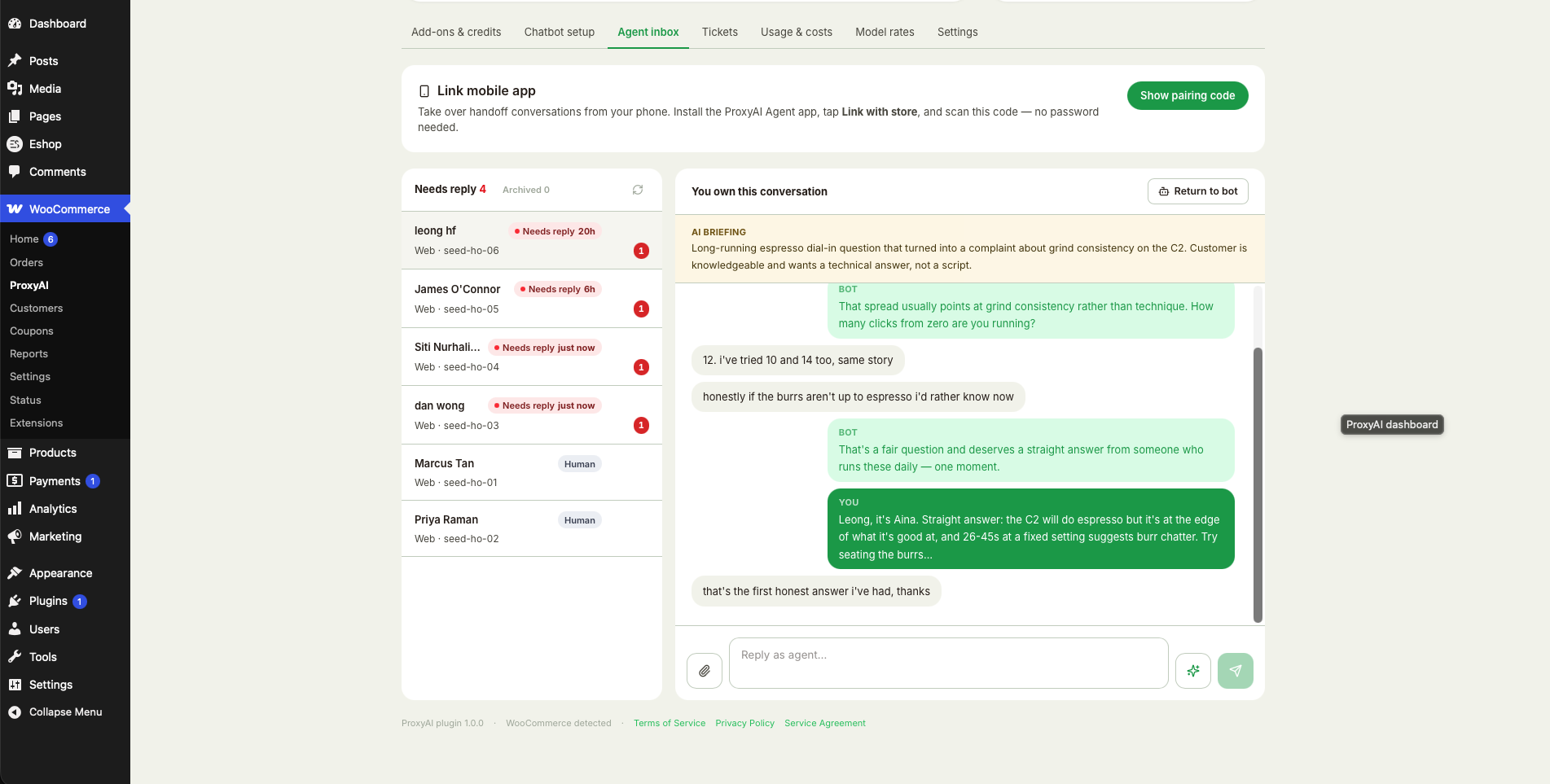
- Hands off to a human, with the conversation in a shared inbox
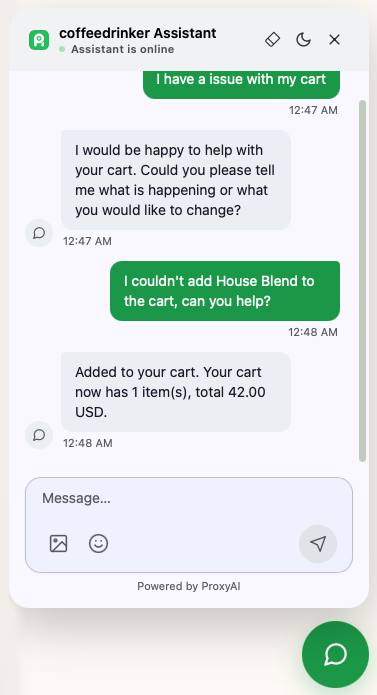
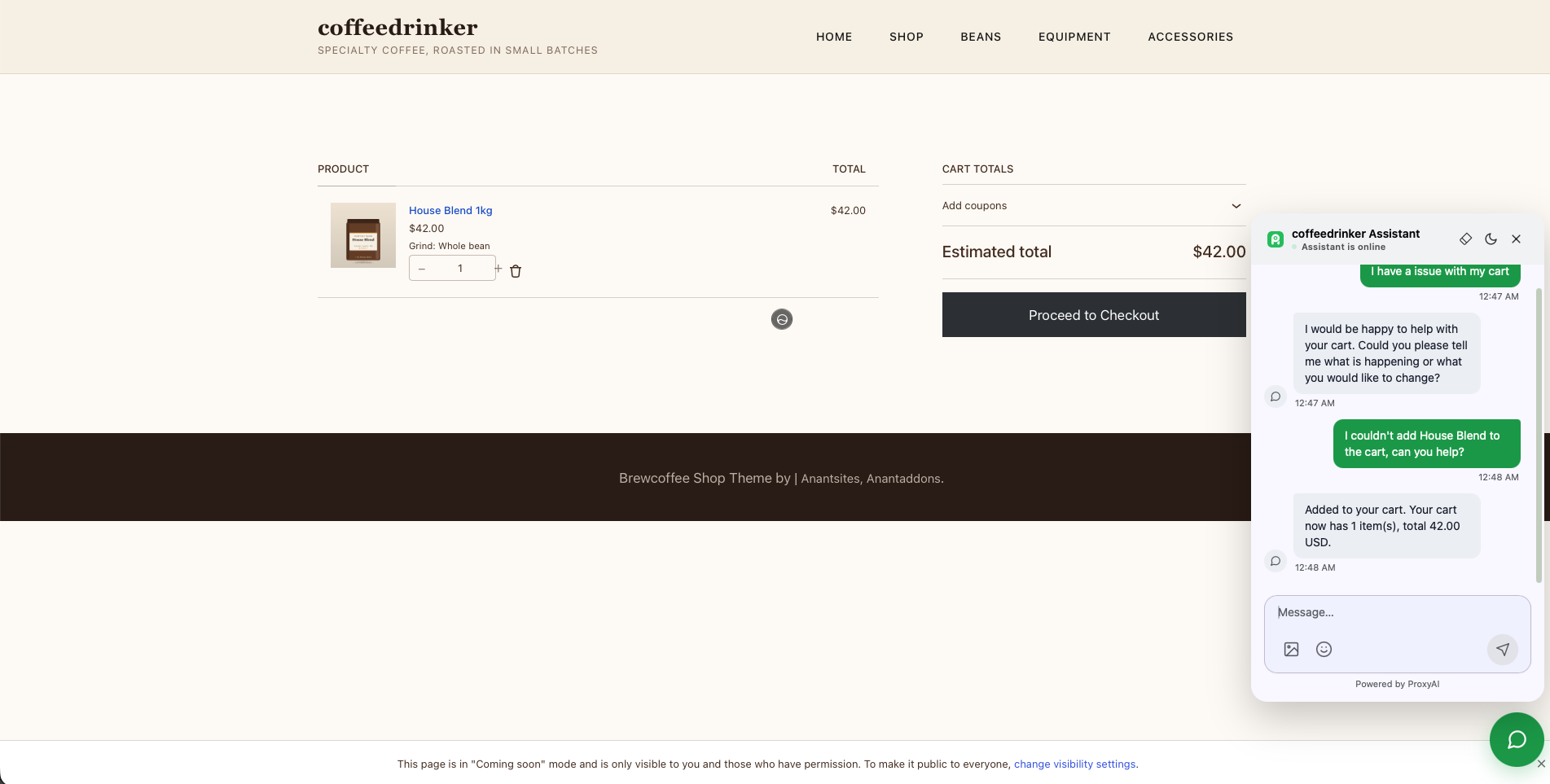
- Adds to cart, and links to checkout, on WooCommerce stores
- Looks up a guest's order by order number and billing email
- Gives signed-in customers a support-ticket button, as a block or a shortcode
- Keeps its knowledge in step as you publish, edit and delete content
https://example.com/wp-json/proxyai/v1/confirm to verify you control this
domain — so a local, staging or password-protected site cannot connect.
WooCommerce is optional. Without it the assistant works as a content chatbot
and the cart and order-lookup features stay switched off.
安装:
- Install and activate the plugin.
- Open ProxyAI in the admin menu (under WooCommerce if it is installed).
- Read what connecting sends, then press Connect to ProxyAI.
- Add credit from the Add-ons & credits tab, and the assistant starts answering.
屏幕截图:
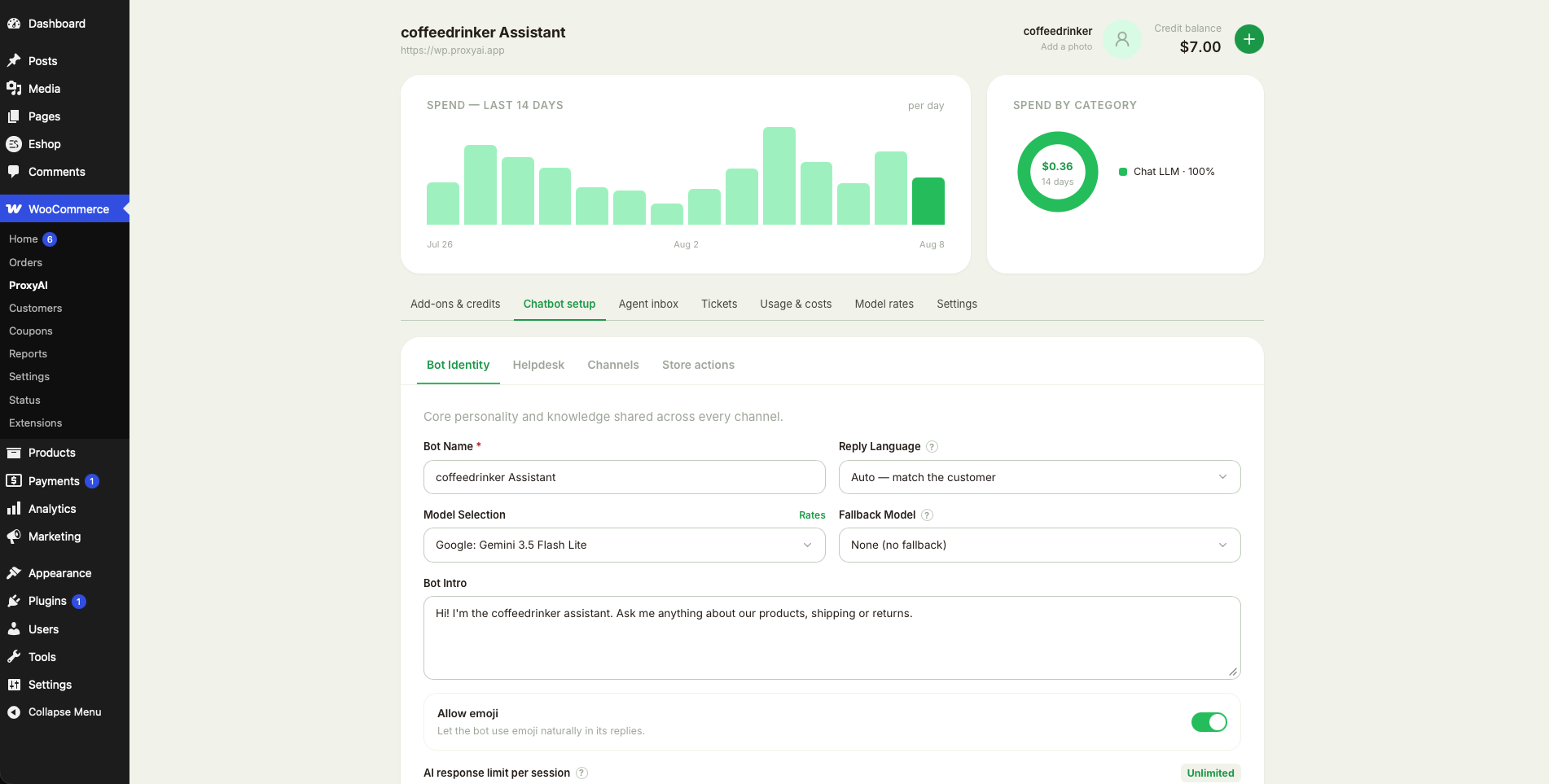
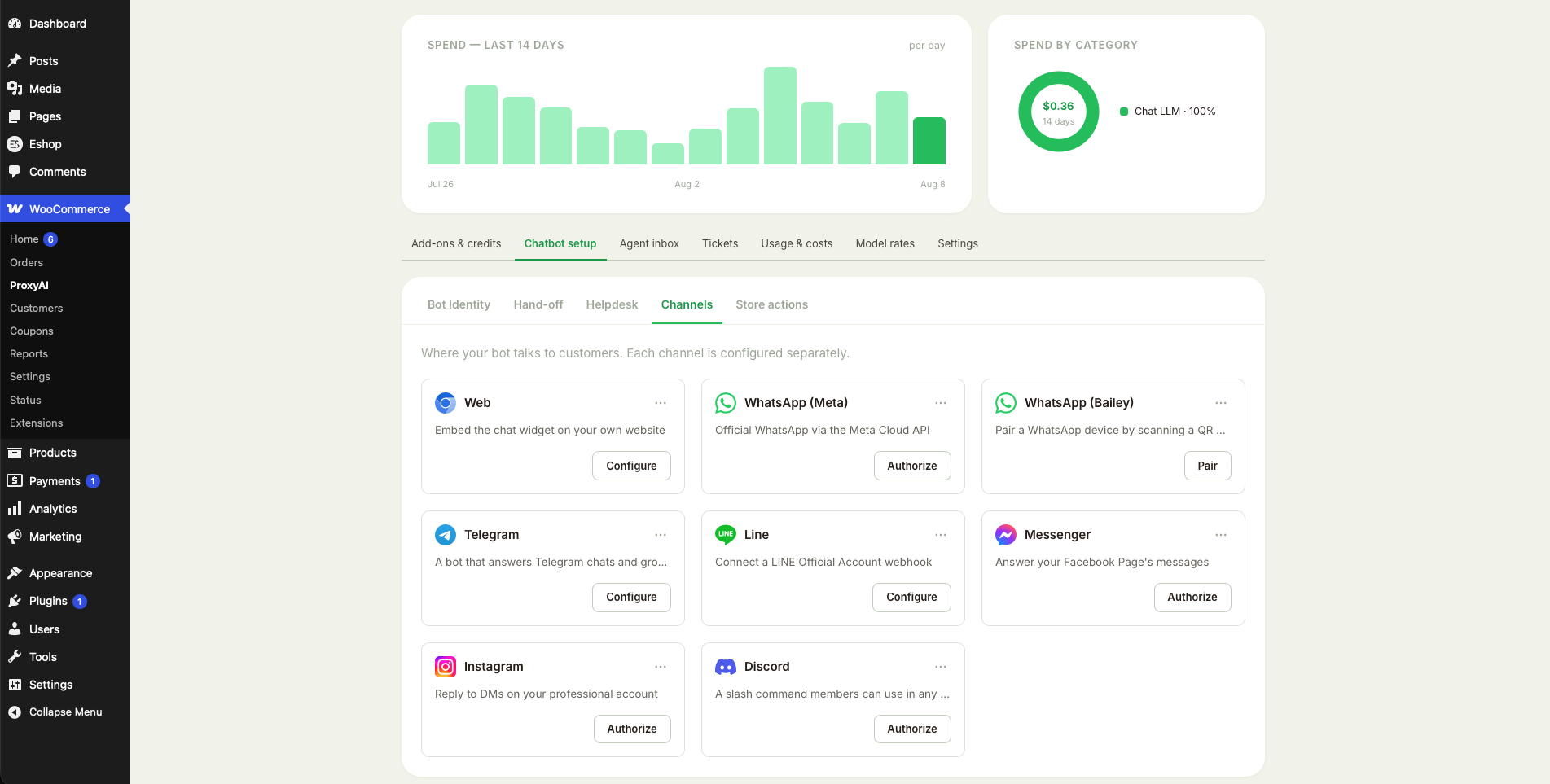
常见问题:
Do I need an account before installing?
No. Connecting creates one for this domain. There is no password to set — the site itself is the credential.
Does it cost anything?
The plugin and the assistant are free. Credit is only consumed while the assistant is answering, and you can top it up from the dashboard at any time. Every add-on, such as Knowledge and Human Handoff, can be added free of charge in exchange for a small "Powered by ProxyAI" badge on the chat widget, or as a one-time purchase without the badge — the feature is identical either way.
Will it work on a local or staging site?
No. Connecting requires ProxyAI to reach this site over HTTPS from the public internet, which a local or password-protected site cannot satisfy.
Does it add a "Powered by" link to my site?
Only if you choose it. The badge is off by default, and the only way to turn it on is to take an add-on for free in exchange for showing it. If you would rather not show it, buy that add-on at its normal price instead — the feature is identical either way; starting credit, where an add-on bundles some, comes with the paid option (the WooCommerce Store add-on includes its credit on both paths). Once taken, the badge stays for as long as you keep the add-on; write to support if you need that changed.
Can I turn the assistant off without uninstalling?
Yes. The Chat widget switch on the ProxyAI screen in wp-admin hides it. Hidden, the widget is not loaded for visitors at all — no script, no request. Your bot, add-ons, credits and conversations are kept, and switching it back on needs nothing else.
What happens if I deactivate the plugin?
Deactivating notifies ProxyAI and clears this site's stored credentials. Uninstalling additionally removes every option the plugin created.
How do I add the support-ticket form?
Insert the ProxyAI Support Tickets block in the editor, or put the
[proxyai_tickets] shortcode on any page. Either way the page shows a single
Open a support ticket button; the form and the customer's own ticket
history open in a dialog on top of the page, so dropping the block into a post
does not push your content around. It is rendered fresh on every request, so
nothing personal is stored in the post itself. Only signed-in customers can
open a ticket — logged-out visitors are asked to log in first — and the form
needs the Helpdesk add-on to be active.
Can I stop specific content being sent?
Yes. Filter proxyai_sync_document and return null to drop a document, or an
edited array to redact it. To stop automatic sync altogether, turn off Sync
content automatically under Store actions in the ProxyAI screen — nothing
more is sent until you turn it back on. proxyai_enable_woo_cart disables the cart bridge
while leaving the assistant running.
更新日志:
- Book a guided onboarding call from this dashboard. A free 30-minute walkthrough, held on Discord with our screen shared: pick your timezone and a half-hour slot at least a day ahead, and you get the joining link, a confirmation email with a calendar invite, and a reminder an hour before. Cancel it here at any time and the slot frees up.
- Agent Tasks, in this dashboard. With the add-on, a new Agent Tasks tab runs the same console as the hosted dashboard: add agents from the library or build your own, connect Google Sheets, Excel, Slack, Stripe and the rest, approve what agents want to send, and read every run. Connecting a provider opens a tab that comes back on its own.
- WooCommerce connects itself. With Agent Tasks owned, the plugin mints a WooCommerce REST key for ProxyAI and forwards new, cancelled and refunded orders, so store recipes and order-triggered agents work on a WooCommerce site with nothing to set up. Disconnecting it in the Connectors tab stops both the key and the order events, and stays off. The key is removed when the add-on lapses or the plugin is deactivated.
- Support ticket board: when the AI agent is allowed to send on its own (YOLO mode) but holds a reply back instead — the leak screen flagged it, the daily cap was reached, or delivery failed — the reason now shows on the staged card and in the review panel.
- A reply the agent sent by itself is labelled "Agent · sent automatically" on the ticket card, the ticket thread and the agent inbox, instead of reading as one of yours.
- Voice channel settings match the hosted dashboard: the Mode picker shows each mode's per-minute price and response speed, and you can now get, import (Twilio, Vonage, Telnyx, or any SIP trunk) and release a phone number right from this dashboard instead of visiting the web one.
- Support ticket board: a staged AI draft that has waited more than a day shows a "Waiting" alert on its card, matching the hosted board.
- Dragging a ticket to Pending no longer snaps back to Resolved moments later on boards with auto-resolve enabled (fixed platform-side; noted here because the board lives in this plugin too).
- Card payments work again. The payment window's own loading spinner sat inside the element Stripe mounts into, and Stripe refuses to mount where anything else already is — so every card payment, for credit or for an add-on, ended at "Payments are unavailable right now."
- Buying an add-on shows its price in the payment window again, instead of "$undefined".
- The Web channel's Configure window is wider, so Customise look shows the settings and the live preview side by side instead of stacking the preview below a long scroll.
- Settings has a Partner ID field. If an agency or developer set this site up for you, enter the ID they gave you and they are credited for it. It can only be set once, and the field disappears afterwards.
- The Tickets board says when it could not load, and offers Retry, instead of showing "Loading…" for good. A board left open overnight could hit an expired WordPress session and sit there silently — it now says so, and a long-open tab renews the session on its own rather than needing a reload.
- The same silent failure could strand a ticket thread, an inbox conversation and the rates estimator. All three now report it and offer Retry.
- Bot Knowledge's implanted-document list refreshes while you watch it, so documents picked up by a site content sync appear without reloading the page.
- The Smart Helpdesk Agent can now draft from your knowledge documents, and you decide whether it does. A switch on the Agent panel turns searching your bot's documents on or off for drafts.
- It also gets a knowledge base of its own that only it reads. Upload the things you would never hand a customer-facing bot — approval limits, when to escalate, what staff may promise — and the agent drafts from them while your chat assistant never sees them.
- Both need the Bot Knowledge add-on, and both are charged at that add-on's usual indexing and storage rates. Without it, the panel says what the add-on would buy you instead of showing controls that cannot work.
- When the Smart Helpdesk Agent cannot answer a ticket, it no longer parks an empty card in the Staged column. The ticket stays where the work is, with the agent's own reason on it — "Agent: needs a human — …" — so you can triage it at a glance instead of opening it to find nothing there.
- The ticket board now names the model that actually answered. If your chosen model was unavailable and the curated fallback replied instead, the draft and the activity log say so, and say which model you had picked.
- Dismissing a draft clears it from the Staged column immediately, without reloading the page.
- A one-time dismissible note appears in wp-admin once your account has been open a month. Dismissing it is permanent, on every device and every ProxyAI surface.
- WhatsApp modes are now exclusive: the WhatsApp (Meta) modal says plainly that saving switches the bot to the official Cloud API and unpairs any phone connected through WhatsApp (Bridge). The server enforces it — no bot answers on both transports at once.
- Smart Helpdesk Agent: with the Helpdesk add-on, the bot can draft the reply to every new ticket and customer follow-up for you. Drafts wait in a new Staged column on the ticket board — nothing reaches a customer until you send it.
- An "Agent mode" button on the ticket board opens the agent's own settings, and shows at a glance whether it is drafting on this desk.
- Per-desk settings: switch the agent on, pick the model (or leave it Automatic), and write house instructions in your own voice — refund limits, what never to promise, how to sign off.
- Every staged draft opens in the ticket for review, with the model that wrote it named. Edit the words before sending, or dismiss the draft and reply yourself.
- YOLO mode lets the agent send confident replies directly, and stays locked until this desk has ten drafts a human approved — you see what it would have sent before it may send anything.
- Spend guards you control: a cap on drafts per ticket and per day, so a looping conversation or a busy inbox cannot run up the bill.
- While the agent is on, the plain "we received your ticket" acknowledgment is not sent — the reply you approve is the first email the customer gets.
- The plugin is now listed as "ProxyAI Chat Assistant" — the same plugin, under the name it goes by; your settings and connection are untouched.
- Sending a reply now moves the ticket to Pending on its own, and a customer writing back moves it to Open again, where the agent drafts the next reply.
- Reviewing a knowledge document now opens a full-width editor with a live preview beside it, so you can see how the extracted text will read before implanting it.
- "Clean convert markdown (AI powered)" tidies a document's structure — headings, lists and tables the extractor flattened — the same clean-up the hosted dashboard offers.
- A "Sync my site content" button under Bot Knowledge reads the whole site on demand, the same control the hosted Wix dashboard carries.
- Re-syncing is cheap: a post whose text has not changed since it was last sent is skipped rather than re-indexed, so pressing Sync twice costs nothing.
- The pane says when the site was last synced, and tells a first sync apart from a repeat.
- The automatic content sync switch moved from Store actions to Settings, beside the widget switch.
- A switch under Store actions turns automatic content sync off and on.
- Readme documents every external service the plugin uses — Stripe and PayPal terms and privacy links, what is sent and when, uploads — and states that the plugin ships no compiled or minified code, with the source published at https://github.com/Proxyai-team/wordpress.
- WhatsApp (unofficial bridge) now pairs in place: the QR code renders inside the channel dialog and refreshes itself until scanned — no trip to the hosted dashboard.
- The Web channel dialog can upload a chat widget icon again, next to the allowed-domain field.
- Channel cards match the hosted dashboard: a link-status icon shows live connection state, and a card menu offers Reset and Recheck.
- Cart actions no longer disappear from the Store actions tab for sites that own the WooCommerce Store add-on.
- Dialogs centre over the admin content area instead of the full screen, numbered setup steps keep their numbers beside the text, and the ticket dialog's Category dropdown lines up with the fields beside it.
- Support-ticket uploads travel through the site's own REST proxy like every other dashboard call.
- Code housekeeping for the WordPress.org review: the whole plugin passes PHP_CodeSniffer's WordPress standard and Plugin Check clean.
- The dashboard is now fully native to wp-admin — setup, add-ons, agent inbox, ticket board, usage log, rates and settings all render locally on WordPress's own component library, with no embedded frame. Data flows through this site's REST API and is forwarded server-to-server; the browser holds no ProxyAI credential.
- The Helpdesk tab is native too: the customer-identity secret, the built-in desk with its five-step setup wizard (own-mailbox SMTP connect, reply forwarding, auto-archive, AI-written email template, ticket-form guide), and connect cards for Gorgias, Zendesk, Freshdesk and Help Scout.
- The agent inbox matches the hosted dashboard: needs-reply queue sorted by how long the customer has waited, take-over and return-to-bot, the AI briefing, AI-drafted replies, file attachments, and archive/delete with an inline confirmation.
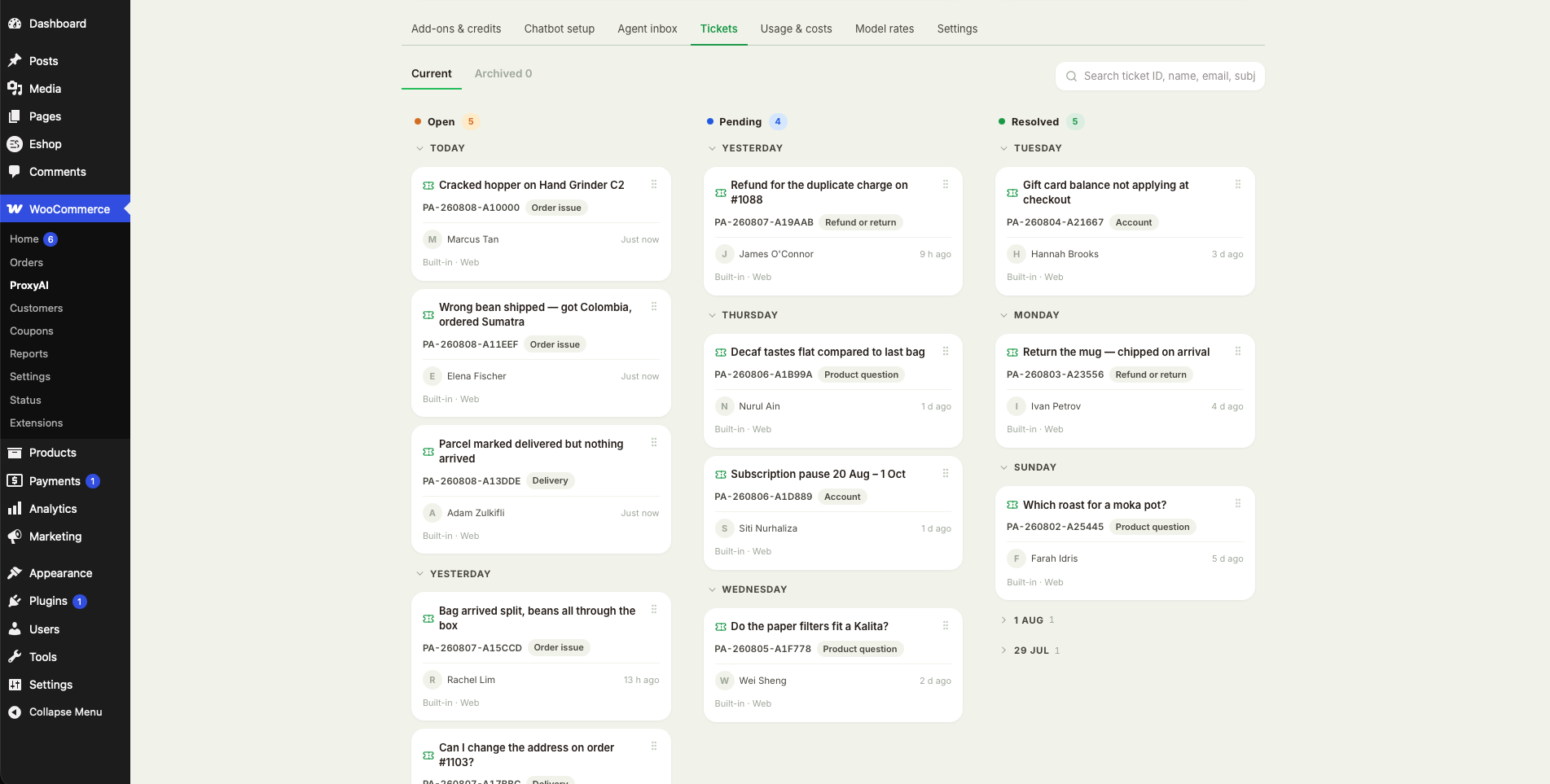
- The ticket board is the hosted kanban: Open/Pending/Resolved columns with drag-and-drop, day grouping, search, archived view with restore, and a ticket dialog with the full thread and reply composer.
- Card payments use Stripe's embedded, PCI-compliant payment form; PayPal opens its own page in a new tab.
- Admin styles and scripts are enqueued; the admin screens carry no inline scripts or styles.
- Support tickets now open in a dialog from a single Open a support ticket button. Previously the form and ticket history sat inline in the page, pushing the surrounding content around.
- The ticket dialog closes with Escape, the close button or a click outside, keeps keyboard focus inside itself while open, and returns focus to the button afterwards.
- Ticket form fields are properly labelled, and the ticket list can be opened with the keyboard as well as the mouse.
- Order tracking rate-limit fix.
- First release.