
PSB Bot Traffic Controller
| 开发者 | paulborile |
|---|---|
| 更新时间 | 2026年10月18日 15:51 |
| PHP版本: | 8.0 及以上 |
| WordPress版本: | 7.1 |
| 版权: | GPLv2 or later |
| 版权网址: | 版权信息 |
详情介绍:
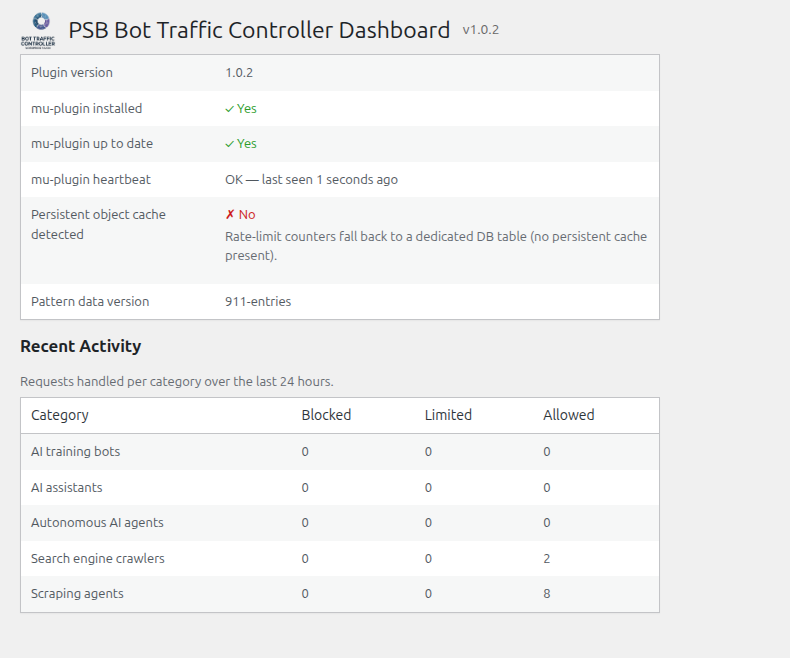
- AI training bots
- AI assistants
- Autonomous AI agents
- Search engine crawlers
- Scraping agents
wp-content/mu-plugins/ — this avoids the cost of a full WordPress bootstrap for traffic that ends up being blocked.
安装:
- Upload the plugin zip via Plugins > Add New > Upload Plugin, or extract it into
wp-content/plugins/psb-bot-traffic-controller/. - Activate the plugin. This installs a small companion file into
wp-content/mu-plugins/(WordPress's "must-use plugin" mechanism) that performs early bot interception. - Configure per-category policy under Settings > PSB Bot Traffic Controller.
屏幕截图:
常见问题:
Does this replace a WAF or CDN-level bot protection?
No — PSB Bot Traffic Controller runs inside WordPress (or, for the mu-plugin path, as early in WordPress's own bootstrap as possible) and cannot intercept traffic before it reaches your web server. It complements, rather than replaces, edge-level protection.
What happens if the mu-plugin file can't be written on activation?
An admin notice is shown with the filesystem error. The plugin still activates, but early interception won't run until the mu-plugin is successfully installed (retry by deactivating/reactivating, or check file permissions on wp-content/mu-plugins/).
How do I reset rate-limit counters while testing?
Add define( 'PSB_BTC_DEBUG', true ); to wp-config.php on a staging/test site. This enables a rotating-token reset URL shown on the Dashboard (valid for a few hours at a time, then automatically expires). It is disabled by default and should never be enabled on a production site.
更新日志:
- Removed all remaining references to a third-party detection engine from code comments and the mu-plugin config cache (an unused engine flag is no longer written). No behavior change: that engine was never implemented.
- Implemented robots.txt generation, previously advertised in this plugin's description but not
actually built: categories set to "block" now get a
User-agent/Disallow: /block in robots.txt, sourced from the same curated bot-name data the detector already uses. Default mode is dynamic (WordPress'srobots_txtfilter, nothing written to disk); an advanced, opt-in setting writes a physical robots.txt file instead, with a persistent warning (Settings page and Dashboard) whenever a physical file exists on disk, since it always takes precedence over the dynamic filter regardless of which mode is configured. - Fixed readme.txt's Description/Installation/Credits sections rendering with broken mid-sentence
line breaks on the WP.org plugin page. The source file had each paragraph hard-wrapped across
multiple lines for editor readability, but WP.org's readme parser treats every newline as a
literal line break rather than reflowing prose — unlike Markdown, a single
\ndoes not get collapsed into a space. Fixed by joining each paragraph onto one logical line. Docs-only, no code changes. - robots.txt generation now detects other active SEO plugins (AIOSEO, Yoast, Rank Math,
SEOPress, The SEO Framework) that commonly also manage robots.txt, and shows an informational
notice on the Settings and Dashboard pages when one is found — WordPress's
robots_txtfilter is designed for multiple plugins to extend the same output, so this doesn't change behavior by default, it just surfaces the interaction. Our filter callback also now registers at a later priority to reduce the chance of being silently overwritten by another plugin's callback. - Added a master on/off switch for robots.txt generation on the Settings page (on by default), independent of the existing physical-file advanced-mode toggle — when off, this plugin never modifies robots.txt at all, regardless of category policy. Turning it off also removes a physical robots.txt file this plugin had previously written, so a stale Disallow list doesn't linger on disk after the feature is disabled.
- Added a help icon with a plain-language explanation to each bot category on the Settings page (hover for a description of what that category actually covers), aimed at non-technical site owners deciding how to configure policy.
- Added
phpcs:ignore WordPress.DB.PreparedSQL.NotPreparedannotations toclass-ratelimit-store-db.php's prepared queries. This class constructor-injects$wpdbas$this->wpdbfor unit testability, which a confirmed upstream WPCS limitation (WordPress-Coding-Standards#2401, closed won't-fix) can't recognize as a real$wpdbinstance — it only matches a bareglobal $wpdb;token — causing it to misfire and flag every argument of an already-correctly-parameterized$wpdb->prepare()call. Comment-only, no behavior change; every value in these queries was already%s/%dplaceholder-bound. - Removed a stale description line claiming an optional third-party detection engine could be enabled for higher accuracy — no such engine exists. Docs-only correction, no code changes.
- Added a global average bot request rate (requests/minute) to the Dashboard's Recent Activity section, computed from the same 24-hour activity summary already used for the per-category block/limit/allow table — no new data collection, just a new aggregate view over existing counters.
- Re-analyzed every remaining automated Plugin Check finding against this version's actual code, rather than restating prior documentation, and applied two genuine fixes found in the process (both comment-only, zero behavior change):
- Added
phpcs:ignore WordPress.DB.PreparedSQL.InterpolatedNotPreparedannotations to the three interpolated-table-name queries inclass-ratelimit-store-db.php(increment_and_get(),get_count(),cleanup_expired()) — this file had none, unlike its siblingclass-ratelimit-reset.php, despite sharing the identical unfixable-by-design pattern (table names can never be%s/%d$wpdb->prepare()placeholders). - Corrected
class-ratelimit-reset.php's existingphpcs:ignorecomment on itsTRUNCATE TABLEquery: it previously named the sniffWordPress.DB.PreparedSQL.NotPrepared, which is not what actually fires there — fixed to nameWordPress.DB.PreparedSQL.InterpolatedNotPrepared,PluginCheck.Security.DirectDB.UnescapedDBParameter, matching what the checker actually reports, so the comment provides real suppression instead of none.
- Regenerated the icon/banner/logo image assets from an updated source design (ring emblem + "BOT TRAFFIC CONTROLLER" wordmark), replacing the placeholder artwork shipped in 1.0.0.
- Sanitize
psb_btc_mu_respond()'s output (strip control characters before echoing) rather than relying on every current call site happening to pass a hardcoded literal — all 3 call sites still do today, so this closes a latent gap rather than fixing a live exploit, but escaping at the point of output shouldn't depend on that staying true as the file is edited. - Re-reviewed the remaining automated Plugin Check findings against this version and confirmed
they remain the already-documented false positives / accepted architectural exceptions
covered in
SUBMISSION.md(non-atomic-counterflock()locking has noWP_Filesystemequivalent and must run pre-bootstrap;$wpdb->prepare()placeholders the checker's static analysis can't trace through) — nothing else new to fix.
- Renamed the plugin from "botpolice" to "PSB Bot Traffic Controller" (slug
psb-bot-traffic-controller), following a WordPress.org plugin review finding that "botpolice" too closely matched an existing project with overlapping functionality. Every internal class/function/constant prefix, option/table/transient name, and generated mu-plugin filename was renamed to match (Botpolice_*→PSB_BTC_*,botpolice_*→psb_btc_*,BOTPOLICE_*→PSB_BTC_*). - Removed the
producerattribution field from the bundled bot-pattern data (includes/detection/regex/data/bot-patterns.php) — it held a URL in most entries and was flagged twice by review under two headings ("calling files remotely" and "undocumented use of a 3rd party/external service"), even though it was never dereferenced as a URL anywhere in the runtime code. Removed entirely rather than disclosed, since the plugin makes no outbound HTTP requests and integrates with no external service. - Changed the mu-plugin's per-category config cache from an executable
<?php return array(...);file to plain JSON (nowpsb-btc-config-cache.json, read viajson_decode()), per a review finding against writing executable code files intowp-content/mu-plugins/outside the small set of core-defined drop-in exceptions. The mu-plugin bootstrap file itself and the (much larger) pattern-data cache were not affected — review did not flag either of those. - Fixed a real correctness bug review's automated tooling also caught: both the
object-cache-backed rate-limit store and the mu-plugin's flat-file rate-limit
counters used a non-atomic read-increment-write sequence, letting concurrent
requests undercount and bypass configured limits. The object-cache store now uses
wp_cache_add()/wp_cache_incr()(atomic at the cache backend); the mu-plugin's flat-file counters now useflock()-based exclusive locking around the read-modify-write. - Replaced the compound
if ( ! defined('ABSPATH') && ! defined('...STANDALONE') )direct-access guard (used to allow PHPUnit to load classes without a full WP install) with the literal bareif ( ! defined( 'ABSPATH' ) ) { exit; }review expects, across all affected files. Test-only standalone loading now works by having the PHPUnit bootstrap itself defineABSPATH, rather than each production file special-casing a second constant.
- Address findings from the official WordPress Plugin Check tool: escape remaining
unescaped Dashboard output, switch
class-mu-installer.php's version-stamp read andclass-ratelimit-reset.php's counter-file cleanup off raw file-handle/unlink()calls, document the intentional nonce-free design of the (opt-in, off-by-default) debug reset endpoint, add a direct-access guard to the generatedbot-patterns.php(viatools/cmd/build-patterns, not by hand-editing the output), and correct "Tested up to" to the current WordPress release. SeeSUBMISSION.mdfor a list of remaining Plugin Check findings that are intentional design choices rather than defects (theBOTPOLICE_STANDALONEdirect-access guard variant, the mu-plugin's necessarily-early filesystem calls, and the reset endpoint's token-based-not-nonce-based auth).
- The rate-limit-reset debug endpoint (
?botpolice_reset=<token>) is no longer loaded or registered by default — it now requiresdefine( 'BOTPOLICE_DEBUG', true );inwp-config.phpto become reachable at all, rather than being an unauthenticated endpoint present on every install.uninstall.phpalso now removes its secret option, if present. - Prepare for WordPress.org Plugin Directory submission: tightened the short description to fit the directory's display limit, corrected the "Tested up to" header (was a nonexistent "7.0"), added a Screenshots section covering the Settings and Dashboard admin pages, added a Credits section disclosing and licensing the bundled bot-pattern data's third-party sources, and fixed composer.json declaring "proprietary" while the plugin itself is GPLv2 or later.
- Fix: the debug rate-limit-reset token (
?botpolice_reset=<token>, shown on the Dashboard for manual testing) was a single fixed value stored inwp_options— once leaked (screenshot, shared log, browser history), it stayed valid forever. It now rotates automatically every 4 hours: the displayed/accepted token is an HMAC-SHA256 of a persistent random secret (never displayed) and the current 4-hour time window, so a leaked token expires on its own without any manual rotation step, and reading the plugin's source alone is not enough to compute a valid token (the algorithm is public; the secret it's keyed on is not). The Dashboard now also shows how many minutes remain before the current URL expires.
- Add the product logo/emblem to the Settings and Dashboard admin page headers
(
assets/images/logo.png, shipped in the plugin zip) and WordPress.org-listing icon and banner assets (.wordpress-org/, not bundled into the plugin zip per WP.org convention — those live in the SVN assets/ directory of the plugin listing, separate from trunk/).
- Fix: rate-limiting and category policy keyed on the raw TCP peer address
(
REMOTE_ADDR), which is the reverse proxy's/load balancer's own IP on any site running behind one (Cloudflare, nginx, AWS ALB/ELB) — collapsing every distinct visitor onto one shared rate-limit bucket. AddedBotpolice_Client_Ip(includes/detection/class-client-ip.php, documented inCLIENT_IP.md), which resolves the real public client IP by walking theForwarded(RFC 7239) andX-Forwarded-Forheaders before falling back to the raw peer address, and only ever returns an internet-routable address for rate-limiting purposes. Wired into both enforcement layers:Botpolice_Request_Context(full-WP path) and a duplicatedbotpolice_mu_client_ip()in the self-contained mu-plugin hot path.
- Fix: mu-plugin bootstrap and its pattern-data cache could go stale after an upload-based
plugin upgrade (WordPress does not re-fire the activation hook on that path), silently
running old enforcement logic indefinitely. Added
Botpolice_Upgrade_Handler, which resyncs the mu-plugin onupgrader_process_completeand via a cheap staleness check on every admin page load, covering upgrade paths that bypass WordPress's upgrader (e.g. manual FTP replacement) as well.
- Add per-category, per-action activity recording (
Botpolice_Activity_Recorderand the mu-plugin's own inline counter), surfaced on the dashboard's Recent Activity view. - Add a token-gated debug endpoint (
?botpolice_reset=<token>) to clear rate-limit counters for iterative live-site testing without waiting out hourly buckets. - Add a curl-based live end-to-end test suite (
tests/live/test-live-site.sh,make test-live) verifying block/limit/allow enforcement against a real deployed site.
- Fix: mu-plugin helper functions were declared conditionally (inside
function_exists()guards) but called from a closure defined before those declarations executed — PHP only hoists unconditional top-level function declarations, so any request matching a bot pattern hit a fatal "call to undefined function" error, blocking all traffic on the plugin's highest-risk hot path. Passed a plainphp -llint check without complaint. Caught by a new subprocess-based regression suite (tests/php/mu-bootstrap/), since PHPUnit cannot safely interceptexit()-calling code in-process.
- Initial development release: regex/User-Agent detection engine (911 pattern entries across 5 categories, built from matomo-org/device-detector, crawler-user-agents, and ai.robots.txt), policy engine (block/limit/allow per category plus a global rate cap), rate limiter (transients or DB-table-backed), mu-plugin-based early interception with a WP-API-backed fallback layer, Settings/Dashboard admin UI, and installable-zip packaging.