QuantaPay Payment
| 开发者 | quantapay |
|---|---|
| 更新时间 | 2026年3月3日 01:05 |
| PHP版本: | 7.4 及以上 |
| WordPress版本: | 6.9.1 |
| 版权: | GPLv2 or later |
| 版权网址: | 版权信息 |
详情介绍:
- Launch in 5 minutes – email sign-up → API key → paste credentials in the WooCommerce settings page and you’re ready to accept crypto.
- Funds go directly to your wallet – QuantaPay never holds balances; each payment settles to the merchant address with full blockchain visibility.
- Flat 0.8% pricing – no monthly fees or withdrawal charges, making gross margin planning straightforward.
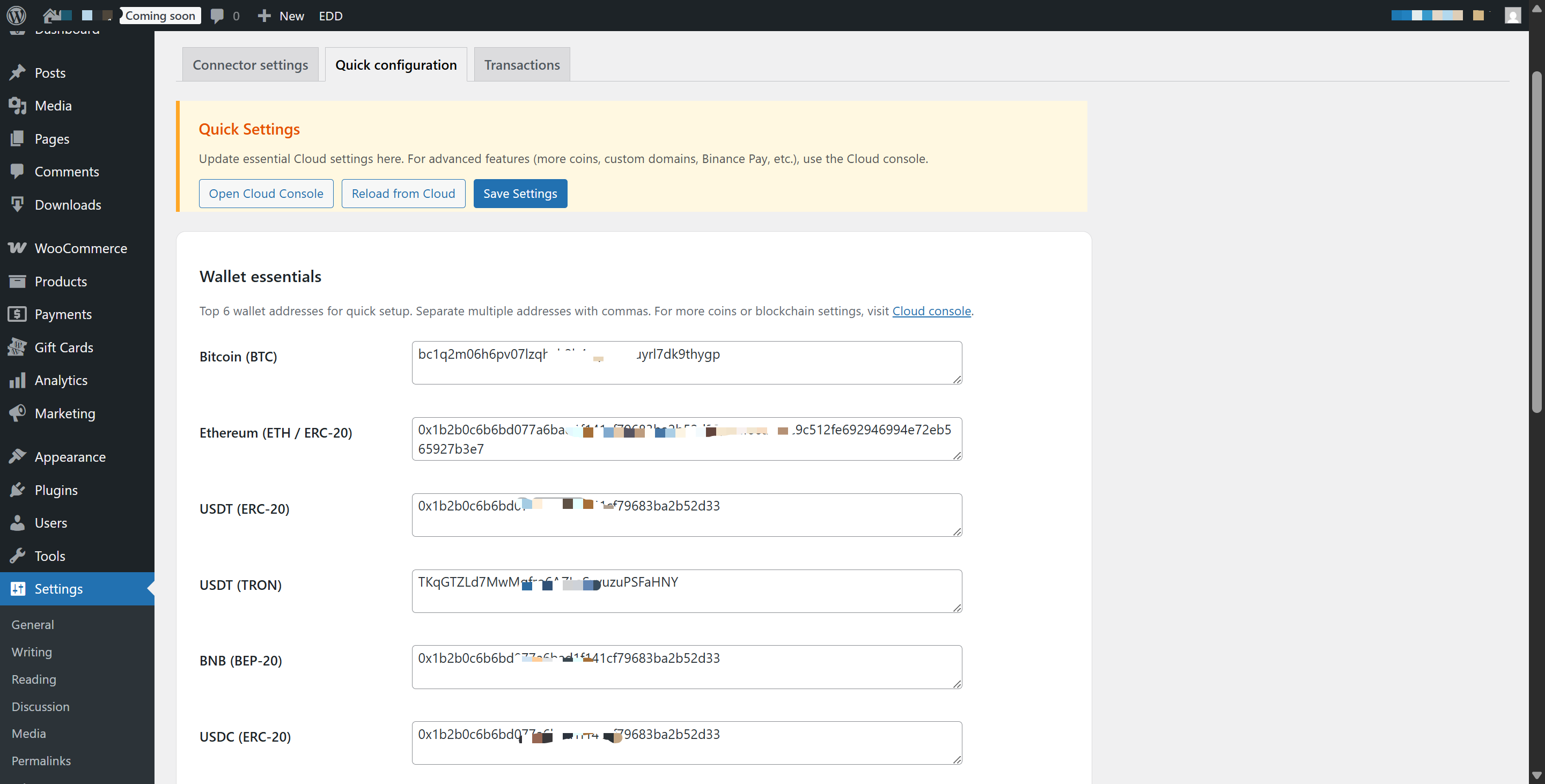
- Native WooCommerce experience – edit the title, description, API key, and webhook directly inside WooCommerce → Settings → Payments; Quick Config surfaces wallet addresses, thank-you redirect, and messaging in WordPress.
- 30+ cryptocurrencies + custom tokens – BTC, ETH, USDT (ERC/TRC/BEP), USDC, BNB, SOL, DOGE, LTC, and your own ERC-20/BEP-20 tokens for regional campaigns.
- One-click configuration – WooCommerce’s native Payments screen stores your API key/webhook, while the QuantaPay tab exposes wallets, default currency, thank-you redirect, and messaging in one place.
- Consistent checkout UI – classic and Blocks checkout share the same title, description, and currency row (BTC · ETH · USDT · USDC · BNB) with built-in crypto icons so shoppers immediately recognize the method.
- Instant, non-custodial settlement – payments land directly in your wallet with a default 60-minute price-lock window and countdown reminders; status updates flow between the plugin and QuantaPay Cloud automatically.
- Cloud dashboard sync – view balances, the latest 100 transactions, and debug logs from WordPress without switching tabs; underpayments or expired invoices surface reminders for the next step.
- Security & compliance – webhooks validate request signatures with your shared secret, sensitive options are encrypted at rest, and optional debug logs automatically redact secrets.
- Cloud toolset – enable payment links, hosted checkout, invoices/VAT, support payment pages, and fiat rails (Stripe, PayPal, Verifone) from the same Cloud settings screen.
- Branding & advanced settings – customize logos, colors, layouts, copy, custom fields, blockchain explorers, RPC nodes, Lightning Network, MetaMask support, and white-label domains when needed.
- Localization + custom assets – the plugin ships eight languages and QuantaPay Cloud lets you add custom tokens with icons and exchange rates for different regions.
- A QuantaPay Cloud merchant account: https://quantapay.app/wordpress-plugin
- Your Cloud API key and webhook secret (Account → API key & Webhook key)
- WordPress 5.8+ with PHP 7.4+ (PHP 8.x recommended) on a host that allows outbound HTTPS requests
安装:
- Upload the
quantapay-paymentfolder to/wp-content/plugins/. - Activate “QuantaPay Payment” inside Plugins > Installed Plugins.
- Navigate to QuantaPay in the WordPress sidebar.
- Paste your Cloud API key and Webhook secret key from QuantaPay Cloud.
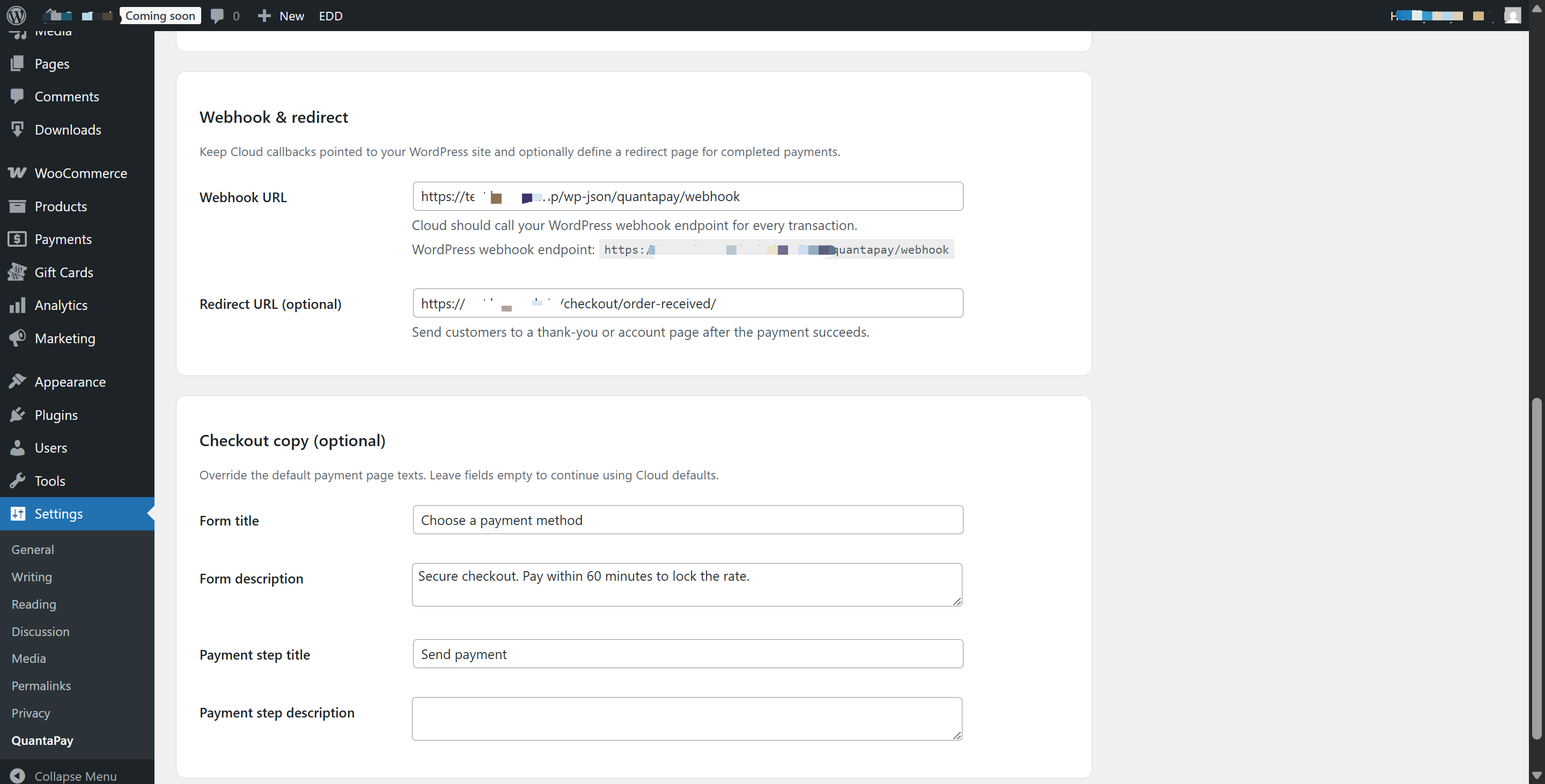
- Copy the generated Webhook URL into Cloud > Settings > Webhook URL.
- (Optional) Customize the checkout label and description.
- Enable the gateway inside WooCommerce (WooCommerce > Settings > Payments > QuantaPay) or in EDD (Downloads > Settings > Payment Gateways). The same page also lets you edit the checkout label/description without visiting the standalone QuantaPay settings page.
屏幕截图:
常见问题:
Do I need a QuantaPay account?
Yes. Sign up via https://quantapay.app/wordpress-plugin (or the Cloud portal) to generate the API key and webhook secret that the plugin requires.
Which cryptocurrencies are supported?
QuantaPay tracks 30+ assets including BTC, ETH, USDT (ERC/TRC/BEP), USDC, BNB, SOL, DOGE, LTC, XRP, DOT, BAT, ALGO, and more. You can also add your own ERC-20/BEP-20 tokens from the Cloud settings screen.
How do I configure the gateway in WordPress?
After installing the plugin, go to WooCommerce → Settings → Payments → QuantaPay, paste your Cloud API key + webhook secret, and click “Enable.” Quick Config in the QuantaPay sidebar menu lets you adjust wallets, default currency, thank-you redirect, and checkout copy without editing code.
Do I have to wait for withdrawals?
No. QuantaPay is fully non-custodial—each confirmed payment settles directly to your wallet with a blockchain hash you can verify in both Cloud and WordPress logs.
Can I customize the checkout wording and branding?
Yes. Quick Config lets you edit the title, description, default currency, and thank-you redirect directly inside WordPress, and the Cloud portal allows deeper customization (logos, colors, layout, additional fields, custom explorers/RPC nodes).
How do I ensure webhooks work when my site is behind Cloudflare or another WAF?
QuantaPay webhooks POST to https://yoursite.com/wp-json/quantapay/webhook. If your site is behind Cloudflare, please allow this endpoint so callbacks are not blocked:
- In Cloudflare, create a Firewall/WAF rule that matches
Hostname equals yoursite.comandURI contains /wp-json/quantapay. Set the action to Allow (or Bypass Security). - Optionally match on the QuantaPay webhook headers, e.g.
http.user_agent contains "QuantaPay-Webhook"or the signature header, for stricter filtering. - Make sure the Security Level isn’t set to “I’m Under Attack” for that URL.
How much does QuantaPay cost?
The gateway charges a flat 0.8% per successful crypto payment. There are no monthly fees or withdrawal charges, so you can predict margins accurately.
How is security handled?
Webhooks use shared-secret signatures, sensitive options are encrypted at rest, optional debug logs automatically redact secrets, and you can point QuantaPay at your own blockchain explorers or RPC nodes for maximum control.
更新日志:
- Fix transaction status labels and stock handling.
- Improve settings caching and log file management.
- Checkout Session API – cleaner, shorter payment URLs with automatic fallback.
- Top-level admin menu – QuantaPay now has its own sidebar entry.
- Webhook stability fix for virtual and deleted products.
- Security improvements.
- Initial release with WooCommerce and EDD gateways.
- Secure webhook + REST entry points and encrypted
external_reference. - Quick configuration tab, Cloud dashboard sync, and optional debug logging.
- Localization pack covering 8 languages.