
Quick Variable Products – Generate Variations for WooCommerce
| 开发者 | erenlabs |
|---|---|
| 更新时间 | 2026年9月15日 05:02 |
| PHP版本: | 7.4 及以上 |
| WordPress版本: | 7.1 |
| 版权: | GPLv2 or later |
| 版权网址: | 版权信息 |
详情介绍:
- Generate variations from multiple attributes at once. Type
red, blue, greenandS, M, Land the plugin creates every combination in one batch — nine real WooCommerce variations, ready to sell. - Any attributes, any number of axes. Use the global product attributes you already have (Size, Colour, Material…), or create a new attribute without leaving the screen.
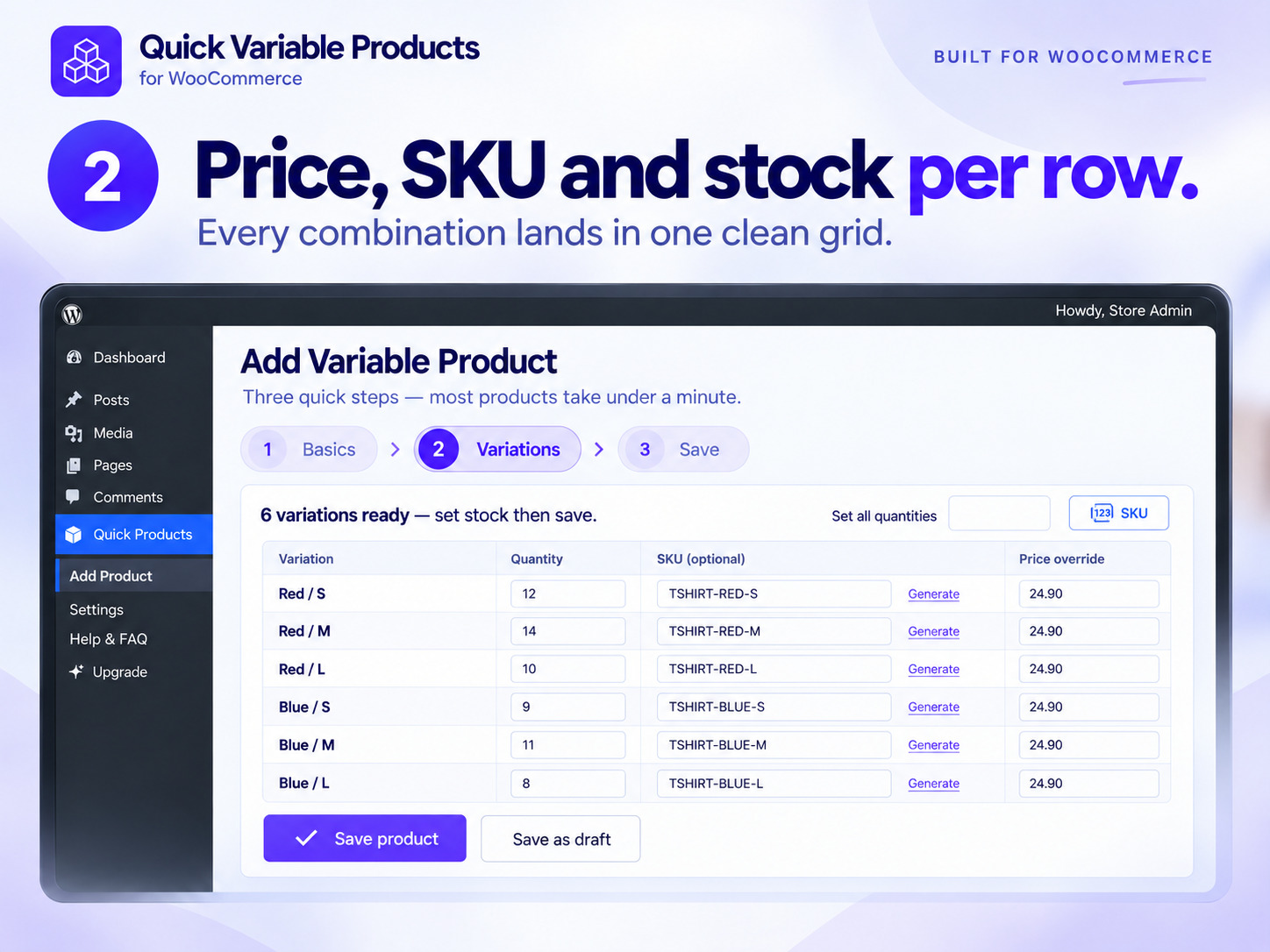
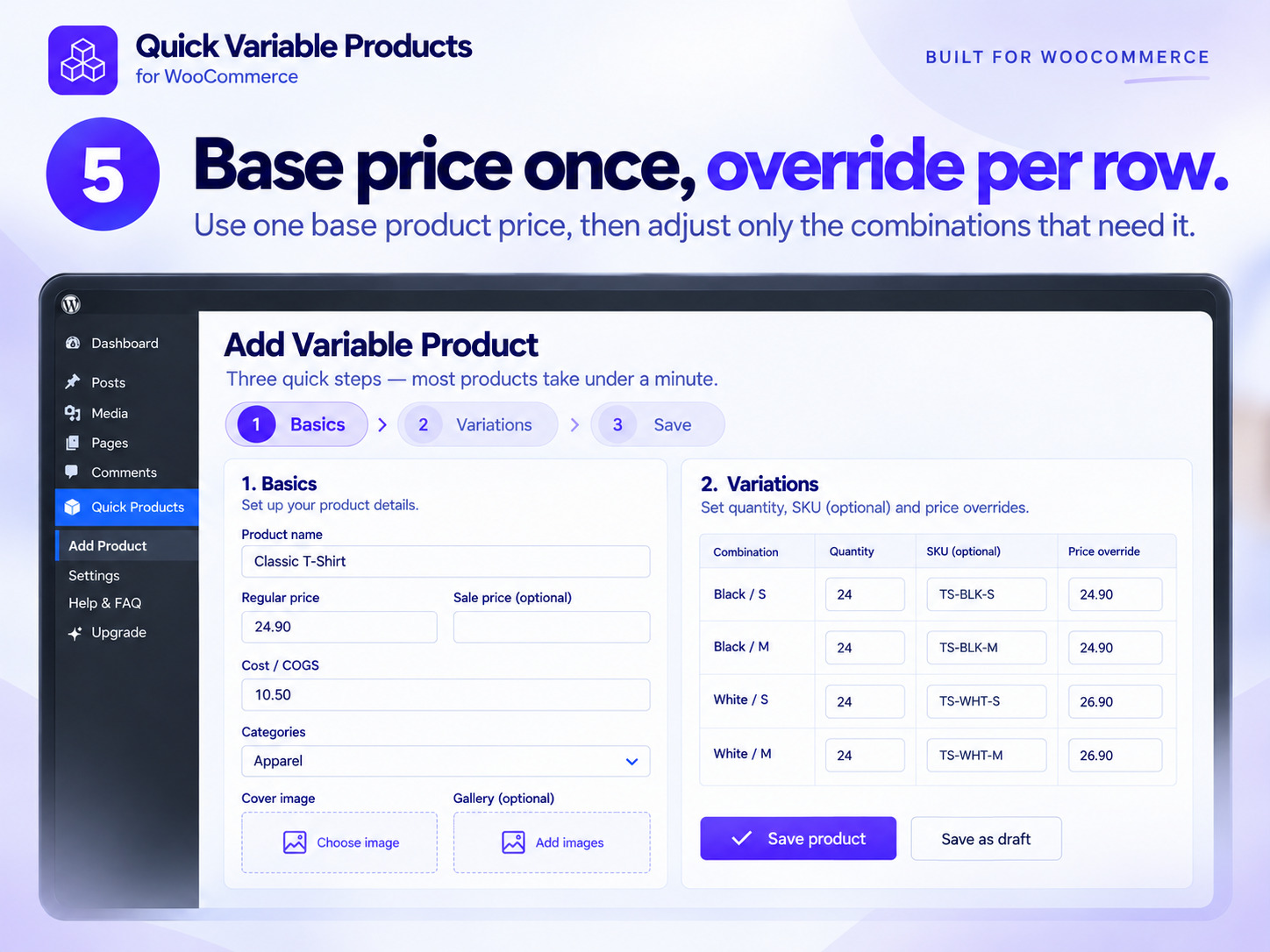
- Per-variation stock, SKU and price. Every row of the generated grid gets its own fields, so you stop filling in one variation form at a time. Override the price on individual rows when you need to.
- Built-in SKU generator. Auto-generate SKUs for every row with one click, or type your own — handy when your codes follow a pattern.
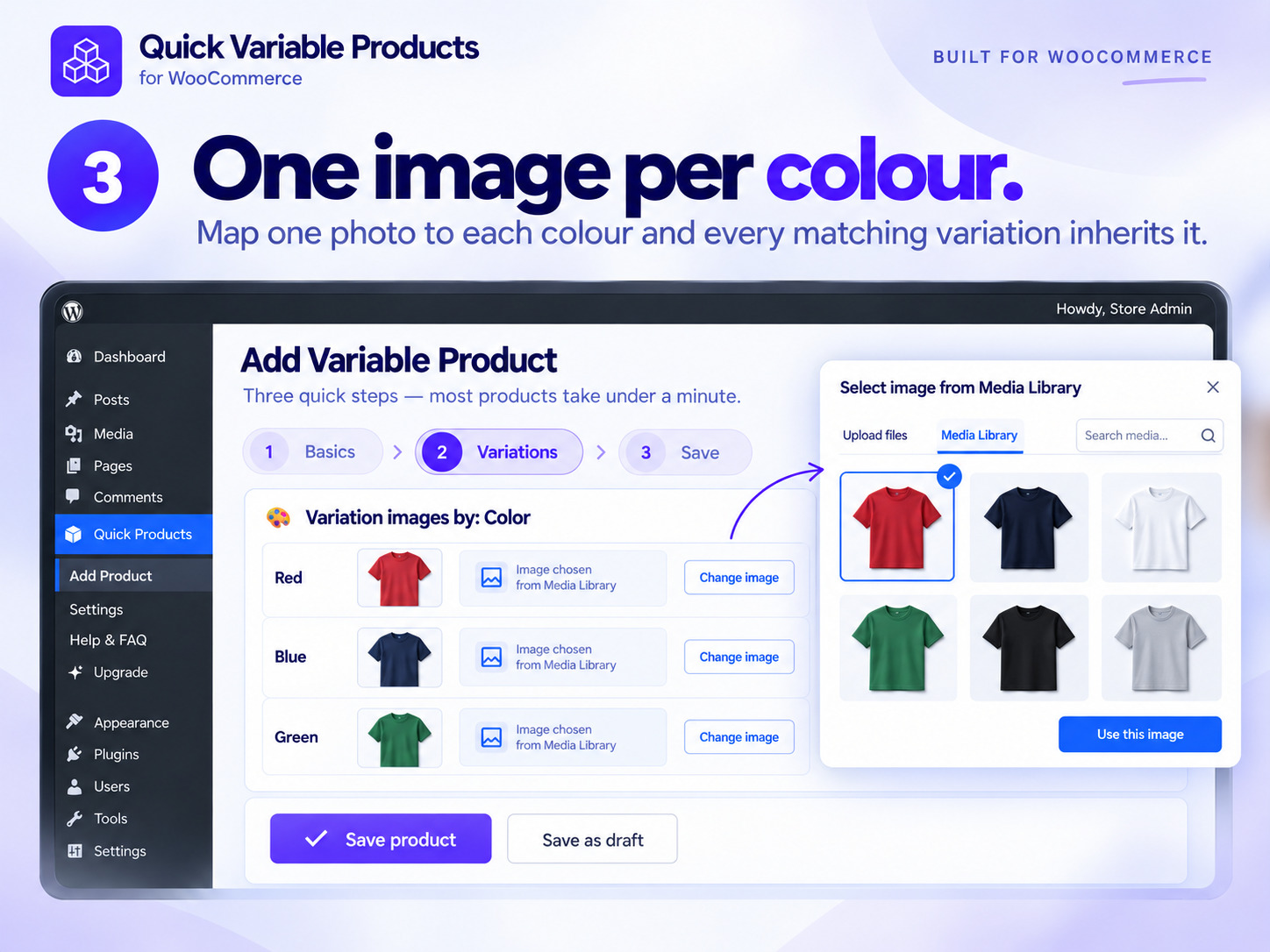
- One image per variation. Optionally give each color (or any attribute value) its own photo as you create the product.
- Shared stock pool. Opt in and a single quantity is managed on the parent, so every variation draws from the same stock — WooCommerce-native, no shadow inventory.
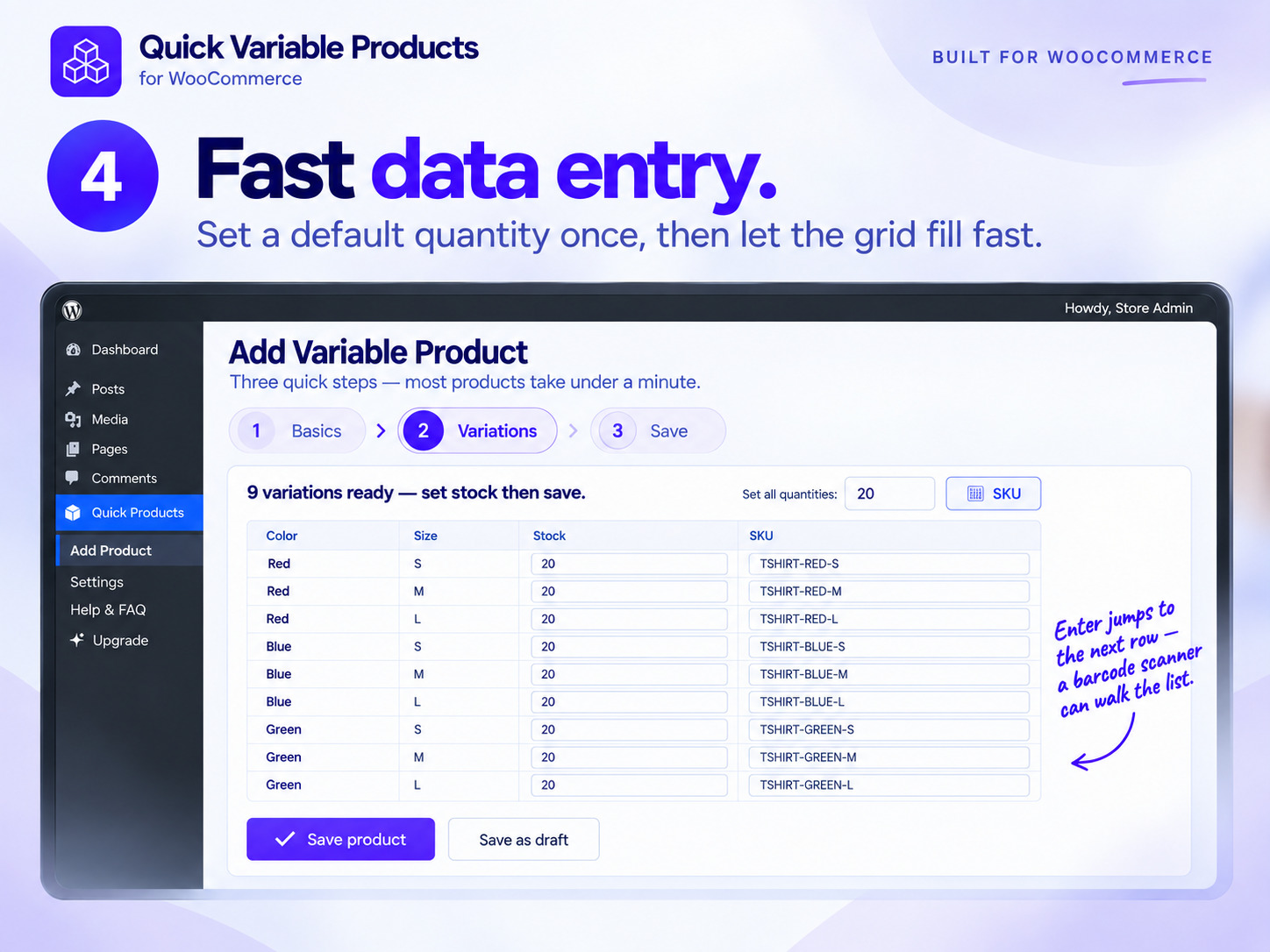
- Fast data entry. "Set all quantities", bulk SKU generation, and Enter-to-next-row so a barcode scanner can walk the whole list.
- Handles big products. Need more than 50 variations? There is no 50-variation limit here — large combination sets are created in one pass, with a safe cap you can filter.
- Simple products too. Leave the attributes empty and it saves a simple product with the same fast form.
- Open Quick Products → Add Product and give the product a name and a price.
- Add one row per attribute — for example Color with
red, blue, green, and Size withS, M, L. - Press Generate matrix. Every combination of your attributes appears as a row in the variation grid.
- Type stock, SKU and price per row — or auto-generate the SKUs and set all quantities at once — then press Save product.
save_post callback cannot abort the loop and leave you with a half-built product. It then re-fires the key hooks once for the finished product, so Yoast, Rank Math, WPML, Polylang and search indexers still see it normally.
It is admin-only with no frontend changes — the plugin loads nothing on your storefront, so it cannot slow your shop down or fight your theme. It is HPOS compatible and works with the standard WooCommerce product editor, so anything you create can still be edited the usual way. Any shop manager with the WooCommerce permissions you already grant can use it.
Free vs Pro
Everything below marked Free is in this plugin, with no limits and no locked buttons. Quick Variable Products Pro (a separate download, distributed through Freemius) adds a catalog operations workspace for stores that also need to change products they already have.
Free — the complete create-fast workflow:
- Create screen: use any attributes, generate every combination, set stock, SKU and price per row
- One image per variation — a single photo for each attribute value (e.g. one for Red, one for Blue, one for Green)
- Built-in SKU generator
- Shared stock pool (one quantity on the parent, shared by every variation)
- Simple products from the same fast screen
- Cost/COGS, tax, inventory, shipping, categories, tags and brand fields
- Admin-only, HPOS compatible, standard WooCommerce products as output
- Add variations to products that already exist
- Bulk edit (mass edit) variation prices, sale prices, cost, stock, weight and dimensions
- Extend one attribute across many products at once (with preview + undo)
- A gallery per attribute value — several photos for one value, not just one
- Smart views (on sale, no cost, low margin, low stock, missing SKU)
- Exact dry-run before → after preview
- Persistent, conflict-safe undo of any recent run, with a run-history panel
- Saved filter + operation recipes, and reusable templates / presets
- Bulk edit tax/shipping class, backorders, SKU, title, description, categories, tags, brands, visibility and status
- Target-margin pricing (cost ÷ (1 − margin%) + charm ending)
- Text tools: find & replace, prefix/suffix, case transform and regex
- CSV import / export
- Priority email support
- Documentation — generating WooCommerce variations step by step
- Plugin home page
- Watch the full plugin tour on YouTube — every feature, on real WooCommerce screens
- How to create a variable product in one minute — the short version
安装:
- Upload the
quick-variable-productsfolder to/wp-content/plugins/, or install the zip via Plugins → Add New → Upload. - Activate the plugin. WooCommerce must be active.
- Open Quick Products → Add Product in the admin menu.
屏幕截图:

常见问题:
How do I generate variations for every combination of my attributes?
Open Quick Products → Add Product, give the product a name and a price, then add one row per attribute (for example Color and Size) and type the values separated by commas. Press Generate matrix and the plugin creates variations from multiple attributes at once — one row per combination. Fill in stock, SKU and price on the rows and press Save product. There is a step-by-step guide with screenshots if you would like to see it first.
Can I create more than 50 variations at once?
Yes. There is no 50-variation limit in this plugin — a large combination set is created in a single batch. A safety cap (1500 by default) protects your server from an accidental runaway request, and developers can raise it with a filter.
Does it work with my existing attributes?
Yes. It lists every global product attribute defined under Products → Attributes. You can also create a new attribute without leaving the screen; creating brand-new terms requires the product-term management capability.
Can I add variations to an existing product?
That is a Pro feature. The free plugin is focused on creating new products fast. Pro adds an "add variations to existing products" tool, plus a catalog editor that can bulk edit variation prices and stock across many products at once.
Can I bulk edit the prices and stock of variations I already have?
Not in the free plugin — free is for creating products quickly. Bulk editing existing product variations across the catalog (prices, sale prices, cost, stock, weight, dimensions, SKUs and more, with a before → after preview and undo) is what Pro adds.
Do I need a CSV import or a spreadsheet?
No. There is no CSV import or export and no spreadsheet round-trip in the free plugin — you type the attribute values and the variations are generated in place. (Pro adds CSV import/export for stores that want it.)
Can I give each color its own image?
Yes. Turn on the per-variation image option and pick one image per variation value while you create the product. WooCommerce stores one image per variation natively; Pro adds full per-value galleries.
Are the products it creates normal WooCommerce products?
Completely. Variations are written through the WooCommerce API into the standard tables, so the WooCommerce product editor, reports, feeds and every other extension treat them like any other product. Deactivating the plugin changes nothing about products you already created.
Will it slow down my shop?
No. The plugin is admin-only with no frontend changes — it registers no storefront scripts, styles or queries at all.
Does it work with SEO, translation and indexing plugins?
Yes. The key post hooks are re-fired once for the finished product, so Yoast, Rank Math, WPML, Polylang and search indexers process it normally.
Is it translatable?
Yes. All strings use the quick-variable-products text domain and a POT template ships in /languages.
更新日志:
- New: the Store Suite section on the Upgrade screen is now a full landing section - a block per plugin with a sample screen, what it is for, five things it does, who it suits, its own price and a link to its product page.
- New: the section prices the six plugins separately against the bundle, and adds how the single licence key works, five questions about it, and the 14-day money-back note.
- Improved: the sample screens are drawn in HTML and CSS - no images and no external requests - and their labels are translated like the rest of the screen; the till animation stops under prefers-reduced-motion.
- Translations: the Upgrade screen is fully translated in all seven bundled languages, including nine strings that had been showing in English.
- New: Eren Labs Store Suite — the upgrade screen now shows the six-plugin suite and its single-licence bundle.
- New: the plugin accepts a Store Suite bundle licence; one key activates every Eren Labs plugin installed on the site.
- Compatibility: tested up to WooCommerce 11.1.
- Translations: the free package now bundles the Arabic, German, Spanish, French, Italian, Brazilian Portuguese and Turkish catalogs, so the admin screens follow your site language without waiting for translate.wordpress.org.
- Updated: bundled Freemius SDK 2.13.4.
- Fixed: the bulk cost tool's Clear could wipe a cost another plugin recorded when WooCommerce's Cost of Goods Sold feature is on — it now only clears a cost this plugin wrote, and says so instead of reporting an update that changed nothing.
- Fixed: undoing a bulk cost change no longer claims a sibling plugin's cost as this plugin's own, so a later Clear cannot delete it.
- Fixed: setting a cost a product already has is no longer counted as an update.
- Listing: summary and tags now name bulk variations.
- Fixed: variations WooCommerce refused to save are counted and reported after a build, instead of going missing in silence.
- Fixed: the bulk grid no longer lifts a zero price to a charm ending; an inconsistent price pair is refused rather than half-applied.
- Fixed: a bulk cost clear no longer removes a cost a sibling plugin wrote; cost edits reach the shared cost field; the bulk cost tool no longer reports success when it changed nothing.
- Fixed: uninstalling one copy (free or Pro) no longer removes data the other copy still uses; uninstall completes on multisite and with an object cache.
- Fixed: destructive confirmations open on the safe answer.
- Improved: the Add Product screen fits a phone. The upgrade page and its Free vs Pro table meet WCAG AA contrast in both colour schemes.
- Tested with WooCommerce 11 and WordPress 7.1.
- Admin notices from your theme and other plugins now appear in the standard WordPress place — just below the screen header, not inside the plugin's header banner. They are still shown in full and never hidden.
- Hardening: product, gallery and per-variation image IDs are now validated as real image attachments before they are assigned, so a stray or non-image ID can never be stored as an image.
- Fix: when creating a variable product, a variation row whose typed attribute value cannot be resolved to a term (for example a brand-new value the current user lacks permission to create) is now skipped cleanly instead of being saved as an over-broad "Any" combination that could merge with its siblings; the reported variation count reflects exactly what was created.
- Housekeeping: removed leftover Pro-only styles from the free build for a strictly clean free/Pro separation.
- Every plugin-authored function, class, constant, option, meta key, hook, AJAX action, menu slug and script handle now uses a distinct, four-plus-character prefix to avoid collisions with other plugins.
- Translation catalogs are no longer bundled — WordPress.org distributes them through translate.wordpress.org. The per-user language switcher now reads the installed language pack for its chosen locale.
- Security & review hardening: the create-product request payload is now recursively sanitized immediately after it is decoded, so every value — including the variation rows passed to the
erenqvp_variation_savedhook — is clean before any use. - Admin notices from WordPress, WooCommerce and other plugins are no longer hidden on the plugin's screens.
- The Cost of Goods extension's
_wc_cog_costmeta key is now only written or removed while that plugin is active; the plugin's own_erenqvp_costkey always carries the value. - The free and Pro builds can no longer conflict if both are briefly installed during an upgrade (guarded constants, functions and a single-boot check).
- Small output-escaping fixes on the Upgrade page.
- New "Show me around" guided tour on the Add Product screen — an optional, replayable walkthrough that points out how attributes turn into the full set of variations, the shared-stock option, per-value images and where to set stock and SKU per row. Start it from the card button or the Tips control; it never opens on its own.
- The plugin now speaks 7 more languages (Turkish, Spanish, German, French, Italian, Portuguese-BR and Arabic, which renders right-to-left).
- Added a per-user language switcher in Settings — pick the language for this plugin without changing the rest of wp-admin.
- Added a Help & FAQ screen and a support link (community forum, or priority contact with Pro).
- Bulk confirmations (apply, undo, save) now use an accessible in-page dialog instead of the browser's native pop-up — clearer, on-brand and keyboard-friendly.
- The before/after preview now dims while it recalculates, so a briefly-stale sample is never mistaken for the current one (applying was already blocked until a fresh preview matched).
- First release of the productized build: the proven create-fast free engine plus the Pro catalog tools (bulk editor, add-to-existing, recipes, conflict-safe undo) as one plugin with a free/pro split.
- Creating brand-new categories, tags, brands or attribute values now requires the product-term management capability. For the full pre-1.0 history of the free and pro engines, see changelog.txt.