
Quickify AI for WooCommerce
| 开发者 | hadom |
|---|---|
| 更新时间 | 2026年5月26日 05:38 |
| PHP版本: | 7.4 及以上 |
| WordPress版本: | 6.9 |
| 版权: | GPLv2 or later |
| 版权网址: | 版权信息 |
详情介绍:
- One-click AI description generation from product editor
- Vision API — AI analyzes product images for richer descriptions (Basic and Detailed modes)
- Short description generation
- SEO meta title and description (Yoast SEO & Rank Math integration)
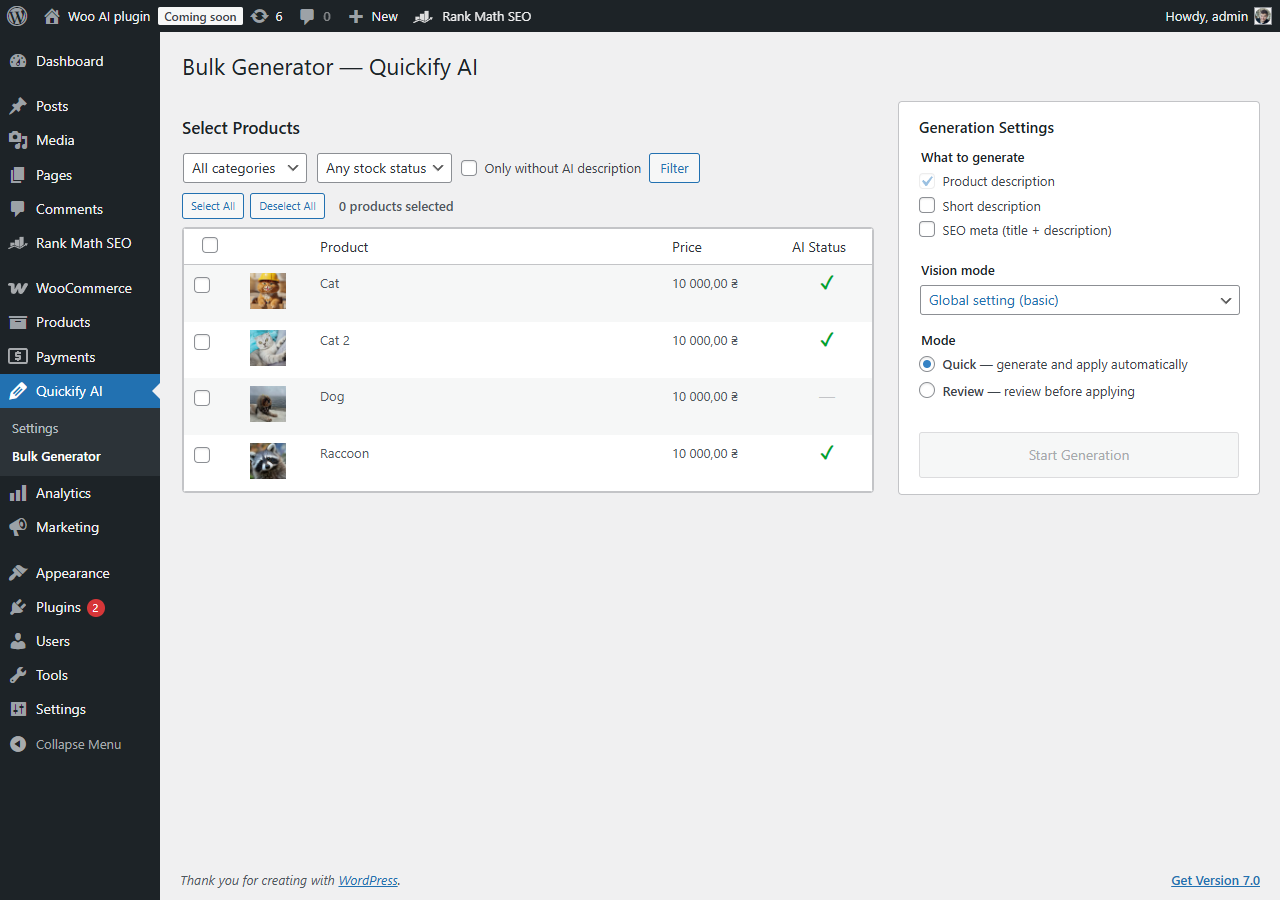
- Bulk generation for multiple products at once with progress bar
- AI Status column in products list
- History & Rollback — keep last 5 versions, restore with one click
- Per-product vision mode override
- Gutenberg sidebar panel + Classic Editor metabox
- WP-CLI commands (generate, bulk, status, reset, test)
- Two AI providers: Anthropic Claude and OpenAI GPT
- 15 output languages, 5 writing tones
- Customizable prompt template with placeholders
- Brand voice setting for consistent tone
- API keys encrypted at rest (AES-256-CBC)
- HPOS compatible, variable product support
- Install the plugin and enter your Anthropic or OpenAI API key in WooCommerce > Quickify AI.
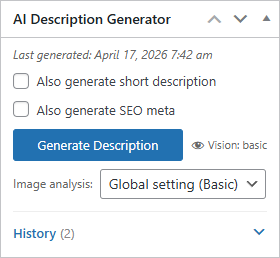
- Open any product in the editor. Find the "AI Description Generator" metabox in the sidebar.
- Click "Generate Description". The plugin collects product data, builds a prompt, and sends it to the AI.
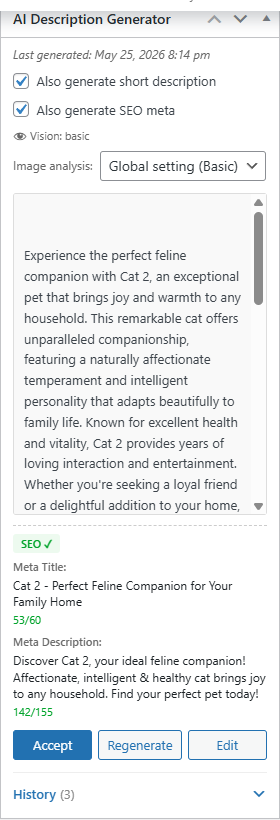
- Preview the result. Edit it if needed, then click "Accept" to insert it into the product description.
安装:
- Upload the
quickify-aifolder to/wp-content/plugins/. - Activate the plugin through the "Plugins" menu in WordPress.
- Go to WooCommerce > Quickify AI and enter your API key.
- Choose your preferred language, tone, and description length.
- Open any product and click "Generate Description" in the sidebar metabox.
- WordPress 6.0 or higher
- WooCommerce 7.0 or higher
- PHP 7.4 or higher
- An API key from Anthropic or OpenAI
屏幕截图:
常见问题:
Do I need my own API key?
Yes. You need an active API key from either Anthropic (for Claude) or OpenAI (for GPT). The plugin does not include any API credits. You can get your key from console.anthropic.com or platform.openai.com.
How much does the API cost?
Each product description costs approximately $0.003–$0.01 depending on the provider, model, and description length. Generating 1,000 descriptions would cost roughly $3–$10 total.
Which languages are supported?
The plugin supports 15 languages: English, Ukrainian, Russian, German, French, Spanish, Italian, Portuguese, Polish, Dutch, Czech, Turkish, Japanese, Chinese, and Korean.
Does it work with variable products?
Yes. For variable products, the plugin automatically collects all variation data (attributes and prices) and includes them in the prompt so the AI can write a comprehensive description covering all options.
Which AI provider should I choose?
Both providers produce high-quality descriptions. Anthropic Claude tends to follow instructions more precisely, while OpenAI GPT is widely used and well-documented. Try both with the "Test Connection" button and see which output you prefer.
Are my API keys stored securely?
Yes. All API keys are encrypted using AES-256-CBC before being stored in the database. They are never exposed in HTML source or JavaScript.
Can I customize the prompt?
Yes. Go to WooCommerce > Quickify AI > Generation Settings. You can edit the prompt template using placeholders like {title}, {categories}, {attributes}, {price}, {sku}, {language}, {tone}, and {length}.
Does it support Vision (image analysis)?
Yes. Enable Vision API in settings to let AI analyze product images. Choose Basic (general visual overview) or Detailed (full analysis of colors, materials, textures, accessories). You can also override the vision mode per product.
Does it work with Gutenberg?
Yes. The plugin provides a full-featured sidebar panel in the block editor with all the same features as the Classic Editor metabox.
Does it integrate with SEO plugins?
Yes. When enabled, it auto-generates SEO meta title (max 60 chars) and meta description (max 155 chars) and saves them to Yoast SEO or Rank Math.
Are there WP-CLI commands?
Yes. Available commands: wp qfai generate, wp qfai bulk, wp qfai status, wp qfai reset, wp qfai test.
更新日志:
- Vision API — analyze product images for richer descriptions (off/basic/detailed modes).
- Per-product vision mode override in product editor.
- Gutenberg sidebar panel — full feature parity with Classic Editor.
- Yoast SEO and Rank Math integration — auto-generate meta title and description.
- Short description generation with checkbox control.
- History and rollback — keep last 5 generations, restore with one click.
- WP-CLI commands: generate, bulk, status, reset, test.
- Image optimization — auto-resize large images before sending to API.
- Vision image hash caching — skip redundant image analysis.
- Improved error handling and fallback for vision requests.
- Initial release.
- Single product description generation via Anthropic Claude or OpenAI GPT.
- Settings page with encrypted API key storage.
- Product editor sidebar metabox with preview workflow.
- Customizable prompt template with 8 placeholders.
- 15 output languages and 5 writing tones.
- Variable product support with variation details.
- HPOS (High-Performance Order Storage) compatibility.
- Clean uninstall removing all plugin data.