RationalCleanup
| 开发者 | rationalwp |
|---|---|
| 更新时间 | 2026年8月13日 21:19 |
| PHP版本: | 7.4 及以上 |
| WordPress版本: | 7.1 |
| 版权: | GPLv2 or later |
| 版权网址: | 版权信息 |
详情介绍:
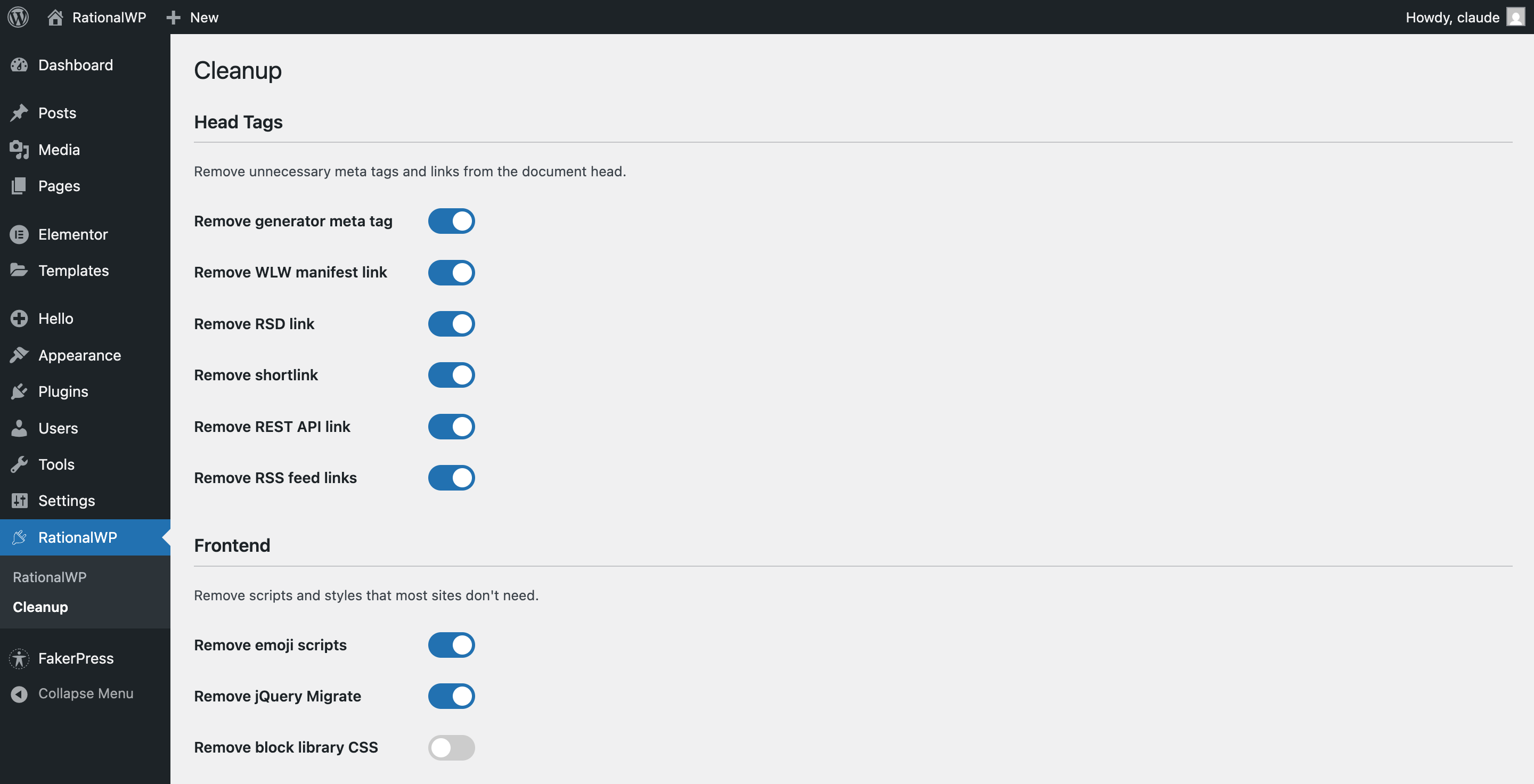
- Remove WordPress generator meta tag (hides version number)
- Remove RSD link
- Remove shortlink
- Remove REST API discovery link
- Remove RSS feed links
- Remove emoji detection scripts and styles
- Remove jQuery Migrate from frontend
- Remove Gutenberg block library CSS
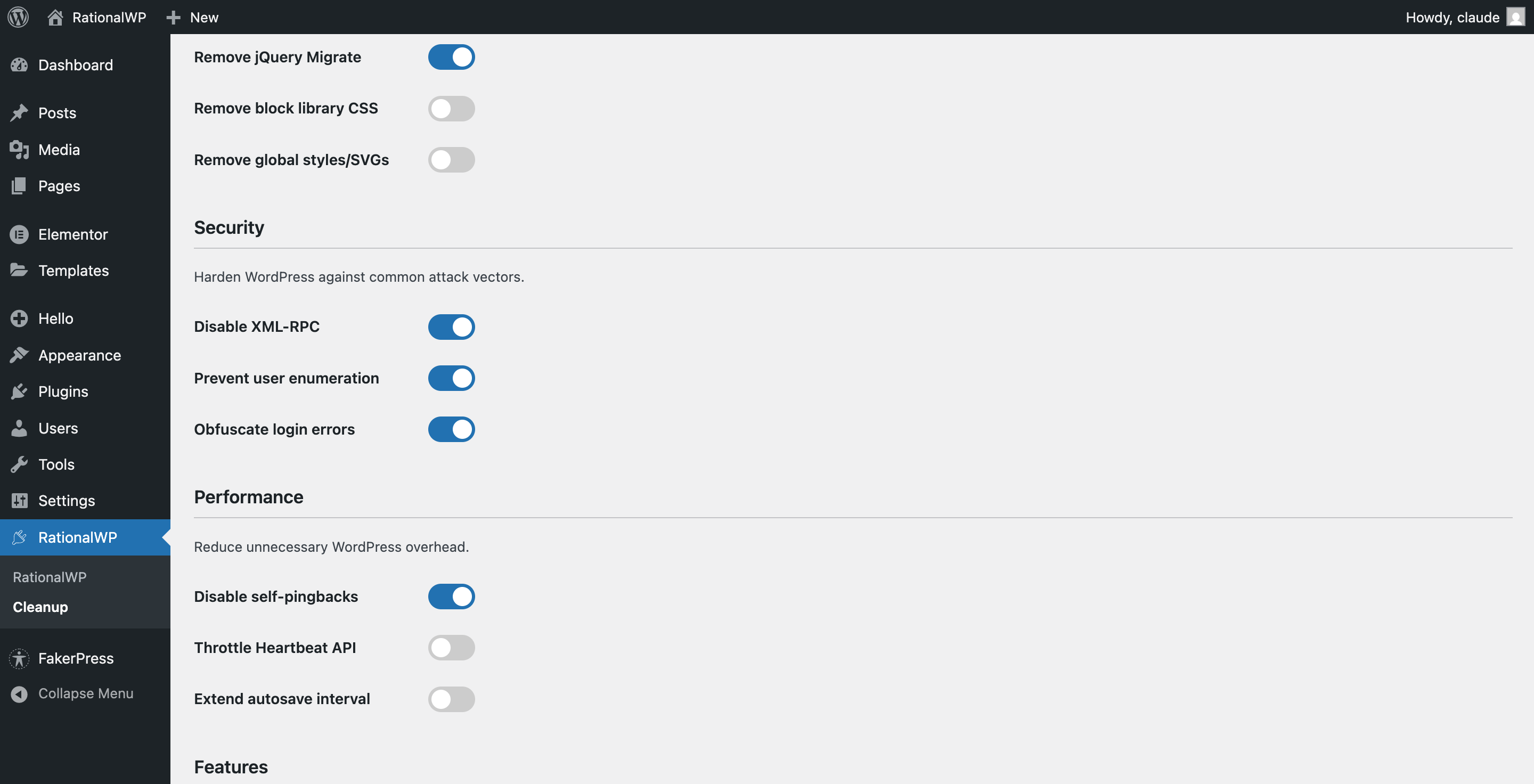
- Remove global styles and SVG filters
- Disable XML-RPC completely (prevents brute force and DDoS attacks)
- Prevent user enumeration (blocks author archives and REST API user endpoints)
- Obfuscate login error messages (prevents username discovery)
- Disable self-pingbacks
- Throttle Heartbeat API (reduces server load)
- Extend autosave interval (reduces database writes)
- Disable comments system completely
- Disable block editor (force classic editor)
- Disable REST API for non-authenticated users
- Remove WordPress Events and News widget
- Remove Quick Draft widget
- Remove At a Glance widget
- Remove Activity widget
- Remove Site Health Status widget
- Security options: Enabled by default (XML-RPC disabled, user enumeration blocked)
- Head cleanup: Mostly enabled (safe, no compatibility issues)
- Frontend cleanup: Emoji and jQuery Migrate removal enabled
- Breaking features: Disabled by default (comments, block editor, REST API restrictions)
- Admin widgets: Disabled by default
安装:
- Upload the
rationalcleanupfolder to/wp-content/plugins/ - Activate the plugin through the 'Plugins' menu in WordPress
- Configure settings under RationalWP > Cleanup in the admin menu
屏幕截图:
常见问题:
What happens when I activate the plugin?
The plugin applies its default settings immediately. Security options (XML-RPC disabled, user enumeration blocked, login error obfuscation) and safe cleanup options (emoji removal, jQuery Migrate removal, head tag cleanup) are enabled by default.
Will this break my site?
The default settings are designed to be safe for most sites. Features that could cause compatibility issues (disabling comments, block editor, or REST API) are disabled by default. You can enable them if needed after reviewing their impact.
Are settings preserved when I deactivate the plugin?
Yes, your settings are preserved when you deactivate the plugin. They are only deleted if you completely uninstall (delete) the plugin.
Does this work with caching plugins?
Yes, RationalCleanup works well with caching plugins. After changing settings, you may need to clear your cache to see the effects on the frontend.
Will disabling XML-RPC break anything?
XML-RPC is a legacy API that most modern sites don't need. However, if you use the WordPress mobile app, Jetpack, or certain third-party services that rely on XML-RPC, you should leave it enabled.
What does "Prevent user enumeration" do?
It blocks two common methods attackers use to discover usernames: author archive URLs (/?author=1) and the REST API users endpoint (/wp-json/wp/v2/users). Logged-in administrators can still access these.
更新日志:
- Tested up to WordPress 7.1.
- Removed: the "Remove WLW manifest link" option. WordPress stopped outputting the WLW manifest link in 6.3, so the option no longer had any effect.
- Removed: an internal call to unhook
wp_global_styles_render_svg_filters(), which WordPress deprecated in 6.3. Global styles removal is unaffected. - Changed: minimum supported WordPress version is now 6.3, matching the two changes above.
- Tested up to WordPress 7.0.
- Added third-party dashboard widget management — detect and disable widgets added by other plugins
- Added plugin banner and icon assets for WordPress.org listing
- Text domain fix
- Initial release
- 24 toggleable options across 6 categories
- Head tag cleanup (generator, WLW, RSD, shortlink, REST API link, RSS feeds)
- Frontend cleanup (emoji, jQuery Migrate, block CSS, global styles)
- Security hardening (XML-RPC, user enumeration, login errors)
- Performance optimization (self-pingbacks, heartbeat, autosave)
- Feature toggles (comments, block editor, REST API)
- Admin dashboard cleanup (5 widget removal options)