Rearrange Products for WooCommerce
| 开发者 | aslamdoctor |
|---|---|
| 更新时间 | 2026年9月7日 20:24 |
| 捐献地址: | 去捐款 |
| PHP版本: | 7.4.0 及以上 |
| WordPress版本: | 7.1 |
| 版权: | GPL-3.0-or-later |
| 版权网址: | 版权信息 |
详情介绍:
- Reorder/Rearrange products on your main Shop page.
- Set custom product order for specific categories and sub-categories.
- Select multiple products at once and move them together.
- Manage product display without touching any code.
安装:
- Go to your WordPress Admin Dashboard.
- Navigate to Plugins → Add New.
- Search for “Rearrange Products for WooCommerce.”
- Click Install, then Activate. If WooCommerce is not installed or activated, this plugin will not activate.
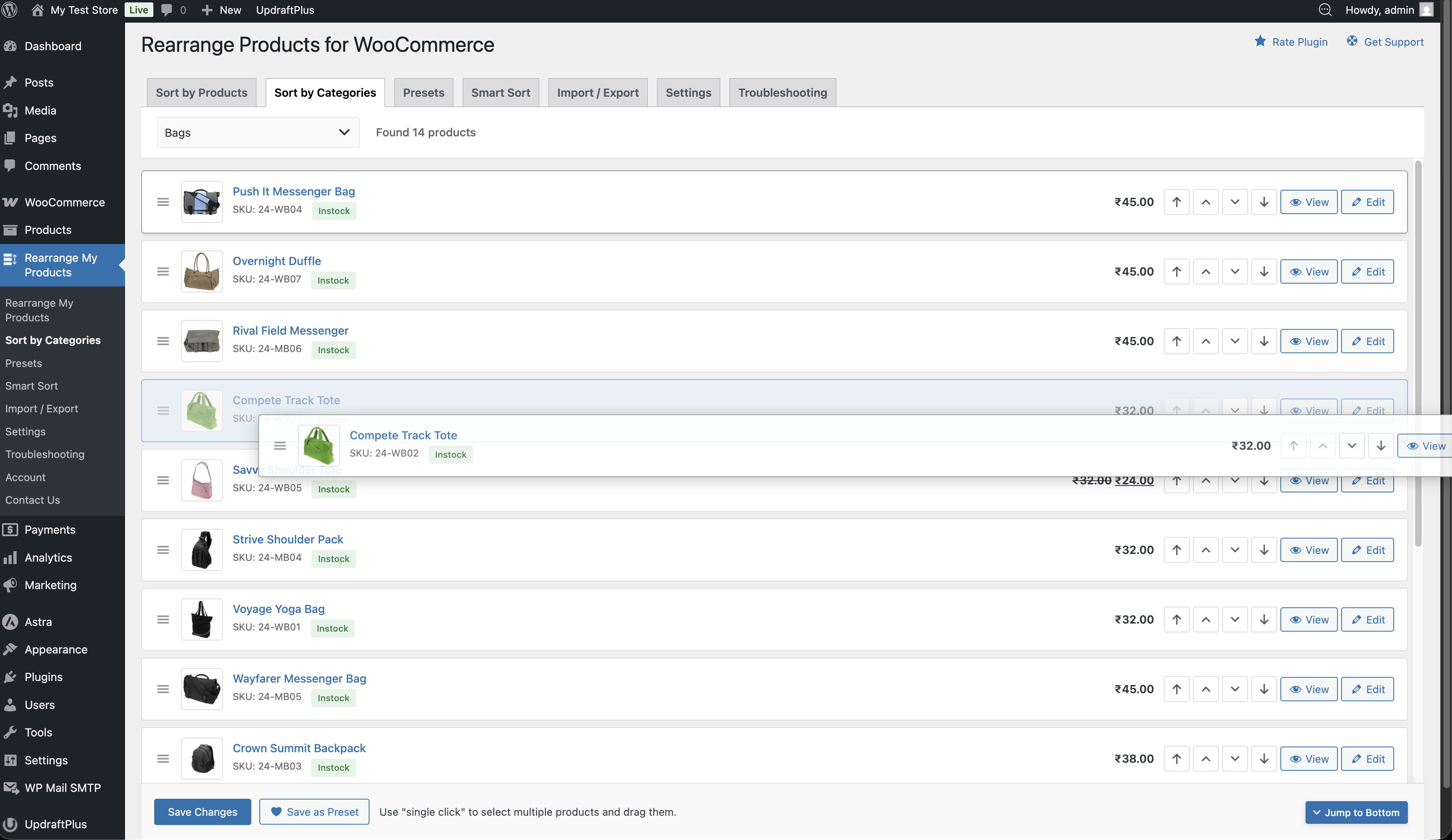
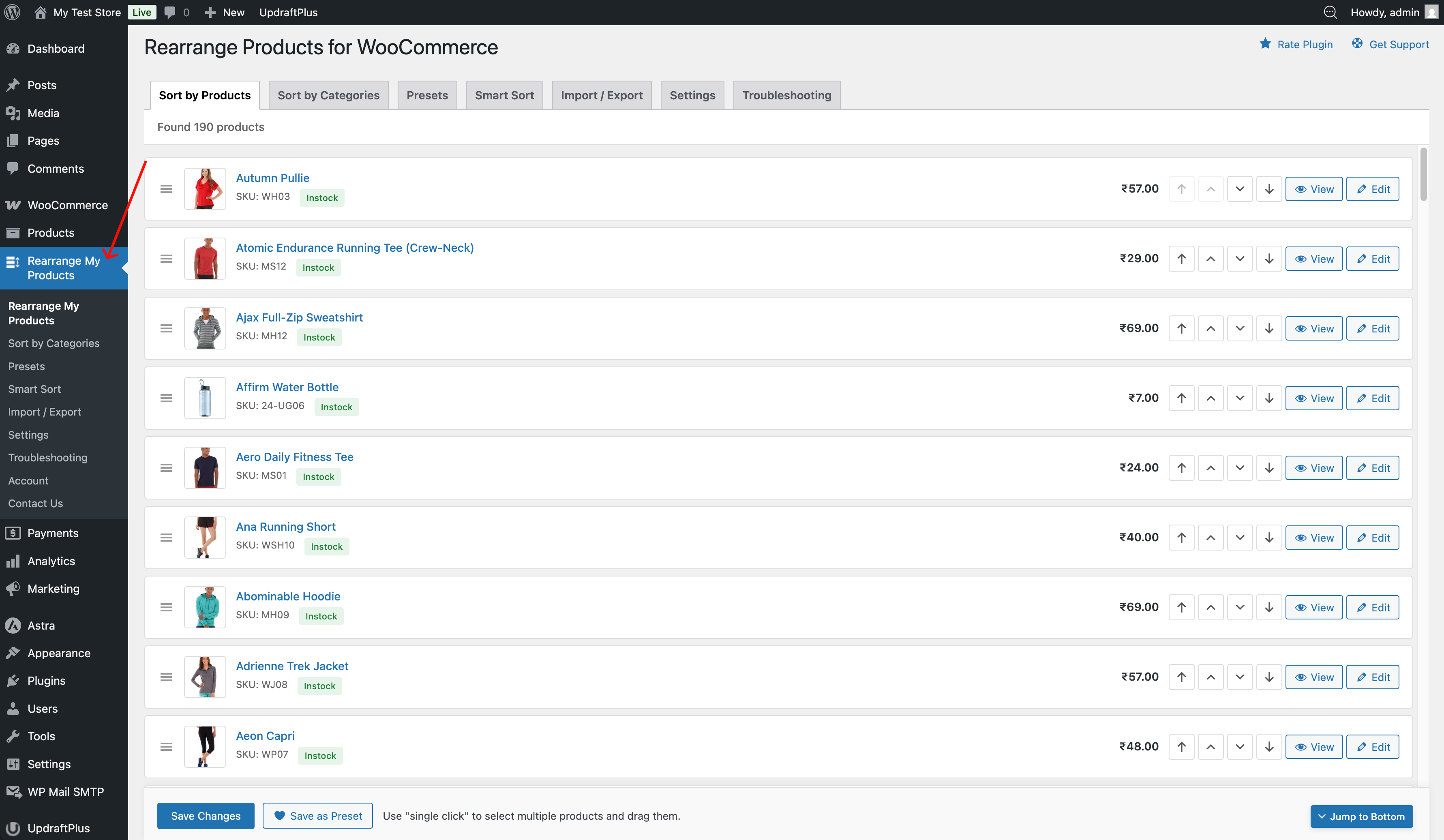
- Go to Admin → Rearrange Products and reorder products using drag and drop.
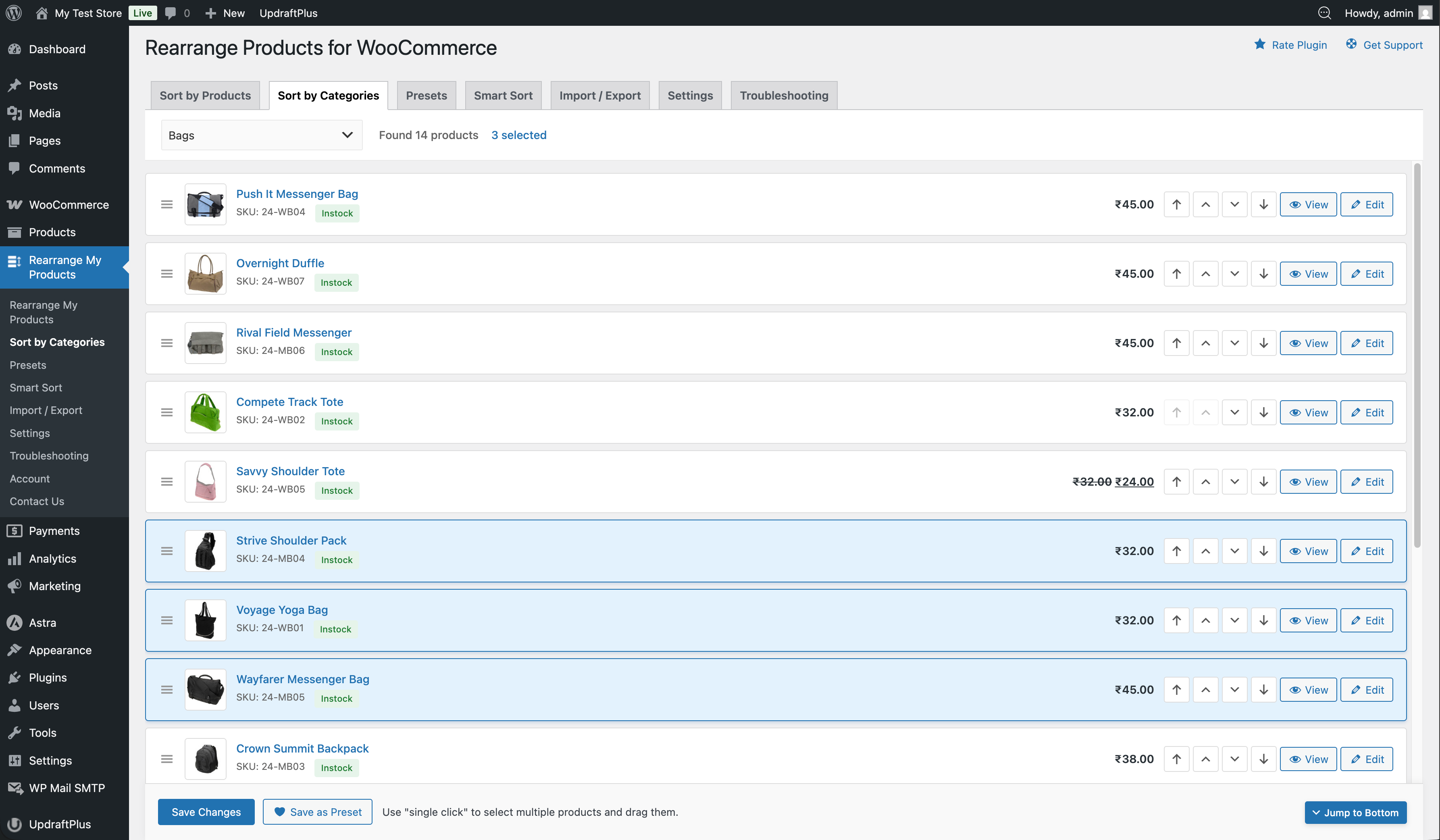
- Use the “Sort by Categories” tab to arrange products by category.
屏幕截图:
常见问题:
How do I use this plugin?
Go to Admin → Rearrange Products and drag and drop products into your preferred order. To sort by category, open the “Sort by Categories” tab.
Can I recover my product order after deactivating or deleting the plugin?
- Deactivating the plugin will temporarily disable your custom product order.
- Deleting or uninstalling the plugin will permanently remove all product rearrangements, and they cannot be restored.
Does this plugin work with WooCommerce shortcodes?
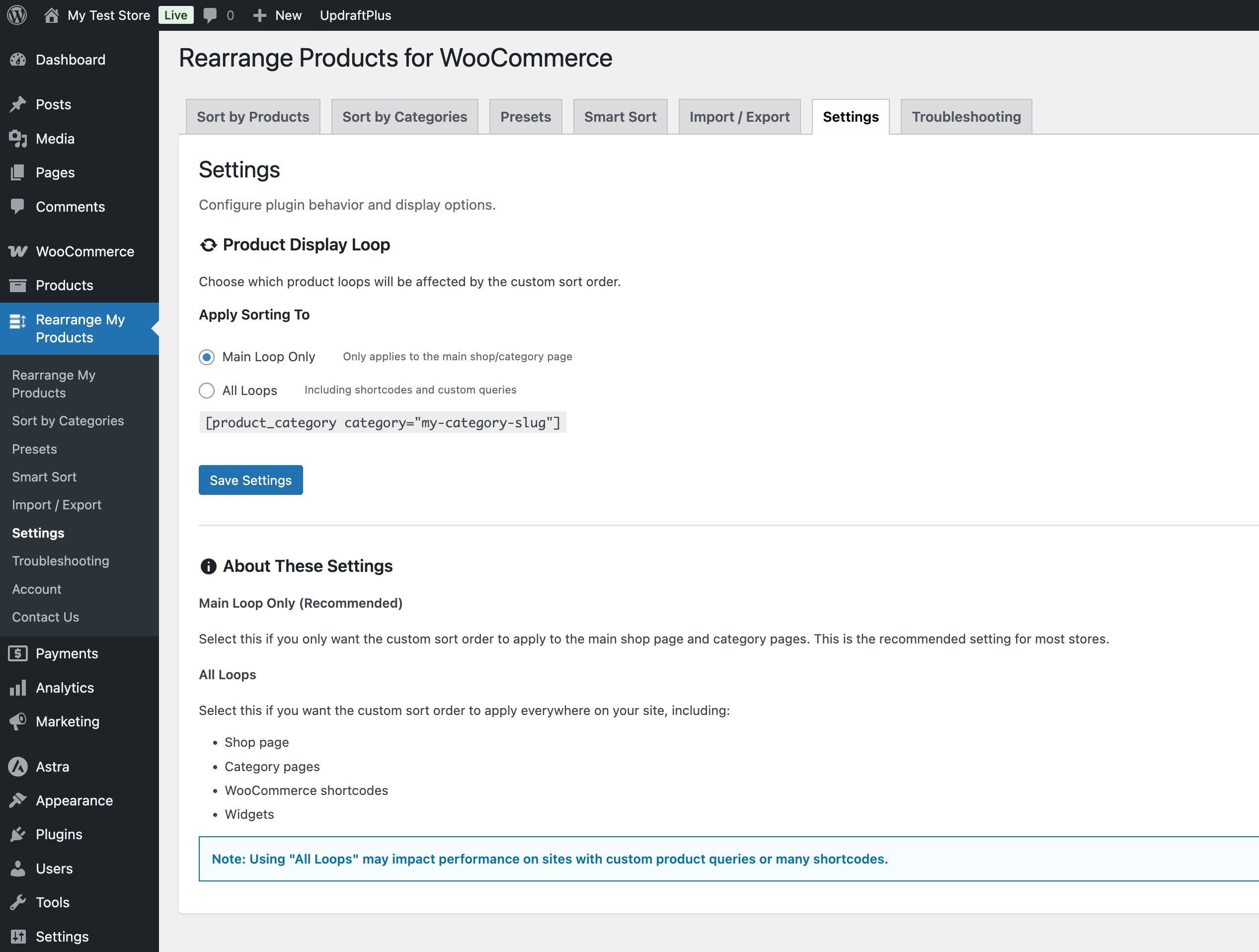
Yes. You can override the default sorting of products added via shortcodes such as:
[product_category category=”my-category-slug”]
To enable this:
- Go to Admin → Rearrange Products → Settings
- Enable ”All Loops (including shortcodes)”
What does the Pro version include?
The Pro version adds three powerful features:
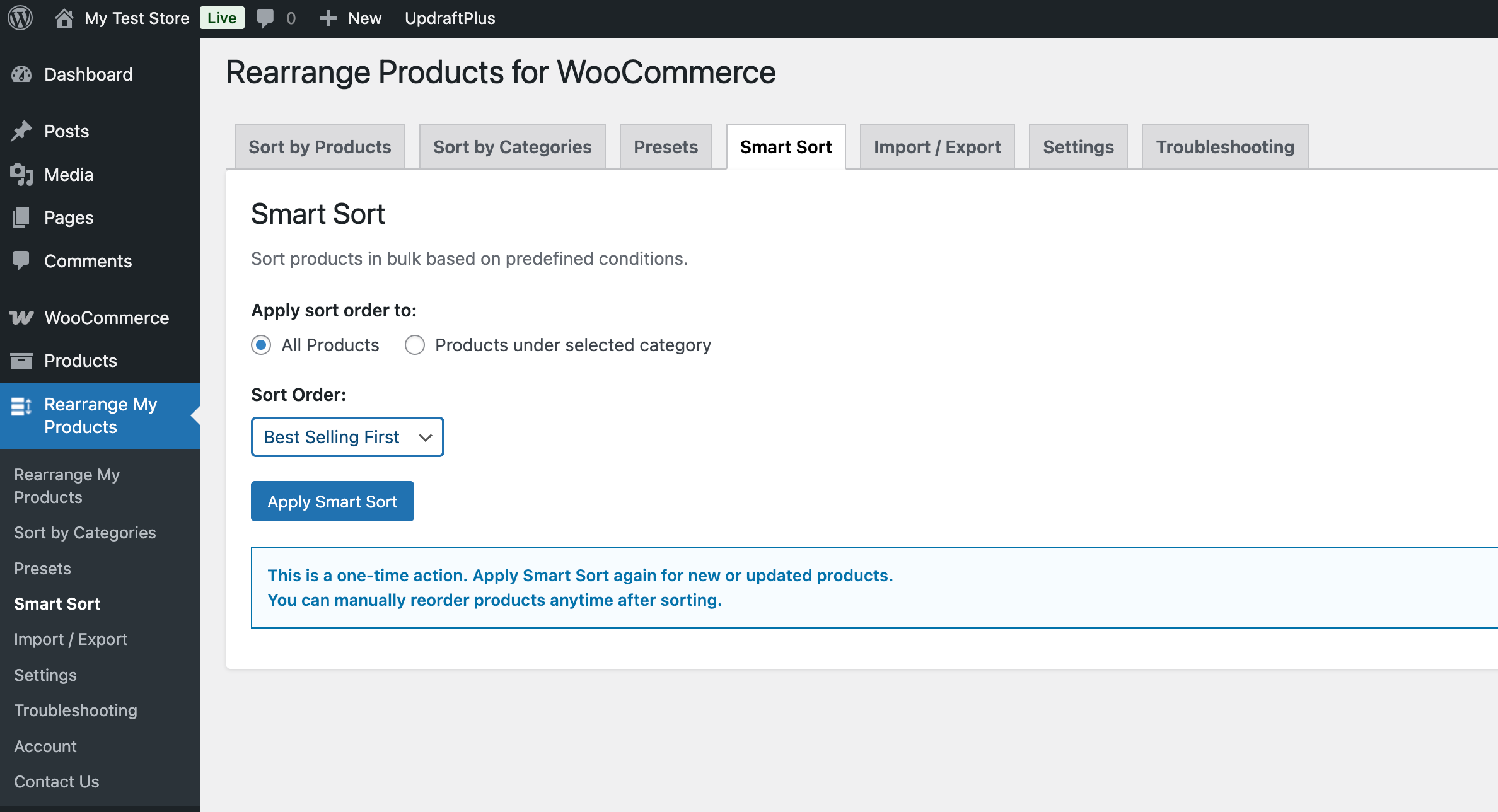
- Smart Sort — Sort all your products in bulk by best-selling, ratings, price, stock status, sale status, and more with a single click.
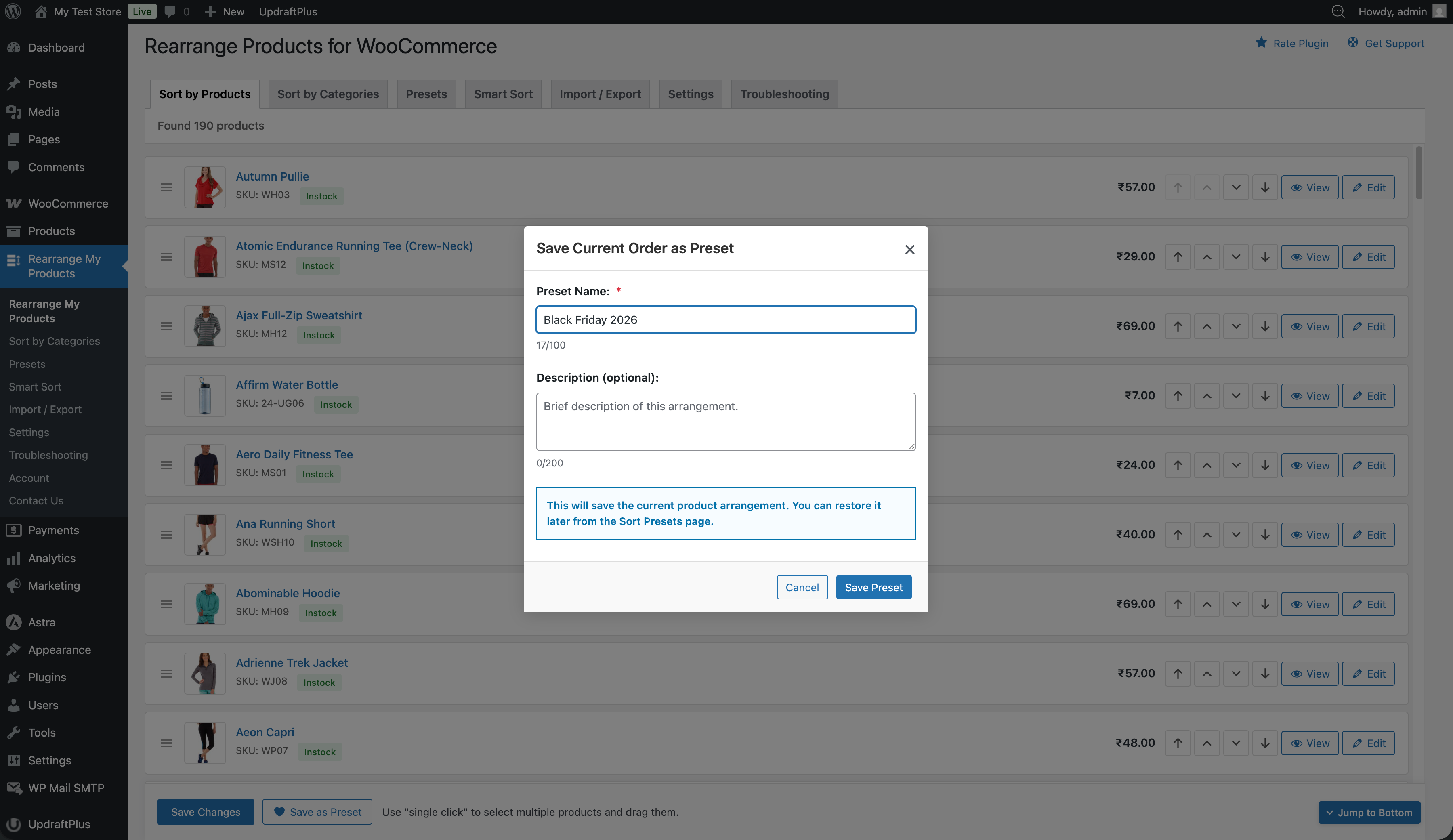
- Sort Presets — Save your product arrangements and switch between them instantly. Great for seasonal promotions and A/B testing.
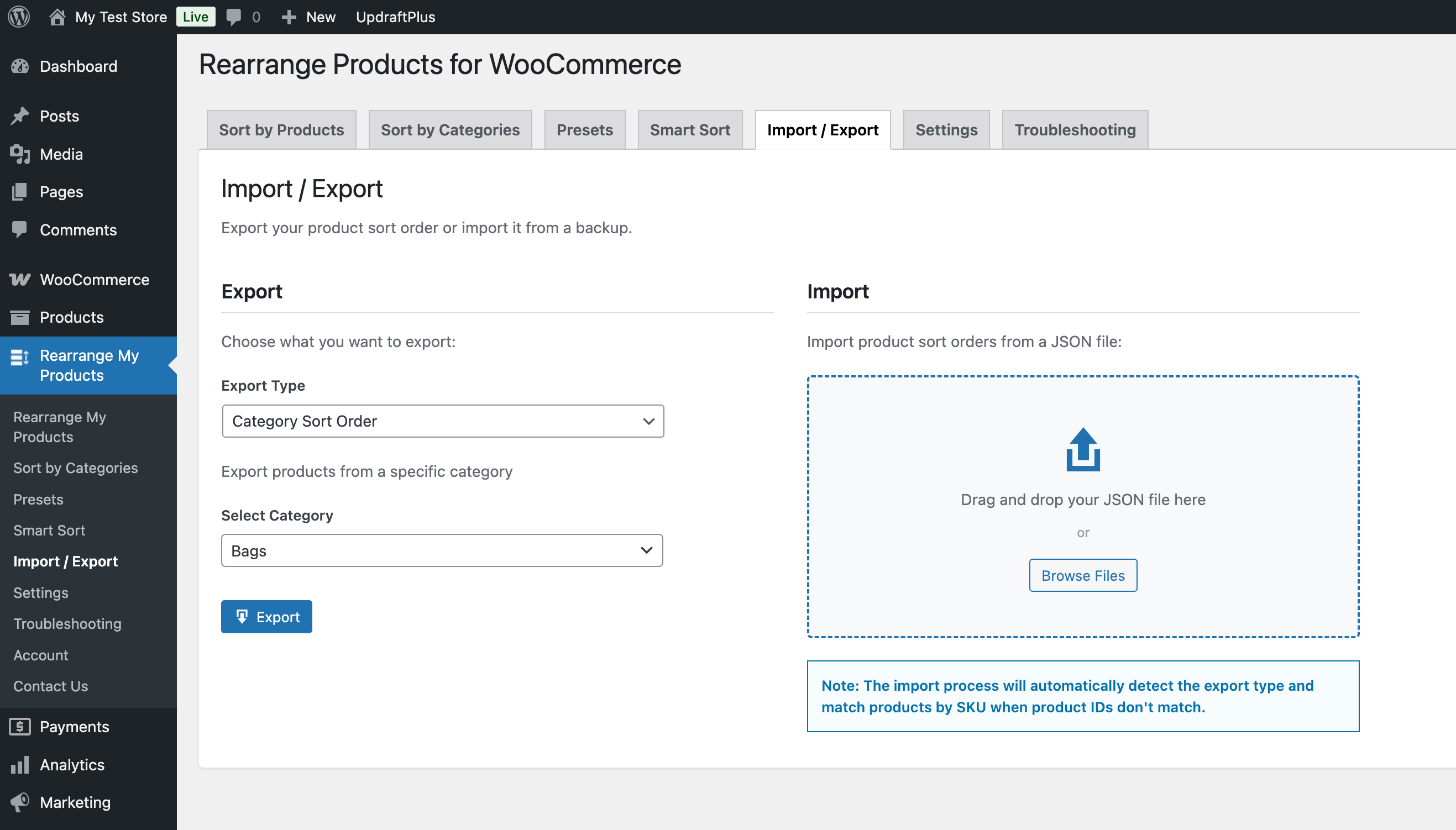
- Import / Export — Export your product arrangements as JSON files and import them on another site. Products are matched by SKU for cross-site compatibility.
Can I try the free version first?
Absolutely! The free version includes drag-and-drop sorting for all products and categories. You can upgrade to Pro at any time to unlock Smart Sort, Presets, and Import/Export.
Will I lose my product order if I downgrade from Pro to Free?
No. Your manually arranged product order (global and category-specific) is preserved. However, Pro features like presets and Smart Sort will no longer be accessible until you upgrade again.
Can I use Import/Export to migrate product order to a new site?
Yes. The Import/Export feature (Pro) exports your product arrangements as a JSON file. When importing on a different site, products are matched by SKU, so your arrangements transfer even if product IDs differ between sites.
更新日志:
- Fixed: WPML sync of product sort order to translated products was lost during the 6.0.0 merge. Saving a global or category order in the default language now updates the translations again, as it did in 5.0.11
- Added: One-time automatic resync of existing sort orders to WPML translations after updating to 6.0.4
- Added: "Resync Sort Order to WPML Translations" tool on the Troubleshooting page (shown only when WPML is active)
- Fixed: "Load More" on the rearrange pages excluded private products, causing the loaded list to not match the "Found N products" count and occasionally skip a published product at page boundaries
- Improved: Removed unused jquery-ui-sortable script dependency (drag-and-drop uses bundled SortableJS), so jQuery UI no longer loads on the plugin admin pages
- Updated: Tested up to WordPress 7.1 and WooCommerce 11.0.1
- Fixed: Button icons misaligned inside admin buttons on WordPress 7.0 (core now sets line-height/vertical-align on dashicons inside buttons)
- Updated: Tested up to WordPress 7.0 and WooCommerce 10.9.4
- Updated: Freemius SDK to 2.13.4
- Fixed: Product sort order resetting to last position when editing/saving a product at the first position in a category
- Fixed:
Database::get_sort_order()now correctly distinguishes between "no entry" (null) and "sort_order = 0" (first position)
- Added: Show private products in admin rearrange UI
- Added: System status / diagnostic info section on Troubleshooting page for easier support requests
- Added: Custom admin menu icon
- Added: Page navigation controls for large product catalogs
- Added: Auto-scroll when moving products to top or bottom of the list
- Added: Smooth FLIP animations for product move buttons
- Added: Empty state UI with guidance for Sort by Products tab
- Added: Product selection counter showing how many products are selected
- Added: Automatic cleanup of sort order data when products are deleted
- Added: Freemius SDK integration for licensing and premium feature management Enhancements
- Improved: Refactored JavaScript into modular ES6 architecture for better maintainability
- Improved: Custom RWPP Modal component replacing third-party MicroModal library
- Improved: Updated branding and plugin display name to "Rearrange Products for WooCommerce"
- Improved: UI redesign with modern styling, CSS variables, and semantic color system
- Improved: Button consistency and visual hierarchy across all admin pages
- Improved: Reorder buttons now disabled based on product position (first/last)
- Improved: Page builder compatibility notes added to Troubleshooting page Bug Fixes
- Fixed: Conflict with Post Types Order plugin by bumping filter priority
- Fixed: Postmeta fallback for category sorting and re-migration support
- Fixed: Filter bleed-through between multiple WooCommerce shortcodes on the same page
- Fixed: WooCommerce shortcode caching returning stale results for custom sorting
- Fixed: Sorting no longer affects secondary queries (widgets, shortcodes, custom blocks) on category pages
- Fixed: Category-specific sort order on category pages when "All Loops" is enabled
- Fixed: Nested category dropdown overflow in admin UI
- Fixed: Layout shift when modals open and close
- Fixed: Label hyphenation in Safari admin sidebar
- Fixed: Unbalanced left/right spacing in admin UI
- Fixed: Modal accessibility issues including aria-hidden warnings Compatibility
- Tested with WordPress 6.9.1 and WooCommerce 10.6.1
- Exclude docs folder from plugin distribution
- Fixed: Product sort order resetting to last position when editing/saving a product at the first position in a category
- Fixed:
Database::get_sort_order()now correctly distinguishes between "no entry" (null) and "sort_order = 0" (first position) - Fixed: Category-specific sort orders broken for users who upgraded from v4.x due to silent migration failures
- Fixed: Migration error handling in
Database.php—create_table(),migrate_data(), and individual migration methods now properly detect and report failures - Added: Postmeta fallback in frontend sorting — category pages now automatically fall back to legacy
rwpp_sortorder_{id}postmeta data if the custom table is empty - Added: "Re-run Migration" button on Troubleshooting page to manually re-populate the custom table from legacy data
- Fixed: Product category shortcode sorting issues when "Apply Sorting To" is set to "All Loops"
- Added: WPML support - Sync product order across language translations for Global sorting
- Fixed: Plugin sorting no longer affects secondary product queries (widgets, shortcodes, custom blocks) on category pages
- Fixed: Footer product blocks now display correctly with their configured sorting on category archives
- Improved: Sorting filters are now properly removed after main query execution
- Fixed: Products moving to top of list after editing/updating
- Improved: Product updates now preserve existing sort order in custom table
- Tested with WooCommerce 10.4.3
- Fixed: Category sorting page not loading due to URL routing mismatch
- Fixed: Critical data loss bug where unloaded products lost sort orders during pagination
- Improved: Removed automatic orphan cleanup that was causing data loss in category-specific sorting
- Improved: Troubleshooting page with more customer-friendly language and clearer explanations
- Improved: Updated troubleshooting titles to be more relatable for end users
- Improved: Added helpful context and guidance for common issues
- Improved: Simplified technical language in server configuration section
- Fixed: Missing vendor and build files
- Major Release: Complete architectural refactor with unified database storage
- Added: Custom database table
wp_rwpp_product_orderfor centralized sort order storage - Added: Support for both global and category-specific product sorting
- Added: Automatic data migration from legacy storage systems (menu_order and postmeta)
- Added: Confirmation modal for product order changes with undo functionality
- Added: Load More button for pagination (replaced infinite scroll with manual control)
- Added: AJAX load more functionality to load products in chunks of 100
- Added: CSS variables and design tokens for better maintainability and theming
- Added: New SCSS buttons component file for consistent styling
- Added: Comprehensive debug logging for troubleshooting load more issues
- Improved: Database query optimization with indexed JOINs instead of meta_query
- Improved: COALESCE fallback logic for graceful degradation
- Improved: Chunked processing for large product datasets
- Improved: UI redesign with custom category dropdown
- Improved: Removed inline styles from templates (all styles now in SCSS)
- Improved: Cleaner HTML markup without redundant success messages
- Improved: Better separation of concerns between structure and styling
- Improved: Performance by loading initial products in chunks
- Enhanced: Performance with production-ready asset optimization
- Enhanced: User feedback with loading states on Load More button
- Enhanced: Better UX with explicit load more control instead of auto-scroll
- Fixed: Category view now includes subcategory products (matching frontend behavior)
- Fixed: WP_DEBUG reference error in JavaScript by localizing debug flag
- Fixed: WP_Query namespace issue in AJAX handler
- Fixed: AJAX action registrations to execute properly
- Updated: Build system to @wordpress/scripts with modern Sass implementation
- Refactored: Complete SASS file structure with variables for colors, typography, spacing
- Tested with WordPress 6.9 and WooCommerce 10.4.2
- fixed: Attempt to read property “term_id” on null
- tested with wordpress version 6.8.1
- tested with woocommerce version 9.8.3
- fixed: is_tax was called incorrectly
- fixed: settings for effected loops was not working properly
- tested with wordpress version 6.8
- tested with woocommerce version 9.8.2
- tested with wordpress version 6.7.1
- tested with woocommerce version 9.5.2
- Added settings to enable/disable override main loop or all loops
- tested with wordpress version 6.5.3
- tested with woocommerce version 8.9.1
- Make plugin compatible with HPOS ( High-Performance Order Storage )
- tested with wordpress version 6.4
- tested with woocommerce version 8.2.1
- Fix - under admin, some products not visible while sorting by category
- tested with wordpress version 6.3
- tested with woocommerce version 8.0.1
- Fix enqueue_assets hook not checking hook name properly when site is using different language. Ref: https://wordpress.org/support/topic/products-are-no-longer-displayed-in-categories/#post-16934448
- Fix sort by "Latest" option not working
- tested with wordpress version 6.2.2
- tested with woocommerce version 7.9.0
- Added fix where products were missing on categories pages
- Added fix where is_product_category() was not working
- other minor bug fixes & cleanup
- tested with wordpress version 6.2.0
- tested with woocommerce version 7.7.0
- moved the plugin pages to top level of admin menu
- bug fixes
- tested with wordpress version 6.1.1
- tested with woocommerce version 7.2.0
- added page for troubleshooting guidelines
- Added translations for:
- English (Canada)
- English (UK)
- French (France)
- Spanish (Colombia)
- Spanish (Venezuela)
- Russian
- Hindi
- Spanish (Ecuador)
- Chinese (China)
- Spanish (Spain)
- added Troubleshooting steps for fix missing products issue
- tested with woocommerce version 6.5.1
- updated all node/npm packages to latest stable version
- tested with wordpress version 5.9.3
- tested with woocommerce version 6.4.1
- added notes for developers for contributing to plugin
- added global translation support
- added plugin translation support
- minor security patch to escape sql query
- minor security patch
- tested with woocommerce version 6.3.1
- delete entries from postmeta table when plugin uninstalled/deleted from admin
- fixed the issue that was making navigation menus unordered
- Fixes made for user roles and permissions checking
- Do not escape post title
- Updated code to follow WPCS Protocol
- Check for plugin authorization properly
- Add CSRF security on Ajax requests
- Security fixes: disable direct code file access from browser
- Minor security fixes
- Security Fixes: Removed nonpriv handlers
- Security Fixes: Added security to remove all SQL injections added as input
- Minor fix for checking product loop inside pre_get_posts hook
- Fixed: While sorting by categories, some products that are added recently were not visible.
- Code re-factoring and cleanup.
- Fixed: Keep default sort order on frontend if it was not updated for Categories.
- Fixed: Category orders not showing any products due to meta_query not found.
- Re-published the files as in v3.0.0, the files were not published properly
- Ability to sort products by any product category
- Ability to select multiple products by single click and sort them at once
- Removed feature to sort by Tags as it was not being used and also had unresolvable bug due to WC limitations
- Tested for Woocommerce Version 5.7.1 and Wordpress Version 5.8.1
- Code cleanup
- Tested for Woocommerce Version 4.8.0 and Wordpress Version 5.6
- Code cleanup
- Tested for Woocommerce Version 4.7.0 and Wordpress Version 5.5.3
- Tested with Storefront Theme Version 2.9.0
- Minor bug fixes with Group by Categories & Tags sorting.
- In group by categories parent category was also including products from child categories. So they were repeated to 2 places. This has been updated to show products exactly below their parent categories only. (changed 'include_children' to "false" in tax_query)
- Styling issue fixed for long product names
- Added button to expand/collapse all categories & tags
- Tested for Woocommerce Version 4.3.1 and Wordpress Version 5.4.2
- Added important notices for sorting by categories and tags
- Added feature to group and sort by Product Tags
- Added feature to move products up, down, top, bottom of the list using arrow buttons
- Added serial numbers(not ID) to each products so it can give us idea on which product's sort order we changed
- Added current user check for "manage_woocommerce" capability
- Plugin information updated to properly show "tested upto" version of Woocommerce
- Added security to disable direct access to the plugin PHP files
- Added expand/collapse feature on categories to clear the clutter
- Fixed a minor bug that was happening while activating the plugin
- Tested for Woocommerce Version 4.0.0 and Wordpress Version 5.3.2
- Hide Products from list that are set as "private"
- Added a fix for bug that was checking the user role
- Tested for Woocommerce Version 3.7.1 and Wordpress Version 5.2.4
- Added shortcut button to edit products
- Tested for Woocommerce Version 3.7.0 and Wordpress Version 5.2.3
- Added feature to group products by categories
- Added feature to preview product info from same page
- Added some minor bug fixes
- Tested for latest Woocommerce version 3.6.3
- Added fix as the plugin was not working for some people. As it was using static table prefix "wp_". So changed it to dynamic table prefix to work will all kind of WP Databases.
- Tested for latest Woocommerce version 3.5.3
- Added capability to handle huge amount of products.
- Combined multiple sql update queries into one query.
- Initial release.