
Refract
| 开发者 | anpsthemes |
|---|---|
| 更新时间 | 2026年11月8日 16:54 |
| PHP版本: | 8.1 及以上 |
| WordPress版本: | 7.1 |
| 版权: | GPLv2 or later |
| 版权网址: | 版权信息 |
详情介绍:
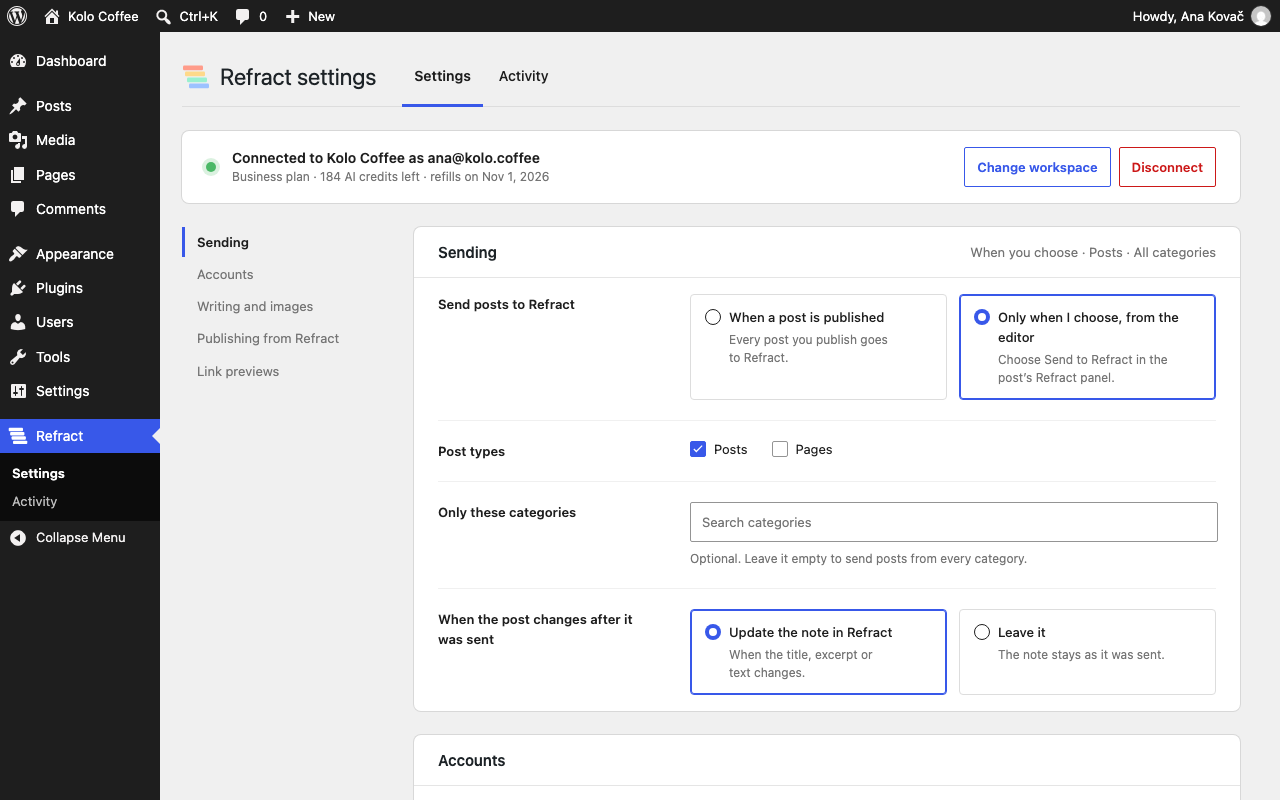
- Send posts when they're published, or only when you choose, from the editor.
- Choose the post types, the categories and the accounts.
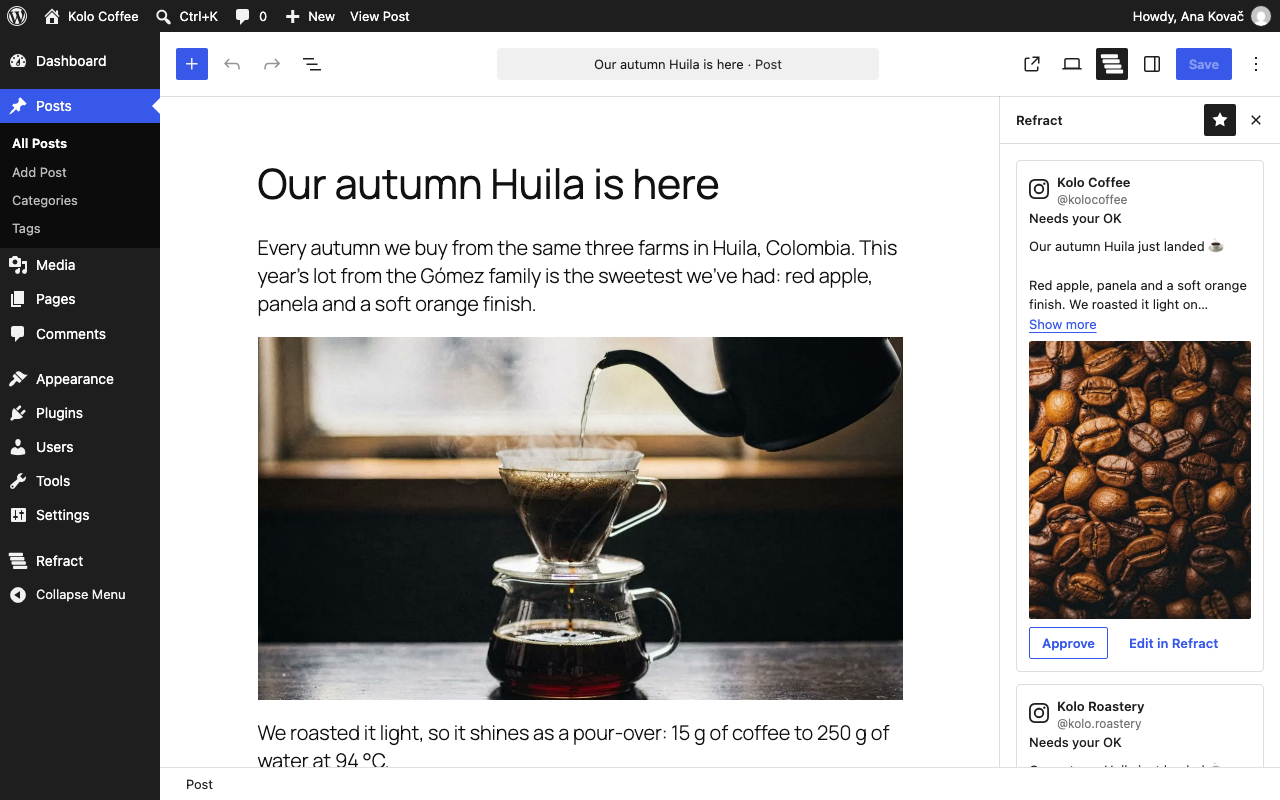
- See each version in the post sidebar: its text, its image in the network's shape and its status.
- Approve each version, or approve all and add them to the queue. Or open one in Refract to edit it.
- Works with the block editor and the Classic Editor plugin.
- A Refract account. You can start with a free trial at refract.social, no card needed.
- AI credits for the versions. Each version costs 1 AI credit, and your plan includes credits each month. With your own AI key in Refract, versions cost no credits. You can also send the same post, with the link, to every account for free.
- WordPress 6.8 or later and PHP 8.1 or later. Multisite works: each site connects separately.
build/ is made with @wordpress/scripts. Its unminified source is in the plugin's src/ folder, and the build setup is in package.json and webpack.config.js. To build it yourself, run npm install and then npm run build in the plugin's folder. The source code is also on GitHub: anpsthemes-wp-themes/refract-for-wordpress.
The network icons in src/common/marks.js come from Simple Icons (CC0 1.0). The Refract and LinkedIn marks are drawn for this plugin.
安装:
- In WordPress, go to Plugins › Add New, search for "Refract" and click Install, then Activate. Or upload the plugin's folder to
/wp-content/plugins/and activate it on the Plugins screen. - Go to Refract › Settings and click "Connect to Refract". Sign in to Refract, or start a free trial, and allow the connection.
- Choose the workspace, the accounts that get a version of each post, and when to send posts to Refract. Click Save.
屏幕截图:
常见问题:
Do I need a Refract account?
Yes. The plugin connects your site to Refract, which writes the versions and schedules the posts. You can start with a free trial.
Does anything go out without my approval?
No. Every version waits for your approval. Approve it in the post editor or in Refract, and Refract schedules it in your queue.
What does it cost?
The plugin is free. Refract is a paid service with a free trial. Each version costs 1 AI credit, or none with your own AI key. "The same post for every account, with the link" is always free. If you run out of credits, the post sidebar tells you, and you can send the same post to every account instead.
What is sent to Refract, and when?
Nothing, until you click Connect. The External services section below lists what's sent and when.
Can I change a version before it's posted?
Yes. Click "Edit in Refract" on the version to open it in Refract.
What happens when I update a post that was already sent?
By default, Refract updates the note when the title, excerpt or text changes. You can choose "Leave it" in the settings instead.
Can Refract publish to my site?
Only if you turn on "Let Refract publish to this site" in the settings. It then sends drafts only, unless you choose "Publish and schedule posts". Refract can only create posts, update the posts it created and move them to the trash; it can't change anything else on your site. Posts that come from Refract are never sent back to Refract.
Does it work with multisite?
Yes. Network activation works, and each site connects to Refract separately.
What happens when I deactivate or delete the plugin?
Deactivating stops the plugin's scheduled tasks and keeps the connection. Deleting the plugin removes its settings and post data, and asks Refract to end the connection.
更新日志:
- Publishing from Refract never acts as a user on your site. The "Publish as" person is only shown as the author, and what they can do is checked before anything changes.
- Publishing from Refract sends drafts only until you choose "Publish and schedule posts".
- The settings page says exactly what Refract can and can't do on your site.
- A clearer Settings page: the connection at the top, a section for each part (Sending, Accounts, Writing and images, Publishing from Refract, Link previews) with a summary of what's chosen, and links to jump between them.
- Choices are cards that say what each one does, and which ones use AI credits or are free.
- Accounts show as cards by network, with how many are chosen and Select all or Select none. Pick categories by searching for them.
- Save changes stays in view while you have unsaved changes, with Discard changes. Leaving the page asks first.
- Settings and Activity are tabs at the top of both pages.
- Refract can remove a post it published on your site: when you remove the post in Refract, it moves to the trash here.
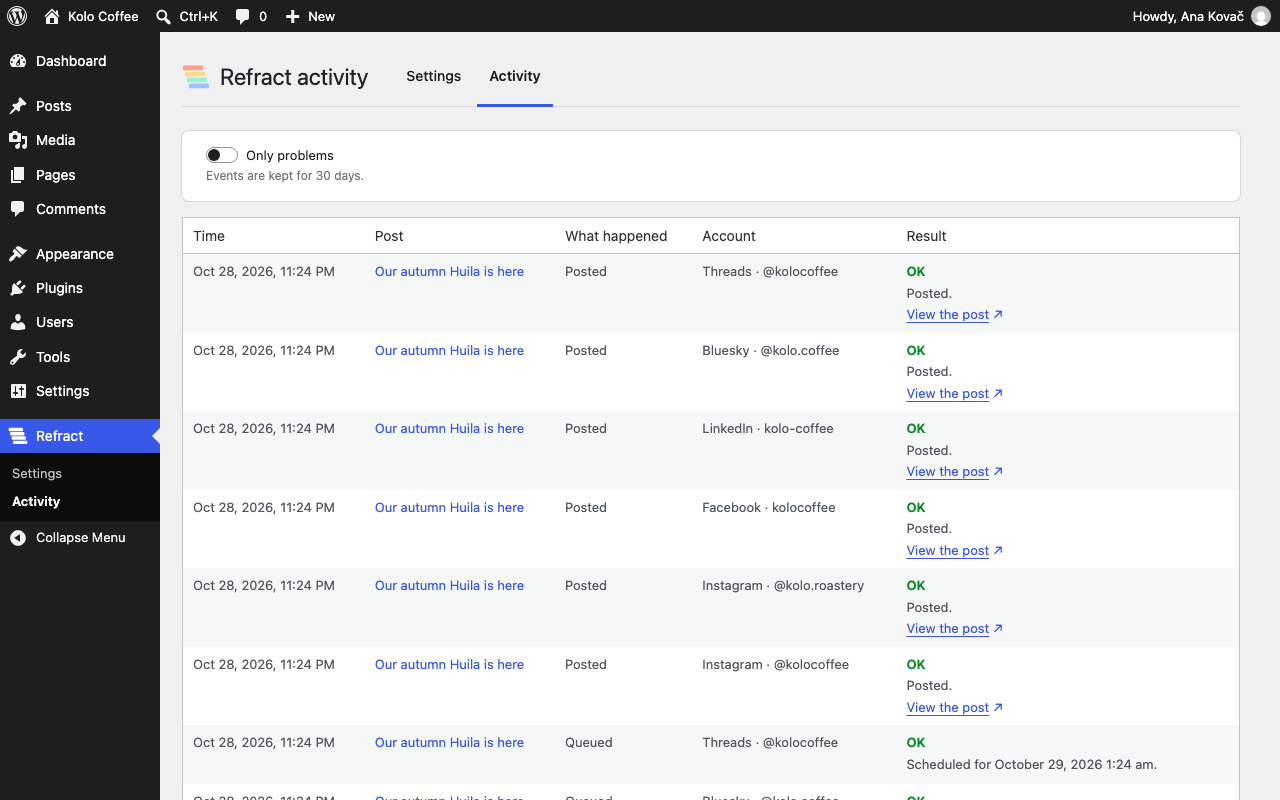
- First release: connect your site, send posts to Refract, preview and approve the versions in the editor, publish from Refract to your site, social preview tags and the Activity log.