
Reloadify Frontend Sync
| 开发者 | shaounchandrashill |
|---|---|
| 更新时间 | 2026年10月5日 02:44 |
| PHP版本: | 7.4 及以上 |
| WordPress版本: | 7.1 |
| 版权: | GPLv2 or later |
| 版权网址: | 版权信息 |
详情介绍:
- Works with Elementor, Divi, Bricks, Oxygen, Beaver Builder, WPBakery Page Builder, and the classic WordPress editor.
- Cross-browser, cross-window reload — ten supported browsers (Chrome, Brave, Edge, Firefox, Safari, Opera, UC Browser, Vivaldi, Yandex Browser, Samsung Internet), normal and incognito/private alike. Chrome, Edge and Safari are on out of the box; switch the rest on as you need them.
- Choose whether a change reloads every open tab or only the tab you're looking at, so background tabs keep their scroll position and form state.
- Optional Speed Boost: CSS/JS/HTML minification, comment and whitespace stripping, and delayed non-essential JavaScript — each pass individually switchable, and off until you turn it on.
- Reloads any frontend page (home, archives, search results — not just the exact post you're editing).
- Choice of soft reload or cache-busting hard reload.
- A Last change detected readout with a one-click Check now button, so you can confirm the plugin picked up a save without waiting for a frontend tab to reload.
- A modern settings dashboard with per-browser cards and live status.
- Speed Boost — on by default: strips the emoji script, trims unused
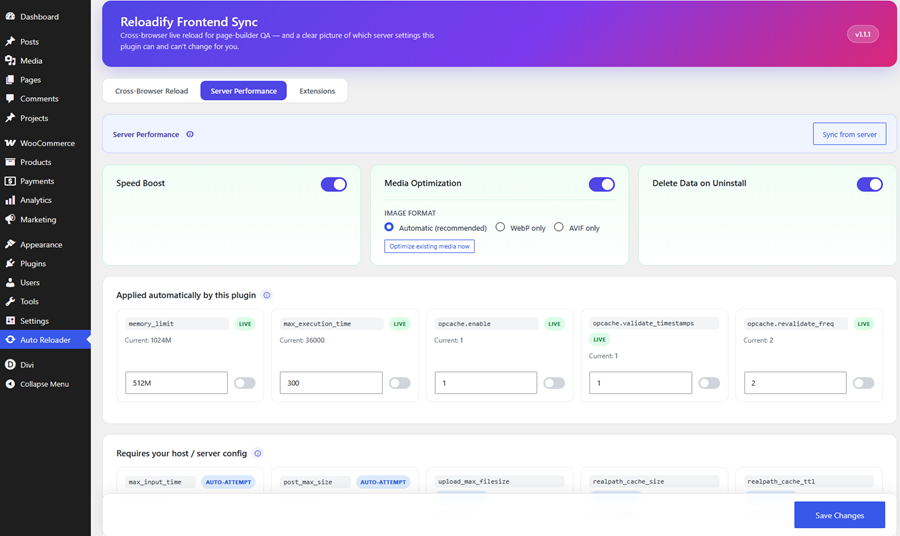
<head>tags, throttles the Heartbeat API, caps stored post revisions, disables self-pingbacks, and eases wp-admin memory/time limits for heavy builders — all reversible with one toggle. - Media Optimization — on by default: new image uploads get WebP/AVIF versions automatically (Automatic picks the best your server supports, or pin WebP/AVIF yourself), video is compressed in the background when ffmpeg is available, offscreen images and embedded video are lazy-loaded, and a new Optimization column in the Media Library shows the real, measured size saved on every file.
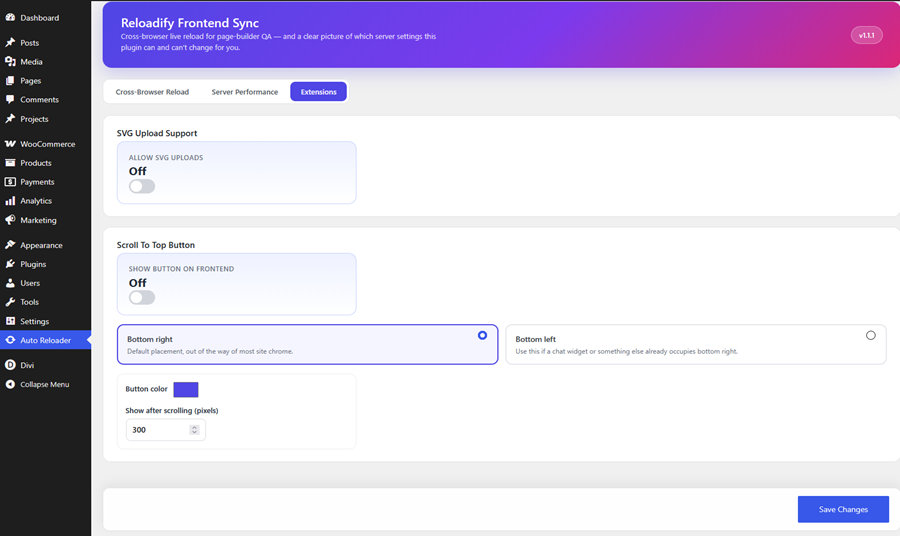
- Extensions tab — optional SVG upload support (off by default; scanned for scripts/embedded HTML before accepting) and an optional Scroll To Top floating button (off by default; configurable position and color).
- An honest Server Performance panel: applies memory_limit / max_execution_time automatically, and generates ready-to-paste php.ini / .htaccess snippets for the settings a plugin genuinely cannot change at runtime (opcache, upload/post size limits, realpath cache).
- Intelligent exclusion: never triggers a reload loop inside the builder canvas itself.
- WordPress Block Editor (Gutenberg)
- Classic Editor
- Elementor
- Divi
- Bricks Builder
- Oxygen Builder
- Beaver Builder
- WPBakery Page Builder
- Most WordPress themes
- Install and activate the plugin — no configuration needed to start; everything works out of the box.
- Open your page in the builder (Elementor, Divi, etc.) in one browser tab.
- Open the same page's live frontend view in another tab, another window, or even another browser entirely.
- Make a change and save it in the builder as normal.
- The frontend tab reloads on its own within a couple of seconds — no manual refresh needed.
- If you ever need to fine-tune behavior (turn off a specific browser, switch to hard reload, check server settings), go to Reloadify Sync in your wp-admin sidebar.
安装:
- Upload the plugin files to
/wp-content/plugins/reloadify-frontend-sync, or install through the WordPress plugins screen. - Activate the plugin.
- Open a page in your builder in one tab/browser, and the frontend view in another (any browser, any window).
- Save in the builder — the frontend reloads on its own.
- Visit Reloadify Sync in the wp-admin sidebar to fine-tune Developer Mode, reload behavior, per-browser settings, and server performance.
屏幕截图:
常见问题:
Why doesn't it reload in a particular browser?
Check Reloadify Sync → Cross-Browser Reload: confirm Developer Mode is on and that browser/mode is toggled on. Everything is on by default, but if you turned things off before, check there first.
Is incognito/private mode detection 100% reliable?
No — it's a best-effort heuristic. Several browsers deliberately make private mode indistinguishable from normal mode. When it can't tell, the plugin defaults to running the reloader anyway rather than staying silent.
Does the Server Performance panel really change opcache/upload limits?
memory_limit, max_execution_time, and three of the six opcache.* directives (enable, validate_timestamps, revalidate_freq) genuinely can be applied live by any WordPress plugin — that's just how PHP classifies them. The other three opcache directives (memory_consumption, interned_strings_buffer, max_accelerated_files) size shared memory once at PHP startup and truly can't be touched without editing php.ini and restarting PHP — same for post_max_size, upload_max_filesize, and realpath cache. For those, the panel writes a best-effort .user.ini/.htaccess (works on many hosts) or generates a copy-paste snippet, instead of pretending to apply them for you.
Should I leave Developer Mode on in production?
No — turn it on only while you're actively testing, then switch it back off yourself. It's off by default for exactly this reason: while it's on, every visitor's browser polls the server, which is fine for staging but adds real load with real traffic. Unlike earlier versions, Developer Mode no longer disables itself automatically — it stays exactly as you set it until you change it, so remembering to switch it off is now on you.
Will this slow my site down?
The frontend check is a small static file the webserver answers directly — no PHP or WordPress involved — so it's cheap per check. The main thing that adds load is leaving Developer Mode on for a long time on a busy live site, since every visitor's browser then polls continuously; keep it switched on only while you're actually testing.
Does Media Optimization touch my original uploaded files?
No. For images, the original file you uploaded is never modified — only the generated thumbnail/medium/large sizes get WebP or AVIF versions alongside them, and only if your server's image library actually supports that format (checked with WordPress's own detection, never assumed). Video compression only runs if the server has ffmpeg available; if it doesn't, video is left completely untouched rather than pretending to optimize it. The whole feature is one toggle — turn it off any time to leave media exactly as WordPress would handle it by default.
更新日志:
- Fixed Active Tab incorrectly switching to All Tabs.
- Fixed duplicated tabs sharing the same tab ID.
- Fixed tab ownership and newly focused tab synchronization.
- Fixed private-window reload behavior.
- Fixed Heartbeat and post-lock AJAX requests being detected as content changes.
- Fixed CSS/JS minification edge cases.
- Fixed Delayed JavaScript execution order and event replay.
- Fixed page-builder frame handling and cache issues.
- Fixed Speed Boost autosave, revisions, and Heartbeat behavior.
- Fixed Media Optimization and video processing issues.
- Fixed Delete Data on Uninstall cleanup on multisite.
- Added Reload All Tabs for synchronizing multiple frontend tabs and windows.
- Added live settings propagation for already-open frontend tabs.
- Added CSS, JavaScript, and HTML minification to Speed Boost.
- Added Delayed JavaScript optimization with essential-script exclusions.
- Changed Speed Boost, Media Optimization, and Delete Data on Uninstall to opt-in for new installations.
- Improved media optimization performance for large media libraries.
- Fixed Active Tab synchronization after page reloads.
- Added confirmation toasts and improved notification messages.
- Fixed translation template issues and regenerated the
.potfile.
- Added automatic saving for Cross-Browser Reload, Server Performance, and Extensions settings.
- Updated default enabled browsers for new installations to Chrome, Edge, and Safari.
- Existing installations preserve their current browser settings.
- Fixed Apache 500 errors when applying automatic server overrides.
- Improved
.htaccessvalidation, permissions, error handling, and backups. - Added Apache/mod_php detection to prevent incompatible server configuration changes.
- Added fallback cache directives for supported Apache configurations.
- Added WordPress 7.1 compatibility.
- Improved Speed Boost server-side optimizations.
- Added
blueprint.jsonsupport for WordPress Playground Live Preview. - Added support for Vivaldi, Yandex Browser, and Samsung Internet.
- Reviewed frontend request handling to minimize server overhead.
- Fixed video compression on Windows servers.
- Added selectable image optimization formats: Automatic, WebP, or AVIF.
- Improved tooltip styling and positioning.
- Renamed the Extra Features tab to Extensions.
- Changed SVG Upload Support and Scroll To Top to be disabled by default.
- Updated Bengali translation.
- Added the Extensions tab with optional SVG Upload Support and Scroll To Top.
- Added Media Optimization for images and supported video files.
- Added lazy loading for images and embedded video.
- Enhanced Speed Boost with Heartbeat, revisions, and self-pingback optimizations.
- Added Last Change Detected and Check Now controls.
- Improved Developer Mode and settings notifications.
- Updated Bengali translation and improved code quality.
- Added a video walkthrough and How It Works section to the plugin description.
- Added Speed Boost with WordPress, PHP, and server performance optimizations.
- Added Delete Data on Uninstall option.
- Improved Developer Mode controls and frontend reload reliability.
- Added additional cache and reload detection safeguards.
- Added Bengali translation.
- Improved code quality and server configuration handling.
- Initial public release.
- Added cross-browser and cross-window frontend reload.
- Added support for Elementor, Divi, Bricks, Oxygen, Beaver Builder, and the Classic Editor.
- Added soft reload and cache-busting hard reload modes.
- Added site-wide frontend change detection.
- Added Developer Mode.
- Added Server Performance settings.
- Added browser status and synchronization controls.
- Added intelligent page-builder reload protection.