Repeater Fields for Gravity Forms
| 开发者 |
appointmentsbooking
Rednumber addonsorg |
|---|---|
| 更新时间 | 2026年10月14日 11:09 |
| PHP版本: | 5.2 及以上 |
| WordPress版本: | 7.1 |
| 版权: | GPLv2 or later |
| 版权网址: | 版权信息 |
详情介绍:
(Product + Options) * Quantity, and place a Total field outside the repeater to calculate the Grand Total of all rows combined! Both can be used together seamlessly.
* Real-time Price Calculation: The form's Total field updates dynamically in real time as customers add, remove, or modify repeated rows.
* Supports All Product Types: Single Product, Drop Down, Radio Buttons, User Defined Price, and Calculation products.
* Option & Quantity Support: Sub-options (Drop Down, Radio, Checkboxes) and item quantities are calculated per individual repeater row.
* Payment Gateways Integration: Seamlessly passes line items and totals to payment add-ons including Stripe, PayPal, Mollie, Square, and Authorize.net.
* Detailed Order Summary: View entry details with full itemized breakdown (Row 1, Row 2, etc.) for admin review, notifications, and customer emails.
Dynamic Initial Rows Count & Field Mapping (Pro)
Control exactly how many rows appear when the form loads, or bind repeater row counts dynamically to another form field:
* Custom Initial Rows Count: Set any specific number of rows to display by default upon page load (e.g., start with 0, 1, 3, or more rows).
* Smart Field Mapping: Connect the repeater directly to another field in your form (such as a Number, Drop Down, or Quantity field) using its Field ID.
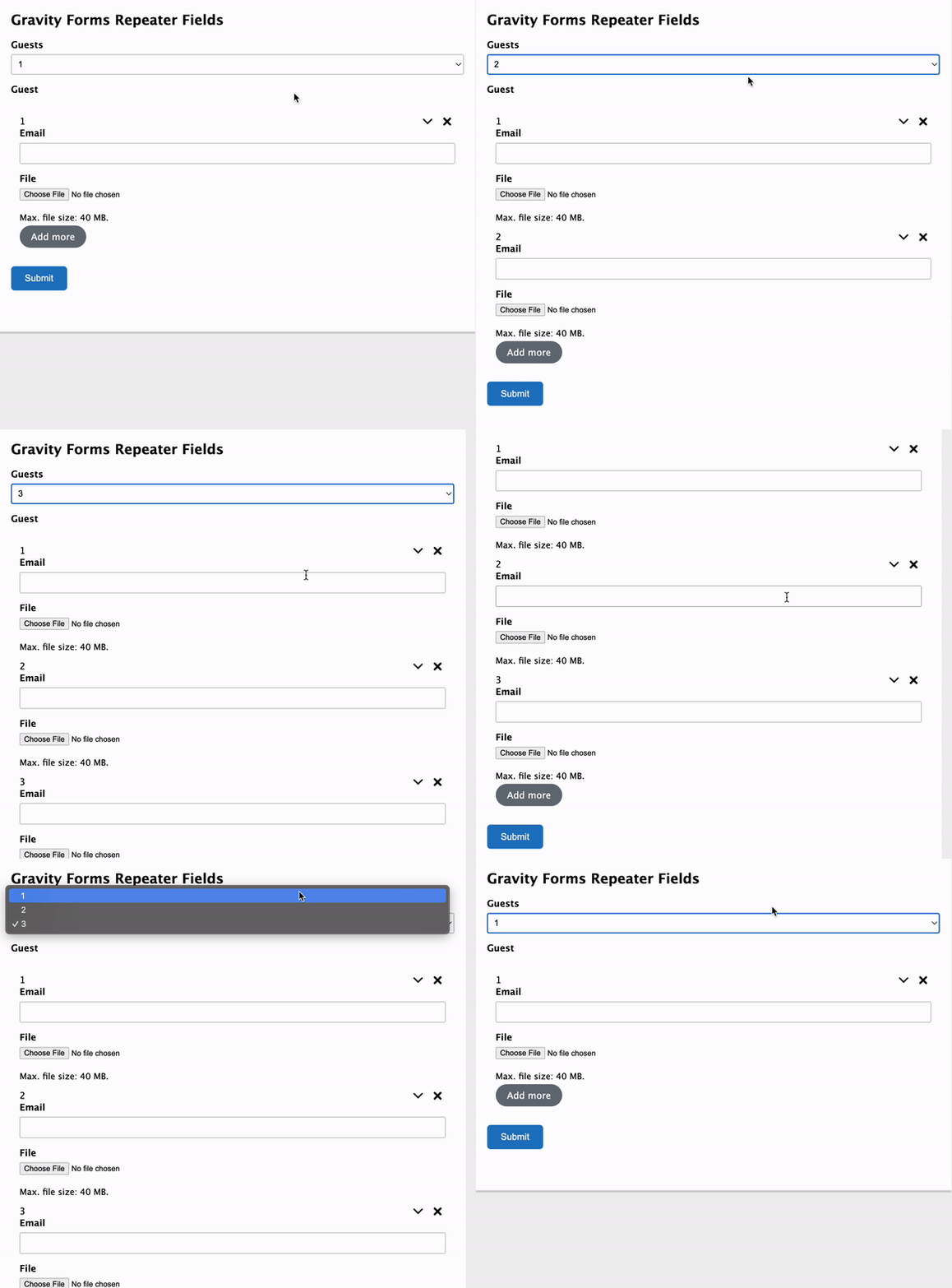
* Instant Dynamic Row Generation: When the user enters or selects a number (e.g., "Number of Attendees: 4"), the repeater automatically expands to create exactly 4 rows in real time.
* Streamlined User Experience: Optionally locks the row count and hides manual "+ Add Row" / delete buttons when mapped, preventing submission mismatches for ticket bookings, group registrations, and order forms.
Save and Continue Later Support
Fully compatible with Gravity Forms' built-in Save and Continue Later feature! When users save their unfinished submission and return via the save token link:
* Preserves All Repeated Rows: All added rows are automatically re-created in their exact order.
* Restores Field Data: Inputs including text, numbers, dates, checkboxes, radio buttons, and pricing choices are restored.
* Retains Uploaded Files: Attachments and files uploaded inside repeater rows are safely preserved across draft sessions.
安装:
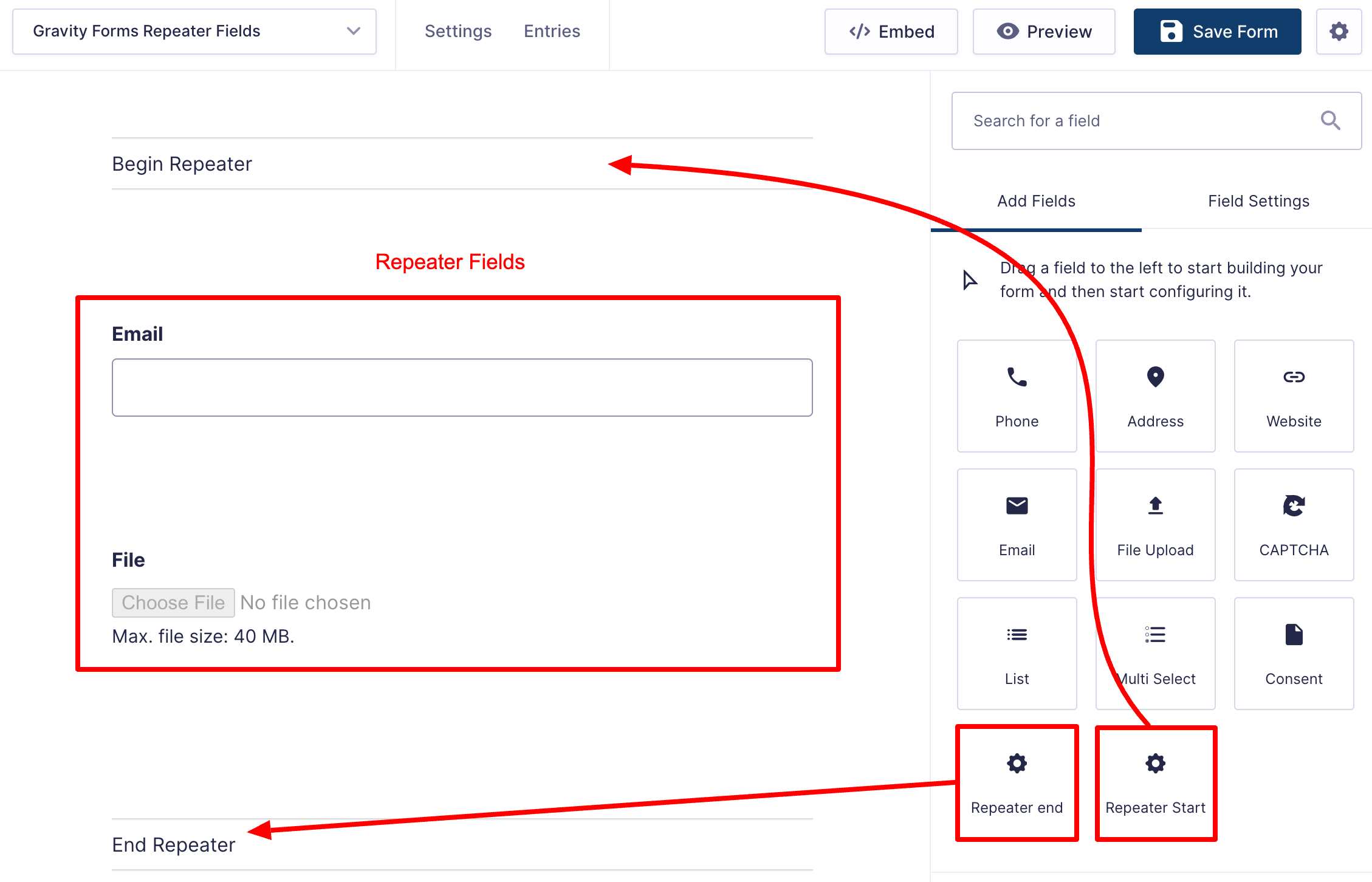
- Download the repeater-for-gravity-forms.zip file to your computer.
- Unzip the file.
- Upload the
repeater-for-gravity-formsdirectory to your/wp-content/plugins/directory. - Activate the plugin through the 'Plugins' menu in WordPress.
- Document: https://add-ons.org/document-gravity-forms-repeater-fields/
屏幕截图:
常见问题:
What is "Initial Rows Count" and how does "Field Mapping" work?
Initial Rows allows you to choose how many rows are automatically displayed when the form loads. If you set it to 0, no rows show up until the user clicks "+ Add Row"; if set to 3, three rows appear immediately. Field Mapping with Initial Rows allows you to enter the Field ID of another field in the form (such as a Number or Dropdown field asking "How many guests/tickets?"). When the user selects or enters a number (e.g., 4), the repeater automatically renders exactly 4 rows in real time without requiring the user to click "+ Add Row" four times.
Does it work with Gravity Forms Save and Continue Later?
Yes! The plugin fully integrates with Gravity Forms' "Save and Continue Later" feature. When users save their progress, all repeated rows and entered field values are saved to the draft. When they open the resume token link (?gf_token=...), the entire repeater structure, all field values, and uploaded files are automatically restored.
Can I use Pricing, Product, and Option fields inside the repeater?
Yes! With the Pro version, you can place Product, Quantity, and Option fields between Repeater Start and Repeater End. The form Total automatically updates as users add/remove rows or change values.
Does it work with payment gateways like Stripe and PayPal?
Yes, in the Pro version, line items from each repeater row are properly registered in Gravity Forms order info (gform_product_info), allowing Stripe, PayPal, and all Gravity Forms payment add-ons to charge the accurate order total.
How do repeated products appear in Entry Details and Confirmation Emails?
Each repeated row is itemized in the Order Summary table (e.g., "Ticket (Row 1)", "Ticket (Row 2)") along with chosen options, quantities, and subtotal.
更新日志:
- Fixed: Pricing
- Added: Pricing Fields support in Repeater (Pro) - Dynamic calculation for Product, Option, Quantity fields and payment gateway integration.
- Added: Full support for Save and Continue Later - Automatically preserves and restores all repeated rows, entered field values, and files when resuming via draft token link.
- Fixed: Radio field Required
- Fixed: Resolved '$element.datepicker is not a function' error by adding jquery-ui-datepicker dependency.
- Fixed: security issue
- Fixed: state_validation
- Fixed: Input Mask
- Fixed: PHP Fatal error: Declaration of Superaddons_GFRepeater_Field::get_field_label
- Fixed: upload field on multi-step form
- Fixed: Phone field
- Fixed: conditional logic radio
- Added: Fixed Required upload field
- Added: Translate
- Fixed: Save datas
- Fixed: Required field
- Fixed: CSS Orbital Theme
- Fixed: Date select type
- Fixed: for label
- Fixed: Checkbox label
- Fixed: Important
- Fixed: Compatible with Gravity Forms Chained Selects Add-On
- Fixed: Multi Select field
- Fixed: Upload multiple files
- Fixed: Conditional logic
- Fixed: set Initial Rows = 0
- Fixed: Conditional logic out repeater
- Fixed: Save Radio submit
- Fixed: Export entries
- Fixed: Maps with field
- Fixed: Uncaught ReferenceError: gform is not defined
- Fixed: Radio
- Fixed: Conditional logic with end repeater
- Fixed: Conditional logic
- Fixed: Input Mask
- Fixed: shortcode end tags
- Fixed: Active the plugin
- Fixed: Big update
- Version 1.0 Initial Release