
RestoCommerce – Restaurant Menu & Food Ordering for WooCommerce
| 开发者 | momsolutions |
|---|---|
| 更新时间 | 2026年11月17日 06:35 |
| PHP版本: | 8.0 及以上 |
| WordPress版本: | 7.1 |
| 版权: | GPL-2.0-or-later |
| 版权网址: | 版权信息 |
详情介绍:
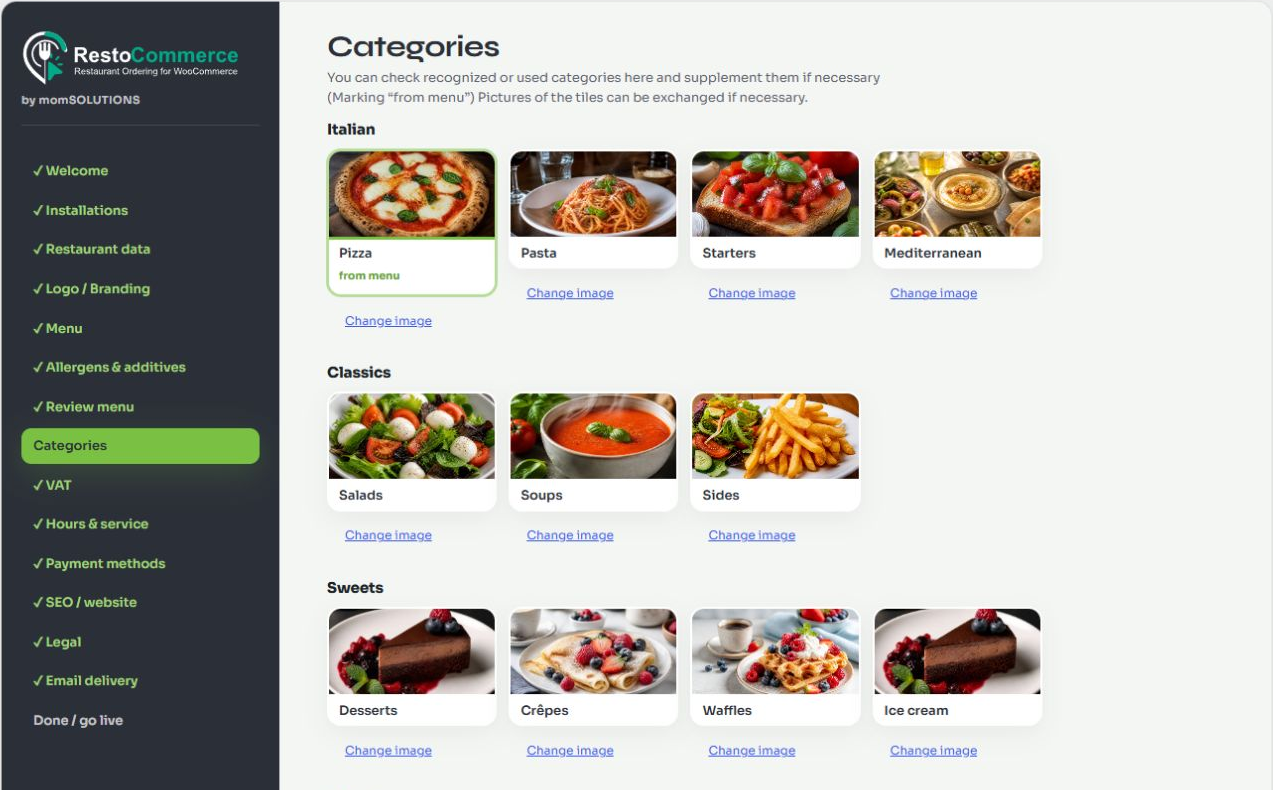
- Create your restaurant menu: add dishes, drinks, categories, descriptions and prices manually.
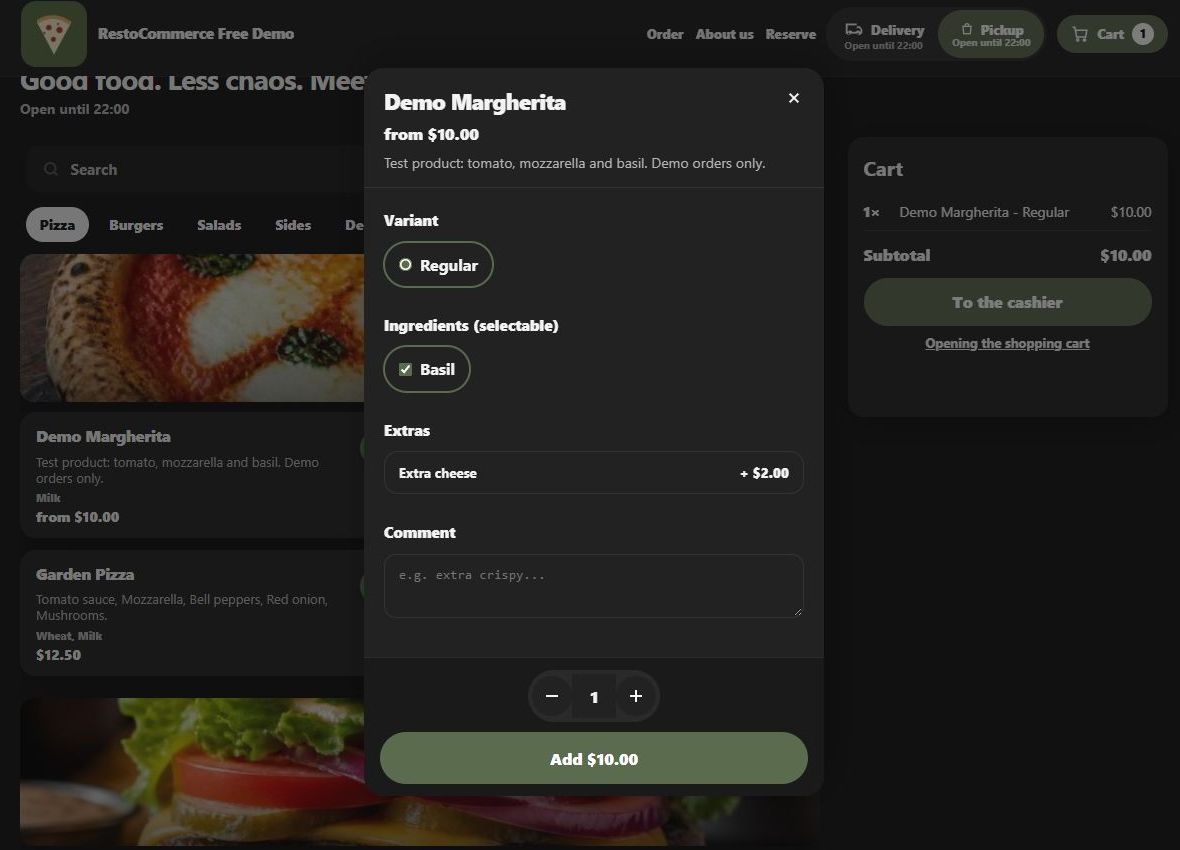
- Offer product choices: configure variants, selectable ingredients and paid extras.
- Accept pickup and delivery orders: configure service hours, delivery areas, delivery fees, minimum orders and free-delivery thresholds.
- Guide your setup: work through restaurant details, branding, menu, service settings, payments and launch checks in the installation wizard.
- Maintain food information: enter and review allergen and additive information manually.
- Use WooCommerce checkout: choose payment methods available through your configured WooCommerce payment plugins.
- Work in five languages: German, English, French, Spanish and Italian interfaces are included.
安装:
- Install and activate RestoCommerce.
- Open the RestoCommerce setup wizard and select your interface language and operating country.
- In the Installations step, install or activate WooCommerce. Keep your existing theme or choose the free RestoCommerce theme offered in the wizard. Download its separate ZIP, upload it through WordPress Appearance > Themes and activate it after previewing.
- Enter your business information, menu, service times and delivery settings.
- Configure WooCommerce payments and test the complete ordering process before opening your store.
屏幕截图:
常见问题:
Is RestoCommerce a free restaurant ordering plugin?
Yes. The local restaurant menu, manual product management, pickup and delivery features are free. WooCommerce is required. Hosting, payment providers and optional third-party services may charge separately. PRO, the Windows Hub and AI features are not included in Free.
Can I try the restaurant menu before installing?
Yes. Visit https://demo.restocommerce.de/ to try the Free demo shop. It uses fictional products and the optional RestoCommerce theme. No real payments or deliveries take place.
Can customers choose ingredients and extras?
Yes. Configure product variants, selectable ingredients and extras in the menu management tools.
Do I have to change my WordPress theme?
No. Add the [restocommerce_menu] shortcode to a page in your existing theme. The optional RestoCommerce theme shown in the demo is available as a separate free ZIP; the setup wizard explains how to install it.
Does the free version require the Windows Hub?
No. The Hub belongs to the separate PRO product.
How do I install PRO?
Download the separate PRO ZIP from your authenticated RestoCommerce customer account, then use Plugins > Add New Plugin > Upload Plugin. The customer account checks payment and download eligibility. This free plugin does not download or install premium packages from an external server.
Does the free version include AI?
No. The free wizard uses information entered by the store operator. AI requires a qualifying paid PRO license.
Is the PRO demo automatically converted to a subscription?
No. The demo expires after 14 days and does not include AI.
Which languages are included?
German, English, French, Spanish and Italian.
How can I ask for help or suggest an improvement?
Open RestoCommerce > Support & Ideas in WordPress. The support form is available in all five interface languages. It provides a reference number and sends an email confirmation after your request is saved. Replies are sent to the email address you enter. Please do not include passwords, license keys, payment details or your customers' data.
更新日志:
- Correct English source wording for setup, tax settings, order numbers and payment status messages.
- Complete remaining English source messages in menu drafts and improve bundled German, French, Spanish and Italian translations.
- Preserve translated compatibility messages for previously released themes and add-ons.
- Refine setup wizard, shared stock, ingredient and advance-ordering instructions in all five bundled languages.
- Correct English source wording and German, French, Spanish and Italian translations, including menu imports, payment labels and reservation messages.
- Repair damaged characters, mixed-language labels and spacing while retaining compatibility with previously released themes and add-ons.
- Keep the previously optimized category images to avoid unnecessarily large downloads. English source messages and all five bundled languages are unchanged.
- Use English source messages for WordPress translations while retaining bundled German, English, French, Spanish and Italian catalogs.
- Preserve older theme/add-on and JavaScript translation keys and recognize both existing German and new English default page titles.
- Complete missing translated notices and regenerate the translation templates and compiled catalogs.
- Complete WordPress.org checks: harden output escaping, bind bulk-confirmation SQL values, clarify translator placeholders and update the optional theme download.
- Preserve Pickup and Delivery choices across immediate page changes. Synchronize the cart with the latest choice and ignore outdated address/save responses without changing delivery validation.
- Keep saved delivery enquiries collapsed while browsing. Customers can reopen the address to edit it; delivery-area and checkout validation remain unchanged.
- Keep the homepage ordering link pointed at the menu after permalink changes, in every language and after activating the optional restaurant theme.
- Correct legacy shop-page redirects and send direct product visits to the menu when using the RestoCommerce theme. Other themes retain their product pages.
- Load webshop payment configuration independently of Pro's POS module while retaining authenticated access.
- Fix missing web-server rewrite rules when completing setup on a fresh WordPress installation.
- Support reservation forms and pickup/delivery selection with standard WordPress themes.
- Respect the saved 12/24-hour format in order details, totals and email pickup information.
- Translate variant, omitted-ingredient and order cancellation display labels without changing stored order data.
- Fix translated labels, search fields and variant placeholders in the manual menu editor.
- Localize custom banner and allergen editor labels in all five supported languages.
- Use the shared country default or saved 12/24-hour preference in the table-reservation time selector. Keep reservation values unchanged.
- Correct corrupted separators and section signs in English translations, including automatic allergen assignment.
- Keep hidden AI resume and new-file actions hidden despite wizard button styling.
- Review source fidelity rather than missing optional declarations: empty allergens, additives and ingredient lists alone no longer require confirmation.
- Keep checks for unresolved source codes, conflicting labels, uncertain mappings and invalid item relationships.
- Focus menu review on flagged items and discrepant pages. Validate item, ingredient, extra, variant-price and source-legend relationships. Preserve explicit ingredient and component labels on import.
- Guide menu setup through allergens before menu review and categories. Place allergen upload first, show processing activity, and apply selected unambiguous matches to the draft before products are created.
- Show a visible loading indicator and localized status while preparing and analysing a menu. Stop the indicator on completion or errors; respect reduced-motion preferences.
- Include the short-lived HTTPS ownership callback required when activating a purchased license on its first website.
- Keep license, domain, expiry and device checks on the CRM; remove the temporary callback after the activation request.
- Preserve saved website verification codes and the localized return-to-account instructions.
- Harden existing-order timeslot access and structured output.
- Use WordPress asset APIs and manual WordPress theme management.
- Store private audit events in the database and wrap new encryption keys using installation secrets.
- Preserve read access to legacy encrypted settings.
- Combine Pro/Demo activation, website verification and optional Hub connection on one wizard page in five languages.
- Keep customers on the connection page after activation and preserve existing verification and license checks.
- Recover interrupted menu job requests using the same saved job and cursor (with Pro 1.0.8).
- Localize menu review controls and page warnings in five languages; use the shop currency in draft prices.
- Show the allowance on the review page and explain completed usage and open reservations.
- Replace obsolete POS token guidance with the CRM-based Hub connection guide in five languages.
- Align the brand color pickers in the settings interface.
- Add the shared 12/24-hour switch to the opening-hours settings.
- Preorders are off by default and can be enabled explicitly in the hours wizard with 1–14 days of notice.
- Existing saved choices are preserved; missing settings no longer impose a next-day ordering restriction.
- Choose a separate banner badge image, keep the website logo, or hide the badge in the branding wizard.
- Works with optional RestoCommerce theme 1.3.62; navigation, email and receipt logos stay independent.
- Choose and remember 24-hour or AM/PM entry in the setup wizard, independently of the country default.
- Switching formats preserves edited opening hours, including noon and midnight.
- Apply the wizard design to settings and load shared local design assets reliably.
- Add a localized RestoCommerce order list and details with status editing, permission checks and stale-state protection. WooCommerce remains the order store; advanced payment and refund tools remain accessible.
- Localize the Debug / logs settings in all five languages without changing the debug state or logging behavior.
- Localize the Extras and ingredients settings, management tools, POS guidance and import examples in all five languages.
- Preserve import formats, category assignments and POS authentication behavior.
- Localize inventory settings, category stock controls and the empty state in all five languages.
- Clarify that zero tracked stock means sold out, while untracked categories have no stock limit.
- Translate Service and guests settings, delivery fee options, postal-code rules and Google Places guidance in all five languages.
- Show the configured shop currency beside delivery fee fields.
- Avoid an undefined-option warning when displaying service settings before a default service has been saved.
- Localize all time-slot and capacity settings in German, English, French, Spanish and Italian.
- Clarify automatic/manual time confirmation and category quantity limits without changing order handling.
- Correct Opening hours translations in all supported languages, including the closed-days label and preorder guidance.
- Remove an unrelated email message accidentally stored in two translation entries.
- Localize Menu settings, the copy prompt, sample JSON and preview feedback in all five admin languages.
- Show translated category labels in previews while preserving import identifiers and customer content.
- Translate all SEO and homepage settings labels, hints and JSON feedback.
- Provide the SEO copy prompt in all five admin languages with a valid JSON example and the selected shop language for generated text.
- Translate the entire preorder banner, weekdays and countdown days in all five storefront languages.
- Display US/Canadian opening hours and order deadlines with AM/PM, preserving booking calculations.
- Localized AI allowance heading and remaining percentage in all five languages.
- Colored remaining-allowance bar with an explicit unknown state when current usage cannot be verified. AI authorization and accounting are unchanged.
- Clearer, concise explanations of automatic time confirmation, manual Hub confirmation and kitchen capacity in all five languages.
- Explain the default product category without renaming categories or changing capacity settings.
- Opening-hours entry follows the country of operation: AM/PM for USA and Canada, 24-hour for the other supported profiles.
- Existing times remain unchanged; validated input is stored in the same canonical format.
- Accessible time fields and responsive daily cards in all five interface languages.
- Add automatic readable text colors, live contrast feedback and one-click correction in the branding wizard.
- Fixed product-image toggle alignment and keyboard focus visibility in the setup wizard.
- Fixed an obsolete missing-theme-bundle error blocking setup when the optional theme is distributed separately.
- Improved delivery-area setup with consistent fields, readable country selection and a responsive layout.
- Offer the free optional RestoCommerce theme in both Free and Pro setup.
- Add a local design example, installation guidance and theme status in five languages.
- Keep theme download and installation under the site administrator’s control.
- Simplify setup: choose an edition, install dependencies, then connect Pro once.
- Keep valid connections when continuing setup and mask licence input.
- Respect the selected Free workflow and configure taxes before importing the menu.
- Update setup guidance in all five languages.
- Fix encrypted licence onboarding before WooCommerce installation.
- Validate credential storage and show accurate activation errors in all five languages.
- Preserve saved extras when submitted JSON contains invalid labels or non-finite prices.
- Validate extra and extra-group category IDs before writing, preventing malformed IDs from becoming another category.
- Bind checkout retries to the customer session and verify the stored order binding.
- Require explicit age confirmation and edit permission for product age settings.
- Reject malformed reservation fields, invalid party sizes and non-finite settings.
- Harden typed form input and HTML output without changing plain-text or JSON messages.
- Fix the Hours & service wizard crashing before WooCommerce activation.
- Allow delivery zones, fees and opening hours to be saved before product categories exist.
- Require explicit consent values before loading optional external services.
- Reject malformed extras identifiers and verify posted extras at the cart-data boundary.
- Reject malformed consent nonce values without PHP warnings.
- Preserve existing WooCommerce country, currency, tax and checkout settings during installation.
- Allow setup to be paused without redirecting other WordPress admin pages.
- Verify wizard request nonces explicitly at each endpoint.
- Validate location coordinates before geocoding and localize Google Places.
- Allow activation before WooCommerce is installed so the setup wizard can install and activate it.
- Keep ordering modules disabled until WooCommerce is active.
- Count all matching reservations and backfill legacy dates beyond the first 200 records.
- Consolidate pickup-capacity lookups while retaining fresh results, historical keys, both date formats and custom order statuses.
- Avoid unused total-count queries and prime product data for stock calculations.
- Fix checkout pickup event and heading update loops, menu category navigation, and new orders after a successful checkout.
- Improve five-language setup copy and reduce unnecessary coupon queries.
- Harden malformed request handling and use WordPress nonce, URL and file APIs.
- Keep the SQLite test adapter outside the distributed plugin.
- Document narrowly scoped scanner exceptions at their verified validation and output boundaries.
- Keep local Free ordering, reservations and inventory available after a PRO connection expires or is revoked. Paid access still requires authorization.
- Allow setup with an existing theme; distribute the optional RestoCommerce theme separately from the WordPress.org package.
- Direct premium downloads to the authenticated customer account; remove the in-plugin premium package download endpoint.
- Document external connections, asset licenses and manual PRO installation.
- Improve setup navigation, localized page creation and optional PRO setup.
- Validate localized prices before saving products, extras and variants.
- Localize setup test mail in all five interface languages.
- Country-aware delivery areas and checkout address fields, five-language delivery messages and Hub integration.
- Plugin Check review: request handling, translations, date boundaries and private log retention.
- Release preparation: multilingual setup and country profiles, protected PRO and Hub integration, and license documentation.