
Romiltec Analytics Tracking
| 开发者 | romiltecsrl |
|---|---|
| 更新时间 | 2026年4月30日 07:24 |
| 捐献地址: | 去捐款 |
| PHP版本: | 7.4 及以上 |
| WordPress版本: | 6.9 |
| 版权: | GPLv2 or later |
| 版权网址: | 版权信息 |
详情介绍:
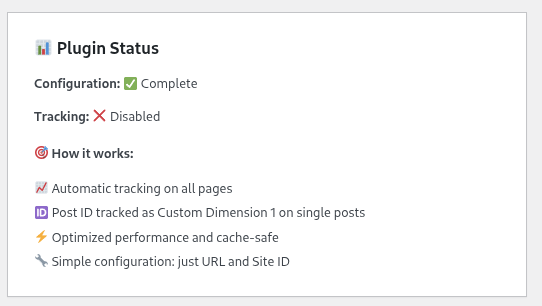
Romiltec Analytics Tracking provides seamless Matomo analytics integration for WordPress sites. The plugin automatically tracks Post IDs as Custom Dimension 1 on single post pages, allowing you to analyze individual content performance in your Matomo dashboard.
Perfect for publishers, bloggers, and content marketers who want detailed insights into their content performance using self-hosted Matomo analytics.
Features
- Automatic Post ID Tracking - Post IDs are automatically tracked as Custom Dimension 1 on single post pages
- Matomo Integration - Full Matomo analytics integration with customizable URL and Site ID
- Scroll Depth Tracking - Automatically tracks user scroll depth at 25%, 50%, 75%, and 100% milestones
- Time on Page Tracking - Accurate time measurement with heartbeat timer (tracks active viewing time)
- Performance Optimized - Lightweight and cache-safe implementation
- Easy Configuration - Simple admin interface with validation
- Translation Ready - Full internationalization support
- Security First - Input sanitization and capability checks
- No External Dependencies - Works with your self-hosted Matomo installation
- Install and activate the plugin
- Configure your Matomo URL and Site ID in Settings > Romiltec Analytics
- Set up Custom Dimension 1 in your Matomo dashboard
- The plugin automatically tracks all pageviews and sends Post IDs for single posts
- Active Matomo analytics installation (self-hosted or cloud)
- HTTPS recommended for security
安装:
Automatic Installation
- Log in to your WordPress admin panel
- Go to Plugins > Add New
- Search for "Romiltec Analytics Tracking"
- Click Install Now and then Activate
- Download the plugin zip file
- Go to Plugins > Add New > Upload Plugin
- Choose the zip file and click Install Now
- Activate the plugin
- Go to Settings > Romiltec Analytics
- Enter your Matomo Analytics URL (e.g., https://analytics.yoursite.com/)
- Enter your Site ID from your Matomo dashboard
- Check Enable Tracking to activate
- Click Save Changes
- Log in to your Matomo dashboard
- Go to Administration > Custom Dimensions
- Click Add Custom Dimension
- Set Scope to "Visit" or "Action"
- Set Name to "Post ID" (or your preferred name)
- Save the custom dimension
- Page Views - Standard page visit tracking
- Post IDs - Available in Custom Dimension 1 reports for single posts
- Scroll Depth Events - Go to Behavior > Events and look for the "Scroll_depth" category with actions: 25%, 50%, 75%, 100%
- Time on Page - Accurate time tracking visible in standard time metrics (uses 15-second heartbeat timer)
屏幕截图:
常见问题:
Does this work with Matomo Cloud?
Yes! This plugin works with both self-hosted Matomo and Matomo Cloud installations. Just enter your Matomo URL in the settings.
Where do I find my Site ID?
Log in to your Matomo dashboard, go to Administration > Websites > Manage, and you'll see the Site ID next to your website name.
What events does the plugin track?
The plugin automatically tracks:
- Page views with Post ID custom dimensions
- Scroll depth events (25%, 50%, 75%, 100%)
- Time spent on page using heartbeat timer All events are sent to Matomo and visible in the Events reports under the "Scroll_depth" category.
Is this compatible with caching plugins?
Yes! The tracking code is injected client-side and is fully compatible with all major caching plugins.
Do I need to have Matomo installed?
Yes, you need an active Matomo analytics installation (either self-hosted or Matomo Cloud) to use this plugin.
Will this slow down my website?
No. The tracking code is lightweight, loads asynchronously, and has no impact on your site's performance.
更新日志:
1.1.0
- Cookie consent mode with 7 CMP integrations (TCF v2, Iubenda, CookieBot, CookieYes, Complianz, Google Consent Mode v2, Manual)
- Matomo requireCookieConsent/setCookieConsentGiven flow
- Admin page redesigned with brand styling
- First-party CNAME domain setup guide
- Manual CMP integration instructions with JavaScript examples
- CSS moved to dedicated stylesheet via wp_enqueue_style
- Defensive JS checks with console.warn diagnostics
- Fix PHP 8.0 dependency on str_starts_with (now uses strpos for PHP 7.0+ compatibility)
- Fix scroll depth division by zero on short pages
- Fix printf XSS patterns with wp_kses
- Fix sanitize_settings input key existence checks
- CMP labels now translatable
- Initial release
- Matomo analytics integration
- Automatic Post ID tracking as Custom Dimension 1
- Scroll depth tracking (25%, 50%, 75%, 100%)
- Heartbeat timer for accurate time on page measurement
- Admin settings page with validation
- Translation support
- Security hardening and sanitization